
TypeScript Protected Members: A Visual, Hands-On Guide
Learn TypeScript protected members visually: why subclasses can't reach private data, how protected fixes it, protected methods, the instance rule, changing access in a subclass, why protected data can break a class's rules, what it can't catch, and exercises.


On this page
In object-oriented programming, an object's data is usually private, so that it can't be read or changed directly. Other code goes through getters and setters instead. That works until you add a subclass: it's part of the family, and yet it's locked out as well.
In this last guide of the series you'll meet the level between public and private: protected. You'll use it on properties and methods, learn a rule that surprises even experienced developers, see how protected data can quietly break a class, and find out what protected can't stop. Exercises wrap it up.
This guide builds on TypeScript Class Inheritance. All outputs below come from real runs with TypeScript 7.0 and Node.js 26 on Windows. Save each example as main.ts, then run npx tsc main.ts and node main.js.
Private data
Here's a class that represents a vehicle. Its brand is private, and a getter and a setter control access to it:
1class Vehicle {
2  private brand: string;
3
4  constructor(brand: string) {
5    this.brand = brand;
6  }
7
8  getBrand(): string {
9    return this.brand;
10  }
11
12  setBrand(newBrand: string): void {
13    this.brand = newBrand;
14  }
15}
16
17const car = new Vehicle("Honda");
18console.log(car.getBrand());
19
20console.log(car.brand);
21car.brand = "Toyota";
main.ts(20,17): error TS2341: Property 'brand' is private and only accessible within class 'Vehicle'.
main.ts(21,5): error TS2341: Property 'brand' is private and only accessible within class 'Vehicle'.The getter works, and both direct uses are rejected. That's what we want.
Locked out of the family
Now let's derive a class from Vehicle. Car inherits the constructor, so it doesn't need one of its own:
1class Vehicle {
2  private brand: string;
3
4  constructor(brand: string) {
5    this.brand = brand;
6  }
7}
8
9class Car extends Vehicle {
10  printBrand(): void {
11    console.log(this.brand);
12  }
13}
14
15new Car("Honda").printBrand();
main.ts(11,22): error TS2341: Property 'brand' is private and only accessible within class 'Vehicle'.
HondaEvery Car has a brand, and Car still can't touch it. private means this class only, and a subclass is a different class.
protected
Change private to protected, and the subclass gets in, while code outside stays out:
1class Vehicle {
2  protected brand: string;
3
4  constructor(brand: string) {
5    this.brand = brand;
6  }
7}
8
9class Car extends Vehicle {
10  printBrand(): void {
11    console.log(this.brand);
12  }
13}
14
15const car = new Car("Honda");
16car.printBrand();
17console.log(car.brand);
main.ts(17,17): error TS2445: Property 'brand' is protected and only accessible within class 'Vehicle' and its subclasses.
Honda
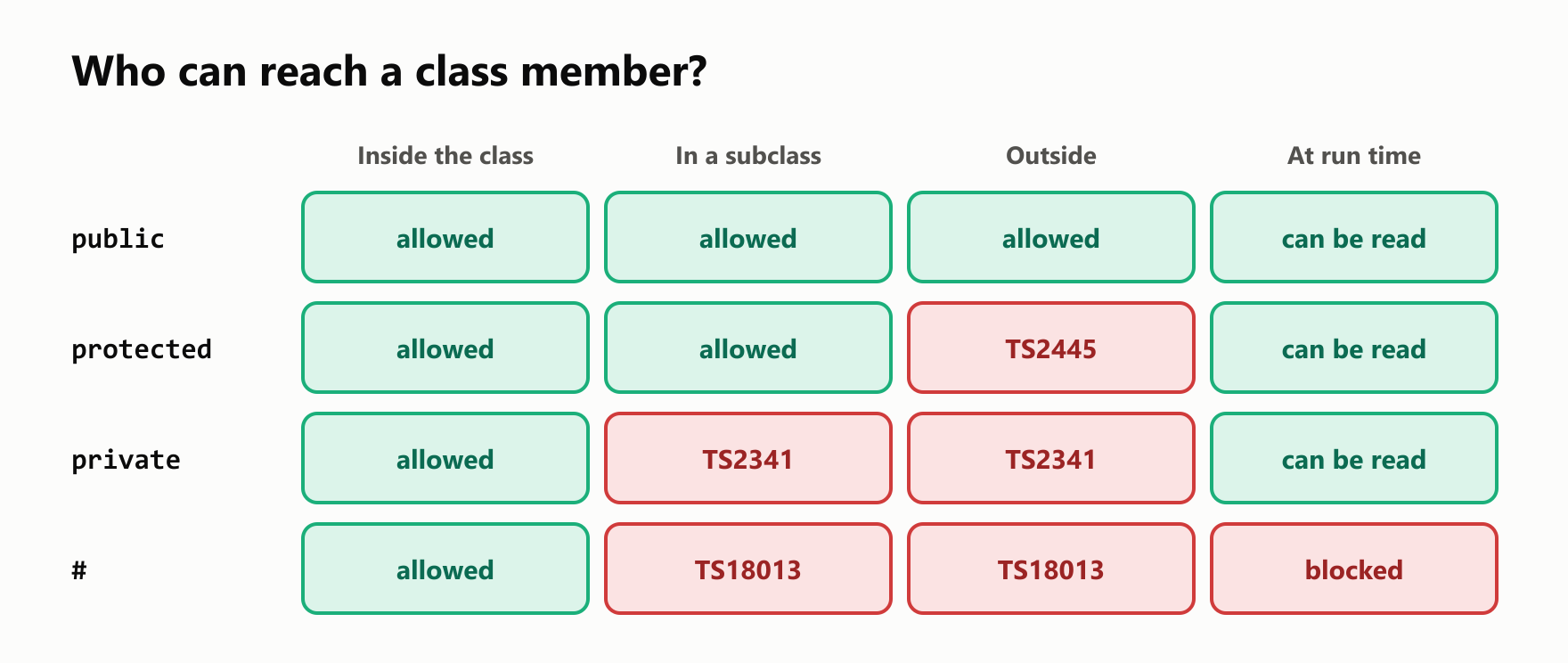
HondaThat completes the picture of who can reach a member:
Protected methods
Methods can be protected too, and that's where the keyword is often most useful. A base class can define the steps of a job, and let each subclass fill in one step that nobody else should call:
1abstract class Report {
2  print(): void {
3    console.log("--- Report ---");
4    console.log(this.getBody());
5    console.log("--- End ---");
6  }
7
8  protected abstract getBody(): string;
9}
10
11class SalesReport extends Report {
12  protected override getBody(): string {
13    return "Sales: 100";
14  }
15}
16
17const report = new SalesReport();
18report.print();
19report.getBody();1main.ts(19,8): error TS2445: Property 'getBody' is protected and only accessible within class 'SalesReport' and its subclasses.
2--- Report ---
3Sales: 100
4--- End ---Outside code calls print, which is public. getBody is an internal step, and hiding it keeps the class simple to use.
The instance rule
Here's the surprise. A subclass can use a protected member through this, or through another object of its own class. Through any other type, it can't:
1class Vehicle {
2  protected brand = "Honda";
3}
4
5class Truck extends Vehicle {}
6
7class Car extends Vehicle {
8  own(): string {
9    return this.brand;
10  }
11
12  sameClass(other: Car): string {
13    return other.brand;
14  }
15
16  baseClass(other: Vehicle): string {
17    return other.brand;
18  }
19
20  sibling(other: Truck): string {
21    return other.brand;
22  }
23}
main.ts(17,18): error TS2446: Property 'brand' is protected and only accessible through an instance of class 'Car'. This is an instance of class 'Vehicle'.
main.ts(21,18): error TS2446: Property 'brand' is protected and only accessible through an instance of class 'Car'. This is an instance of class 'Truck'.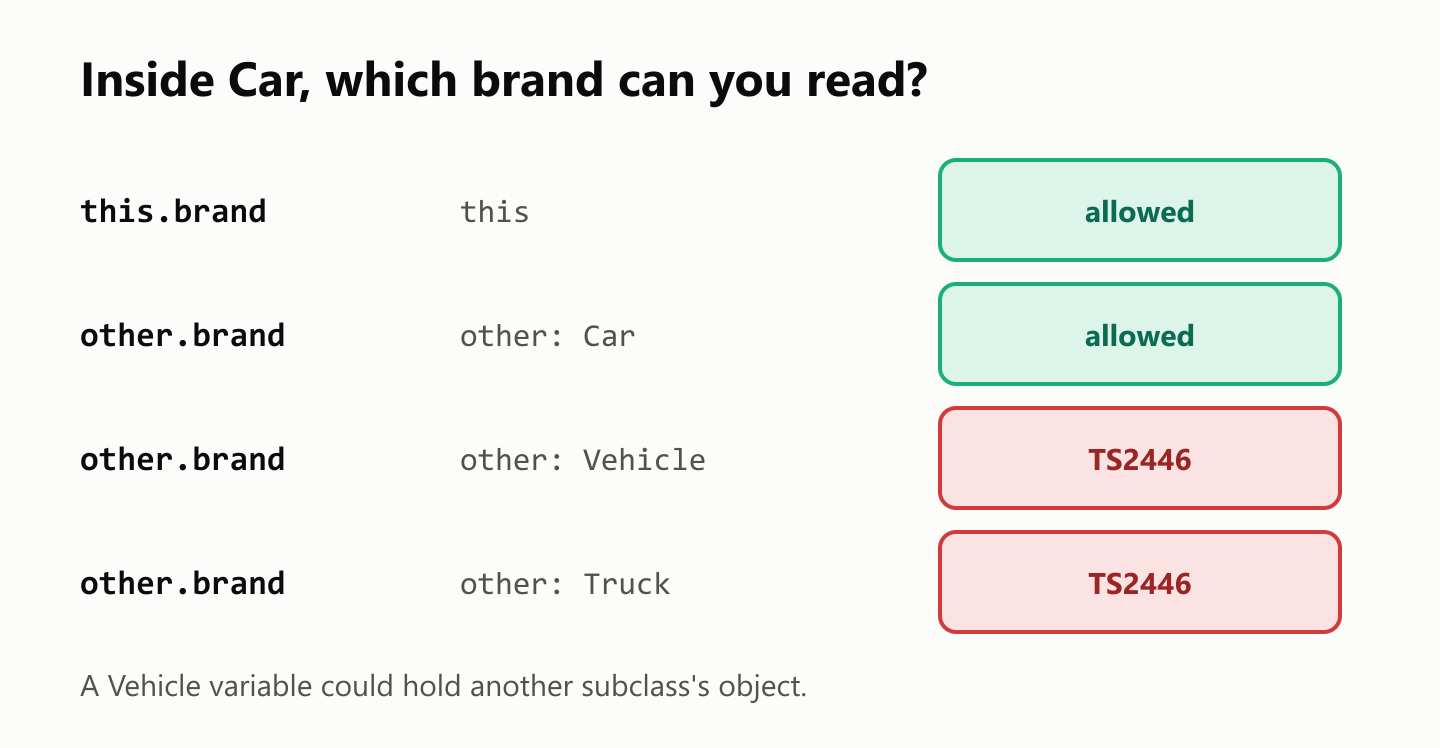
The reason: protected trusts a class with its own objects. A Vehicle variable might hold a Truck, and Car has no business reaching inside a Truck. Code inside Vehicle itself has no such limit, so a method there can compare any two vehicles:
1class Vehicle {
2  protected brand: string;
3
4  constructor(brand: string) {
5    this.brand = brand;
6  }
7
8  static sameBrand(first: Vehicle, second: Vehicle): boolean {
9    return first.brand === second.brand;
10  }
11}
12
13class Car extends Vehicle {}
14class Truck extends Vehicle {}
15
16console.log(Vehicle.sameBrand(new Car("Honda"), new Truck("Honda")));trueChanging access in a subclass
A subclass can make a protected member public, by declaring it again:
1class Vehicle {
2  protected brand = "Honda";
3}
4
5class Car extends Vehicle {
6  public override brand = "Toyota";
7}
8
9console.log(new Car().brand);ToyotaIt can't go the other way, though. Code that works with a Vehicle expects its public members to be there, so a subclass can't take one away:
1class Vehicle {
2  brand = "Honda";
3}
4
5class Car extends Vehicle {
6  protected override brand = "Toyota";
7}
main.ts(5,7): error TS2415: Class 'Car' incorrectly extends base class 'Vehicle'.
Property 'brand' is protected in type 'Car' but public in type 'Vehicle'.Combining protected
protected works with the features from the earlier guides. On a constructor parameter it creates a property, and with readonly subclasses can read it and not change it:
1class Vehicle {
2  constructor(protected brand: string, protected readonly year: number) {}
3}
4
5class Car extends Vehicle {
6  describe(): string {
7    return `${this.brand} ${this.year}`;
8  }
9
10  changeYear(): void {
11    this.year = 2000;
12  }
13}
14
15console.log(new Car("Honda", 2020).describe());
main.ts(11,10): error TS2540: Cannot assign to 'year' because it is a read-only property.
Honda 2020JavaScript's # doesn't combine with it. A # member is always private, and there's no # version of protected:
class Vehicle {
  protected #brand = "Honda";
}
main.ts(2,3): error TS18010: An accessibility modifier cannot be used with a private identifier.Protected data can break the rules
protected is a real opening in a class, and it's worth being careful with. This account protects itself from bad deposits, but its balance is protected, so a subclass can skip the check:
1class Account {
2  protected balance = 0;
3
4  deposit(amount: number): void {
5    if (amount <= 0) {
6      throw new Error(`Invalid amount: ${amount}`);
7    }
8    this.balance += amount;
9  }
10
11  getBalance(): number {
12    return this.balance;
13  }
14}
15
16class BonusAccount extends Account {
17  addBonus(): void {
18    this.balance -= 1000;
19  }
20}
21
22const account = new BonusAccount();
23account.deposit(100);
24account.addBonus();
25console.log(account.getBalance());-900This compiled with no errors, and the balance is negative. The safer design keeps the data private, and offers subclasses a protected method that goes through the check:
1class Account {
2  private balance = 0;
3
4  protected addToBalance(amount: number): void {
5    if (amount <= 0) {
6      throw new Error(`Invalid amount: ${amount}`);
7    }
8    this.balance += amount;
9  }
10
11  getBalance(): number {
12    return this.balance;
13  }
14}
15
16class BonusAccount extends Account {
17  addBonus(): void {
18    this.addToBalance(-1000);
19  }
20}
21
22const account = new BonusAccount();
23
24try {
25  account.addBonus();
26} catch (error) {
27  console.log(String(error));
28}
29
30console.log(account.getBalance());
Error: Invalid amount: -1000
0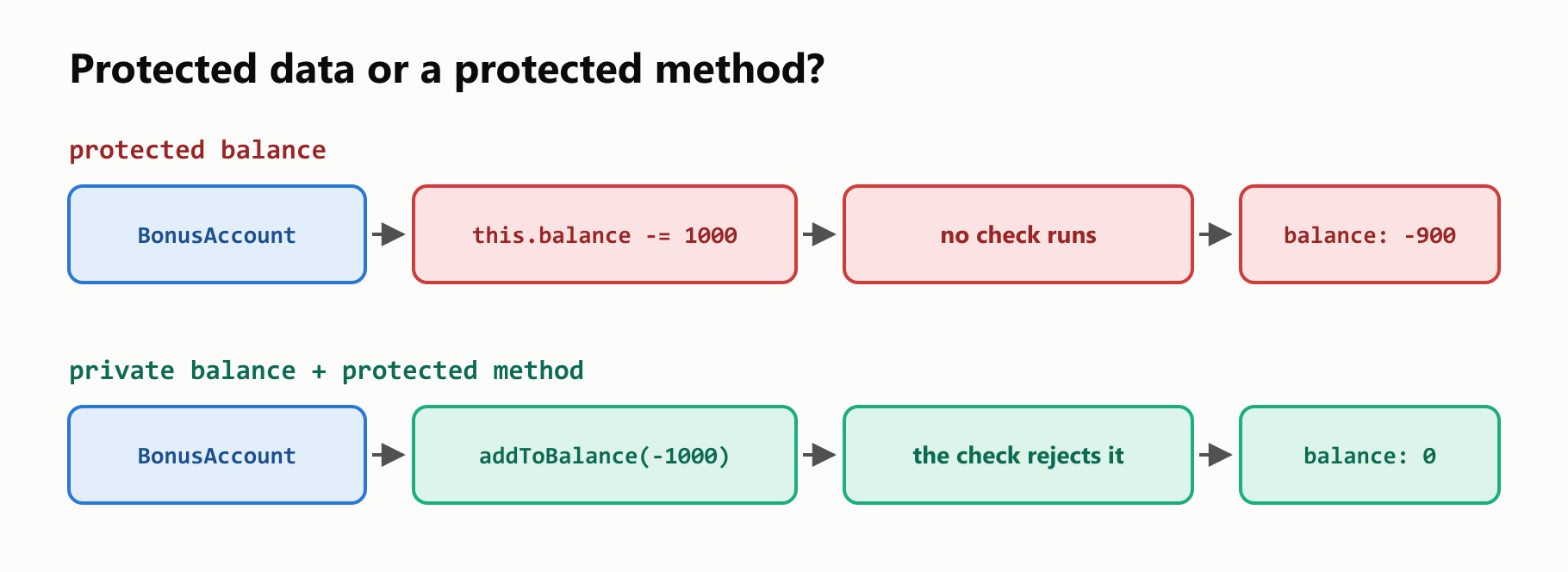
If subclasses only need to read a value, a protected getter does the job. With no setter, they can't change it:
1class Vehicle {
2  #brand = "Honda";
3
4  protected get brand(): string {
5    return this.#brand;
6  }
7}
8
9class Car extends Vehicle {
10  show(): string {
11    return this.brand;
12  }
13
14  change(): void {
15    this.brand = "Toyota";
16  }
17}
18
19console.log(new Car().show());
main.ts(15,10): error TS2540: Cannot assign to 'brand' because it is a read-only property.
HondaWhat protected can't catch
Like private, protected is removed from the JavaScript. Nothing guards the value when the program runs:
1class Vehicle {
2  protected brand = "Honda";
3}
4
5const car = new Vehicle();
6
7console.log(car);
8console.log(JSON.stringify(car));
Vehicle { brand: 'Honda' }
{"brand":"Honda"}There's also a gap inside the compiler itself. Square brackets are an intentional way around the check for both private and protected, so this compiles with no errors:
1class Vehicle {
2  protected brand = "Honda";
3}
4
5const car = new Vehicle();
6console.log(car["brand"]);HondaThe check does help in one way you've seen before. Unlike a class with only public members, a class with a protected member can't be imitated by a plain object:
1class Vehicle {
2  protected brand = "Honda";
3}
4
5const imitation: Vehicle = { brand: "Honda" };
main.ts(5,7): error TS2322: Type '{ brand: string; }' is not assignable to type 'Vehicle'.
Property 'brand' is protected but type '{ brand: string; }' is not a class derived from 'Vehicle'.Choosing an access level
Start closed, and open only as far as you need:
| Who needs it? | Use |
|---|---|
| Only this class | private, or # if it must hold at run time |
| Subclasses need to read a value | A protected getter on private data |
| Subclasses need to change a value | A protected method with the checks in it |
| Subclasses must supply a step | A protected abstract method |
| Everyone | public |
Moving a member from private to protected later is easy. Taking it back is hard, because subclasses may depend on it by then.
Your turn: practice
Try these before peeking at the answers.
Exercise 1: Predict both tools (warm-up). What does tsc report for this program, and what does node main.js print afterward?
1class Employee {
2  protected salary: number;
3
4  constructor(salary: number) {
5    this.salary = salary;
6  }
7}
8
9class Manager extends Employee {
10  raise(): void {
11    this.salary += 10;
12  }
13
14  compare(other: Employee): boolean {
15    return this.salary > other.salary;
16  }
17}
18
19const manager = new Manager(100);
20manager.raise();
21console.log(manager.compare(new Employee(50)));
22console.log(manager.salary);
Exercise 2: Fix it. Change one word so that this program compiles, and name stays hidden from outside code.
1class Animal {
2  private name: string;
3
4  constructor(name: string) {
5    this.name = name;
6  }
7}
8
9class Dog extends Animal {
10  speak(): string {
11    return `${this.name} barks`;
12  }
13}
14
15console.log(new Dog("Rex").speak());
Exercise 3: Drinks. Write an abstract class Drink with a public prepare(): string method that returns Boil water, then <step>, and a protected abstract getStep(): string method. Write Tea and Coffee subclasses, and print the result of prepare() for each.
Exercise 4: Safe counter. Write a Counter class with a private count, a public getCount(), and a protected increase(amount: number) method that throws an error for amounts of 0 or less. Write a DoubleCounter subclass with a public tick() method that increases by 2. Tick twice and print the count.
Exercise 5: Payroll (challenge). Use everything from this series. Write an abstract class Employee with a private #salary set by the constructor, a protected getter salary, a protected abstract getBonus(): number, and a public getPay(): number that adds both. Write a Manager, whose bonus is 10% of the salary, and an Intern, whose bonus is 0. Write totalPay(employees: Employee[]): number, and try it with a manager earning 200 and an intern earning 100.
Quick quiz
- What's the difference between
privateandprotected? - Which error do you get when outside code uses a protected property?
- Why might a method be protected and not public?
- Can
Carreadother.brandwhenotheris aCar? And when it's aVehicle? - Can a subclass make a protected member public? And a public member protected?
- Is there a
#version ofprotected? - Why is protected data riskier than a protected method?
- Does
protectedhide a value when the program runs? - Which access level should you start with?
Answers
Exercise 1: compare receives an Employee, not a Manager, and the last line is outside the classes. tsc still writes main.js, and nothing stops it from running:
1main.ts(15,32): error TS2446: Property 'salary' is protected and only accessible through an instance of class 'Manager'. This is an instance of class 'Employee'.
2main.ts(22,21): error TS2445: Property 'salary' is protected and only accessible within class 'Employee' and its subclasses.
3true
4110
Exercise 2: Change private to protected:
1class Animal {
2  protected name: string;
3
4  constructor(name: string) {
5    this.name = name;
6  }
7}
8
9class Dog extends Animal {
10  speak(): string {
11    return `${this.name} barks`;
12  }
13}
14
15console.log(new Dog("Rex").speak());
Rex barksExercise 3: The base class owns the steps, and each subclass fills in its own:
1abstract class Drink {
2  prepare(): string {
3    return `Boil water, then ${this.getStep()}`;
4  }
5
6  protected abstract getStep(): string;
7}
8
9class Tea extends Drink {
10  protected override getStep(): string {
11    return "add the tea bag";
12  }
13}
14
15class Coffee extends Drink {
16  protected override getStep(): string {
17    return "pour over the ground coffee";
18  }
19}
20
21console.log(new Tea().prepare());
22console.log(new Coffee().prepare());
Boil water, then add the tea bag
Boil water, then pour over the ground coffeeExercise 4: The subclass can only go through increase, so the check always runs:
1class Counter {
2  private count = 0;
3
4  getCount(): number {
5    return this.count;
6  }
7
8  protected increase(amount: number): void {
9    if (amount <= 0) {
10      throw new Error(`Invalid amount: ${amount}`);
11    }
12    this.count += amount;
13  }
14}
15
16class DoubleCounter extends Counter {
17  tick(): void {
18    this.increase(2);
19  }
20}
21
22const counter = new DoubleCounter();
23counter.tick();
24counter.tick();
25
26console.log(counter.getCount());4Exercise 5: Subclasses can read the salary through the getter, and nothing outside the base class can change it:
1abstract class Employee {
2  #salary: number;
3
4  constructor(salary: number) {
5    this.#salary = salary;
6  }
7
8  protected get salary(): number {
9    return this.#salary;
10  }
11
12  protected abstract getBonus(): number;
13
14  getPay(): number {
15    return this.salary + this.getBonus();
16  }
17}
18
19class Manager extends Employee {
20  protected override getBonus(): number {
21    return this.salary * 0.1;
22  }
23}
24
25class Intern extends Employee {
26  protected override getBonus(): number {
27    return 0;
28  }
29}
30
31function totalPay(employees: Employee[]): number {
32  return employees.reduce((total, employee) => total + employee.getPay(), 0);
33}
34
35console.log(totalPay([new Manager(200), new Intern(100)]));320Quiz: (1) private works only inside the class that declares it, and protected also works in its subclasses. (2) TS2445. (3) It's an internal step that subclasses need and outside code shouldn't call. (4) Yes, because it's the class's own type. No, because a Vehicle could be another subclass, which gives TS2446. (5) Yes, by declaring it again as public. No, because code that uses the base class expects it to be there. (6) No. A # member is always private. (7) A subclass can change data directly and skip the class's checks, while a method can keep them. (8) No. It's removed from the JavaScript, and square brackets get past the compiler too. (9) private, and open up only when something needs it.
Cheat sheet
| I want to… | Write |
|---|---|
| Share a property with subclasses | protected brand: string; |
| Share a method with subclasses | protected getBody(): string { … } |
| Require a hidden step in subclasses | protected abstract getBody(): string; |
| Declare it in the constructor | constructor(protected brand: string) {} |
| Let subclasses read but not change | protected readonly year: number; |
| Expose private data to subclasses, read-only | protected get brand(): string { … } |
| Let subclasses change data safely | protected addToBalance(amount: number): void { … } |
| Make a protected member public | public override brand = "Toyota"; |
Wrapping up
protected opens a class to its family, and no further:
privatestops at the class that declares it, so subclasses are locked out too.protectedalso lets subclasses in, and outside code gets TS2445.- Protected methods hide internal steps from outside code.
- A subclass reaches protected members only through its own type, or you get TS2446.
- A subclass can make a member more public, but not less.
- There's no
#version ofprotected. - Prefer private data with protected methods, so a class keeps its rules.
protectedis removed from the JavaScript, and square brackets get past the compiler.- Start with
private, and open up only when you need to.
That's the end of this TypeScript series. Here's the whole path, in order:
- Function parameter types
- Function return types
- Function types
- Introduction to classes
- Class inheritance
- Protected constructors
- Protected members, this guide
Read next

Ruby Blocks and Iterators: Write Your Own
Learn how Ruby methods receive blocks, pass values with yield, handle a missing block, and return an Enumerator. Build and run your own iterator.
 nbkhope
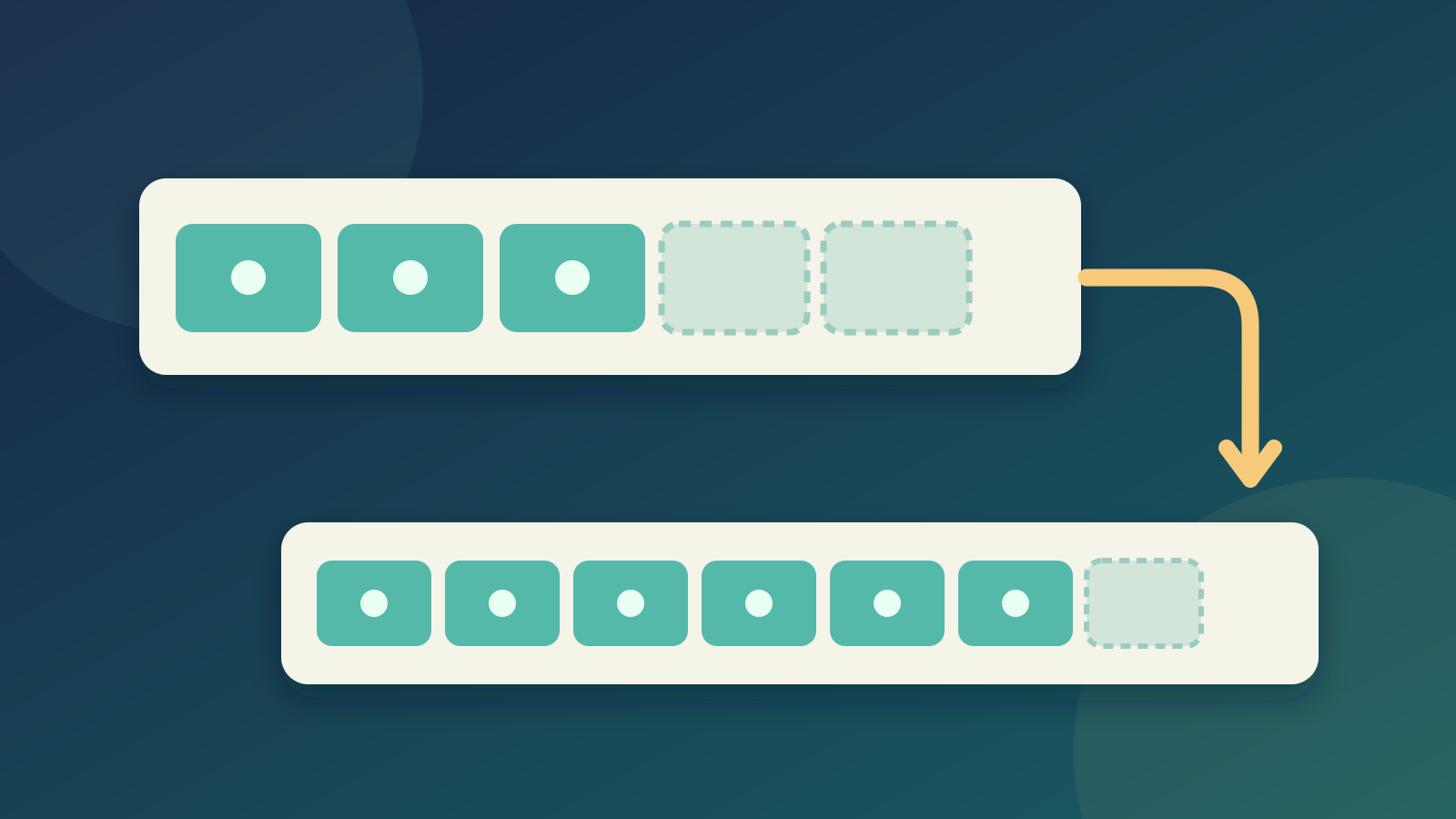
C++ std::vector: Size, Capacity, and Safe Growth
Learn how std::vector grows in C++: the difference between size and capacity, when reserve helps, why resize is different, and how growth can invalidate references.
nbkhope
How to Handle Errors in Go: A Hands-On Guide
Learn Go's everyday error pattern with runnable examples: return an error, check it, add context with %w, and recognize a missing file with errors.Is.
nbkhope
Comments
Be kind and specific. Comments with links from new accounts appear after a moderator reviews them.