
TypeScript Class Inheritance: A Visual, Hands-On Guide
Learn TypeScript class inheritance visually: extends, super and the order constructors run, overriding methods, the override keyword, storing subclasses in a base type, instanceof, the single parent rule, a bug the compiler can't see, when not to inherit, and exercises.


On this page
In the introduction to TypeScript classes you built a class on its own. Real programs often have classes that are nearly the same: a student and an employee both have a name, and both can describe themselves. Inheritance lets you write that shared part once. In traditional JavaScript this was done with prototypes, and today the extends keyword does it.
In this guide you'll create subclasses, learn the rules of super and the order in which constructors run, and override methods safely with the override keyword. You'll then store different subclasses in one variable, see what the compiler can and can't know about them, meet a bug that compiles cleanly, and finish with when not to inherit. Exercises wrap it up.
All outputs below come from real runs with TypeScript 7.0 and Node.js 26 on Windows. Save each example as main.ts, then run npx tsc main.ts and node main.js.
"Is a"
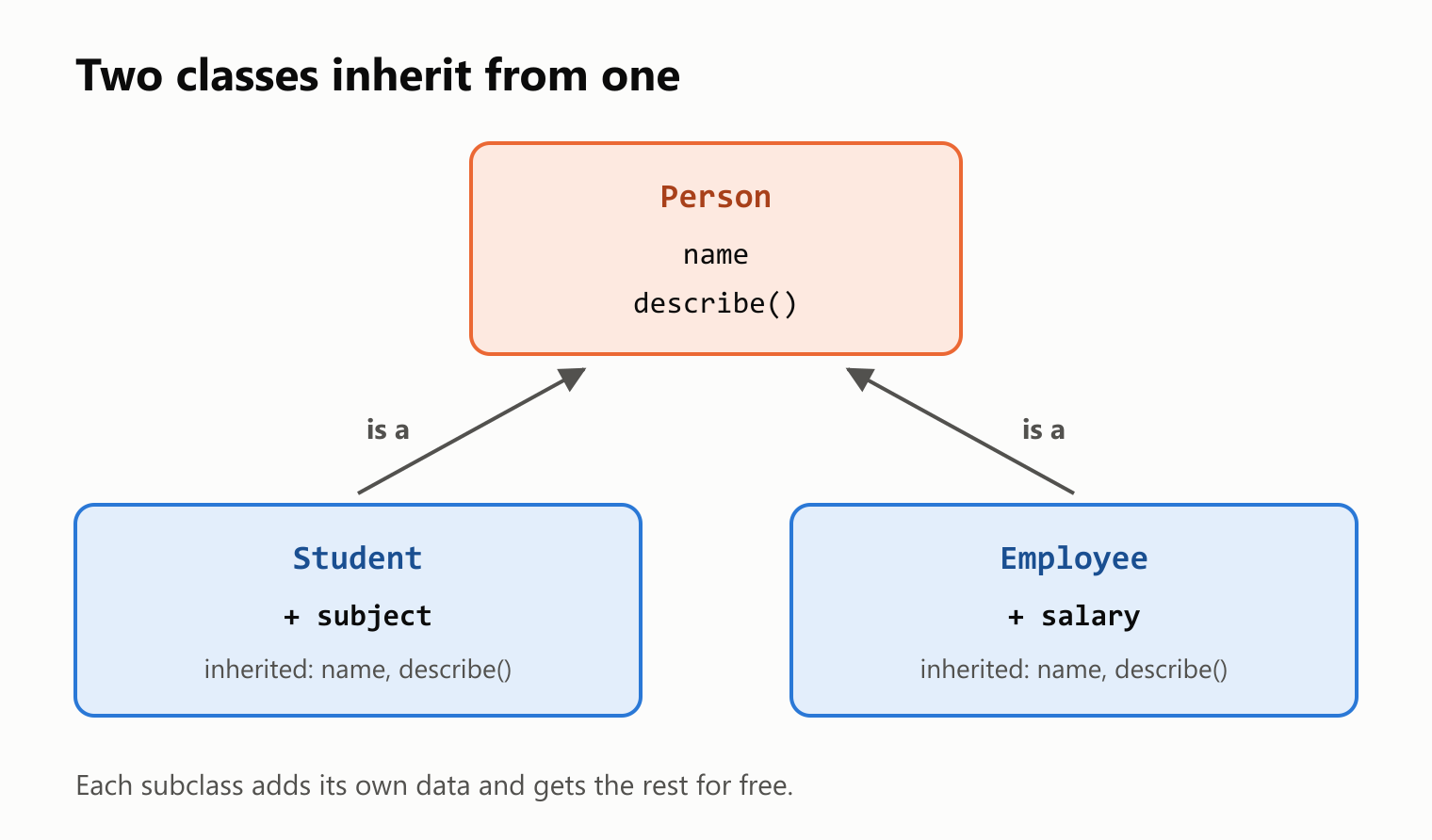
Suppose a person can be a student or an employee of a company. Two sentences describe that:
A Student is a Person
An Employee is a Person
Person is the base class, also called the superclass. Student and Employee are derived classes, also called subclasses.
Your first subclass
Start with the base class. To inherit from it, write extends and its name after the new class's name:
1class Person {
2  name: string;
3
4  constructor(name: string) {
5    this.name = name;
6  }
7
8  describe(): string {
9    return `${this.name} is a person`;
10  }
11}
12
13class Student extends Person {}
14class Employee extends Person {}
15
16const ana = new Student("Ana");
17
18console.log(ana);
19console.log(ana.describe());
20console.log(ana instanceof Student);
21console.log(ana instanceof Person);
22console.log(ana instanceof Employee);1Student { name: 'Ana' }
2Ana is a person
3true
4true
5falseNeither subclass has a single line of its own, and yet Student has a name, a constructor and a describe method. They're all inherited. Notice also that ana is both a Student and a Person, but not an Employee.
Adding to a subclass
A subclass exists to add something. A student has a subject, and an employee has a salary. To set those, each subclass needs its own constructor, which calls the base class's constructor with super:
1class Person {
2  name: string;
3
4  constructor(name: string) {
5    this.name = name;
6  }
7}
8
9class Student extends Person {
10  subject: string;
11
12  constructor(name: string, subject: string) {
13    super(name);
14    this.subject = subject;
15  }
16}
17
18class Employee extends Person {
19  salary: number;
20
21  constructor(name: string, salary: number) {
22    super(name);
23    this.salary = salary;
24  }
25}
26
27const joao = new Employee("João", 123);
28const ana = new Student("Ana", "Architecture");
29
30console.log(joao);
31console.log(ana);
Employee { name: 'João', salary: 123 }
Student { name: 'Ana', subject: 'Architecture' }super(name) reuses the code from Person, so this.name = name lives in a single place.
If a subclass only adds properties with default values, it doesn't need a constructor at all, and it keeps the inherited one:
1class Person {
2  name: string;
3
4  constructor(name: string) {
5    this.name = name;
6  }
7}
8
9class Student extends Person {
10  subject = "Undecided";
11}
12
13console.log(new Student("Ana"));
Student { name: 'Ana', subject: 'Undecided' }The rules of super
A subclass that has a constructor must call super. Leave it out, and the compiler objects:
1class Person {
2  name: string;
3
4  constructor(name: string) {
5    this.name = name;
6  }
7}
8
9class Student extends Person {
10  subject: string;
11
12  constructor(name: string, subject: string) {
13    this.subject = subject;
14  }
15}
main.ts(12,3): error TS2377: Constructors for derived classes must contain a 'super' call.
main.ts(13,5): error TS17009: 'super' must be called before accessing 'this' in the constructor of a derived class.The second message is the other rule: you can't touch this before super runs. This one is enforced by JavaScript as well, so the program crashes if you ignore the compiler:
1class Person {
2  name: string;
3
4  constructor(name: string) {
5    this.name = name;
6  }
7}
8
9class Student extends Person {
10  subject: string;
11
12  constructor(name: string, subject: string) {
13    this.subject = subject;
14    super(name);
15  }
16}
17
18console.log(new Student("Ana", "Math"));
main.ts(13,5): error TS17009: 'super' must be called before accessing 'this' in the constructor of a derived class.ReferenceError: Must call super constructor in derived class before accessing 'this' or returning from derived constructorWhy the rule? The object isn't ready until the base class has built its part. You can see the order by adding some logging:
1class Person {
2  constructor() {
3    console.log("Person constructor");
4  }
5}
6
7class Student extends Person {
8  constructor() {
9    console.log("Student: before super");
10    super();
11    console.log("Student: after super");
12  }
13}
14
15new Student();
Student: before super
Person constructor
Student: after super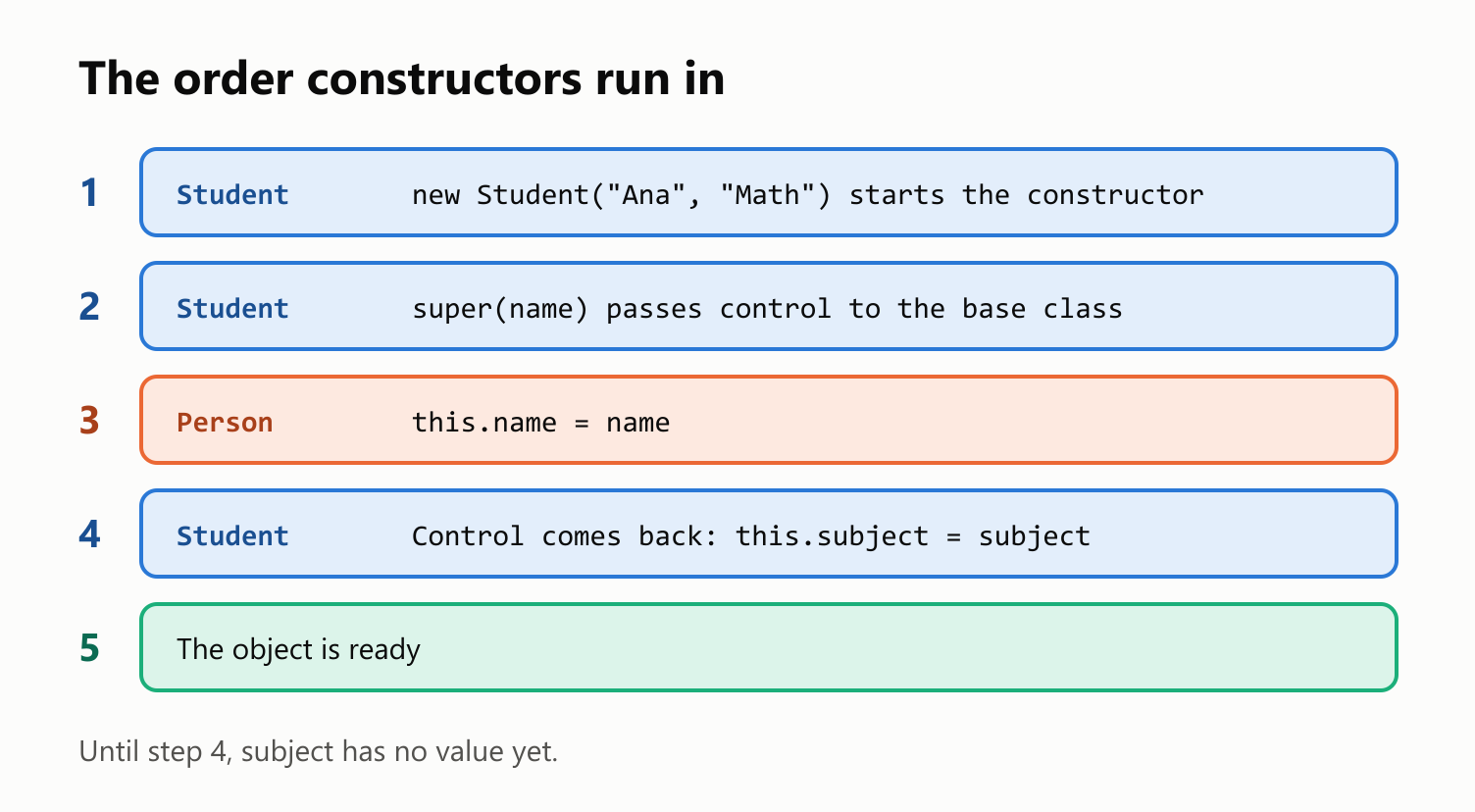
Overriding a method
A subclass can replace an inherited method with its own version, which is called overriding. Write override before the method. To reuse the original, call it through super:
1class Person {
2  name: string;
3
4  constructor(name: string) {
5    this.name = name;
6  }
7
8  describe(): string {
9    return `${this.name} is a person`;
10  }
11}
12
13class Student extends Person {
14  override describe(): string {
15    return `${this.name} is a student`;
16  }
17}
18
19class Employee extends Person {
20  override describe(): string {
21    return `${super.describe()} with a job`;
22  }
23}
24
25console.log(new Student("Ana").describe());
26console.log(new Employee("João").describe());
Ana is a student
João is a person with a jobWhy write override?
The keyword is optional, but it catches a real mistake. Misspell the method's name without it, and you've simply added a new method. The program compiles and quietly uses the old one:
1class Person {
2  name: string;
3
4  constructor(name: string) {
5    this.name = name;
6  }
7
8  describe(): string {
9    return `${this.name} is a person`;
10  }
11}
12
13class Student extends Person {
14  descibe(): string {
15    return `${this.name} is a student`;
16  }
17}
18
19console.log(new Student("Ana").describe());
Ana is a personWith override, you're telling the compiler that the base class has this method, and it can check:
1class Person {
2  name: string;
3
4  constructor(name: string) {
5    this.name = name;
6  }
7
8  describe(): string {
9    return `${this.name} is a person`;
10  }
11}
12
13class Student extends Person {
14  override descibe(): string {
15    return `${this.name} is a student`;
16  }
17}
18
19console.log(new Student("Ana").describe());
main.ts(14,12): error TS4117: This member cannot have an 'override' modifier because it is not declared in the base class 'Person'. Did you mean 'describe'?To make the keyword mandatory, compile with npx tsc --noImplicitOverride main.ts, or set "noImplicitOverride": true in tsconfig.json. It isn't part of strict mode, so you have to turn it on. A method that overrides without saying so then gets this error:
main.ts(14,3): error TS4114: This member must have an 'override' modifier because it overrides a member in the base class 'Person'.An override must also be compatible with the original. Code that works with a Person has to keep working when it gets a Student, so you can't change the return type or add a required parameter:
1class Person {
2  name: string;
3
4  constructor(name: string) {
5    this.name = name;
6  }
7
8  describe(): string {
9    return `${this.name} is a person`;
10  }
11}
12
13class Student extends Person {
14  override describe(): number {
15    return 1;
16  }
17}
main.ts(14,12): error TS2416: Property 'describe' in type 'Student' is not assignable to the same property in base type 'Person'.
Type '() => number' is not assignable to type '() => string'.
Type 'number' is not assignable to type 'string'.One type, many classes
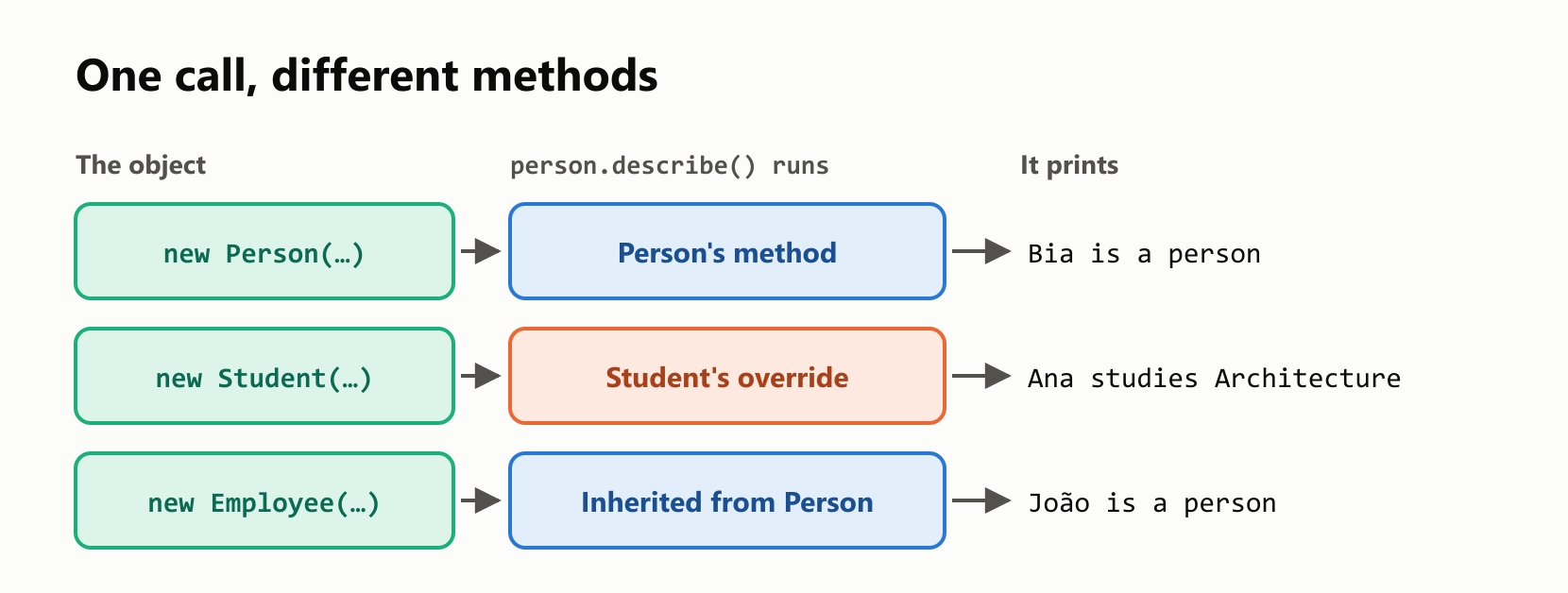
Since an Employee is a Person, a variable of type Person can hold one. So can an array, which lets you treat different classes the same way:
1class Person {
2  name: string;
3
4  constructor(name: string) {
5    this.name = name;
6  }
7
8  describe(): string {
9    return `${this.name} is a person`;
10  }
11}
12
13class Student extends Person {
14  subject: string;
15
16  constructor(name: string, subject: string) {
17    super(name);
18    this.subject = subject;
19  }
20
21  override describe(): string {
22    return `${this.name} studies ${this.subject}`;
23  }
24}
25
26class Employee extends Person {
27  salary: number;
28
29  constructor(name: string, salary: number) {
30    super(name);
31    this.salary = salary;
32  }
33}
34
35const people: Person[] = [
36  new Person("Bia"),
37  new Student("Ana", "Architecture"),
38  new Employee("João", 123),
39];
40
41for (const person of people) {
42  console.log(person.describe());
43}
Bia is a person
Ana studies Architecture
João is a personThe loop has one line, and it ran different code for different objects. The method is chosen when the program runs, based on the object's real class and not on the variable's type. This is called polymorphism.
What a base type can see
The variable's type still decides what the compiler lets you use. A Person variable only exposes what every Person has, even if it holds an Employee:
1class Person {
2  name: string;
3
4  constructor(name: string) {
5    this.name = name;
6  }
7}
8
9class Employee extends Person {
10  salary: number;
11
12  constructor(name: string, salary: number) {
13    super(name);
14    this.salary = salary;
15  }
16}
17
18const person: Person = new Employee("João", 123);
19console.log(person.salary);
main.ts(19,20): error TS2339: Property 'salary' does not exist on type 'Person'.
123The value is there, as the output shows, but the compiler can't promise that for every Person. The safe way to get at it is instanceof, which narrows the type just as typeof does:
1class Person {
2  name: string;
3
4  constructor(name: string) {
5    this.name = name;
6  }
7}
8
9class Employee extends Person {
10  salary: number;
11
12  constructor(name: string, salary: number) {
13    super(name);
14    this.salary = salary;
15  }
16}
17
18function showSalary(person: Person): void {
19  if (person instanceof Employee) {
20    console.log(person.salary);
21  } else {
22    console.log(`${person.name} has no salary`);
23  }
24}
25
26showSalary(new Employee("João", 123));
27showSalary(new Person("Bia"));
123
Bia has no salaryAvoid forcing it with as, which tells the compiler to trust you and checks nothing:
1class Person {
2  name: string;
3
4  constructor(name: string) {
5    this.name = name;
6  }
7}
8
9class Employee extends Person {
10  salary = 0;
11}
12
13const person = new Person("Bia");
14const employee = person as Employee;
15
16console.log(employee.salary.toFixed(2));
TypeError: Cannot read properties of undefined (reading 'toFixed')The relationship only goes one way, too. Every Employee is a Person, but not every Person is an Employee:
1class Person {
2  name: string;
3
4  constructor(name: string) {
5    this.name = name;
6  }
7}
8
9class Employee extends Person {
10  salary = 0;
11}
12
13const employee: Employee = new Person("Bia");
main.ts(13,7): error TS2741: Property 'salary' is missing in type 'Person' but required in type 'Employee'.What isn't inherited
A subclass gets everything, but it can't use what's private. Both forms of private from the classes guide stop at the class that declares them:
1class Person {
2  private secret = 1;
3  #code = 2;
4}
5
6class Student extends Person {
7  showSecret(): number {
8    return this.secret;
9  }
10
11  showCode(): number {
12    return this.#code;
13  }
14}
main.ts(8,17): error TS2341: Property 'secret' is private and only accessible within class 'Person'.
main.ts(12,17): error TS18013: Property '#code' is not accessible outside class 'Person' because it has a private identifier.TypeScript has a third level for this situation, protected, which later guides in this series cover.
Only one parent
A class can extend only one other class:
class Person {}
class Musician {}
class Student extends Person, Musician {}
main.ts(3,31): error TS1174: Classes can only extend a single class.What the compiler can't catch
Here's a trap that comes straight from the order of constructors. If a base constructor calls a method, and a subclass overrides that method, the override runs before the subclass has finished setting up:
1class Person {
2  name: string;
3
4  constructor(name: string) {
5    this.name = name;
6    console.log(this.describe());
7  }
8
9  describe(): string {
10    return `${this.name} is a person`;
11  }
12}
13
14class Student extends Person {
15  subject: string;
16
17  constructor(name: string, subject: string) {
18    super(name);
19    this.subject = subject;
20  }
21
22  override describe(): string {
23    return `${this.name} studies ${this.subject.toUpperCase()}`;
24  }
25}
26
27new Student("Ana", "Math");
TypeError: Cannot read properties of undefined (reading 'toUpperCase')This compiled with no errors. subject is declared as a string, and the constructor does set it, but only after super returns. By then the crash has already happened. The fix is a simple rule: don't call overridable methods from a constructor.
When not to inherit
Inheritance is a strong promise: a subclass can be used anywhere the base class can. A sentence that sounds right can still break that promise. A square is a rectangle, isn't it?
1class Rectangle {
2  width: number;
3  height: number;
4
5  constructor(width: number, height: number) {
6    this.width = width;
7    this.height = height;
8  }
9
10  setWidth(width: number): void {
11    this.width = width;
12  }
13
14  getArea(): number {
15    return this.width * this.height;
16  }
17}
18
19class Square extends Rectangle {
20  constructor(side: number) {
21    super(side, side);
22  }
23
24  override setWidth(width: number): void {
25    this.width = width;
26    this.height = width;
27  }
28}
29
30function stretch(rectangle: Rectangle): number {
31  rectangle.setWidth(10);
32  return rectangle.getArea();
33}
34
35console.log(stretch(new Rectangle(3, 3)));
36console.log(stretch(new Square(3)));
30
100Both start as 3 by 3, and stretch only changes the width. A Square has to change both sides, so the same function gives a different answer. Everything compiles, and the compiler can't tell you that the two classes don't really fit.
When "is a" doesn't hold up, or you just want to reuse some code, use composition: keep the other object in a property, which reads as "has a":
1class Engine {
2  start(): string {
3    return "Engine started";
4  }
5}
6
7class Car {
8  private engine = new Engine();
9
10  drive(): string {
11    return `${this.engine.start()}. Driving`;
12  }
13}
14
15console.log(new Car().drive());
Engine started. DrivingA car isn't an engine. It has one. Car shows only drive, and no method of Engine leaks out.
Your turn: practice
Try these before peeking at the answers.
Exercise 1: Predict both tools (warm-up). What does tsc report for this program, and what does node main.js print afterward?
1class Animal {
2  name: string;
3
4  constructor(name: string) {
5    this.name = name;
6  }
7
8  speak(): string {
9    return `${this.name} makes a sound`;
10  }
11}
12
13class Dog extends Animal {
14  override speak(): string {
15    return `${this.name} barks`;
16  }
17
18  fetchBall(): string {
19    return `${this.name} fetches the ball`;
20  }
21}
22
23const animal: Animal = new Dog("Rex");
24const dog: Dog = new Animal("Mia");
25
26console.log(animal.speak());
27console.log(animal.fetchBall());
Exercise 2: Books. Write a Product class with a name, a price and a describe() method that returns text like Pen: 3. Write a Book subclass that adds an author, and overrides describe() to add by <author> to what the base method returns.
Exercise 3: Fix the constructor. This class has two problems. Find and fix them, so that new Teacher("Rosa", "Math") works.
1class Person {
2  name: string;
3
4  constructor(name: string) {
5    this.name = name;
6  }
7}
8
9class Teacher extends Person {
10  subject: string;
11
12  constructor(name: string, subject: string) {
13    this.subject = subject;
14    super();
15  }
16}
Exercise 4: Payroll. Write an Employee class with a name, a salary and a getPay() method. Write a Manager subclass that adds a bonus and overrides getPay(). Write totalPay(employees: Employee[]): number, and try it with an employee earning 100 and a manager earning 200 with a bonus of 50.
Exercise 5: Shapes (challenge). Write a Shape base class with a read-only name and a getArea() method that returns 0. Write Circle and Rectangle subclasses that override it. Put one of each in a Shape[], print each name with its area to two decimal places, and print the circle's radius using instanceof.
Quick quiz
- What does
extendsdo? - When must a subclass call
super? - Why can't you use
thisbeforesuper? - How do you call the base version of an overridden method?
- What mistake does the
overridekeyword catch? - Can a variable of type
Personhold aStudent? And the other way around? - Which method runs when a
Personvariable holds aStudentthat overrides it? - Why shouldn't a constructor call a method that a subclass can override?
- What's the difference between "is a" and "has a"?
Answers
Exercise 1: tsc rejects two lines. Animal isn't a Dog, and an Animal variable can't see fetchBall. It still writes main.js, and because the object really is a Dog, both calls work:
1main.ts(24,7): error TS2741: Property 'fetchBall' is missing in type 'Animal' but required in type 'Dog'.
2main.ts(27,20): error TS2339: Property 'fetchBall' does not exist on type 'Animal'.
3Rex barks
4Rex fetches the ball
Exercise 2: super.describe() keeps the base text in one place:
1class Product {
2  name: string;
3  price: number;
4
5  constructor(name: string, price: number) {
6    this.name = name;
7    this.price = price;
8  }
9
10  describe(): string {
11    return `${this.name}: ${this.price}`;
12  }
13}
14
15class Book extends Product {
16  author: string;
17
18  constructor(name: string, price: number, author: string) {
19    super(name, price);
20    this.author = author;
21  }
22
23  override describe(): string {
24    return `${super.describe()} by ${this.author}`;
25  }
26}
27
28console.log(new Product("Pen", 3).describe());
29console.log(new Book("Dom Casmurro", 40, "Machado de Assis").describe());
Pen: 3
Dom Casmurro: 40 by Machado de AssisExercise 3: this is used before super, and super is missing the name:
1class Person {
2  name: string;
3
4  constructor(name: string) {
5    this.name = name;
6  }
7}
8
9class Teacher extends Person {
10  subject: string;
11
12  constructor(name: string, subject: string) {
13    super(name);
14    this.subject = subject;
15  }
16}
17
18console.log(new Teacher("Rosa", "Math"));
Teacher { name: 'Rosa', subject: 'Math' }Exercise 4: totalPay doesn't need to know which class it's looking at:
1class Employee {
2  name: string;
3  salary: number;
4
5  constructor(name: string, salary: number) {
6    this.name = name;
7    this.salary = salary;
8  }
9
10  getPay(): number {
11    return this.salary;
12  }
13}
14
15class Manager extends Employee {
16  bonus: number;
17
18  constructor(name: string, salary: number, bonus: number) {
19    super(name, salary);
20    this.bonus = bonus;
21  }
22
23  override getPay(): number {
24    return super.getPay() + this.bonus;
25  }
26}
27
28function totalPay(employees: Employee[]): number {
29  return employees.reduce((total, employee) => total + employee.getPay(), 0);
30}
31
32console.log(totalPay([new Employee("Ana", 100), new Manager("João", 200, 50)]));350Exercise 5: Parameter properties work in a subclass too:
1class Shape {
2  readonly name: string;
3
4  constructor(name: string) {
5    this.name = name;
6  }
7
8  getArea(): number {
9    return 0;
10  }
11}
12
13class Circle extends Shape {
14  constructor(public radius: number) {
15    super("Circle");
16  }
17
18  override getArea(): number {
19    return Math.PI * this.radius * this.radius;
20  }
21}
22
23class Rectangle extends Shape {
24  constructor(public width: number, public height: number) {
25    super("Rectangle");
26  }
27
28  override getArea(): number {
29    return this.width * this.height;
30  }
31}
32
33const shapes: Shape[] = [new Circle(2), new Rectangle(3, 4)];
34
35for (const shape of shapes) {
36  console.log(`${shape.name}: ${shape.getArea().toFixed(2)}`);
37  if (shape instanceof Circle) {
38    console.log(`Radius: ${shape.radius}`);
39  }
40}
Circle: 12.57
Radius: 2
Rectangle: 12.00Quiz: (1) It makes a class inherit the members of another class. (2) Whenever it has its own constructor. (3) The object isn't ready until the base class has built its part. (4) With super.describe(). (5) A method name that doesn't exist in the base class, such as a typo. (6) Yes, because a Student is a Person. No, because a Person might not be a Student. (7) The Student version, because the choice is made when the program runs, based on the object's real class. (8) The override would run before the subclass has set its own properties. (9) "Is a" means inheritance, and "has a" means composition: one object kept in a property of another.
Cheat sheet
| I want to… | Write |
|---|---|
| Inherit from a class | class Student extends Person { … } |
| Run the base constructor | super(name); |
| Replace an inherited method | override describe(): string { … } |
| Call the base method | super.describe() |
Make override mandatory | npx tsc --noImplicitOverride main.ts |
| Hold any subclass | const people: Person[] = [ … ]; |
| Check a subclass and narrow | if (person instanceof Employee) { … } |
| Reuse code without inheriting | private engine = new Engine(); |
Wrapping up
Inheritance shares code between classes that truly are the same kind of thing:
extendsinherits properties, methods and the constructor.- A subclass with a constructor must call
super, and it can't usethisbefore that. - The base constructor finishes first, and the subclass's properties are set afterward.
overridereplaces a method safely, andsuper.method()reuses the original.- Turn on
noImplicitOverrideto make the keyword mandatory. - A base type can hold any subclass, and the object's real class decides which method runs.
- The compiler only sees what the variable's type offers. Use
instanceofto narrow, and avoidas. - Private members stay in the class that declares them.
- A class has only one parent.
- Don't call overridable methods from a constructor.
- If "is a" doesn't truly hold, prefer composition.
Next up: TypeScript Protected Constructors.
Read next

Ruby Blocks and Iterators: Write Your Own
Learn how Ruby methods receive blocks, pass values with yield, handle a missing block, and return an Enumerator. Build and run your own iterator.
 nbkhope

C++ std::vector: Size, Capacity, and Safe Growth
Learn how std::vector grows in C++: the difference between size and capacity, when reserve helps, why resize is different, and how growth can invalidate references.
nbkhope
How to Handle Errors in Go: A Hands-On Guide
Learn Go's everyday error pattern with runnable examples: return an error, check it, add context with %w, and recognize a missing file with errors.Is.
nbkhope
Comments
Be kind and specific. Comments with links from new accounts appear after a moderator reviews them.