
Introduction to TypeScript Classes: A Visual, Hands-On Guide
Learn TypeScript classes visually: properties, constructors, methods and this, what tsc keeps at run time, why a class is also a type, public vs. private vs. #, readonly, getters, parameter properties, static members, the lost this bug, and exercises.


On this page
JavaScript originally did object-oriented programming with functions and prototypes. ECMAScript 2015, known as ES6, added the class keyword, so you can now write classes much as you would in C++, C# or Java. TypeScript supports them too, and adds types and access control on top.
In this guide you'll write a class with properties, a constructor and methods, and see what the compiler does with it, which is different from everything else in this series. You'll then control who can touch what with public, private and #, cover readonly, getters, parameter properties and static members, and end with a classic bug the compiler can't see. Exercises wrap it up.
This guide builds on function parameter types and function return types. All outputs below come from real runs with TypeScript 7.0 and Node.js 26 on Windows. Save each example as main.ts, then run npx tsc main.ts and node main.js.
Why classes?
You can already describe a shape with a type, and calculate its area with a function:
1type Shape = {
2  name: string;
3  width: number;
4  height: number;
5};
6
7function getArea(shape: Shape): number {
8  return shape.width * shape.height;
9}
10
11const rectangle: Shape = { name: "Rectangle", width: 3, height: 4 };
12console.log(getArea(rectangle));12That works, but the data and the function that uses it are separate things. A class puts them together: it defines what data an object has, how to build it, and what it can do.
Your first class
Here's a class called Shape, with a single property:
1class Shape {
2  name: string;
3
4  constructor(name: string) {
5    this.name = name;
6  }
7}
8
9const rectangle = new Shape("Rectangle");
10console.log(`The shape's name is ${rectangle.name}`);
The shape's name is RectangleThree things happen here:
name: string;declares a property: everyShapehas a name.- The constructor is a special function that runs when you build an object. Inside it,
thisis the new object. new Shape("Rectangle")builds an object, called an instance, and passes"Rectangle"to the constructor.
The compiler checks the constructor like any other function. It also knows what properties exist, and it catches a forgotten new:
1class Shape {
2  name: string;
3
4  constructor(name: string) {
5    this.name = name;
6  }
7}
8
9const noName = new Shape();
10const tooMany = new Shape("Rectangle", 2);
11const noNew = Shape("Rectangle");
12console.log(tooMany.color);1main.ts(9,16): error TS2554: Expected 1 arguments, but got 0.
2main.ts(10,40): error TS2554: Expected 1 arguments, but got 2.
3main.ts(11,15): error TS2348: Value of type 'typeof Shape' is not callable. Did you mean to include 'new'?
4main.ts(12,21): error TS2339: Property 'color' does not exist on type 'Shape'.One class, many objects
A class is a blueprint. You write it once, and each new builds a separate object with its own data:
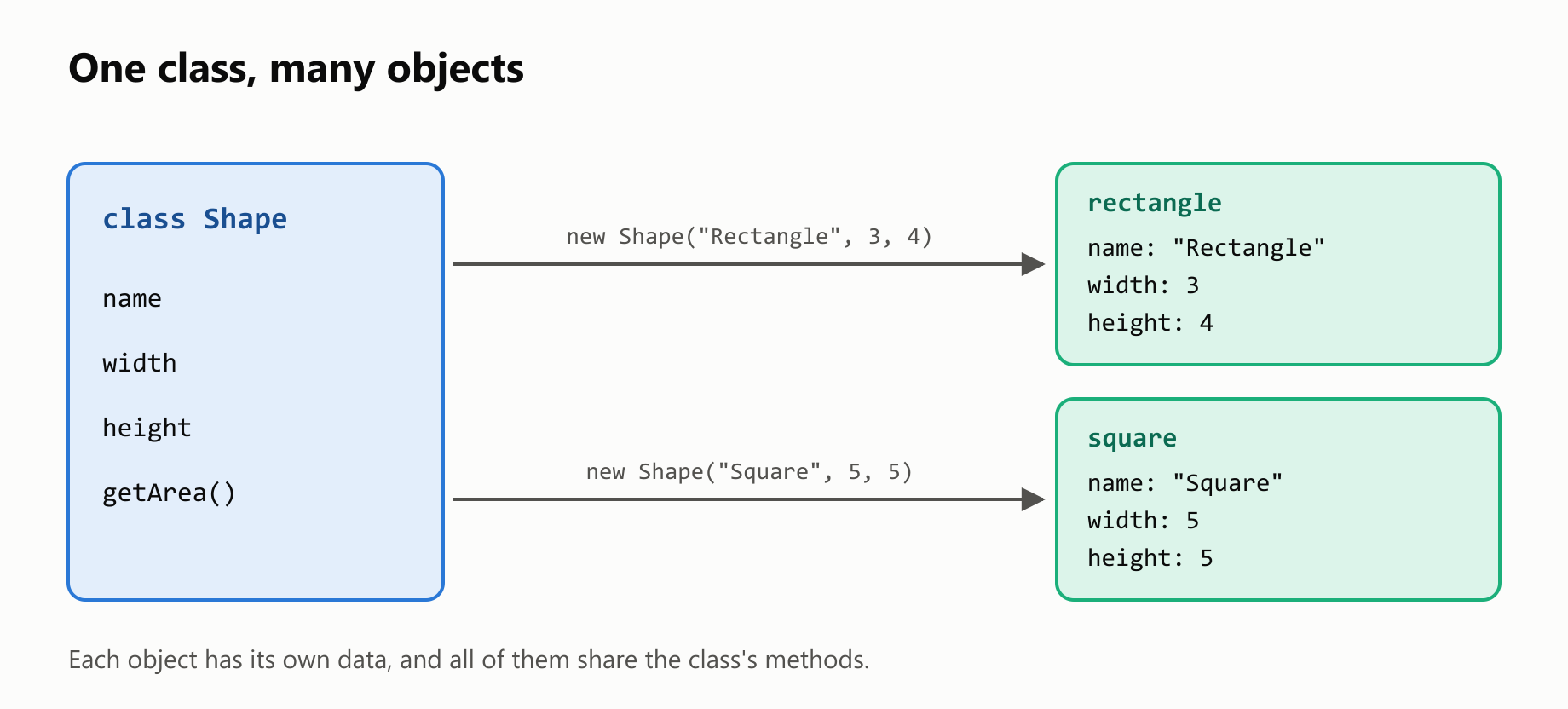
Changing one object doesn't affect the others.
What tsc does with a class
In the earlier guides, everything you wrote about types disappeared from main.js. A class is different. Compile this:
1class Shape {
2  name: string;
3
4  constructor(name: string) {
5    this.name = name;
6  }
7}
8
9const rectangle = new Shape("Rectangle");
10
11console.log(rectangle);
12console.log(typeof Shape);
13console.log(rectangle instanceof Shape);
Shape { name: 'Rectangle' }
function
trueHere's the class in main.js. The types are gone, but the class is still there, because class is a JavaScript feature:
1"use strict";
2class Shape {
3    name;
4    constructor(name) {
5        this.name = name;
6    }
7}
So a class exists when the program runs, which is why instanceof works. A type doesn't exist then, and you can't use instanceof with one.
Properties must be set
In strict mode, the compiler makes sure that every property gets a value. A common slip is forgetting this., which only assigns the parameter to itself:
1class Shape {
2  name: string;
3
4  constructor(name: string) {
5    name = name;
6  }
7}
8
9console.log(new Shape("Rectangle"));
main.ts(2,3): error TS2564: Property 'name' has no initializer and is not definitely assigned in the constructor.
Shape { name: undefined }You can also give a property a default value, whose type is inferred, or mark it as optional with ?:
1class Shape {
2  name: string;
3  color = "blue";
4  label?: string;
5
6  constructor(name: string) {
7    this.name = name;
8  }
9}
10
11console.log(new Shape("Rectangle"));
Shape { name: 'Rectangle', color: 'blue', label: undefined }Adding methods
Let's add a width and a height, and a function that belongs to the class, known as a method:
1class Shape {
2  name: string;
3  width: number;
4  height: number;
5
6  constructor(name: string, width: number, height: number) {
7    this.name = name;
8    this.width = width;
9    this.height = height;
10  }
11
12  getArea(): number {
13    return this.width * this.height;
14  }
15}
16
17const rectangle = new Shape("Rectangle", 3, 4);
18console.log(`The rectangle's area is ${rectangle.getArea()}`);
The rectangle's area is 12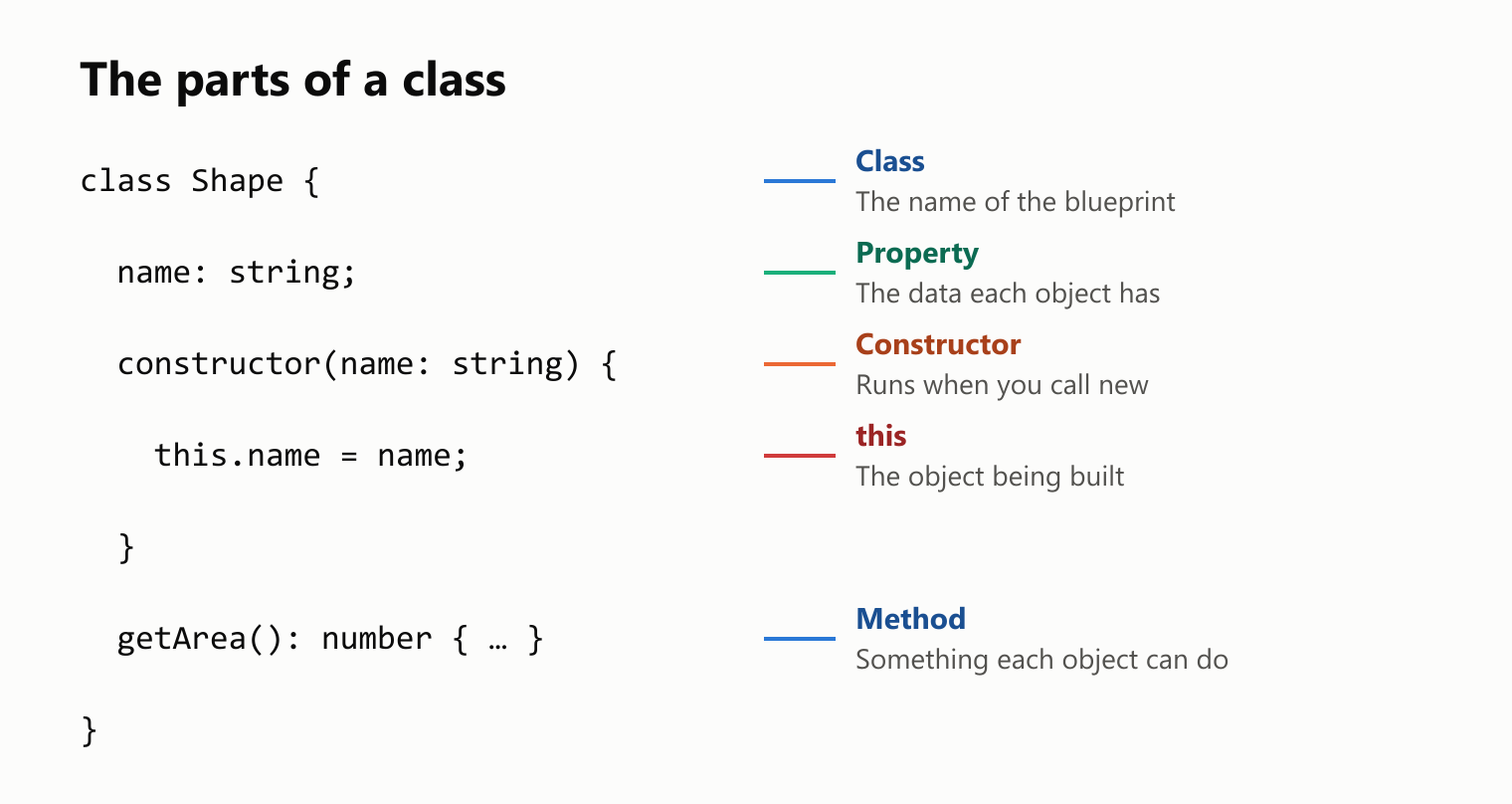
getArea takes no parameters, because what it needs is already in the object. You could leave out : number and let the compiler infer it, as with any function. Inside a method, you must reach properties through this, and the compiler reminds you if you forget:
1class Shape {
2  width: number;
3  height: number;
4
5  constructor(width: number, height: number) {
6    this.width = width;
7    this.height = height;
8  }
9
10  getArea(): number {
11    return width * height;
12  }
13}
main.ts(11,12): error TS2663: Cannot find name 'width'. Did you mean the instance member 'this.width'?
main.ts(11,20): error TS2663: Cannot find name 'height'. Did you mean the instance member 'this.height'?A class is also a type
The name of a class works as a type, in annotations and in parameters:
1class Shape {
2  name: string;
3
4  constructor(name: string) {
5    this.name = name;
6  }
7}
8
9function describe(shape: Shape): string {
10  return `This is a ${shape.name}`;
11}
12
13const rectangle: Shape = new Shape("Rectangle");
14console.log(describe(rectangle));
This is a RectangleHere's a surprise, though. TypeScript compares types by their shape, not by their name, so a plain object with the same properties counts as a Shape:
1class Shape {
2  name: string;
3
4  constructor(name: string) {
5    this.name = name;
6  }
7}
8
9const imitation: Shape = { name: "Imitation" };
10
11console.log(imitation);
12console.log(imitation instanceof Shape);
{ name: 'Imitation' }
falseIt compiled, but it isn't an instance of the class, as instanceof shows.
public and private
Every member of a class is public by default, which means code outside the class can use it. You can also write that explicitly. A private member, on the other hand, can only be used inside the class:
1class Shape {
2  public name: string;
3  private width: number;
4  private height: number;
5
6  constructor(name: string, width: number, height: number) {
7    this.name = name;
8    this.width = width;
9    this.height = height;
10  }
11
12  public getArea(): number {
13    return this.width * this.height;
14  }
15}
16
17const rectangle = new Shape("Rectangle", 3, 4);
18console.log(rectangle.name);
19console.log(rectangle.getArea());
20console.log(rectangle.width);1main.ts(20,23): error TS2341: Property 'width' is private and only accessible within class 'Shape'.
2Rectangle
312
43getArea can use this.width, because it's inside the class. The last line can't. Look at the output, though: it still printed 3.
private only exists for the compiler
Like every other TypeScript annotation, private is removed from main.js. It's a check at compile time, and nothing protects the value when the program runs. It also shows up when you print the object or turn it into JSON:
1class Shape {
2  private width: number;
3
4  constructor(width: number) {
5    this.width = width;
6  }
7}
8
9const rectangle = new Shape(3);
10console.log(rectangle);
11console.log(JSON.stringify(rectangle));
Shape { width: 3 }
{"width":3}JavaScript has its own version, written with #, which holds when the program runs:
1class Shape {
2  #width: number;
3
4  constructor(width: number) {
5    this.#width = width;
6  }
7
8  getWidth(): number {
9    return this.#width;
10  }
11}
12
13const rectangle = new Shape(3);
14console.log(rectangle);
15console.log(JSON.stringify(rectangle));
16console.log(rectangle.getWidth());
Shape {}
{}
3Try to read it from outside, and both tools refuse:
1class Shape {
2  #width: number;
3
4  constructor(width: number) {
5    this.#width = width;
6  }
7}
8
9const rectangle = new Shape(3);
10console.log(rectangle.#width);
main.ts(10,23): error TS18013: Property '#width' is not accessible outside class 'Shape' because it has a private identifier.
SyntaxError: Private field '#width' must be declared in an enclosing classNode.js rejected the whole file, so not one line of it ran.
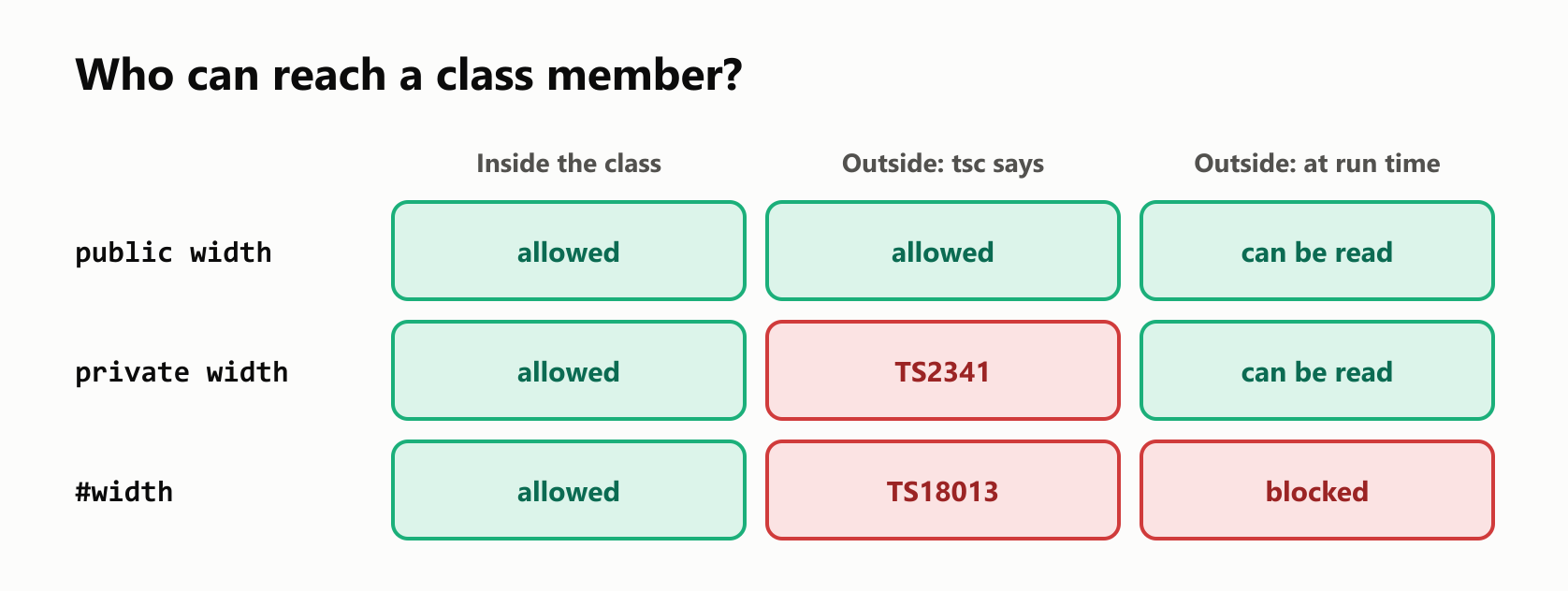
For everyday code, private is enough, because the compiler already stops honest mistakes. Reach for # when the data must stay hidden even from code that ignores the compiler.
Why hide anything?
Private data lets a class protect its own rules. If width is public, anyone can set it to -1. If it's private, the only way in is a method you control:
1class Shape {
2  private width: number;
3  private height: number;
4
5  constructor(width: number, height: number) {
6    this.width = width;
7    this.height = height;
8  }
9
10  setWidth(width: number): void {
11    if (width <= 0) {
12      throw new Error(`Invalid width: ${width}`);
13    }
14    this.width = width;
15  }
16
17  get area(): number {
18    return this.width * this.height;
19  }
20}
21
22const rectangle = new Shape(3, 4);
23console.log(rectangle.area);
24
25rectangle.setWidth(5);
26console.log(rectangle.area);
27
28try {
29  rectangle.setWidth(-1);
30} catch (error) {
31  console.log(String(error));
32}
12
20
Error: Invalid width: -1Notice get area(). A getter is a method you read like a property, with no parentheses: rectangle.area. It suits a value that's calculated from other data. With no matching set, it can't be assigned:
1class Shape {
2  get area(): number {
3    return 12;
4  }
5}
6
7const rectangle = new Shape();
8rectangle.area = 100;
main.ts(8,11): error TS2540: Cannot assign to 'area' because it is a read-only property.readonly
A readonly property can be set where it's declared or in the constructor, and never again:
1class Shape {
2  readonly name: string;
3
4  constructor(name: string) {
5    this.name = name;
6  }
7
8  rename(name: string): void {
9    this.name = name;
10  }
11}
12
13const rectangle = new Shape("Rectangle");
14rectangle.name = "Square";
15console.log(rectangle.name);
main.ts(9,10): error TS2540: Cannot assign to 'name' because it is a read-only property.
main.ts(14,11): error TS2540: Cannot assign to 'name' because it is a read-only property.
SquareBoth the method and the outside code are rejected. As with private, this is a compile-time check, so the program still changed the name when it ran.
Parameter properties
Declaring a property, repeating it in the constructor and assigning it gets tedious. TypeScript has a shortcut: put public, private or readonly on a constructor parameter, and it becomes a property:
1class Shape {
2  constructor(public name: string, private width: number, private height: number) {}
3
4  getArea(): number {
5    return this.width * this.height;
6  }
7}
8
9const rectangle = new Shape("Rectangle", 3, 4);
10console.log(rectangle.name);
11console.log(rectangle.getArea());
Rectangle
12This one line replaces three declarations and three assignments. There's a catch: this is one of the few TypeScript features that generates code, so it can't simply be stripped away. Compiling with tsc works, but running the file directly with node main.ts fails:
SyntaxError [ERR_UNSUPPORTED_TYPESCRIPT_SYNTAX]: TypeScript parameter property is not supported in strip-only modeStatic members
A static member belongs to the class itself, not to each object. It's useful for data about all the objects together:
1class Shape {
2  static created = 0;
3
4  constructor() {
5    Shape.created += 1;
6  }
7}
8
9const first = new Shape();
10const second = new Shape();
11
12console.log(Shape.created);
13console.log(first.created);
main.ts(13,19): error TS2576: Property 'created' does not exist on type 'Shape'. Did you mean to access the static member 'Shape.created' instead?
2
undefinedYou reach it through the class's name, and an instance doesn't have it.
What classes can't catch
Here's the classic class bug. Store a method in a variable, and it loses its object:
1class Shape {
2  width: number;
3  height: number;
4
5  constructor(width: number, height: number) {
6    this.width = width;
7    this.height = height;
8  }
9
10  getArea(): number {
11    return this.width * this.height;
12  }
13}
14
15const rectangle = new Shape(3, 4);
16const getArea = rectangle.getArea;
17
18console.log(rectangle.getArea());
19console.log(getArea());
12
TypeError: Cannot read properties of undefined (reading 'width')This compiled with no errors. In JavaScript, this isn't fixed when you write the method. It depends on how you call it: rectangle.getArea() sets this to rectangle, and a bare getArea() leaves it undefined. The same thing happens when you pass a method as a callback.
The simple fix is to call it through the object, by wrapping it in an arrow function:
1class Shape {
2  width: number;
3  height: number;
4
5  constructor(width: number, height: number) {
6    this.width = width;
7    this.height = height;
8  }
9
10  getArea(): number {
11    return this.width * this.height;
12  }
13}
14
15const rectangle = new Shape(3, 4);
16const getArea = () => rectangle.getArea();
17
18console.log(getArea());12Your turn: practice
Try these before peeking at the answers.
Exercise 1: Predict both tools (warm-up). What does tsc report for this program, and what does node main.js print afterward?
1class Book {
2  title: string;
3  private pages: number;
4
5  constructor(title: string, pages: number) {
6    this.title = title;
7    this.pages = pages;
8  }
9}
10
11const book = new Book("Dom Casmurro");
12console.log(book.title);
13console.log(book.pages);
Exercise 2: Circle. Write a Circle class with a private radius and a getArea() method. Print the area of a circle with radius 2, rounded to two decimal places with toFixed(2).
Exercise 3: Bank account. Write a BankAccount class with a private #balance that starts at 0, a deposit(amount: number) method that throws an error for amounts of 0 or less, and a balance getter. Deposit 100 and 50, print the balance, then try to deposit -5.
Exercise 4: Shorter class. Rewrite this class with parameter properties, and make name read-only. Then try to change a student's name, and read the error.
1class Student {
2  name: string;
3  grade: number;
4
5  constructor(name: string, grade: number) {
6    this.name = name;
7    this.grade = grade;
8  }
9}
10
11const student = new Student("Ana", 9);
12console.log(student);
Exercise 5: Playlist (challenge). Write a Playlist class with a private songs array that starts empty, an add(song: string): void method, a size getter, and a first() method that returns string | undefined. Also keep a static count of how many playlists were created. Test it with an empty playlist and with one that has two songs.
Quick quiz
- What does the constructor do, and when does it run?
- What's the difference between a class and an instance?
- How is a class different from a
typewhen the program runs? - Why can a plain object count as a
Shape? - What's the default access of a class member?
- Can you read a
privateproperty while the program runs? And a#one? - What's a getter?
- Why does
node main.tsreject parameter properties? - Why does
const getArea = rectangle.getArea; getArea();crash?
Answers
Exercise 1: tsc reports the missing argument and the private access, then writes main.js anyway. When it runs, pages was never passed, so it's undefined:
1main.ts(11,14): error TS2554: Expected 2 arguments, but got 1.
2main.ts(13,18): error TS2341: Property 'pages' is private and only accessible within class 'Book'.
3Dom Casmurro
4undefined
Exercise 2: The method reads radius through this:
1class Circle {
2  private radius: number;
3
4  constructor(radius: number) {
5    this.radius = radius;
6  }
7
8  getArea(): number {
9    return Math.PI * this.radius * this.radius;
10  }
11}
12
13const circle = new Circle(2);
14console.log(circle.getArea().toFixed(2));12.57Exercise 3: Only deposit can change the balance, and the getter lets you read it:
1class BankAccount {
2  #balance = 0;
3
4  deposit(amount: number): void {
5    if (amount <= 0) {
6      throw new Error(`Invalid amount: ${amount}`);
7    }
8    this.#balance += amount;
9  }
10
11  get balance(): number {
12    return this.#balance;
13  }
14}
15
16const account = new BankAccount();
17account.deposit(100);
18account.deposit(50);
19console.log(account.balance);
20
21try {
22  account.deposit(-5);
23} catch (error) {
24  console.log(String(error));
25}
150
Error: Invalid amount: -5Exercise 4: readonly also creates a parameter property, and it's public:
1class Student {
2  constructor(readonly name: string, public grade: number) {}
3}
4
5const student = new Student("Ana", 9);
6console.log(student);
7student.name = "Bia";
main.ts(7,9): error TS2540: Cannot assign to 'name' because it is a read-only property.
Student { name: 'Ana', grade: 9 }Exercise 5: The first song may not exist. By default, TypeScript treats this.songs[0] as a string, so the return type on first is what tells the truth to callers:
1class Playlist {
2  static created = 0;
3  private songs: string[] = [];
4
5  constructor() {
6    Playlist.created += 1;
7  }
8
9  add(song: string): void {
10    this.songs.push(song);
11  }
12
13  get size(): number {
14    return this.songs.length;
15  }
16
17  first(): string | undefined {
18    return this.songs[0];
19  }
20}
21
22const empty = new Playlist();
23const favorites = new Playlist();
24favorites.add("Garota de Ipanema");
25favorites.add("Aquarela do Brasil");
26
27console.log(empty.first());
28console.log(favorites.size);
29console.log(favorites.first());
30console.log(Playlist.created);1undefined
22
3Garota de Ipanema
42Quiz: (1) It sets up a new object, and it runs when you call new. (2) A class is the blueprint, and an instance is an object built from it. (3) A class still exists in the JavaScript, while a type is removed. (4) TypeScript compares types by their shape, so an object with the same public properties fits. (5) public. (6) Yes for private, because the check only happens at compile time. No for #, which JavaScript enforces. (7) A method you read like a property, with no parentheses. (8) They generate code, so removing the types isn't enough. (9) this depends on how you call a method, and a bare call leaves it undefined.
Cheat sheet
| I want to… | Write |
|---|---|
| Define a class | class Shape { … } |
| Declare a property | name: string; |
| Give a property a default value | color = "blue"; |
| Set up a new object | constructor(name: string) { this.name = name; } |
| Build an object | const rectangle = new Shape("Rectangle"); |
| Add a method | getArea(): number { return this.width * this.height; } |
| Check an object's class | rectangle instanceof Shape |
| Hide a member from other code | private width: number; |
| Hide it at run time too | #width: number; |
| Forbid changes | readonly name: string; |
| Read a calculated value like a property | get area(): number { … } |
| Declare and assign in one step | constructor(public name: string) {} |
| Share a value across all objects | static created = 0; |
| Keep a method's object in a callback | () => rectangle.getArea() |
Wrapping up
A class puts data and the code that uses it in one place:
- A class is a blueprint, and
newbuilds instances from it. - The constructor runs on
new, andthisis the new object. - A class exists when the program runs. Its types don't.
- Strict mode requires every property to get a value.
- Methods reach properties through
this. - A class name is also a type, and types are compared by shape.
- Members are
publicby default.privateis checked only by the compiler, and#also holds at run time. - Private data lets a class protect its rules.
readonlyforbids changes, and a getter reads like a property.- Parameter properties save typing, but
node main.tscan't run them. staticmembers belong to the class.- A method loses
thiswhen you detach it from its object.
Next up: TypeScript Class Inheritance.
Read next

Ruby Blocks and Iterators: Write Your Own
Learn how Ruby methods receive blocks, pass values with yield, handle a missing block, and return an Enumerator. Build and run your own iterator.
 nbkhope

C++ std::vector: Size, Capacity, and Safe Growth
Learn how std::vector grows in C++: the difference between size and capacity, when reserve helps, why resize is different, and how growth can invalidate references.
nbkhope
How to Handle Errors in Go: A Hands-On Guide
Learn Go's everyday error pattern with runnable examples: return an error, check it, add context with %w, and recognize a missing file with errors.Is.
nbkhope
Comments
Be kind and specific. Comments with links from new accounts appear after a moderator reviews them.