
TypeScript Function Return Types: A Visual, Hands-On Guide
Learn TypeScript function return types visually: what inference already knows, how to write a return type, why it moves errors to the real bug, void, never, unions, objects, arrow and async functions, recursion, when to annotate, and exercises.


On this page
In TypeScript Function Parameter Types you told the compiler what goes into a function. This guide covers what comes out.
The compiler can usually work out a function's return type by itself. So why write one at all? Because of what happens when the function has a bug: with a return type, the error points at the bug. Without one, it may show up somewhere else, or not at all.
You'll see how inference works, write your first return type, and compare where errors land with and without it. You'll then cover void, never, unions, objects, arrow functions, async functions and recursion, and finish with a simple rule for when to write one. Exercises wrap it up.
All outputs below come from real runs with TypeScript 7.0 and Node.js 26 on Windows. Save each example as main.ts, then run npx tsc main.ts and node main.js.
TypeScript already knows
Consider a simple function that multiplies two numbers:
1function multiply(first: number, second: number) {
2  return first * second;
3}
4
5console.log(multiply(2, 3));6There's no return type here, and yet TypeScript knows the answer is a number. It looks at the expression after return and infers the type. You can prove it by misusing the result:
1function multiply(first: number, second: number) {
2  return first * second;
3}
4
5const product: string = multiply(2, 3);
6console.log(product);
main.ts(5,7): error TS2322: Type 'number' is not assignable to type 'string'.To see what TypeScript inferred, hover over the function's name in your code editor. Or ask the compiler to write it down with npx tsc --declaration main.ts, which creates a main.d.ts file with the signature of each function:
declare function multiply(first: number, second: number): number;Writing the return type
To state the return type yourself, add a colon and the type right after the closing parenthesis of the parameter list:
1function multiply(first: number, second: number): number {
2  return first * second;
3}
4
5console.log(multiply(2, 3));
6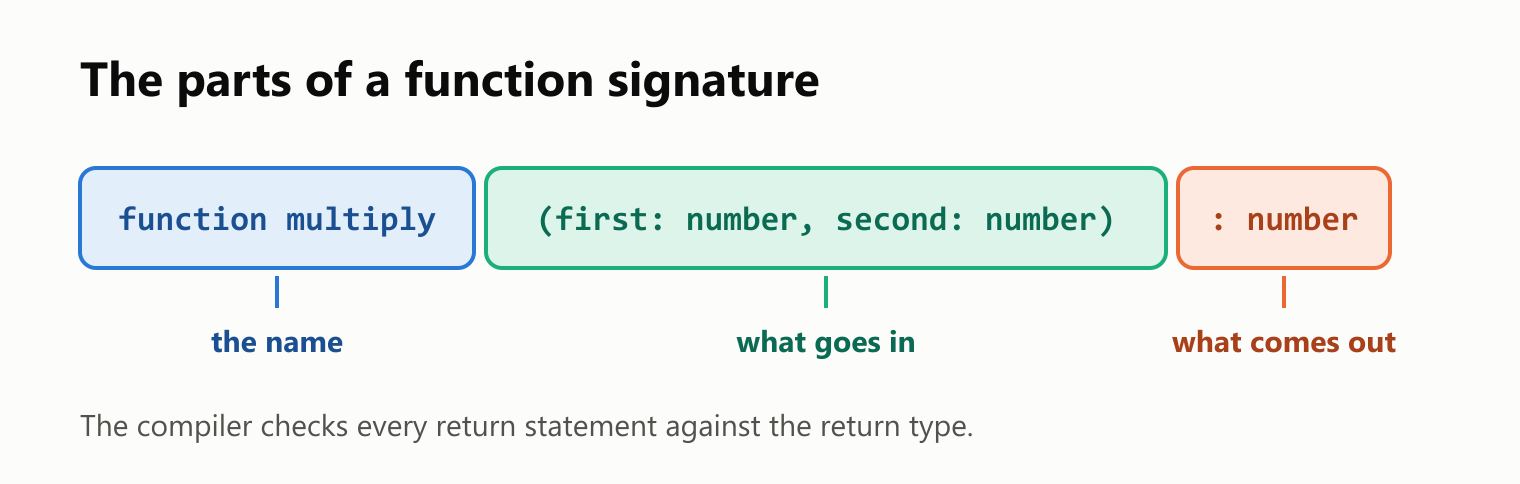
Like parameter types, a return type only exists for the compiler. The main.js that tsc writes has no trace of it:
1"use strict";
2function multiply(first, second) {
3    return first * second;
4}
5console.log(multiply(2, 3));
The difference is that the compiler now checks the function against what you promised. Return the wrong thing, and it tells you:
1function multiply(first: number, second: number): number {
2  return `${first * second}`;
3}
4
5console.log(multiply(2, 3));
main.ts(2,3): error TS2322: Type 'string' is not assignable to type 'number'.The same bug, in two different places
This is the main reason to write a return type. Here's a function that should always return a number, with a bug in the first return. There's no return type, so TypeScript simply infers that the function returns a number or the text "no data":
1function average(numbers: number[]) {
2  if (numbers.length === 0) {
3    return "no data";
4  }
5  const total = numbers.reduce((sum, number) => sum + number, 0);
6  return total / numbers.length;
7}
8
9console.log(average([8, 9, 10]));
10console.log(average([]));
11console.log(average([8, 9, 10]).toFixed(1));
12console.log(average([7, 8]) * 2);
13console.log(average([]) + 1);1main.ts(11,33): error TS2339: Property 'toFixed' does not exist on type 'number | "no data"'.
2 Property 'toFixed' does not exist on type '"no data"'.
3main.ts(12,13): error TS2362: The left-hand side of an arithmetic operation must be of type 'any', 'number', 'bigint' or an enum type.
4main.ts(13,13): error TS2365: Operator '+' cannot be applied to types 'string | number' and 'number'.That's three errors, none of them on the line with the bug. Every place that uses the function gets the blame. Now add : number and change nothing else:
1function average(numbers: number[]): number {
2  if (numbers.length === 0) {
3    return "no data";
4  }
5  const total = numbers.reduce((sum, number) => sum + number, 0);
6  return total / numbers.length;
7}
8
9console.log(average([8, 9, 10]));
10console.log(average([]));
11console.log(average([8, 9, 10]).toFixed(1));
12console.log(average([7, 8]) * 2);
13console.log(average([]) + 1);
main.ts(3,5): error TS2322: Type 'string' is not assignable to type 'number'.One error, right on the bug.
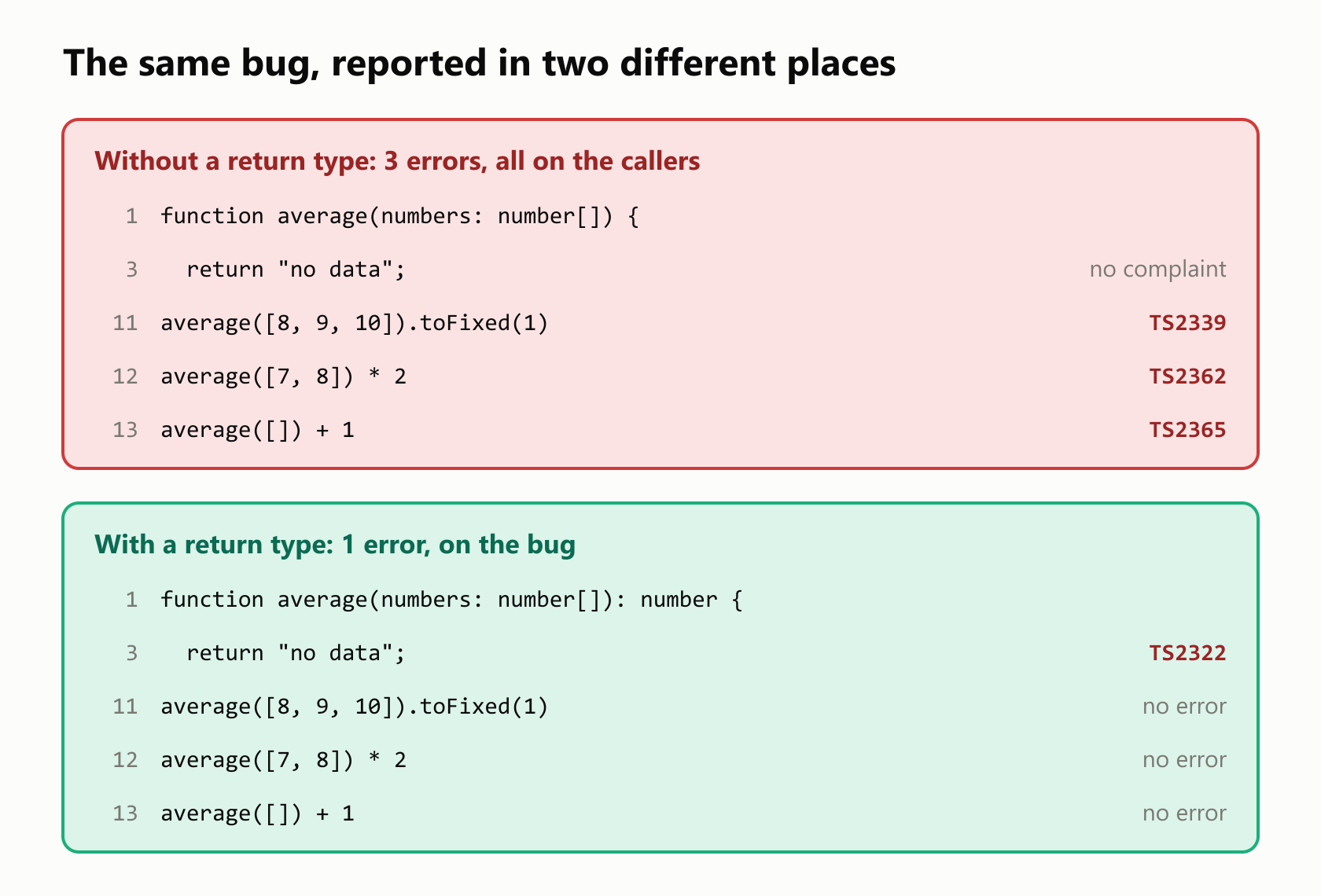
With more callers, the gap gets bigger. And if the callers only print the result, like the first two console.log lines, the version with no return type reports nothing at all.
Forgetting to return
It's easy to compute a value and forget the word return:
1function double(value: number) {
2  value * 2;
3}
4
5console.log(double(4));undefinedThis compiled with no errors. With no return, TypeScript inferred that the function returns nothing, which is valid, and console.log will print anything. With a return type, the mistake can't get past the compiler:
1function double(value: number): number {
2  value * 2;
3}
4
5console.log(double(4));
main.ts(1,33): error TS2355: A function whose declared type is neither 'undefined', 'void', nor 'any' must return a value.Every path must return
A return type also applies to every way out of the function. To you, these two conditions cover all the numbers. The compiler doesn't reason about that:
1function result(score: number): string {
2  if (score >= 7) {
3    return "passed";
4  } else if (score < 7) {
5    return "failed";
6  }
7}
8
9console.log(result(8));
main.ts(1,33): error TS2366: Function lacks ending return statement and return type does not include 'undefined'.The compiler has a point, too: NaN is neither greater than nor less than 7. Replace the second condition with a plain else, and every path returns:
1function result(score: number): string {
2  if (score >= 7) {
3    return "passed";
4  } else {
5    return "failed";
6  }
7}
8
9console.log(result(8));
10console.log(result(5));
passed
failedFive return types worth knowing
Beyond the basic types, you'll meet these often:
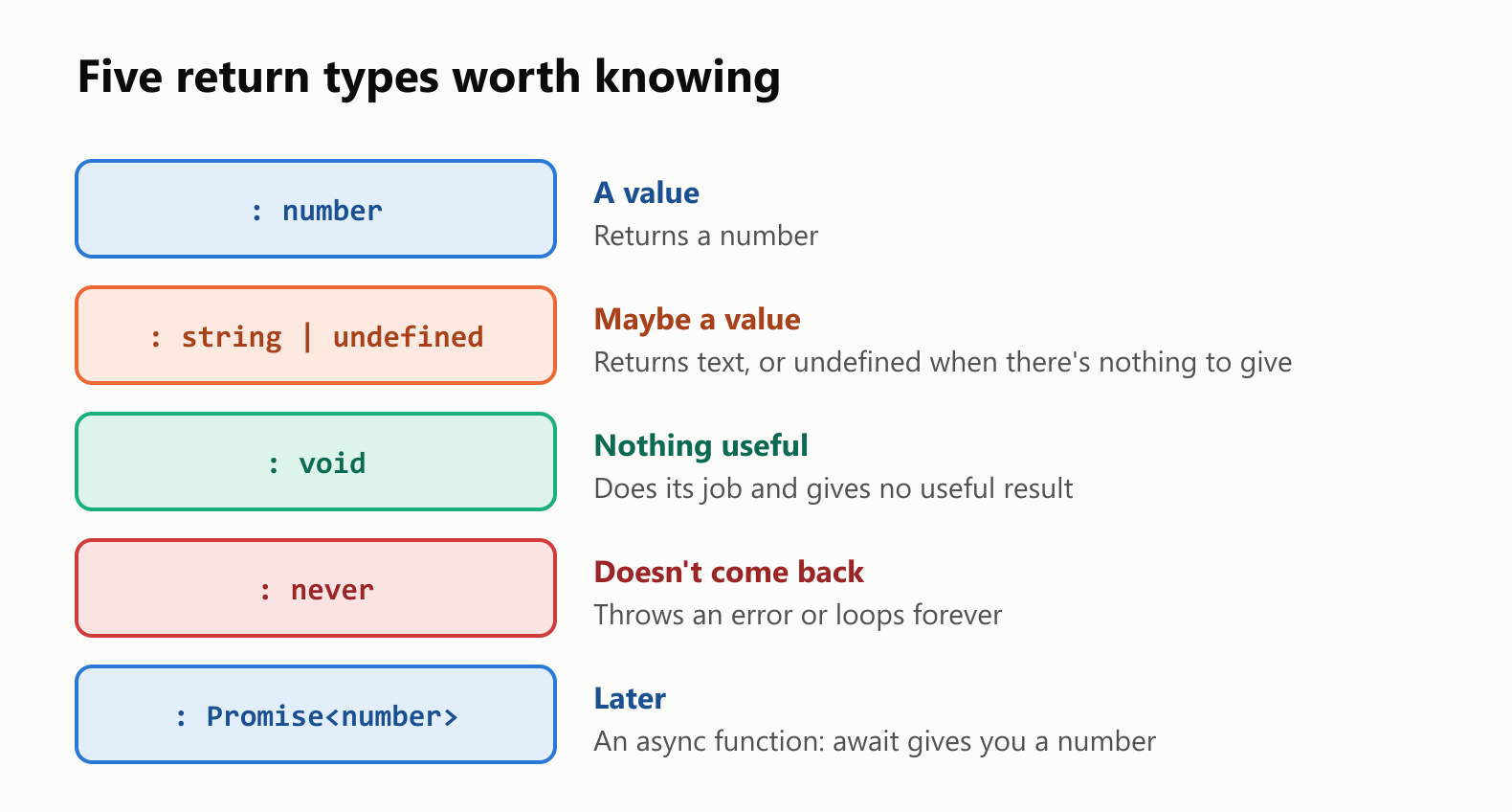
void: no useful result
Use void for a function that does something and gives nothing back:
1function logMessage(message: string): void {
2  console.log(`[log] ${message}`);
3}
4
5const result = logMessage("started");
6console.log(result);
7console.log(result.length);
main.ts(7,20): error TS2339: Property 'length' does not exist on type 'void'.
[log] started
undefinedWhen the program runs, the value is simply undefined, as the second line of output shows. The third console.log then crashes, which is the mistake tsc warned you about.
string | undefined: maybe a value
The array method find gives you undefined when nothing matches, so a function that uses it returns a union:
1function findName(names: string[], prefix: string): string | undefined {
2  return names.find((name) => name.startsWith(prefix));
3}
4
5const found = findName(["Ana", "Bruno"], "B");
6console.log(found.toUpperCase());
main.ts(6,13): error TS18048: 'found' is possibly 'undefined'.The type makes every caller deal with the missing case. Check first, and it compiles:
1function findName(names: string[], prefix: string): string | undefined {
2  return names.find((name) => name.startsWith(prefix));
3}
4
5const found = findName(["Ana", "Bruno"], "B");
6if (found !== undefined) {
7  console.log(found.toUpperCase());
8}
9console.log(findName(["Ana"], "Z"));
BRUNO
undefinednever: it doesn't come back
A function that always throws never gets to return. Its type is never, and this is one case where inference won't help. A function declaration that only throws is inferred as void, so writing never yourself tells the compiler something new: any code after the call can't run.
1function fail(message: string): never {
2  throw new Error(message);
3}
4
5function parseAge(text: string): number {
6  const age = Number(text);
7  if (!Number.isNaN(age)) {
8    return age;
9  }
10  fail(`Not a number: ${text}`);
11}
12
13console.log(parseAge("30"));30parseAge has no return at its end, and that's fine, because the compiler knows fail won't come back. Remove : never from fail, and you get error TS2366 again, on parseAge.
Returning objects
Return types shine with objects. When you state the type, the compiler checks each object you return against it:
1type Student = {
2  name: string;
3  grade: number;
4};
5
6function createStudent(name: string): Student {
7  return { name, grdae: 0 };
8}
9
10console.log(createStudent("Ana"));
main.ts(7,18): error TS2561: Object literal may only specify known properties, but 'grdae' does not exist in type 'Student'. Did you mean to write 'grade'?Without a return type, that typo becomes part of the inferred type. The function looks fine, and the error waits for whoever uses the property:
1function createStudent(name: string) {
2  return { name, grdae: 0 };
3}
4
5const student = createStudent("Ana");
6console.log(student.grade);
main.ts(6,21): error TS2551: Property 'grade' does not exist on type '{ name: string; grdae: number; }'. Did you mean 'grdae'?Arrow functions and function expressions
The return type goes in the same spot, right after the parameter list. In an arrow function, that's before the =>:
1const multiply = (first: number, second: number): number => first * second;
2
3const toLabel = function (value: number): string {
4  return `#${value}`;
5};
6
7console.log(multiply(2, 3));
8console.log(toLabel(7));
6
#7Async functions
An async function always returns a promise, so its return type has to say so:
1async function fetchTotal(): number {
2  return 42;
3}
4
5fetchTotal();
main.ts(1,30): error TS1064: The return type of an async function or method must be the global Promise<T> type. Did you mean to write 'Promise<number>'?Write Promise<number>, which reads as "a promise of a number". You still return 42, and await gets the number back. A return type also catches a forgotten await:
1async function fetchTotal(): Promise<number> {
2  return 42;
3}
4
5async function main(): Promise<void> {
6  const total = await fetchTotal();
7  console.log(total + 1);
8
9  const pending = fetchTotal();
10  console.log(pending + 1);
11}
12
13main();
main.ts(10,15): error TS2365: Operator '+' cannot be applied to types 'Promise<number>' and '1'.
43
[object Promise]1Recursive functions
When a function calls itself, inference can get stuck: to work out the return type it needs the return type. Here, the annotation isn't optional:
1function factorial(value: number) {
2  if (value <= 1) {
3    return 1;
4  }
5  return value * factorial(value - 1);
6}
7
8console.log(factorial(5));
main.ts(1,10): error TS7023: 'factorial' implicitly has return type 'any' because it does not have a return type annotation and is referenced directly or indirectly in one of its return expressions.Add : number, and the problem goes away:
1function factorial(value: number): number {
2  if (value <= 1) {
3    return 1;
4  }
5  return value * factorial(value - 1);
6}
7
8console.log(factorial(5));120Callers only see what you declare
A return type replaces what TypeScript would have inferred. If you declare something wider than what the function really returns, callers lose that information:
1function roundedPrice(price: number): number | string {
2  return Math.round(price);
3}
4
5console.log(roundedPrice(9.7).toFixed(2));
main.ts(5,31): error TS2339: Property 'toFixed' does not exist on type 'string | number'.
Property 'toFixed' does not exist on type 'string'.The function only ever returns a number, but number | string is what you declared, so that's what callers get. Declare the narrowest type that's true.
What return types can't catch
As with parameters, types are gone when the program runs. JSON.parse returns any, and any fits any return type, so this compiles with no errors:
1type Student = {
2  name: string;
3  grade: number;
4};
5
6function loadStudent(): Student {
7  return JSON.parse('{"name": "Ana"}');
8}
9
10const student = loadStudent();
11console.log(student.grade.toFixed(1));
TypeError: Cannot read properties of undefined (reading 'toFixed')The return type says Student, the data has no grade, and nothing compared the two. To make the promise true, check the data when it comes in:
1type Student = {
2  name: string;
3  grade: number;
4};
5
6function parseStudent(text: string): Student {
7  const data: { name?: unknown; grade?: unknown } = JSON.parse(text);
8  if (typeof data.name !== "string" || typeof data.grade !== "number") {
9    throw new Error("Invalid student data");
10  }
11  return { name: data.name, grade: data.grade };
12}
13
14try {
15  console.log(parseStudent('{"name": "Ana", "grade": 9}'));
16  console.log(parseStudent('{"name": "Ana"}'));
17} catch (error) {
18  console.log(String(error));
19}
{ name: 'Ana', grade: 9 }
Error: Invalid student dataWhen to write one
Inference is good, and you don't need an annotation everywhere. TypeScript teams disagree on the details, but this is a sensible starting point:
| Situation | Return type? |
|---|---|
A short callback, as in scores.map((score) => score * 2) | Leave it out |
| A one-line helper in the same file | Your choice |
A function with more than one return | Write it |
| A function other files or people call | Write it |
| A function that returns an object | Write it |
| A function that only throws | Write never |
| A recursive function | Usually required |
The idea behind the table: a return type is worth writing when you want the compiler to check the function against your intention, and not only against what the code happens to do.
Your turn: practice
Try these before peeking at the answers.
Exercise 1: Predict the inference (warm-up). What return type does TypeScript infer for each function? Check your answers with npx tsc --declaration main.ts.
1function firstName(names: string[]) {
2  return names[0];
3}
4
5function isAdult(age: number) {
6  return age >= 18;
7}
8
9function logAge(age: number) {
10  console.log(age);
11}
12
13function ageLabel(age: number) {
14  return age >= 18 ? "adult" : "minor";
15}
Exercise 2: Even numbers. Write isEven(value: number) with an explicit return type, and print the result for 4 and 7.
Exercise 3: Find the bug. What does tsc report here, and what's the fix for a non-member, who pays the full price?
1function discountedPrice(price: number, member: boolean): number {
2  if (member) {
3    return price * 0.9;
4  }
5}
6
7console.log(discountedPrice(100, true));
Exercise 4: Find a grade. Define a Student type with a name and a grade. Write findStudent(students: Student[], name: string) with an explicit return type, then print Ana's grade, or not found if she isn't in the list.
Exercise 5: Async with a failure (challenge). Write an async function loadScore(text: string) that converts the text to a number, and calls the fail function from this guide when it isn't one. Don't add a return after the fail call. Write an async main that prints the score for "9", then catches the failure for "abc".
Quick quiz
- Where does the return type go in a function declaration? And in an arrow function?
- Does TypeScript need a return type to know what a function returns?
- Why does a return type move an error closer to the bug?
- What's the difference between
voidandnever? - What's the return type of an
asyncfunction that gives back a number? - Why does
factorialneed a return type? - Does
function load(): Studentguarantee that the data is really aStudentwhen it comes fromJSON.parse?
Answers
Exercise 1: Here's the main.d.ts file. Notice the last one: TypeScript keeps the two exact values. Also notice that firstName says string, though firstName([]) really gives undefined. By default, TypeScript assumes that an array index exists:
1declare function firstName(names: string[]): string;
2declare function isAdult(age: number): boolean;
3declare function logAge(age: number): void;
4declare function ageLabel(age: number): "adult" | "minor";
Exercise 2: A comparison gives a boolean:
1function isEven(value: number): boolean {
2  return value % 2 === 0;
3}
4
5console.log(isEven(4));
6console.log(isEven(7));
true
falseExercise 3: Nothing is returned when member is false:
main.ts(1,59): error TS2366: Function lacks ending return statement and return type does not include 'undefined'.Return the full price on that path:
1function discountedPrice(price: number, member: boolean): number {
2  if (member) {
3    return price * 0.9;
4  }
5  return price;
6}
7
8console.log(discountedPrice(100, true));
9console.log(discountedPrice(100, false));
90
100Exercise 4: find can come back empty, so the return type is a union, and the check narrows it:
1type Student = {
2  name: string;
3  grade: number;
4};
5
6function findStudent(students: Student[], name: string): Student | undefined {
7  return students.find((student) => student.name === name);
8}
9
10const students = [
11  { name: "Ana", grade: 9 },
12  { name: "Bruno", grade: 7 },
13];
14
15const found = findStudent(students, "Ana");
16console.log(found === undefined ? "not found" : found.grade);9Exercise 5: fail must declare never, or loadScore won't compile:
1function fail(message: string): never {
2  throw new Error(message);
3}
4
5async function loadScore(text: string): Promise<number> {
6  const score = Number(text);
7  if (!Number.isNaN(score)) {
8    return score;
9  }
10  fail(`Invalid score: ${text}`);
11}
12
13async function main(): Promise<void> {
14  console.log(await loadScore("9"));
15  try {
16    console.log(await loadScore("abc"));
17  } catch (error) {
18    console.log(String(error));
19  }
20}
21
22main();
9
Error: Invalid score: abcQuiz: (1) After the closing parenthesis of the parameters, in both cases. In an arrow function, that's before the =>. (2) No. It usually infers the type from the return statements. (3) The compiler checks each return against your declared type, so it doesn't have to treat the bug as part of the function's type. (4) A void function finishes but gives nothing useful back, while a never function doesn't finish normally at all. (5) Promise<number>. (6) To infer the return type, TypeScript would need the return type of the recursive call, which is the same thing. (7) No. JSON.parse returns any, so you need a check that runs with the program.
Cheat sheet
| I want to… | Write |
|---|---|
| Let TypeScript infer the type | function multiply(first: number, second: number) { … } |
| See the inferred types | npx tsc --declaration main.ts |
| State the return type | function multiply(first: number, second: number): number { … } |
| Type an arrow function's result | (first: number): number => first * 2 |
| Return nothing useful | function logMessage(message: string): void |
| Maybe return a value | function findName(…): string | undefined |
| Never come back | function fail(message: string): never |
| Return an object | function createStudent(name: string): Student |
| Return from an async function | async function fetchTotal(): Promise<number> |
| Call a function recursively | function factorial(value: number): number |
Wrapping up
A return type is a promise that the compiler checks at every return:
- TypeScript infers return types, usually correctly.
- A colon and a type after the parameter list state it yourself. It disappears from the JavaScript, like all types.
- With a return type, the error lands on the bug. Without one, it lands on the callers, or nowhere.
- Every path must return a value of the declared type.
voidmeans no useful result.nevermeans the function doesn't come back.- A union such as
string | undefinedmakes callers deal with the missing case. - Return types catch typos in objects right where they're created.
asyncfunctions returnPromise<T>.- Recursive functions usually need one.
- Callers see what you declare, so declare the narrowest type that's true.
- Check outside data at run time.
anyfits every return type.
Next up: function types in TypeScript.
Read next

Ruby Blocks and Iterators: Write Your Own
Learn how Ruby methods receive blocks, pass values with yield, handle a missing block, and return an Enumerator. Build and run your own iterator.
 nbkhope

C++ std::vector: Size, Capacity, and Safe Growth
Learn how std::vector grows in C++: the difference between size and capacity, when reserve helps, why resize is different, and how growth can invalidate references.
nbkhope
How to Handle Errors in Go: A Hands-On Guide
Learn Go's everyday error pattern with runnable examples: return an error, check it, add context with %w, and recognize a missing file with errors.Is.
nbkhope
Comments
Be kind and specific. Comments with links from new accounts appear after a moderator reviews them.