
TypeScript Function Parameter Types: A Visual, Hands-On Guide
Learn TypeScript function parameter types visually: why add("3", 5) prints 35, your first annotation, what tsc really does, optional, default and rest parameters, unions and narrowing, object parameters, any vs. unknown, what types can't catch, and exercises.


On this page
Adding two numbers should be the easiest function you ever write. In JavaScript, though, nothing stops someone from passing a string by accident, and the program won't complain. It just gives you a wrong answer and keeps going.
TypeScript is JavaScript with types. You state what each function parameter should be, and the compiler checks every call before the program runs.
In this guide you'll write your first annotation and see what the compiler really does, including one thing that surprises most beginners. You'll then cover optional, default and rest parameters, union types, object parameters, the difference between any and unknown, and what types can't protect you from. Exercises wrap it up.
All outputs below come from real runs with TypeScript 7.0 and Node.js 26 on Windows. New to JavaScript? Start with What Is the JavaScript Programming Language?
The bug TypeScript catches
Here's a small function in plain JavaScript, with an honest mistake in the call:
1function add(first, second) {
2  return first + second;
3}
4
5console.log(add("3", 5));353 plus 5 should be 8. The first argument, however, is the text "3", and in JavaScript + joins a string and a number into the string "35". There's no error at all, just a wrong value that can travel far from the line that caused it.
Setting up
You need Node.js. In a new folder, install the TypeScript compiler, called tsc:
npm init -y
npm install --save-dev typescript
From now on, write your code in a file called main.ts, then compile and run it with two commands:
npx tsc main.ts
node main.js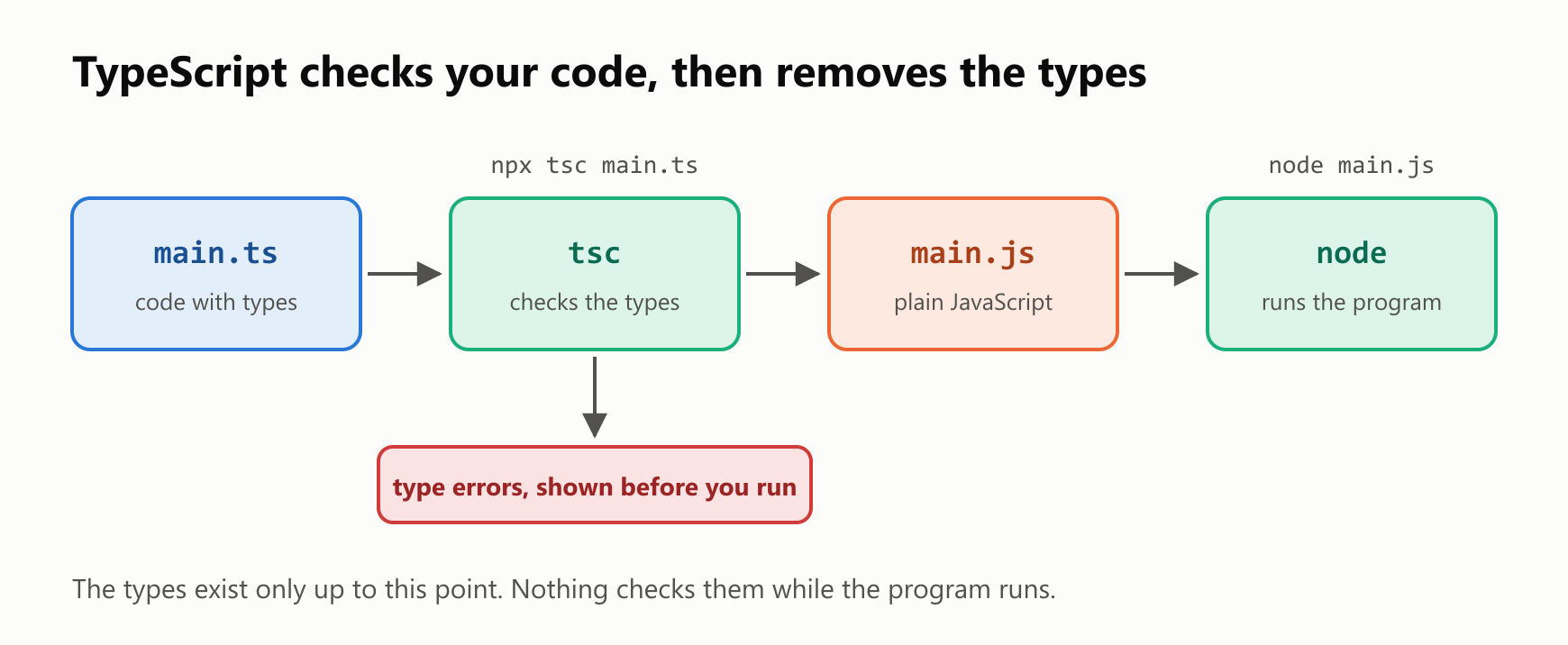
tsc does two jobs: it checks your types, and it writes a plain JavaScript file. Node.js then runs that file. Most code editors run the same checks as you type, so you'll usually see the errors as red underlines before you compile anything.
Your first annotation
To give a parameter a type, write a colon and the type after its name:
1function add(first: number, second: number) {
2  return first + second;
3}
4
5console.log(add("3", 5));
main.ts(5,17): error TS2345: Argument of type 'string' is not assignable to parameter of type 'number'.The compiler found the bug without running anything. The message tells you the file, the line and column (5,17), an error code and the problem. The fix is to pass a number:
1function add(first: number, second: number) {
2  return first + second;
3}
4
5console.log(add(3, 5));8A type error doesn't stop the compiler
Here's the surprise. Go back to the broken call, compile it, and look in your folder. tsc reported the error, and it wrote main.js anyway:
1"use strict";
2function add(first, second) {
3    return first + second;
4}
5console.log(add("3", 5));
The types are gone, and running that file still prints the wrong answer:
35So a type error is a warning you have to act on. It doesn't stop the program by itself. Two details follow from this:
- To refuse to write a file when there are errors, run
npx tsc --noEmitOnError main.ts. With that flag, the broken version produced nomain.js. - Node.js can run
.tsfiles directly, but it doesn't check them. Recent versions simply remove the types, sonode main.tsprinted35for the broken version as well, with no warning. You still needtscfor the checking.
Eight bad calls
How much does this catch? We tried eight wrong calls to the same add function:
1function add(first: number, second: number) {
2  return first + second;
3}
4
5console.log(add("3", 5));
6console.log(add(3));
7console.log(add(3, 5, 7));
8console.log(add(null, 5));
9console.log(add(undefined, 5));
10console.log(add([1], 5));
11console.log(add({}, 5));
12console.log(add(true, 5));
JavaScript ran all eight without a single error. TypeScript rejected all eight. Some of those results look believable, too: add(null, 5) gives 5, and add(3, 5, 7) gives 8 while silently ignoring the 7.
Common parameter types
The basic types are string, number and boolean, and you write an array by adding []:
1function describePlayer(name: string, level: number, active: boolean, scores: number[]) {
2  const total = scores.reduce((sum, score) => sum + score, 0);
3  return `${name} (level ${level}, ${active ? "active" : "away"}): ${total} points`;
4}
5
6console.log(describePlayer("Ana", 3, true, [10, 20, 5]));
Ana (level 3, active): 35 pointsNotice that sum and score have no annotations. TypeScript knows scores is a number[], so it works out the types of the callback's parameters by itself.
Leaving out the type
For an ordinary function, TypeScript can't guess a parameter's type, and it won't accept a silent guess either:
1function add(first, second) {
2  return first + second;
3}
4
5console.log(add(3, 5));
main.ts(1,14): error TS7006: Parameter 'first' implicitly has an 'any' type.
main.ts(1,21): error TS7006: Parameter 'second' implicitly has an 'any' type.This check comes from strict mode, which is on by default in TypeScript 7. Older versions need asking: with TypeScript 5.9, plain tsc accepted this file without a word. If your project uses an older version, add --strict or set "strict": true in tsconfig.json.
Optional, default and rest parameters
Every parameter is required unless you say otherwise. There are three ways to say otherwise:

An optional parameter has a ? after its name. Inside the function it might be undefined, and TypeScript makes you deal with that:
1function greet(name: string, greeting?: string) {
2  return `${greeting.toUpperCase()}, ${name}`;
3}
4
5console.log(greet("Ana", "Hi"));
main.ts(2,13): error TS18048: 'greeting' is possibly 'undefined'.Check for it first, and the error goes away:
1function greet(name: string, greeting?: string) {
2  if (greeting === undefined) {
3    return `Hello, ${name}`;
4  }
5  return `${greeting.toUpperCase()}, ${name}`;
6}
7
8console.log(greet("Ana"));
9console.log(greet("Ana", "Hi"));
Hello, Ana
HI, AnaOptional parameters must come after the required ones:
1function greet(greeting?: string, name: string) {
2  return `${greeting}, ${name}`;
3}
4
5console.log(greet("Hi", "Ana"));
main.ts(1,35): error TS1016: A required parameter cannot follow an optional parameter.A default value is often simpler, and it needs no annotation, because the type comes from the value. A rest parameter collects the remaining arguments into an array:
1function repeat(text: string, times = 2) {
2  return text.repeat(times);
3}
4
5function total(...numbers: number[]) {
6  return numbers.reduce((sum, number) => sum + number, 0);
7}
8
9console.log(repeat("ha"));
10console.log(repeat("ha", 3));
11console.log(total(1, 2, 3));
haha
hahaha
6Accepting more than one type
A union type, written with |, accepts any of the listed types. You can only use what all of them have in common, though:
1function format(value: string | number) {
2  return value.toUpperCase();
3}
4
5console.log(format("hi"));
main.ts(2,16): error TS2339: Property 'toUpperCase' does not exist on type 'string | number'.
Property 'toUpperCase' does not exist on type 'number'.Test the type with typeof, and TypeScript follows your logic. This is called narrowing:
1function format(value: string | number) {
2  if (typeof value === "string") {
3    return value.toUpperCase();
4  }
5  return value.toFixed(2);
6}
7
8console.log(format("hi"));
9console.log(format(3.14159));
HI
3.14Inside the if, value is a string. After it, only number is left.
A union can also list exact values. That's perfect for a parameter with a few valid options:
1function sortNames(names: string[], direction: "asc" | "desc") {
2  const sorted = [...names].sort();
3  return direction === "asc" ? sorted : sorted.reverse();
4}
5
6console.log(sortNames(["Bruno", "Ana"], "down"));
main.ts(6,41): error TS2345: Argument of type '"down"' is not assignable to parameter of type '"asc" | "desc"'.Object parameters
Describe an object's shape once with a type, and then use its name:
1type Student = {
2  name: string;
3  grade: number;
4};
5
6function describe(student: Student) {
7  return `${student.name}: ${student.grade}`;
8}
9
10console.log(describe({ name: "Ana", grade: 9 }));
11console.log(describe({ name: "Ana", grade: 9, age: 20 }));
12console.log(describe({ name: "Ana" }));
main.ts(11,47): error TS2353: Object literal may only specify known properties, and 'age' does not exist in type 'Student'.
main.ts(12,22): error TS2741: Property 'grade' is missing in type '{ name: string; }' but required in type 'Student'.Both a missing property and a misplaced extra one are caught, which also protects you from typos in property names. You can pull the properties out right in the parameter list, too:
1type Student = {
2  name: string;
3  grade: number;
4};
5
6function describe({ name, grade }: Student) {
7  return `${name}: ${grade}`;
8}
9
10console.log(describe({ name: "Ana", grade: 9 }));
Ana: 9any and unknown
Two special types accept every value, and they behave in opposite ways. any turns checking off:
1function shout(value: any) {
2  return value.toUpperCase();
3}
4
5console.log(shout(5));
TypeError: value.toUpperCase is not a functionThat compiled with no errors and crashed when it ran, which is exactly what TypeScript is meant to prevent. unknown also accepts everything, but it makes you check before you use the value:
1function shout(value: unknown) {
2  return value.toUpperCase();
3}
4
5console.log(shout(5));
main.ts(2,10): error TS18046: 'value' is of type 'unknown'.Add the check, and it's safe:
1function shout(value: unknown) {
2  if (typeof value === "string") {
3    return value.toUpperCase();
4  }
5  return "not text";
6}
7
8console.log(shout("hi"));
9console.log(shout(5));
HI
not textPrefer unknown when you don't know a value's type, and avoid any unless you have no other choice.
What types can't catch
Types are removed before the program runs, so they say nothing about data that arrives at run time. JSON.parse returns any, which brings the original bug straight back:
1function add(first: number, second: number) {
2  return first + second;
3}
4
5const input = JSON.parse('{"first": "3", "second": 5}');
6console.log(add(input.first, input.second));35This compiles with no errors and prints 35. Data from a file, a form or an API needs a real check while the program runs:
1function toNumber(value: unknown) {
2  if (typeof value !== "number") {
3    throw new Error(`Expected a number, got ${typeof value}`);
4  }
5  return value;
6}
7
8function add(first: number, second: number) {
9  return first + second;
10}
11
12const input = JSON.parse('{"first": "3", "second": 5}');
13
14try {
15  console.log(add(toNumber(input.first), toNumber(input.second)));
16} catch (error) {
17  console.log(String(error));
18}
Error: Expected a number, got stringCheck the data where it enters your program, and from there on the types can protect you.
Your turn: practice
Try these before peeking at the answers. Save each one as main.ts, then run npx tsc main.ts and node main.js.
Exercise 1: Find the errors (warm-up). Which of these calls does TypeScript reject, and why?
1function repeat(text: string, times?: number) {
2  return text.repeat(times ?? 1);
3}
4
5console.log(repeat("a"));
6console.log(repeat("a", 2));
7console.log(repeat(2, "a"));
8console.log(repeat("a", null));
Exercise 2: Average. Write average(numbers: number[]), which returns the average of an array. Print the average of 1, 2 and 3.
Exercise 3: Predict both tools. What does tsc report for this program, and what does node main.js print afterward?
1function double(value: number) {
2  return value * 2;
3}
4
5console.log(double("4"));
Exercise 4: Full name. Write fullName(first: string, last?: string), which returns just the first name when there's no last name.
Exercise 5: Discount (challenge). Define a Product type with a name and a price. Write applyDiscount(product: Product, percent = 10), which returns text like Book: 90. Try it on a book that costs 100, with the default discount and with 25%.
Quick quiz
- How do you say that a parameter must be a number?
- Does
tscwrite a JavaScript file when it finds a type error? - Does
node main.tscheck your types? - What's the difference between
greeting?: stringandgreeting = "Hello"? - What's the difference between
anyandunknown? - Can TypeScript catch a wrong type in data from
JSON.parse?
Answers
Exercise 1: The first two calls are fine. In the third, the first argument is the wrong type, and in the fourth, null isn't allowed, because an optional parameter accepts number or undefined:
main.ts(7,20): error TS2345: Argument of type 'number' is not assignable to parameter of type 'string'.
main.ts(8,25): error TS2345: Argument of type 'null' is not assignable to parameter of type 'number | undefined'.
Exercise 2: The array's type also gives sum and number their types:
1function average(numbers: number[]) {
2  const total = numbers.reduce((sum, number) => sum + number, 0);
3  return total / numbers.length;
4}
5
6console.log(average([1, 2, 3]));2Exercise 3: tsc reports the string, then writes main.js anyway. When it runs, JavaScript's * turns "4" into a number, so the answer happens to be right:
main.ts(5,20): error TS2345: Argument of type 'string' is not assignable to parameter of type 'number'.
8
Exercise 4: Check for undefined, which narrows last to a string:
1function fullName(first: string, last?: string) {
2  return last === undefined ? first : `${first} ${last}`;
3}
4
5console.log(fullName("Ana"));
6console.log(fullName("Ana", "Silva"));
Ana
Ana SilvaExercise 5: The default value gives percent its type:
1type Product = {
2  name: string;
3  price: number;
4};
5
6function applyDiscount(product: Product, percent = 10) {
7  const price = product.price * (1 - percent / 100);
8  return `${product.name}: ${price}`;
9}
10
11const book = { name: "Book", price: 100 };
12
13console.log(applyDiscount(book));
14console.log(applyDiscount(book, 25));
Book: 90
Book: 75Quiz: (1) With a colon after its name: first: number. (2) Yes, unless you use --noEmitOnError. (3) No. It removes the types and runs the code. (4) The optional one is undefined when it's left out, and the default one gets the value "Hello". (5) any turns checking off, while unknown makes you check the type before you use the value. (6) No. JSON.parse returns any, so you need a check that runs with the program.
Cheat sheet
| I want to… | Write |
|---|---|
| Install the compiler | npm install --save-dev typescript |
| Check and compile | npx tsc main.ts |
| Refuse to write a file on errors | npx tsc --noEmitOnError main.ts |
| Type a parameter | first: number |
| Accept an array | scores: number[] |
| Make a parameter optional | greeting?: string |
| Give a default value | times = 2 |
| Accept any number of arguments | ...numbers: number[] |
| Accept several types | value: string | number |
| Accept only certain values | direction: "asc" | "desc" |
| Narrow a union | if (typeof value === "string") { … } |
| Describe an object | type Student = { name: string; grade: number }; |
| Unpack an object parameter | function describe({ name, grade }: Student) |
| Accept anything, safely | value: unknown |
Wrapping up
A parameter type is a promise that the compiler checks at every call:
- A colon and a type annotate a parameter, as in
first: number. tscchecks your types and writes plain JavaScript. Types don't exist when the program runs.- A type error doesn't stop
tscfrom writing the file, unless you use--noEmitOnError. node main.tsruns your code without checking it.- Strict mode rejects parameters with no type. It's on by default in TypeScript 7.
- Use
?, default values and...for flexible parameters. - Unions accept several types, and
typeofnarrows them. typedescribes objects, which catches missing and extra properties.- Prefer
unknowntoany. - Check outside data at run time. Types can't see what arrives while the program runs.
Next up: function return types in TypeScript.
Read next

Ruby Blocks and Iterators: Write Your Own
Learn how Ruby methods receive blocks, pass values with yield, handle a missing block, and return an Enumerator. Build and run your own iterator.
 nbkhope

C++ std::vector: Size, Capacity, and Safe Growth
Learn how std::vector grows in C++: the difference between size and capacity, when reserve helps, why resize is different, and how growth can invalidate references.
nbkhope
How to Handle Errors in Go: A Hands-On Guide
Learn Go's everyday error pattern with runnable examples: return an error, check it, add context with %w, and recognize a missing file with errors.Is.
nbkhope
Comments
Be kind and specific. Comments with links from new accounts appear after a moderator reviews them.