What Is the JavaScript Programming Language? A Simple Guide to the Language of the Web
A friendly, jargon-free guide to JavaScript, the programming language that makes websites interactive. Learn what it does in your browser, how it was born in 10 days, why it gets faster as it runs, and where it's used beyond the web.

On this page
Every time you click "Like" on a post, see new messages appear without refreshing the page, drag a map around, or watch a search box suggest words as you type, you're seeing JavaScript at work.
JavaScript is the programming language of the web. It runs inside every major web browser, and more than 98% of websites use it. It has also spread far beyond web pages, into servers, phone apps and desktop programs. This article explains, in plain language, what JavaScript is, how it works, and why it's one of the most used programming languages in the world.
The three layers of every web page
Web pages are built from three main ingredients, each with its own job:
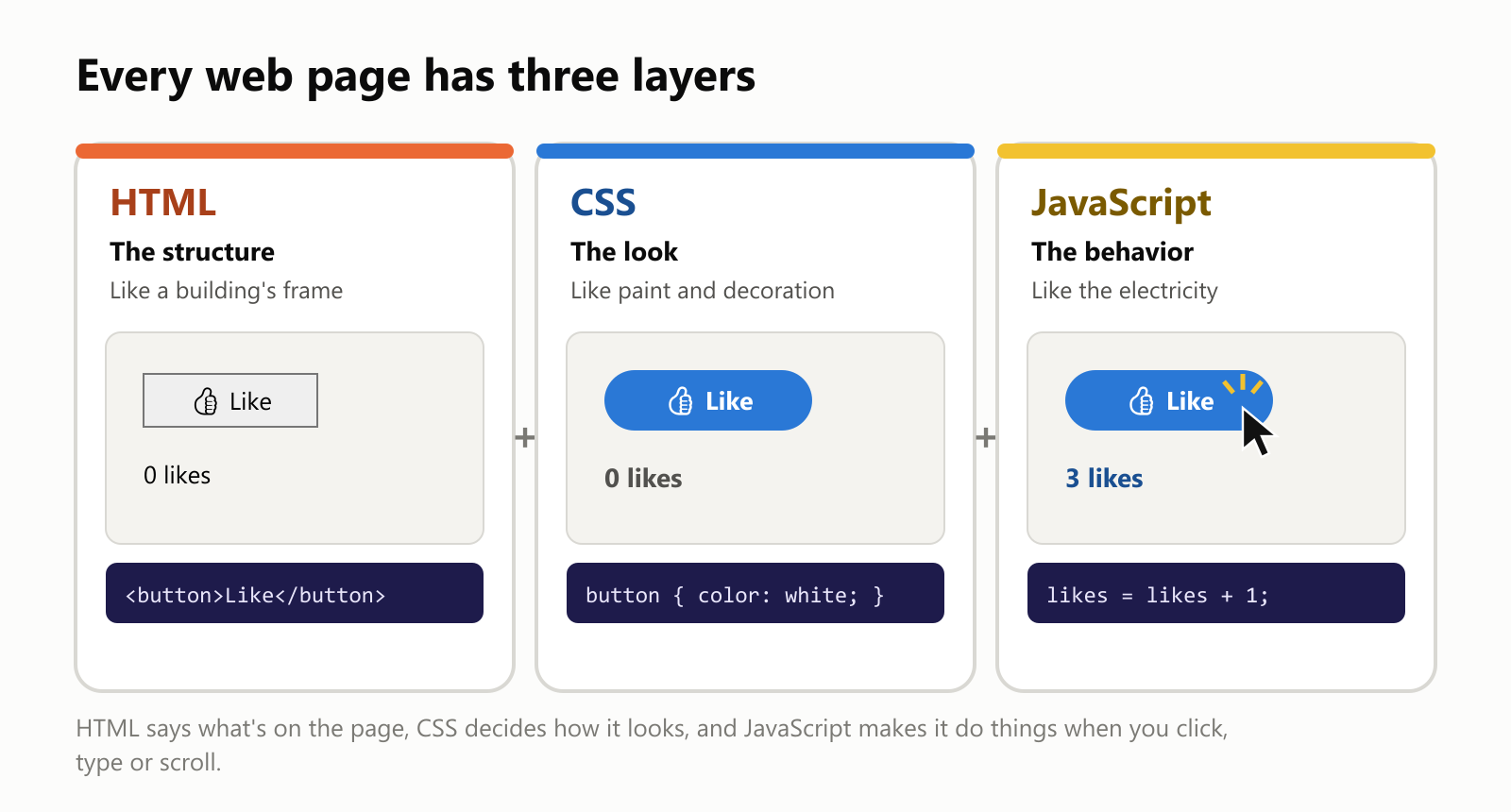
- HTML describes what's on the page: headings, paragraphs, images, buttons. Think of it as the frame of a building.
- CSS describes how it looks: colors, fonts, spacing, layout. Think of paint and decoration.
- JavaScript describes what it does: what happens when you click, type, scroll or wait. Think of the electricity that makes the lights turn on and the elevator move.
A page with only HTML and CSS is like a beautiful poster. Add JavaScript, and it becomes something you can interact with.
What JavaScript looks like
Here's a tiny but complete example: a "Like" button that counts clicks.
1<button id="like-button">👍 Like</button>
2<p id="like-count">0 likes</p>
3<script>
4  const button = document.getElementById("like-button");
5  const countText = document.getElementById("like-count");
6  let likes = 0;
7
8  button.addEventListener("click", () => {
9    likes = likes + 1;
10    countText.textContent = likes + " likes";
11  });
12</script>
In plain words, the JavaScript part (inside <script>) says:
- Find the button and the text on the page.
- Start counting from zero.
- Whenever the button is clicked, add one and update the text.
Click it three times and the page shows "3 likes", instantly, without reloading. That "whenever this happens, do that" style is the heart of JavaScript.
What happens when you click
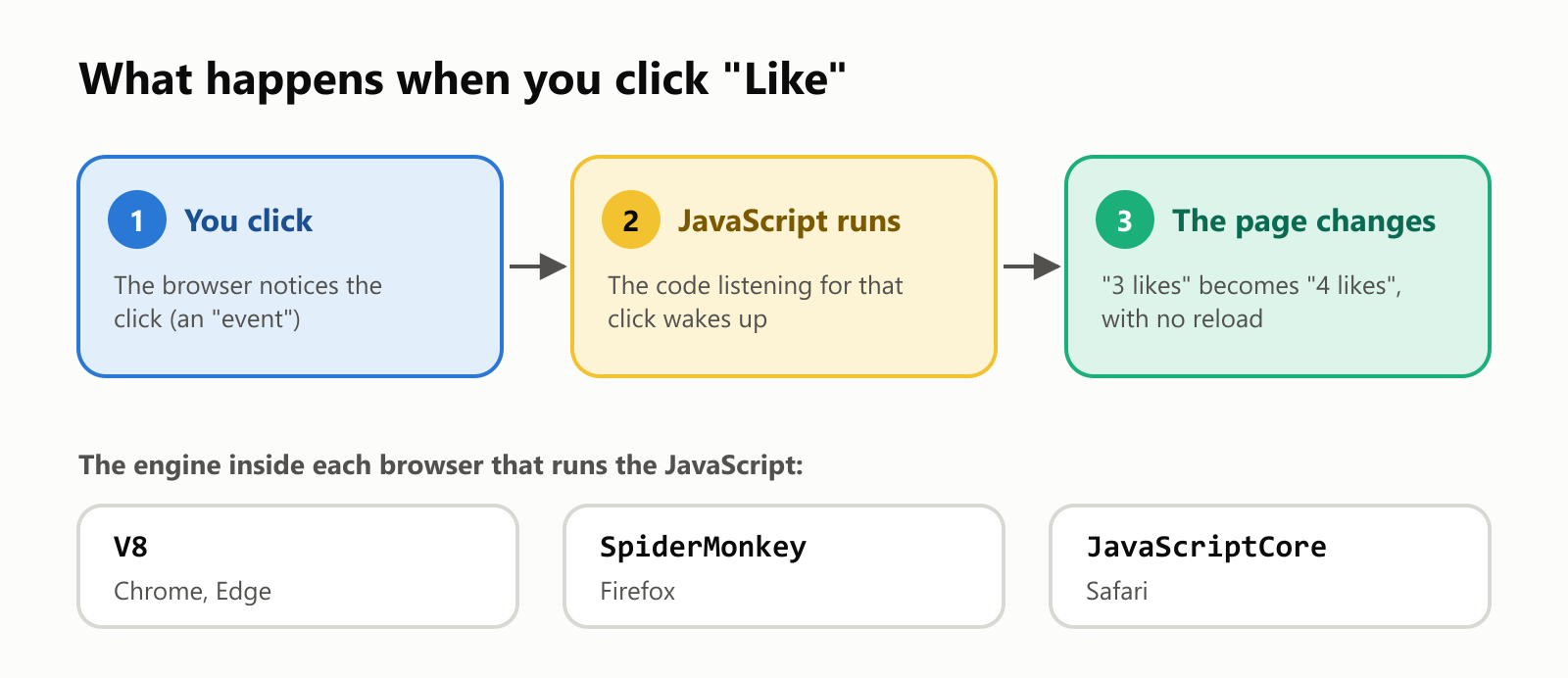
Every browser has a built-in JavaScript engine, a program that reads and runs JavaScript code: V8 in Chrome and Edge, SpiderMonkey in Firefox, and JavaScriptCore in Safari.
JavaScript is built around events: clicks, key presses, a page finishing loading, a message arriving from a server. Your code says "when this event happens, run this", and the browser takes care of calling it at the right moment.
A good way to picture it is a waiter in a restaurant. The waiter doesn't stand frozen at the kitchen door waiting for one dish. They take an order, pass it to the kitchen, serve another table, and come back when the food is ready. JavaScript works the same way: while it waits for something slow, like data from the internet, it keeps the page responsive instead of freezing.
Born in 10 days
In 1995, the web was mostly static pages of text and images. The company behind the most popular browser of the time, Netscape, wanted a simple language that anyone could sprinkle into web pages to make them interactive.
They hired Brendan Eich, who wrote the first version in about 10 days in May 1995. It was first called Mocha, then LiveScript, and finally JavaScript, a marketing move to ride the popularity of Java, the hottest language of that moment.
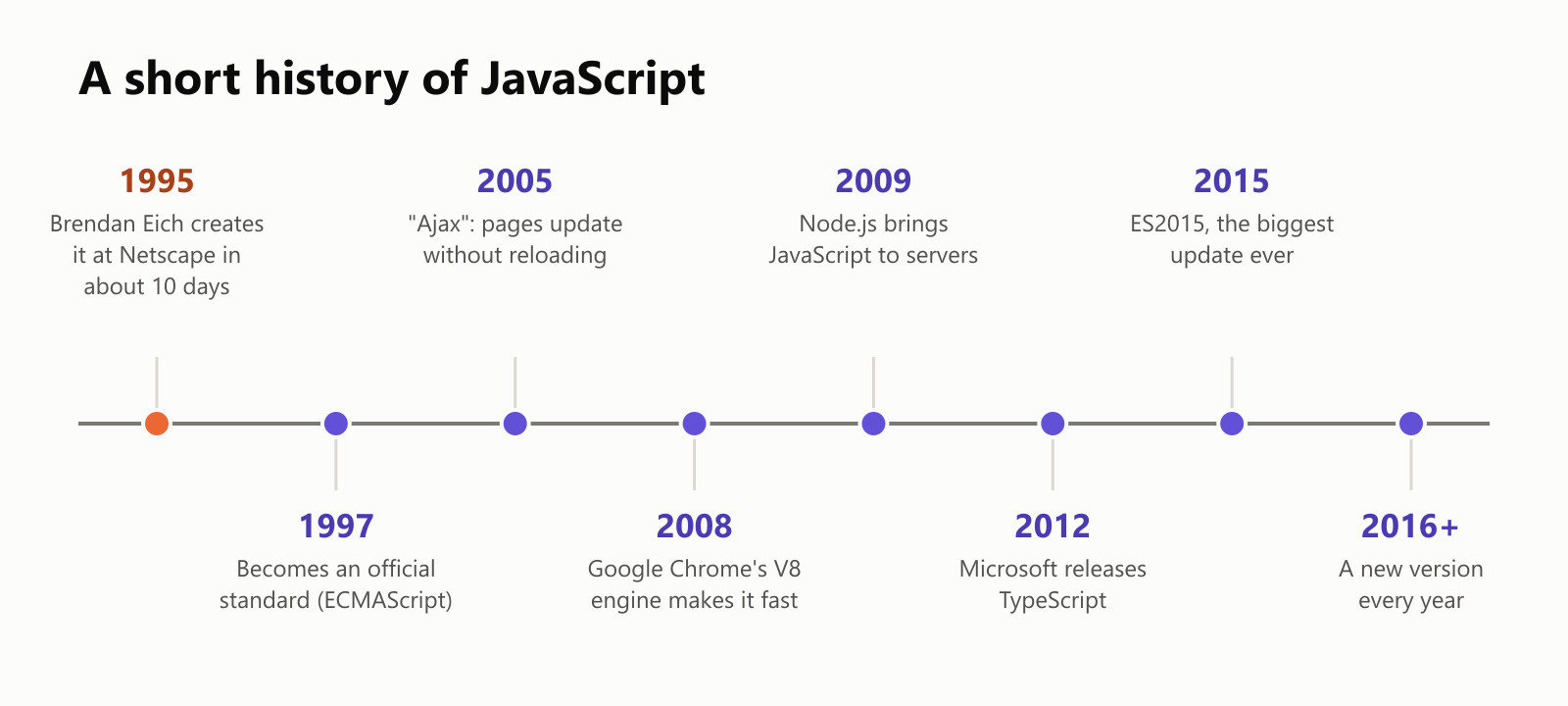
A few turning points:
- 1997: JavaScript became an official standard called ECMAScript, so every browser could implement the same language. (That's why you'll sometimes see versions named "ES2015" or "ES2024".)
- 2004–2005: Gmail and Google Maps showed that web pages could update themselves without reloading, a technique nicknamed Ajax. Websites started feeling like real apps.
- 2008: Google's Chrome browser arrived with V8, an engine so much faster than older ones that it changed what people thought JavaScript could do.
- 2009: Node.js took the V8 engine out of the browser so JavaScript could run on servers too.
- 2015: ES2015 (also called ES6) was the biggest update in the language's history, and since then a new version has come out every year.
Why JavaScript gets faster as it runs
Early JavaScript was slow, because browsers read the code line by line, like reading a recipe aloud one step at a time. Modern engines are much smarter. They start running your code right away, watch which parts are used the most, and then compile those busy parts into fast machine code while the program runs. This is called just-in-time (JIT) compilation.
We measured this. The same small job (scoring 20,000 words) ran 40 times in a row, once normally and once with the compiler switched off:
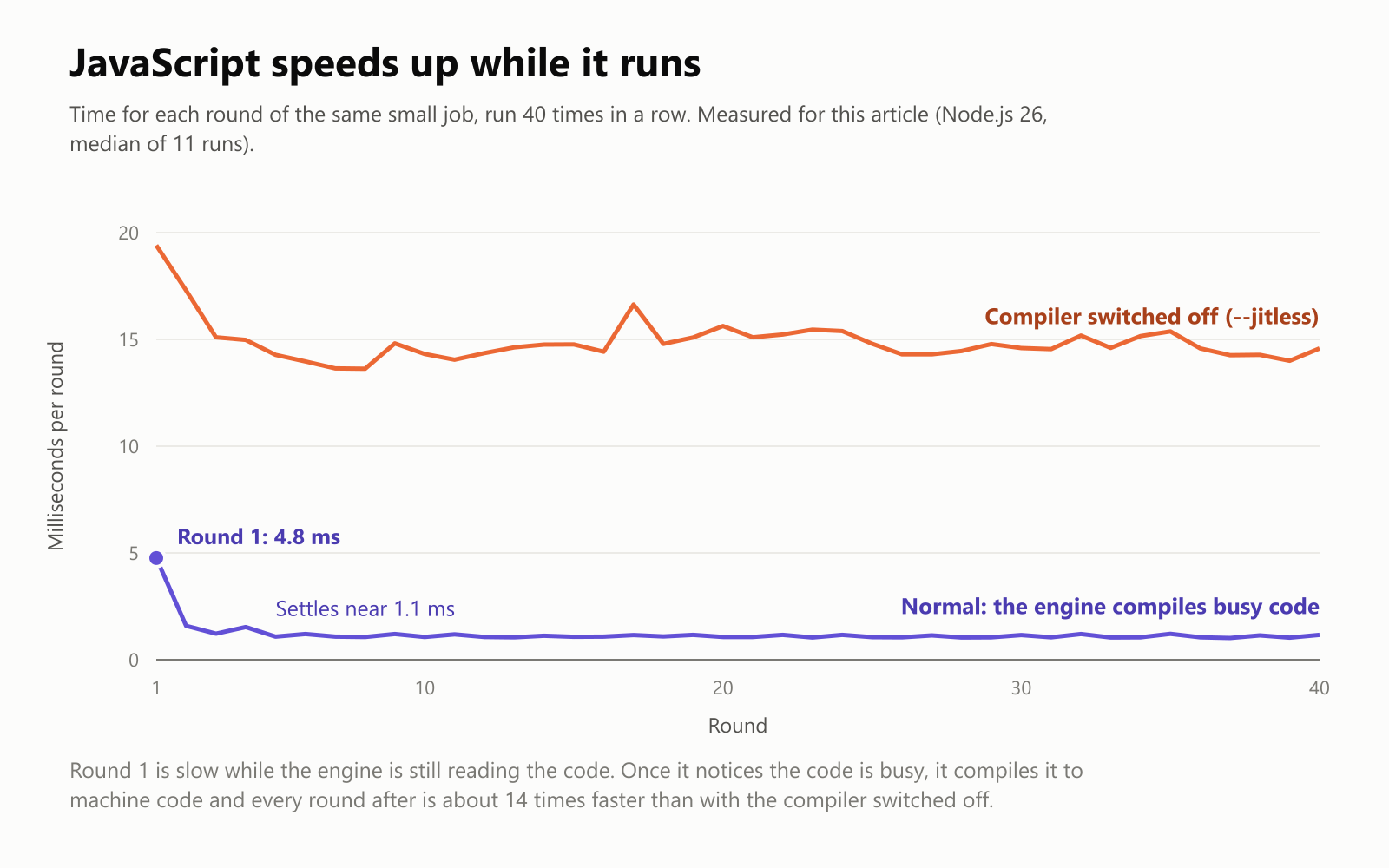
The first round took 4.8 milliseconds while the engine was still getting to know the code. By the second or third round, the engine had compiled it, and every round after took about 1.1 milliseconds. With the compiler switched off, every round stayed around 14 to 15 milliseconds, roughly 14 times slower. That warm-up trick is a big reason today's web apps feel fast.
Where JavaScript runs today
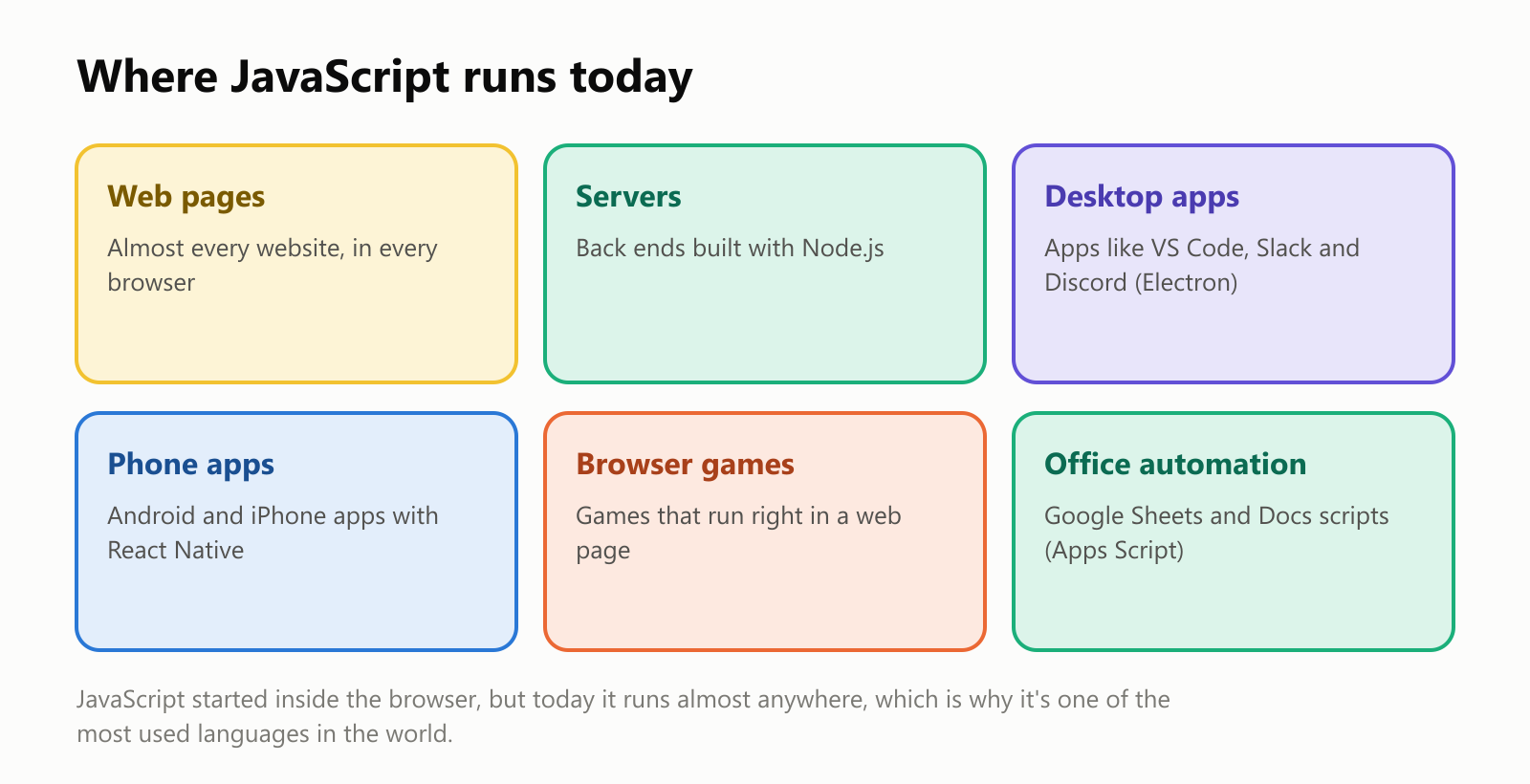
- Web pages: practically every website you visit.
- Servers: with Node.js, the same language runs the back end, the part of a website you don't see.
- Desktop apps: a tool called Electron wraps web pages into desktop programs. Visual Studio Code, Slack and Discord are built this way.
- Phone apps: React Native lets developers build Android and iPhone apps with JavaScript.
- Games and automation: browser games, and even scripts that automate Google Sheets and Docs.
On top of that, npm, JavaScript's package registry, hosts millions of free, ready-made building blocks that developers can plug into their projects. And in Stack Overflow's yearly developer survey, JavaScript has been the most commonly used language for more than a decade.
A language with quirks
Because JavaScript was created so quickly, and because old websites must keep working forever, it has some famously odd behaviors that can never be removed:
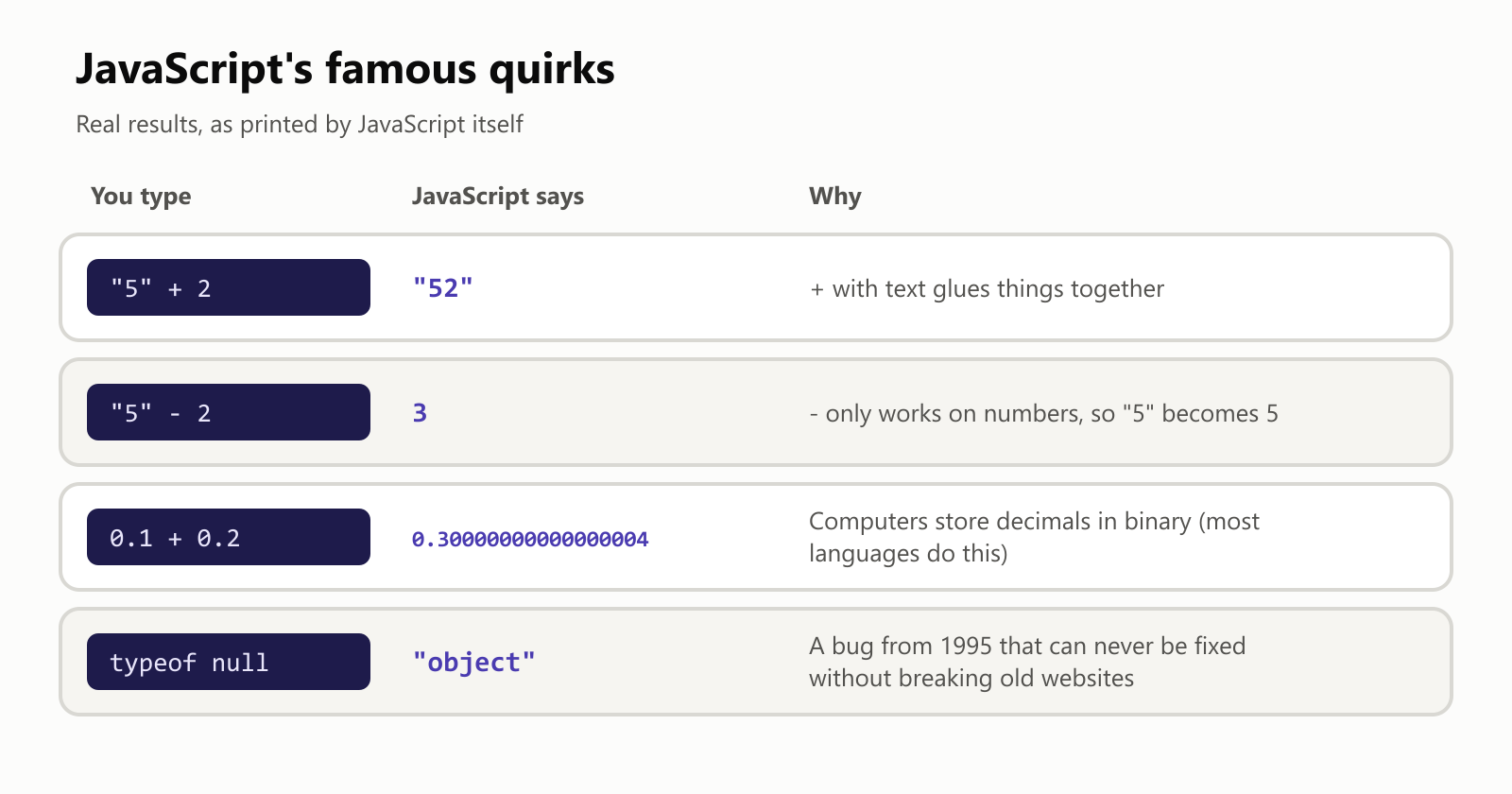
"5" + 2gives"52", but"5" - 2gives3. JavaScript tries to be helpful by converting values automatically, which sometimes surprises people.0.1 + 0.2gives0.30000000000000004. This one isn't JavaScript's fault: most programming languages store decimal numbers in binary and show the same tiny rounding error.typeof nullsays"object". It's a bug from the very first version, and fixing it now would break countless existing websites.
A taste of modern JavaScript
Modern JavaScript is much more pleasant than its reputation. Here's how you might pick out the adults from a list of people and sort their names:
1const people = [
2  { name: "Maria", age: 34 },
3  { name: "Ana", age: 17 },
4  { name: "Pedro", age: 25 },
5  { name: "Lucas", age: 15 },
6];
7
8const adults = people
9  .filter((person) => person.age >= 18)
10  .map((person) => person.name)
11  .sort();
12
13console.log(adults.join(", ")); // Maria, Pedro
It reads almost like a sentence: filter the people who are 18 or older, map each one to their name, and sort the names.
Should you learn JavaScript?
- Great reasons: you want to build websites or web apps; it's the only language that runs natively in every browser. You also don't need to install anything to try it: every browser has a built-in console where you can type JavaScript (press F12 and look for the "Console" tab).
- Good to know: JavaScript is flexible and forgiving, which makes it easy to start, but that same flexibility lets mistakes slip through. Learning good habits early, or moving to TypeScript later, pays off.
For a practical tip from the archive, see JavaScript: Stop Using var with ES6.
A small glossary
- JavaScript: the programming language that makes web pages interactive, created in 1995.
- HTML / CSS: the languages for a page's structure and its look.
- ECMAScript: the official standard that defines JavaScript.
- Engine: the program inside a browser that runs JavaScript, like V8, SpiderMonkey or JavaScriptCore.
- Event: something that happens on a page, like a click or a key press, that code can respond to.
- JIT (just-in-time) compilation: turning busy code into fast machine code while the program runs.
- Sandbox: the protected space where a web page's JavaScript runs, cut off from your files.
- Ajax: updating part of a page with new data without reloading it.
- Node.js: a way to run JavaScript outside the browser, especially on servers.
- npm: JavaScript's huge library of free, ready-made packages.
- TypeScript: JavaScript with types, created by Microsoft.
Wrapping up
JavaScript was written in about 10 days to make web pages a little more lively, and it ended up running a large part of the digital world. HTML builds the page, CSS makes it look good, and JavaScript makes it come alive, responding to your clicks and keystrokes and updating the page without reloading.
It has its quirks, but thanks to fast engines that compile busy code on the fly, a yearly stream of improvements, and tools like TypeScript, it's more capable than ever. So the next time a page reacts to your click in a blink, you'll know who's doing the work.
Read next
A Brief History of Computer Programming: From Wires to Apps
From Ada Lovelace’s 1843 notes to today’s apps and AI coding assistants, see how programming changed—and what a program really is—in plain language.
 nbkhope
A Brief History of Programming Languages: From Machine Code to Modern Tools
From machine code and FORTRAN to Python, JavaScript, and Rust, explore how programming languages evolved and why there are so many.
nbkhopeGetting Started with GraphQL and Express
You can employ GraphQL in your Express server using a middleware. If you get a request that goes to the endpoint POST /graphql, it will pass through the GraphQL Express middleware and handle the…
nbkhope
Comments
Be kind and specific. Comments with links from new accounts appear after a moderator reviews them.