What Is the Java Programming Language? A Simple Guide to "Write Once, Run Anywhere"
A friendly, jargon-free guide to Java, the programming language behind Android apps, Minecraft and countless business systems. Learn how "write once, run anywhere" works, why Java isn't JavaScript, and why it's still everywhere after 30 years.

On this page
Java is one of the most successful programming languages ever made. It runs a huge share of Android apps, the original version of Minecraft, the systems behind banks and online stores, and even tiny chips inside SIM cards and bank cards. For years, its installer famously bragged that Java ran on billions of devices.
It was created at Sun Microsystems and released in 1995, and more than 30 years later it's still one of the most widely used languages in the world. This article explains, in plain language, what Java is, the clever idea that made it famous, and why it's (very) different from JavaScript.
From an oak tree to a cup of coffee
In 1991, a small team at Sun Microsystems led by James Gosling started working on software for consumer gadgets like TV set-top boxes. Gadgets back then used many different kinds of chips, and rewriting software for each one was a pain. The team wanted one language that could run on all of them.
Gosling first named the language Oak, after an oak tree outside his office window. The name was already taken by another company, so the team brainstormed new ones and settled on Java, a slang word for coffee (after the coffee grown on the Indonesian island of Java). That's why Java's logo is a steaming cup of coffee.
The gadget plan didn't take off, but the timing was perfect for something else: the World Wide Web was exploding, and the web needed exactly what Java offered: programs that could run on any computer.
The big idea: write once, run anywhere
Most programs are translated into machine code for one specific kind of computer. A program built for Windows won't simply run on a Mac. Java took a different route:
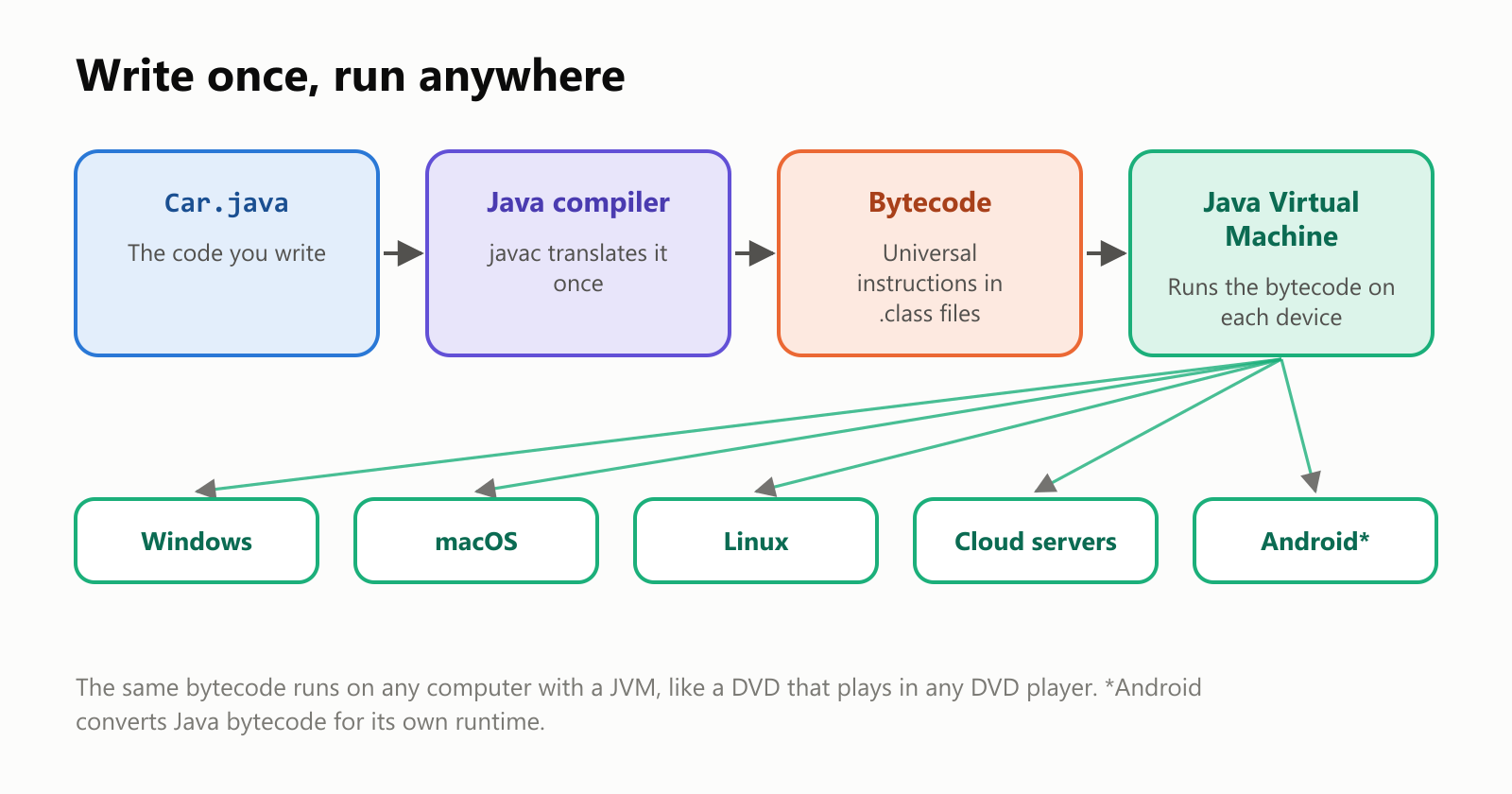
- The Java compiler translates your code into bytecode: universal instructions that aren't tied to any particular computer.
- Each computer has a Java Virtual Machine (JVM), a program that reads the bytecode and runs it, translating the busiest parts into fast machine code on the fly.
Think of a DVD. The movie is stored in a standard format, and any DVD player, whatever its brand, can play it. Java bytecode is the DVD, and the JVM is the player. Sun turned this into a famous slogan: "Write once, run anywhere."
What Java looks like
Here's the classic first program in Java:
1public class HelloWorld {
2    public static void main(String[] args) {
3        System.out.println("Hello, world!");
4    }
5}
It's wordier than in some languages. In Java, every piece of code lives inside a class, and the program starts at a method called main. System.out.println prints a line of text. (Recent versions of Java let beginners skip some of this ceremony, but you'll see this classic form everywhere.)
Java is object-oriented: you describe a kind of thing as a class, a blueprint, and then create objects from it. Here's a small car:
1public class CarDemo {
2    public static void main(String[] args) {
3        Car myCar = new Car("red");
4        myCar.accelerate();
5        myCar.accelerate();
6        System.out.println("My " + myCar.getColor() + " car is going " + myCar.getSpeed() + " km/h");
7    }
8}
9
10class Car {
11    private final String color;
12    private int speed = 0;
13
14    Car(String color) { this.color = color; }
15
16    void accelerate() { speed += 10; }
17    void brake() { speed = 0; }
18
19    String getColor() { return color; }
20    int getSpeed() { return speed; }
21}
When it runs, it prints: My red car is going 20 km/h.
Notice the word private: the car's speed can only be changed by the car itself, through accelerate and brake. Keeping each object's data protected like this is a core Java habit, and it's one reason large teams can work on huge Java programs without stepping on each other's toes.
Memory that takes care of itself
Like C#, Java uses a garbage collector: an automatic cleaner that frees memory your program no longer uses. Programmers never have to hand memory back by hand, which rules out a whole family of crashes and security holes common in C and C++. Java was one of the languages that made this idea mainstream in the 1990s.
Java also checks your work constantly. If a program tries to read item number 4 from a list that only has 3 items, Java stops with a clear error instead of quietly reading whatever happens to be in memory.
Java is not JavaScript
This is the most common mix-up in all of programming. Despite the name, Java and JavaScript are completely different languages. As programmers like to say, Java is to JavaScript as car is to carpet.
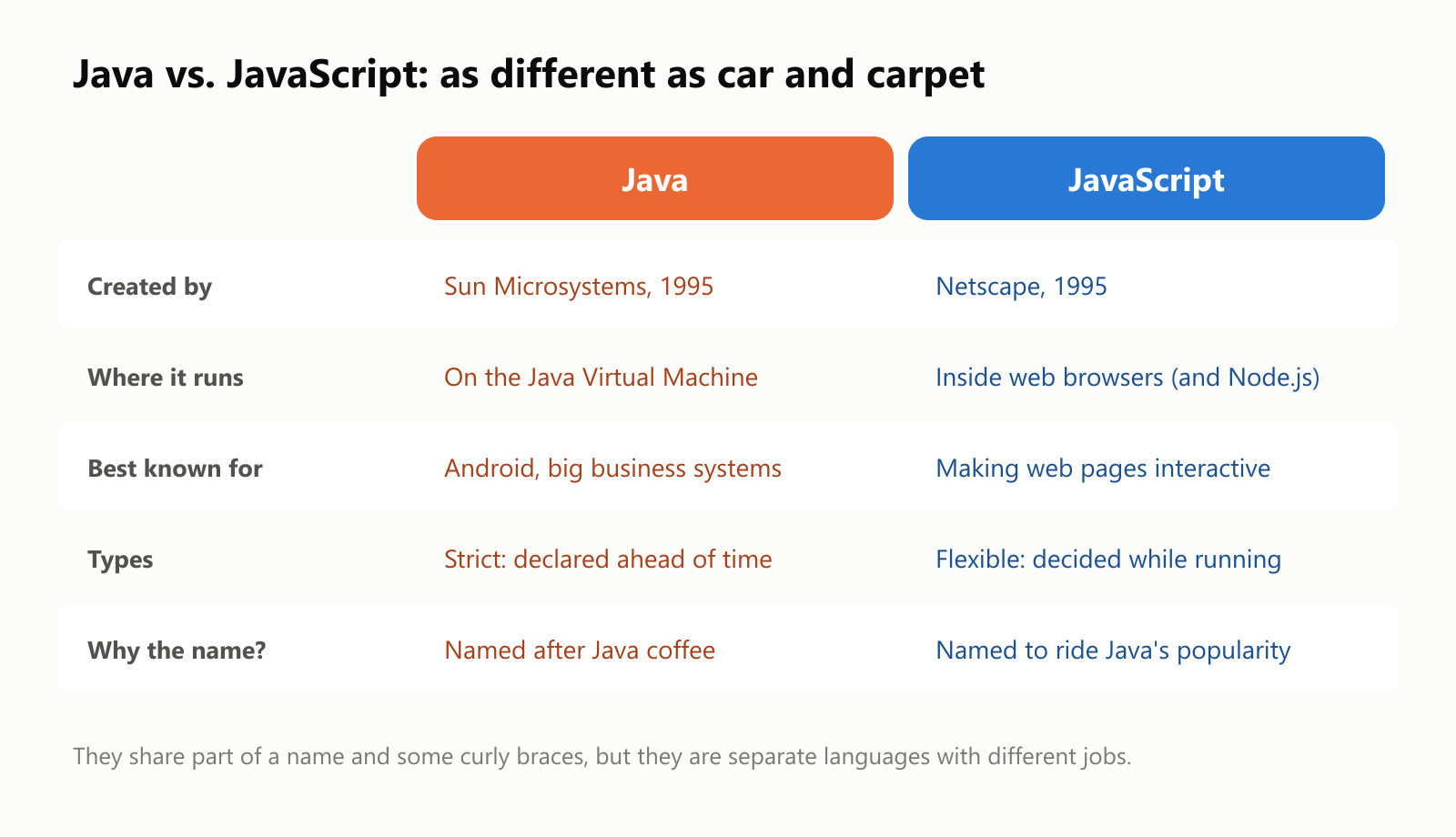
So why the similar name? In 1995, Java was the hottest thing in tech. The browser company Netscape had just created its own language for web pages, and gave it the name JavaScript as a marketing move, to ride Java's popularity. The confusion has lasted ever since.
Is it fast?
Java has an old reputation for being slow, from its early days in the 1990s. Today, the JVM is extremely good at turning busy code into fast machine code while the program runs. We timed the same simple program, counting the prime numbers below 2 million, in five languages:
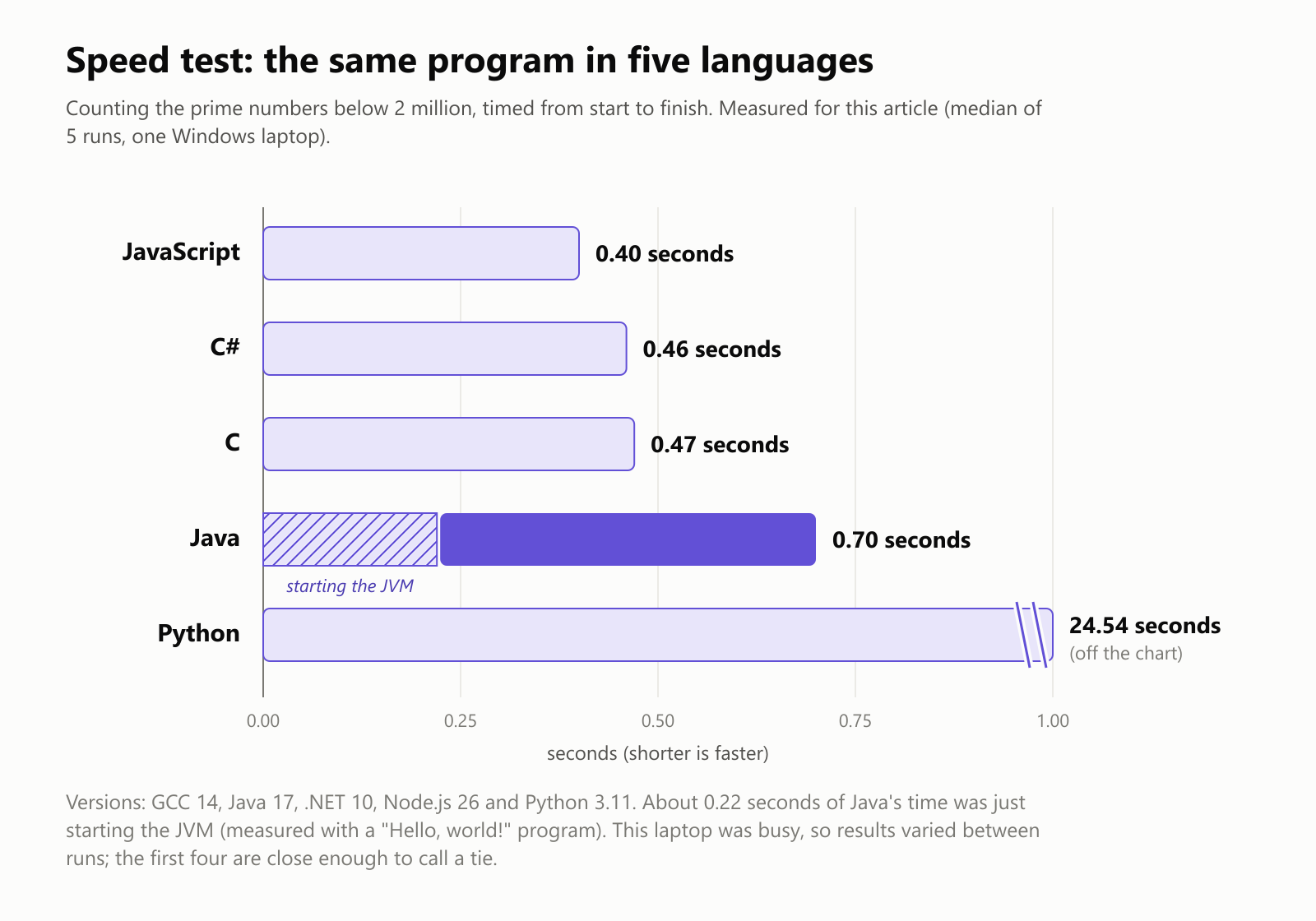
Java's total was 0.70 seconds, but about 0.22 seconds of that was just starting the JVM (we measured that separately with a "Hello, world!" program). Once running, Java crunched the numbers about as fast as C, C# and JavaScript. Python took dozens of times longer.
That startup cost is one of Java's real trade-offs: it's great for programs that run for a long time, like servers that stay up for weeks, and less ideal for tiny programs that start and stop instantly.
Where Java is used
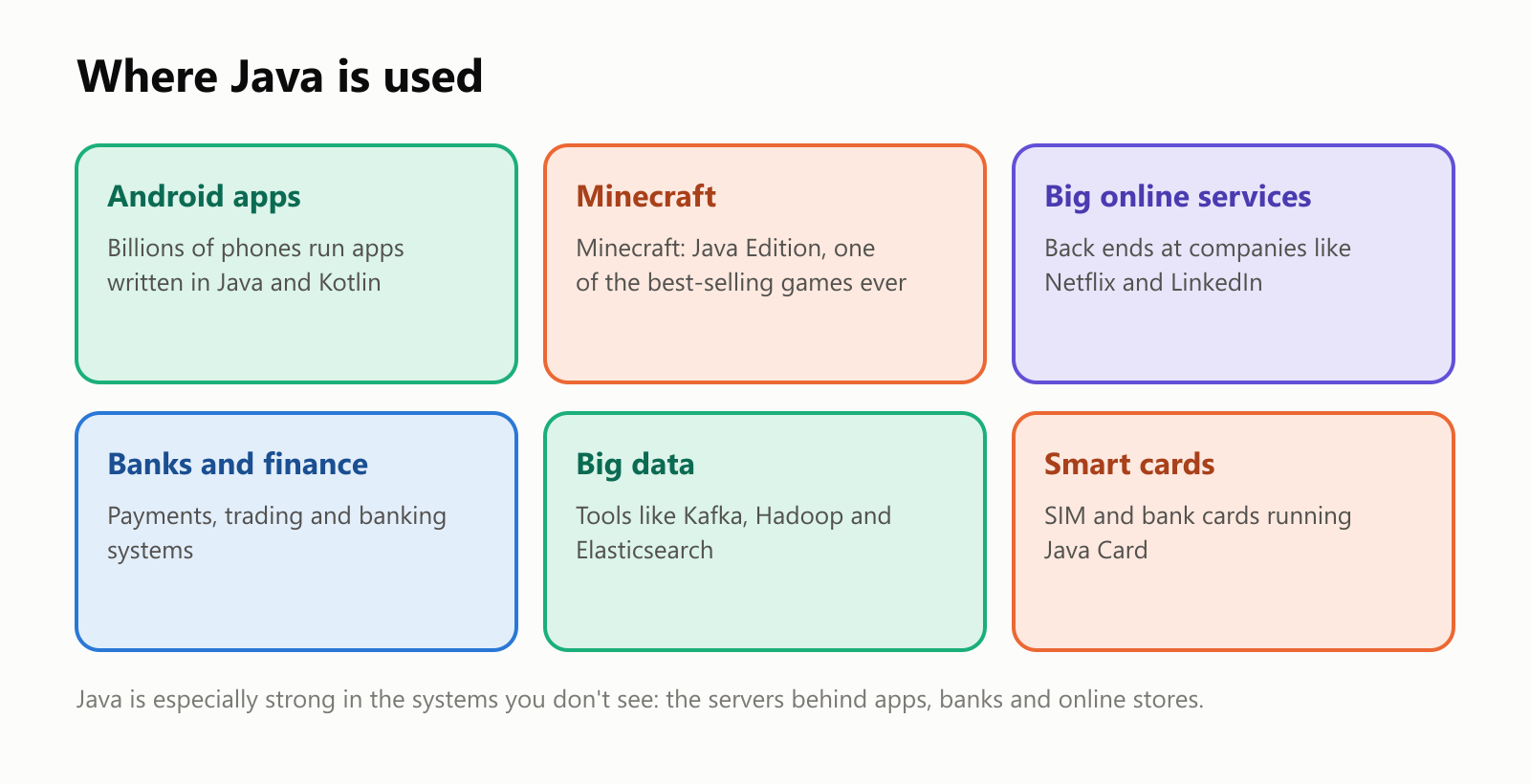
- Android: when Android launched in 2008, its apps were written in Java. Today Google recommends Kotlin for new Android apps, but Kotlin runs on the same foundations, and a huge amount of Android code is still Java.
- Minecraft: the original version of Minecraft, one of the best-selling video games of all time, was written in Java, and Minecraft: Java Edition is still around (and is the version famous for its mods).
- Big online services: companies like Netflix and LinkedIn run many of their behind-the-scenes services on Java.
- Banks, insurance and stores: Java is a favorite for big, long-lived business systems that must be reliable for decades.
- Big data: popular tools for moving and searching enormous amounts of data, like Kafka, Hadoop and Elasticsearch, are built with Java.
- Smart cards: a tiny version called Java Card runs on chips inside many SIM cards and bank cards.
One machine, many languages
The JVM turned out to be so good that other languages started using it too. Any language that compiles to Java bytecode can run on the JVM and use Java's enormous collection of ready-made libraries:
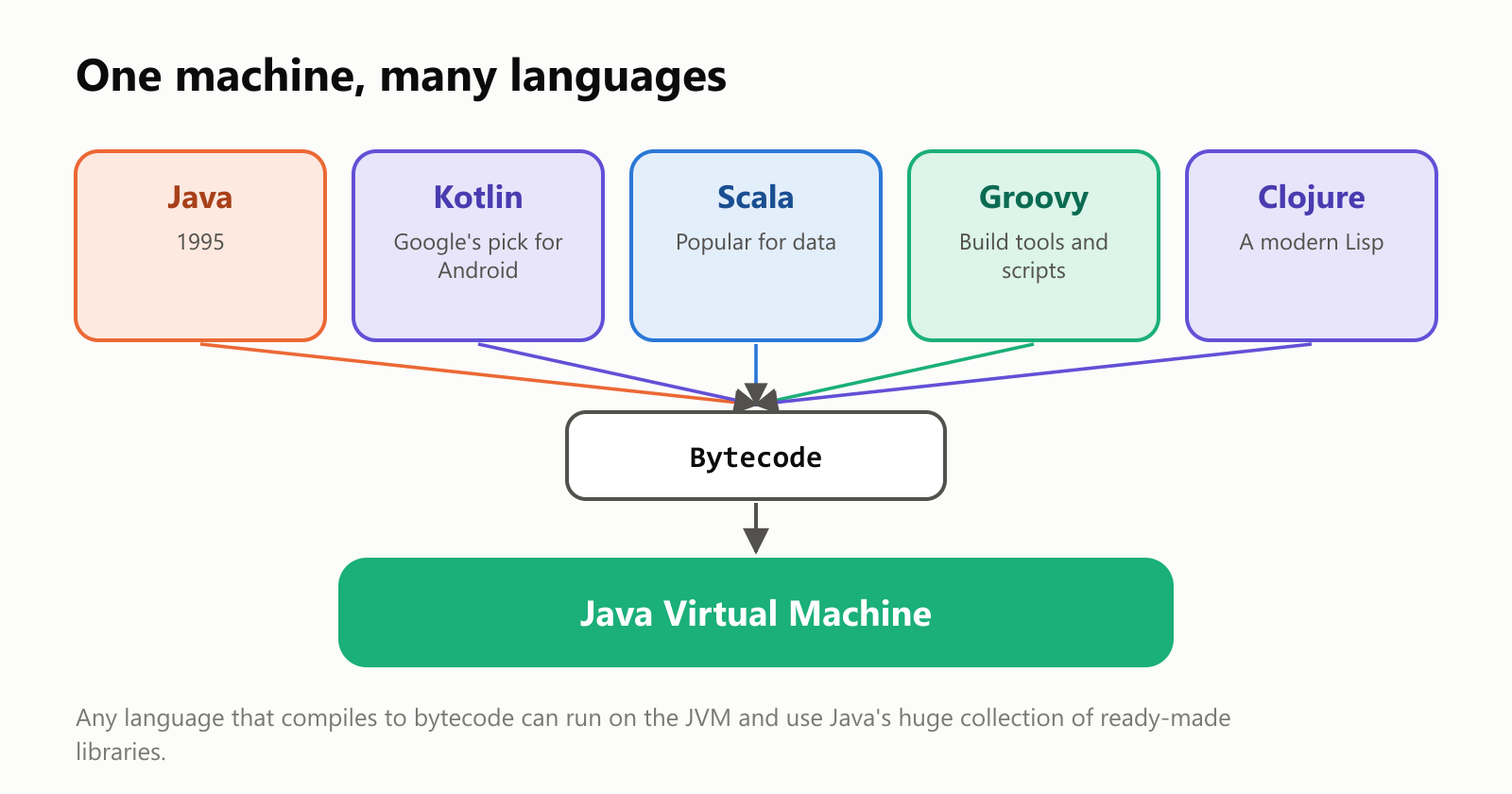
Kotlin, created by the company JetBrains, is the best known: Google made it an official Android language in 2017. Kotlin and Java can even be mixed in the same project.
A short history
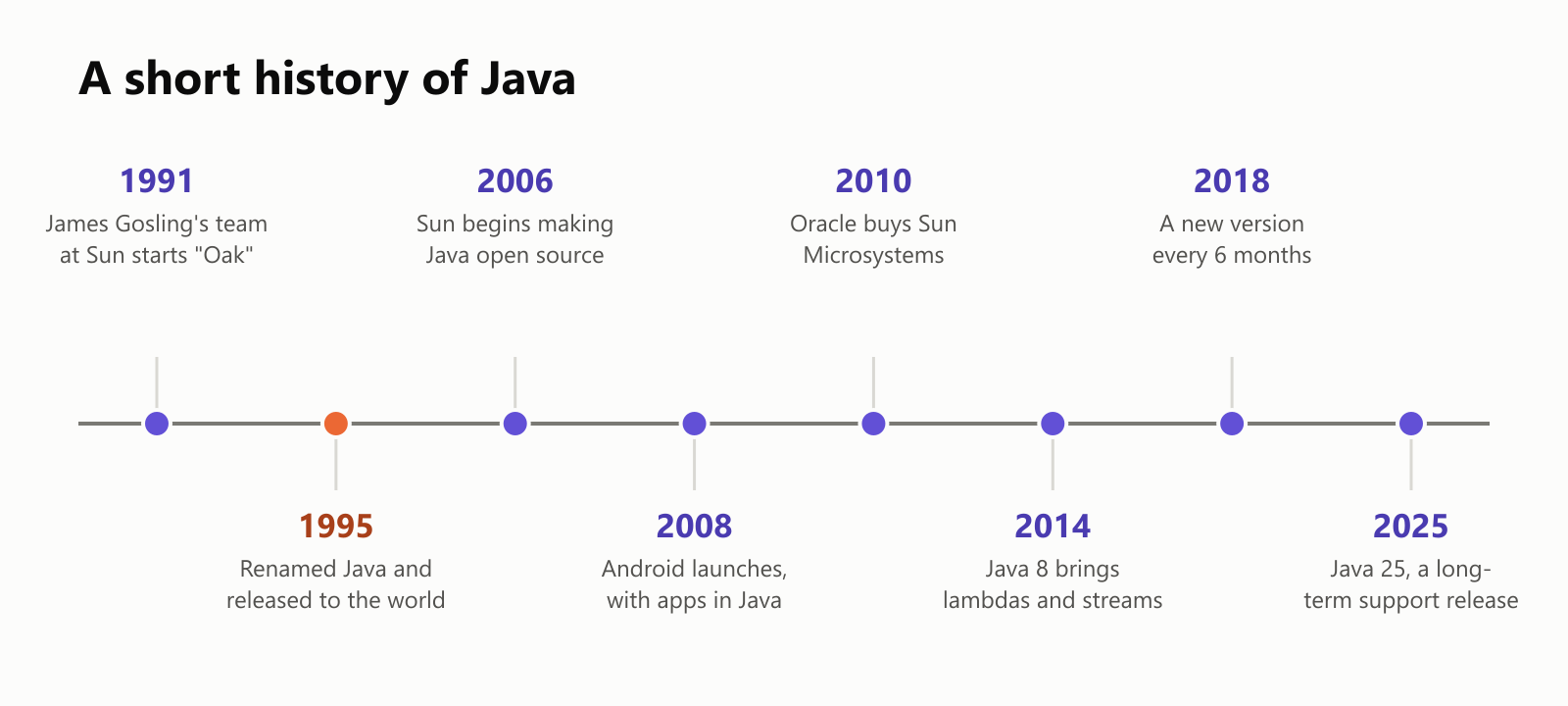
A few milestones worth knowing:
- 2006–2007: Sun released Java as open source (the OpenJDK project), so anyone can use and improve it for free.
- 2010: Oracle bought Sun Microsystems, and has looked after Java since.
- 2014: Java 8 added lambdas and streams, a more modern way to work with lists of data. For example, "from this list of people, give me the adults' names, sorted":
1String adults = people.stream()
2    .filter(person -> person.age() >= 18)
3    .map(Person::name)
4    .sorted()
5    .collect(Collectors.joining(", "));
With Maria (34), Ana (17), Pedro (25) and Lucas (15) in the list, this gives Maria, Pedro.
- Since 2018: a new version of Java comes out every six months, and every two years one of them is a long-term support (LTS) release that companies can rely on for many years. Java 21 (2023) and Java 25 (2025) are LTS releases.
The downsides
- It's wordy. Java often needs more lines than newer languages to say the same thing. Programmers call this extra code boilerplate. Recent versions have trimmed a lot of it, and Kotlin was created partly to fix this.
- Startup time and memory. The JVM takes a moment to start and uses more memory than a C program, which matters for small tools and tiny devices.
- Popular means targeted. Because Java runs so much of the world's software, a flaw in a widely used Java library can have huge consequences. In late 2021, a vulnerability nicknamed Log4Shell, in a popular Java logging library called Log4j, sent companies everywhere scrambling to patch their systems.
- Licensing confusion. Oracle's own Java builds have had changing license terms over the years, but free, open-source builds of Java (based on OpenJDK) are widely available from several organizations.
Should you learn Java?
- Good reasons: you want to build Android apps, work on the back end of big websites, or get a job at a bank or large company; Java skills have been in demand for decades. It's also a common first language in universities, because its strictness teaches good habits.
- Good to know: Java is free to download and use. Popular free editors include IntelliJ IDEA Community Edition, Eclipse and Visual Studio Code.
A small glossary
- Java: a programming language created at Sun Microsystems and released in 1995.
- Bytecode: universal instructions that Java code is compiled into, stored in
.classfiles. - JVM (Java Virtual Machine): the program that runs bytecode on each device.
- JDK (Java Development Kit): the free toolkit for writing Java, including the compiler
javac. - Write once, run anywhere: Java's promise that the same bytecode runs on any computer with a JVM.
- Class / object: a blueprint, and a thing built from it.
- Garbage collector: an automatic cleaner that frees memory nothing uses anymore.
- Boilerplate: repetitive code that has to be written but adds little meaning.
- Lambda / stream: Java's modern tools for working with lists of data step by step.
- LTS (long-term support): a version that gets fixes and updates for many years.
- OpenJDK: the free, open-source project that develops Java.
- Kotlin: a newer language that runs on the JVM, now Google's preferred language for Android.
Wrapping up
Java started as a language for TV boxes, got a coffee-flavored name, and became one of the pillars of modern computing. Its big idea, write once, run anywhere, works by compiling code into universal bytecode that a Java Virtual Machine runs on each device, like a DVD in any DVD player. Add automatic memory cleanup and strict safety checks, and you get a language that big companies have trusted for three decades.
So the next time you open an Android app, pay with a card, or watch someone build a castle in Minecraft, there's a good chance Java is brewing somewhere behind the scenes. And remember: it's not JavaScript.
Read next
What Is a Transformer in AI? The Idea Behind ChatGPT, Explained Simply
A friendly, jargon-free guide to transformers, the AI design behind ChatGPT, Claude and Gemini. Learn how "attention" lets AI understand words in context, what happens inside a transformer, and why it changed AI so quickly.
 nbkhope
What Is Reinforcement Learning? How AI Learns by Trial, Error and Reward
A friendly, jargon-free introduction to reinforcement learning, how AI learns by trial, error and reward, like training a dog with treats. Watch a real robot learn a maze, see why exploring matters, and learn how it shapes chatbots.
nbkhope
What Is Graph Engineering? How Today's AI Teams Up to Get Real Work Done
A friendly, jargon-free guide to graph engineering, the 2026 idea of building AI as a map of connected steps instead of one big loop. See how today's AI agents work, why small mistakes add up, and how checkers, branches and teamwork fix it.
nbkhope
Comments
Be kind and specific. Comments with links from new accounts appear after a moderator reviews them.