What Is the C++ Programming Language? A Simple Guide to the Language Behind Games and Browsers
A friendly, jargon-free guide to C++, the programming language behind video games, web browsers and much of the software you use every day. Learn what it adds to C, how classes and automatic cleanup work, and why it's both fast and famously complex.

On this page
If you've played a big video game, browsed the web in Chrome, edited a photo or watched a video on your computer, you've used software written in C++ (pronounced "C plus plus"). It's one of the most widely used programming languages in the world, especially for software that has to be both very fast and very big.
This article explains, in plain language, what C++ is, how it grew out of the C language, the key ideas it added, where it's used, and why programmers both love it and find it challenging.
Where the name comes from
In C, writing ++ after something means "add one to it". So count++ means "count goes up by one". The name C++ is a programmer's joke: it's C, plus one, or "C, one step better".
The language was created by Bjarne Stroustrup, a Danish computer scientist working at Bell Labs, the same research lab where C was born. In 1979, he started working on what he called "C with Classes". He loved how fast C was, but he was working on large, complicated programs and wanted better ways to organize them. In 1983, the language got its new name, C++.
C++ is C with a lot more on top
The simplest way to think about C++ is as layers added on top of C:
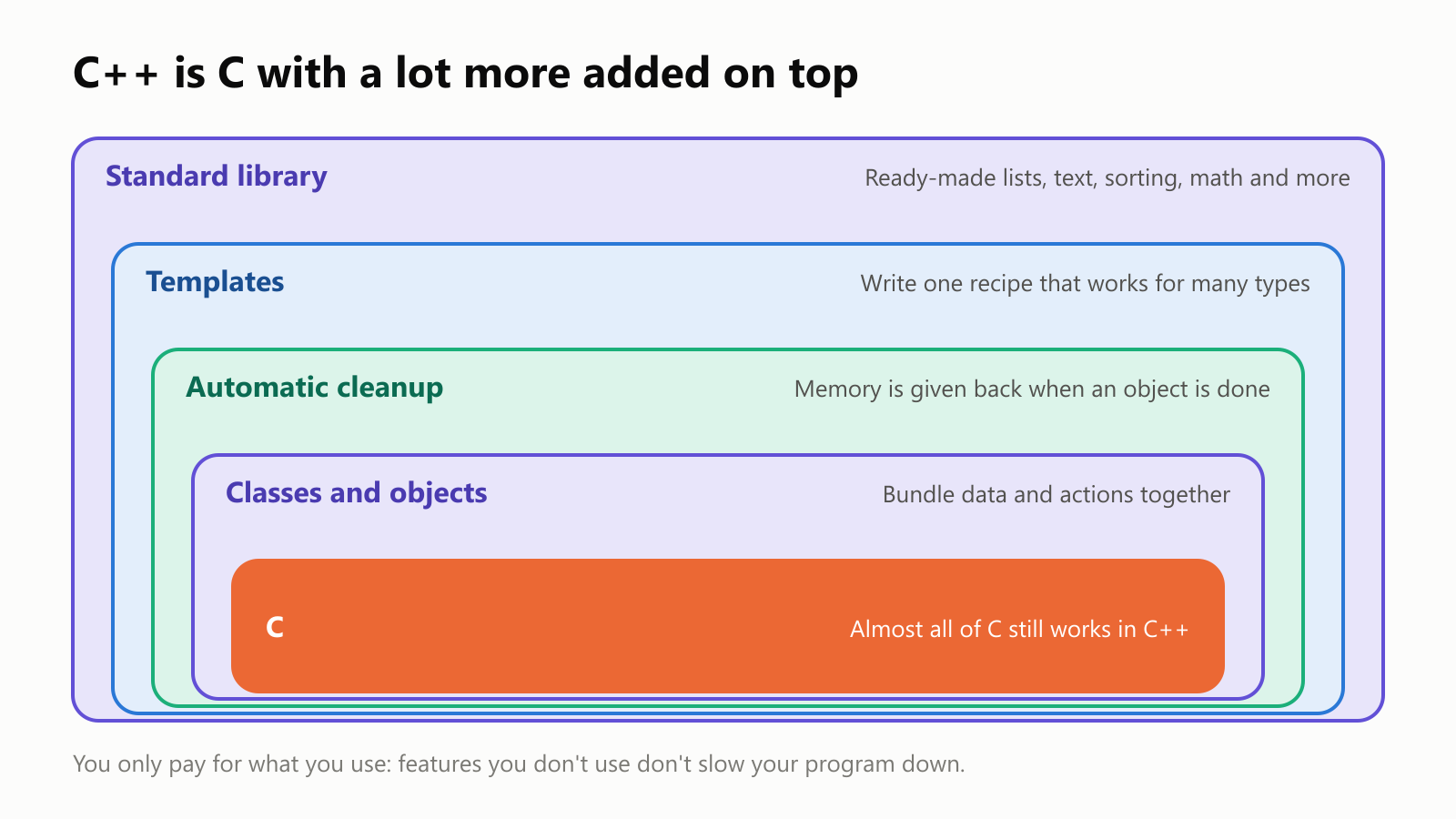
Almost any C program can be turned into a C++ program with few or no changes. But C++ adds powerful tools for building large programs, and a guiding promise often called the zero-overhead principle: you don't pay for what you don't use, and what you do use should be as fast as if you'd written it carefully by hand.
Let's look at the three biggest additions.
Big idea 1: classes and objects
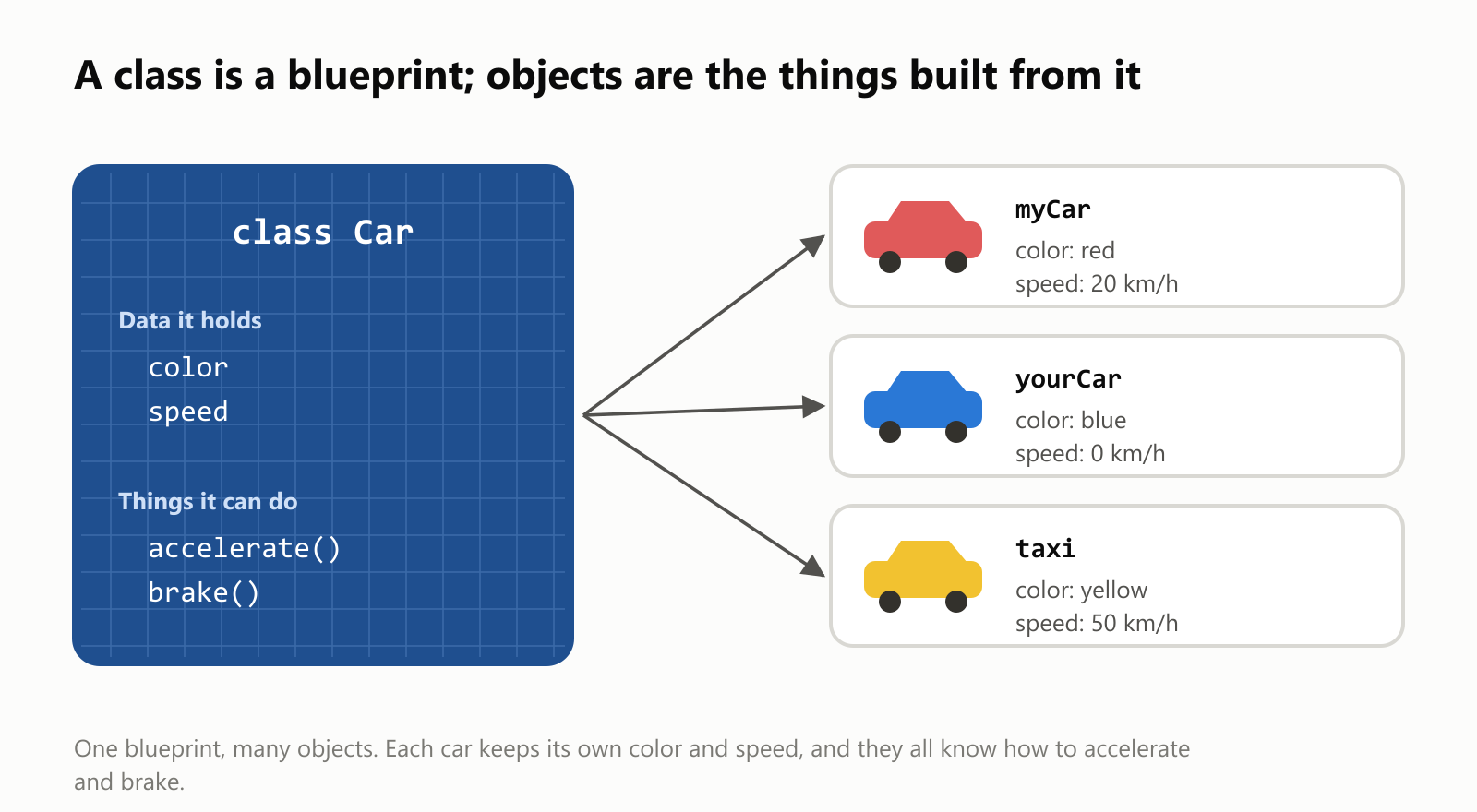
Real programs deal with "things": players and enemies in a game, tabs and pages in a browser, layers in a photo editor. C++ lets you describe a kind of thing once, as a class, and then create as many objects of that kind as you like.
A class is like a blueprint. It describes what data each thing holds and what it can do. Objects are the actual things built from that blueprint:
Here's what that looks like in C++:
1#include <iostream>
2#include <string>
3
4class Car {
5public:
6    std::string color;
7    int speed = 0;
8
9    void accelerate() { speed += 10; }
10    void brake() { speed = 0; }
11};
12
13int main() {
14    Car myCar;
15    myCar.color = "red";
16    myCar.accelerate();
17    myCar.accelerate();
18    std::cout << "My " << myCar.color << " car is going " << myCar.speed << " km/h\n";
19}
When it runs, it prints: My red car is going 20 km/h.
Bundling data and actions together like this is called object-oriented programming. It makes huge programs easier to understand, because each piece of the program takes care of its own business. A game with a thousand enemies doesn't need a thousand copies of the enemy code, just one Enemy class and a thousand objects.
Big idea 2: memory that cleans up after itself
In C, if a program asks for memory, the programmer has to remember to give it back. Forget, and the program slowly eats up memory. Give it back too early and keep using it, and the program can crash, or worse, become a security hole.
C++ added a clever solution. An object can have a special cleanup function (called a destructor) that runs automatically when the object is no longer needed:
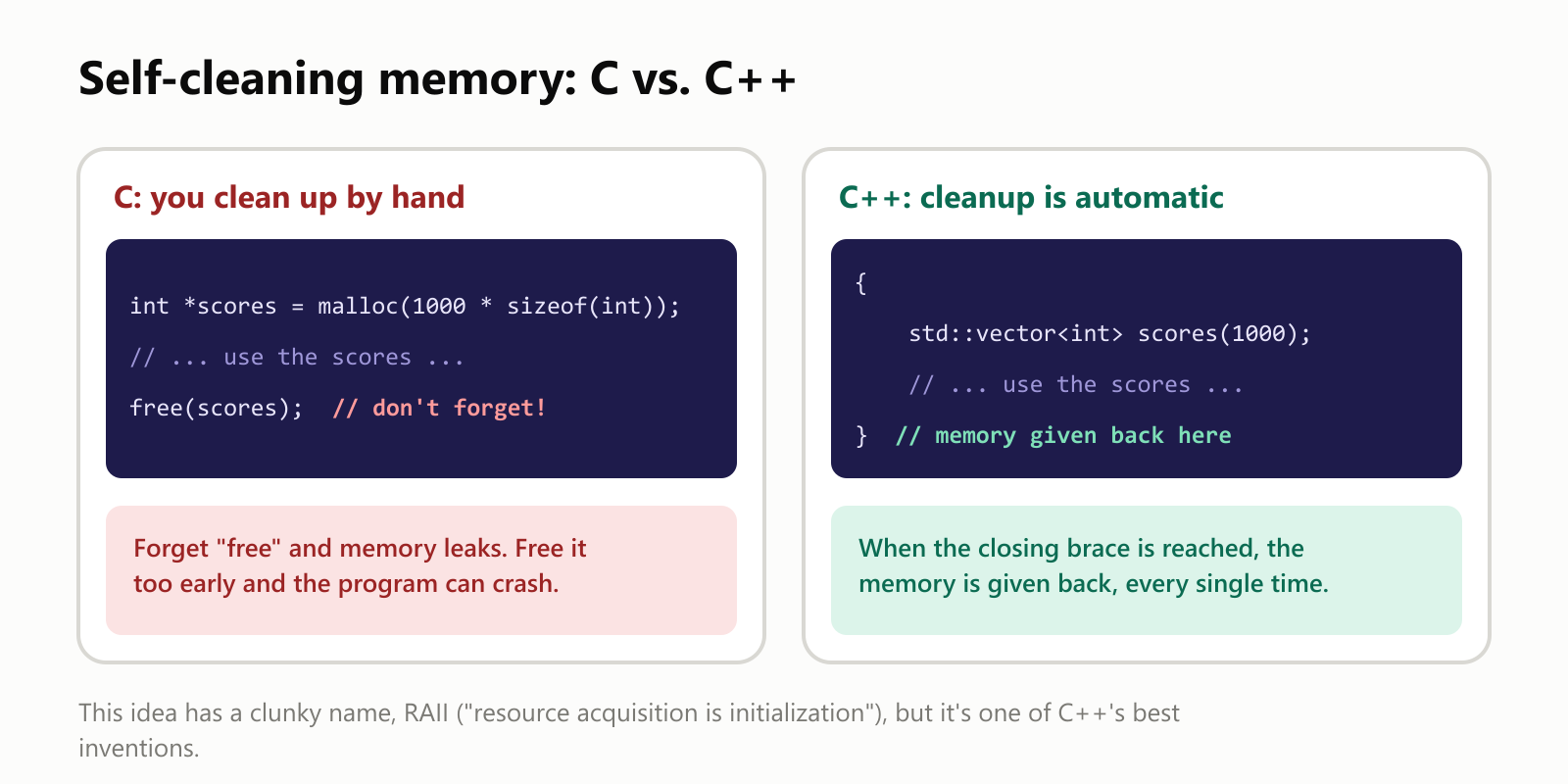
Think of it like a hotel room. In C, you have to remember to check out and hand back the key. In C++, the key returns itself the moment you walk out the door. The idea has an awkward name, RAII ("resource acquisition is initialization"), but it works not just for memory, but for files, network connections and anything else that needs to be closed or released.
Big idea 3: templates and a big toolbox
The third big addition is templates: a way to write one recipe that works for many kinds of data. A sorting recipe written once with templates can sort numbers, names, dates or anything else that can be compared.
C++ uses templates to provide a large standard library: ready-made lists that grow as needed, text handling, sorting, searching, math and much more. Here's the same small task, sorting a list of names, in C and in C++:
In C:
1#include <stdio.h>
2#include <stdlib.h>
3#include <string.h>
4
5int compare_names(const void *first, const void *second) {
6    return strcmp(*(const char **)first, *(const char **)second);
7}
8
9int main(void) {
10    const char *names[] = {"Maria", "Ana", "Pedro", "Lucas"};
11    int count = sizeof(names) / sizeof(names[0]);
12    qsort(names, count, sizeof(names[0]), compare_names);
13    for (int index = 0; index < count; index++) {
14        printf("%s\n", names[index]);
15    }
16    return 0;
17}
In C++:
1#include <algorithm>
2#include <iostream>
3#include <string>
4#include <vector>
5
6int main() {
7    std::vector<std::string> names = {"Maria", "Ana", "Pedro", "Lucas"};
8    std::sort(names.begin(), names.end());
9    for (const std::string& name : names) {
10        std::cout << name << "\n";
11    }
12}
Both print Ana, Lucas, Maria and Pedro, in that order. You don't need to follow every symbol; just notice that the C version needs a special comparison function and some careful size math, while the C++ version simply says: here's a list of names, sort it.
Here's the surprising part. You might expect the easier code to be slower. Instead, it's often faster. We sorted the same 10 million numbers with C's built-in sort (qsort) and with C++'s (std::sort):
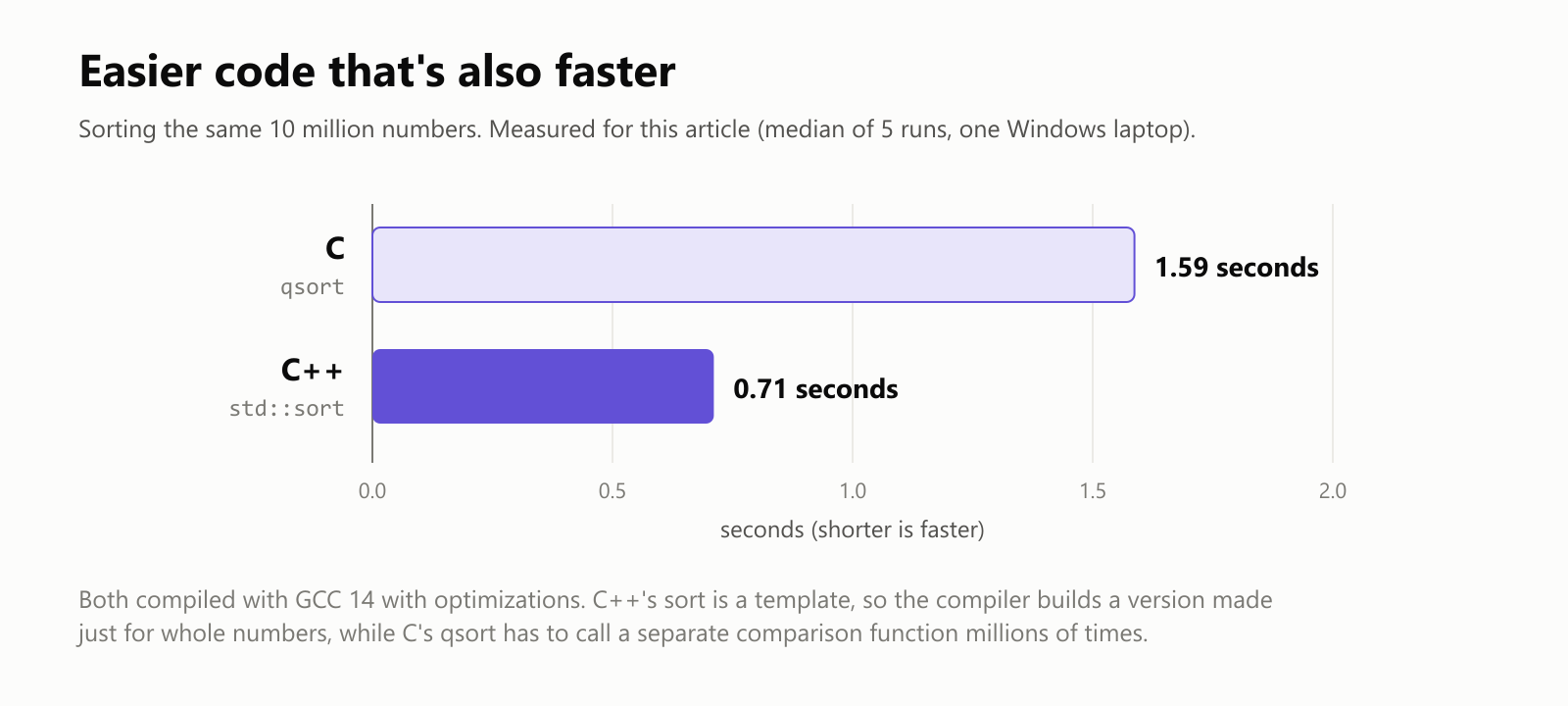
C++'s version finished in less than half the time. Because std::sort is a template, the compiler builds a custom version made specifically for whole numbers, with the comparison built right in. C's qsort is one general-purpose function that has to call a separate comparison function, over and over, millions of times. That's the zero-overhead principle in action: higher-level code without a speed penalty.
Where C++ is hiding
Because it's fast and good at organizing very large programs, C++ shows up wherever software is both demanding and complex:
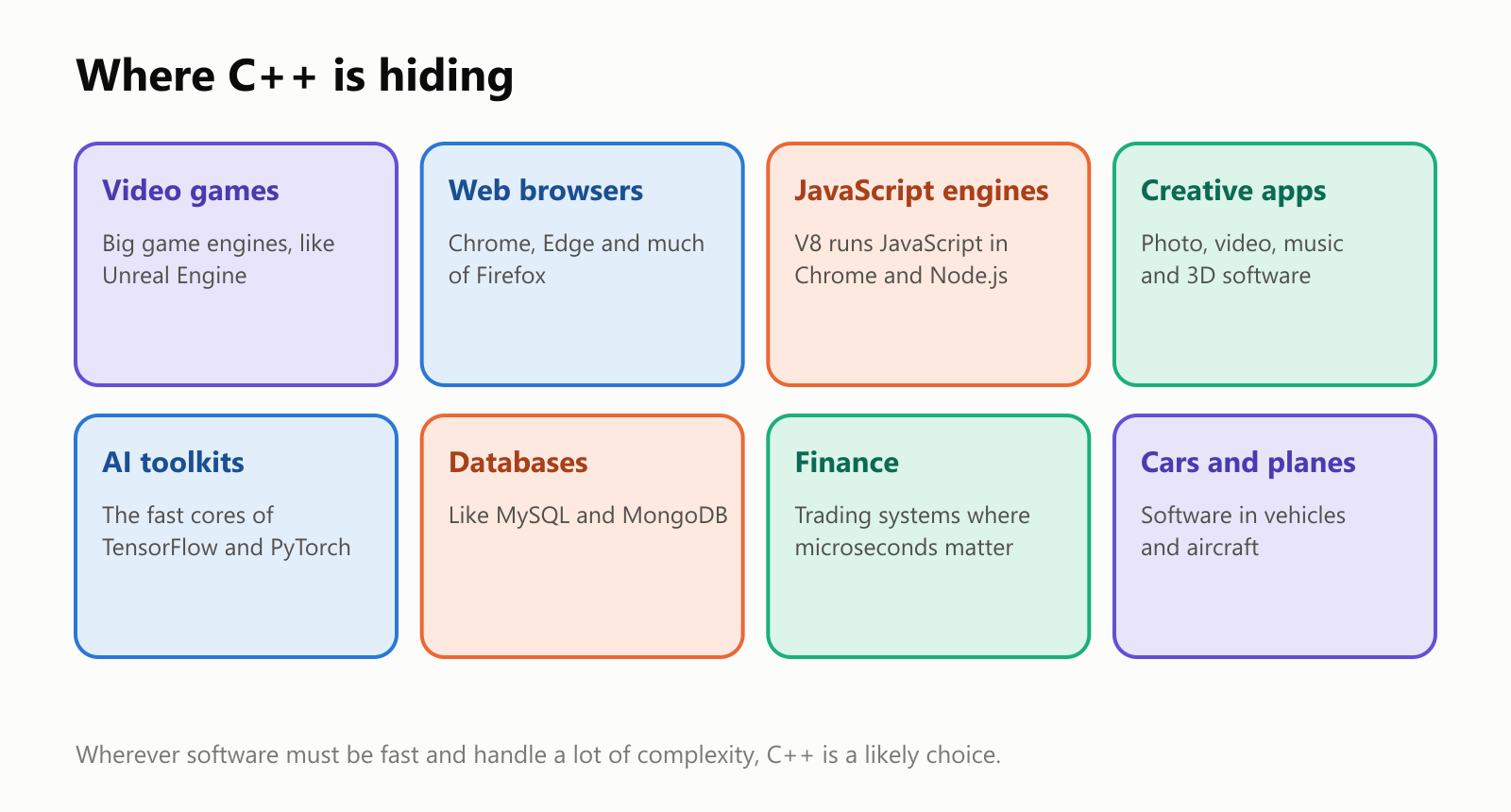
- Video games: most big games and game engines, like Unreal Engine, are built with C++, because games must draw a new picture dozens of times per second.
- Web browsers: Chrome and Edge are built mostly in C++, and so is much of Firefox. The engine that runs JavaScript in Chrome (called V8) is written in C++ too.
- Creative software: professional photo, video, music and 3D tools rely on C++ to handle huge files smoothly.
- AI: even when people build AI in Python, the heavy lifting inside toolkits like TensorFlow and PyTorch is done by C++ code underneath.
- Finance, databases, cars and planes: anywhere a delay of a millionth of a second, or a crash, is costly.
Still evolving after 40+ years
C++ isn't frozen in time. An international committee updates it regularly, and since 2011 a new version has come out roughly every three years:
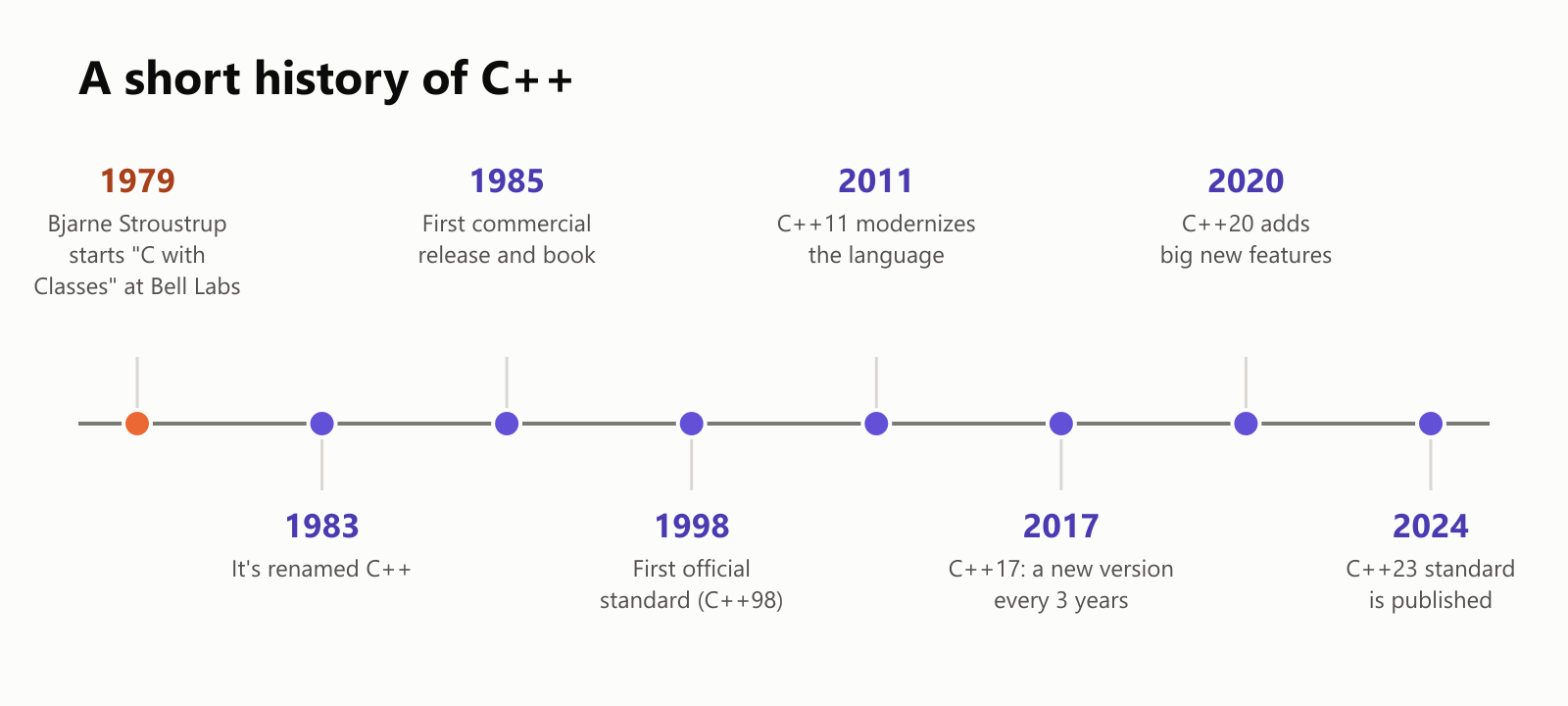
The 2011 update, C++11, was so big that many programmers say it felt like a new language. People often talk about "modern C++" to mean the newer, safer and simpler style these updates made possible.
The downsides
C++ is powerful, but it has real drawbacks:
- It's huge and complex. After more than 40 years of additions, C++ has an enormous number of features, and often several ways to do the same thing. Even experts say they don't know all of it.
- It's still not memory-safe. Automatic cleanup helps a lot, but C++ keeps C's ability to work directly with memory, and with it, the risk of the same dangerous mistakes, like writing past the end of a list. Much of the C++ code in the world was written in older styles, too.
- Slow to build, cryptic errors. Big C++ projects can take a long time to compile, and error messages, especially involving templates, can be famously long and confusing.
Because of the safety concerns, governments and companies have been encouraging memory-safe languages for new projects. A newer language called Rust has become a popular alternative for some of the same jobs, and the C++ community is actively working on ways to make C++ itself safer.
C++ vs. its neighbors
- C++ vs. C: C is small and simple; C++ is C plus classes, automatic cleanup, templates and a big library. Both are fast. C is common in tiny devices and operating system cores; C++ in large applications like games and browsers.
- C++ vs. C# and Java: these borrowed C++'s look, but they manage memory automatically with a garbage collector, a helper that periodically cleans up unused memory. That's safer and easier, but gives programmers less control over speed and timing.
- C++ vs. Python: Python is far easier to learn and write, but much slower for heavy calculations. They're often used together: Python on the outside, C++ doing the heavy work inside.
Should you learn C++?
- Good reasons: you want to make games, work on browsers or creative tools, write high-performance software, or truly understand how fast software works.
- Things to know: it has a steep learning curve. Many people start with a friendlier language and come to C++ later, but plenty of programmers learn it first and do just fine.
If you'd like to try it, start with Writing your First Program in the C++ Programming Language, then How to Create a Variable in C++ and C++ Arrays.
A small glossary
- C++: a programming language created by Bjarne Stroustrup, starting in 1979, that extends C with classes, templates and more.
- Class: a blueprint describing what data a kind of thing holds and what it can do.
- Object: an actual thing built from a class, with its own data.
- Object-oriented programming: organizing a program around objects that bundle data and actions.
- Destructor: a special function that runs automatically when an object is no longer needed, to clean up.
- RAII: the C++ habit of tying cleanup to an object's lifetime, so resources are released automatically.
- Template: a recipe that works for many kinds of data, filled in by the compiler.
- Standard library: the ready-made toolbox that comes with C++: lists, text, sorting and more.
- Zero-overhead principle: you don't pay for features you don't use, and the ones you use are as fast as hand-written code.
- Garbage collector: an automatic memory cleaner used by languages like Java and C#, but not by C++.
- Compiler: the program that translates C++ code into machine code the processor can run.
Wrapping up
C++ began as "C with Classes" and grew into one of the most important languages in computing. It keeps C's speed and closeness to the machine, and adds tools for organizing enormous programs: classes to model things, automatic cleanup so memory takes care of itself, and templates that let simple code run remarkably fast.
That power comes with complexity, and with some of C's risks. But the next time a game runs smoothly, a web page loads in a blink, or a photo filter applies instantly, there's a good chance C++ is doing the work behind the scenes.
Read next
What Is the C# Programming Language? A Simple Guide to Microsoft's Language for Apps, Websites and Games
A friendly, jargon-free guide to C#, Microsoft's popular programming language behind Unity games, websites and business apps. Learn where its name comes from, how it runs on almost any device, and why it cleans up memory for you.
 nbkhope
What Is the C Programming Language? A Simple Guide to the Language That Runs the World
A friendly, jargon-free guide to C, the 50-year-old programming language hiding inside your phone, your car and the internet. Learn what C is, why it's so fast, how it works with memory, and why it still matters today.
nbkhope
How to Create a Variable in the C++ Programming Language
We can create variables in C++ using the following syntax: We declare the variable first with the data type, followed by the desired name. For example, if you want to store a person's age, you could…
nbkhope
Comments
Be kind and specific. Comments with links from new accounts appear after a moderator reviews them.