What Is the C# Programming Language? A Simple Guide to Microsoft's Language for Apps, Websites and Games
A friendly, jargon-free guide to C#, Microsoft's popular programming language behind Unity games, websites and business apps. Learn where its name comes from, how it runs on almost any device, and why it cleans up memory for you.

On this page
If you've played games like Among Us, Hollow Knight or Pokémon GO, visited Stack Overflow, or used software at a bank, a store or a hospital, there's a good chance you've used something built with C# (pronounced "C sharp").
C# is a programming language created by Microsoft and released in 2002. It's designed to be fast, safe and productive: a language where programmers can build big, reliable applications without worrying about every tiny detail of the computer's memory. This article explains, in plain language, what C# is, how it works and where you'll find it.
Where the name comes from
The name is a clever double meaning:
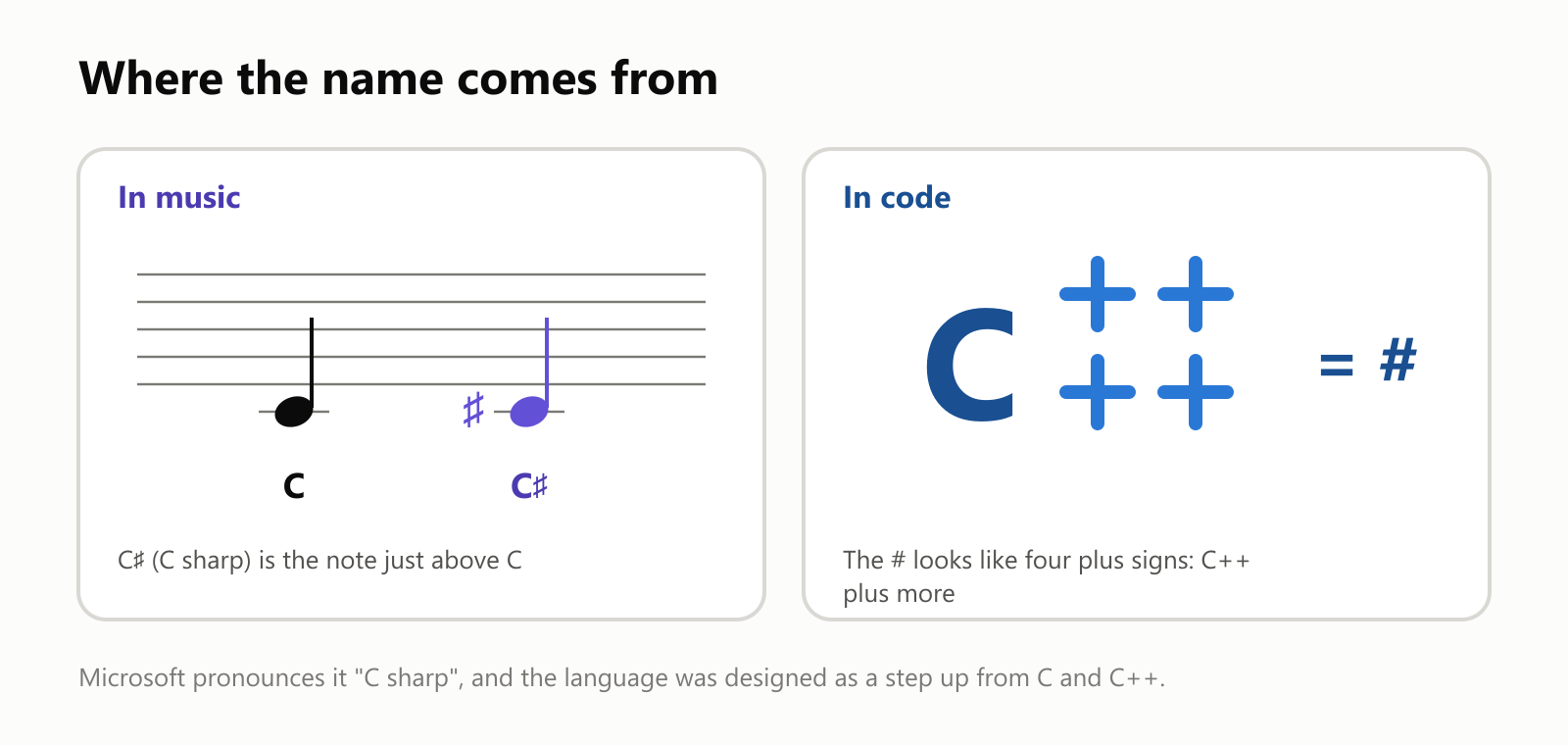
- In music, C♯ (C sharp) is the note a half step above C. So C# is "C, raised a notch".
- In code, the # sign looks like four plus signs stacked together, a playful hint that it's a step beyond C++.
The # on your keyboard isn't exactly the musical sharp sign (♯), but it's the closest thing on a keyboard, so that's what everyone uses.
Who made it, and why
In the late 1990s, Microsoft wanted a modern language for building Windows programs and websites, one that was easier and safer than C++ but still fast. The project was led by Anders Hejlsberg, a Danish engineer who had already created the popular Turbo Pascal and Delphi tools (and who later also designed TypeScript).
The language was first code-named "Cool", and was announced as C# in 2000. C# 1.0 shipped in early 2002, together with .NET, the platform that C# programs run on.
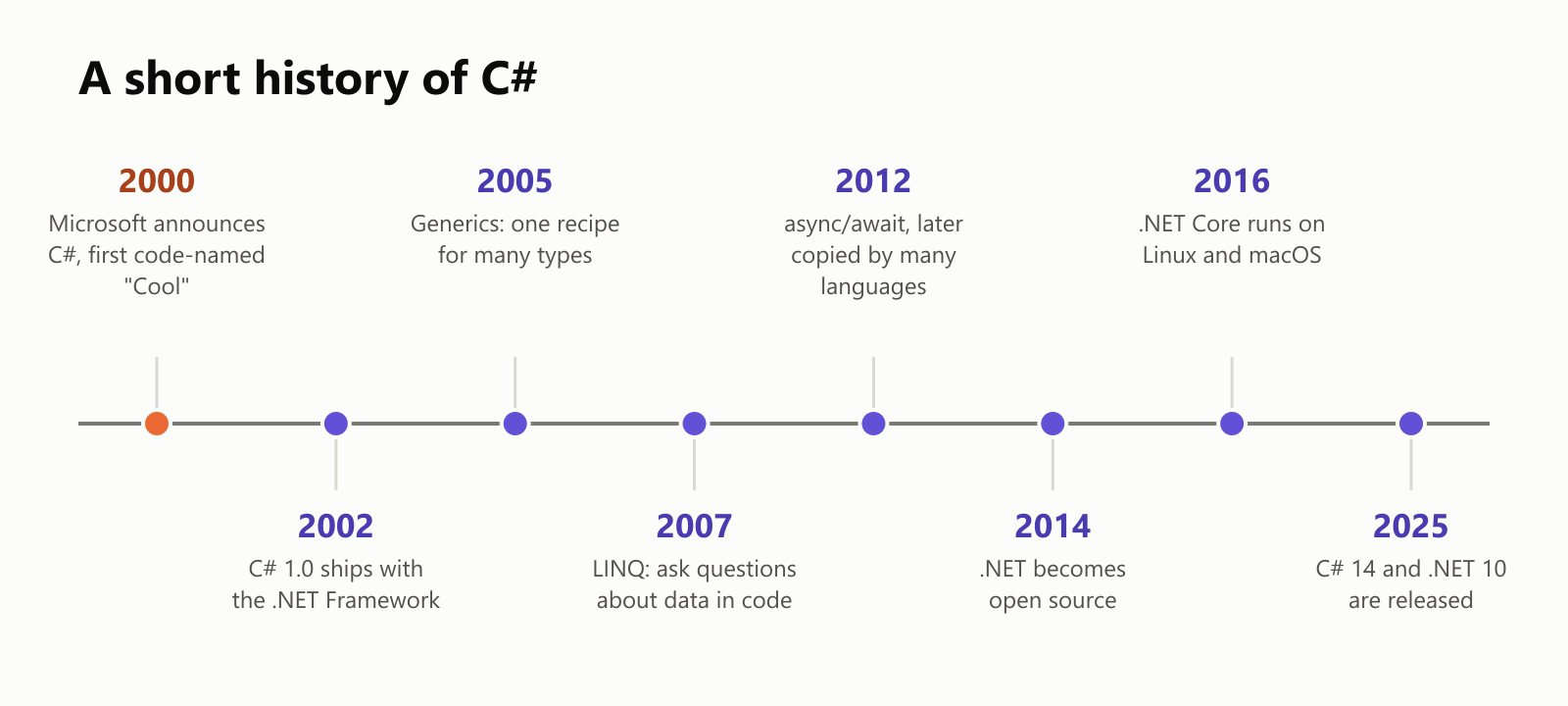
For its first decade, C# was mostly a Windows thing. That changed in 2014, when Microsoft made .NET open source, and in 2016, when .NET started running on Linux and macOS too. Today, C# and .NET are free, open, and run almost everywhere, with a new version released every November.
What C# looks like
Here's the classic first program in modern C#. It's just one line:
Console.WriteLine("Hello, world!");Console is the text window, and WriteLine writes a line of text in it. That's it.
Like C++, C# is object-oriented: you describe a kind of thing as a class (a blueprint), then create objects from it. Here's a tiny car:
1var myCar = new Car { Color = "red" };
2myCar.Accelerate();
3myCar.Accelerate();
4Console.WriteLine($"My {myCar.Color} car is going {myCar.Speed} km/h");
5
6class Car
7{
8    public string Color { get; set; } = "";
9    public int Speed { get; private set; }
10
11    public void Accelerate() => Speed += 10;
12    public void Brake() => Speed = 0;
13}
When it runs, it prints: My red car is going 20 km/h.
If you read the C++ article, this will look familiar, with a few extras. For example, private set means only the car itself can change its speed. Nobody else can secretly set it to 500 km/h. Small safety touches like this are everywhere in C#.
How a C# program runs
C# uses a two-step translation that's a bit different from C and C++:
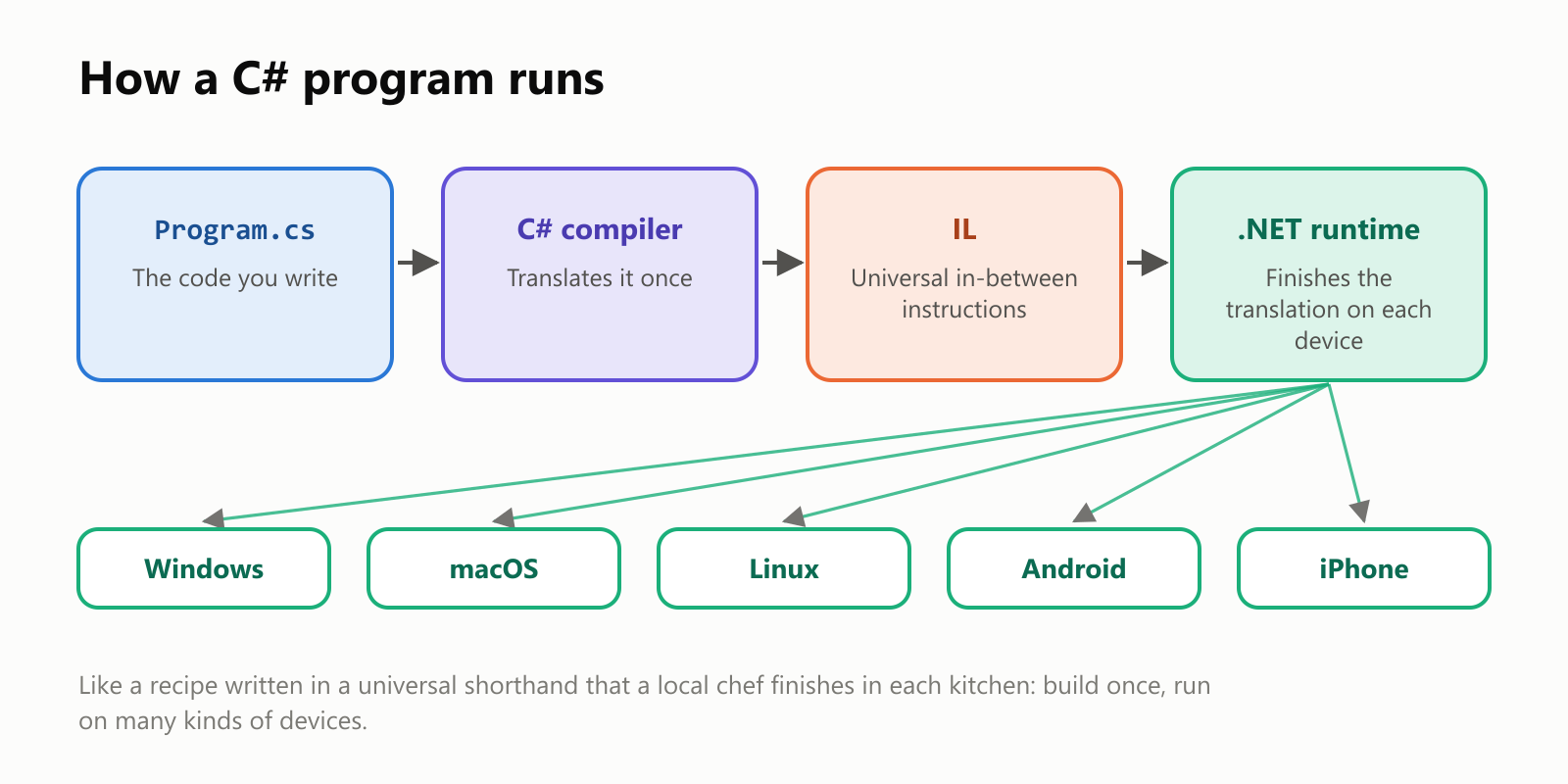
- The C# compiler translates your code into IL (Intermediate Language), a set of universal instructions that aren't tied to any one kind of computer.
- When the program runs, the .NET runtime on that device translates the IL into the exact machine code that processor understands. This is called just-in-time (JIT) compilation, because it happens just in time, as the program needs it.
Think of a recipe written in a universal shorthand. Each kitchen has a local chef who reads the shorthand and cooks it with the ingredients and tools on hand. You write the recipe once, and it works in kitchens all over the world.
Memory that takes care of itself
In C, programmers must hand memory back by hand. In C++, objects clean up after themselves when they go out of scope. C# goes one step further, with a garbage collector:
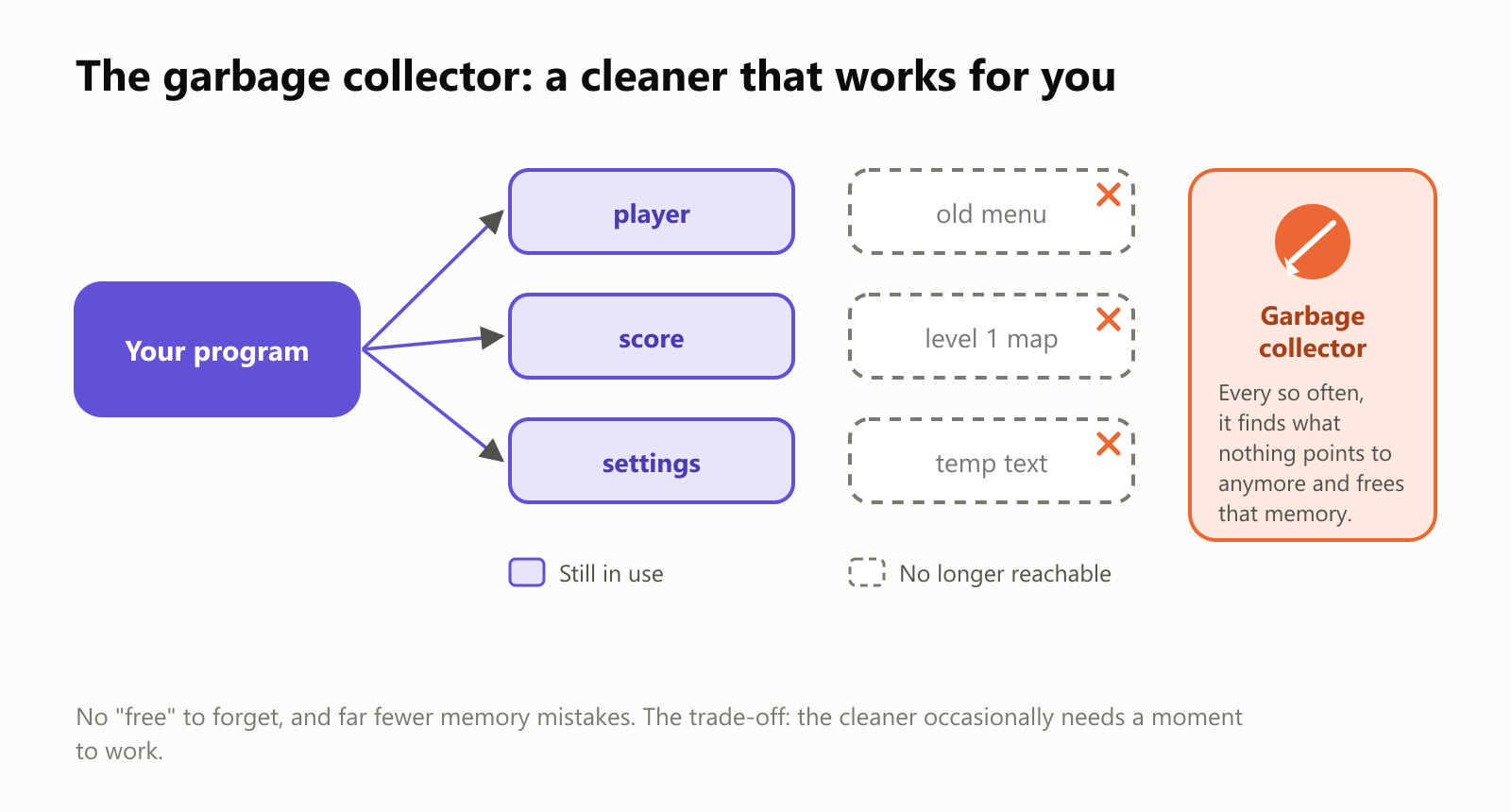
The garbage collector is like a cleaner who passes through every so often. Anything your program can still reach (the player, the score, the settings) is left alone. Anything nothing points to anymore (the old menu you closed, the map of a level you finished) gets swept away, and its memory is freed.
This makes C# a memory-safe language: the dangerous mistakes common in C and C++, like writing past the end of a list or using memory after it was given back, are blocked by default. C# checks, for example, that you never read item number 4 of a list with only 3 items, and stops with a clear error instead of quietly corrupting memory.
The trade-off: the cleaner needs a moment to do its job now and then, and programmers have a bit less control over exactly when memory is freed. For most apps, that's an excellent deal.
Is it fast?
Yes, surprisingly so. We ran the same simple program, counting all the prime numbers below 2 million, in four languages on the same laptop:
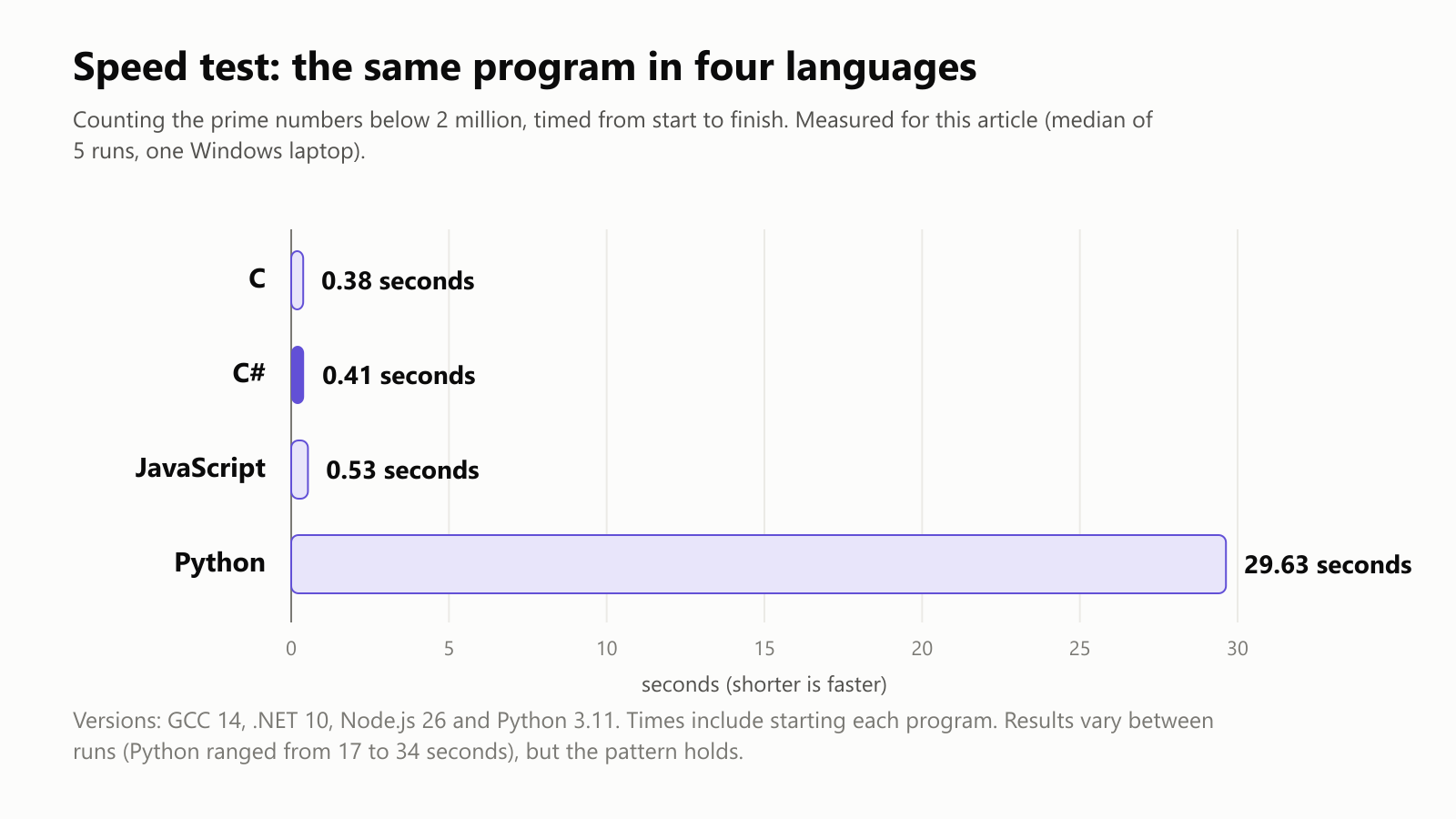
C# came in just behind C, even though these times include starting the .NET runtime. Python, which is wonderful for many things but not built for raw speed, took dozens of times longer. On a simple test like this, the just-in-time translator produces machine code nearly as good as C's.
Some ideas C# made popular
C# didn't just borrow from other languages; several of its ideas spread far and wide:
- async/await (2012): a simple way to write code that waits for something slow, like downloading a file, without freezing the app. JavaScript, Python, Rust and many other languages later adopted the same keywords.
- LINQ (2007): a way to ask questions about data directly in code. For example, "from this list of people, give me the adults, sorted by name":
1var people = new List<Person>
2{
3    new("Maria", 34), new("Ana", 17), new("Pedro", 25), new("Lucas", 15),
4};
5
6var adults = people
7    .Where(person => person.Age >= 18)
8    .OrderBy(person => person.Name)
9    .Select(person => person.Name);
10
11Console.WriteLine(string.Join(", ", adults));
12
13record Person(string Name, int Age);
This prints Maria, Pedro. It reads almost like a sentence: where age is 18 or more, order by name, select the name.
Where C# is used
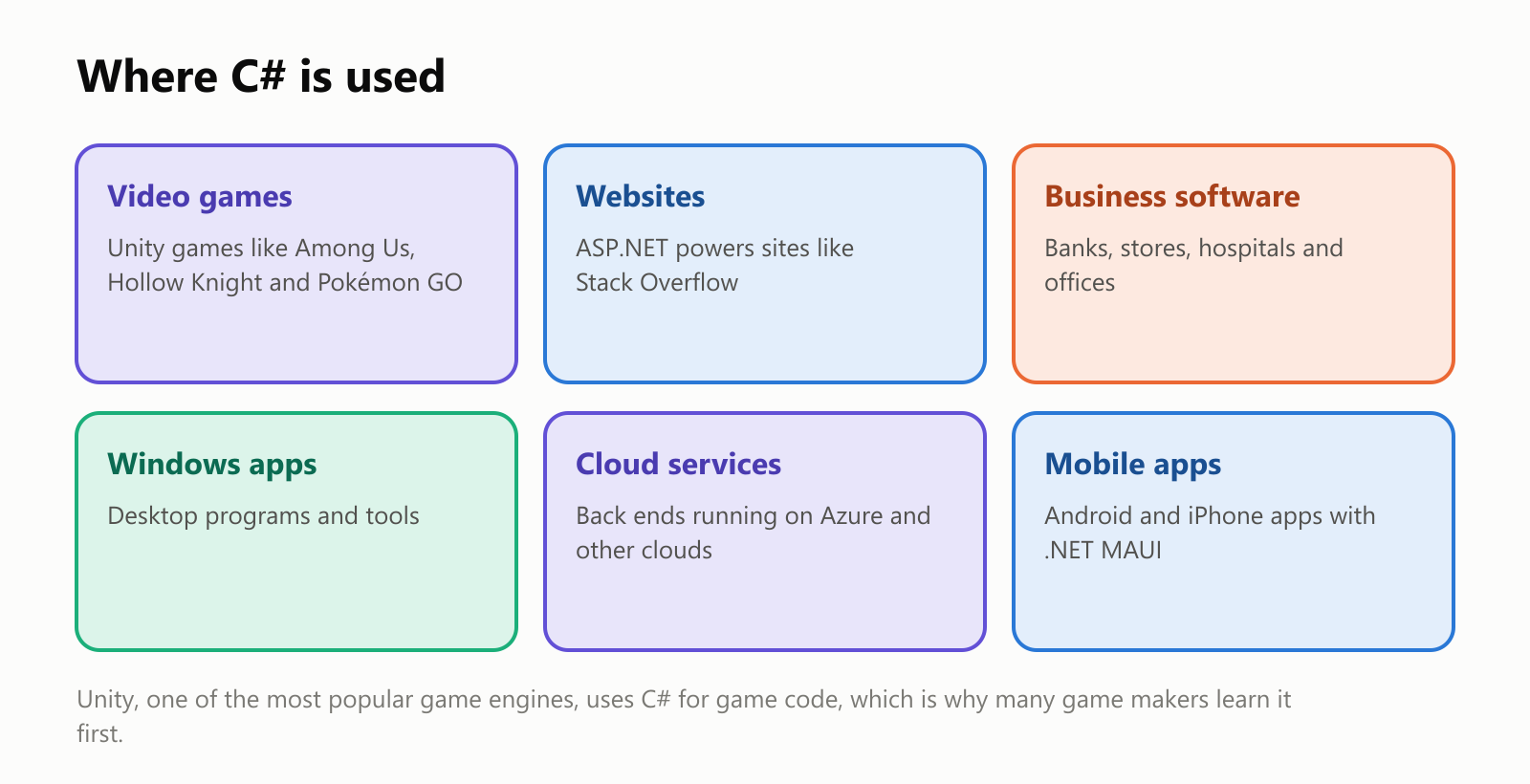
- Video games: Unity, one of the world's most popular game engines, uses C# for game code. Hits like Among Us, Hollow Knight, Cuphead and Pokémon GO were made with Unity. If you want to make games, C# is a common first language.
- Websites and online services: ASP.NET, the web part of .NET, powers many websites, including Stack Overflow, the famous question-and-answer site for programmers.
- Business software: banks, insurance companies, retailers and hospitals run a lot of their internal systems on C#.
- Windows apps, cloud services and mobile apps: from desktop tools to back ends on Microsoft's Azure cloud, to phone apps built with .NET MAUI.
C# has long been one of the most widely used languages in the world, and the TIOBE popularity index named it "programming language of the year" for 2023.
C# next to its neighbors
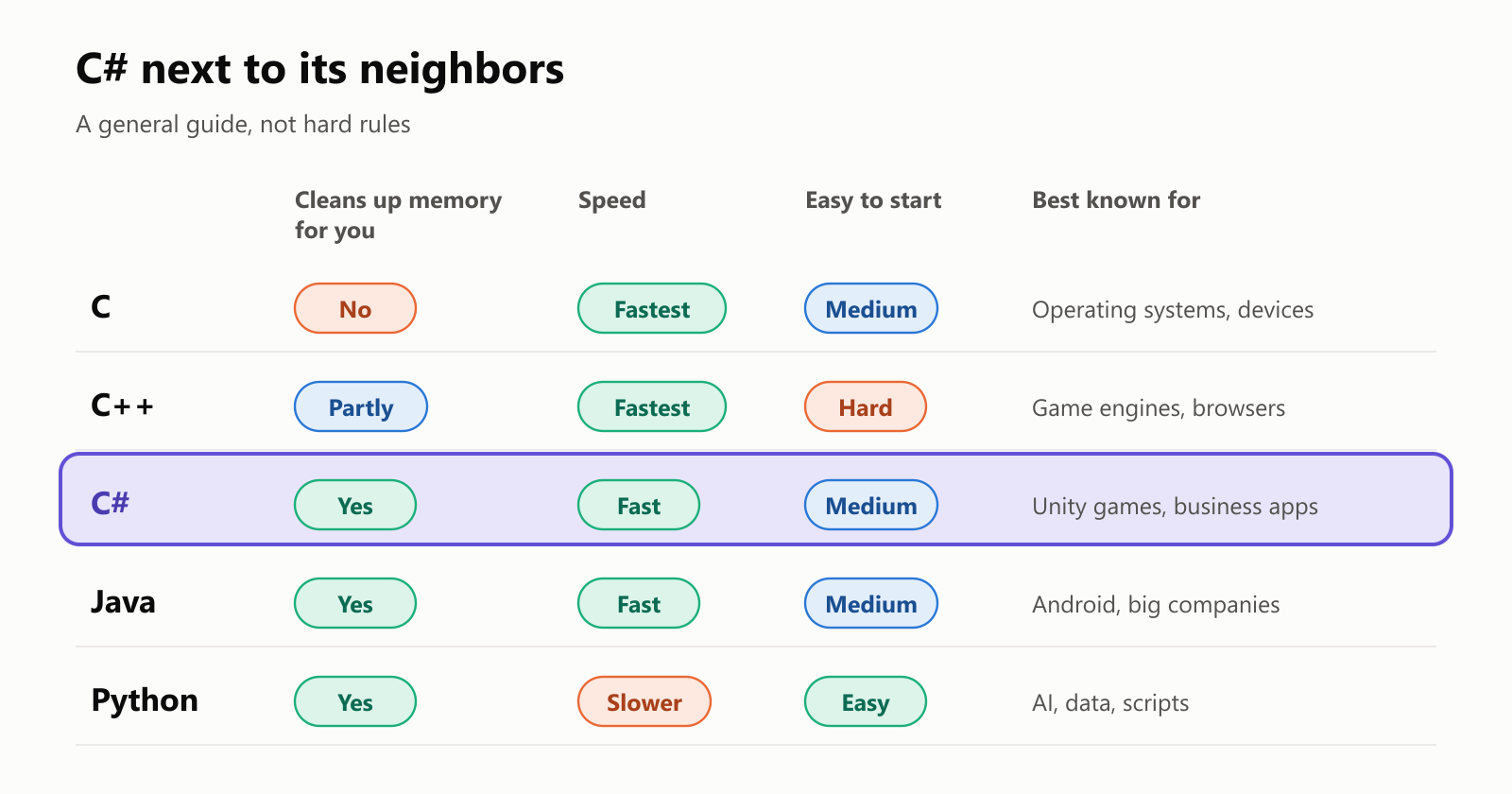
- C# vs. C and C++: they share a look (curly braces, semicolons), but C# handles memory for you and stops many mistakes before they happen. C and C++ give more direct control, which matters for operating systems and game engines.
- C# vs. Java: these two are close cousins. Both run on a virtual platform, both use a garbage collector, and both are huge in business software. C# was even seen as Microsoft's answer to Java when it launched. Today, the choice often comes down to the tools and companies around you.
- C# vs. Python: Python is easier to start with and rules in AI and data science. C# is faster and catches more mistakes before the program runs, thanks to its strict types (every value has a declared kind, like number or text).
Should you learn C#?
- Great reasons: you want to make games with Unity, build websites or business apps, or develop for Windows. C# is also a solid general-purpose first language: strict enough to teach good habits, friendly enough not to overwhelm.
- Good to know: all the tools are free. The .NET SDK runs on Windows, macOS and Linux, and you can write C# in Visual Studio, Visual Studio Code or other editors.
A small glossary
- C#: a programming language from Microsoft, released in 2002, pronounced "C sharp".
- .NET: the free, open-source platform that C# programs run on.
- IL (Intermediate Language): universal in-between instructions that C# is first translated into.
- Runtime: the part of .NET that runs your program on a device.
- JIT (just-in-time) compilation: translating IL into machine code on the device, as the program runs.
- Class / object: a blueprint, and a thing built from it.
- Garbage collector: an automatic cleaner that frees memory nothing uses anymore.
- Memory-safe: a language that prevents most memory mistakes by default.
- Type: the declared kind of a value, like a whole number, text or a date.
- LINQ: C#'s way of asking questions about data in code.
- async/await: keywords for code that waits for slow things without freezing.
- Unity: a popular game engine that uses C# for game code.
- ASP.NET: the part of .NET for building websites and web services.
Wrapping up
C# is Microsoft's answer to a big question: how do you keep much of the speed of C and C++ while making programming safer and more productive? Its answer combines a familiar look, a two-step translation that runs on almost any device, and a garbage collector that takes care of memory for you.
More than 20 years after its debut, C# is free, open source and everywhere: in Unity games on your phone, in websites, and in the systems that keep banks, stores and hospitals running. The name says it well: it's C, raised a notch.
Read next
What Is the C++ Programming Language? A Simple Guide to the Language Behind Games and Browsers
A friendly, jargon-free guide to C++, the programming language behind video games, web browsers and much of the software you use every day. Learn what it adds to C, how classes and automatic cleanup work, and why it's both fast and famously complex.
 nbkhope
What Is the C Programming Language? A Simple Guide to the Language That Runs the World
A friendly, jargon-free guide to C, the 50-year-old programming language hiding inside your phone, your car and the internet. Learn what C is, why it's so fast, how it works with memory, and why it still matters today.
nbkhope
How to Create a Variable in the C++ Programming Language
We can create variables in C++ using the following syntax: We declare the variable first with the data type, followed by the desired name. For example, if you want to store a person's age, you could…
nbkhope
Comments
Be kind and specific. Comments with links from new accounts appear after a moderator reviews them.