
C++ std::vector: Size, Capacity, and Safe Growth
Learn how std::vector grows in C++: the difference between size and capacity, when reserve helps, why resize is different, and how growth can invalidate references.

On this page
C++ std::vector: Size, Capacity, and Safe Growth
You have a list of scores, but you do not know how many there will be. A built-in C++ array has a fixed number of elements; std::vector can grow as you add scores. That flexibility raises a few practical questions: What is the difference between size and capacity? Does reserve create elements? What happens to a reference when the vector moves its storage?
This guide picks up where C++ Arrays leaves off. That article compares built-in arrays, std::array, and std::vector; here we will work with a vector in more detail. All sample output below was checked with GCC 14.1 on Windows using C++20.
Add and read elements
Save this as main.cpp, compile it with g++ -std=c++20 -Wall -Wextra main.cpp -o main, and run the resulting program:
1#include <cstddef>
2#include <iostream>
3#include <vector>
4
5int main() {
6    std::vector<int> scores{90, 85, 77};
7    scores.push_back(92);
8
9    std::cout << "count: " << scores.size() << '\n';
10    std::cout << "first: " << scores.front() << '\n';
11    std::cout << "last: " << scores.back() << '\n';
12
13    for (std::size_t i = 0; i < scores.size(); ++i) {
14        if (i != 0) std::cout << ' ';
15        std::cout << scores[i];
16    }
17    std::cout << '\n';
18}1count: 4
2first: 90
3last: 92
490 85 77 92push_back appends one element. size() counts elements that actually exist. Indexing starts at zero, so scores[3] is the fourth score. Only call front() or back() when the vector is not empty.
Size is not capacity
Capacity is how many elements the vector can hold in its current storage before it must allocate more. It is always at least as large as the size, but spare capacity is not a set of ready-to-use elements.
1size = 3, capacity = 5
2
3index:     0    1    2    3    4
4storage: [ 10 ][ 20 ][ 30 ][ -- ][ -- ]
5          existing elements  | spare space
The boxes at indexes 3 and 4 are only a picture of available storage. They are outside the vector's size: values[3] is invalid until a fourth element is added. Use push_back or resize to create that element.
Measure growth without assuming a growth rule
Run this program to watch size and capacity change:
1#include <iostream>
2#include <vector>
3
4int main() {
5    std::vector<int> values;
6    values.reserve(5);
7    std::cout << "start: size=" << values.size()
8              << " capacity=" << values.capacity() << '\n';
9
10    for (int value = 1; value <= 6; ++value) {
11        const auto before = values.capacity();
12        values.push_back(value * 10);
13        if (values.capacity() != before) {
14            std::cout << "storage grew at size " << values.size()
15                      << ": capacity=" << values.capacity() << '\n';
16        }
17    }
18
19    std::cout << "finish: size=" << values.size()
20              << " capacity=" << values.capacity() << '\n';
21}
On the GCC 14.1 setup used for this article, the output was:
start: size=0 capacity=5
storage grew at size 6: capacity=10
finish: size=6 capacity=10
The C++ standard guarantees that reserve(5) gives a capacity of at least five and does not change the size. It does not promise that every implementation will choose capacity 5 or grow to 10. The useful observation is that the first five additions fit without reallocation; the sixth needs more storage when capacity was five. This is a measurement of one implementation's growth behavior, not a speed benchmark.
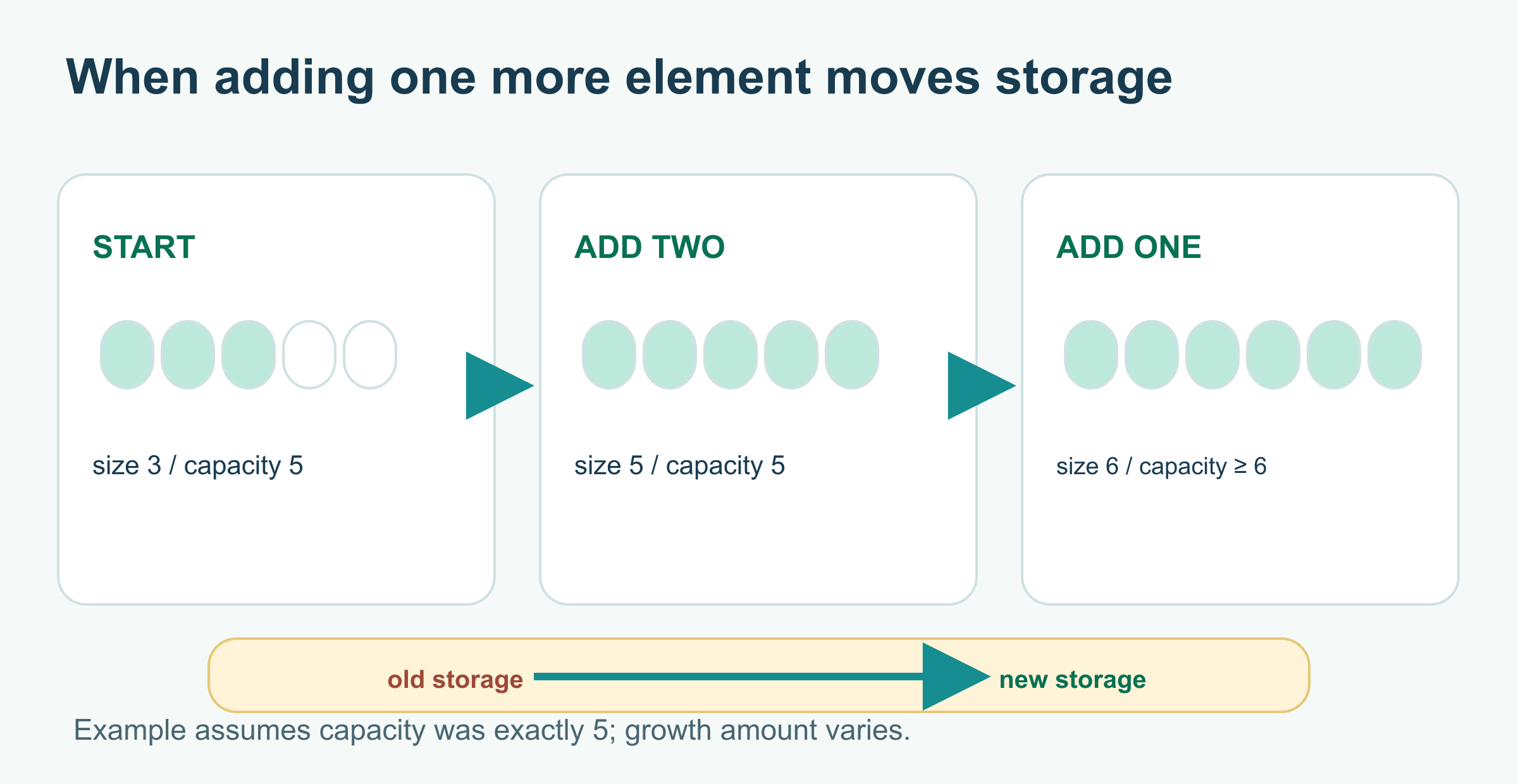
The drawing starts with capacity exactly five so the third step necessarily reallocates. Real implementations can choose a larger capacity, so the new capacity is marked only as “at least six.” Keep an index and look up the element again after growth rather than using a reference into the old storage.
reserve versus resize
These names are easy to mix up:
| Call on an empty vector | Size afterward | What changed? |
|---|---|---|
values.reserve(5) | 0 | Storage for at least five elements is available; no elements were created |
values.resize(5) | 5 | Five int elements now exist, initialized to zero |
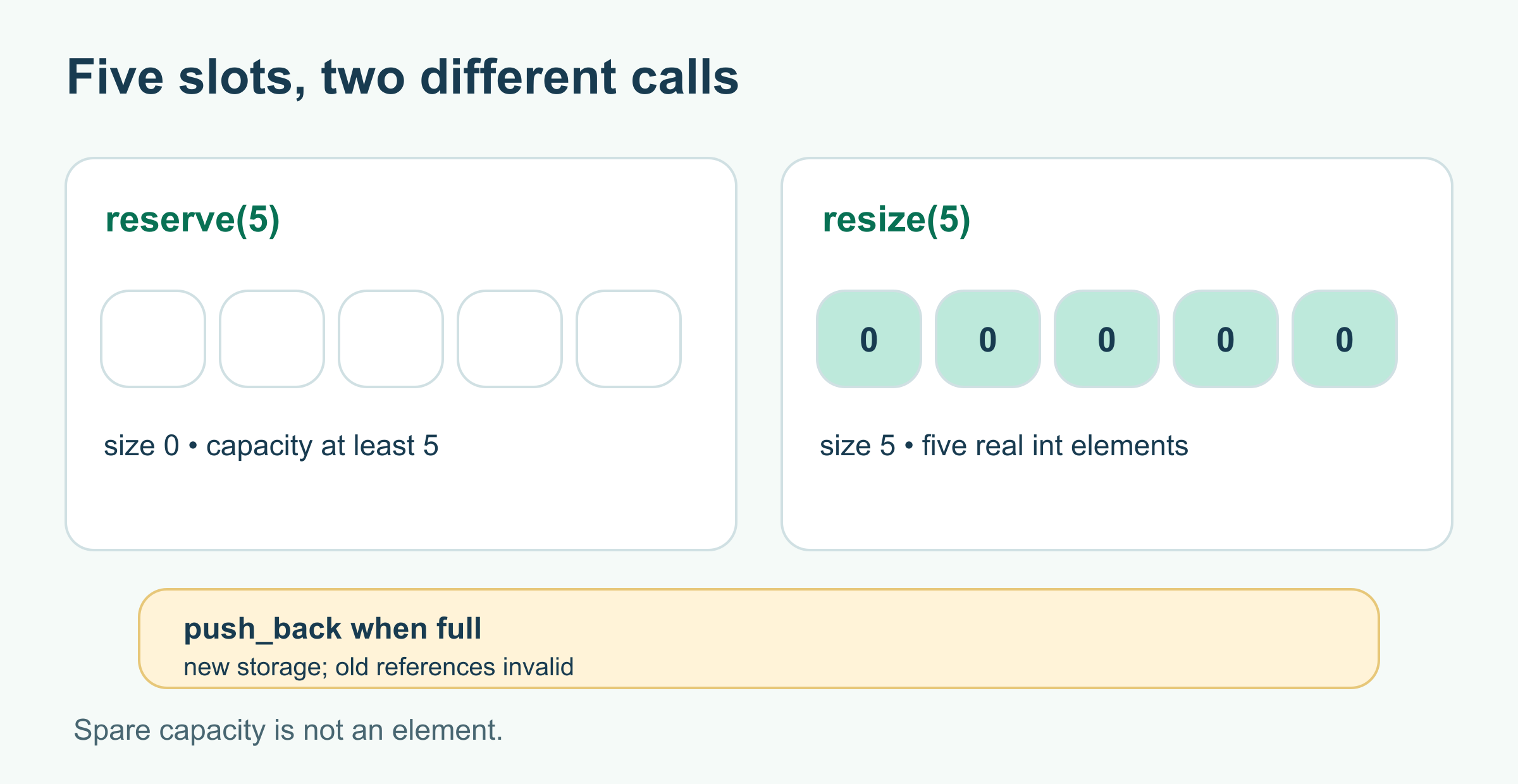
The five boxes show potential storage on the left and existing elements on the right. Both calls may allocate memory, but only resize makes those indexes valid. If a later push_back exceeds capacity and reallocates, reacquire any pointer, reference, or iterator from the vector.
Use reserve when you expect to append about that many elements and want to avoid some reallocations. Use resize when you need that many elements now, perhaps to fill them by index. Reserving on every push_back is usually counterproductive; let the vector manage growth unless you have a useful size estimate.
1std::vector<int> values;
2values.reserve(5);  // size is still 0: values[0] is invalid
3values.push_back(42); // size is now 1: values[0] exists
4values.resize(3);    // size is now 3: values[1] and values[2] are 0
Growth can invalidate references and iterators
A vector stores its elements contiguously. When it needs a larger block, it can move or copy the elements there. If reallocation occurs, pointers, references, and iterators to its elements become invalid. Reading through one afterward is undefined behavior. Do not try to demonstrate that by dereferencing a dangling pointer; a program that appears to work can still be wrong.
Instead, keep an index if you need to find an element after adding more values, then look it up again:
1#include <iostream>
2#include <vector>
3
4int main() {
5    std::vector<int> values{10};
6    const std::size_t firstIndex = 0;
7
8    for (int value = 20; value <= 100; value += 10) {
9        values.push_back(value);
10    }
11
12    std::cout << "first: " << values.at(firstIndex) << '\n';
13    std::cout << "count: " << values.size() << '\n';
14}
first: 10
count: 10at() checks the index and throws std::out_of_range if it is outside the current size; operator[] does not perform that check. An index must still be valid for the current vector: insertion or erasure before an element can shift its position. reserve can reduce reallocations, but do not use it as a general promise that every future mutation keeps references valid.
Choose the right tool
- Use
std::vectorwhen the number of elements can change, especially when adding to the end. - Use
std::arraywhen the size is fixed and known at compile time. - Use a built-in array when you need to interface with code that requires one or when learning how arrays and pointers work.
std::vector is not inherently slow to read: like an array, it stores elements next to each other. Growing it may involve allocation and moving elements, so keep the cost of growth separate from the cost of access. For the fuller array comparison and measurements, return to C++ Arrays.
Try it yourself
Change the growth program to call reserve(8) and append six values. Predict the final size and the minimum possible capacity before running it. Then change reserve(8) to resize(8) and predict the first eight values before the loop starts.
Answer: After reserve(8) and six additions, the size is 6 and capacity is at least 8. After resize(8), the size is already 8 and its eight int elements are zero; appending six more makes the size 14. The exact capacity is implementation-dependent.
Further reading
Read next

How to Handle Errors in Go: A Hands-On Guide
Learn Go's everyday error pattern with runnable examples: return an error, check it, add context with %w, and recognize a missing file with errors.Is.
 nbkhope
What Is the Swift Programming Language? A Simple Guide to the Language Behind iPhone Apps
A friendly, jargon-free guide to Swift, the programming language Apple created for iPhone, iPad and Mac apps. Learn why it replaced Objective-C, how optionals prevent crashes, how an app is made, and how fast Swift really is.
nbkhope
What Is the Rust Programming Language? A Simple Guide to the Fast Language That Won't Let You Crash
A friendly, jargon-free guide to Rust, the programming language that is as fast as C but stops whole families of memory bugs before a program ever runs. Learn about ownership, why tech giants are adopting it, and where it is used.
nbkhope
Comments
Be kind and specific. Comments with links from new accounts appear after a moderator reviews them.