What Is the Swift Programming Language? A Simple Guide to the Language Behind iPhone Apps
A friendly, jargon-free guide to Swift, the programming language Apple created for iPhone, iPad and Mac apps. Learn why it replaced Objective-C, how optionals prevent crashes, how an app is made, and how fast Swift really is.

On this page
Almost every app on your iPhone, from your banking app to the games you play on the bus, was built by someone writing code. These days, most new apps for Apple devices are written in Swift, a programming language Apple introduced in 2014 to make building apps faster, safer and more pleasant.
This article explains, in plain language, what Swift is, why Apple created it, what makes it safer than the language it replaced, and how a Swift app goes from an idea to the App Store.
Before Swift: Objective-C
For about 30 years, Apple's apps were written in a language called Objective-C, created in the early 1980s by adding object-oriented features on top of the C language (see What Is the C Programming Language?). Apple inherited it in 1997, when it bought NeXT, the company Steve Jobs founded after leaving Apple.
Objective-C powered the first iPhone apps and the App Store, which opened in 2008. But it showed its age: lots of symbols, long-winded code and, because it was built on C, the same risky memory mistakes. Here's the same small task in both languages:
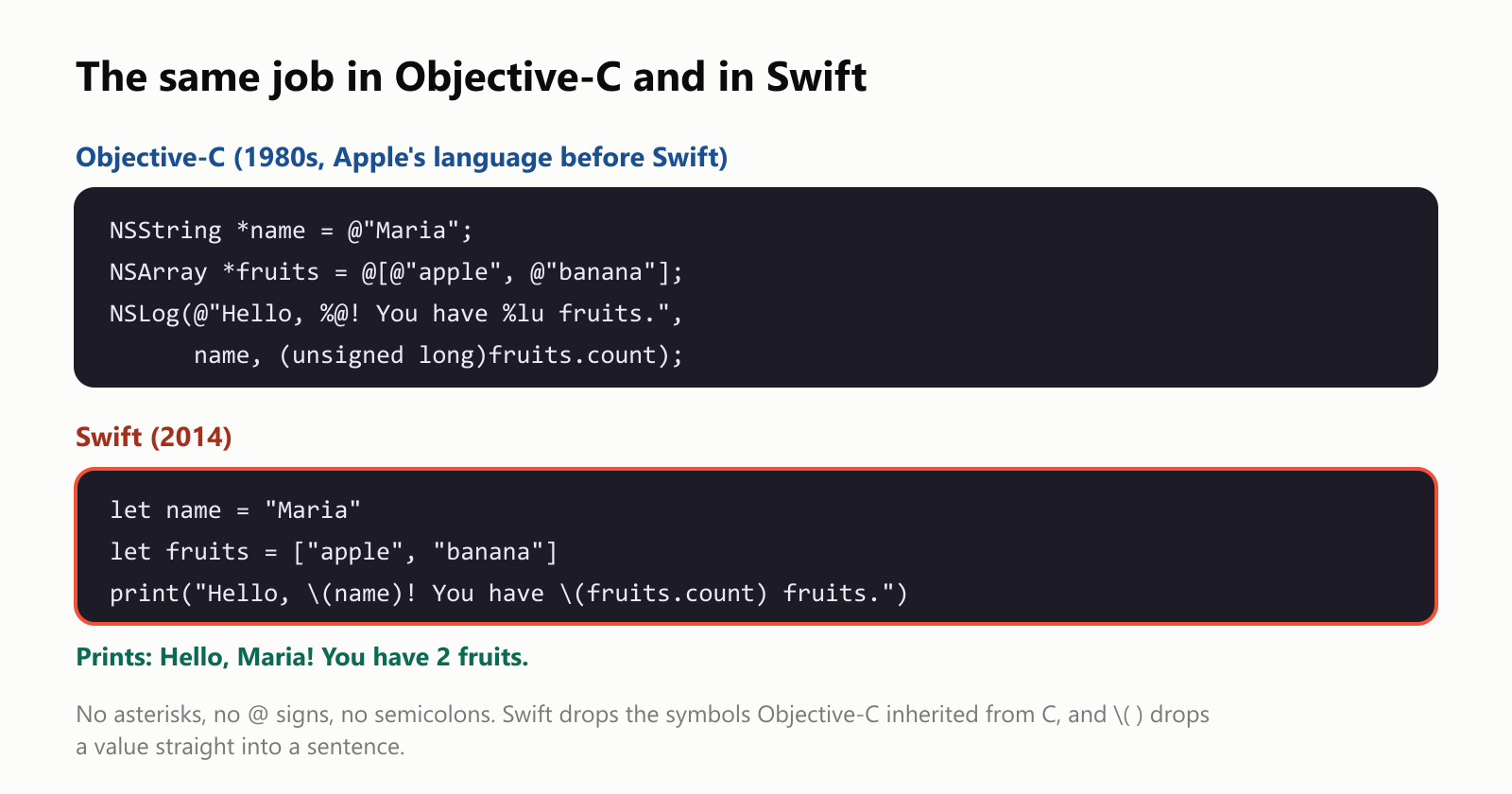
Swift drops the asterisks, the @ signs and the semicolons. Writing \(name) inside a sentence drops a value right in. And Swift figures out on its own that name holds text and fruits holds a list, so you don't have to say it.
A secret project
In 2010, an Apple engineer named Chris Lattner started designing a new language in his spare time. Lattner was already famous among programmers: as a university student, he had created LLVM, a toolkit for building compilers that now powers many programming languages.
His side project grew into a secret team inside Apple. When Apple unveiled Swift at its developer conference in June 2014, it surprised almost everyone. A year later, in 2015, Apple made Swift open source, free for anyone to use and improve, and it started running on Linux too.
What Swift looks like
Here's the classic first program:
print("Hello, world!")One line. And here's a small car, described with a struct (a bundle of named values with abilities):
1struct Car {
2    var color: String
3    var speed = 0
4
5    mutating func accelerate() {
6        speed += 10
7    }
8}
9
10var myCar = Car(color: "red")
11myCar.accelerate()
12myCar.accelerate()
13print("My \(myCar.color) car is going \(myCar.speed) km/h")
This prints My red car is going 20 km/h. Swift uses let for values that never change and var for values that can, and it encourages let whenever possible, so fewer things change unexpectedly.
Picking the adults out of a list of people reads almost like a sentence:
1let adults = people
2    .filter { $0.age >= 18 }
3    .map { $0.name }
4    .sorted()
5
6print(adults.joined(separator: ", "))  // Maria, Pedro
Filter the people 18 or older, map each to their name, sort the names. ($0 is Swift's shorthand for "the current item".)
Optionals: Swift's answer to the "empty box" crash
One of the most common reasons apps crash is trying to use a value that isn't there: a nickname that was never set, a photo that didn't download, a user who isn't logged in. Many languages represent "nothing" with a special empty value, often called null or nil, and using it by accident crashes the program. Its inventor, Tony Hoare, later called it his "billion-dollar mistake".
Swift tackles this with optionals. A value that might be missing gets a ? in its type, like a box that might be empty:
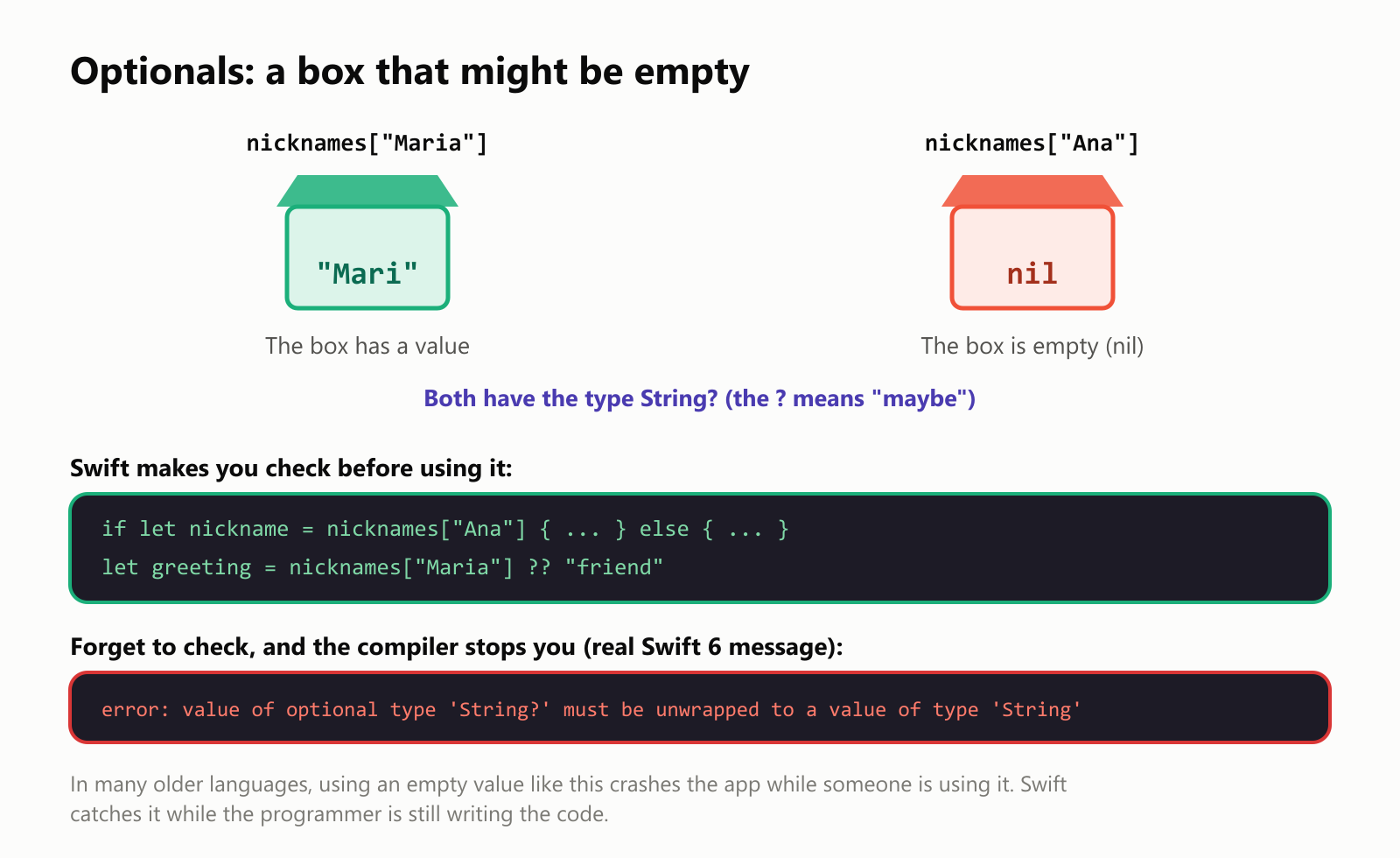
Swift won't let you use what's inside the box until you've checked whether it's empty. You can open it carefully with if let, or provide a backup value with ??:
1let nicknames = ["Maria": "Mari", "Pedro": "Pepe"]
2
3if let nickname = nicknames["Ana"] {
4    print("Hi, \(nickname)!")
5} else {
6    print("Ana doesn't have a nickname yet.")
7}
8
9let greeting = nicknames["Maria"] ?? "friend"
10print("Hi, \(greeting)!")
This prints Ana doesn't have a nickname yet. and then Hi, Mari!. If you forget to check, the program doesn't even build: the compiler (the tool that turns code into an app) points at the line and explains what's wrong. The mistake gets caught on the programmer's computer, not on yours.
More safety nets
Swift checks for other classic mistakes too. In this test, both programs store 127 in a small number "box" that can only hold numbers up to 127, then add 1:
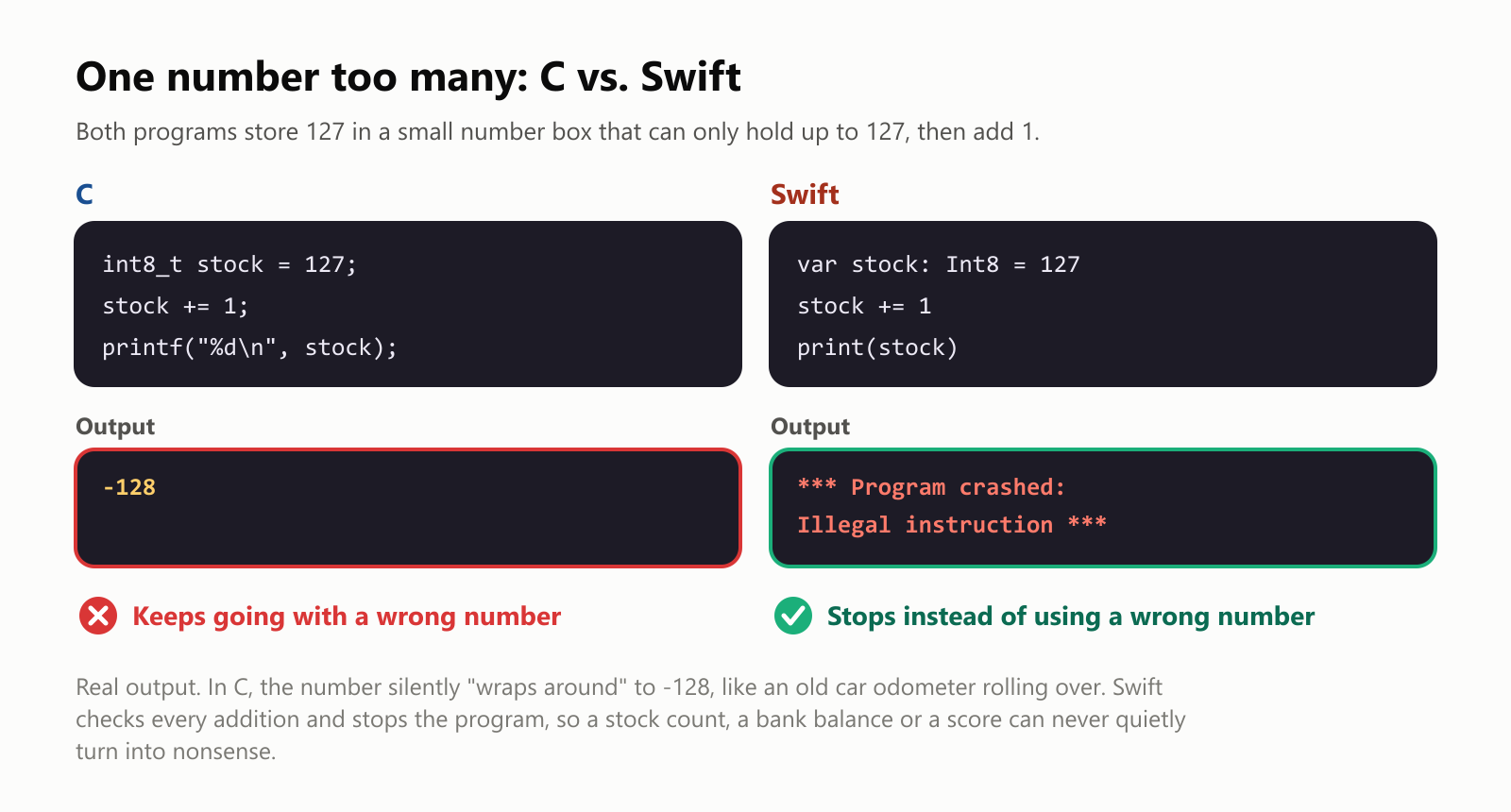
C silently "wraps around" to -128, like an old car odometer rolling over, and keeps going with a wrong number. Swift stops the program instead. Stopping sounds bad, but it's much safer than an app quietly showing a negative stock count or a wrong balance. Swift also checks that you never read past the end of a list, and it manages memory automatically, so the dangerous memory mistakes common in C and Objective-C are prevented. (For another language built around safety, see What Is the Rust Programming Language?)
How an app is made
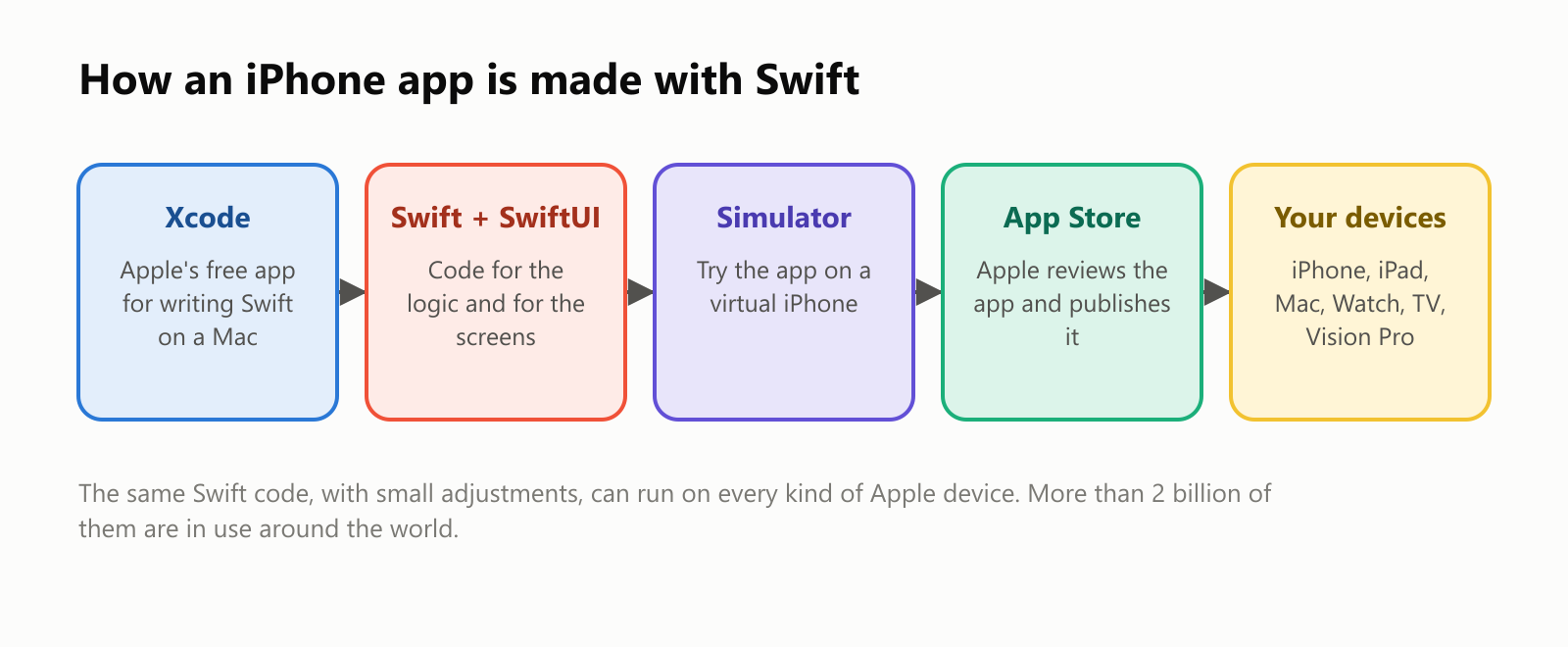
- Xcode: developers write Swift in Xcode, Apple's free app for Mac.
- SwiftUI: since 2019, the screens of many apps are built with SwiftUI, where you describe what the screen should show and SwiftUI keeps it up to date.
- Simulator: Xcode can show the app on a virtual iPhone right on the Mac, so you can test it without a phone.
- App Store: when it's ready, the developer sends it to Apple (publishing requires a paid Apple developer membership), Apple reviews it, and it appears in the App Store.
Here's a tiny SwiftUI screen with a "Like" button that counts taps:
1import SwiftUI
2
3struct LikeView: View {
4    @State private var likes = 0
5
6    var body: some View {
7        VStack {
8            Text("\(likes) likes")
9            Button("👍 Like") {
10                likes += 1
11            }
12        }
13    }
14}
@State tells SwiftUI that likes can change, and every time it does, SwiftUI redraws the text automatically. There's no code that says "find the label and update it": you describe the screen, and SwiftUI handles the rest.
Is Swift fast?
Yes, when it's built for release. Swift compiles to machine code like C. We timed the same job, counting the prime numbers below 2 million, inside Apple's official Swift container for Linux:
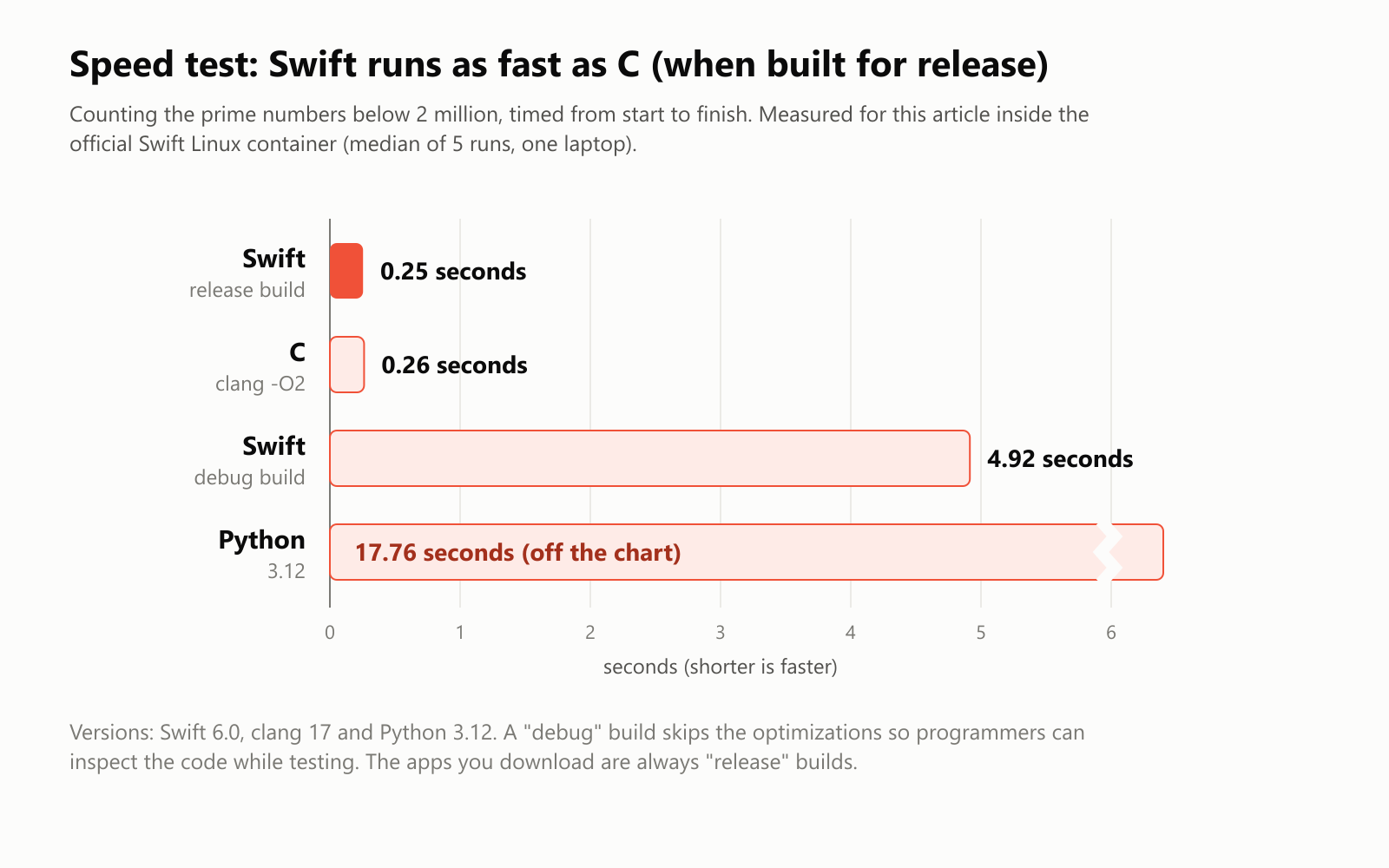
The release build of Swift tied with C at about a quarter of a second, roughly 70 times faster than Python. We also timed a debug build, the version programmers use while testing, which skips optimizations so the code is easier to inspect. It took almost 5 seconds, a good reminder of how much work the compiler's optimizations do. The apps you download are always release builds.
Where Swift runs
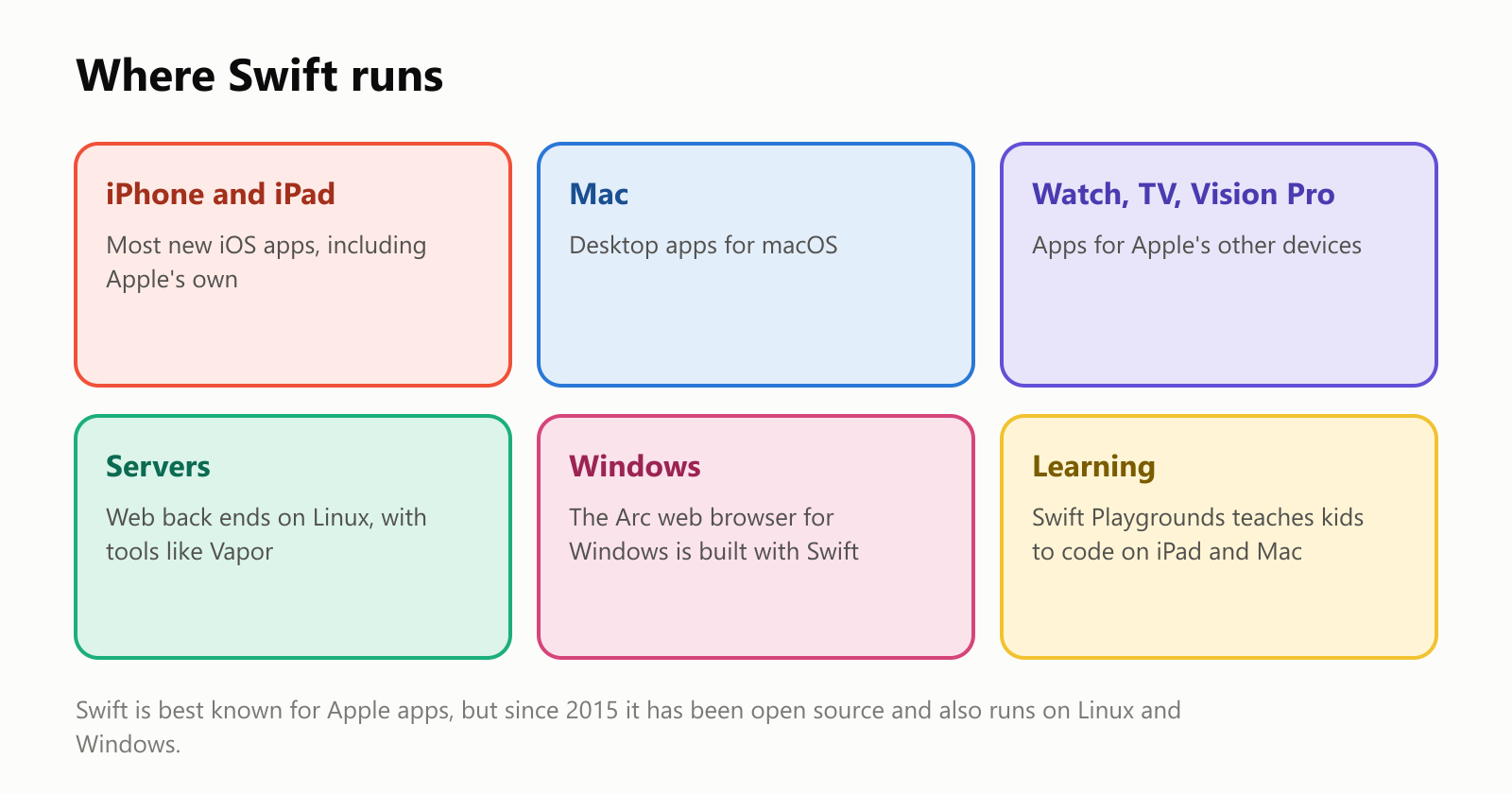
- Apple devices: iPhone, iPad, Mac, Apple Watch, Apple TV and Apple Vision Pro. Apple uses Swift in its own apps, and it's the recommended language for new ones.
- Servers: because Swift is open source and runs on Linux, it can also power the behind-the-scenes part of websites, with frameworks like Vapor.
- Windows: the Arc web browser for Windows was built with Swift, showing it can work outside Apple's world too.
- Learning: Apple's free Swift Playgrounds app, released in 2016, teaches kids and beginners to code with puzzles and games on iPad and Mac.
If you're wondering about Android: Android apps are usually written in a different language, Kotlin, which fills a similar role in Google's world. Many companies keep two teams, one writing Swift for iPhone and one writing Kotlin for Android.
The downsides
- Tied to Apple. Swift runs elsewhere, but its biggest strengths, SwiftUI and the app frameworks, are Apple-only. Building iPhone apps requires a Mac.
- Fast-changing. Swift has evolved quickly, and early versions broke older code with each update. It's much more stable today, but some online tutorials are out of date.
- Compile times. Large Swift projects can be slow to build, partly because the compiler works hard to figure out types on its own.
- Smaller world outside Apple. For servers, data science or AI, other languages have far more ready-made tools and libraries.
A short history
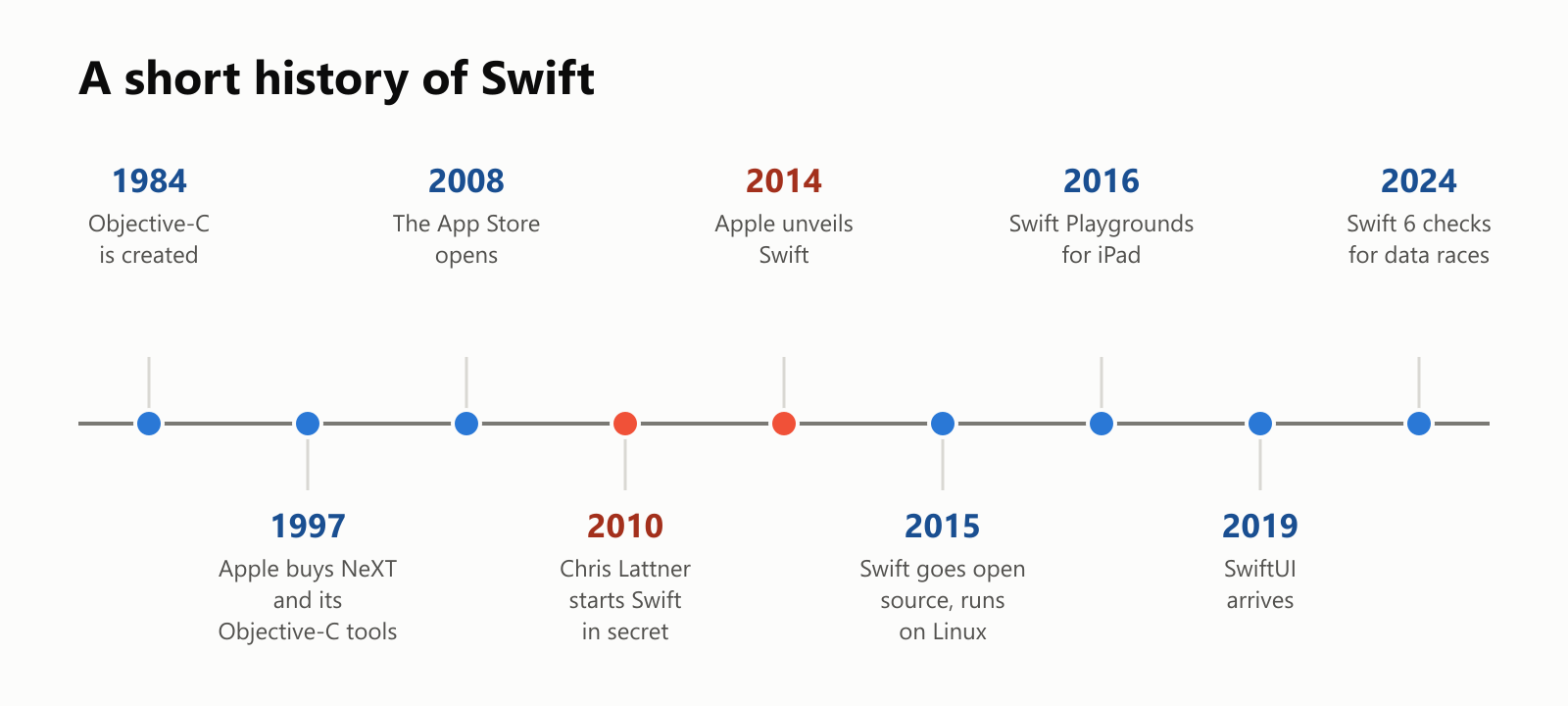
A recent milestone: Swift 6, released in 2024, can detect data races, a sneaky kind of bug where two parts of an app change the same data at the same time, and it can warn about them before the app even runs.
Should you learn Swift?
- Great reasons: you want to build apps for iPhone, iPad, Mac or Apple Watch. Swift is the most direct path, and it's a modern, readable language that teaches good habits.
- Good to know: Swift and Xcode are free, but Xcode only runs on a Mac. Without a Mac, you can still try Swift on Windows or Linux, or in your browser with an online Swift playground. Apple's free Swift Playgrounds app on iPad and Mac is a fun place to start.
A small glossary
- Swift: Apple's programming language for its devices, introduced in 2014 and open source since 2015.
- Objective-C: the language Apple used before Swift, built on top of C.
- Xcode: Apple's free app for writing, testing and publishing apps, available on Mac.
- SwiftUI: Apple's way of building app screens by describing what they should show.
- Struct: a bundle of named values, like a car's color and speed, with abilities attached.
- let / var: Swift's words for values that never change and values that can.
- Optional: a value that might be missing, marked with
?, which must be checked before use. - nil: Swift's word for "no value", an empty box.
- ARC: automatic reference counting, how Swift frees memory without a garbage collector.
- Release build / debug build: the optimized version of an app that users get, and the slower version programmers use while testing.
- Data race: a bug where two parts of a program change the same data at the same time.
Wrapping up
Swift began as one engineer's side project and became the language behind most new apps for more than 2 billion Apple devices. It replaced Objective-C's symbols with clean, readable code, and added safety nets, like optionals and overflow checks, that catch common crash-causing mistakes before an app reaches anyone's hands.
It's at its best in Apple's world, and you'll need a Mac to build iPhone apps. But if you've ever wondered what's behind the apps on your phone, there's a good chance the answer is a language named after a small, very fast bird.
Read next
What Is the Rust Programming Language? A Simple Guide to the Fast Language That Won't Let You Crash
A friendly, jargon-free guide to Rust, the programming language that is as fast as C but stops whole families of memory bugs before a program ever runs. Learn about ownership, why tech giants are adopting it, and where it is used.
 nbkhope
What Is the Go Programming Language? A Simple Guide to the Language of the Cloud
A friendly, jargon-free guide to Go, the simple and fast programming language Google created for the cloud. Learn what goroutines are, why Go programs are a single file, and how Go came to power Docker, Kubernetes and much of the internet.
nbkhope
What Is the Python Programming Language? A Simple Guide to the Language Behind Data Science and AI
A friendly, jargon-free guide to Python, the easy-to-read programming language behind data science and AI. Learn why it uses indentation, how it can be slow and fast at the same time, and why it became the most popular language in the world.
nbkhope
Comments
Be kind and specific. Comments with links from new accounts appear after a moderator reviews them.