What Is the Python Programming Language? A Simple Guide to the Language Behind Data Science and AI
A friendly, jargon-free guide to Python, the easy-to-read programming language behind data science and AI. Learn why it uses indentation, how it can be slow and fast at the same time, and why it became the most popular language in the world.

On this page
If you've heard of a programming language recently, there's a good chance it was Python. It's the language most AI researchers use, a favorite of scientists and data analysts, a common first language in schools, and, since 2024, the most used language on GitHub, the world's biggest home for code.
This article explains, in plain language, what Python is, why its code is so easy to read, how a language known for being slow ended up powering artificial intelligence, and where it's used today.
A hobby project over the holidays
In December 1989, a Dutch programmer named Guido van Rossum was looking for something to keep him busy during the Christmas holidays. He decided to write a new programming language: one that was easy to read, fun to use and powerful enough for real work.
He released it to the public in 1991. Guido led the language for almost 30 years, with the playful title of "Benevolent Dictator For Life", until he stepped down in 2018. Today Python is guided by an elected group of volunteers and supported by a nonprofit, the Python Software Foundation, and it's free for anyone to use.
Python's guiding ideas are even built into the language. If you type import this into Python, it prints a short poem called The Zen of Python, which starts like this:
Beautiful is better than ugly.
Explicit is better than implicit.
Simple is better than complex.
What Python looks like
Here's the classic first program:
print("Hello, world!")That's it: one line, and it prints Hello, world!.
Python code is famous for looking almost like pseudocode, the plain-English outlines people sketch before writing real code. Here are some real one-liners and the answers Python gave:
![Try it in Python, real Python code and what Python answered. len("hello") asks how many letters are in "hello", and Python answers 5. "py" in "python" asks if "py" is inside "python", and Python answers True. sorted([3, 1, 2]) sorts the list, and Python answers [1, 2, 3]. "hello world".title() capitalizes each word, and Python answers 'Hello World'. sum([10, 20, 30]) adds up the list, and Python answers 60. 2 ** 100 means 2 to the power of 100, and Python answers a 31-digit number, 1267650600228229401496703205376, with no extra work](https://nbktechworld.us-southeast-1.linodeobjects.com/static/images/5a639561-aba3-4609-80a5-f38e4436f5a6.png?v=1792092593093)
That last one is a nice surprise. Many languages can only handle whole numbers up to a certain size, but Python lets numbers grow as big as your computer's memory allows.
Spaces that mean something
Python's most recognizable feature is how it groups lines of code. Most languages, like JavaScript, C and Java, use curly braces { } to mark which lines belong together. Python uses indentation, the spaces at the start of a line:
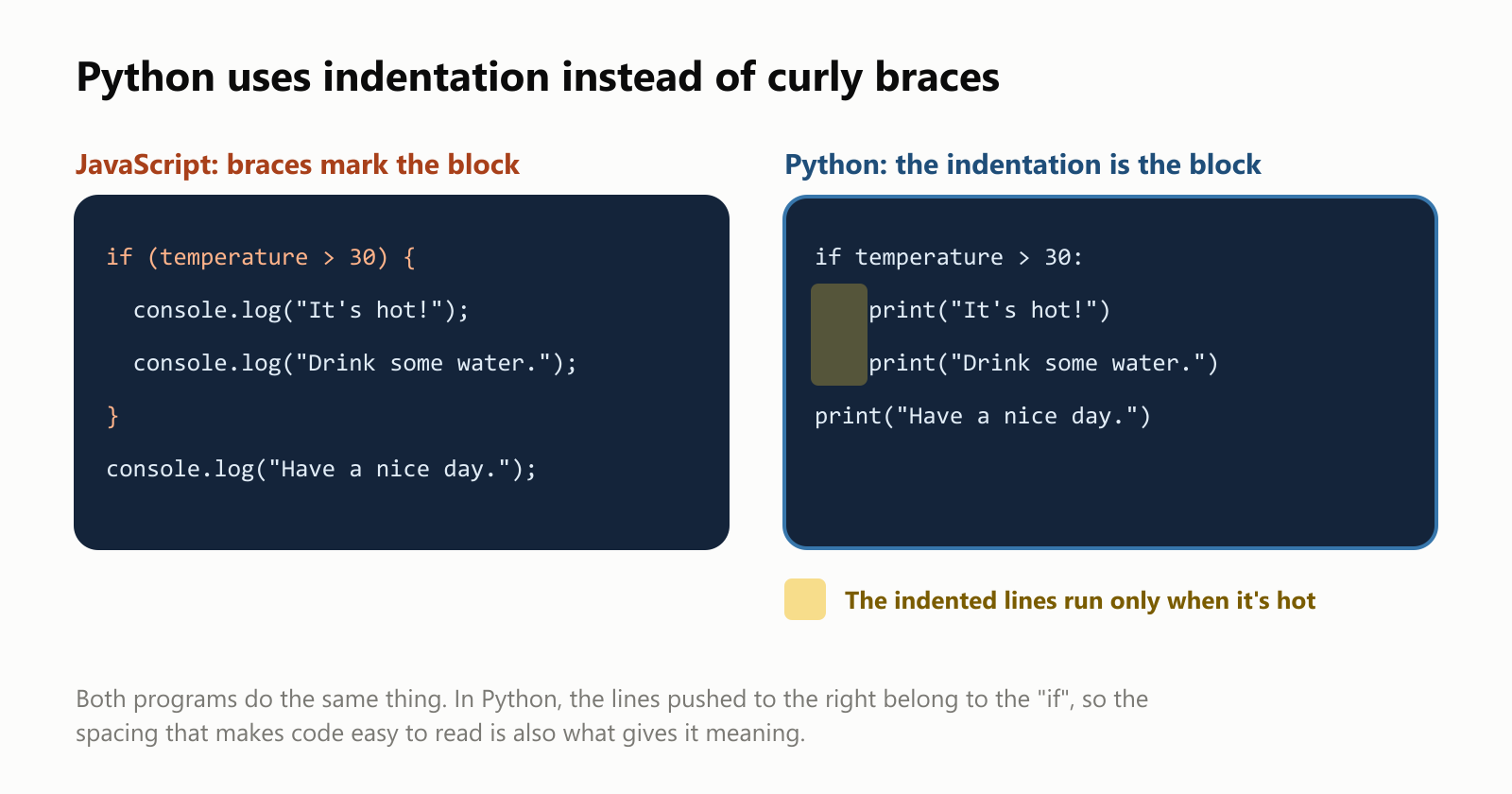
In the Python version, the two lines pushed to the right belong to the if, so they only run when it's hot. The last line isn't indented, so it always runs. With temperature = 31, the program prints:
It's hot!
Drink some water.
Have a nice day.
Programmers in every language indent their code to make it readable. Python simply makes it a rule, so Python code tends to look neat and consistent no matter who wrote it.
Python also has classes, blueprints for creating objects, like a car that knows its color and speed:
1class Car:
2    def __init__(self, color):
3        self.color = color
4        self.speed = 0
5
6    def accelerate(self):
7        self.speed += 10
8
9    def brake(self):
10        self.speed = 0
11
12
13my_car = Car("red")
14my_car.accelerate()
15my_car.accelerate()
16print(f"My {my_car.color} car is going {my_car.speed} km/h")
This prints My red car is going 20 km/h. def defines an action, __init__ sets up each new car, and the f before the quotes lets you drop values right into a sentence with {...}.
And here's how you'd pick out the adults from a list of people and sort their names, in a single readable line:
1people = [
2    {"name": "Maria", "age": 34},
3    {"name": "Ana", "age": 17},
4    {"name": "Pedro", "age": 25},
5    {"name": "Lucas", "age": 15},
6]
7
8adults = sorted(person["name"] for person in people if person["age"] >= 18)
9print(", ".join(adults))  # Maria, Pedro
Read it out loud: sorted: each person's name, for each person in people, if their age is 18 or more.
Is Python fast?
On its own, not really. Python reads and carries out your program step by step while it runs, using a program called an interpreter, instead of translating everything into the computer's own machine language ahead of time like C does. That makes it flexible and easy to try things out, but it adds overhead to every single step.
We timed the same simple job, counting the prime numbers below 2 million, in four languages:
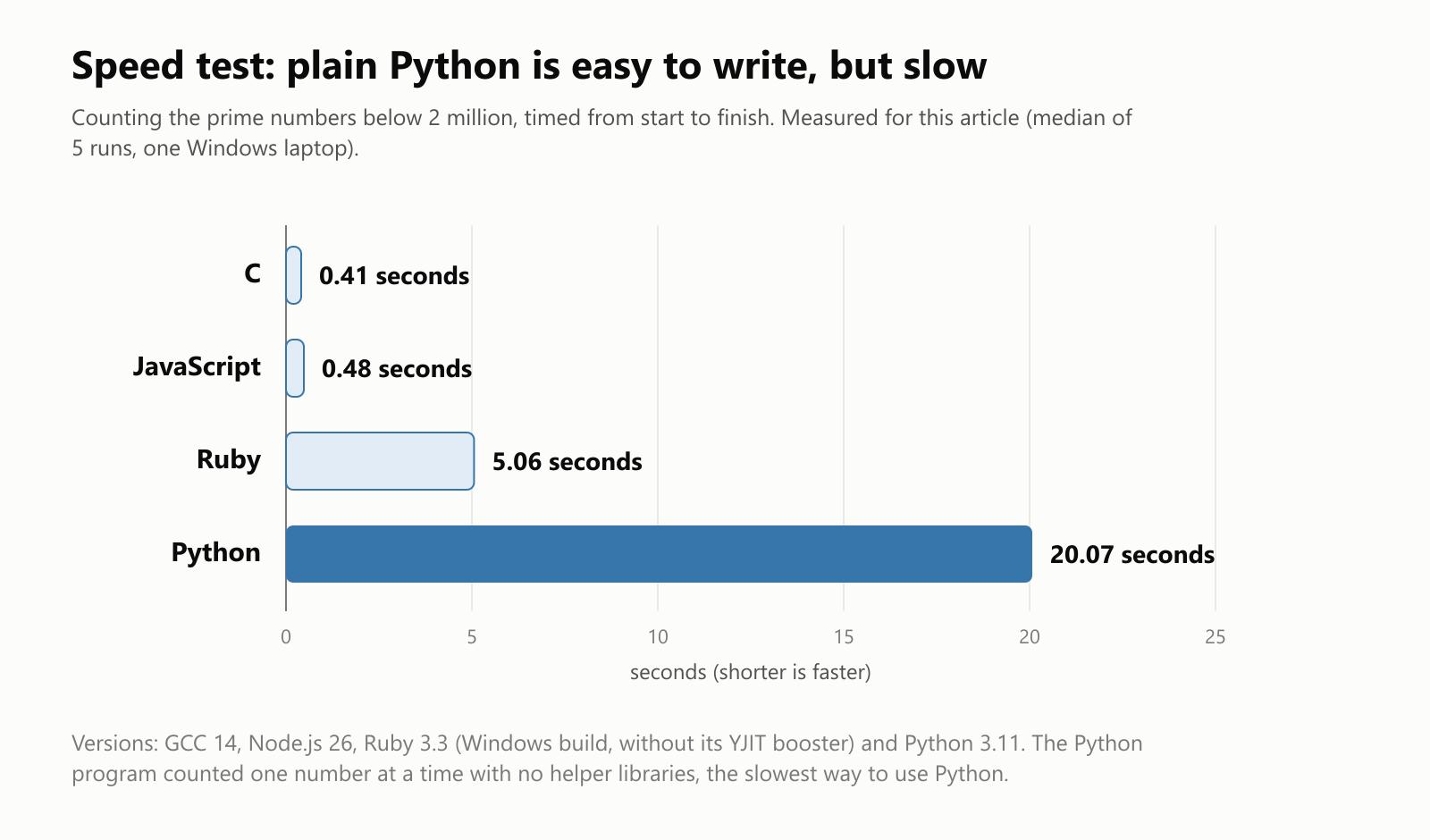
Python took about 20 seconds, roughly 50 times slower than C. This was the plain, step-by-step Python you'd write as a beginner. (We used the same test in What Is the Ruby Programming Language?)
Newer versions are catching up. Python 3.11 was on average about 25% faster than the version before it, and recent versions have started adding a built-in compiler that turns busy code into machine code while it runs.
So how did a slow language become the language of AI, where speed matters enormously? That's Python's cleverest trick.
Python's secret: the steering wheel and the engine
Python is excellent at calling code written in other languages. The libraries that do heavy math, like NumPy (numbers and grids), pandas (tables of data), PyTorch and TensorFlow (AI), are written mostly in fast languages like C and C++, with Python as the friendly front end:
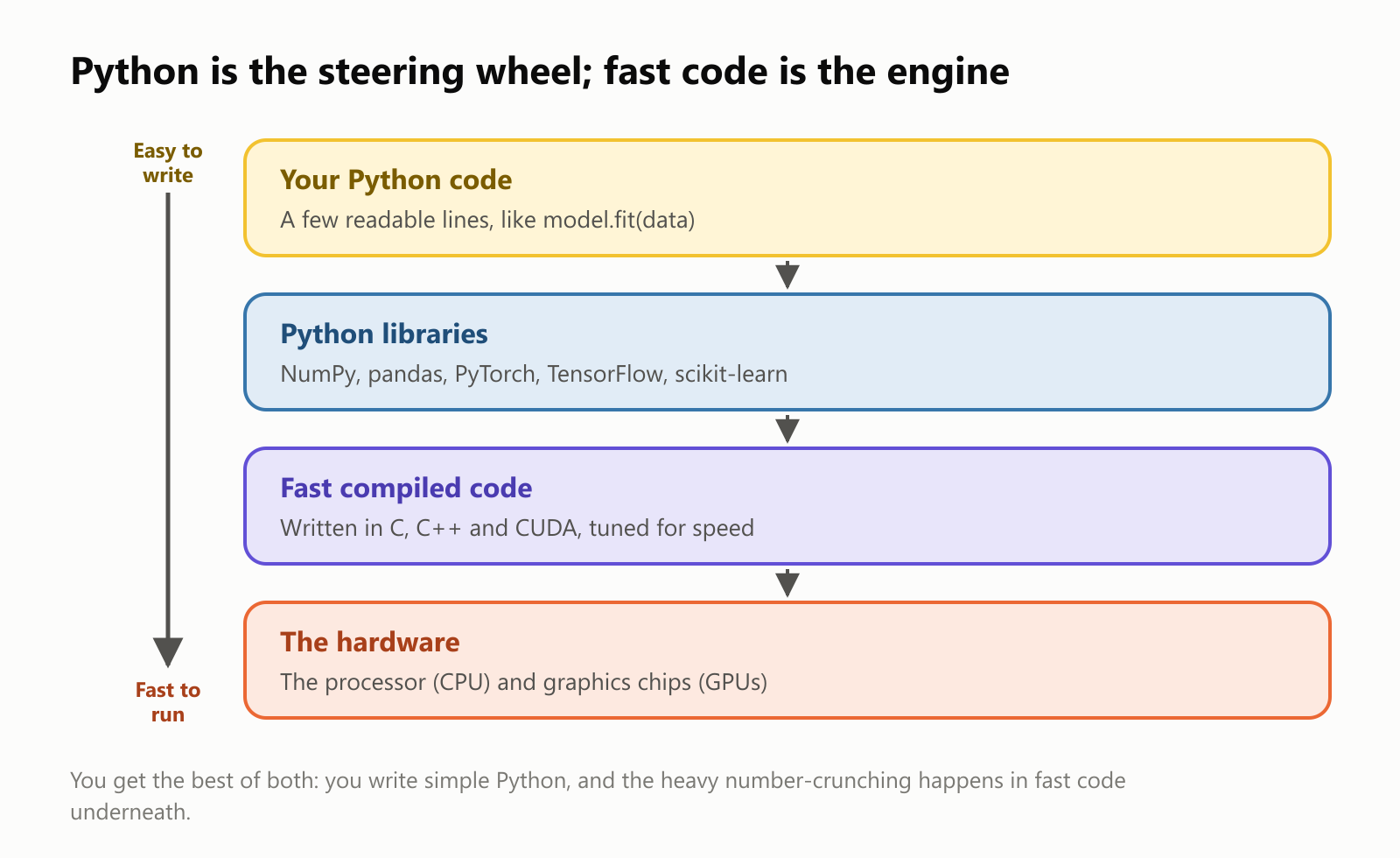
Think of driving a car. You turn the steering wheel and press the pedals, which is easy, and the engine does the hard work. In Python, you write a short, readable instruction, and a library hands the actual number-crunching to fast code underneath, sometimes running on powerful graphics chips (GPUs).
We measured how big the difference is. Multiplying two grids of numbers is the central calculation inside neural networks, the technology behind modern AI. Here's the same multiplication done with plain Python loops and with NumPy:
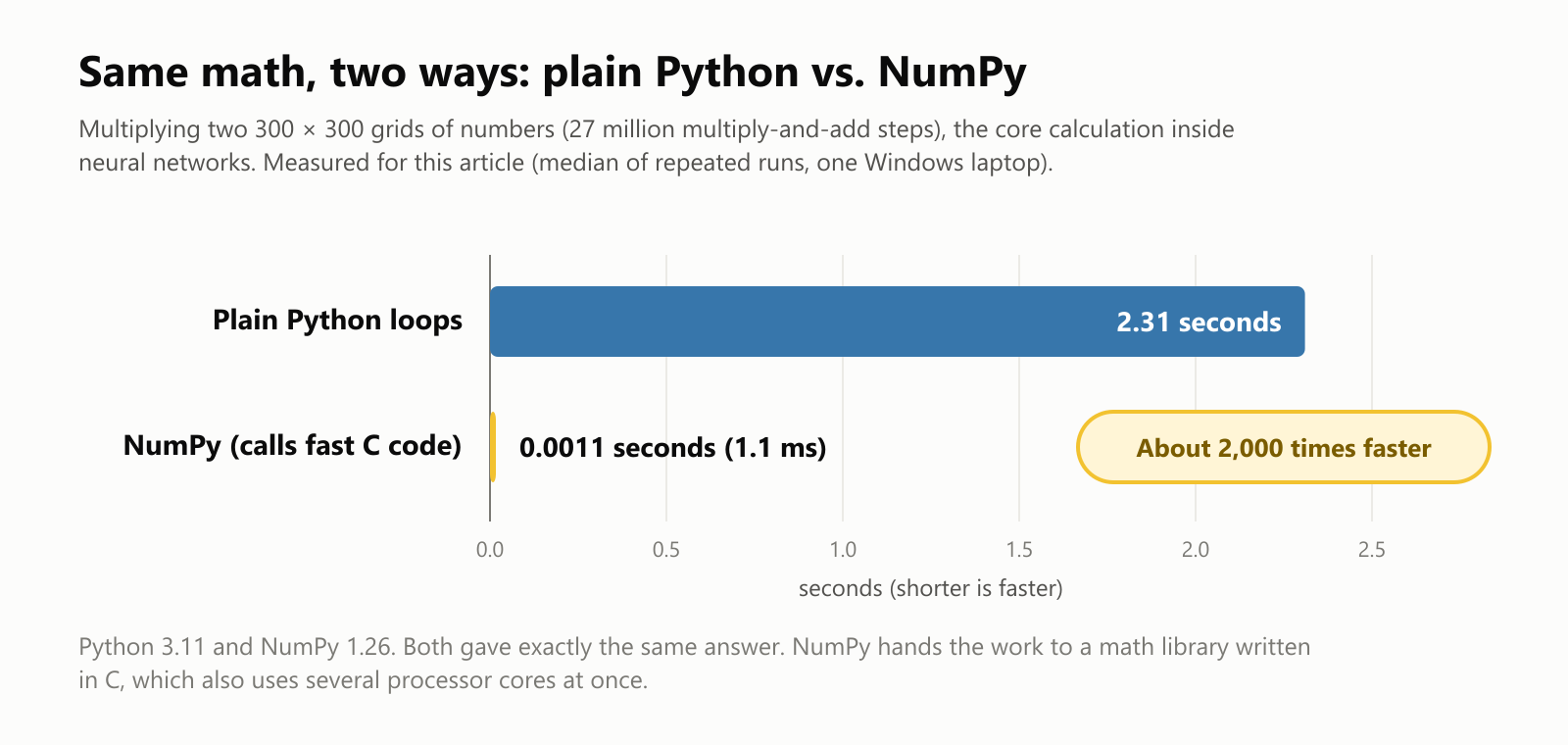
Same Python, same answer, about 2,000 times faster, because NumPy hands the job to a math library written in C. With NumPy, the whole calculation is one line:
result = grid_a @ grid_bThat's the deal Python offers: you write simple code, and the experts who built the libraries make it fast. It's why a data scientist can analyze millions of rows, or an AI researcher can train a model, in a few lines of Python. For an example, see What Is TensorFlow?
Batteries included
Python comes with a large standard library, a toolbox that ships with the language, for working with files, dates, the internet, spreadsheets in CSV format, compressed files and much more. Python's fans describe this as "batteries included": lots of useful things work right out of the box.
Beyond that, the Python Package Index (PyPI) hosts more than half a million free packages that anyone can install with a single command, pip install. Want to build a website, make charts, control a robot or read PDFs? Someone has probably already written a package for it.
Where Python is used
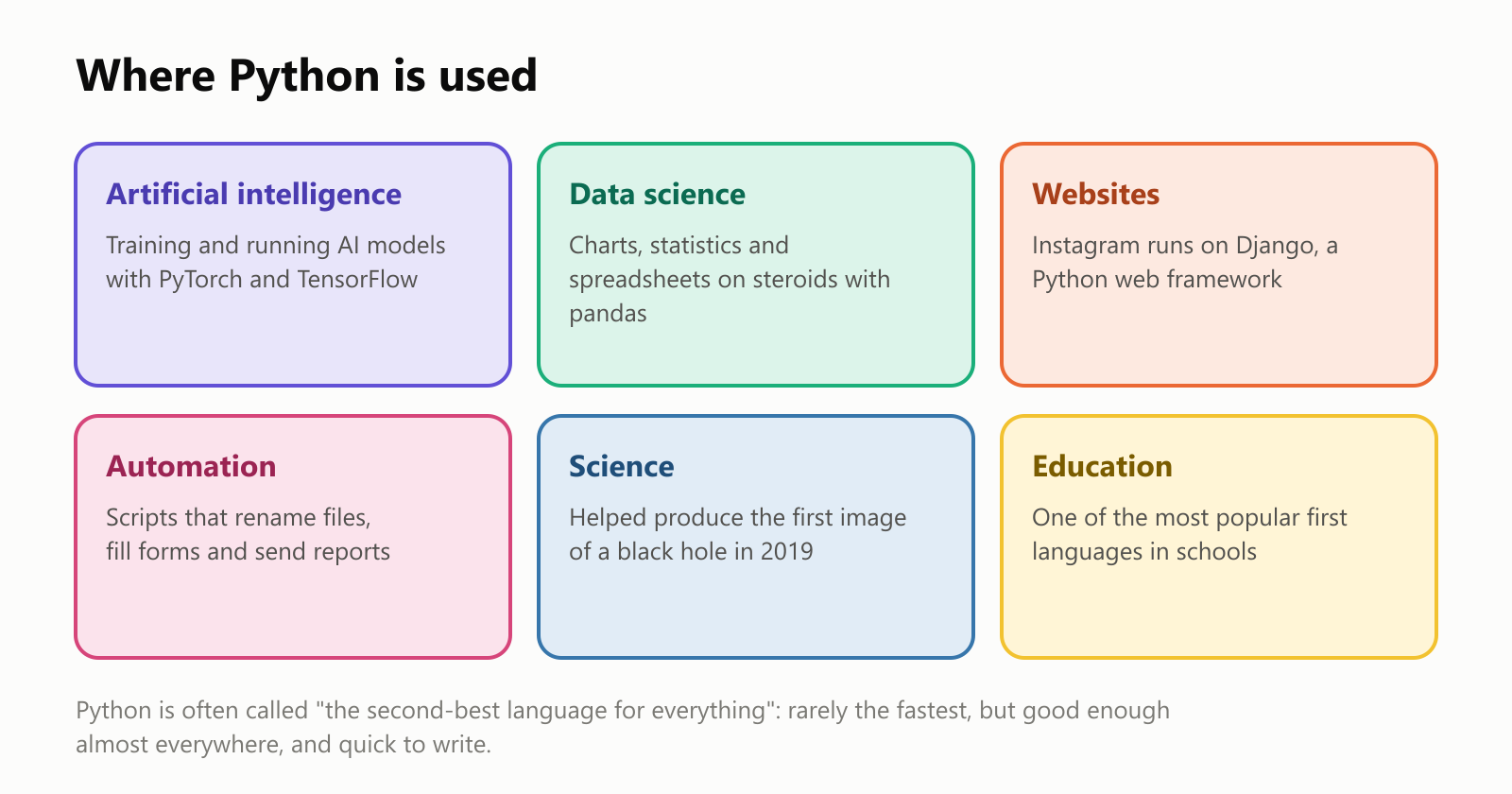
- Artificial intelligence: most of today's AI models, including the large language models behind chatbots, are built and trained with Python tools like PyTorch. If you've read our articles on machine learning or deep learning, the code behind those ideas is usually Python.
- Data science: analysts use Python to clean data, compute statistics and draw charts, often in Jupyter notebooks, documents that mix code, results and notes.
- Websites: frameworks like Django and Flask power the back ends of sites such as Instagram.
- Automation: small Python scripts save people hours by renaming thousands of files, pulling data from websites or sending daily reports.
- Science: astronomers, biologists and physicists use Python every day. The team behind the first-ever image of a black hole, released in 2019, used Python tools to process their data.
- Education: its readable style makes Python one of the most popular first languages for students.
Python is sometimes called "the second-best language for everything". For any one job, there's often a faster or more specialized language, but Python is good enough almost everywhere, and you can use the same language for all of it.
The downsides
- Slow on its own. Plain Python is much slower than C, C++, Java or JavaScript, as our speed test showed. Libraries hide this for math-heavy work, but not for everything.
- One thing at a time. For decades, a safety lock inside the standard Python interpreter, nicknamed the GIL, let only one piece of Python code run at any moment, even on a computer with many processor cores. Recent versions offer an optional build without it, but it's still being adopted.
- Errors show up late. Like Ruby and JavaScript, Python doesn't check the types of values before running, so some mistakes only appear while the program runs. Optional type hints (for example,
age: int) and checking tools help catch them early. - Not built for phones or browsers. Python isn't a natural fit for iPhone and Android apps, and web browsers run JavaScript, not Python.
- Setup can be confusing. Different projects may need different versions of the same packages, and juggling them is a common headache for beginners.
- The long move to Python 3. Python 3, released in 2008, fixed old design mistakes but wasn't compatible with Python 2. It took the community more than a decade to switch, and Python 2 was officially retired in 2020.
A short history
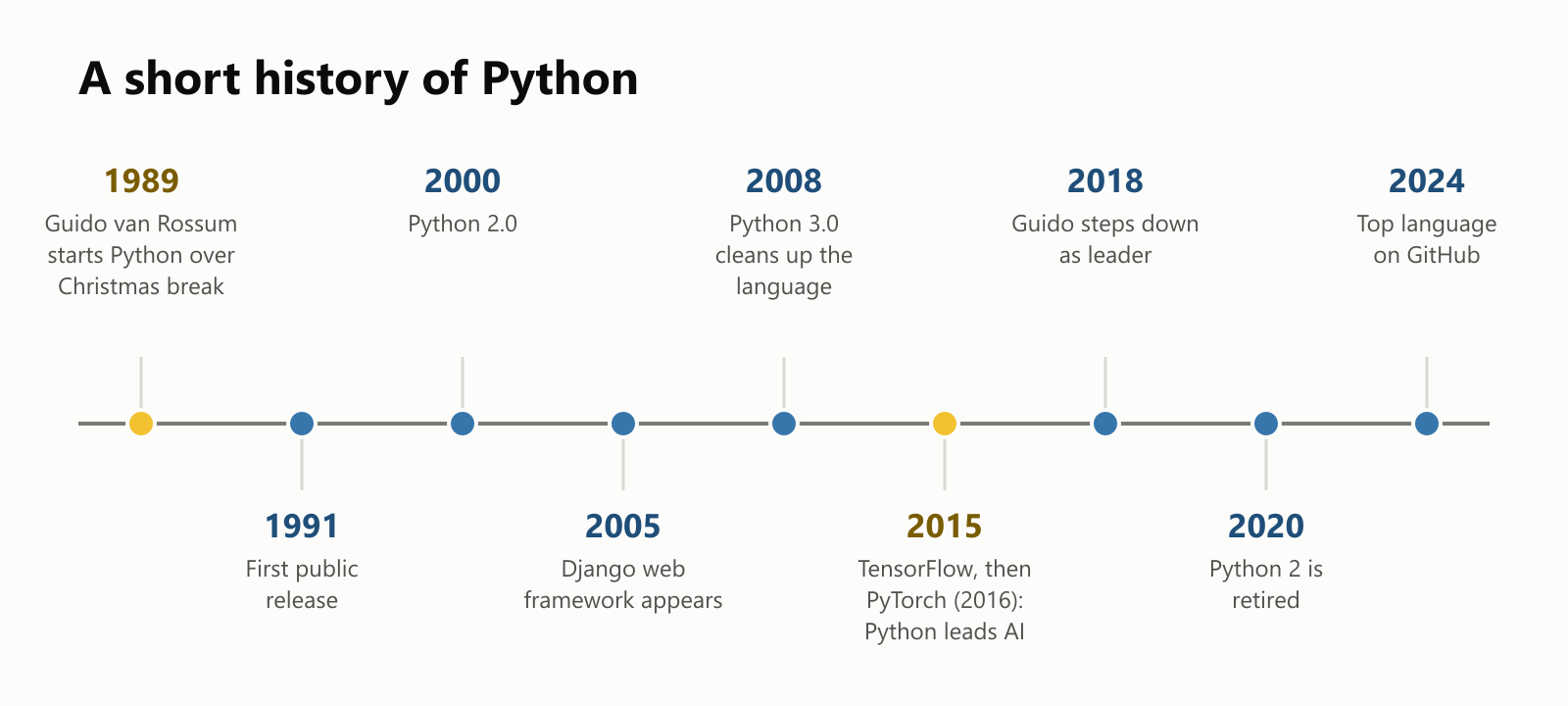
Python's rise was slow and steady. Scientists adopted it in the 2000s, when tools like NumPy (2006) and pandas (2008) made it great for data. Then the AI boom of the 2010s arrived, and the most popular AI toolkits, TensorFlow and PyTorch, chose Python as their main language. Since 2021, Python has also topped the TIOBE index, a long-running monthly ranking of programming language popularity.
For the bigger picture, see The History of Programming Languages.
Should you learn Python?
- Great reasons: you're new to programming, you want to work with data or AI, or you want to automate boring tasks at work. Python is one of the most commonly recommended first languages, and many university courses teach it.
- Good to know: Python is free and runs on Windows, Mac and Linux. Type
pythonin a terminal and you get an interactive prompt (>>>) where you can type one line at a time and see the answer immediately. Websites like Google Colab even let you run Python in your browser without installing anything.
A small glossary
- Python: a programming language created by Guido van Rossum and first released in 1991.
- Interpreter: the program that reads Python code and carries it out step by step.
- Indentation: the spaces at the start of a line. In Python, they decide which lines belong together.
- Library / package: ready-made code you can add to your project, like NumPy or Django.
- Standard library: the toolbox that comes with Python itself ("batteries included").
- PyPI and pip: Python's online catalog of packages, and the command that installs them.
- NumPy: a library for fast math on large grids of numbers.
- pandas: a library for working with tables of data, like a programmable spreadsheet.
- PyTorch / TensorFlow: the two best-known toolkits for building AI models.
- Jupyter notebook: a document that mixes code, results, charts and notes.
- Django / Flask: frameworks for building websites with Python.
- GIL: a lock in the standard Python interpreter that let only one piece of Python code run at a time.
- Type hints: optional labels like
age: intthat help tools catch mistakes.
Wrapping up
Python started as a hobby project over the Christmas holidays, and grew into one of the most popular programming languages in the world. Its code is clean and readable, its indentation rule keeps programs tidy, and its huge collection of libraries means there's a ready-made tool for almost anything.
Plain Python isn't fast, but that hardly matters for most of what people do with it: Python is the steering wheel, and libraries written in fast languages are the engine. That combination of simple to write and fast where it counts is exactly why Python became the language of data science and artificial intelligence.
Read next
What Is a Transformer in AI? The Idea Behind ChatGPT, Explained Simply
A friendly, jargon-free guide to transformers, the AI design behind ChatGPT, Claude and Gemini. Learn how "attention" lets AI understand words in context, what happens inside a transformer, and why it changed AI so quickly.
 nbkhope
What Is Reinforcement Learning? How AI Learns by Trial, Error and Reward
A friendly, jargon-free introduction to reinforcement learning, how AI learns by trial, error and reward, like training a dog with treats. Watch a real robot learn a maze, see why exploring matters, and learn how it shapes chatbots.
nbkhope
What Is Graph Engineering? How Today's AI Teams Up to Get Real Work Done
A friendly, jargon-free guide to graph engineering, the 2026 idea of building AI as a map of connected steps instead of one big loop. See how today's AI agents work, why small mistakes add up, and how checkers, branches and teamwork fix it.
nbkhope
Comments
Be kind and specific. Comments with links from new accounts appear after a moderator reviews them.