What Is TensorFlow? Google's AI Toolkit, Explained Simply
A friendly, jargon-free guide to TensorFlow, Google's free toolkit for building AI. Learn what a tensor is, how TensorFlow helps computers learn from examples, where it runs, and how it compares with PyTorch.

On this page
If you've read about artificial intelligence, you've probably bumped into the name TensorFlow. It sounds like something out of a science-fiction movie, but it's actually something much more down to earth: a free toolkit for building AI, made by Google.
This article explains, in plain language, what TensorFlow is, where its odd name comes from, what it actually does for the people who use it, and where you've probably already run into it without knowing.
TensorFlow in one sentence
TensorFlow is free software that gives programmers ready-made building blocks for creating, training and running AI models.
Think of it like a well-equipped kitchen. You could make bread by grinding your own flour, building your own oven and figuring out baking temperatures from scratch. Or you could walk into a kitchen with an oven, a mixer and measuring cups already in place, and focus on the recipe. TensorFlow is that kitchen for AI: it handles the heavy, repetitive work so people can focus on the idea they want to build.
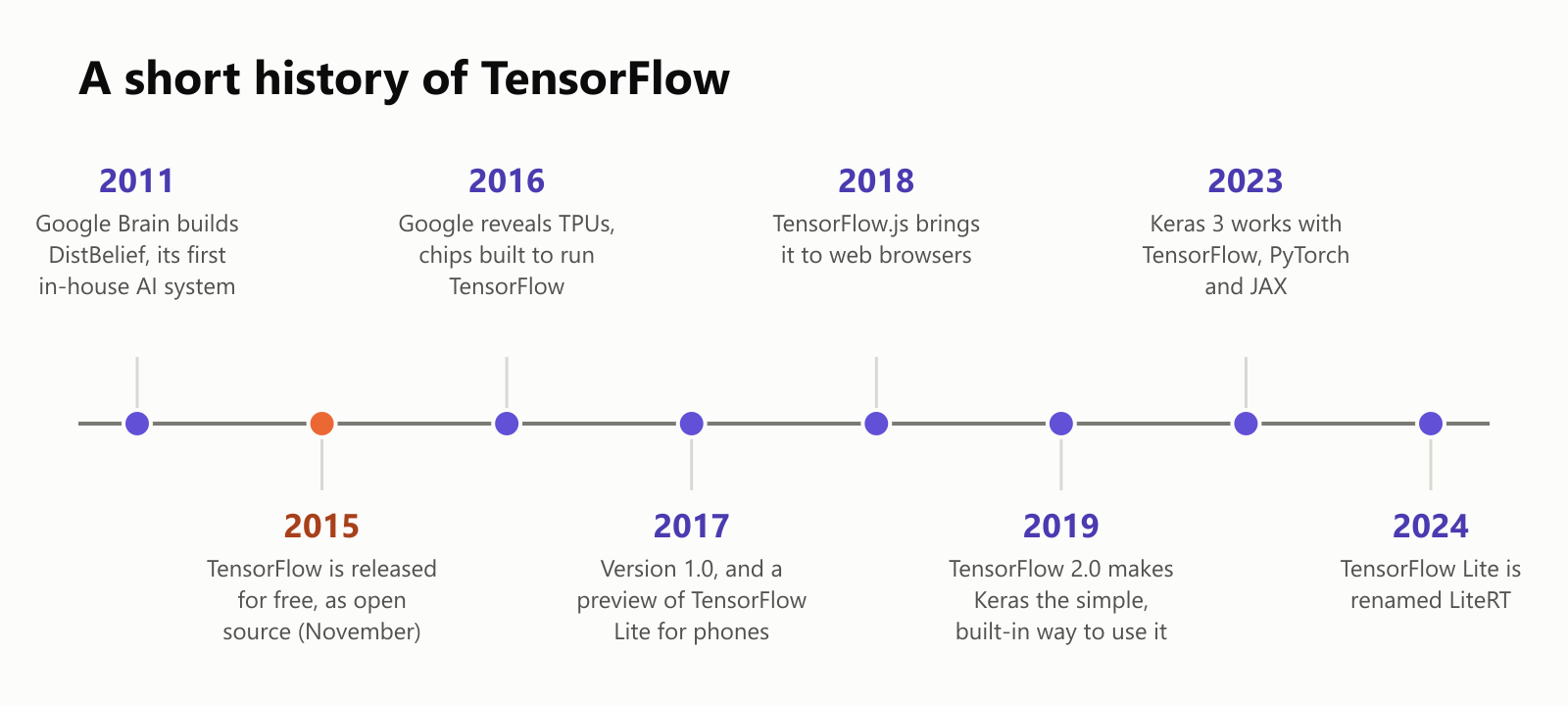
It was created by Google Brain, Google's AI research team, and released for free to the public in November 2015 as open source, meaning anyone can use it, read its code and improve it.
First, what's a tensor?
The name has two parts. Let's start with tensor.
Computers can't look at a photo or read a sentence the way we do. Everything has to be turned into numbers first. A tensor is just a fancy name for a bunch of numbers arranged in a grid:
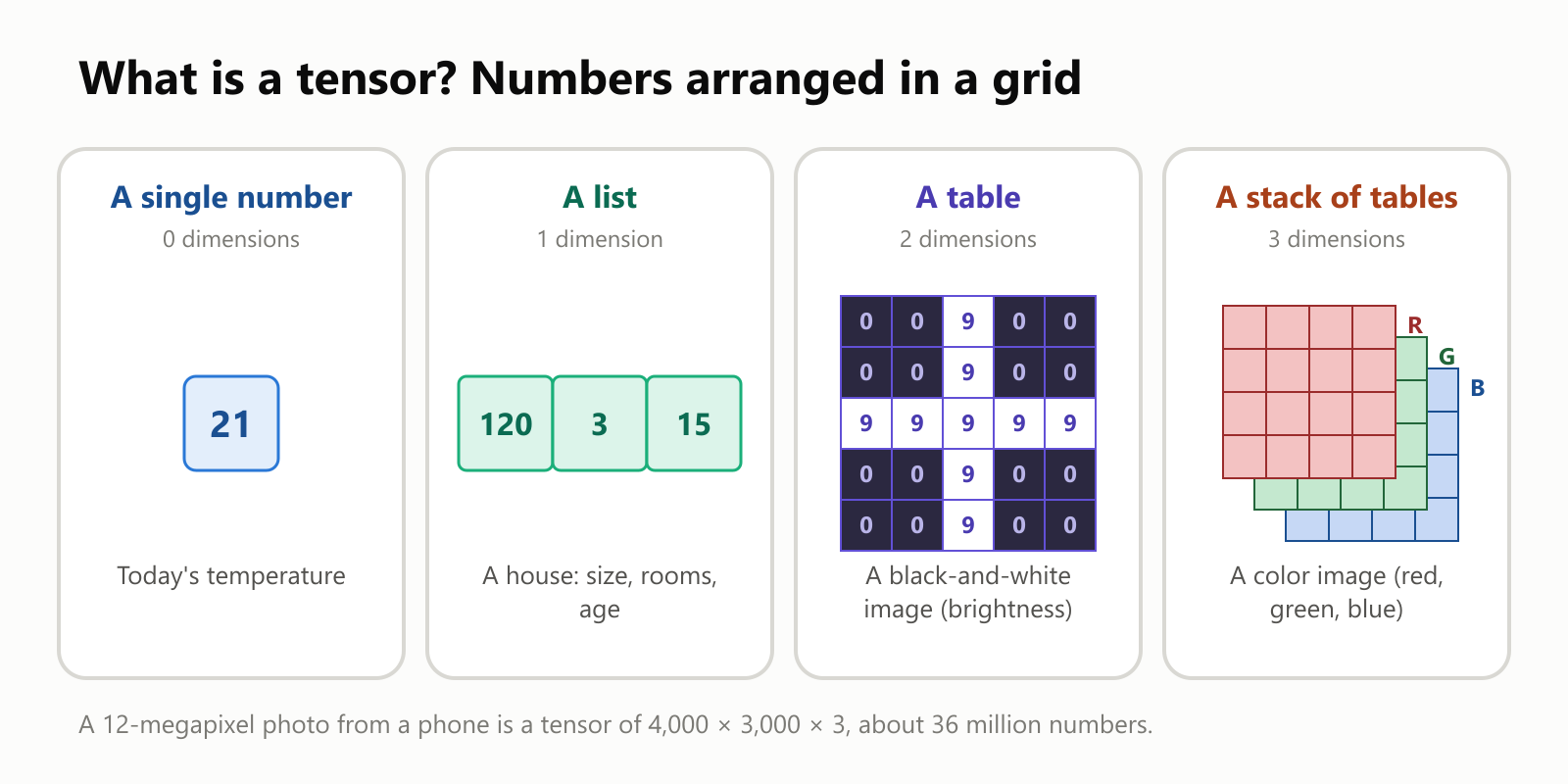
- A single number is the simplest tensor.
- A list of numbers is a tensor too: a house described by its size, number of rooms and age.
- A table of numbers can be a black-and-white picture, where each number says how bright a dot is.
- A stack of tables can be a color photo: one table for how much red is in each dot, one for green, one for blue.
So when you hear "tensor", just picture a box of numbers. AI models take tensors in, do math on them, and produce tensors out.
Then, what's the flow?
The second part of the name is flow. An AI model is really a long series of math steps: multiply these numbers, add those, keep the useful signals, and so on. TensorFlow lets you describe those steps, then lines them up into a map, called a graph, and the tensors flow through it:
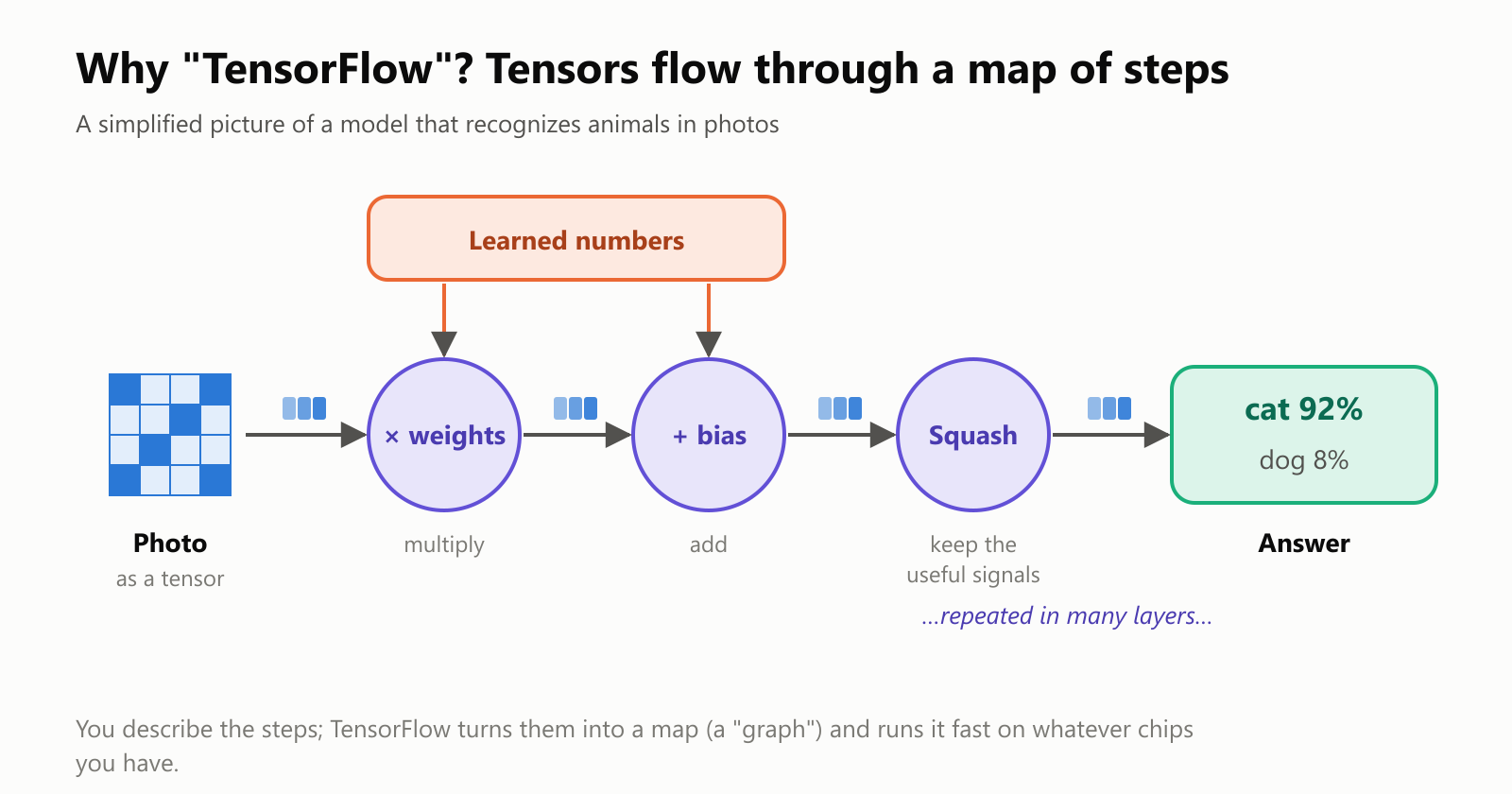
The important part is the box labeled learned numbers. A brand-new model has random numbers there, so its answers are nonsense. Training is the process of slowly adjusting those numbers until the answers become good. Big models have millions or even billions of these numbers.
What TensorFlow actually does for you
Training a model always follows the same loop: make a guess, check it against the right answer, figure out what to fix, and adjust. Over and over again:
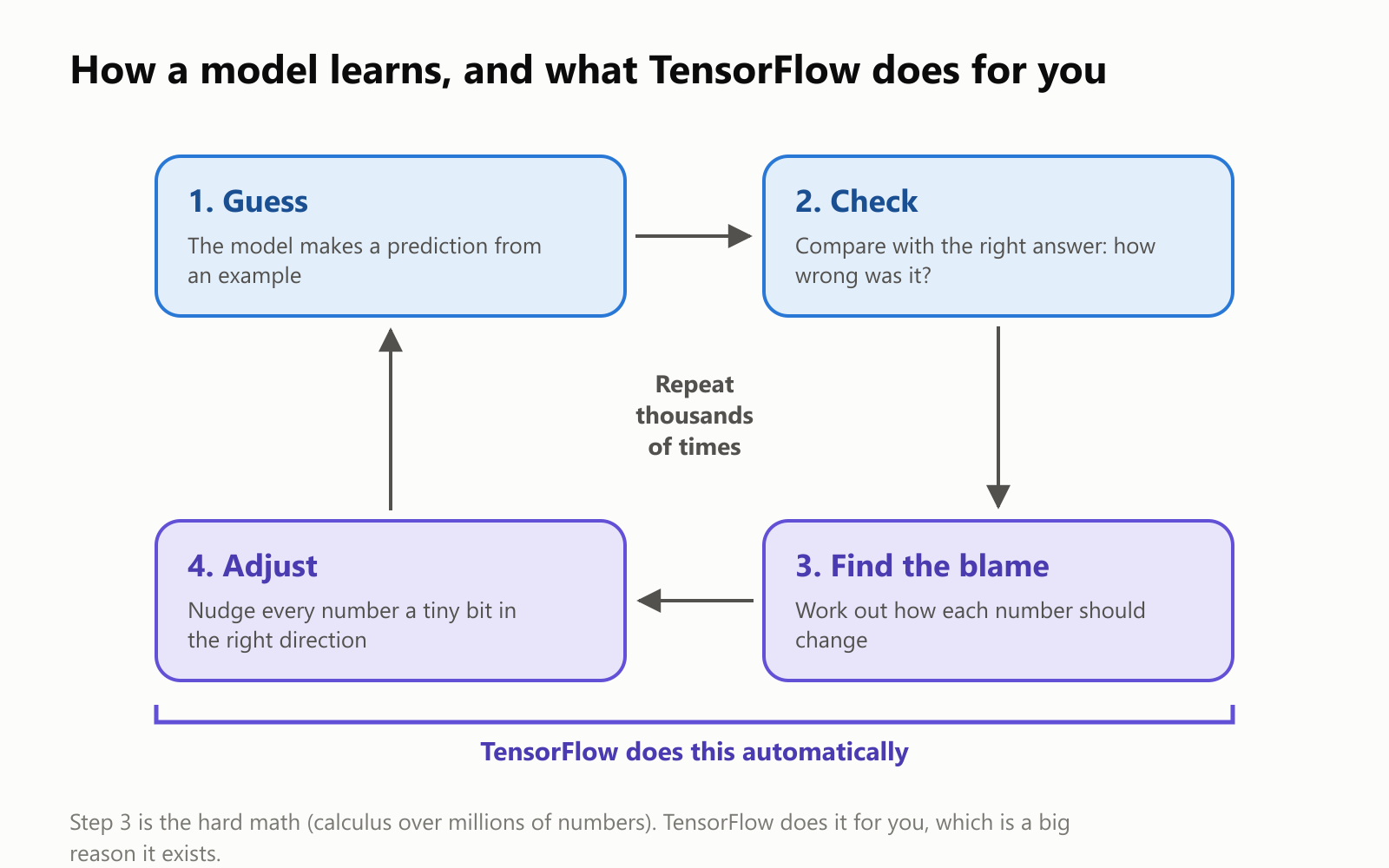
Step 3 is the hard part. Working out exactly how each of millions of numbers should change involves calculus, and doing it by hand for every model would be slow and error-prone. TensorFlow does it automatically. You describe the model, and it works out the rest.
Here's what else it takes off your plate:
- Ready-made building blocks. Common pieces of neural networks (layers) come prepackaged, so you can stack them like LEGO bricks instead of writing the math yourself.
- Speed. It runs the math on graphics chips (GPUs) and on Google's special AI chips called TPUs, which can be dozens of times faster than a regular processor for this kind of work.
- Scale. It can spread training across many machines when a model or dataset is too big for one.
- Saving and sharing. A trained model can be saved, shared and loaded again later, even on a completely different device.
A tiny example: learning a formula from examples
Let's watch learning happen. A classic beginner exercise in TensorFlow is to teach a model to convert Celsius to Fahrenheit, without ever giving it the formula. It only gets seven examples, like "0 °C is 32 °F" and "38 °C is 100.4 °F".
The model is as small as it gets: one "neuron" with just two learned numbers. Here's how its answer for 100 °C changed as it trained:
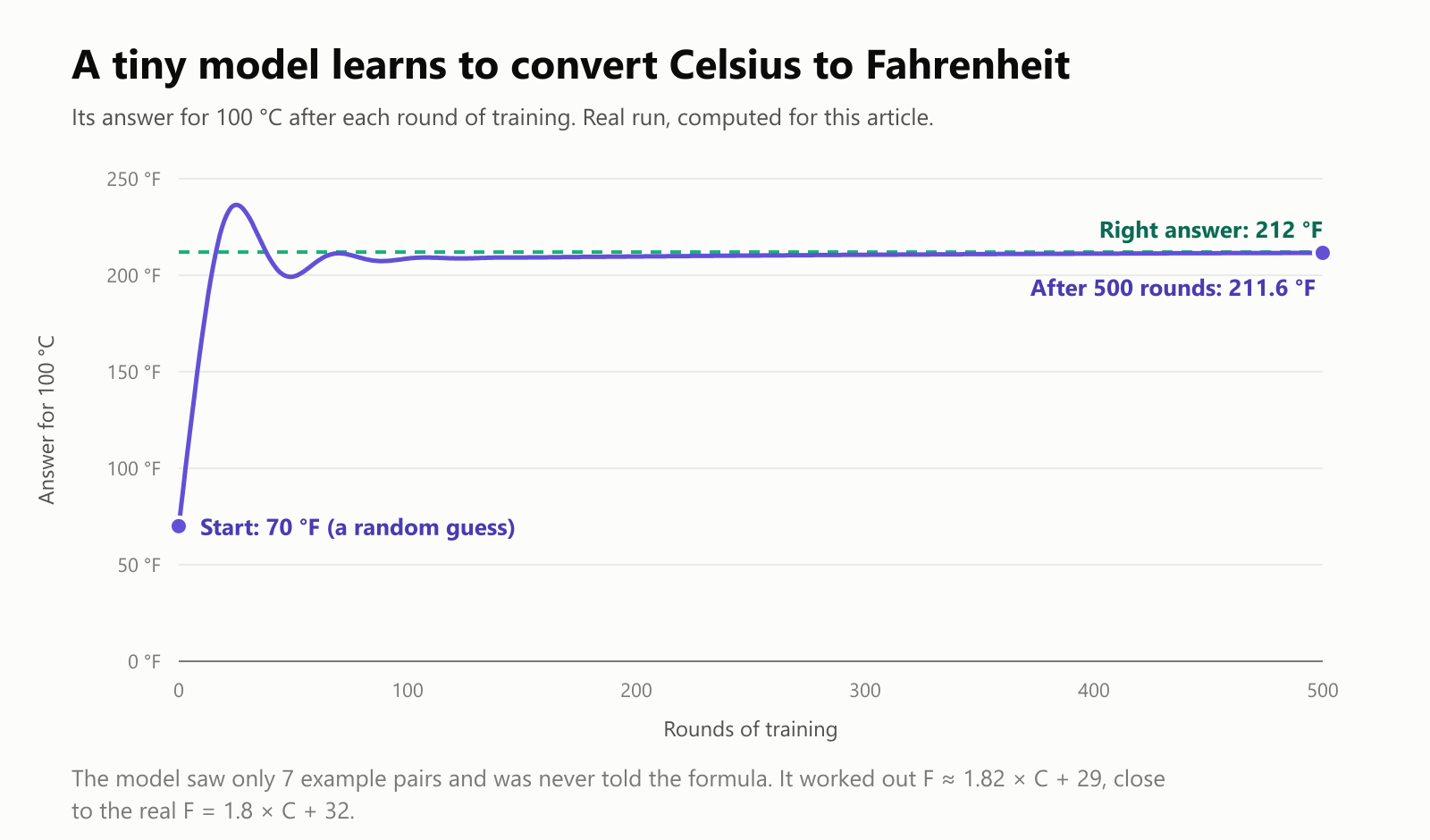
It starts with a random guess (70 °F), overshoots, wobbles a little, then settles almost exactly on the right answer, 212 °F. It discovered the pattern on its own, purely from examples. That's machine learning in a nutshell, and the same loop, scaled up enormously, is how much bigger models learn to recognize faces or translate languages.
For the curious, here's roughly what that looks like in TensorFlow, using Keras, its beginner-friendly layer. You don't need to understand the code; notice how short it is:
1import tensorflow as tf
2
3# Seven examples: temperatures in Celsius and the matching Fahrenheit
4celsius = tf.constant([[-40.0], [-10.0], [0.0], [8.0], [15.0], [22.0], [38.0]])
5fahrenheit = tf.constant([[-40.0], [14.0], [32.0], [46.4], [59.0], [71.6], [100.4]])
6
7# 1. Build: a model with a single "neuron"
8model = tf.keras.Sequential([tf.keras.Input(shape=(1,)), tf.keras.layers.Dense(units=1)])
9
10# 2. Choose how to measure mistakes and how to improve
11model.compile(loss="mean_squared_error", optimizer=tf.keras.optimizers.Adam(0.1))
12
13# 3. Train: go through the examples 500 times
14model.fit(celsius, fahrenheit, epochs=500, verbose=0)
15
16# 4. Use it
17print(model.predict(tf.constant([[100.0]])))  # about 211
Four steps: build the model, say how to measure mistakes, train it, and use it. All the calculus from the loop above happens inside that one fit line.
Train once, run almost anywhere
A big strength of TensorFlow is that a model trained on powerful computers can then be shipped to all sorts of devices:
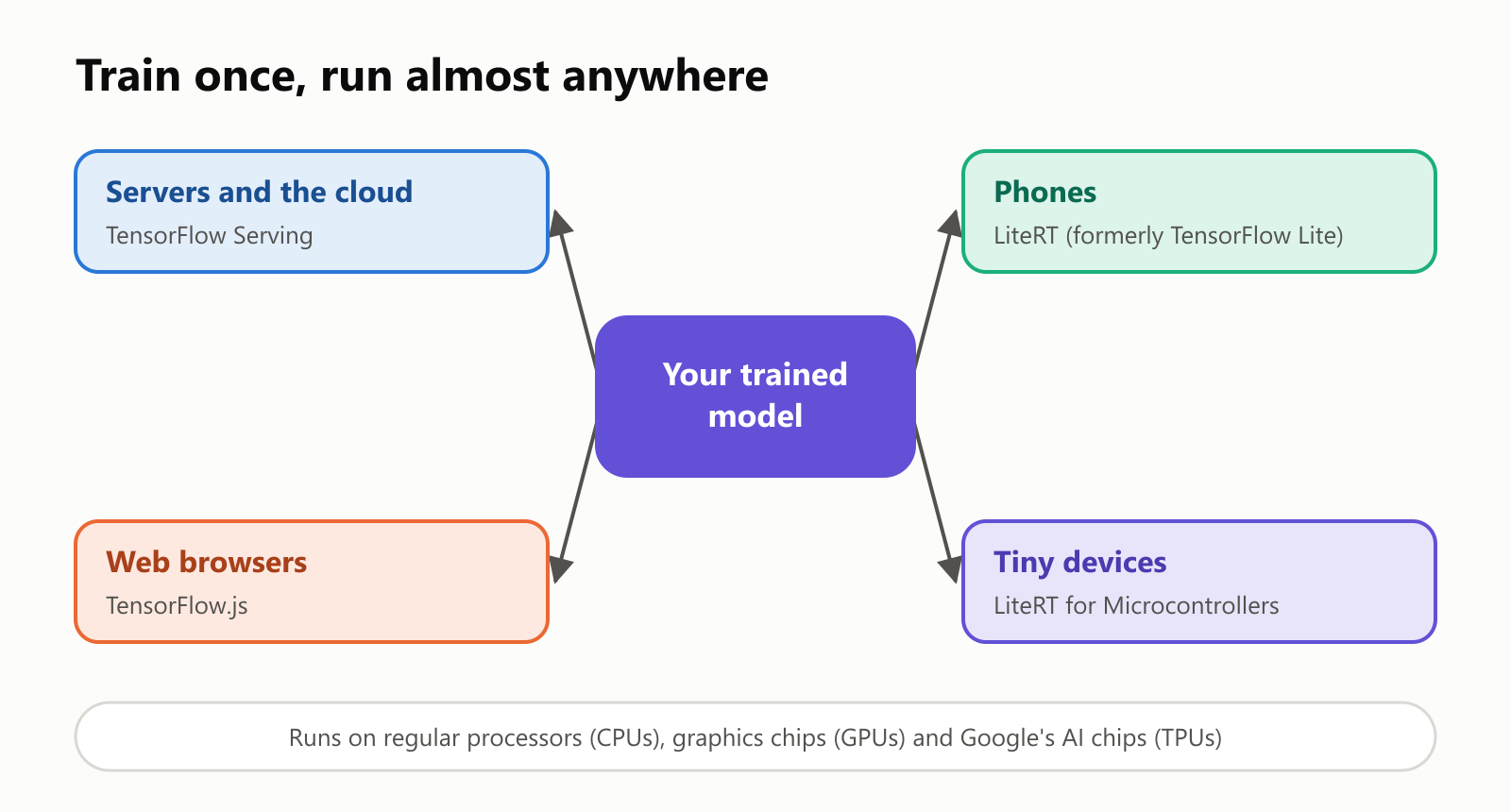
- Servers and the cloud: websites and apps send questions to a model running in a data center.
- Phones: a slimmed-down version (now called LiteRT, formerly TensorFlow Lite) runs models right on your phone, which is faster and keeps your data on your device. Think of features like live camera effects or offline speech recognition.
- Web browsers: TensorFlow.js runs models inside a web page, with nothing to install.
- Tiny devices: small gadgets with very little memory, like a sensor that listens for a wake word, can run tiny models too.
Where you've seen it
You've probably used TensorFlow without knowing it. When Google released it in 2015, the company said it was already powering things like speech recognition, searching your photos by what's in them, and suggested email replies. Since then, countless companies have used it, for tasks like sorting photos of home listings, spotting fraudulent payments, recommending what to watch or listen to, and finding problems in medical images.
Here's a quick look at its history:
TensorFlow vs. PyTorch
TensorFlow isn't the only toolkit in town. Its best-known rival is PyTorch, released by Facebook (now Meta) in 2016.
- PyTorch became the favorite of AI researchers, mostly because early TensorFlow was considered harder to use. Today, a large share of new AI research, and many of the big language models behind chatbots, are built with PyTorch.
- TensorFlow responded with version 2.0 in 2019, which made it much friendlier. It remains widely used in companies, and it's especially strong at running models on phones, in browsers and on small devices.
- JAX is another Google toolkit, popular for cutting-edge research, including at Google itself.
The good news: the core ideas (tensors, layers, the training loop) are the same everywhere. Learn one, and the others feel familiar. Keras 3 even lets you write a model once and run it on TensorFlow, PyTorch or JAX.
What TensorFlow is not
A few common mix-ups:
- It's not an AI itself. TensorFlow doesn't think, chat or answer questions. It's the toolkit people use to build and train models that do those things, like a kitchen isn't a meal.
- It doesn't do the learning without data. A model is only as good as the examples it learns from. TensorFlow can't fix bad or biased data.
- You don't need it to use AI. Chatting with an AI assistant or using a photo app requires no TensorFlow knowledge. It's for people who build AI.
A small glossary
- TensorFlow: Google's free, open-source toolkit for building, training and running machine learning models.
- Tensor: a group of numbers arranged in a grid, from a single number to a list, a table or a stack of tables.
- Graph: the map of math steps a model goes through, which tensors flow along.
- Model: the thing being built, a set of math steps plus learned numbers that turns inputs into answers.
- Training: adjusting a model's numbers, little by little, until its answers match the examples.
- Keras: TensorFlow's beginner-friendly layer for building models from ready-made pieces.
- Layer: one reusable building block of a neural network.
- GPU / TPU: chips that do huge amounts of math in parallel. GPUs started out for video games; TPUs are Google's chips made for AI.
- LiteRT (formerly TensorFlow Lite): the version for running models on phones and small devices.
- TensorFlow.js: the version that runs in web browsers.
- PyTorch: a popular alternative toolkit, originally from Meta.
- Open source: software whose code is public, free to use and improve.
Wrapping up
TensorFlow is a free toolkit from Google that gives people the building blocks to create AI. Its name says it all: tensors, boxes of numbers that represent photos, sounds and text, flow through a map of math steps. Its biggest gift is doing the hard parts automatically: the calculus that tells each number how to change during training, the speed of special chips, and the ability to run the finished model almost anywhere, from huge data centers to the phone in your pocket.
You may never write a line of TensorFlow yourself, but now, when you hear the name, you'll know it's the kitchen where a lot of everyday AI gets cooked up.
Read next
What Is a Transformer in AI? The Idea Behind ChatGPT, Explained Simply
A friendly, jargon-free guide to transformers, the AI design behind ChatGPT, Claude and Gemini. Learn how "attention" lets AI understand words in context, what happens inside a transformer, and why it changed AI so quickly.
 nbkhope
What Is Reinforcement Learning? How AI Learns by Trial, Error and Reward
A friendly, jargon-free introduction to reinforcement learning, how AI learns by trial, error and reward, like training a dog with treats. Watch a real robot learn a maze, see why exploring matters, and learn how it shapes chatbots.
nbkhope
What Is Graph Engineering? How Today's AI Teams Up to Get Real Work Done
A friendly, jargon-free guide to graph engineering, the 2026 idea of building AI as a map of connected steps instead of one big loop. See how today's AI agents work, why small mistakes add up, and how checkers, branches and teamwork fix it.
nbkhope
Comments
Be kind and specific. Comments with links from new accounts appear after a moderator reviews them.