
TypeScript Function Types: A Visual, Hands-On Guide
Learn TypeScript function types visually: how to type a variable that holds a function, why parameter names don't matter, writing types only once, type aliases, what fits a function type, callbacks, void, why to avoid Function, what types can't catch, and exercises.


On this page
So far in this series you've typed what goes into a function and what comes out of it. There's one more piece. In JavaScript, a function is a value: you can store it in a variable, pass it to another function, or return it. So a function needs a type of its own.
In this guide you'll learn to read and write a function type, then see why parameter names don't matter, how to avoid writing the types twice, and how to give a function type a name. You'll also test which functions fit a type and which don't, use function types for callbacks, and meet a few traps, including one line of code that compiles and gives the wrong answer. Exercises wrap it up.
All outputs below come from real runs with TypeScript 7.0 and Node.js 26 on Windows. Save each example as main.ts, then run npx tsc main.ts and node main.js.
Functions are values
A variable can have a type annotation, which the compiler then enforces:
let myNumber: number = 48;
myNumber = "48";
main.ts(2,1): error TS2322: Type 'string' is not assignable to type 'number'.A variable can also hold an anonymous function. Here, TypeScript infers the variable's type from the function:
1let myFunction = function (text: string, count: number): string {
2  return `The string is ${text} and the number is ${count}`;
3};
4
5console.log(myFunction("Ana", 48));
6myFunction = 48;
main.ts(6,1): error TS2322: Type 'number' is not assignable to type '(text: string, count: number) => string'.
The string is Ana and the number is 48The error message shows you the type of myFunction. It isn't function. It's the whole signature: (text: string, count: number) => string.
Reading a function type
That's a function type. It looks like an arrow function, but it describes a function and contains no code:
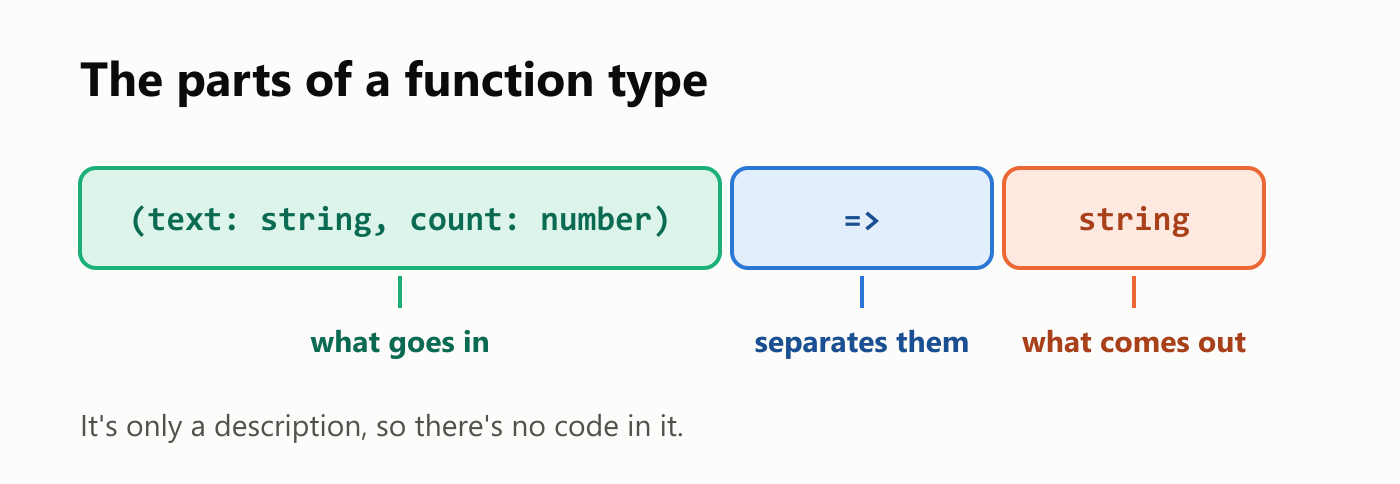
Read it as "a function that takes a string and a number, and returns a string". To annotate the variable yourself, put the function type where you'd normally put number:
1let myFunction: (text: string, count: number) => string =
2  function (text: string, count: number): string {
3    return `The string is ${text} and the number is ${count}`;
4  };
5
6console.log(myFunction("Ana", 48));
The string is Ana and the number is 48Names don't matter, types do
The names in a function type are only labels for people reading it. They don't have to match the real function's parameters. What must match is the types, in order:
1let myFunction: (label: string, amount: number) => string =
2  function (text: string, count: number): string {
3    return `The string is ${text} and the number is ${count}`;
4  };
5
6console.log(myFunction("Ana", 48));
The string is Ana and the number is 48Change the type of one parameter, though, and the function no longer fits:
1let myFunction: (label: string, amount: number) => string =
2  function (text: number, count: number): string {
3    return `The first is ${text} and the second is ${count}`;
4  };
5
6console.log(myFunction("Ana", 48));
main.ts(1,5): error TS2322: Type '(text: number, count: number) => string' is not assignable to type '(label: string, amount: number) => string'.
Types of parameters 'text' and 'label' are incompatible.
Type 'string' is not assignable to type 'number'.Writing the types only once
That last declaration says everything twice, and the line gets long. You don't need both sides. On its own, a function with no annotations is an error:
1let myFunction = function (text, count) {
2  return `The string is ${text} and the number is ${count}`;
3};
4
5console.log(myFunction("Ana", 48));
main.ts(1,28): error TS7006: Parameter 'text' implicitly has an 'any' type.
main.ts(1,34): error TS7006: Parameter 'count' implicitly has an 'any' type.Put the type on the variable, and the same function compiles. TypeScript takes the types from the left side and applies them to the right side, which is called contextual typing:
1let myFunction: (text: string, count: number) => string = function (text, count) {
2  return `${text.toUpperCase()} and ${count.toFixed(1)}`;
3};
4
5console.log(myFunction("Ana", 48));
ANA and 48.0text is a string and count is a number, so toUpperCase and toFixed are both allowed. The return value is still checked as well:
1let myFunction: (text: string) => string = function (text) {
2  return text.length;
3};
4
5console.log(myFunction("Ana"));
main.ts(1,5): error TS2322: Type '(text: string) => number' is not assignable to type '(text: string) => string'.
Type 'number' is not assignable to type 'string'.So there are two good options: annotate the function and let the variable be inferred, or annotate the variable and let the function be inferred.
Giving a function type a name
A long function type is hard to read in the middle of a line. As with objects, type gives it a name you can use anywhere:
1type Operation = (first: number, second: number) => number;
2
3const add: Operation = (first, second) => first + second;
4const multiply: Operation = (first, second) => first * second;
5
6console.log(add(3, 4));
7console.log(multiply(3, 4));
7
12The name also says what the functions are for, and you can reuse it. Here's a list of them:
1type Operation = (first: number, second: number) => number;
2
3const operations: Operation[] = [
4  (first, second) => first + second,
5  (first, second) => first * second,
6];
7
8for (const operation of operations) {
9  console.log(operation(3, 4));
10}
7
12What fits a function type
How strict is the match? We tried eight functions against the same type:
1type Formatter = (text: string, count: number) => string;
2
3const differentNames: Formatter = (label: string, amount: number) => "ok";
4const fewerParameters: Formatter = (text: string) => text;
5const noParameters: Formatter = () => "ok";
6const extraOptional: Formatter = (text: string, count: number, loud?: boolean) => text;
7const extraRequired: Formatter = (text: string, count: number, loud: boolean) => text;
8const wrongParameter: Formatter = (text: number, count: number) => "ok";
9const wrongReturn: Formatter = (text: string, count: number) => count;
10const swappedOrder: Formatter = (count: number, text: string) => text;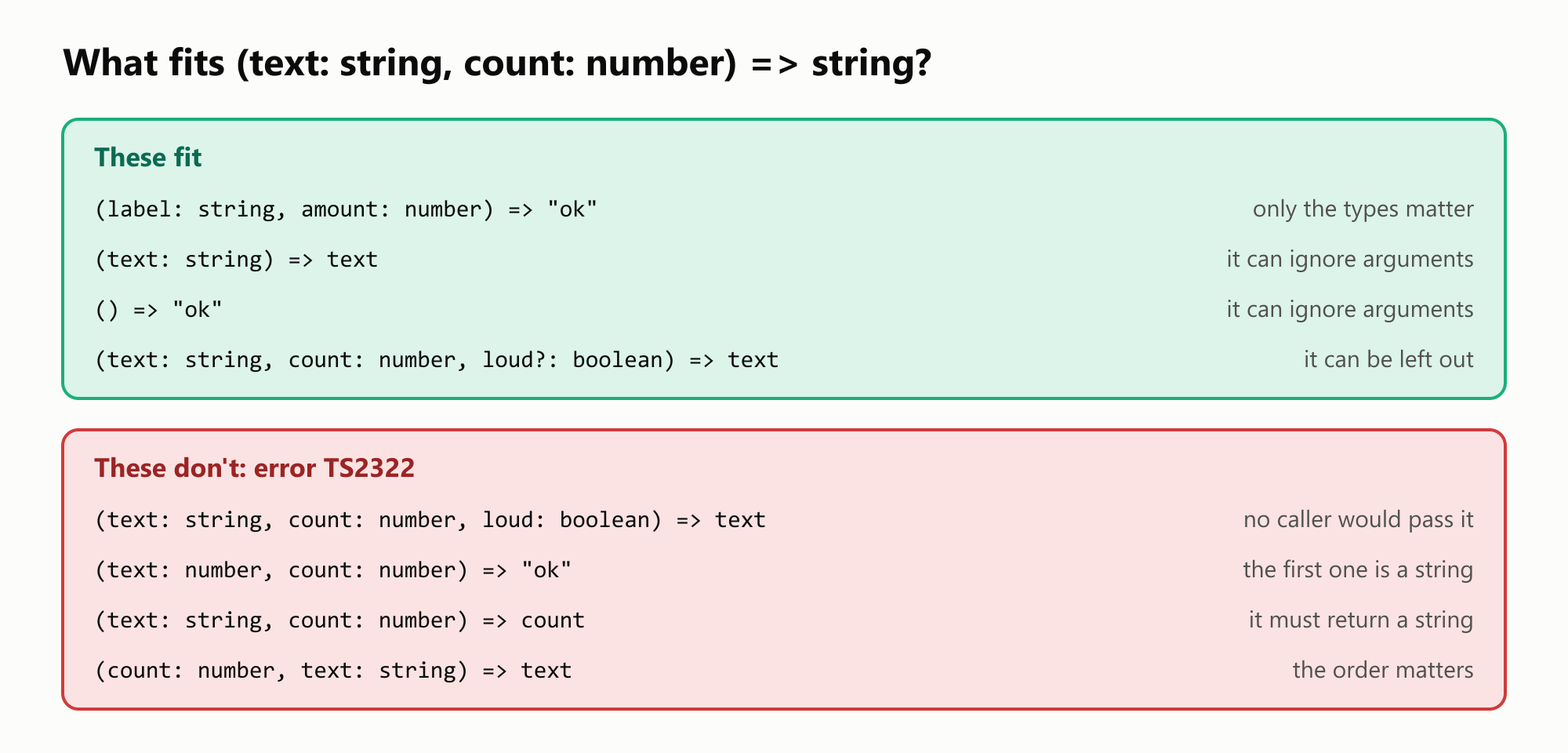
Most of those results make sense right away. The surprising one is that a function with fewer parameters fits. The caller will pass two arguments, and a function is free to ignore the ones it doesn't need. That's why you can write numbers.map((value) => value * 2), even though map passes each callback three arguments. A required extra parameter is different, because no caller would ever pass it.
Colon or arrow?
The most common beginner mistake is mixing up where the return type goes, because the same idea takes three forms:
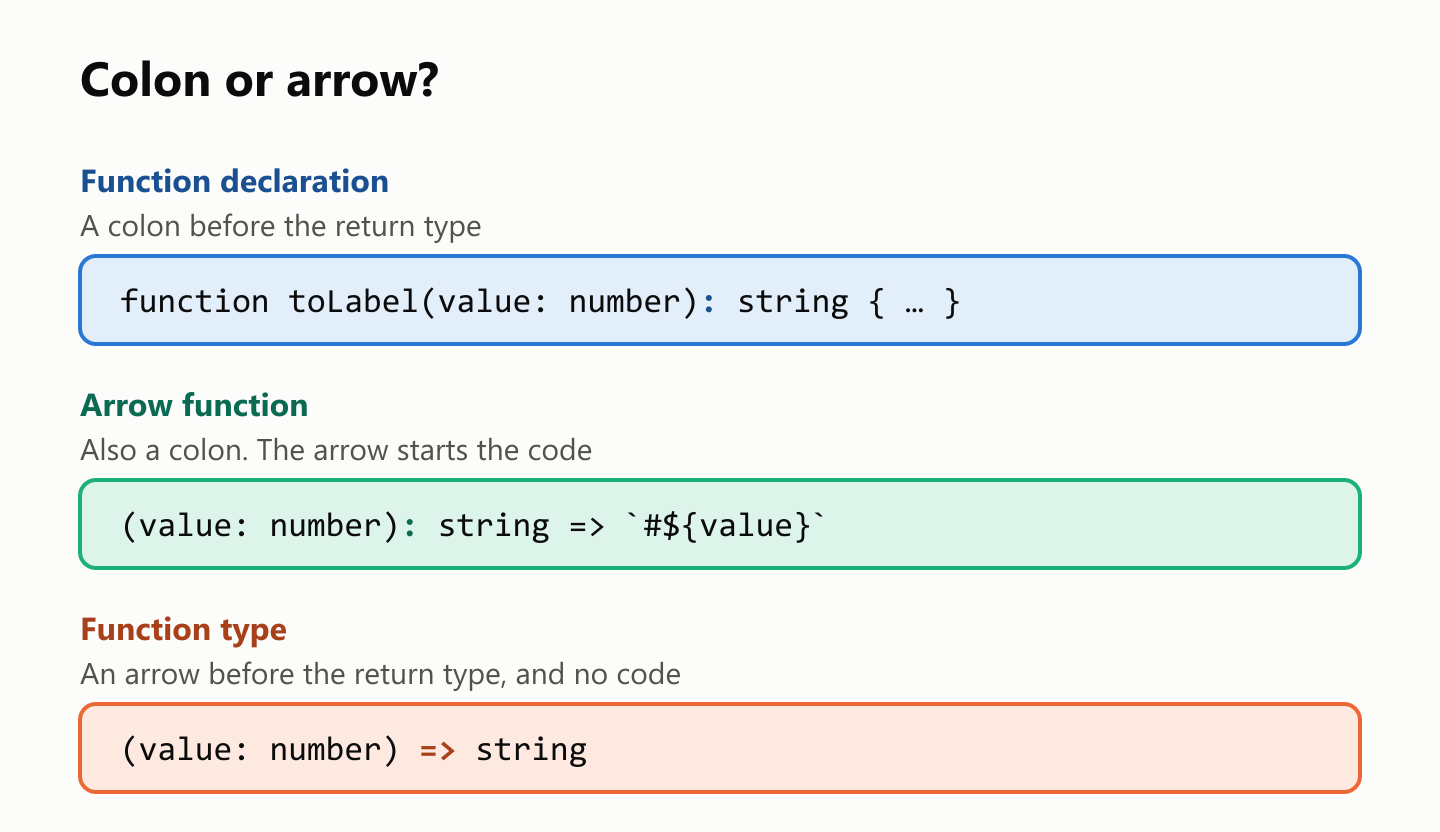
A colon inside a type gives you this:
let toLabel: (value: number): string = (value) => `#${value}`;main.ts(1,29): error TS1005: '=>' expected.The second mistake is writing only the types in a function type. Each parameter needs a name, so TypeScript reads string and number here as parameter names:
1let myFunction: (string, number) => string = function (text, count) {
2  return `${text} ${count}`;
3};
4
5console.log(myFunction("Ana", 48));
main.ts(1,18): error TS7051: Parameter has a name but no type. Did you mean 'arg0: string'?
main.ts(1,26): error TS7051: Parameter has a name but no type. Did you mean 'arg1: number'?Callbacks: passing a function
The most common use of a function type is a parameter that takes a function, known as a callback:
1function applyTwice(value: number, action: (current: number) => number): number {
2  return action(action(value));
3}
4
5console.log(applyTwice(3, (current) => current * 2));
6console.log(applyTwice(3, (current) => current + 10));
12
23current needs no annotation, because applyTwice already says what it is. The callback's result is checked too:
1function applyTwice(value: number, action: (current: number) => number): number {
2  return action(action(value));
3}
4
5console.log(applyTwice(3, (current) => `${current}`));
main.ts(5,40): error TS2322: Type 'string' is not assignable to type 'number'.JavaScript's built-in functions are typed the same way. sort expects a callback that returns a number, and a very common bug is returning a boolean:
const numbers = [3, 1, 2];
numbers.sort((first, second) => first > second);
console.log(numbers);
main.ts(2,14): error TS2345: Argument of type '(first: number, second: number) => boolean' is not assignable to parameter of type '(a: number, b: number) => number'.
Type 'boolean' is not assignable to type 'number'.
[ 3, 1, 2 ]The compiler found the bug, and the output confirms it: the array wasn't sorted.
Returning a function
A function type also works as a return type. Careful with the two arrows here: the colon starts the return type, and the return type is itself a function type:
1function makeMultiplier(factor: number): (value: number) => number {
2  return (value) => value * factor;
3}
4
5const double = makeMultiplier(2);
6const triple = makeMultiplier(3);
7
8console.log(double(5));
9console.log(triple(5));
10
15Optional callbacks
A callback can be optional, like any other parameter. It might then be undefined, so you can't just call it:
1function save(text: string, onDone?: () => void): void {
2  console.log(`Saved ${text}`);
3  onDone();
4}
5
6save("notes");
main.ts(3,3): error TS2722: Cannot invoke an object which is possibly 'undefined'.The ?.() syntax calls it only if it's there:
1function save(text: string, onDone?: () => void): void {
2  console.log(`Saved ${text}`);
3  onDone?.();
4}
5
6save("notes");
7save("report", () => console.log("Done"));
Saved notes
Saved report
DoneFunctions inside objects
An object type can describe its functions too, in either of two forms:
1type Student = {
2  name: string;
3  describe: () => string;
4  addPoints(points: number): number;
5};
6
7const student: Student = {
8  name: "Ana",
9  describe: () => "Ana is a student",
10  addPoints: (points) => points + 1,
11};
12
13console.log(student.describe());
14console.log(student.addPoints(9));
Ana is a student
10describe uses the arrow form you've seen in this guide. addPoints uses the method form, with a colon before the return type. Either way, the object must provide a function that fits.
void in a function type
Here's a rule that looks like a contradiction. In the return types guide, a function declared with : void couldn't return a value. In a function type, it can:
1type Logger = (message: string) => void;
2
3const logLength: Logger = (message) => message.length;
4
5console.log(logLength("hello"));
6
7const numbers: number[] = [];
8[1, 2].forEach((value) => numbers.push(value));
9console.log(numbers);
5
[ 1, 2 ]This is on purpose. void in a function type means "the caller will ignore the result", not "the function must return nothing". Without this rule, the forEach line wouldn't compile, because push returns a number and forEach expects a void callback.
Avoid the Function type
TypeScript has a built-in type called Function, and it's tempting. It accepts any function, and it also turns off the checks you came here for:
1const add: Function = (first: number, second: number) => first + second;
2
3console.log(add("3"));
4console.log(add("3", 5, true).toUpperCase());
3undefined
35This compiled with no errors. The wrong types, the wrong number of arguments and the method on the result were all accepted, and you're back to the bug from the first guide in this series. Write the real signature instead, even if it's long, and give it a name with type.
What function types can't catch
Remember that fewer parameters fit, and that map passes three arguments? That rule has a famous cost. Try turning some text into numbers:
const values = ["1", "2", "3"].map(parseInt);
console.log(values);
[ 1, NaN, NaN ]This compiles with no errors, and the answer is wrong. map calls its callback with each value and its index, and parseInt has an optional second parameter: the base of the number. So the calls are parseInt("1", 0), parseInt("2", 1) and parseInt("3", 2). Each one is valid according to the types, and the last two don't mean what you wanted.
A function type checks that the arguments fit. It can't check that they mean what you think. Passing just the argument you intend fixes it:
const values = ["1", "2", "3"].map((text) => parseInt(text));
console.log(values);
[ 1, 2, 3 ]Your turn: practice
Try these before peeking at the answers.
Exercise 1: What fits? (warm-up). Which of these lines does TypeScript reject, and why?
1type Compare = (first: number, second: number) => boolean;
2
3const isBigger: Compare = (first, second) => first > second;
4const isPositive: Compare = (first) => first > 0;
5const total: Compare = (first, second) => first + second;
6const isLonger: Compare = (first: string, second: string) => first.length > second.length;
Exercise 2: Greetings. Define a type Greeter for a function that takes a name and returns text. Create two greeters, greetFormal and greetCasual, and print the result of each for "Ana".
Exercise 3: Repeat. Write repeatAction(times: number, action: (round: number) => void): void, which calls action once for each round, starting at 1. Use it to print Round 1, Round 2 and Round 3.
Exercise 4: Counter. Write makeCounter(start: number) with an explicit return type. It returns a function with no parameters that gives the next number each time you call it. Starting at 5, the first two calls give 6 and 7.
Exercise 5: Apply them all (challenge). Using the Operation type from this guide, write applyAll(first: number, second: number, operations: Operation[]): number[], which returns the result of each operation. Try it with 3 and 4, and with addition and multiplication.
Quick quiz
- How do you read the type
(text: string) => number? - Do the parameter names in a function type have to match the function's?
- Why does
function (text, count)compile when the variable already has a function type? - Why does a function with fewer parameters fit a function type?
- What's wrong with the type
(string, number) => string? - Before the return type, do you write a colon or an arrow in a function type? And in an arrow function?
- What does
voidmean in a function type? - Why should you avoid the
Functiontype? - Why does
["1", "2", "3"].map(parseInt)compile?
Answers
Exercise 1: The first two lines are fine, and isPositive simply ignores the second argument. total returns a number instead of a boolean, and isLonger takes strings instead of numbers:
1main.ts(5,43): error TS2322: Type 'number' is not assignable to type 'boolean'.
2main.ts(6,7): error TS2322: Type '(first: string, second: string) => boolean' is not assignable to type 'Compare'.
3  Types of parameters 'first' and 'first' are incompatible.
4    Type 'number' is not assignable to type 'string'.
Exercise 2: The type gives name its type in both functions:
1type Greeter = (name: string) => string;
2
3const greetFormal: Greeter = (name) => `Good morning, ${name}.`;
4const greetCasual: Greeter = (name) => `Hi, ${name}!`;
5
6console.log(greetFormal("Ana"));
7console.log(greetCasual("Ana"));
Good morning, Ana.
Hi, Ana!Exercise 3: A plain for loop calls the callback:
1function repeatAction(times: number, action: (round: number) => void): void {
2  for (let round = 1; round <= times; round += 1) {
3    action(round);
4  }
5}
6
7repeatAction(3, (round) => console.log(`Round ${round}`));
Round 1
Round 2
Round 3Exercise 4: The return type is () => number. The inner function remembers current between calls:
1function makeCounter(start: number): () => number {
2  let current = start;
3  return () => {
4    current += 1;
5    return current;
6  };
7}
8
9const next = makeCounter(5);
10
11console.log(next());
12console.log(next());
6
7Exercise 5: map runs each operation:
1type Operation = (first: number, second: number) => number;
2
3function applyAll(first: number, second: number, operations: Operation[]): number[] {
4 return operations.map((operation) => operation(first, second));
5}
6
7const add: Operation = (first, second) => first + second;
8const multiply: Operation = (first, second) => first * second;
9
10console.log(applyAll(3, 4, [add, multiply]));[ 7, 12 ]Quiz: (1) A function that takes a string and returns a number. (2) No. Only the types and their order matter. (3) Contextual typing: TypeScript takes the types from the variable. (4) The function is free to ignore arguments it doesn't need. (5) It has no parameter names, so string and number are read as names with no types. (6) An arrow in a function type, and a colon in an arrow function. (7) The caller will ignore the result. (8) It accepts any arguments and returns any, which turns the checks off. (9) parseInt takes a string and an optional number, and that fits what map passes, even though the index isn't the number base you wanted.
Cheat sheet
| I want to… | Write |
|---|---|
| Type a variable that holds a function | let toLabel: (value: number) => string |
| Write the types only once | let toLabel: (value: number) => string = (value) => … |
| Name a function type | type Operation = (first: number, second: number) => number; |
| Accept a callback | function run(action: (value: number) => number) |
| Accept an optional callback | onDone?: () => void |
| Call an optional callback | onDone?.(); |
| Return a function | function makeCounter(start: number): () => number |
| Keep a list of functions | const operations: Operation[] = [ … ]; |
| Put a function in an object type | describe: () => string; |
| Say a callback's result is ignored | (message: string) => void |
Wrapping up
A function type describes a function the same way number describes a number:
- A function type is written
(text: string) => string, and it contains no code. - Parameter names are labels. Types and order are what must match.
- Write the types on one side. Contextual typing fills in the other.
typegives a long function type a name.- A function with fewer parameters fits, because it can ignore arguments. A required extra parameter doesn't.
- Use an arrow in a function type, and a colon in a function.
- Callbacks are function types on parameters, and their results are checked.
- Use
?.()to call an optional callback. voidin a function type means the result is ignored.- Avoid
Function. Write the real signature. - Types can't check meaning, as
map(parseInt)shows.
Next up: an introduction to TypeScript classes.
Read next

Ruby Blocks and Iterators: Write Your Own
Learn how Ruby methods receive blocks, pass values with yield, handle a missing block, and return an Enumerator. Build and run your own iterator.
 nbkhope

C++ std::vector: Size, Capacity, and Safe Growth
Learn how std::vector grows in C++: the difference between size and capacity, when reserve helps, why resize is different, and how growth can invalidate references.
nbkhope
How to Handle Errors in Go: A Hands-On Guide
Learn Go's everyday error pattern with runnable examples: return an error, check it, add context with %w, and recognize a missing file with errors.Is.
nbkhope
Comments
Be kind and specific. Comments with links from new accounts appear after a moderator reviews them.