Two-Dimensional Slices in Go: A Visual, Hands-On Guide
Build grids and matrices in Go with slices of slices: literals, make, nested loops, jagged rows, arrays vs. slices, the shared-row and missing-make traps, a real benchmark showing why row order is 13x faster, and exercises like a tic-tac-toe winner check.


On this page
A tic-tac-toe board, a spreadsheet, a game map, the pixels of an image: lots of data comes in rows and columns. In Go you store a grid like that in a two-dimensional slice, a slice whose elements are themselves slices.
In this guide you'll build grids with literals and with make, walk them with nested loops, make rows of different lengths, and learn how slices of slices differ from Go's fixed-size arrays. You'll also hit the two classic traps (rows that are secretly the same row, and rows that were never created) and see a real benchmark where simply swapping two loops made the same work 13 times slower. Exercises, including a tic-tac-toe winner check, wrap it up.
All outputs below come from real runs with Go 1.22 on Windows. New to Go loops? Read The For Loop in Go first.
A quick refresher: one-dimensional slices
A slice is a growable list of values of one type, written []type:
1package main
2
3import "fmt"
4
5func main() {
6	names := []string{"Ana", "Bruno", "Carla"}
7	fmt.Println(names[0], len(names))
8	names = append(names, "Davi")
9	fmt.Println(names, len(names))
10}
Ana 3
[Ana Bruno Carla Davi] 4A slice of slices
Add one more pair of brackets and each element becomes a slice too: [][]string is "a slice of slices of strings". Here's a tic-tac-toe board:
1package main
2
3import (
4	"fmt"
5	"strings"
6)
7
8func main() {
9	board := [][]string{
10		{"O", "X", "-"},
11		{"-", "O", "-"},
12		{"-", "-", "X"},
13	}
14
15	fmt.Println(board[0])
16	fmt.Println(board[0][1])
17	fmt.Println(len(board), "rows,", len(board[0]), "columns")
18
19	board[2][0] = "O"
20	for _, row := range board {
21		fmt.Println(strings.Join(row, " "))
22	}
23}1[O X -]
2X
33 rows, 3 columns
4O X -
5- O -
6O - X![A two-dimensional slice is a slice of rows. board is a [][]string with 3 elements, board[0], board[1] and board[2], and each element is itself a []string row of 3 cells. board[0] is the whole first row, O X -. board[0][1] picks row 0, then column 1 inside it: X. The first index chooses the row, the second chooses the column within that row. len(board) counts the rows; len(board[0]) counts the cells in the first row](https://nbktechworld.us-southeast-1.linodeobjects.com/static/images/503ce6d7-9358-4ad4-9e8c-e24d681b253d.png?v=1792886254445)
board[0]is the first row, a whole[]string.board[0][1]takes row 0 and then column 1 inside it: theX. The first index picks the row, the second picks the column.len(board)counts rows;len(board[0])counts the cells in a row.
Inside the literal, the inner rows don't need their type repeated: {"O", "X", "-"} is short for []string{"O", "X", "-"}. (gofmt -s rewrites the long form into the short one for you.)
Building a grid with make
When you don't know the values in advance, create the grid with make. It takes two steps: make the outer slice of rows, then make each row:
1package main
2
3import "fmt"
4
5func main() {
6	rows, columns := 4, 5
7	table := make([][]int, rows)
8	for row := range table {
9		table[row] = make([]int, columns)
10	}
11
12	for row := range table {
13		for column := range table[row] {
14			table[row][column] = (row + 1) * (column + 1)
15		}
16	}
17
18	for _, line := range table {
19		for _, value := range line {
20			fmt.Printf("%3d", value)
21		}
22		fmt.Println()
23	}
24}
1 1 2 3 4 5
2 2 4 6 8 10
3 3 6 9 12 15
4 4 8 12 16 20A multiplication table: the outer loop walks the rows, the inner loop walks the columns of each row. New rows start full of zero values (0 for int), and %3d pads each number to 3 characters so the columns line up.
Trap 1: forgetting to make the rows
make([][]int, 2) creates 2 rows, but each row is a nil slice with no cells at all:
1package main
2
3import "fmt"
4
5func main() {
6	grid := make([][]int, 2)
7	fmt.Println(grid, len(grid), grid[0] == nil)
8	grid[0][0] = 1
9}
$ go run .
[[] []] 2 true
panic: runtime error: index out of range [0] with length 0(followed by a stack trace). Row 0 has length 0, so there's no cell 0 to write. Always run the second step, grid[row] = make([]int, columns), for every row.
Trap 2: rows that are secretly the same row
1package main
2
3import "fmt"
4
5func main() {
6	row := make([]int, 3)
7	shared := [][]int{row, row, row}
8	shared[0][0] = 7
9	fmt.Println(shared)
10}
[[7 0 0] [7 0 0] [7 0 0]]![Why the shared rows all changed. A slice value is a small header, 24 bytes on 64-bit systems: a pointer to an underlying array, a length and a capacity. In shared := [][]int{row, row, row}, all three headers point at the same underlying array, so writing 7 into shared[0][0] changes what all three rows see. With one make per row, each header points at its own array, and the rows are independent](https://nbktechworld.us-southeast-1.linodeobjects.com/static/images/c0d0163a-e00e-44e9-97f4-9a8f5ed85532.png?v=1792886254487)
All three rows changed, because a slice doesn't hold its elements directly: it's a small header (a pointer to an underlying array, plus a length and a capacity) and all three headers point at the same array. Give each row its own make (or append a fresh slice) and they're independent.
Rows of different lengths
Nothing forces the rows to be the same length. A jagged slice is perfect for shapes like Pascal's triangle, where each number is the sum of the two above it:
1package main
2
3import "fmt"
4
5func main() {
6	triangle := [][]int{}
7	for level := 0; level < 6; level++ {
8		row := make([]int, level+1)
9		row[0], row[level] = 1, 1
10		for position := 1; position < level; position++ {
11			row[position] = triangle[level-1][position-1] + triangle[level-1][position]
12		}
13		triangle = append(triangle, row)
14	}
15	for _, row := range triangle {
16		fmt.Println(row)
17	}
18}1[1]
2[1 1]
3[1 2 1]
4[1 3 3 1]
5[1 4 6 4 1]
6[1 5 10 10 5 1]Each new row is built from the previous one and then appended to the triangle. Because rows can differ, loop with len(triangle[row]) (or range), never with a fixed column count.
Arrays vs. slices
Go also has fixed-size arrays, whose size is part of the type: [3][3]string is always exactly 3 by 3. The big difference shows up when you copy:
1package main
2
3import "fmt"
4
5func main() {
6	var board [3][3]string
7	copyOfBoard := board
8	copyOfBoard[1][1] = "X"
9	fmt.Printf("%q %q\n", board[1], copyOfBoard[1])
10
11	grid := [][]string{{"", "", ""}, {"", "", ""}}
12	sameGrid := grid
13	sameGrid[1][1] = "X"
14	fmt.Printf("%q %q\n", grid[1], sameGrid[1])
15}
["" "" ""] ["" "X" ""]
["" "X" ""] ["" "X" ""]![Assigning an array vs. a slice. copyOfBoard := board, with a [3][3]string: every cell is copied, so there are two independent boards, and marking an X in the copy leaves the original unchanged. sameGrid := grid, with a [][]string: only the row headers are copied, so both variables share the same cells, and the X shows up in both. To really copy a slice grid, make each row and use copy](https://nbktechworld.us-southeast-1.linodeobjects.com/static/images/333c0d69-d87a-46f7-ad4b-83f541987697.png?v=1792886281044)
Array [3][3]string | Slice [][]string | |
|---|---|---|
| Size | Fixed, part of the type | Can grow with append |
| Rows | Always equal length | Can differ (jagged) |
| Assigning copies… | all the values | only the headers: both share the data |
| Zero value | A full grid of zero values | nil (no rows) |
| Typical use | Small fixed boards, coordinates | Most grids and matrices |
Assigning an array copies every cell, so copyOfBoard is independent. Assigning a slice copies only the headers, so sameGrid and grid share the same rows. To copy a slice grid for real, copy each row:
1package main
2
3import "fmt"
4
5func main() {
6	grid := [][]int{{1, 2}, {3, 4}}
7	clone := make([][]int, len(grid))
8	for row := range grid {
9		clone[row] = make([]int, len(grid[row]))
10		copy(clone[row], grid[row])
11	}
12	clone[0][0] = 99
13	fmt.Println(grid, clone)
14}
[[1 2] [3 4]] [[99 2] [3 4]]range rows share their cells
In the for loop guide, changing the range copy of an int didn't change the slice. With rows it's different: the copy is a copy of the header, which still points at the same cells:
1package main
2
3import "fmt"
4
5func main() {
6	grid := [][]int{{1, 2}, {3, 4}}
7	for _, row := range grid {
8		row[0] = 0
9	}
10	fmt.Println(grid)
11}
[[0 2] [0 4]]Row by row is 13 times faster
How you walk a grid matters more than you'd think. We summed a 4,000 × 4,000 grid of ints (16 million cells) two ways: row by row (for row outside, for column inside) and column by column (the loops swapped). Same cells, same additions:
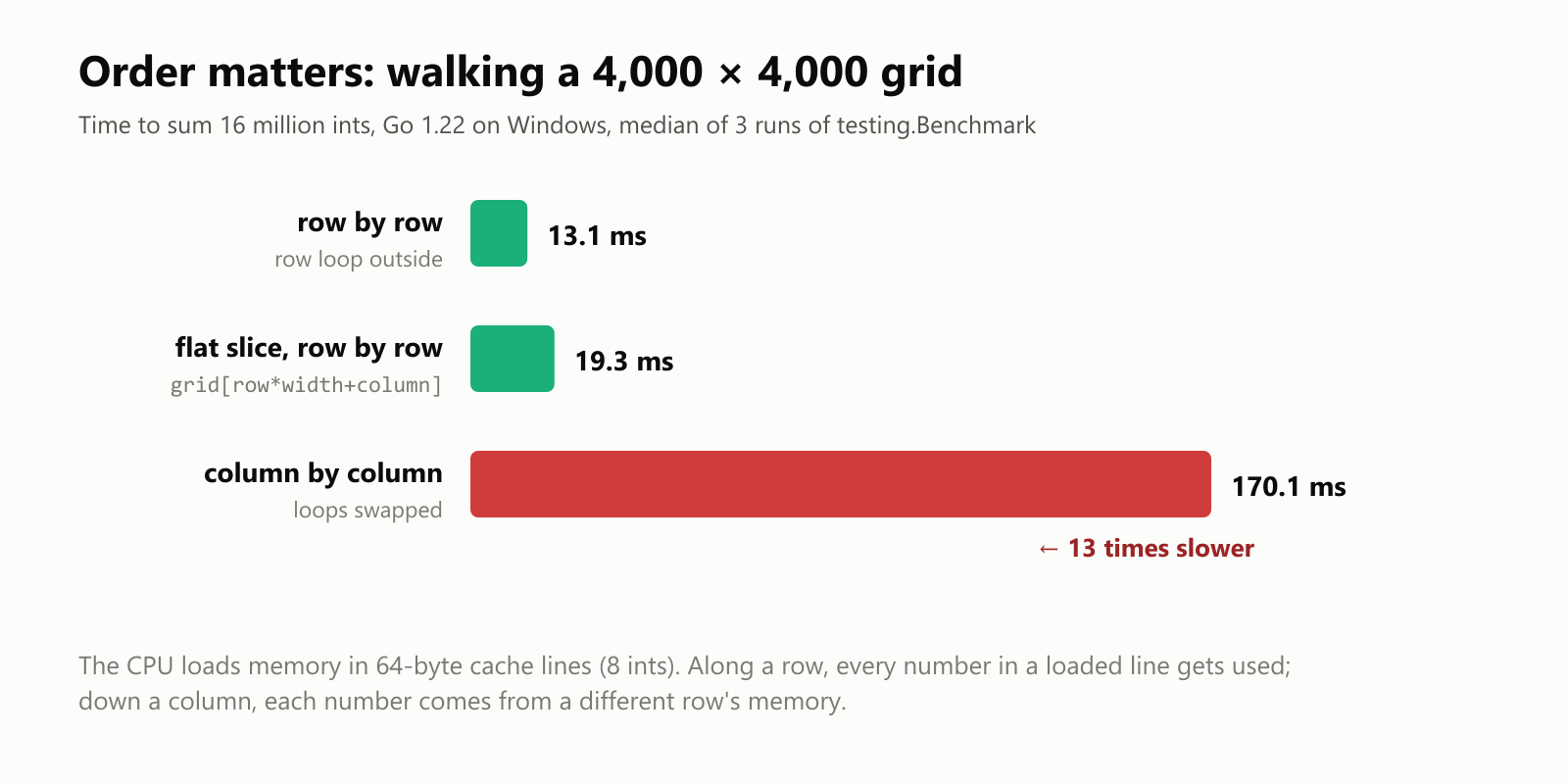
| Order | Time |
|---|---|
| Row by row | 13.1 ms |
| One flat slice, row by row | 19.3 ms |
| Column by column | 170.1 ms |
Column by column was 13 times slower. The processor doesn't fetch numbers one at a time: it loads memory in chunks called cache lines (64 bytes, 8 ints). Walking along a row uses every number in each chunk it loads; walking down a column needs a different row's memory for every single number, and keeps throwing the rest away. So: put the row loop outside and the column loop inside. (A single flat slice indexed with row*width + column was in the same range as the slice of slices here; it saves one pointer hop per row but costs a multiplication.)
Your turn: practice
Try these before peeking at the answers. Run each with go run ..
Exercise 1: Predict the output (warm-up). What does this print?
1package main
2
3import "fmt"
4
5func main() {
6	grid := [][]int{
7		{1, 2, 3},
8		{4, 5},
9		{6},
10	}
11	fmt.Println(len(grid), len(grid[1]), grid[1][1], grid[2][0])
12	grid[0] = append(grid[0], 10)
13	fmt.Println(grid)
14}
Exercise 2: Row totals. Given scores := [][]int{{8, 9, 7}, {6, 10, 9}, {7, 7, 8}} (three students, three tests), print each student's total.
Exercise 3: Find the maximum. In the same scores grid, find the highest score and print its row and column.
Exercise 4: Transpose. Write a program that turns [][]int{{1, 2, 3}, {4, 5, 6}} (2 rows, 3 columns) into its transpose (3 rows, 2 columns), where rows become columns.
Exercise 5: Tic-tac-toe winner (challenge). Write a function winner(board [][]string) string that returns "X", "O" or "none", checking all rows, columns and both diagonals.
Quick quiz
- In
board[2][0], which index picks the row? - What does
make([][]int, 3)create, and what's missing? - Why did changing
shared[0][0]change every row in Trap 2? - What's the difference between assigning a
[3][3]stringand a[][]string? - Why is walking a grid column by column slower?
Answers
Exercise 1: The rows have 3, 2 and 1 cells; append grows just the first row:
1package main
2
3import "fmt"
4
5func main() {
6	grid := [][]int{
7		{1, 2, 3},
8		{4, 5},
9		{6},
10	}
11	fmt.Println(len(grid), len(grid[1]), grid[1][1], grid[2][0])
12	grid[0] = append(grid[0], 10)
13	fmt.Println(grid)
14}
3 2 5 6
[[1 2 3 10] [4 5] [6]]Exercise 2: Sum each row in the inner loop:
1package main
2
3import "fmt"
4
5func main() {
6	scores := [][]int{{8, 9, 7}, {6, 10, 9}, {7, 7, 8}}
7	for student, tests := range scores {
8		total := 0
9		for _, score := range tests {
10			total += score
11		}
12		fmt.Printf("Student %d: %d\n", student+1, total)
13	}
14}
Student 1: 24
Student 2: 25
Student 3: 22Exercise 3: Track the best value and where you found it:
1package main
2
3import "fmt"
4
5func main() {
6	scores := [][]int{{8, 9, 7}, {6, 10, 9}, {7, 7, 8}}
7	best, bestRow, bestColumn := scores[0][0], 0, 0
8	for row := range scores {
9		for column := range scores[row] {
10			if scores[row][column] > best {
11				best, bestRow, bestColumn = scores[row][column], row, column
12			}
13		}
14	}
15	fmt.Printf("Highest: %d at row %d, column %d\n", best, bestRow, bestColumn)
16}
Highest: 10 at row 1, column 1Exercise 4: The result has as many rows as the original has columns; cell [row][column] moves to [column][row]:
1package main
2
3import "fmt"
4
5func main() {
6	matrix := [][]int{{1, 2, 3}, {4, 5, 6}}
7	transposed := make([][]int, len(matrix[0]))
8	for column := range transposed {
9		transposed[column] = make([]int, len(matrix))
10		for row := range matrix {
11			transposed[column][row] = matrix[row][column]
12		}
13	}
14	fmt.Println(transposed)
15}
[[1 4] [2 5] [3 6]]Exercise 5: Check each line of three, ignoring empty cells:
1package main
2
3import "fmt"
4
5func winner(board [][]string) string {
6	lines := [][][2]int{
7		{{0, 0}, {0, 1}, {0, 2}}, {{1, 0}, {1, 1}, {1, 2}}, {{2, 0}, {2, 1}, {2, 2}},
8		{{0, 0}, {1, 0}, {2, 0}}, {{0, 1}, {1, 1}, {2, 1}}, {{0, 2}, {1, 2}, {2, 2}},
9		{{0, 0}, {1, 1}, {2, 2}}, {{0, 2}, {1, 1}, {2, 0}},
10	}
11	for _, cells := range lines {
12		first := board[cells[0][0]][cells[0][1]]
13		if first == "-" {
14			continue
15		}
16		if board[cells[1][0]][cells[1][1]] == first && board[cells[2][0]][cells[2][1]] == first {
17			return first
18		}
19	}
20	return "none"
21}
22
23func main() {
24	fmt.Println(winner([][]string{{"O", "X", "-"}, {"-", "O", "-"}, {"-", "X", "O"}}))
25	fmt.Println(winner([][]string{{"X", "X", "X"}, {"O", "O", "-"}, {"-", "-", "-"}}))
26	fmt.Println(winner([][]string{{"X", "O", "X"}, {"X", "O", "O"}, {"O", "X", "X"}}))
27}
O
X
noneEach line is a list of three [2]int coordinates (row, column), so all eight winning lines live in one table instead of eight separate ifs.
Quiz: (1) The first one, 2; the second picks the column. (2) A slice of 3 rows, each a nil slice with no cells; you still have to make each row. (3) All three rows were the same slice header pointing at one underlying array. (4) Assigning an array copies every value; assigning a slice of slices copies only the headers, so both variables share the rows. (5) The CPU loads memory in 64-byte cache lines; along a row every loaded number gets used, but down a column each number comes from a different row's memory. In our test it was 13 times slower.
Cheat sheet
| I want to… | Write |
|---|---|
| A grid literal | board := [][]string{{"O", "X"}, {"-", "O"}} |
| Read / change a cell | board[row][column], board[row][column] = "X" |
| Count rows / cells in a row | len(board) / len(board[row]) |
| An empty rows × columns grid | make([][]int, rows), then grid[row] = make([]int, columns) for each row |
| Walk every cell | for row := range grid { for column := range grid[row] { … } } |
| Add a row | grid = append(grid, newRow) |
| Copy a grid | make each row and copy(clone[row], grid[row]) |
| A fixed-size board | var board [3][3]string |
| Fastest traversal | row loop outside, column loop inside |
Wrapping up
Two-dimensional slices are just slices of rows:
[][]Tis a slice of slices:grid[row][column], first index the row, second the column.- Building one with
maketakes two steps: the outer slice, then every row. Skipping the second step panics with "index out of range". - Rows are headers that point at data, so reusing one row makes all of them change together, and assigning a grid shares it; copy row by row for a real copy.
- Rows can have different lengths, like Pascal's triangle.
- Arrays like
[3][3]stringare fixed-size values that copy completely when assigned. - Walk row by row: in our benchmark, column by column was 13 times slower on the very same data.
Back through the series: The For Loop in Go, How to Declare a Variable in Go and Your First Program in Go. Next up: delaying work with defer in Go.
Read next
What Is the Swift Programming Language? A Simple Guide to the Language Behind iPhone Apps
A friendly, jargon-free guide to Swift, the programming language Apple created for iPhone, iPad and Mac apps. Learn why it replaced Objective-C, how optionals prevent crashes, how an app is made, and how fast Swift really is.
 nbkhope
What Is the Rust Programming Language? A Simple Guide to the Fast Language That Won't Let You Crash
A friendly, jargon-free guide to Rust, the programming language that is as fast as C but stops whole families of memory bugs before a program ever runs. Learn about ownership, why tech giants are adopting it, and where it is used.
nbkhope
What Is the Go Programming Language? A Simple Guide to the Language of the Cloud
A friendly, jargon-free guide to Go, the simple and fast programming language Google created for the cloud. Learn what goroutines are, why Go programs are a single file, and how Go came to power Docker, Kubernetes and much of the internet.
nbkhope
Comments
Be kind and specific. Comments with links from new accounts appear after a moderator reviews them.