The For Loop in Go: A Visual, Hands-On Guide
Go has one loop keyword, and it does everything. Learn the classic three-part for, the while-style and infinite forms, range over slices, strings, maps and integers, break and continue, the Go 1.22 loop variable change, common traps, real measurements, and exercises.


On this page
Most languages give you several loops: for, while, do-while, foreach. Go gives you exactly one keyword, for, and shapes it to fit every job: counting, repeating while a condition holds, looping forever until you break, and walking through slices, strings and maps with range.
In this guide you'll write every form of Go's for, trace a loop step by step, meet break, continue and labels, and run into the classic traps, including a bug Go itself fixed in version 1.22, which you'll reproduce by changing a single line in go.mod. Real measurements and exercises wrap it up.
All outputs below come from real runs with Go 1.22 on Windows. New to Go? Start with Your First Program in Go and How to Declare a Variable in Go.
The classic three-part for
1package main
2
3import "fmt"
4
5func main() {
6	for count := 1; count <= 5; count++ {
7		fmt.Println("Count:", count)
8	}
9	fmt.Println("Done!")
10}1Count: 1
2Count: 2
3Count: 3
4Count: 4
5Count: 5
6Done!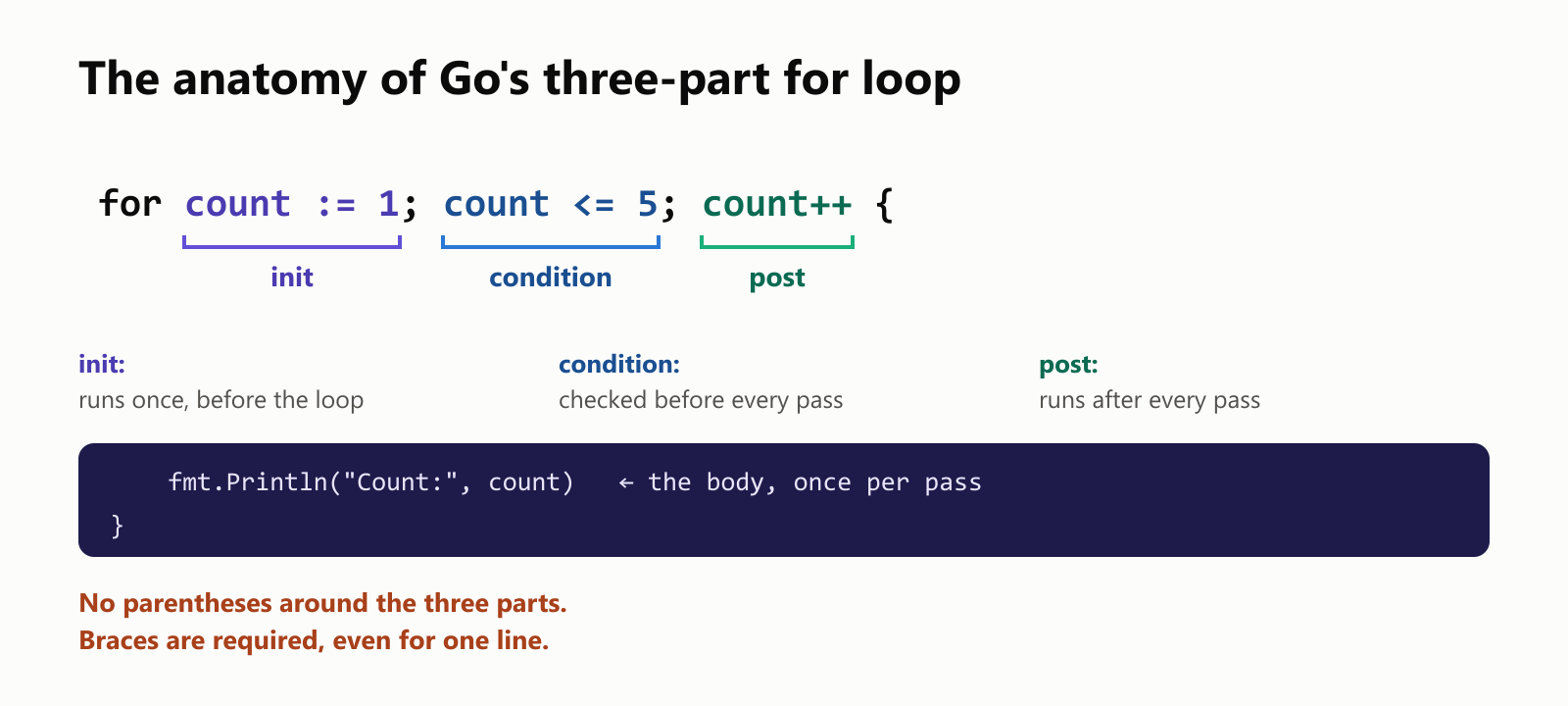
The header has three parts separated by semicolons:
- Init (
count := 1): runs once, before anything else. Usually it declares the loop variable. - Condition (
count <= 5): checked before every pass. True runs the body; false ends the loop. - Post (
count++): runs after every pass.
Unlike C, C++ and Java, Go uses no parentheses around the three parts, and the braces are required, even for a one-line body.
Step by step
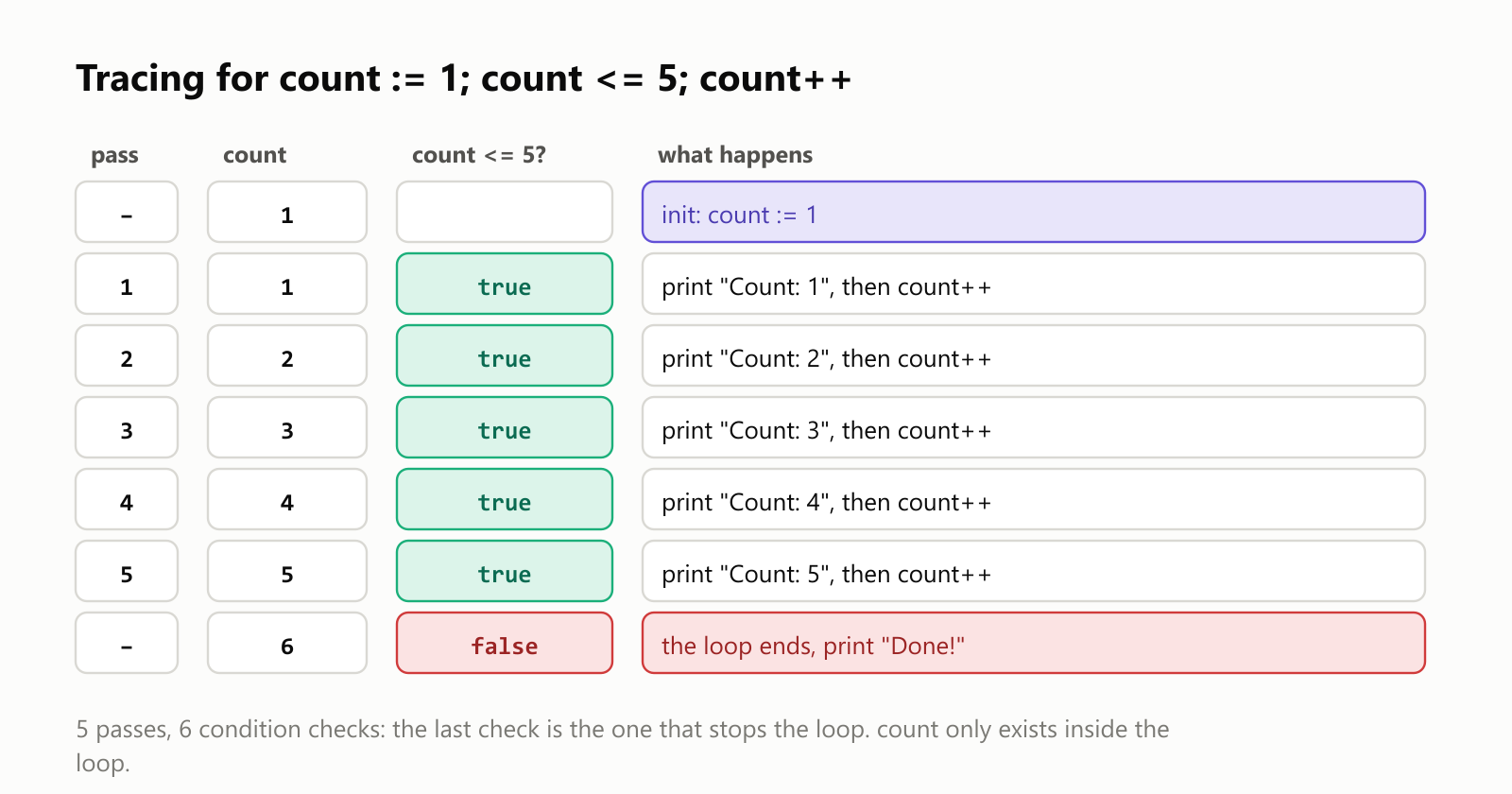
The condition is checked 6 times for 5 passes: the last check (6 <= 5) is the one that stops the loop. And count exists only inside the loop; using it after the closing brace is a compile error (undefined: count).
Counting other ways
The post statement can do anything, not just add one:
1package main
2
3import "fmt"
4
5func main() {
6	for countdown := 5; countdown > 0; countdown-- {
7		fmt.Print(countdown, " ")
8	}
9	fmt.Println("Liftoff!")
10
11	for even := 0; even <= 10; even += 2 {
12		fmt.Print(even, " ")
13	}
14	fmt.Println()
15
16	for power := 1; power < 1000; power *= 2 {
17		fmt.Print(power, " ")
18	}
19	fmt.Println()
20}
5 4 3 2 1 Liftoff!
0 2 4 6 8 10
1 2 4 8 16 32 64 128 256 512 One keyword, four shapes
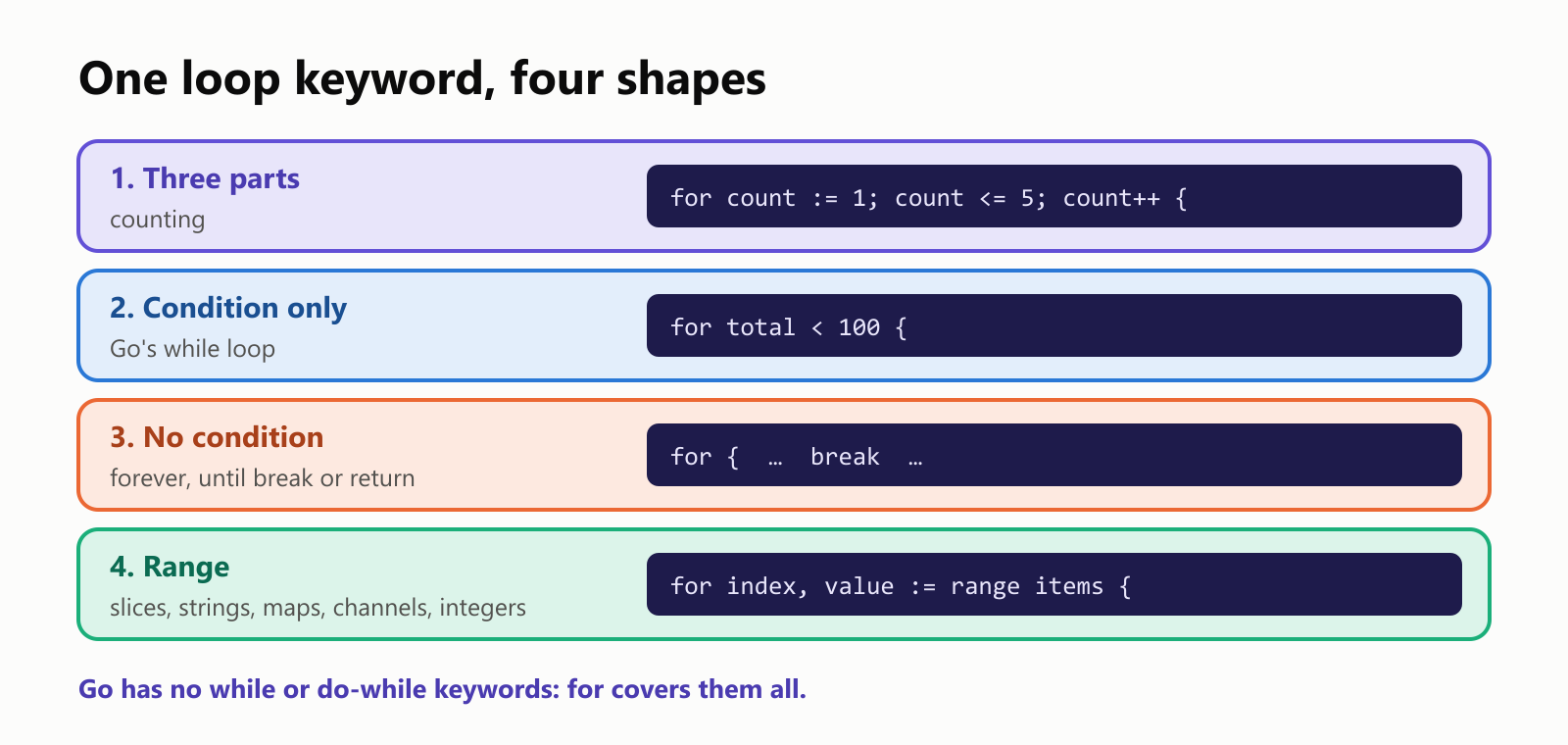
Condition only: Go's while
Drop the init and post statements and for becomes a while loop:
1package main
2
3import "fmt"
4
5func main() {
6	savings := 100.0
7	years := 0
8	for savings < 200 {
9		savings *= 1.07
10		years++
11	}
12	fmt.Printf("Doubled to %.2f after %d years at 7%%\n", savings, years)
13}
Doubled to 210.49 after 11 years at 7%Use this shape when you don't know in advance how many passes you'll need.
No condition: loop until break
for { } loops forever. You leave with break (or return):
1package main
2
3import "fmt"
4
5func main() {
6	number := 27
7	steps := 0
8	for {
9		if number == 1 {
10			break
11		}
12		if number%2 == 0 {
13			number /= 2
14		} else {
15			number = 3*number + 1
16		}
17		steps++
18	}
19	fmt.Println("Reached 1 after", steps, "steps")
20}
Reached 1 after 111 stepsThat's the famous Collatz sequence: halve even numbers, triple-and-add-one odd ones, and (as far as anyone has checked) you always reach 1. Starting at 27 takes a surprising 111 steps. A for { } is also how servers and games run their main loops.
range: walking through collections
Slices
1package main
2
3import "fmt"
4
5func main() {
6	fruits := []string{"apple", "banana", "cherry"}
7	for index, fruit := range fruits {
8		fmt.Println(index, fruit)
9	}
10	for _, fruit := range fruits {
11		fmt.Print(fruit, " ")
12	}
13	fmt.Println()
14	for index := range fruits {
15		fmt.Print(index, " ")
16	}
17	fmt.Println()
18}10 apple
21 banana
32 cherry
4apple banana cherry
50 1 2 range gives you two values per pass: the index and a copy of the element. Don't need the index? Write _ (the blank identifier), because an unused variable is a compile error. Need only the index? Leave the second variable out.
Integers (Go 1.22)
Since Go 1.22, range works on a plain integer, counting from 0 up to (but not including) it:
1package main
2
3import "fmt"
4
5func main() {
6	for lap := range 3 {
7		fmt.Println("Lap", lap+1)
8	}
9}
Lap 1
Lap 2
Lap 3for lap := range 3 is a tidier way to write for lap := 0; lap < 3; lap++.
Strings: characters, not bytes
1package main
2
3import "fmt"
4
5func main() {
6	for index, character := range "Olá!" {
7		fmt.Printf("byte %d: %c\n", index, character)
8	}
9}1byte 0: O
2byte 1: l
3byte 2: á
4byte 4: !![Ranging over a string. The string "Olá!" is 5 bytes in UTF-8: O at byte 0, l at byte 1, á taking bytes 2 and 3, and ! at byte 4. A for range loop gives one rune, one whole character, per pass, together with the index of its first byte: 0 O, 1 l, 2 á, 4 !. The index jumps from 2 to 4 because á is two bytes. A classic loop with s[i] would visit 5 bytes instead and split the á in half](https://nbktechworld.us-southeast-1.linodeobjects.com/static/images/6e1bdab2-d24f-4089-994c-90bf1241da83.png?v=1792884660153)
Ranging over a string gives you one rune (a whole Unicode character) per pass, plus the byte index where it starts. That's why the index jumps from 2 to 4: á takes two bytes. (%c prints a rune as a character.) A classic index loop with text[index] would visit bytes instead and cut á in half.
Maps: in no particular order
1package main
2
3import (
4	"fmt"
5	"sort"
6)
7
8func main() {
9	capitals := map[string]string{"France": "Paris", "Japan": "Tokyo", "Brazil": "Brasília", "Kenya": "Nairobi"}
10
11	countries := make([]string, 0, len(capitals))
12	for country := range capitals {
13		countries = append(countries, country)
14	}
15	sort.Strings(countries)
16
17	for _, country := range countries {
18		fmt.Println(country, "→", capitals[country])
19	}
20}1Brazil → Brasília
2France → Paris
3Japan → Tokyo
4Kenya → NairobiRanging over a map gives each key and value, but the order is deliberately random, so programs can't come to depend on it. A plain for country, capital := range capitals { fmt.Println(country, capital) } printed this on two runs in a row:
1$ go run .
2Japan Tokyo
3Brazil Brasília
4Kenya Nairobi
5France Paris
6$ go run .
7France Paris
8Japan Tokyo
9Brazil Brasília
10Kenya Nairobi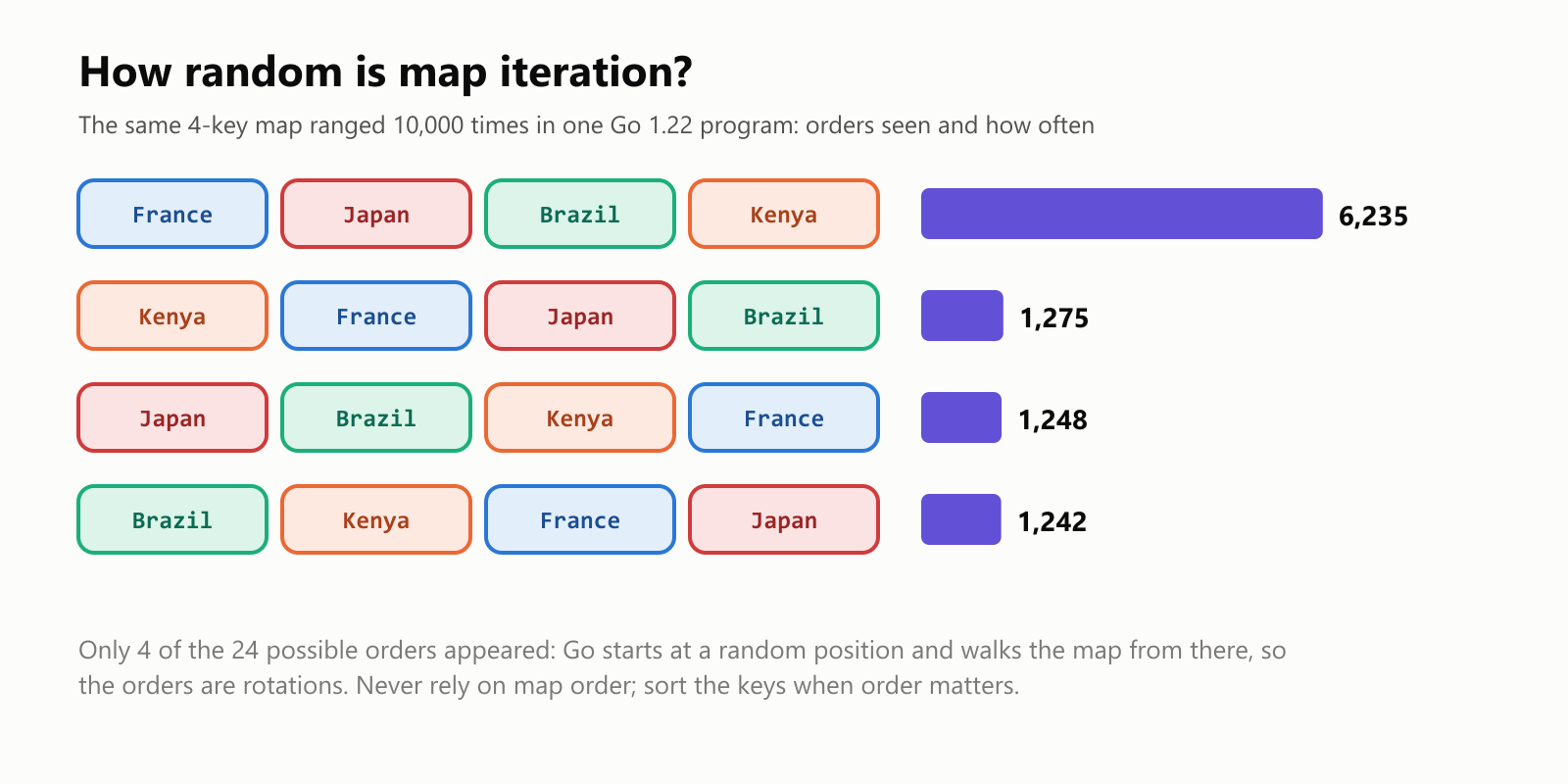
We ranged over that map 10,000 times and counted the orders: only 4 distinct orders appeared (rotations of one sequence, because Go picks a random starting point), and one of them came up 62% of the time. Either way: when order matters, collect the keys and sort them, as above.
break, continue and labels
1package main
2
3import "fmt"
4
5func main() {
6	for number := 1; number <= 10; number++ {
7		if number%3 == 0 {
8			continue
9		}
10		if number > 8 {
11			break
12		}
13		fmt.Print(number, " ")
14	}
15	fmt.Println()
16
17	target := 12
18search:
19	for first := 1; first <= 6; first++ {
20		for second := 1; second <= 6; second++ {
21			if first*second == target {
22				fmt.Printf("%d x %d = %d\n", first, second, target)
23				break search
24			}
25		}
26	}
27}
1 2 4 5 7 8
2 x 6 = 12continueskips the rest of this pass and moves on to the next one (3 and 6 are skipped).breakleaves the loop entirely (at 9).- Labels: a plain
breakonly leaves the innermost loop. Put a label likesearch:before the outer loop andbreak searchleaves both at once, so we stop at the first pair (2 × 6) instead of also finding 3 × 4, 4 × 3 and 6 × 2.
A loop or a formula?
Loops are the obvious way to add up 1 + 2 + … + n:
1package main
2
3import "fmt"
4
5func main() {
6	limit := 100
7	total := 0
8	for number := 1; number <= limit; number++ {
9		total += number
10	}
11	fmt.Println("Loop:", total)
12	fmt.Println("Formula:", limit*(limit+1)/2)
13}
Loop: 5050
Formula: 5050As a schoolboy, Carl Friedrich Gauss reportedly spotted the shortcut: pair 1 with 100, 2 with 99 and so on, 50 pairs of 101. We timed both for n = 10 million:
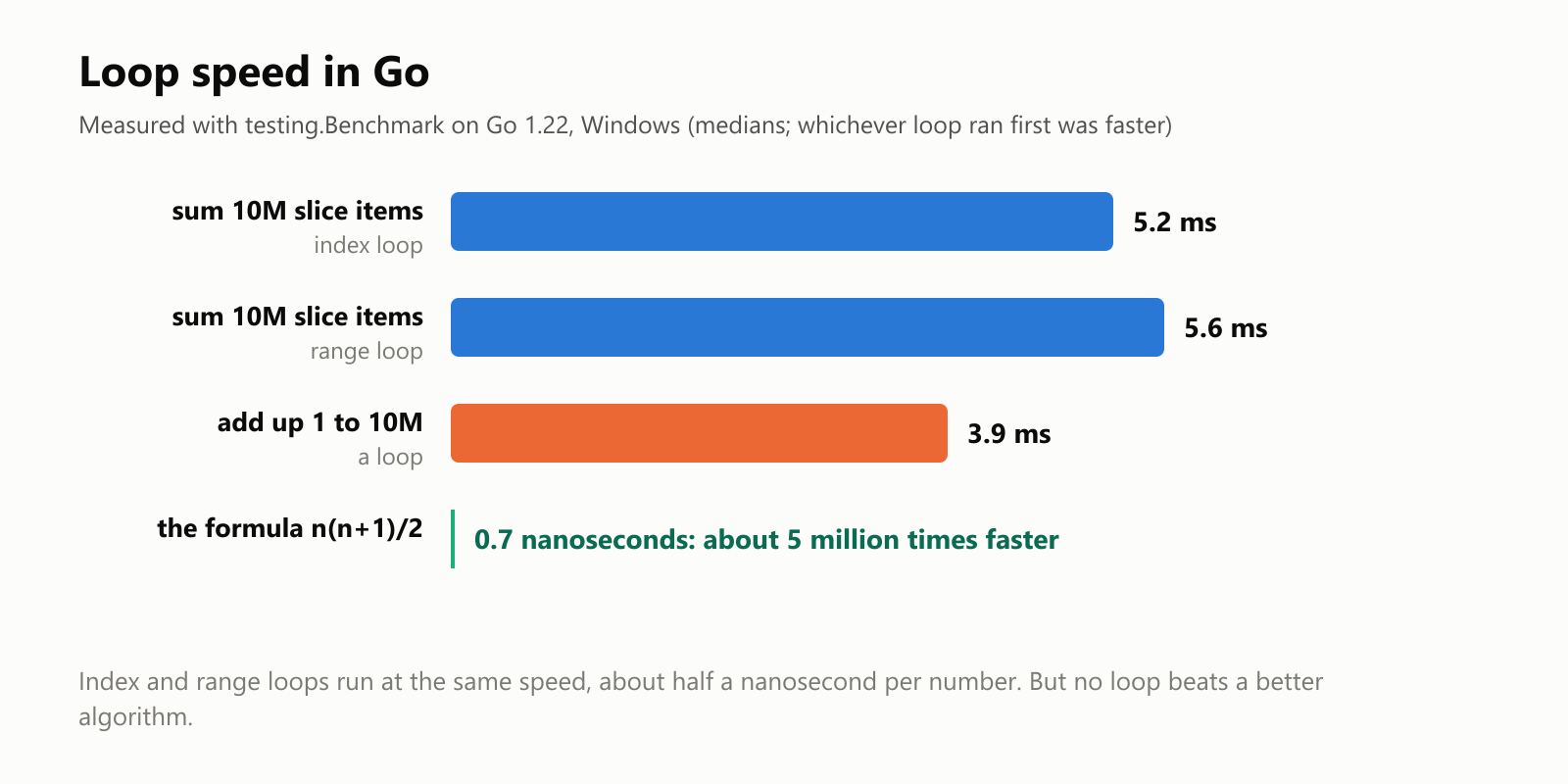
| What | Time |
|---|---|
| Sum 10 million slice elements, index loop | 5.2 ms |
Sum 10 million slice elements, range loop | 5.6 ms |
| Add up 1 to 10 million with a loop | 3.9 ms |
| Add up 1 to 10 million with the formula | 0.7 ns |
Two lessons. Index loops and range loops run at the same speed (whichever we ran first came out ahead, so the gap is noise), so pick the clearer one, usually range. And a loop doing half a nanosecond of work per number is fast, but a better idea is millions of times faster.
Traps
Trap 1: range gives you a copy
1package main
2
3import "fmt"
4
5func main() {
6	prices := []int{10, 20, 30}
7	for _, price := range prices {
8		price *= 2
9	}
10	fmt.Println(prices)
11
12	for index := range prices {
13		prices[index] *= 2
14	}
15	fmt.Println(prices)
16}
[10 20 30]
[20 40 60]The price variable is a copy of each element, so changing it changes nothing in the slice. To modify elements, assign through the index.
Trap 2: loop variables in closures (fixed in Go 1.22)
This program saves three functions in a loop and calls them afterward:
1package main
2
3import "fmt"
4
5func main() {
6	var printers []func()
7	for i := 0; i < 3; i++ {
8		printers = append(printers, func() { fmt.Print(i, " ") })
9	}
10	for _, printer := range printers {
11		printer()
12	}
13	fmt.Println()
14}
0 1 2 That's what you'd expect, and it's what Go 1.22 and later print. But the go line in your go.mod decides which loop rules apply. Change it from go 1.22 to go 1.21 and run the very same code:
$ go run .
3 3 3 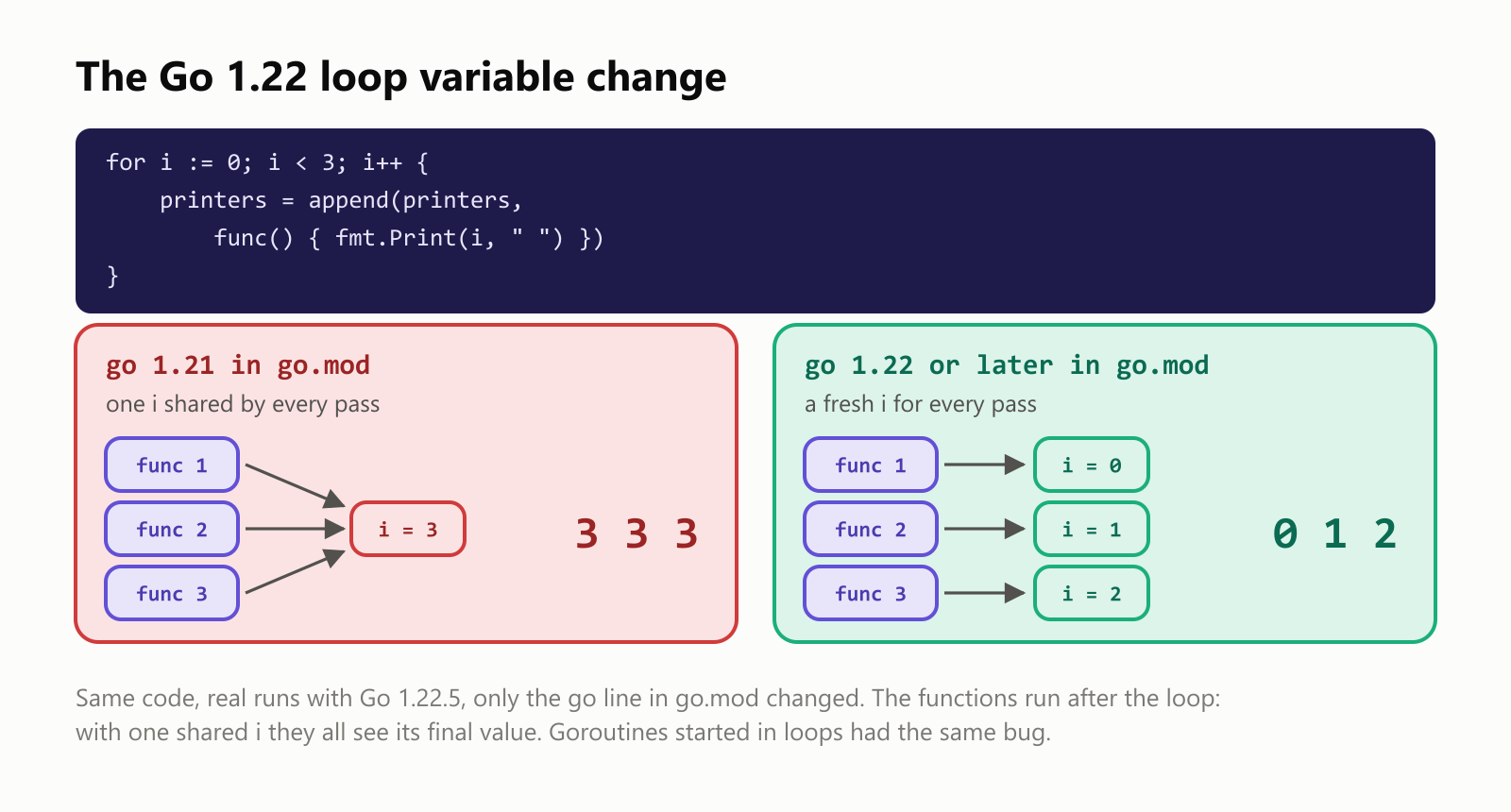
Before Go 1.22, the loop had one i shared by every pass, so all three functions saw its final value, 3. The same bug bit goroutines started inside loops, and it was one of the most common mistakes in Go code, so Go 1.22 changed the rules: each pass now gets its own variable. (The i here is the plain loop counter of a short example; in longer loops, prefer descriptive names.) If you maintain older code, check its go.mod version.
Trap 3: off by one
for index := 0; index <= len(fruits); index++ runs one pass too many and crashes with panic: runtime error: index out of range [3] with length 3. Valid indexes go from 0 to len - 1, so the condition is <, not <=. Better still, use range and let Go handle the bounds.
Your turn: practice
Try these before peeking at the answers. Run each with go run ..
Exercise 1: Predict the output (warm-up). What does this print?
1package main
2
3import "fmt"
4
5func main() {
6	for number := 10; number > 0; number -= 3 {
7		fmt.Print(number, " ")
8	}
9	fmt.Println()
10	for index, letter := range "Go!" {
11		fmt.Print(index, string(letter), " ")
12	}
13	fmt.Println()
14}
Exercise 2: Multiplication table. Print the 7 times table from 7 × 1 to 7 × 10, one line each, like 7 x 3 = 21.
Exercise 3: Sum the evens. Add up the even numbers from 1 to 100 using continue to skip the odd ones.
Exercise 4: FizzBuzz. For the numbers 1 to 15, print Fizz for multiples of 3, Buzz for multiples of 5, FizzBuzz for multiples of both, and the number otherwise, all on one line.
Exercise 5: Count the vowels (challenge). Count the vowels (a, e, i, o, u, including accented ones like á and ê) in "A programação é divertida" using range over the string and strings.ContainsRune.
Quick quiz
- How many loop keywords does Go have?
- How do you write a
whileloop in Go? - What two values does
rangegive you over a slice? - Why does
rangeover"Olá"skip from index 2 to 4? - What changed about loop variables in Go 1.22?
Answers
Exercise 1: The first loop counts down by 3 until the number isn't greater than 0; the second gives byte indexes and characters:
1package main
2
3import "fmt"
4
5func main() {
6	for number := 10; number > 0; number -= 3 {
7		fmt.Print(number, " ")
8	}
9	fmt.Println()
10	for index, letter := range "Go!" {
11		fmt.Print(index, string(letter), " ")
12	}
13	fmt.Println()
14}
10 7 4 1
0G 1o 2! Exercise 2: range 10 counts 0 to 9, so add 1:
1package main
2
3import "fmt"
4
5func main() {
6	for step := range 10 {
7		multiplier := step + 1
8		fmt.Printf("7 x %d = %d\n", multiplier, 7*multiplier)
9	}
10}17 x 1 = 7
27 x 2 = 14
37 x 3 = 21
47 x 4 = 28
57 x 5 = 35
67 x 6 = 42
77 x 7 = 49
87 x 8 = 56
97 x 9 = 63
107 x 10 = 70Exercise 3: continue skips odd numbers before they're added:
1package main
2
3import "fmt"
4
5func main() {
6	total := 0
7	for number := 1; number <= 100; number++ {
8		if number%2 != 0 {
9			continue
10		}
11		total += number
12	}
13	fmt.Println(total)
14}2550Exercise 4: Check "both" first, or 15 would stop at Fizz:
1package main
2
3import "fmt"
4
5func main() {
6	for number := 1; number <= 15; number++ {
7		switch {
8		case number%15 == 0:
9			fmt.Print("FizzBuzz ")
10		case number%3 == 0:
11			fmt.Print("Fizz ")
12		case number%5 == 0:
13			fmt.Print("Buzz ")
14		default:
15			fmt.Print(number, " ")
16		}
17	}
18	fmt.Println()
19}
1 2 Fizz 4 Buzz Fizz 7 8 Fizz Buzz 11 Fizz 13 14 FizzBuzz (A switch with no value checks each case condition in order, a tidy replacement for an if/else if chain.)
Exercise 5: range over the string gives whole characters, so á and é count once each:
1package main
2
3import (
4	"fmt"
5	"strings"
6)
7
8func main() {
9	text := "A programação é divertida"
10	vowels := "aeiouáéíóúâêôãõAEIOU"
11	count := 0
12	for _, character := range text {
13		if strings.ContainsRune(vowels, character) {
14			count++
15		}
16	}
17	fmt.Println("Vowels:", count)
18}
Vowels: 11Quiz: (1) One: for. (2) With only a condition: for total < 100 { … }. (3) The index and a copy of the element. (4) range over a string yields runes with their starting byte index, and á takes two bytes. (5) Each pass of the loop now gets its own copy of the loop variable, so closures and goroutines created in the loop see the value from their own pass (when go.mod says 1.22 or later).
Cheat sheet
| I want to… | Write |
|---|---|
| Count from 1 to 10 | for count := 1; count <= 10; count++ { } |
| Repeat n times (Go 1.22+) | for step := range n { } |
| Loop while a condition holds | for total < 100 { } |
Loop until break | for { … if done { break } … } |
| Walk a slice | for index, value := range items { } |
| Values only / indexes only | for _, value := range items / for index := range items |
| Walk a string's characters | for index, character := range text { } |
| Walk a map (any order) | for key, value := range table { } |
| Skip to the next pass | continue |
| Leave the loop | break |
| Leave nested loops | label the outer loop, then break label |
| Change slice elements | items[index] = …, not the range copy |
Wrapping up
Go's single for keyword covers every kind of loop:
- Three parts (
init; condition; post) for counting, with no parentheses and required braces. - Condition only is Go's
while; no condition loops untilbreak. rangewalks slices (index and a copy), strings (runes and byte indexes), maps (in random order) and, since Go 1.22, integers.continueskips a pass,breakleaves, and labels break out of nested loops.- Since Go 1.22, each pass gets its own loop variable, fixing the classic closure bug (the same code printed
3 3 3withgo 1.21ingo.mod). - Index and
rangeloops are equally fast, about half a nanosecond per element in our test, but the right formula beat the loop by millions of times.
Back through the series: How to Declare a Variable in Go, How to Install Go on Linux and Your First Program in Go. Next up: two-dimensional slices in Go.
Read next
What Is the Swift Programming Language? A Simple Guide to the Language Behind iPhone Apps
A friendly, jargon-free guide to Swift, the programming language Apple created for iPhone, iPad and Mac apps. Learn why it replaced Objective-C, how optionals prevent crashes, how an app is made, and how fast Swift really is.
 nbkhope
What Is the Rust Programming Language? A Simple Guide to the Fast Language That Won't Let You Crash
A friendly, jargon-free guide to Rust, the programming language that is as fast as C but stops whole families of memory bugs before a program ever runs. Learn about ownership, why tech giants are adopting it, and where it is used.
nbkhope
What Is the Go Programming Language? A Simple Guide to the Language of the Cloud
A friendly, jargon-free guide to Go, the simple and fast programming language Google created for the cloud. Learn what goroutines are, why Go programs are a single file, and how Go came to power Docker, Kubernetes and much of the internet.
nbkhope
Comments
Be kind and specific. Comments with links from new accounts appear after a moderator reviews them.