Your First Program in Go: A Visual, Hands-On Guide
Write, build and run your first Go program and understand every line: package main, import, func main, fmt.Println and Printf, go run vs. go build, Go's strict compiler errors, gofmt, reading input, exit codes, cross-compiling, real measurements, and exercises.


On this page
Go (often called Golang) was created at Google to be simple, fast to compile, and pleasant to work with on big projects. It powers Docker, Kubernetes and much of the cloud. And its Hello, World is only seven lines long.
In this guide you'll write, run and build your first Go program, then take it apart line by line. You'll print text and numbers, meet Go's famously strict compiler (it refuses to build code with an unused import!), let gofmt format your code, read input, and build programs for other operating systems with one command. Exercises wrap it up.
All outputs and measurements below come from real runs with Go 1.22 on Windows. Want the big picture first? Read What Is the Go Programming Language?
Setting up
Download Go from go.dev/dl (installers for Windows, macOS and Linux), then check it in a terminal:
$ go version
go version go1.22.5 windows/amd64
Go code lives in modules: a folder with a go.mod file that names the project. Create a folder and a module for your first program:
1$ mkdir hello
2$ cd hello
3$ go mod init hello
4go: creating new go.mod: module hello
Hello, World!
Create a file named hello.go in that folder:
1package main
2
3import "fmt"
4
5func main() {
6	fmt.Println("Hello, World!")
7}
Run it:
$ go run .
Hello, World!
go run . compiles the program in the current folder and runs it right away. Congratulations, you're a Go programmer! Now let's see what each line does.
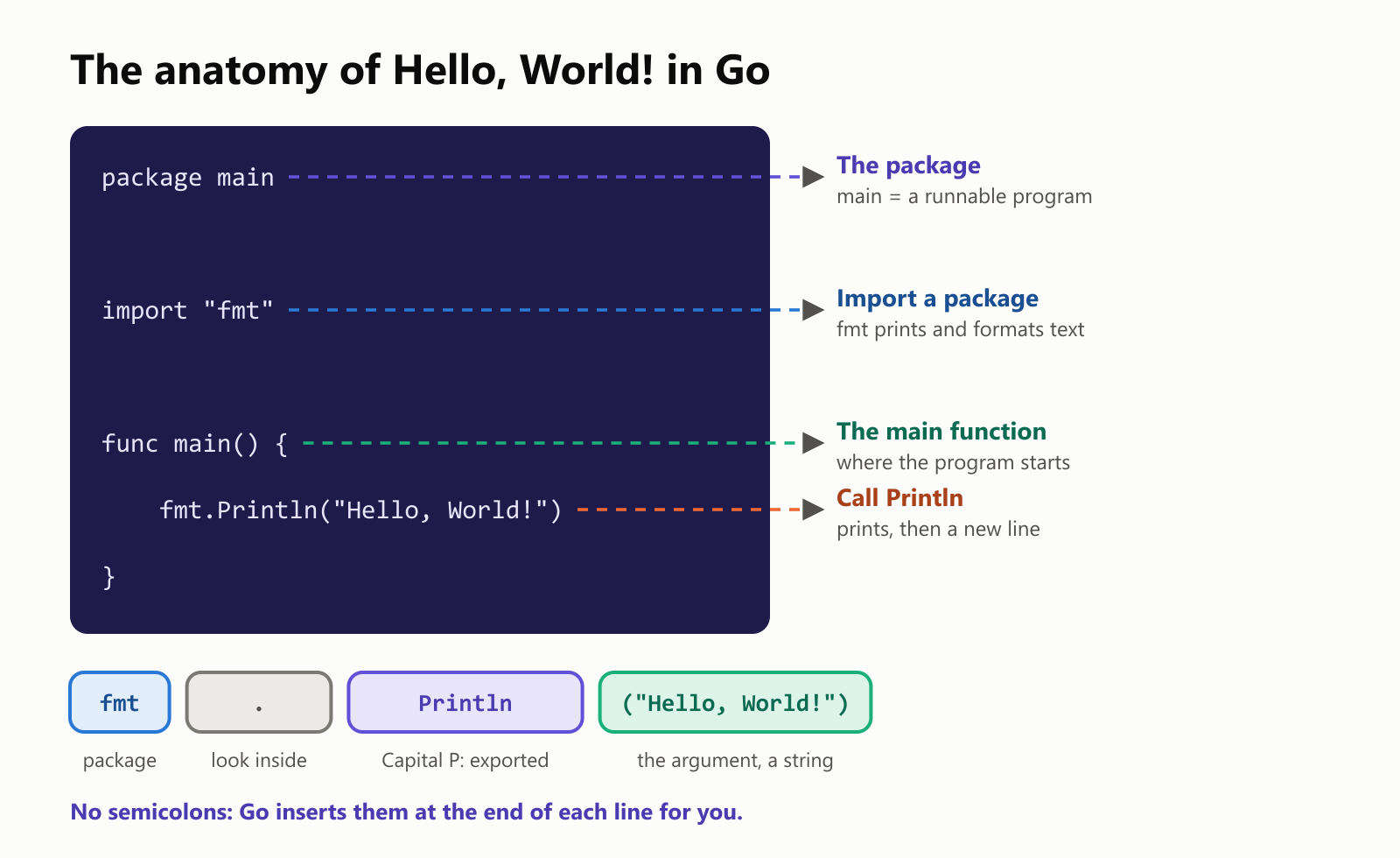
package main: every Go file starts by saying which package it belongs to. The package namedmainis special: it's the one that becomes a runnable program.import "fmt": brings in thefmtpackage (short for format) from Go's standard library, which handles printing.func main(): declares a function namedmain. Like in C and C++, every Go program starts there.funcis the keyword for functions, and the body goes between{and}.fmt.Println("Hello, World!"): calls thePrintlnfunction from thefmtpackage. It prints its arguments followed by a new line (theln).- No semicolons: Go adds them automatically at the end of each line. More on that in a moment.
Notice that main is in two places: the package main and the function main. A runnable Go program needs both.
go run vs. go build
go run is handy while you write code, but it builds the program into a temporary folder every time. go build produces an executable you keep:
$ go build
$ ./hello
Hello, World!
On Windows, go build creates hello.exe (run it as .\hello.exe in PowerShell). That one file is the whole program: no Go installation needed on the computer that runs it.
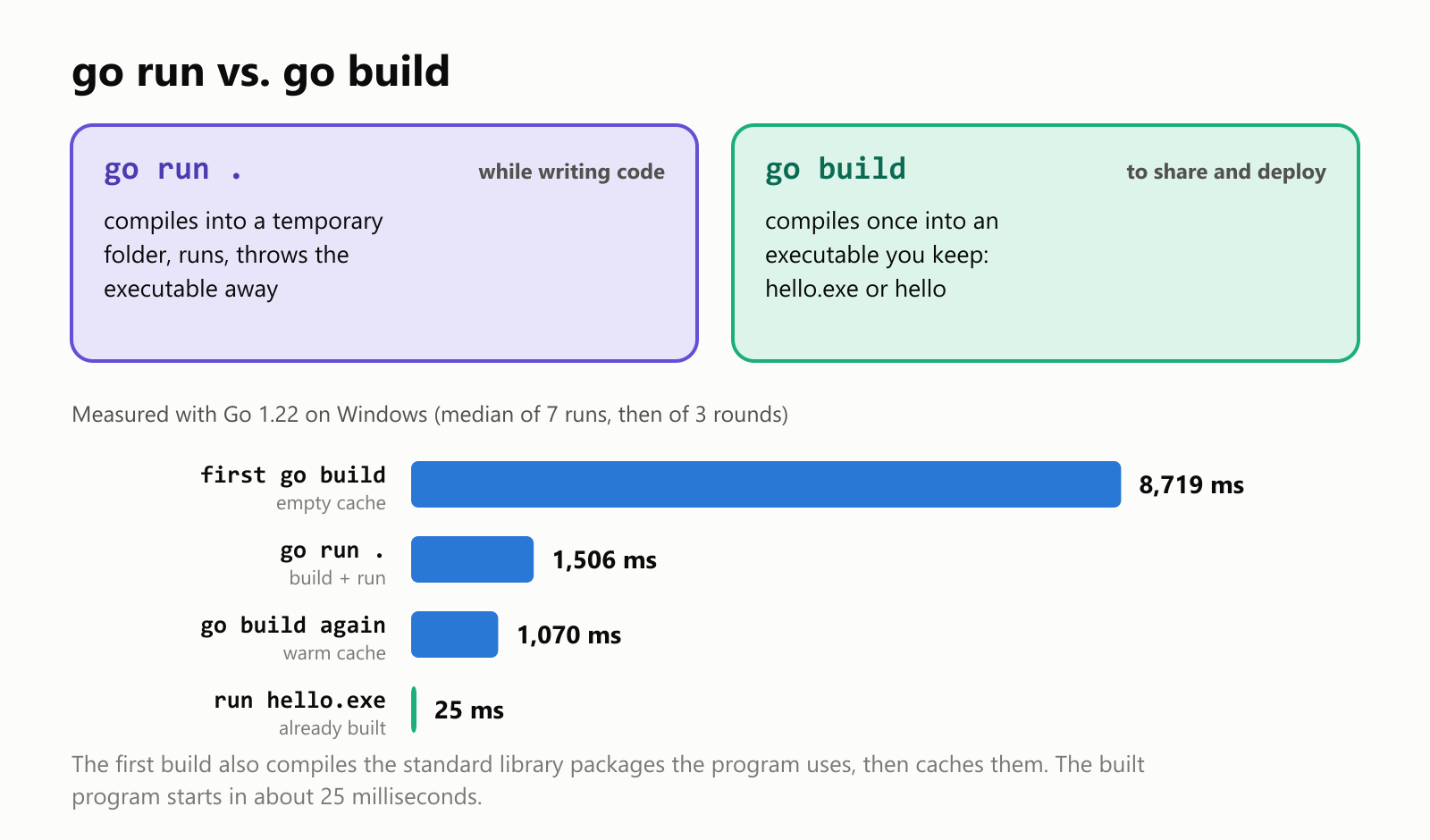
We timed both on this computer:
| What | Time |
|---|---|
First go build (empty build cache) | 8,719 ms |
| Rebuild (warm cache) | 1,070 ms |
go run . | 1,506 ms |
Running the built hello.exe | 25 ms |
The first build is the slow one because Go also compiles the standard library packages your program uses, then caches them. After that, builds take about a second, and the finished program starts in a few dozen milliseconds. (Windows' antivirus scanning slows every step here; on Linux the same steps are typically faster.)
How big is the program?
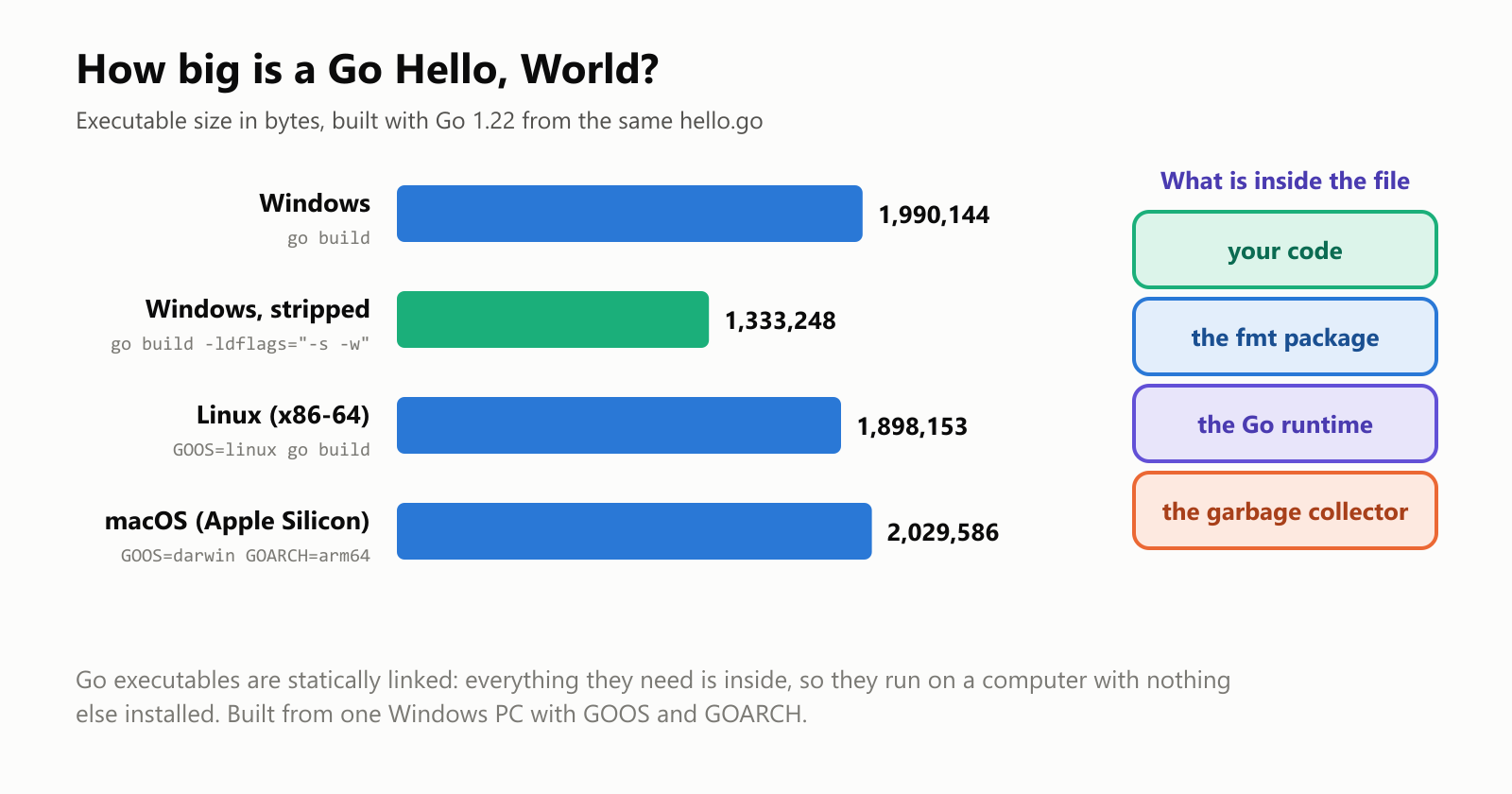
About 1.9 MB for Hello, World. That sounds big, but Go programs are statically linked: the Go runtime, the garbage collector and every package you use are inside that one file. Copy it to another computer with the same operating system and it just runs.
Printing: Println, Print and Printf
The fmt package has three printing functions you'll use constantly:
1package main
2
3import "fmt"
4
5func main() {
6	fmt.Println("Hello,", "Gopher!", 2024)
7	fmt.Print("No new line here. ")
8	fmt.Print("Same line.\n")
9	fmt.Printf("%s is %d years old and %.2f m tall\n", "Ada", 36, 1.65)
10	fmt.Printf("%v %v %v\n", 42, "text", true)
11	fmt.Printf("%T %T %T\n", 42, "text", 3.14)
12	fmt.Println(7/2, 7.0/2, 7%2)
13}1Hello, Gopher! 2024
2No new line here. Same line.
3Ada is 36 years old and 1.65 m tall
442 text true
5int string float64
63 3.5 1Printlnprints its arguments separated by spaces and adds a new line.Printadds no new line (use\n, the newline escape sequence, when you want one).Printf(print formatted) fills verbs in a template:%sfor a string,%dfor a whole number,%.2ffor a decimal with 2 places,%vfor any value in its default format, and%Tfor a value's type.
The last line is a classic: dividing two whole numbers with / drops the remainder (7/2 is 3), a decimal keeps it (7.0/2 is 3.5), and % gives the remainder (1).
Go's strict compiler
Go is famous for refusing to build code that most languages would only warn about. An unused import is an error:
1package main
2
3import (
4	"fmt"
5	"os"
6)
7
8func main() {
9	fmt.Println("Hello, World!")
10}
$ go run .
# hello
.\main.go:5:2: "os" imported and not usedSo is an unused variable:
1package main
2
3import "fmt"
4
5func main() {
6	message := "Hello, World!"
7	fmt.Println("Hi!")
8}
$ go run .
# hello
.\main.go:6:2: message declared and not used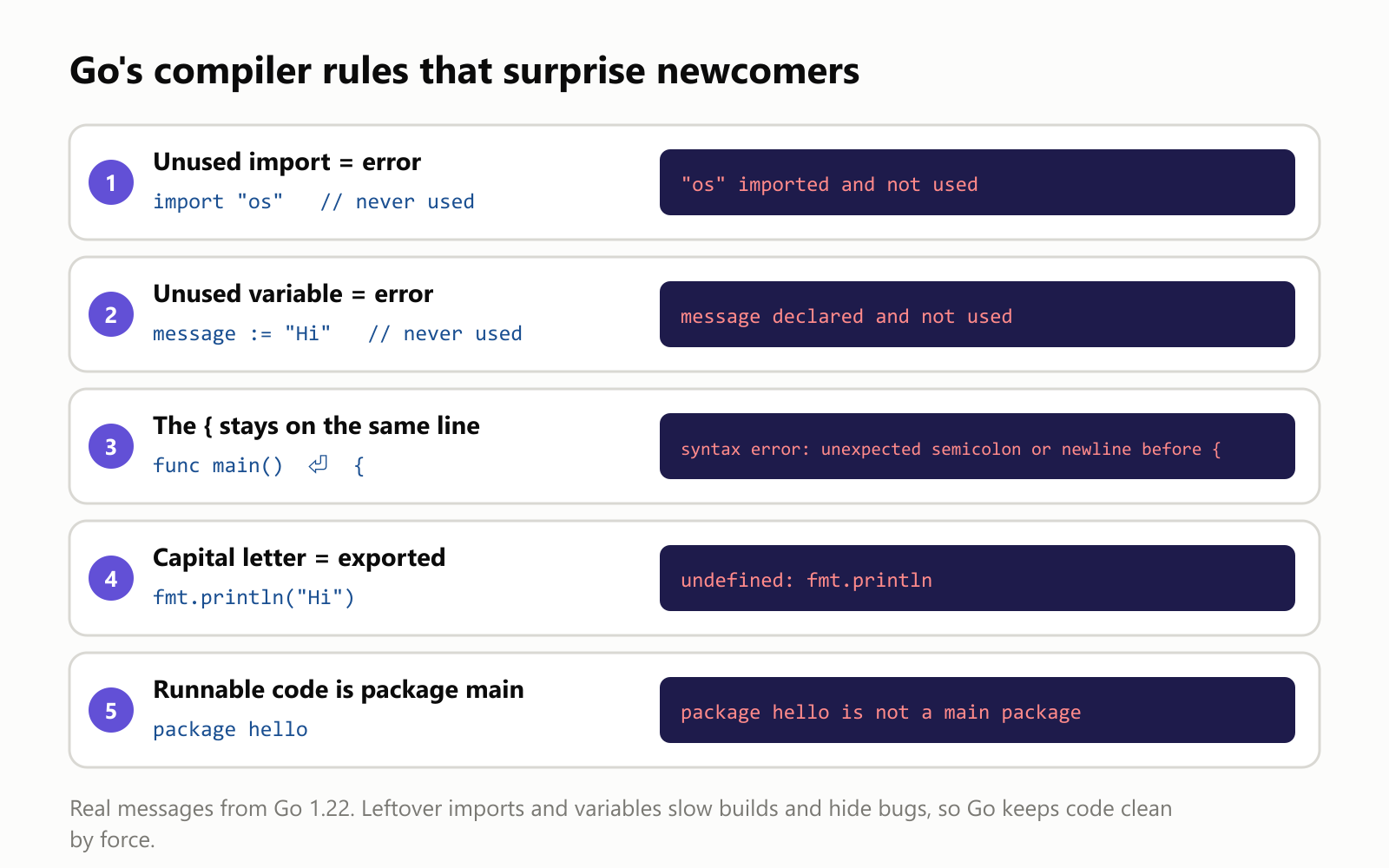
The messages follow the usual pattern: file:line:column: problem. (On macOS and Linux the path shows as ./main.go.) The Go designers made these errors on purpose: unused imports slow down builds of big programs, and unused variables often mean a bug. The fix is simple: delete what you don't use. While experimenting, you can silence an unused variable by assigning it to the blank identifier, _ = message.
Where the brace goes, and the invisible semicolons
Go statements end with semicolons, but you never type them: the compiler inserts one at the end of any line that looks finished. That has a consequence. Put the opening brace on its own line:
1package main
2
3import "fmt"
4
5func main()
6{
7	fmt.Println("Hello, World!")
8}
$ go run .
# hello
.\main.go:6:1: syntax error: unexpected semicolon or newline before {The line func main() looked finished, so Go put a semicolon after it, and then the { on the next line made no sense. In Go, the opening brace always goes on the same line.
Capital letters matter
1package main
2
3import "fmt"
4
5func main() {
6	fmt.println("Hello, World!")
7}
$ go run .
# hello
.\main.go:6:6: undefined: fmt.printlnIn Go, a name that starts with a capital letter is exported: other packages can use it. Println is exported; a lowercase println in fmt would be private to the fmt package. That's the whole visibility system in Go: no public or private keywords, just the first letter.
It has to be package main
If the package has another name, Go treats the folder as a library, something other programs import, not a program you can run:
$ go run .
package hello is not a main package
Let gofmt format your code
Go comes with an official formatter, and nearly every Go project uses it. Here's some carelessly typed code:
1package main
2import "fmt"
3func main(){
4fmt.Println("Hello, World!")
5    for i:=0;i<3;i++{fmt.Println(i)}
6}
Running gofmt messy.go (or go fmt on the whole module) prints:
1package main
2
3import "fmt"
4
5func main() {
6	fmt.Println("Hello, World!")
7	for i := 0; i < 3; i++ {
8		fmt.Println(i)
9	}
10}
Tabs for indentation, spaces around operators, one statement per line. Because everyone's code is formatted the same way, there's nothing to argue about in code reviews, and every Go project looks familiar. Most editors run gofmt automatically when you save.
Reading input
fmt.Scan reads values typed by the user into variables. You pass the variable's address with & so Scan can fill it in:
1package main
2
3import "fmt"
4
5func main() {
6	var first, second int
7	fmt.Print("First number: ")
8	fmt.Scan(&first)
9	fmt.Print("Second number: ")
10	fmt.Scan(&second)
11	fmt.Printf("%d + %d = %d\n", first, second, first+second)
12}
A sample run, where the numbers after the colons are typed by the user:
First number: 12
Second number: 30
12 + 30 = 42
var first, second int declares two integer variables. (The next article in this series covers variables in depth.) To read a whole line, including spaces, use a bufio.Reader:
1package main
2
3import (
4	"bufio"
5	"fmt"
6	"os"
7	"strings"
8)
9
10func main() {
11	reader := bufio.NewReader(os.Stdin)
12	fmt.Print("What's your name? ")
13	line, _ := reader.ReadString('\n')
14	name := strings.TrimSpace(line)
15	fmt.Printf("Hello, %s! Welcome to Go.\n", name)
16}
What's your name? Ada Lovelace
Hello, Ada Lovelace! Welcome to Go.ReadString('\n') reads up to and including the Enter key, so strings.TrimSpace removes the line ending (on Windows that's two characters, \r\n). The _ ignores the second value ReadString returns, an error; Go functions often return a result and an error, a pattern you'll see everywhere.
Exit codes
When a Go program's main returns, it exits with code 0, meaning success. To report a failure, call os.Exit with another number:
1package main
2
3import (
4	"fmt"
5	"os"
6)
7
8func main() {
9	fmt.Println("Something went wrong!")
10	os.Exit(3)
11}1$ go build -o fail
2$ ./fail
3Something went wrong!
4$ echo $?
53Scripts and build tools check that number to decide whether to continue. (In PowerShell, use $LASTEXITCODE instead of $?. And note that go run reports a non-zero exit with an extra exit status 3 line.)
Build for any operating system
One of Go's best tricks: set two environment variables, GOOS (the target operating system) and GOARCH (the processor), and go build produces a program for another system, no extra tools needed. From the same Windows computer:
1$ GOOS=linux GOARCH=amd64 go build -o hello-linux
2$ GOOS=darwin GOARCH=arm64 go build -o hello-mac
3$ file hello-linux
4hello-linux: ELF 64-bit LSB executable, x86-64, version 1 (SYSV), statically linked, …
hello-linux runs on a 64-bit Linux server and hello-mac on an Apple Silicon Mac. (That's Bash syntax; in PowerShell, set $env:GOOS = "linux" and $env:GOARCH = "amd64" first.) go tool dist list shows every supported combination, more than 40.
Your turn: practice
Try these before peeking at the answers. Put each program in its own folder with go mod init, then run it with go run ..
Exercise 1: Predict the output (warm-up). What exactly does this print?
1package main
2
3import "fmt"
4
5func main() {
6	fmt.Print("Go")
7	fmt.Println("pher", 1, 2)
8	fmt.Printf("%d%%\n", 100)
9	fmt.Println(10/4, 10.0/4)
10}
Exercise 2: Fix the program. It has three mistakes that stop it from building. Find them by running it and reading the errors.
1package main
2
3import (
4	"fmt"
5	"strings"
6)
7
8func main()
9{
10	fmt.println("Learning Go")
11}
Exercise 3: Draw a box. Write a program that prints exactly this:
+--------+
|  Go!   |
+--------+
Exercise 4: A receipt. Use Printf to print a line for 3 coffees at 2.5 each, with the total formatted to 2 decimal places: 3 x coffee @ 2.50 = 7.50.
Exercise 5: Temperature converter (challenge). Read a temperature in degrees Celsius as a whole number and print it in Fahrenheit with one decimal place, using F = C × 9 / 5 + 32. For 37, it should print 98.6.
Quick quiz
- Which package and which function does every runnable Go program need?
- What's the difference between
go runandgo build? - Why won't Go build a program with an unused import?
- Why must the opening
{stay on the same line? - Why is it
fmt.Printlnand notfmt.println?
Answers
Exercise 1: Print adds no new line, so pher continues on the same line, and Println puts spaces between its arguments. %% prints a literal percent sign. 10/4 is whole-number division:
1package main
2
3import "fmt"
4
5func main() {
6	fmt.Print("Go")
7	fmt.Println("pher", 1, 2)
8	fmt.Printf("%d%%\n", 100)
9	fmt.Println(10/4, 10.0/4)
10}
Gopher 1 2
100%
2 2.5Exercise 2: The unused strings import, the { on its own line, and the lowercase println. Fixed:
1package main
2
3import "fmt"
4
5func main() {
6	fmt.Println("Learning Go")
7}
Learning Go(Go reports the brace first. It's a syntax error, so the compiler stops before it can check imports and names. Fix it, run again, and the next errors appear.)
Exercise 3: One Println per line:
1package main
2
3import "fmt"
4
5func main() {
6	fmt.Println("+--------+")
7	fmt.Println("|  Go!   |")
8	fmt.Println("+--------+")
9}
+--------+
| Go! |
+--------+Exercise 4: %d for the count, %s for the name and %.2f for both prices:
1package main
2
3import "fmt"
4
5func main() {
6	quantity := 3
7	price := 2.5
8	fmt.Printf("%d x %s @ %.2f = %.2f\n", quantity, "coffee", price, float64(quantity)*price)
9}
3 x coffee @ 2.50 = 7.50float64(quantity) converts the integer to a decimal number: Go never mixes int and float64 in arithmetic automatically, another of its strict rules.
Exercise 5: Convert to float64 before dividing so the decimals survive:
1package main
2
3import "fmt"
4
5func main() {
6	var celsius int
7	fmt.Print("Temperature in Celsius: ")
8	fmt.Scan(&celsius)
9	fahrenheit := float64(celsius)*9/5 + 32
10	fmt.Printf("%d C = %.1f F\n", celsius, fahrenheit)
11}
Temperature in Celsius: 37
37 C = 98.6 FTemperature in Celsius: -40
-40 C = -40.0 FQuiz: (1) The main package and the main function. (2) go run compiles to a temporary folder and runs the program immediately; go build creates an executable file you keep and can copy to other computers. (3) Go's designers made unused imports an error to keep builds fast and code clean; delete the import (or use it). (4) Go inserts a semicolon at the end of a line that looks finished, so a { on the next line would follow a semicolon, a syntax error. (5) Names starting with a capital letter are exported from their package; lowercase names are private to it.
Cheat sheet
| I want to… | Write |
|---|---|
| Start a module | go mod init hello |
| Run while developing | go run . |
| Build an executable | go build (or go build -o name) |
| A runnable program's skeleton | package main + func main() { … } |
| Use a package | import "fmt" (several: import ( "fmt" "os" )) |
| Print with a new line | fmt.Println("Hi", name) |
| Print a template | fmt.Printf("%s is %d\n", name, age) |
| Read a value | fmt.Scan(&age) |
| Report failure | os.Exit(1) |
| Format the code | gofmt -w hello.go or go fmt ./... |
| Build for Linux | GOOS=linux GOARCH=amd64 go build |
Wrapping up
Seven lines, and now you know what each one does:
- A runnable Go program is
package mainwith afunc main(), inside a module created bygo mod init. go run .compiles and runs in one step;go buildmakes a single, self-contained executable (about 1.9 MB for Hello, World, in our build).fmt.Println,PrintandPrintfcover nearly all printing.- Go's compiler is strict: unused imports and variables are errors, the
{stays on the same line, and capital letters decide what a package exports. gofmtformats every Go program the same way.- One command cross-compiles for Linux, macOS or Windows.
Next in this series: how to declare a variable in Go, then how to install Go on Linux. For the bigger picture, read What Is the Go Programming Language?
Read next
What Is the Swift Programming Language? A Simple Guide to the Language Behind iPhone Apps
A friendly, jargon-free guide to Swift, the programming language Apple created for iPhone, iPad and Mac apps. Learn why it replaced Objective-C, how optionals prevent crashes, how an app is made, and how fast Swift really is.
 nbkhope
What Is the Rust Programming Language? A Simple Guide to the Fast Language That Won't Let You Crash
A friendly, jargon-free guide to Rust, the programming language that is as fast as C but stops whole families of memory bugs before a program ever runs. Learn about ownership, why tech giants are adopting it, and where it is used.
nbkhope
What Is the Go Programming Language? A Simple Guide to the Language of the Cloud
A friendly, jargon-free guide to Go, the simple and fast programming language Google created for the cloud. Learn what goroutines are, why Go programs are a single file, and how Go came to power Docker, Kubernetes and much of the internet.
nbkhope
Comments
Be kind and specific. Comments with links from new accounts appear after a moderator reviews them.