How to Install Go on Linux (Ubuntu and Fedora): A Visual, Hands-On Guide
Install Go on Linux three ways, tested for real: apt on Ubuntu, dnf on Fedora, and the official download from go.dev, with versions, download and disk sizes, checksums, PATH setup, a first program, upgrading, and how to pick the right method.

On this page
Before you can build a Go program you need the Go toolchain: the compiler, the linker, the standard library and the go command that drives them all. On Linux there are two common ways to get it: your distribution's package manager, or the official download from go.dev. They're both easy, but they don't give you the same thing.
We installed Go every way this guide describes, in fresh Ubuntu 22.04, Ubuntu 24.04 and Fedora 44 systems, and recorded what each one actually installed: the Go version, the download size, the disk space and the time. Then we picked a winner for each situation.
All outputs below come from those real installs (run in clean containers in October 2026). Versions move fast, so yours will be newer.
Three ways to install
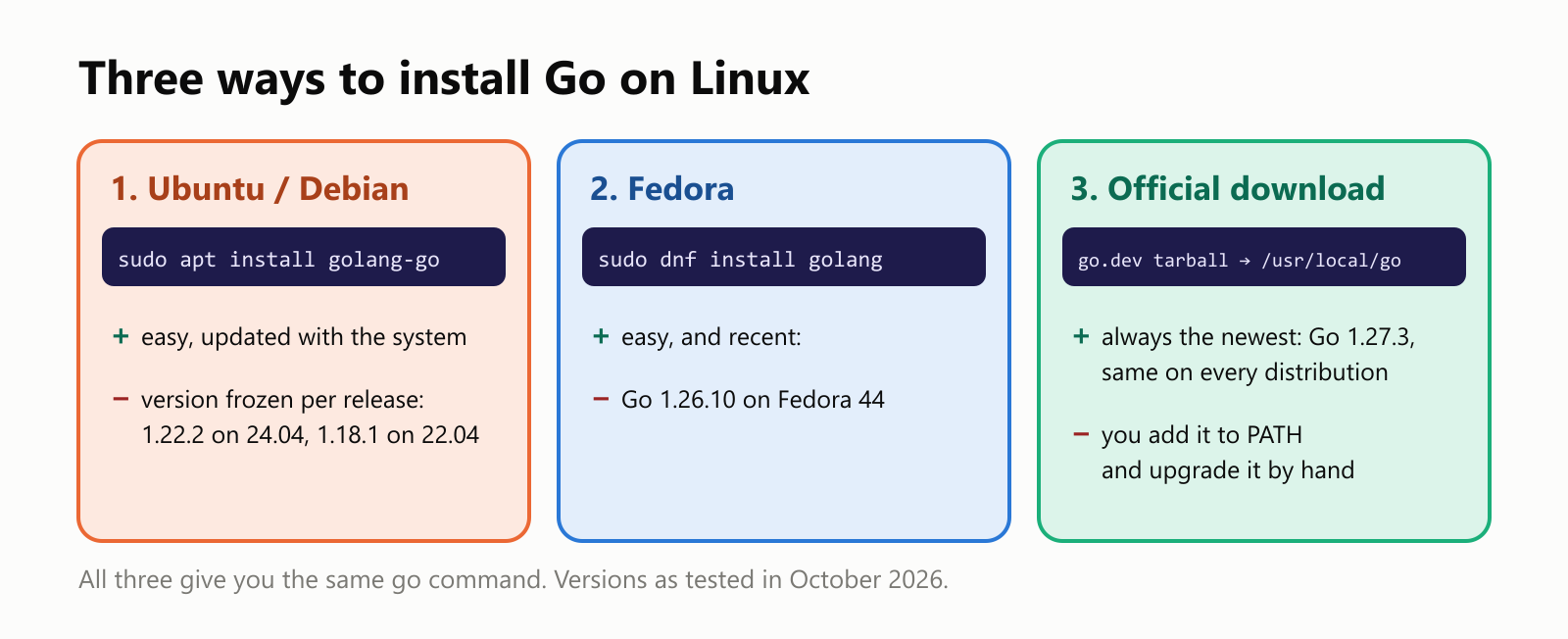
| Method | Command | Go version we got | Best for |
|---|---|---|---|
| Ubuntu / Debian package | sudo apt install golang-go | 1.22.2 (Ubuntu 24.04), 1.18.1 (Ubuntu 22.04) | Quick start, older is OK |
| Fedora package | sudo dnf install golang | 1.26.10 (Fedora 44) | Fedora users |
| Official download | tarball from go.dev | 1.27.3 (newest) | Real projects, any distro |
Is Go already installed?
Open a terminal and ask for the version:
1$ go version
2Command 'go' not found, but can be installed with:
3sudo apt install golang-go  # version 2:1.21~2, or
4sudo apt install gccgo-go   # version 2:1.21~2
That's Ubuntu's friendly "command not found" helper, suggesting packages. (The 2:1.21~2 is the version of a small package that points to the real Go package; the Go you actually get is shown below.) Other distributions just say bash: go: command not found. If instead you see a go version … line, Go is already there.
Method 1: Ubuntu and Debian (apt)
Refresh the package lists, then install the golang-go package:
1$ sudo apt update
2$ sudo apt install golang-go
3…
4Need to get 125 MB of archives.
5After this operation, 500 MB of additional disk space will be used.
6Do you want to continue? [Y/n] y
7…
8$ go version
9go version go1.22.2 linux/amd64
sudo runs the command as the administrator, which installing software requires. apt installs the toolchain into /usr/lib/go-1.22 and puts a go command in /usr/bin.
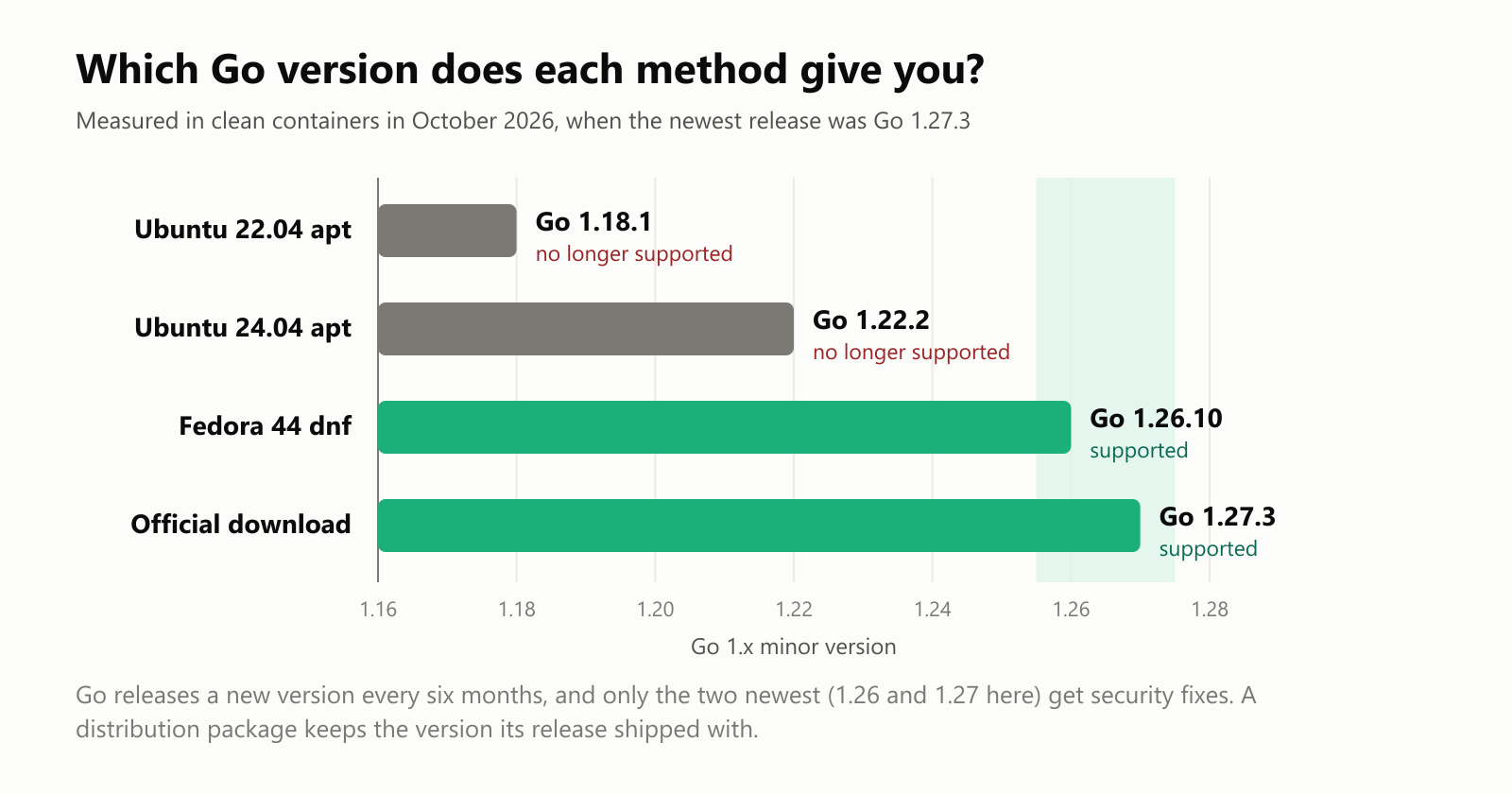
The catch is the version. Ubuntu freezes package versions when it releases, so the Go you get depends on your Ubuntu, not on what's current:
$ go version        # on Ubuntu 22.04
go version go1.18.1 linux/amd64
Go 1.18 came out in March 2022. New Go releases arrive every six months, and only the two newest get security fixes, so an old Ubuntu's Go is soon unsupported and can't build code that uses newer features.
Method 2: Fedora (dnf)
1$ sudo dnf install golang
2…
3Total size of inbound packages is 137 MiB. Need to download 137 MiB.
4After this operation, 506 MiB extra will be used (install 516 MiB, remove 10 MiB).
5Is this ok [y/N]: y
6…
7$ go version
8go version go1.26.10-X:nodwarf5 linux/amd64
Fedora updates fast, so dnf gave us a recent Go 1.26. (The -X:nodwarf5 suffix records an experiment setting Fedora builds Go with; it doesn't change how you use it.) The toolchain lives in /usr/lib/golang. dnf is the successor of the older yum command.
Method 3: The official download (any distribution)
This is the method the Go team documents, and it always gives you the newest release, identical on every distribution.
1. Download the Linux archive for your processor from go.dev/dl (amd64 for most PCs and servers, arm64 for ARM machines like a Raspberry Pi 4/5):
$ curl -LO https://go.dev/dl/go1.27.3.linux-amd64.tar.gz
$ ls -l go1.27.3.linux-amd64.tar.gz
-rw-rw-r-- 1 ada ada 70588678 Oct 24 23:10 go1.27.3.linux-amd64.tar.gz
2. Check the checksum. The download page lists a SHA-256 checksum for every file. Comparing it proves the download is complete and untouched:
$ echo "<checksum from go.dev/dl>  go1.27.3.linux-amd64.tar.gz" | sha256sum --check
go1.27.3.linux-amd64.tar.gz: OK
3. Extract it into /usr/local, after removing any previous Go installed this way (never extract over an old one):
$ sudo rm -rf /usr/local/go
$ sudo tar -C /usr/local -xzf go1.27.3.linux-amd64.tar.gz
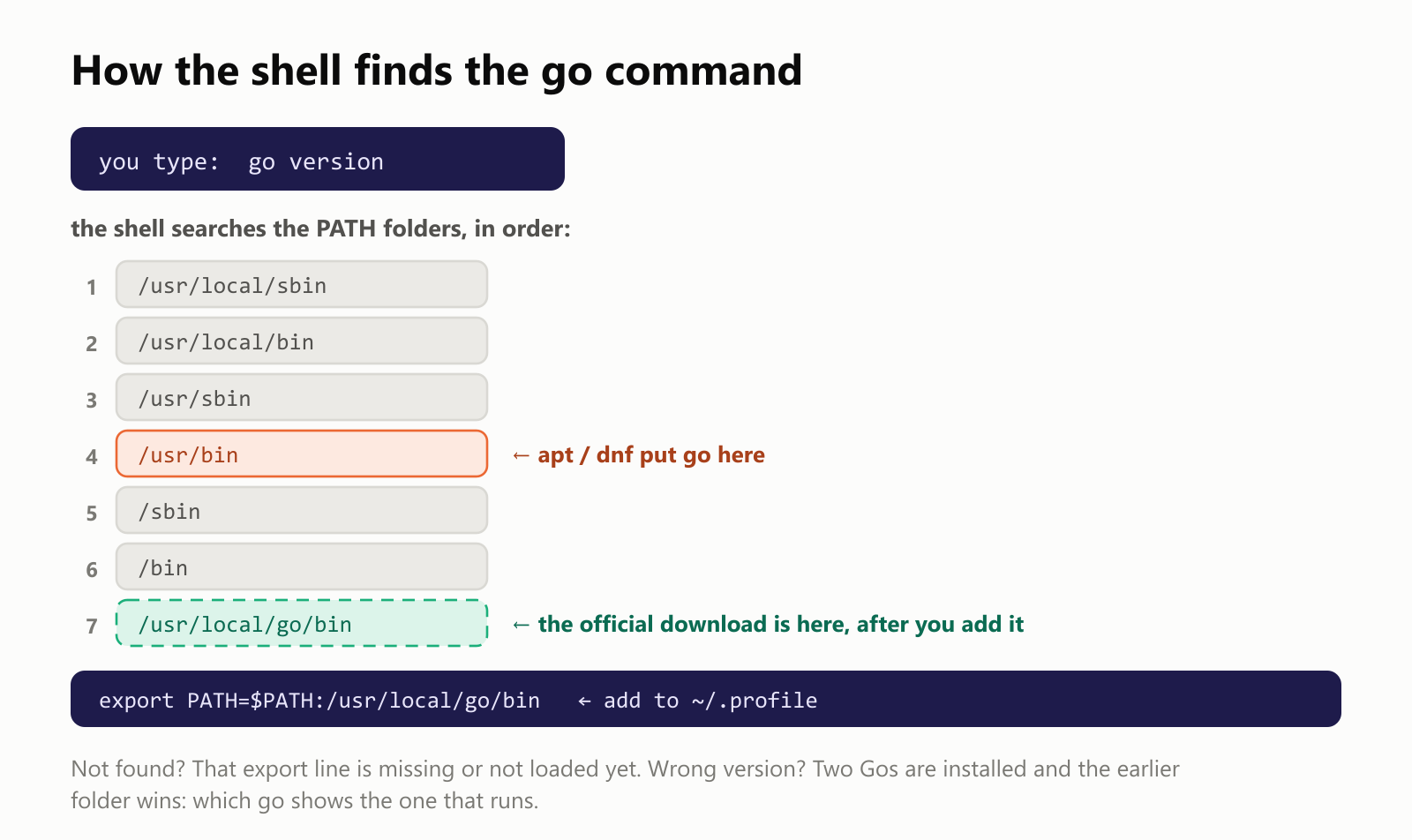
4. Add Go to your PATH so the shell can find the go command. Add this line to the end of ~/.profile (or ~/.bashrc):
export PATH=$PATH:/usr/local/go/binThen log out and back in, or load it right away with source ~/.profile, and check:
$ go version
go version go1.27.3 linux/amd64
The whole thing took 11 seconds in our test: a 70.6 MB download that unpacks to 283 MB.
Comparing the methods
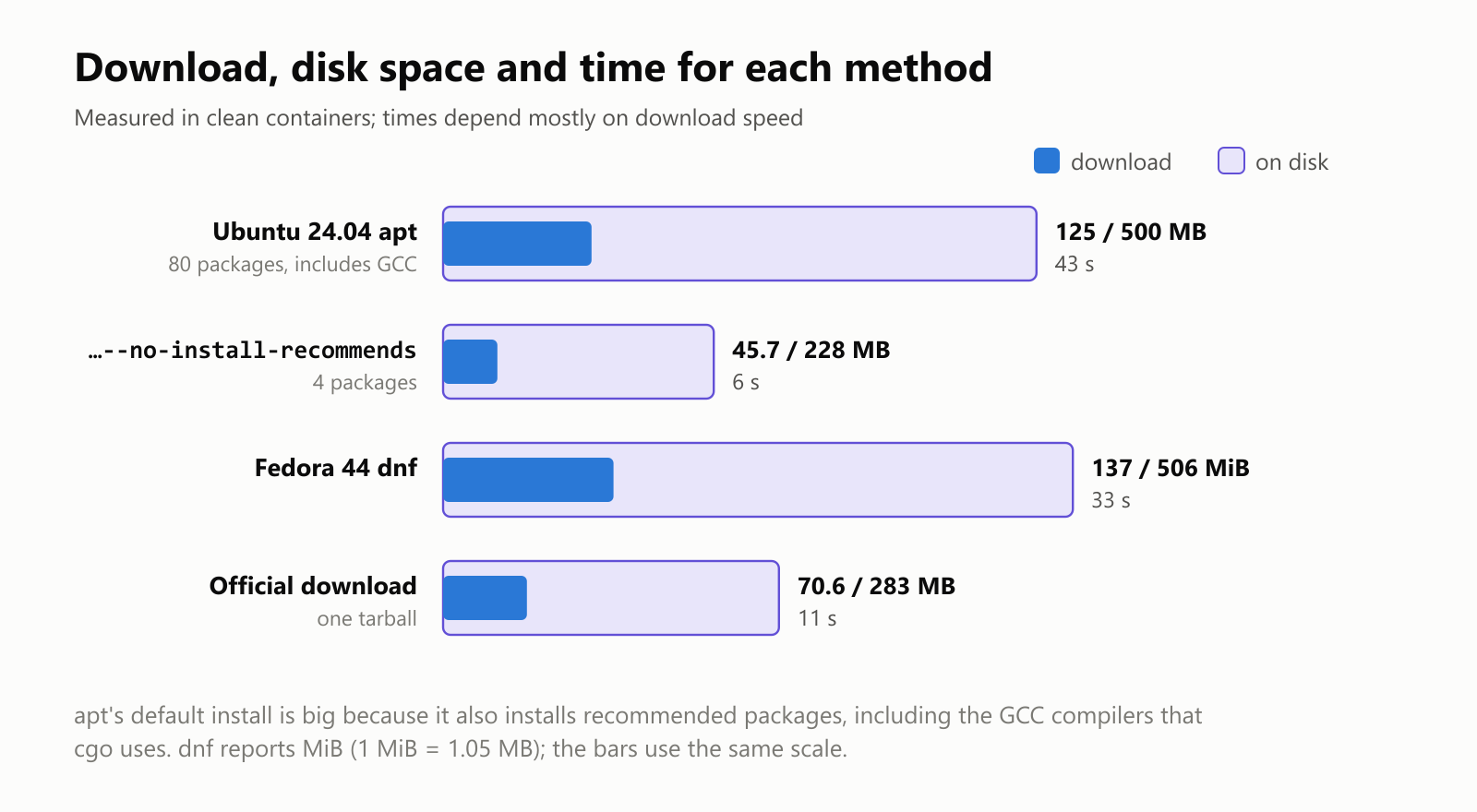
Ubuntu 24.04 apt | Fedora 44 dnf | Official download | |
|---|---|---|---|
| Go version | 1.22.2 | 1.26.10 | 1.27.3 |
| Download | 125 MB (45.7 MB without recommends) | 137 MiB | 70.6 MB |
| Disk | 500 MB (228 MB without recommends) | 506 MiB | 283 MB |
| Time in our test | 43 s (6 s) | 33 s | 11 s |
| Toolchain folder | /usr/lib/go-1.22 | /usr/lib/golang | /usr/local/go |
| Updates | With the system, same version line | With the system | By hand |
So which should you pick?
- Learning, on Fedora or a recent Ubuntu: the package manager is fine.
- Real projects, older Ubuntu, or a specific version: the official download. Modules can require a minimum Go version (the
go 1.22line ingo.mod), and an old distro package may be too old. - Need several versions side by side? Install one officially, then let Go fetch others: since Go 1.21, a
toolchainline ingo.modmakesgodownload the exact version a project asks for automatically.
Your first program on Linux
Whichever method you used, test the whole toolchain with a tiny program (the first program guide explains every line):
1package main
2
3import "fmt"
4
5func main() {
6	fmt.Println("Hello from Linux!")
7}1$ mkdir hello && cd hello
2$ go mod init hello
3go: creating new go.mod: module hello
4$ go run .
5Hello from Linux!If that prints, the compiler, the standard library and the module system all work.
Where things live
1$ go env GOROOT
2/usr/local/go
3$ go env GOPATH
4/home/ada/goGOROOTis the toolchain itself: thegocommand, the compiler and the standard library. You never put your own code there.GOPATH(by default~/go) is where Go keeps downloaded modules (~/go/pkg/mod) and programs you install withgo install(~/go/bin). Add~/go/binto yourPATHtoo if you install Go tools.- Your projects can live anywhere, each in its own folder with a
go.mod.
Upgrading and uninstalling
| Method | Upgrade | Uninstall |
|---|---|---|
apt | sudo apt update && sudo apt upgrade (stays on the same Go version line) | sudo apt remove golang-go |
dnf | sudo dnf upgrade golang | sudo dnf remove golang |
| Official download | Remove /usr/local/go, extract the new tarball | sudo rm -rf /usr/local/go, and remove the PATH line |
On Windows or macOS?
- Windows: run the
.msiinstaller from go.dev/dl. It sets upPATHfor you. Or install Linux itself with WSL (wsl --install) and follow this guide inside it. - macOS: run the
.pkginstaller from go.dev/dl, or use Homebrew:brew install go.
Your turn: practice
These check your understanding rather than your typing; try them before reading the answers.
Exercise 1: Read the version line. What does each part of go version go1.22.2 linux/amd64 tell you?
Exercise 2: Pick a method. For each situation, choose apt/dnf or the official download: (a) a student on Fedora 44 learning Go; (b) a server running Ubuntu 22.04 that must build a project whose go.mod says go 1.25; (c) a laptop where you want the newest Go the day it comes out.
Exercise 3: Fix the PATH. After extracting the official tarball, go version says bash: go: command not found. What's wrong, and what's the fix?
Exercise 4: Two Gos. You installed golang-go with apt last year and the official Go 1.27.3 today, but go version still prints go1.22.2. Why, and how do you check?
Exercise 5: Prove it works (challenge). Write the commands to check that Go is installed, that it's the version you expect, and that it can build and run a program.
Quick quiz
- Which package name do you install on Ubuntu?
- Why does
apt install golang-godownload 125 MB when Go itself is about 100 MB? - Where does the official download put Go?
- Why check the SHA-256 checksum?
- What's the difference between
GOROOTandGOPATH?
Answers
Exercise 1: go1.22.2 is the Go version (major 1, minor 22, patch 2); linux is the operating system and amd64 the processor architecture (64-bit x86) the toolchain is built for, which is also what it builds for by default.
Exercise 2: (a) sudo dnf install golang: Fedora's Go is recent. (b) The official download: Ubuntu 22.04's package is Go 1.18.1, too old for a module that needs 1.25. (c) The official download, which always has the newest release.
Exercise 3: The tarball puts go in /usr/local/go/bin, which isn't on the PATH. Add export PATH=$PATH:/usr/local/go/bin to ~/.profile, then run source ~/.profile (or log in again).
Exercise 4: The apt version lives in /usr/bin, which comes before /usr/local/go/bin in the PATH, so the shell finds it first. which go shows /usr/bin/go. Remove the apt package (sudo apt remove golang-go) or put /usr/local/go/bin earlier in the PATH.
Exercise 5: For example:
1$ go version
2go version go1.27.3 linux/amd64
3$ go env GOROOT
4/usr/local/go
5$ mkdir hello && cd hello && go mod init hello
6go: creating new go.mod: module hello
7$ go run .
8Hello from Linux!
(after writing the hello.go from this article in that folder).
Quiz: (1) golang-go. (2) By default apt also installs recommended packages, 80 in all, including the GCC compilers that cgo uses; --no-install-recommends skips them. (3) /usr/local/go, with the go command in /usr/local/go/bin. (4) To prove the file downloaded completely and wasn't tampered with. (5) GOROOT is the Go toolchain itself; GOPATH (default ~/go) holds downloaded modules and installed tools.
Cheat sheet
| I want to… | Run |
|---|---|
| Check if Go is installed | go version |
| Install on Ubuntu / Debian | sudo apt update && sudo apt install golang-go |
| …without the extras | sudo apt install --no-install-recommends golang-go |
| Install on Fedora | sudo dnf install golang |
| Install the official release | download from go.dev/dl, sudo rm -rf /usr/local/go && sudo tar -C /usr/local -xzf go*.linux-amd64.tar.gz |
| Put it on the PATH | export PATH=$PATH:/usr/local/go/bin in ~/.profile |
| Verify a download | sha256sum --check against the checksum on go.dev/dl |
| See which go runs | which go |
| See where Go lives | go env GOROOT and go env GOPATH |
| Test everything | go mod init hello then go run . |
Wrapping up
Installing Go on Linux takes a minute, but the method decides which Go you get:
sudo apt install golang-gois the quickest on Ubuntu, but the version is frozen per release: Go 1.22.2 on Ubuntu 24.04, Go 1.18.1 on Ubuntu 22.04.sudo dnf install golangon Fedora gives a recent Go (1.26.10 on Fedora 44).- The official download always has the newest Go (1.27.3 in our test): download, verify the checksum, extract to
/usr/local/go, add/usr/local/go/bintoPATH. - apt's default install is 500 MB because it brings GCC along;
--no-install-recommendscuts it to 228 MB. - Test with
go versionand a Hello, World, and usewhich gowhen versions look wrong.
Next in this series: how to declare a variable in Go. Just starting? Read Your First Program in Go, and for the bigger picture, What Is the Go Programming Language?
Read next
What Is PowerShell? A Simple Guide to the Windows Command Line That Speaks in Objects
A friendly, jargon-free guide to PowerShell, the command line built into every Windows PC. Learn its Verb-Noun commands, see why it passes objects instead of plain text, rename 1,000 photos in under a second and find out why there are two PowerShells.
 nbkhope
What Is Bash? A Simple Guide to the Bourne Again Shell and the Command Line
A friendly, jargon-free guide to Bash, the program inside the black text window that developers type into. Have a first real conversation with it, see what happens when you press Enter, rename 1,000 photos in under a second and read your first script.
nbkhope
What Is Android? A Simple Guide to the System on Most of the World's Phones
A friendly, jargon-free guide to Android, the free operating system that runs most of the world's phones. Learn how it is built on Linux, why so many brands use it, what is inside a real app and the permissions it asks for, and why updates are slow.
nbkhope
Comments
Be kind and specific. Comments with links from new accounts appear after a moderator reviews them.