What Is Android? A Simple Guide to the System on Most of the World's Phones
A friendly, jargon-free guide to Android, the free operating system that runs most of the world's phones. Learn how it is built on Linux, why so many brands use it, what is inside a real app and the permissions it asks for, and why updates are slow.

On this page
If your phone isn't an iPhone, it almost certainly runs Android. Samsung, Xiaomi, Motorola, Google Pixel, Oppo, Vivo: different brands, different designs, different prices, but underneath, the same operating system. Worldwide, about two out of every three phones run it, and so do many tablets, TVs, watches and car dashboards.
An operating system is the master program that runs a device: it shares the processor and memory among apps, keeps your data safe, talks to the camera, screen and radios, and gives you a way to control it all. This article explains, in plain language, what Android is, how it's built, why so many companies use it, what's inside a real Android app, and how it compares with Apple's iOS.
Where Android came from
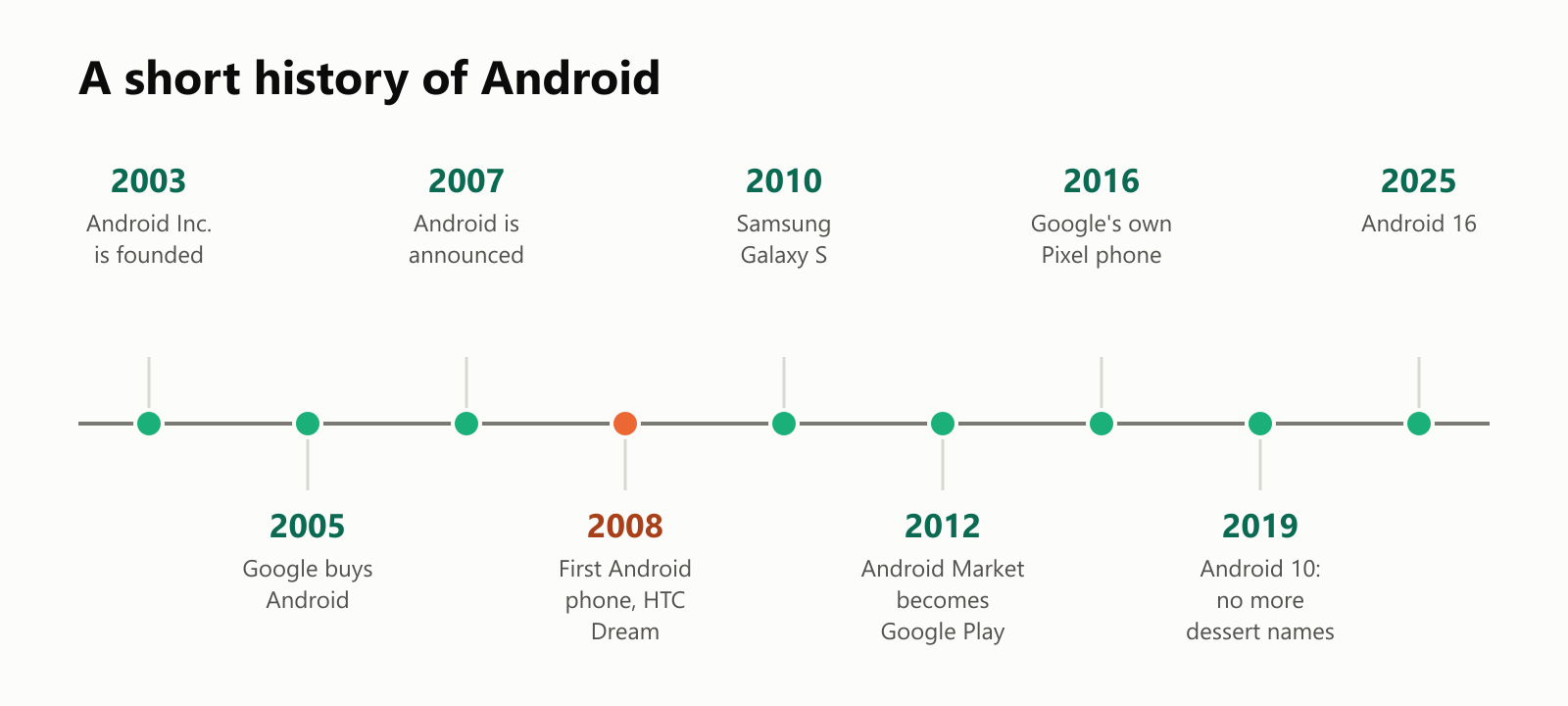
Android started as a small company, Android Inc., founded in 2003 by Andy Rubin and three partners. Its first idea was software for digital cameras, but it soon switched to phones. In 2005, Google bought it.
In November 2007, just months after the first iPhone, Google announced Android together with dozens of phone makers, chip makers and mobile carriers. The first Android phone, the HTC Dream (sold as the T-Mobile G1), went on sale in October 2008. It had a slide-out keyboard and a touchscreen.
Google's big decision was to give Android away for free, as open-source software. Any company could put it on its phones without paying a license fee. That's how Android spread to hundreds of brands and billions of devices.
How Android is built
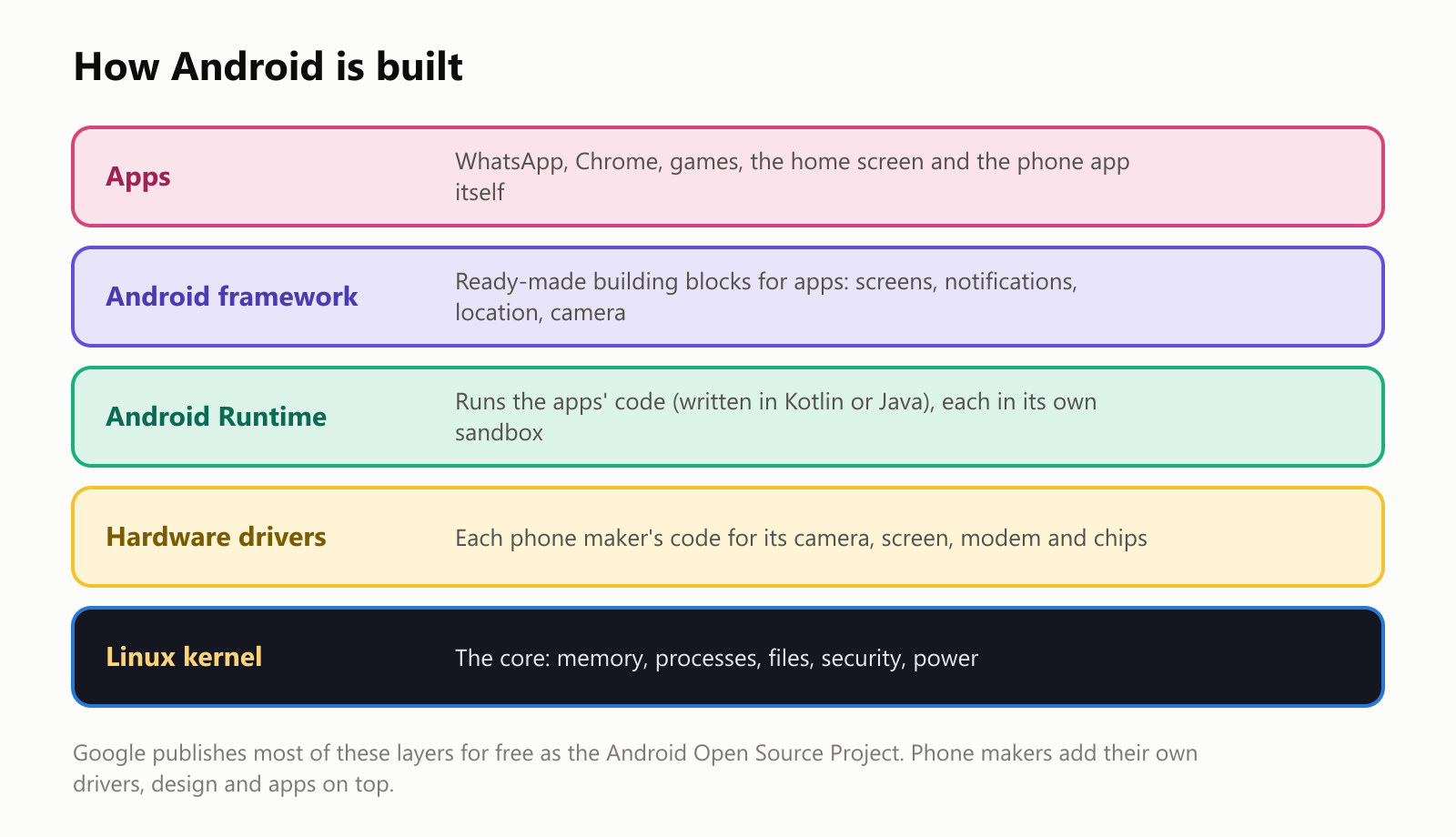
- The Linux kernel is at the bottom. Android is built on the same core as the Linux systems that run most of the internet (see What Is the Linux Operating System?). It manages memory, runs programs, controls power and enforces security.
- Hardware drivers let Android talk to each phone's particular camera, screen, modem and chips. Each phone maker and chip maker writes its own.
- The Android Runtime runs the apps. Developers write Android apps mostly in a language called Kotlin (Google's preferred language since 2019) or in Java.
- The Android framework gives apps ready-made building blocks: screens and buttons, notifications, location, the camera and more.
- Apps sit on top, including the home screen itself.
Google publishes most of this as the Android Open Source Project. But the familiar Google apps (the Play Store, Gmail, Maps, YouTube) are not open source: phone makers need a separate agreement with Google to include them. That difference matters. When Huawei was barred by US trade restrictions from using Google's apps in 2019, its phones lost much of their appeal outside China, and the company built its own system.
One system, many brands
Because Android is free, phone makers compete on hardware, price and design, and each adds its own look (often called a "skin") on top. Samsung's is called One UI, Xiaomi's HyperOS, and so on.
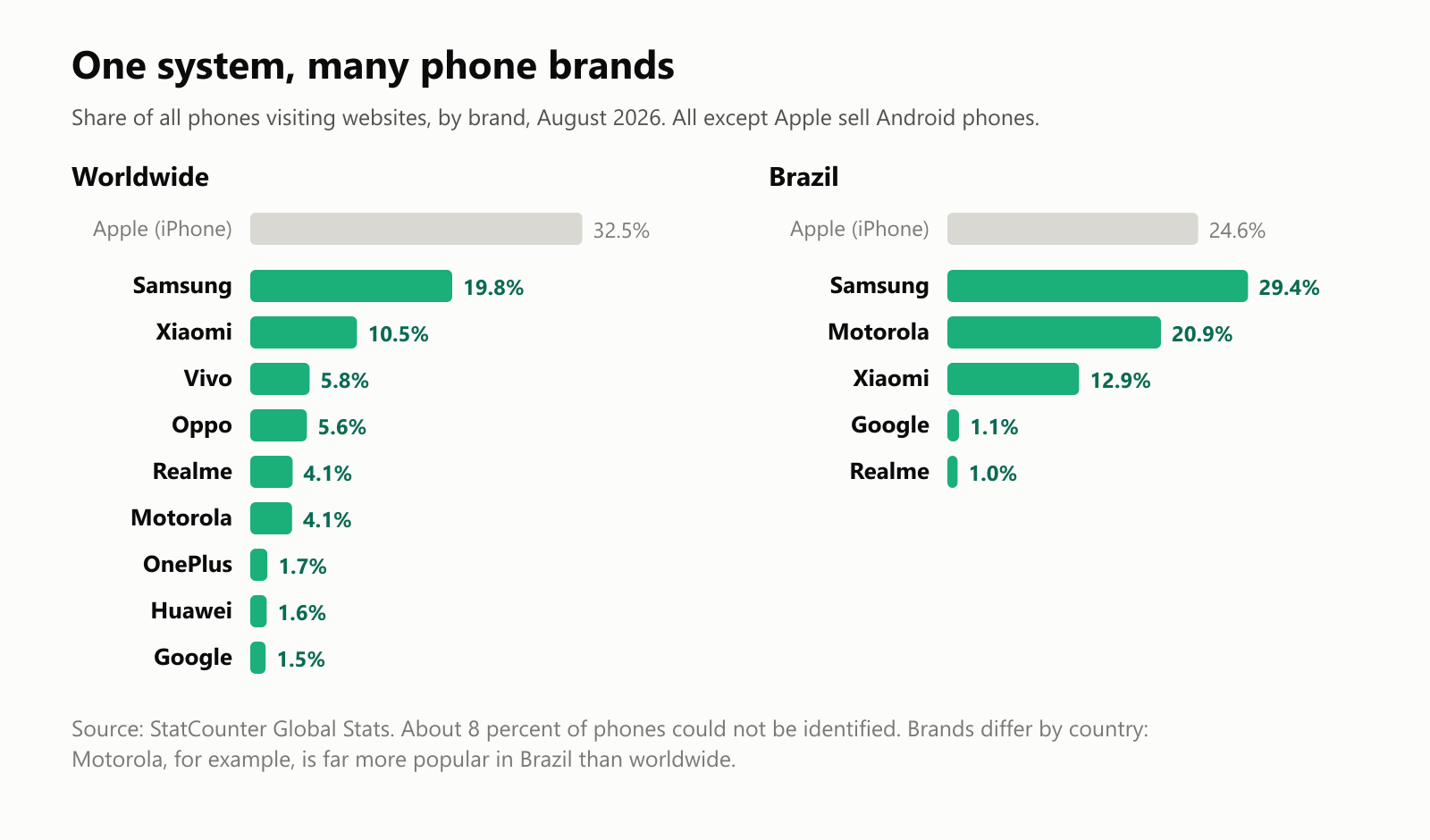
Worldwide, Samsung is the biggest Android brand, followed by Xiaomi and several other Chinese brands. But it varies a lot by country. In Brazil, for example, Motorola is the second most common phone brand, with about one phone in five. Google also makes its own Android phones, called Pixel, which are a showcase for "pure" Android, but they're a small share of the total.
Where Android is popular
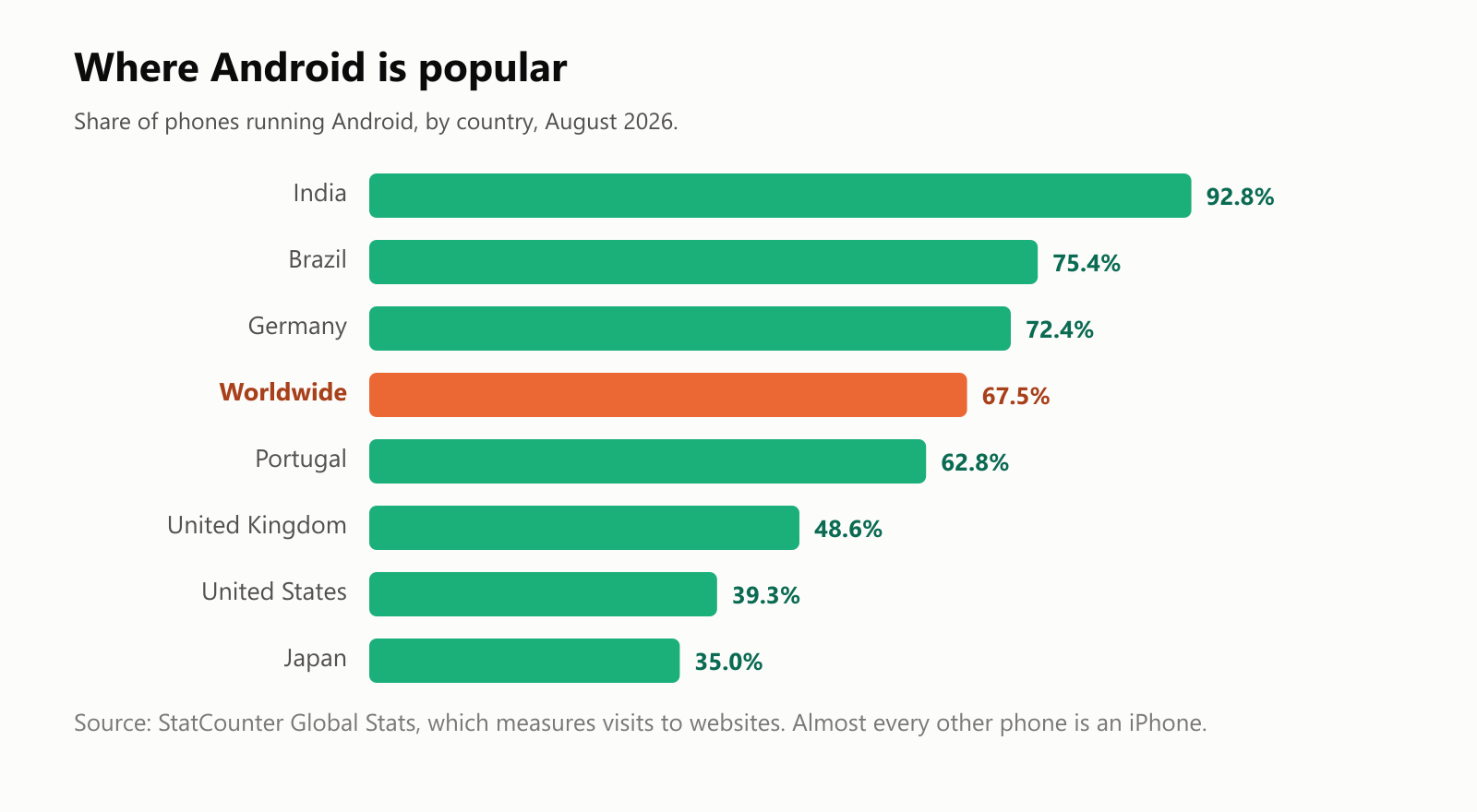
About two-thirds of phones worldwide run Android, according to StatCounter, which measures the phones people use to visit websites. In India, more than nine in ten phones do, because Android phones come in every price range, including very cheap ones. In the United States and Japan, iPhones are more common.
Inside a real Android app
An Android app usually arrives as a file called an APK (Android Package). We downloaded a real one, the open-source app store F-Droid, and unpacked it to see what's inside:
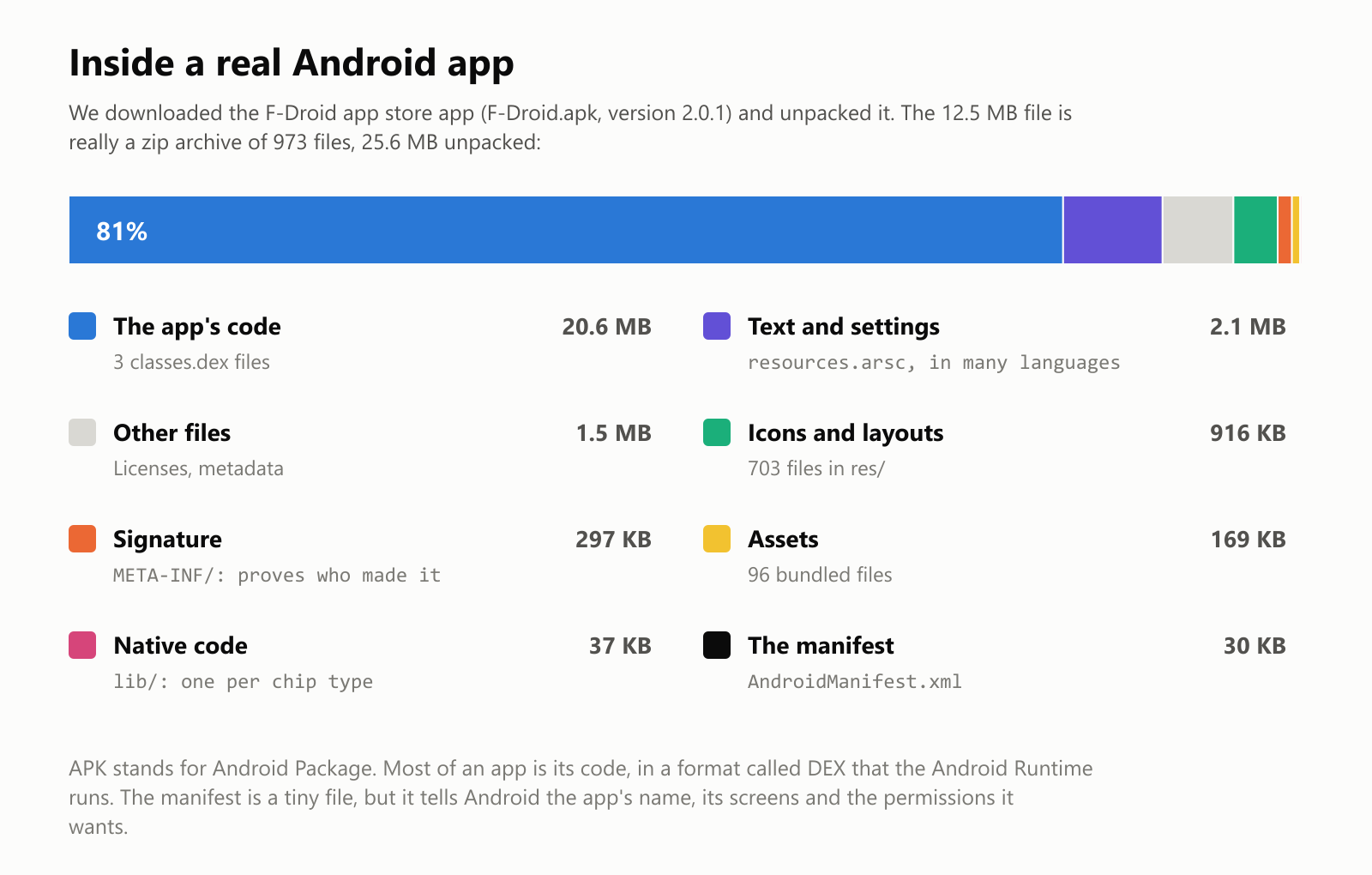
- An APK is really just a zip file, like the ones you use to send several files at once. This one was 12.5 MB, and 25.6 MB once unpacked.
- About 80% of it is the app's code, in a format called DEX that the Android Runtime understands.
- The signature proves who made the app, so a fake update from someone else can't replace it.
- The tiny manifest file is like the app's ID card: its name, its screens, and the permissions it wants.
What the app asks permission for
We read the same app's manifest with a free analysis tool and found 28 Android permissions:
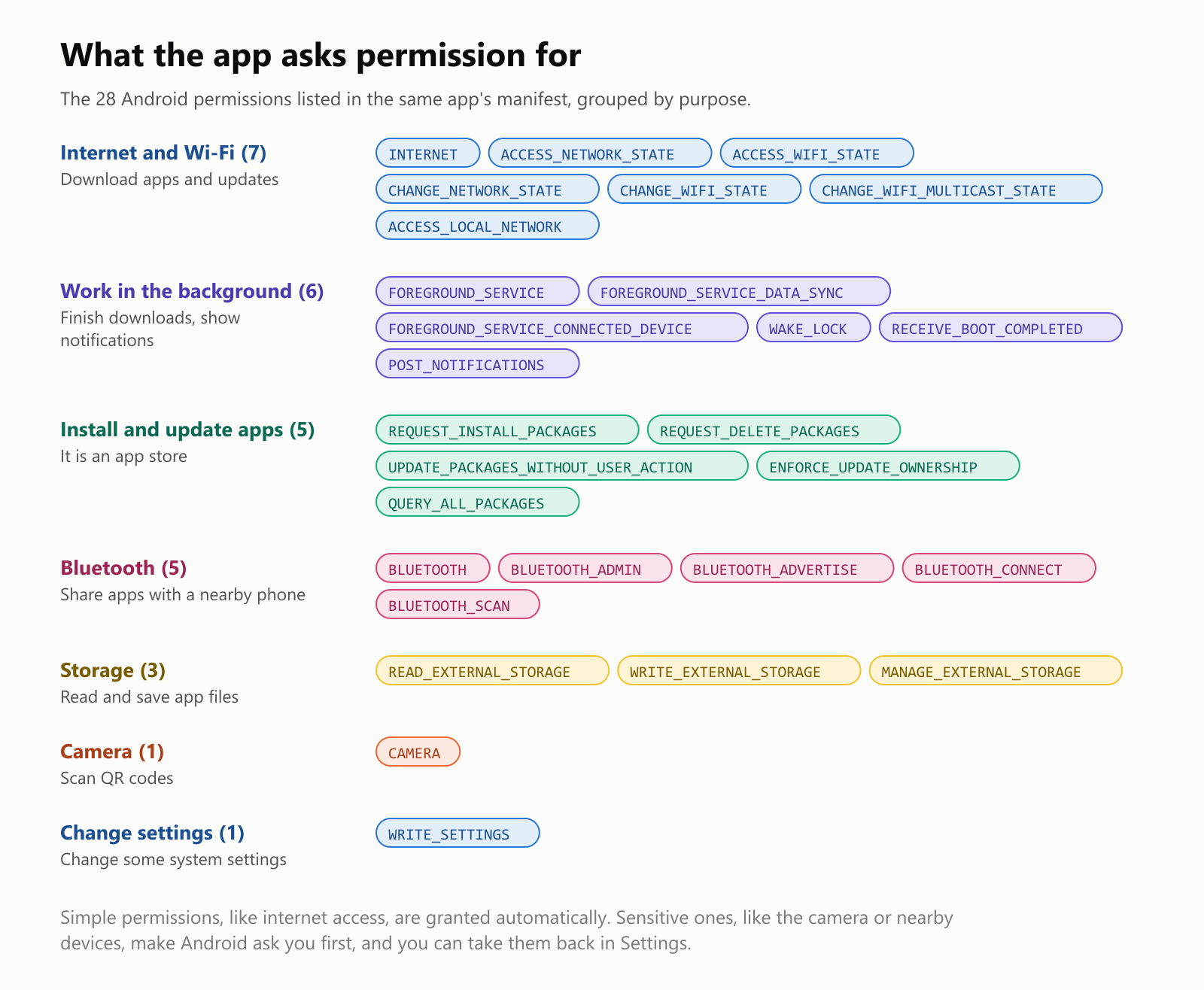
Each permission matches something the app does. It's an app store, so it needs the internet and the right to install and update apps; it can share apps with a nearby phone over Bluetooth; and it uses the camera to scan QR codes.
Android treats permissions in two ways. Simple ones, like internet access, are granted automatically when you install the app. Sensitive ones, like the camera, microphone, location or nearby devices, trigger a pop-up asking you first, and you can take them back any time in Settings. Like on the iPhone, each app also runs in its own sandbox, unable to read other apps' data.
Installing apps: more freedom, more responsibility
Most people get apps from the Google Play Store, where Google scans apps for malware with a system called Play Protect. Phone makers like Samsung have their own stores too.
Unlike on the iPhone, Android also lets you install apps from other sources, such as alternative stores like F-Droid or an APK downloaded from a website. This is called sideloading. It gives you more freedom, but it's also the most common way people end up with malicious apps, so Android shows a warning and asks you to allow it first. A good rule: only install apps from sources you trust.
Why Android updates are slow
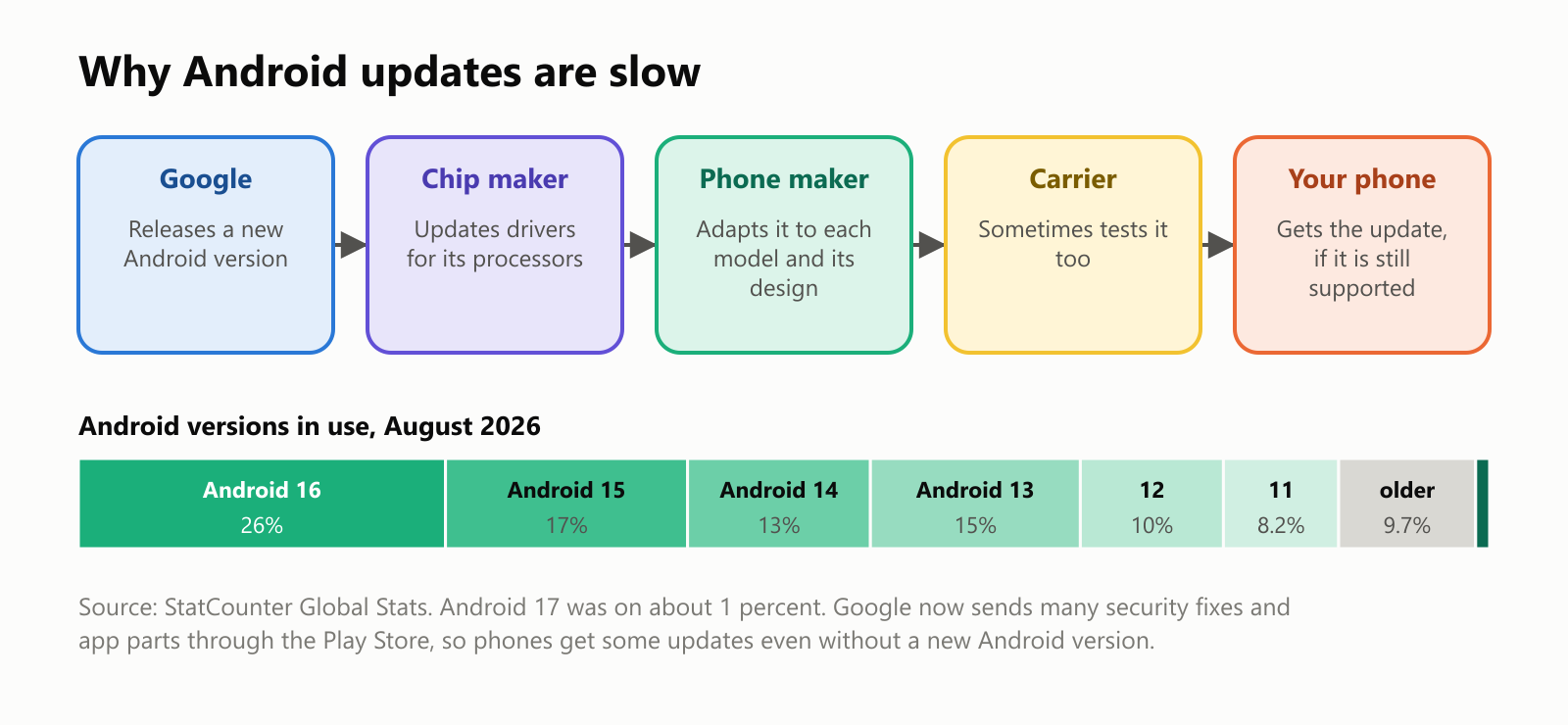
When Google releases a new version of Android, it doesn't go straight to your phone. The chip maker has to update its drivers, then the phone maker has to adapt the update to each model and its own design, and sometimes the mobile carrier tests it too. Cheaper phones often get only one or two big updates, or none at all.
The result: in August 2026, only about a quarter of Android phones were running the newest widely used version, Android 16, while the rest were spread across many older ones. (On iPhones, about three in four were on the latest version.)
Things are improving. Since 2019, Google has sent many security fixes and system parts through the Play Store, without waiting for phone makers. And some makers now promise much longer support: Google's Pixel 8 (2023) and Samsung's Galaxy S24 (2024) were promised seven years of updates.
A sweet tooth: version names
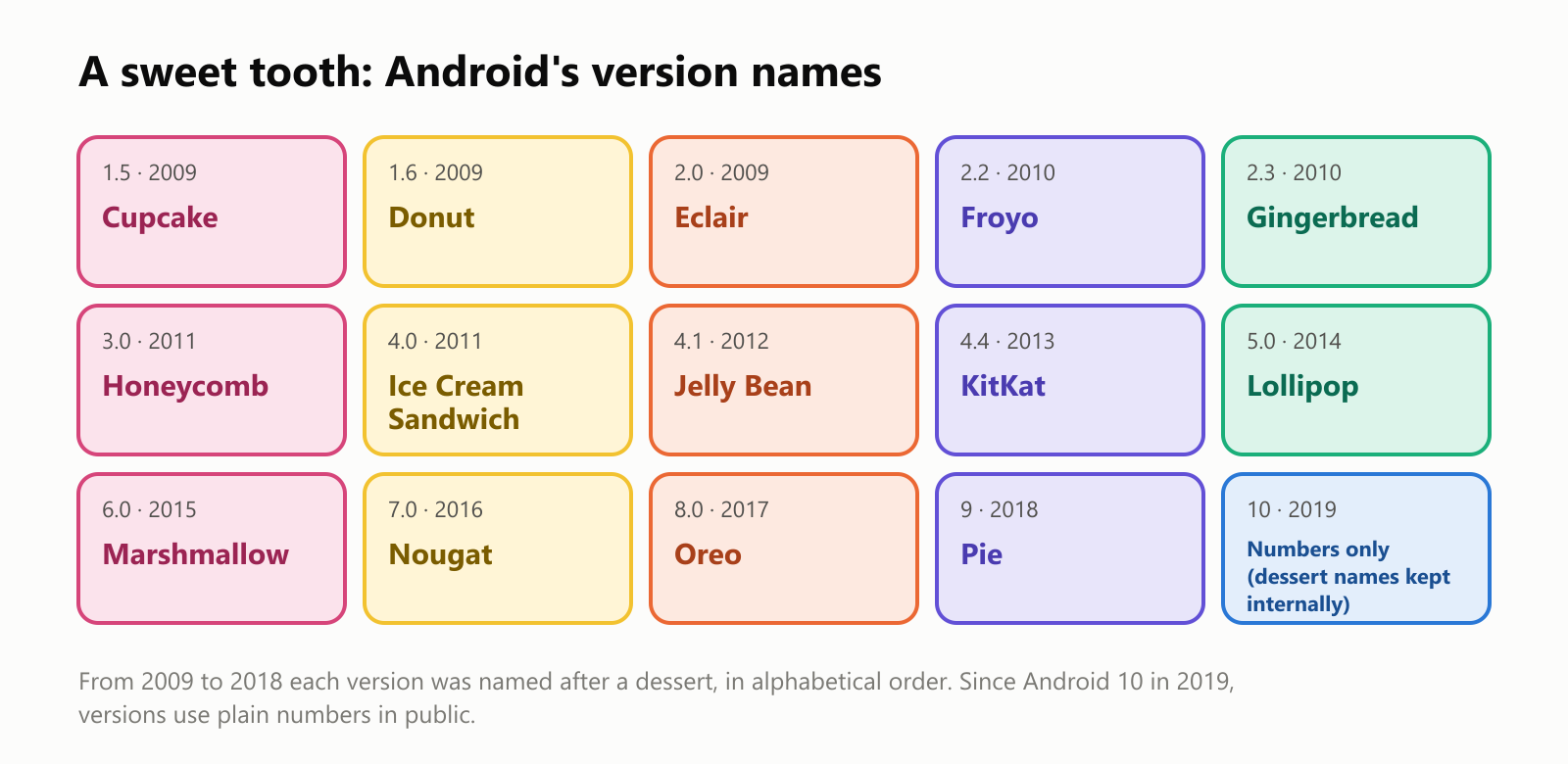
For ten years, every Android version was named after a dessert, in alphabetical order: Cupcake, Donut, Eclair, Froyo (frozen yogurt), Gingerbread and so on, up to Pie. Google even put a giant statue of each dessert on the lawn of its headquarters. Since Android 10 in 2019, versions just use numbers in public, partly because dessert names didn't translate well around the world.
More than phones
The same system runs on many other devices:
- Tablets, from Samsung's Galaxy Tab to Amazon's Fire tablets (which use Android without Google's apps).
- TVs, through Android TV and Google TV.
- Watches, through Wear OS.
- Cars, through Android Auto (your phone on the car's screen) and Android Automotive (built into the car).
A short history
The good and the not-so-good
Why people like Android:
- Choice. Hundreds of models from dozens of brands, at every price, from very cheap to very expensive.
- Freedom to customize. Change the home screen, the keyboard, the default apps, or install apps from outside the Play Store.
- Works with everything. Android phones work with Windows PCs, Macs and Google's services alike.
- Open source. Its core is free for anyone to study, change and build on.
What people complain about:
- Slow and uneven updates, depending on the brand and the price of the phone.
- Extra apps. Some phones come stuffed with preinstalled apps and ads you can't easily remove.
- More malware risk, especially from apps installed outside trusted stores.
- Every phone is different. Menus and settings vary from brand to brand, which can confuse people switching phones.
A small glossary
- Android: Google's free, open-source operating system for phones and other devices.
- Android Open Source Project (AOSP): the free, public version of Android's code.
- Linux kernel: the core at the bottom of Android, shared with Linux systems.
- Skin: a phone maker's own design on top of Android, like Samsung's One UI.
- Google Play Store: Google's main store for Android apps.
- APK: the file format of an Android app, really a zip archive.
- Manifest: the file inside an app that lists its name, screens and permissions.
- Permission: your approval for an app to use something sensitive, like the camera.
- Sandbox: the private space each app runs in, cut off from other apps.
- Sideloading: installing an app from outside the official store.
- Kotlin: the programming language Google recommends for Android apps.
- Pixel: Google's own line of Android phones.
Wrapping up
Android began as a small startup's project, and Google's decision to give it away turned it into the most widely used operating system on Earth. Built on Linux, shaped by dozens of phone makers, and full of apps that are really zip files with an ID card listing their permissions, it powers phones from the cheapest to the most expensive.
That openness is both its greatest strength, more choice and more freedom, and its greatest weakness: slower updates and more ways for bad apps to sneak in. The next time a pop-up asks whether an app can use your camera, you'll know it's the manifest's request reaching you.
Read next
What Is a Transformer in AI? The Idea Behind ChatGPT, Explained Simply
A friendly, jargon-free guide to transformers, the AI design behind ChatGPT, Claude and Gemini. Learn how "attention" lets AI understand words in context, what happens inside a transformer, and why it changed AI so quickly.
 nbkhope
What Is Reinforcement Learning? How AI Learns by Trial, Error and Reward
A friendly, jargon-free introduction to reinforcement learning, how AI learns by trial, error and reward, like training a dog with treats. Watch a real robot learn a maze, see why exploring matters, and learn how it shapes chatbots.
nbkhope
What Is Graph Engineering? How Today's AI Teams Up to Get Real Work Done
A friendly, jargon-free guide to graph engineering, the 2026 idea of building AI as a map of connected steps instead of one big loop. See how today's AI agents work, why small mistakes add up, and how checkers, branches and teamwork fix it.
nbkhope
Comments
Be kind and specific. Comments with links from new accounts appear after a moderator reviews them.