What Is iOS? A Simple Guide to the Operating System Inside Every iPhone
A friendly, jargon-free guide to iOS, the operating system inside every iPhone. Learn how the home screen works, why apps live in sandboxes and must ask permission, how the App Store works, and why iPhones get updates for so many years.

On this page
Every iPhone, whether it's a brand-new model or one from several years ago, runs the same software at its heart: iOS. It's what shows your app icons, unlocks the phone when it sees your face, sends your messages, and asks "Allow this app to use your location?"
An operating system is the master program that runs a device: it shares the processor and memory among apps, keeps your data organized and safe, talks to the camera, screen and radios, and gives you a way to control it all. iOS is made by Apple and only runs on Apple's iPhones. This article explains, in plain language, how iOS works, what makes it different from Android, and how it has changed since 2007.
A tour of the home screen
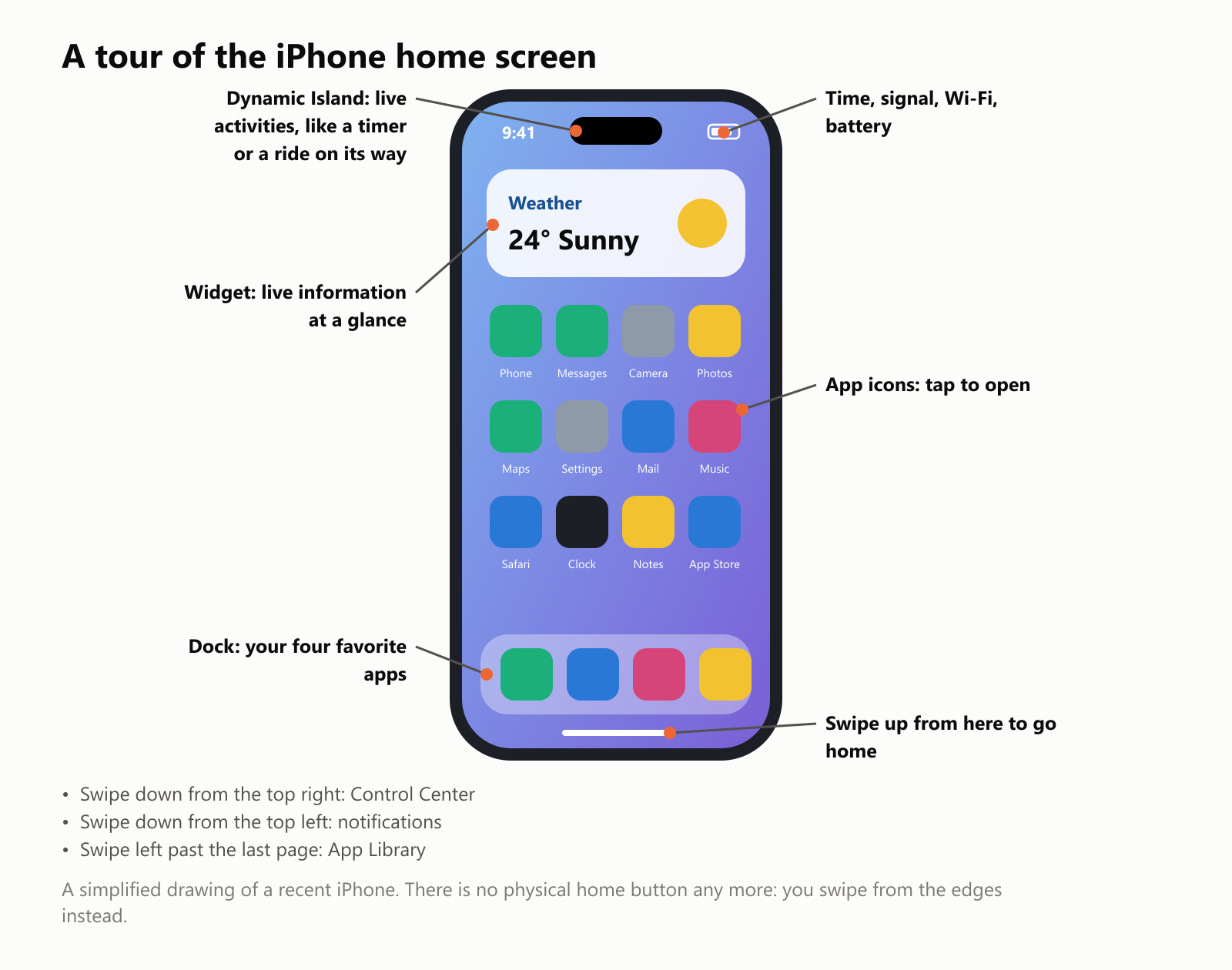
- App icons: tap one to open an app. Press and hold to move or delete it.
- Widgets: small live windows on the home screen, showing things like the weather, your calendar or your step count.
- The Dock: four favorite apps that stay at the bottom of every home screen page.
- The Dynamic Island: on recent iPhones, a black area at the top that expands to show live activities, like a timer, a phone call, music or a delivery on its way.
- Gestures: recent iPhones have no home button. Swipe up from the bottom edge to go home, swipe down from the top right corner for Control Center (Wi-Fi, brightness, flashlight), and swipe down from the top left for your notifications.
- Settings: the gray gear app where you control almost everything, from Wi-Fi to privacy.
Where iOS came from
When Apple introduced the iPhone in January 2007, its software was simply called iPhone OS. Apple built it from the same core as the Mac's operating system, slimmed down for a phone and redesigned around a touchscreen. In 2010, when it also ran on the iPod touch and the new iPad, Apple renamed it iOS.
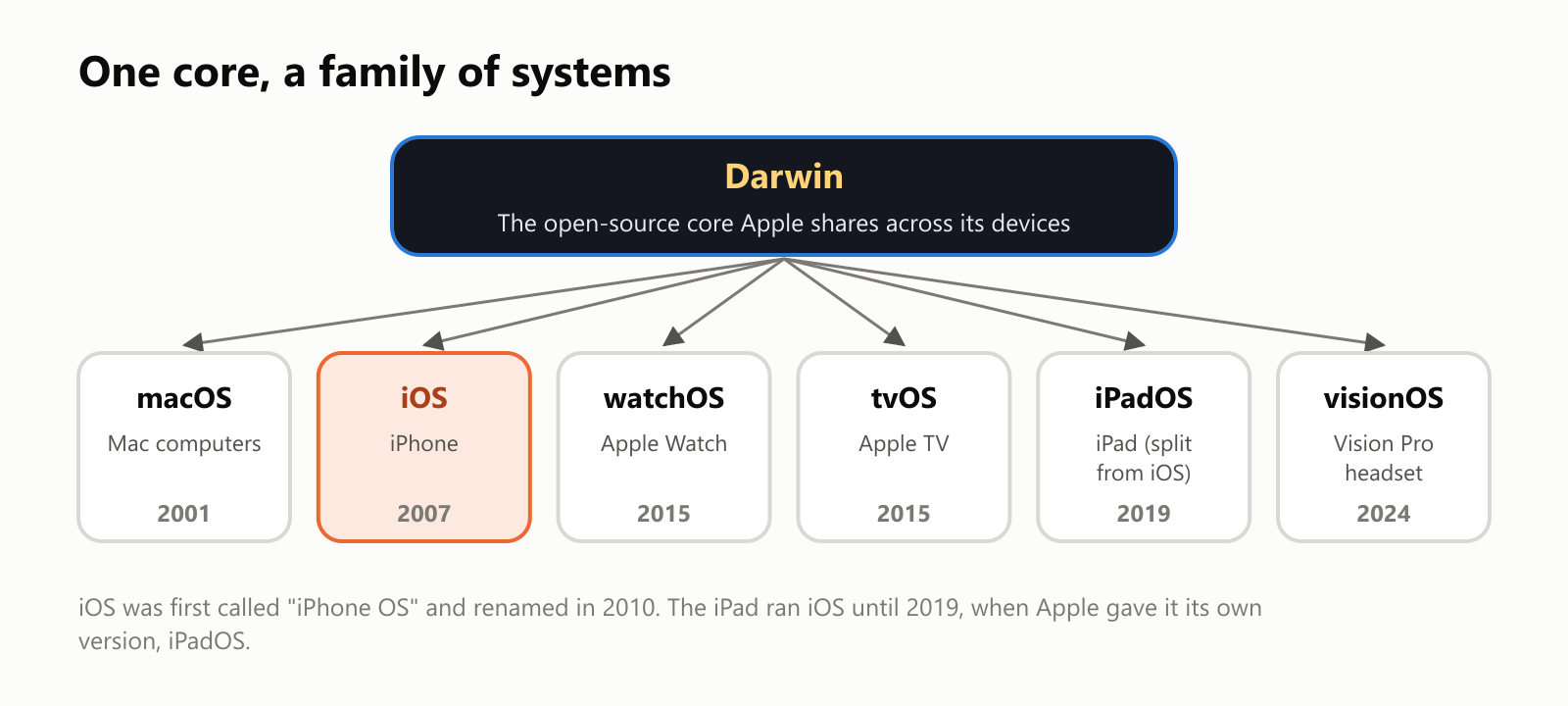
That shared core, called Darwin, is also used by the Apple Watch, Apple TV, the Vision Pro headset and the iPad, which got its own version, iPadOS, in 2019. This is one reason Apple devices work so smoothly together: they're really cousins built from the same parts.
Every app lives in its own sandbox
One of the most important ideas in iOS is the sandbox. Like children playing in separate sandboxes, every app gets its own private space, and it can't reach into anyone else's:
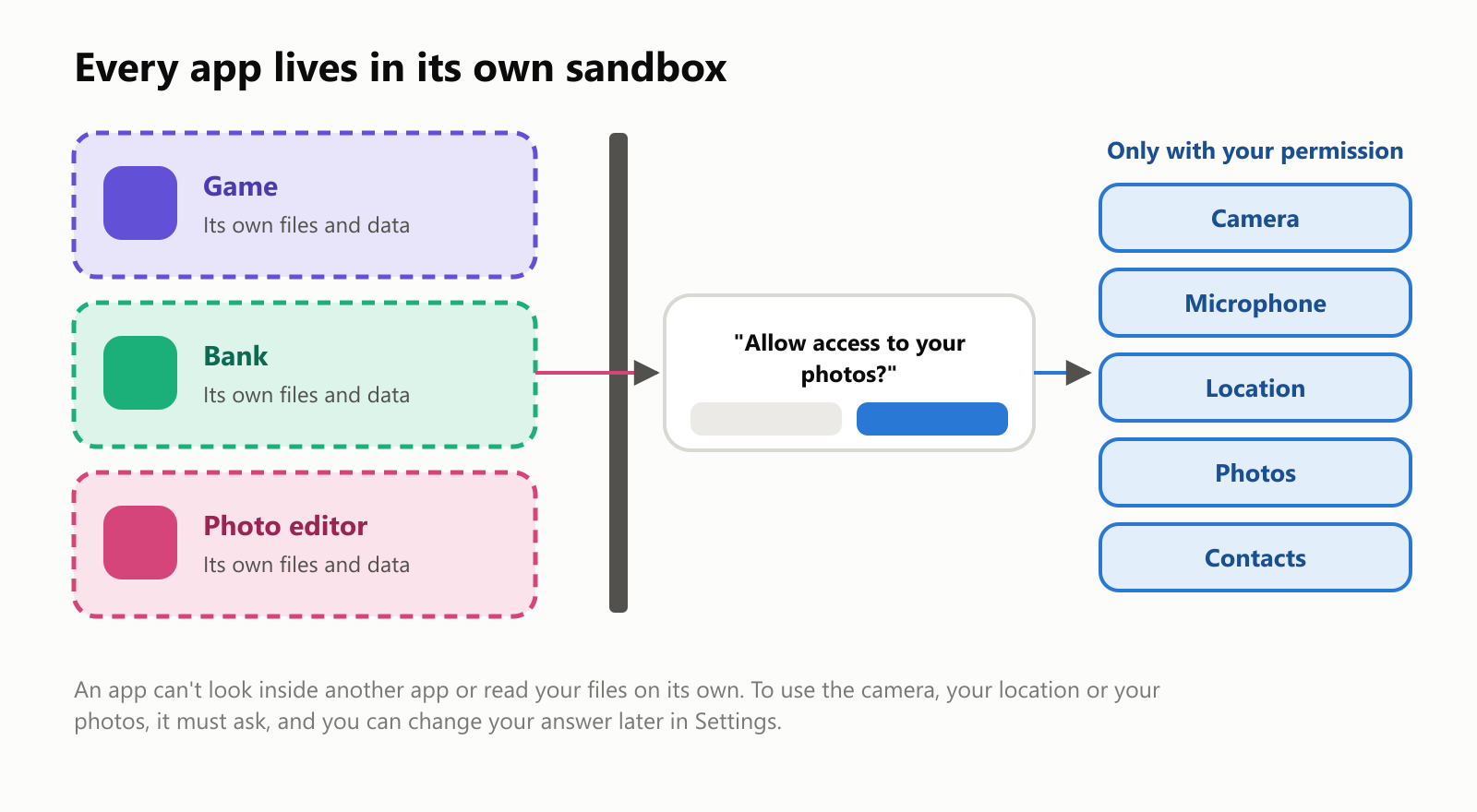
- A game can't read your banking app's data, or your messages.
- An app that wants your camera, microphone, location, photos or contacts has to ask you first, with a pop-up message. You can say no, allow it just once, or (for location) share only your approximate area.
- You can change your mind any time in Settings → Privacy & Security.
- Since 2021, apps also have to ask before they track you across other companies' apps and websites for advertising.
This design makes it much harder for a bad app to steal your information, and it's one reason iPhones have a reputation for security and privacy.
How apps get onto your iPhone
On an iPhone, apps normally come from one place: Apple's App Store, which opened in July 2008 with about 500 apps and now offers around two million.
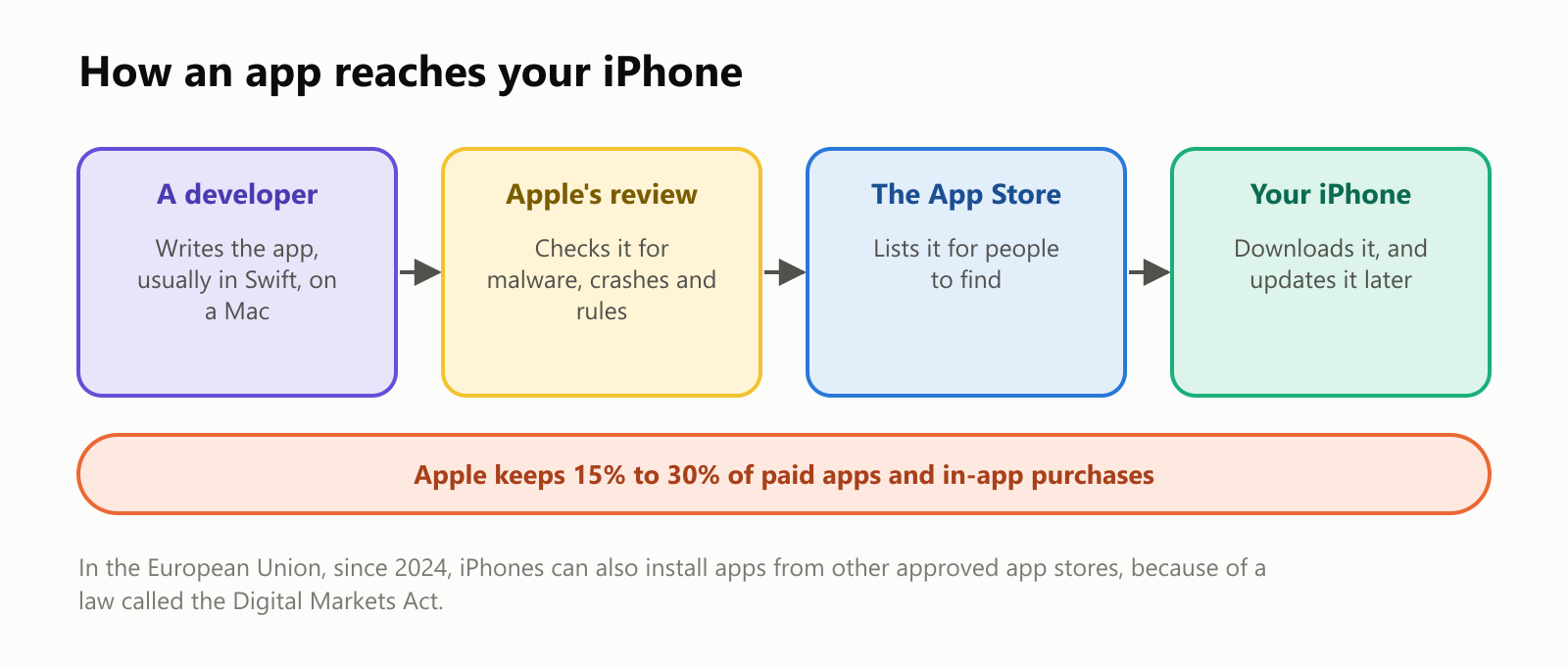
- A developer writes the app, usually in Apple's programming language Swift (see What Is the Swift Programming Language?), or in the older Objective-C (see What Is the Objective-C Programming Language?).
- Apple reviews every app and every update, looking for malware, crashes, hidden features and broken rules.
- The app appears in the App Store, where you can search for it, read reviews and download it.
- Your iPhone installs it and keeps it updated automatically.
Apple keeps a share of the money: usually 30% of paid apps and in-app purchases, or 15% for small developers and long-running subscriptions. This "walled garden" keeps things tidy and safer, but it's also controversial. In the European Union, a 2022 law called the Digital Markets Act forced Apple, starting in 2024, to let iPhone users there install apps from other approved app stores too.
iPhones update fast
Because Apple makes both the iPhone and iOS, it can send a new version of iOS to every supported iPhone in the world on the same day. On Android, each phone maker (and sometimes each mobile carrier) has to prepare updates for its own phones, so many phones get them late or never.
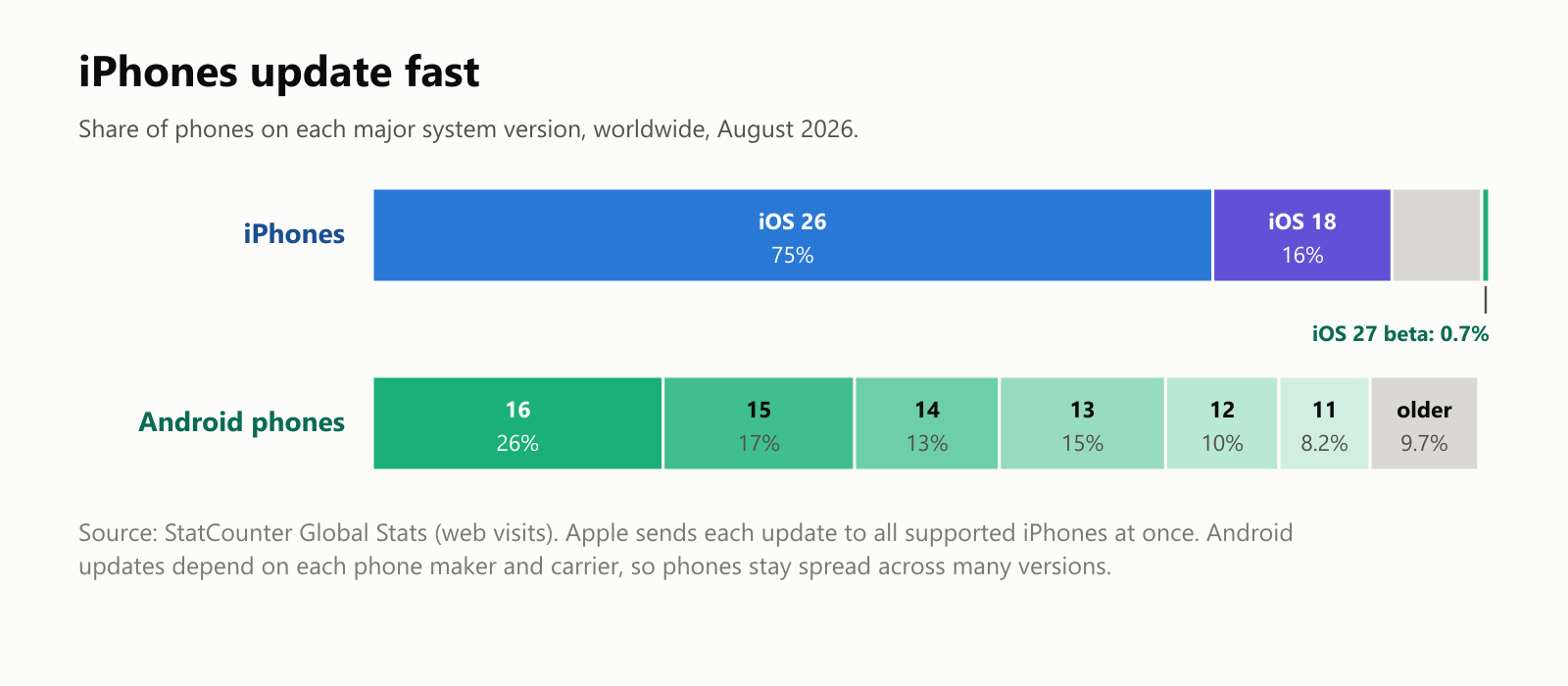
According to StatCounter, which measures the phones people use to browse the web, in August 2026 about three in four iPhones were running the latest version, iOS 26, and about 91% were on one of the two newest versions. Android phones were spread across many versions, with the newest one on about a quarter of them.
iPhones also get updates for a long time:
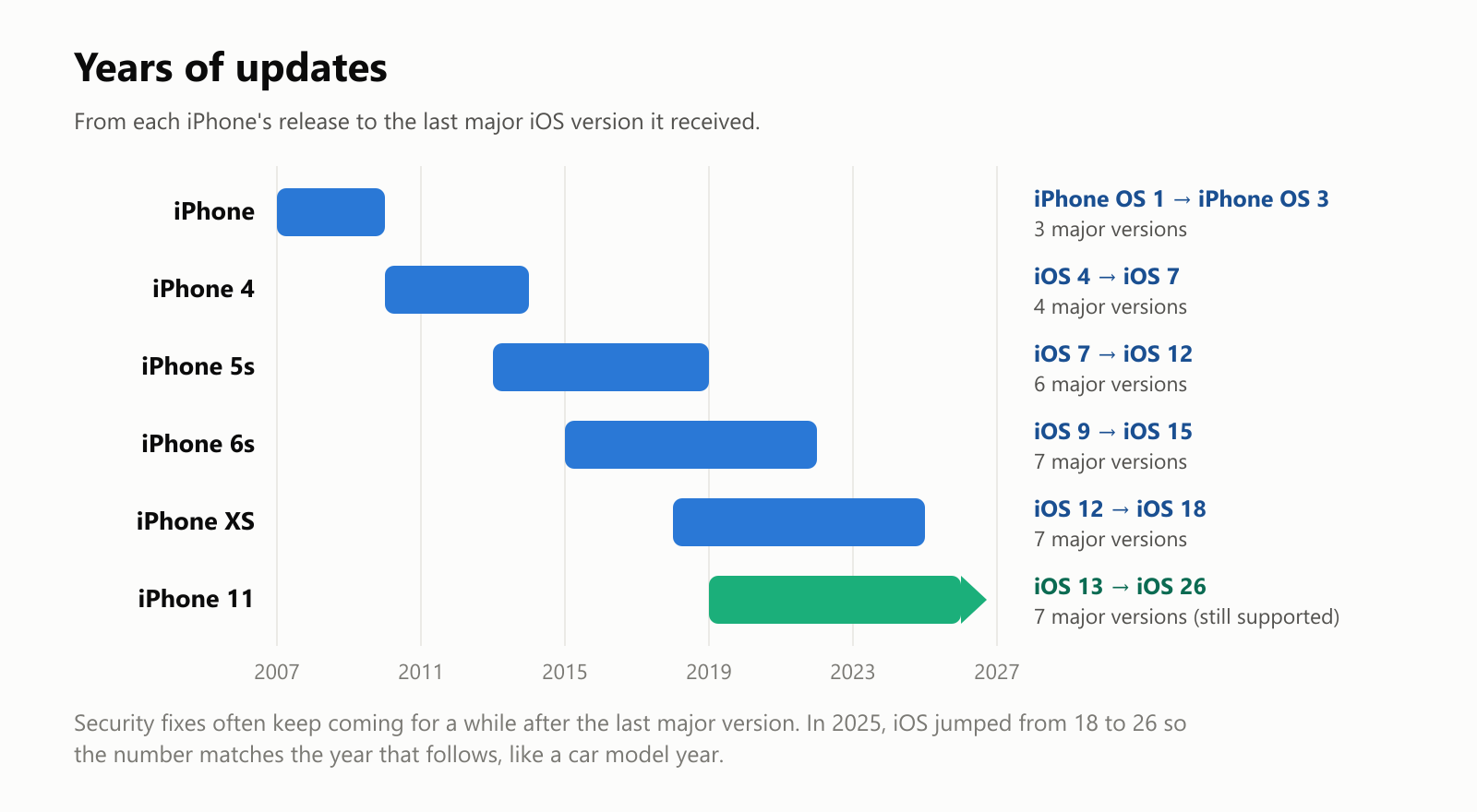
The very first iPhone got three major versions. Recent models get six or seven years of major updates, and often security fixes for a while after that. Notice the jump in 2025 from iOS 18 to iOS 26: Apple switched to numbers that match the year after release (like a car's model year), so all its systems now share the same number.
Where iPhones are popular
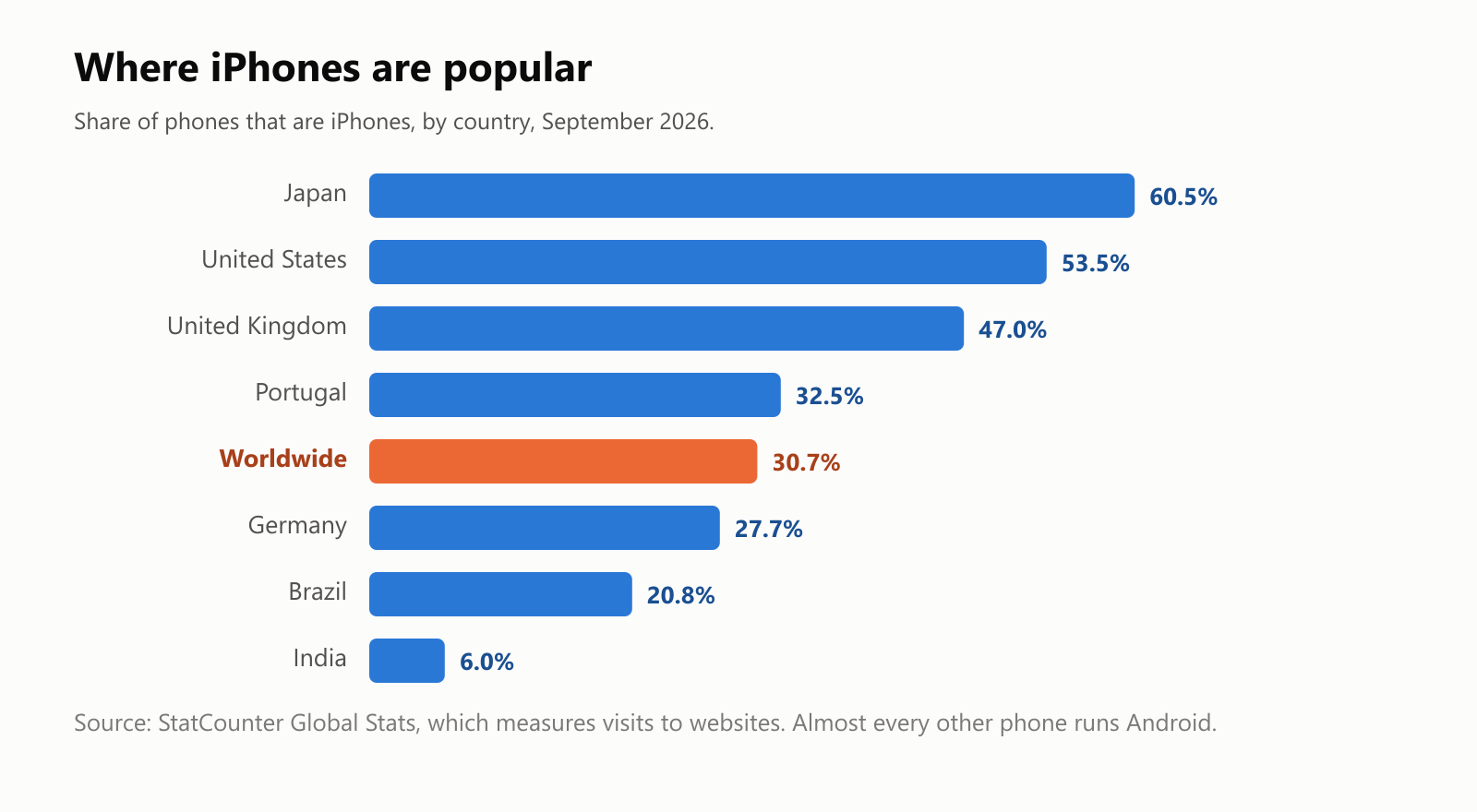
Worldwide, about three in ten phones are iPhones. Almost all the rest run Android. But it varies a lot from country to country: iPhones are the majority in Japan and the United States, while in Brazil and especially India, where cheaper Android phones dominate, they're much rarer.
A short history
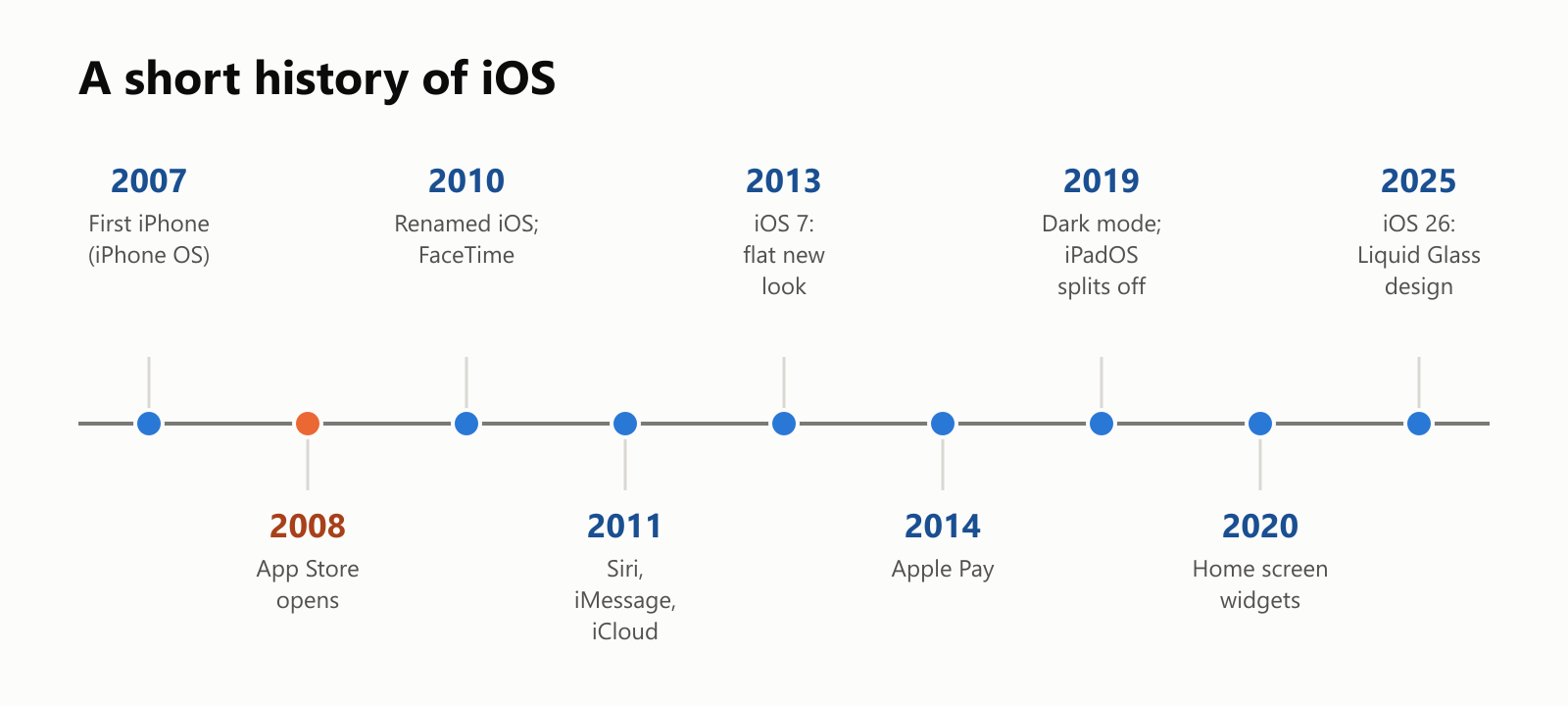
Some highlights along the way:
- 2008: the App Store turns the iPhone into a platform for apps.
- 2009: copy and paste finally arrives, two years after the first iPhone.
- 2011: Siri, the voice assistant, plus iMessage and iCloud.
- 2013: iOS 7 replaces realistic textures (like fake leather and paper) with a flat, colorful design. The iPhone 5s adds Touch ID fingerprint unlocking.
- 2014: Apple Pay lets you pay by holding your phone near a card reader.
- 2017: the iPhone X drops the home button and introduces Face ID.
- 2020: widgets and the App Library arrive on the home screen.
- 2025: iOS 26 introduces a translucent "Liquid Glass" design.
The good and the not-so-good
Why people like iOS:
- Simple and consistent. Apps look and behave alike, and the system is designed together with the hardware.
- Privacy and security. Sandboxing, app review, permission prompts and fast updates make iPhones a hard target.
- Long support. Updates for six or seven years, which also helps iPhones keep their resale value.
- Works with other Apple devices. Messages, photos, passwords and copy-and-paste flow between an iPhone, iPad, Mac and Apple Watch.
What people complain about:
- Less freedom. Outside the EU, you can only install apps from the App Store, and customization is more limited than on Android.
- Price. iPhones cost more than many Android phones, which is why they're less common in some countries.
- Apple's cut. The 15% to 30% commission often makes apps and subscriptions more expensive, and has led to lawsuits and new laws.
- Locked into Apple. Once you use iMessage, iCloud and an Apple Watch, switching to Android can be a hassle.
A small glossary
- iOS: Apple's operating system for the iPhone, first called iPhone OS.
- iPadOS: the version of iOS made for the iPad since 2019.
- Darwin: the open-source core shared by Apple's operating systems.
- Home screen: the pages of app icons and widgets you see when you unlock the phone.
- Widget: a small live window of information on the home screen.
- Control Center: the panel of quick controls like Wi-Fi, brightness and the flashlight.
- Sandbox: the private space each app runs in, cut off from other apps.
- Permission: your answer when an app asks to use the camera, location, photos or other private data.
- App Store: Apple's store for downloading iPhone apps.
- App review: Apple's check of every app before it appears in the store.
- Update: a new version of iOS, with fixes and new features.
- Face ID / Touch ID: unlocking the iPhone with your face or fingerprint.
Wrapping up
iOS turned the iPhone from a phone with a few built-in programs into a platform for millions of apps, while keeping them in their own sandboxes and making them ask before touching your private data. Its tight control, from the App Store to the updates Apple sends to every iPhone at once, is both its biggest strength and its most criticized feature.
The next time a pop-up asks "Allow access to your photos?", you'll know it's iOS standing guard at the edge of the app's sandbox.
Read next
What Is a Transformer in AI? The Idea Behind ChatGPT, Explained Simply
A friendly, jargon-free guide to transformers, the AI design behind ChatGPT, Claude and Gemini. Learn how "attention" lets AI understand words in context, what happens inside a transformer, and why it changed AI so quickly.
 nbkhope
What Is Reinforcement Learning? How AI Learns by Trial, Error and Reward
A friendly, jargon-free introduction to reinforcement learning, how AI learns by trial, error and reward, like training a dog with treats. Watch a real robot learn a maze, see why exploring matters, and learn how it shapes chatbots.
nbkhope
What Is Graph Engineering? How Today's AI Teams Up to Get Real Work Done
A friendly, jargon-free guide to graph engineering, the 2026 idea of building AI as a map of connected steps instead of one big loop. See how today's AI agents work, why small mistakes add up, and how checkers, branches and teamwork fix it.
nbkhope
Comments
Be kind and specific. Comments with links from new accounts appear after a moderator reviews them.