What Is macOS? A Simple Guide to the Operating System Inside Every Mac
A friendly, jargon-free guide to macOS, the operating system that runs every Mac. Learn how it looks and works, how a company Steve Jobs started after leaving Apple shaped it, why it is a real Unix system underneath, and how Macs switched processors four times.

On this page
Every Mac computer, from a slim MacBook Air to a powerful Mac Studio, runs the same operating system: macOS. It's what draws the colorful wallpaper, the row of app icons at the bottom of the screen, and the little red, yellow and green buttons on every window.
An operating system is the master program that runs a computer: it shares the processor and memory among apps, keeps files organized, talks to devices and gives you a way to control it all. macOS is made by Apple, and it only comes on Apple's own computers. This article explains, in plain language, what macOS is, how it's put together, where it came from, and what makes it different from Windows.
A tour of the Mac desktop
If you've used Windows, a Mac will feel familiar but slightly rearranged:
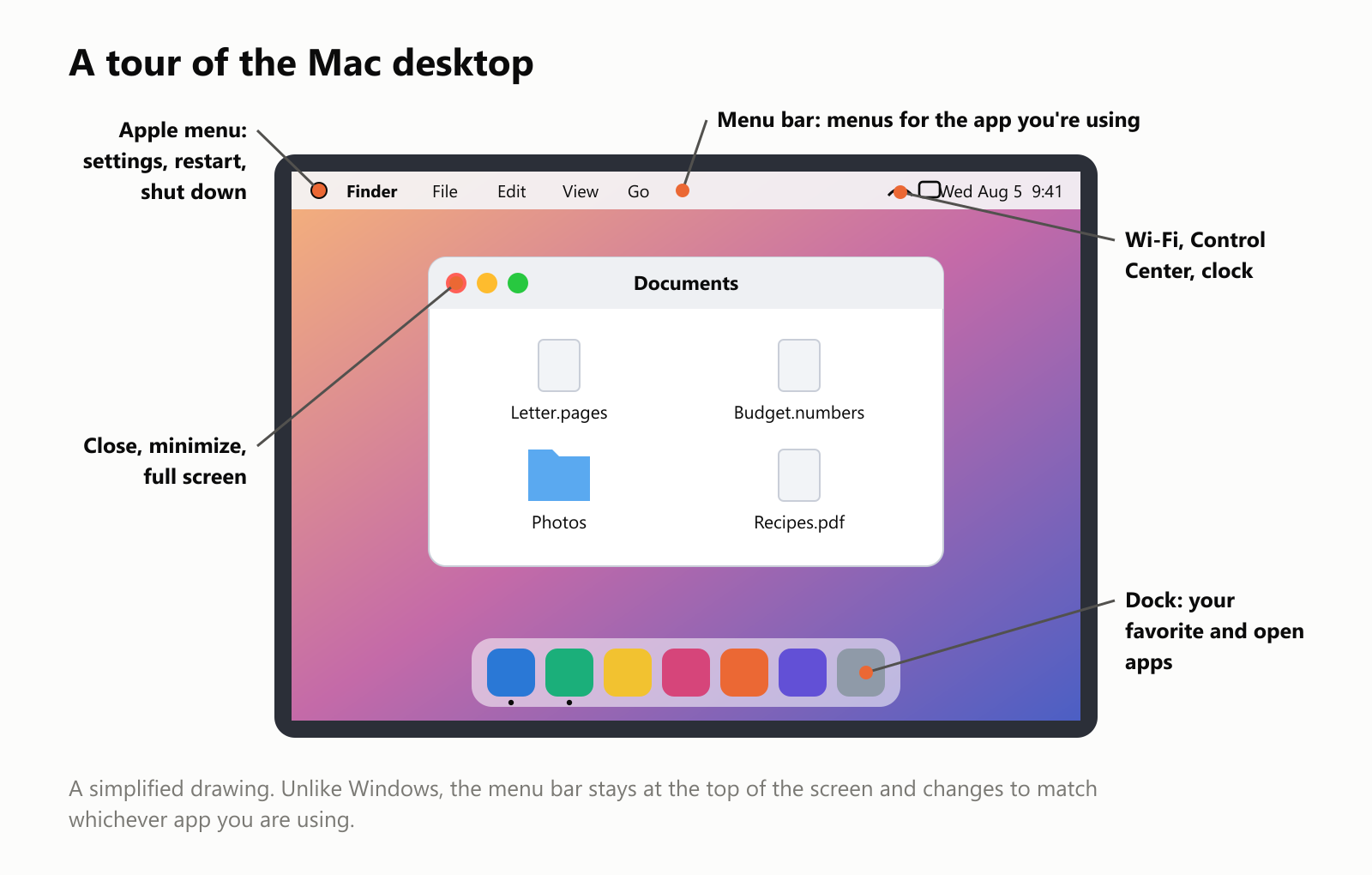
- The menu bar runs along the top of the screen. Its menus (File, Edit, View...) belong to whichever app you're using right now, and they change when you switch apps. In Windows, each window has its own menus instead.
- The Apple menu (the Apple logo in the top-left corner) is where you find System Settings, Restart and Shut Down.
- The Dock at the bottom holds your favorite apps. A small dot under an icon means the app is open.
- Finder is the Mac's app for browsing files and folders, like File Explorer on Windows. Its smiling face icon is always the first one in the Dock.
- The window buttons are in the top-left corner: red closes, yellow minimizes into the Dock, and green makes the window fill the screen.
- The Command key (⌘) does on a Mac what the Ctrl key does on Windows: ⌘C copies, ⌘V pastes, ⌘Q quits an app.
Where macOS came from
The story of macOS is really two stories that came together.
The first is the original Macintosh, launched by Apple in January 1984. It was one of the first affordable computers with a mouse, windows and icons instead of typed commands. Its operating system (later called Mac OS) was friendly, but by the 1990s it was showing its age: it couldn't stop one misbehaving app from freezing the entire computer, and crashes were common. Apple tried for years to build a modern replacement and failed.
The second story belongs to Steve Jobs, Apple's co-founder. After being pushed out of Apple in 1985, he started a new computer company called NeXT. Its operating system, NeXTSTEP (1989), was years ahead of its time, and the world's first web browser and web server were written on a NeXT computer.
In late 1996, Apple decided to buy NeXT, and Steve Jobs came back. NeXTSTEP became the foundation of the new Mac OS X (the "X" is the Roman numeral ten), released in March 2001.
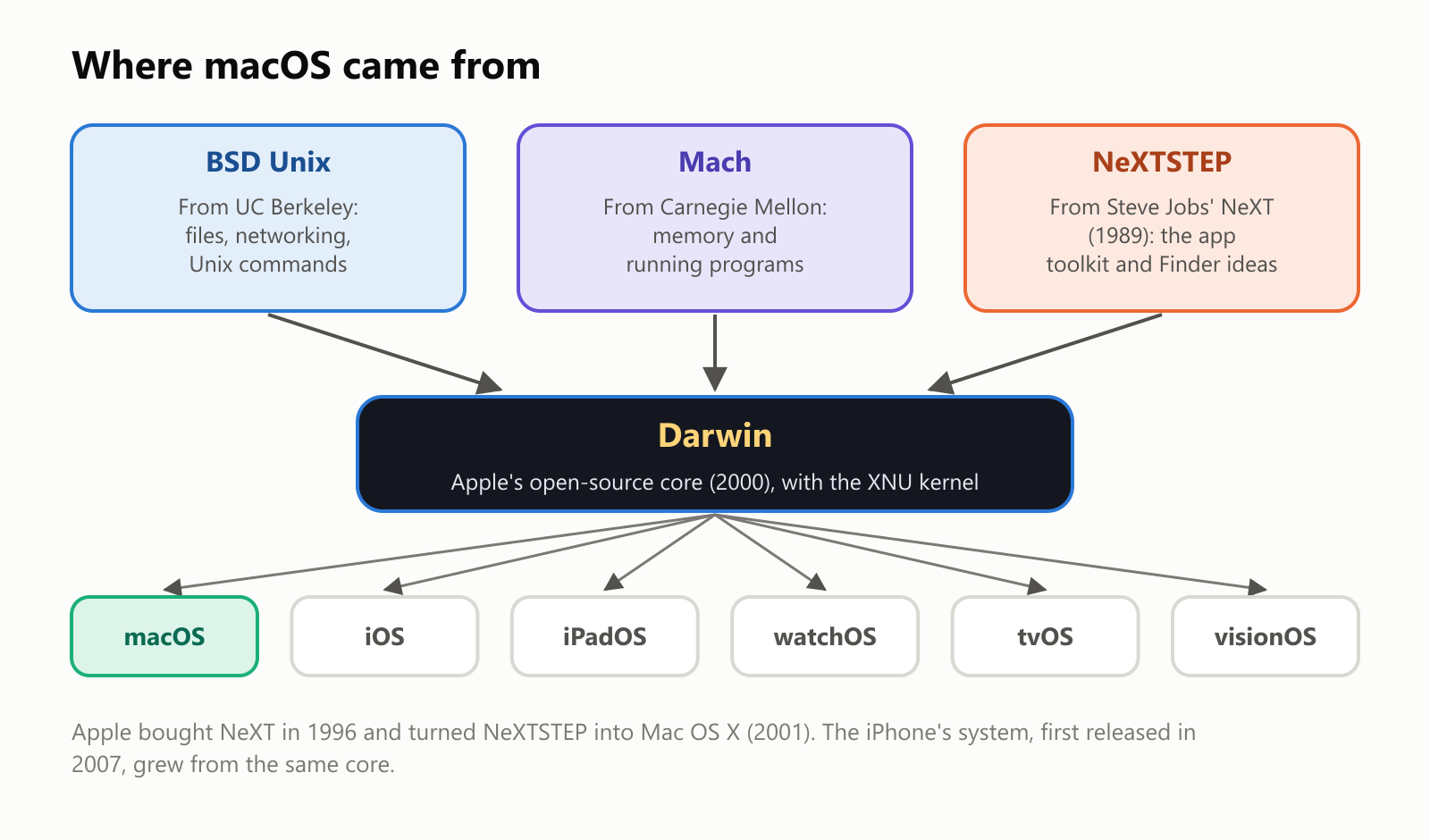
NeXTSTEP itself was built from two older ingredients, both from universities:
- BSD Unix, from the University of California, Berkeley: a version of Unix with networking, files and hundreds of commands.
- Mach, from Carnegie Mellon University: a modern design for managing memory and running programs.
Apple combined them into an open-source core called Darwin. When Apple built the iPhone in 2007, it reused the same core. So the system on your iPhone, iPad, Apple Watch, Apple TV and Vision Pro are all close cousins of macOS.
How macOS is built
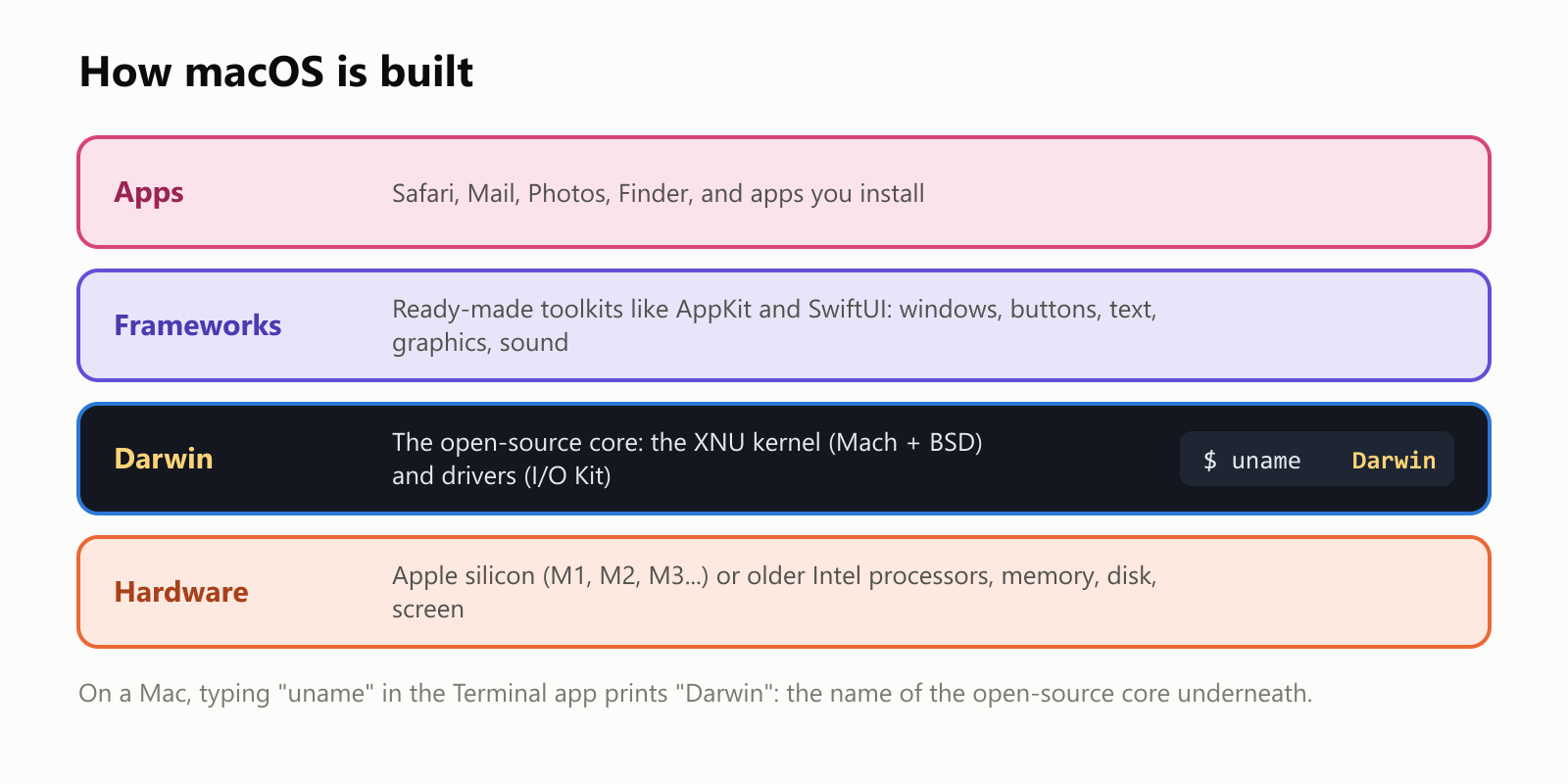
- Apps are what you use: Safari, Mail, Photos, and anything you install.
- Frameworks are Apple's ready-made toolkits. When an app needs a button, a menu or a font, it borrows it from a framework, which is why Mac apps look and behave alike. Developers write Mac apps mostly in Swift and, in older apps, Objective-C (see What Is the Swift Programming Language? and What Is the Objective-C Programming Language?).
- Darwin is the core. Its heart is the kernel, called XNU (a joke name meaning "X is Not Unix"), which combines Mach and BSD, plus a driver system called I/O Kit.
- Hardware: today, that means Apple's own chips.
A real Unix underneath
Here's something many Mac owners don't know: macOS is officially a Unix system. Apple has had it certified by The Open Group, the organization that owns the UNIX trademark, since Mac OS X Leopard (2007).
That means the Terminal app on every Mac gives you the same kind of command line used on Linux servers and in the original Unix from the 1970s. Commands like ls, cd, grep and ssh work just as they do on Linux. It's one reason the Mac is popular with programmers: they can write code on a Mac and run it on Linux servers with few surprises.
Its ancestors are still in the code
Apple publishes the source code of Darwin's kernel, so anyone can read it. We downloaded it and searched every file for the names in its copyright notices:
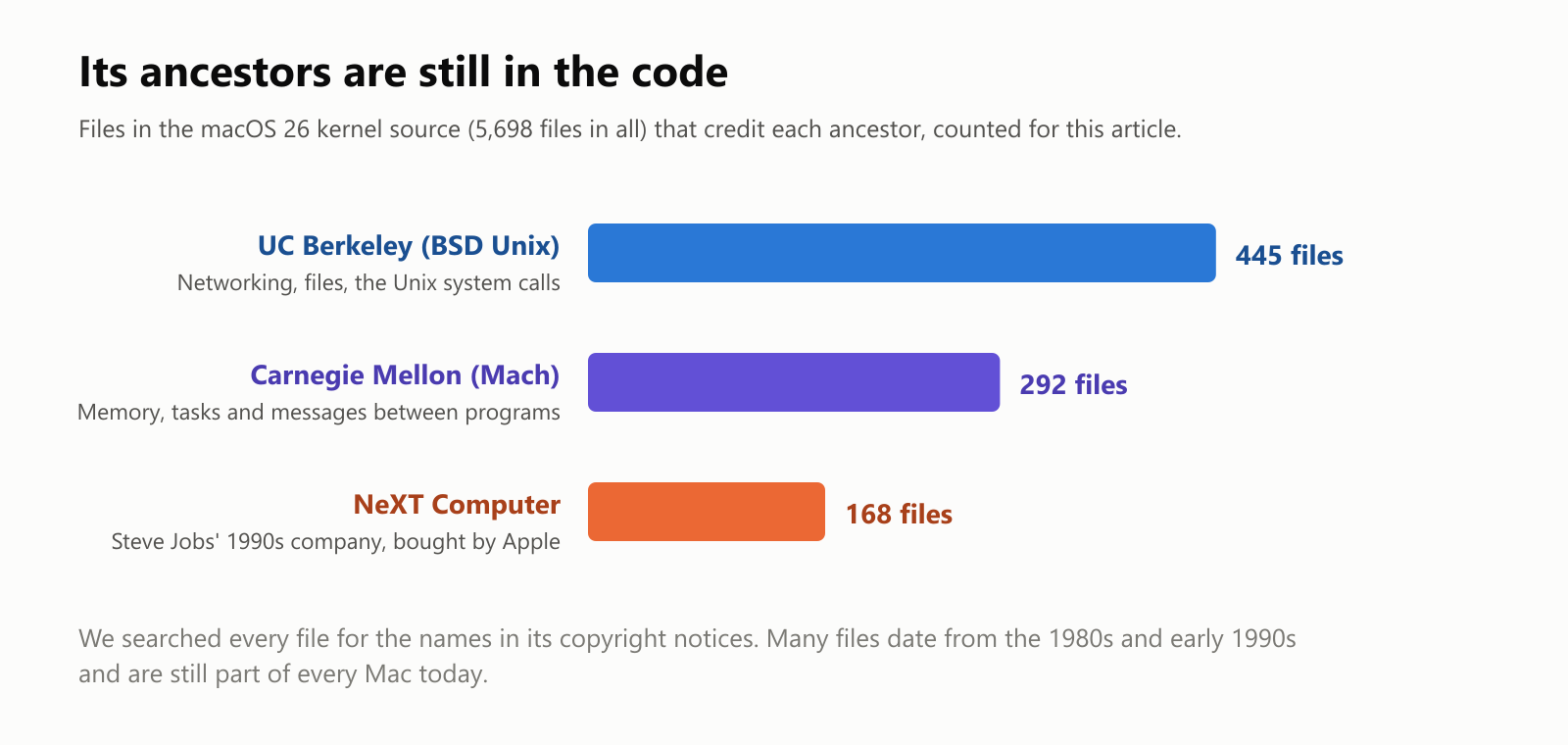
In the kernel of macOS Tahoe 26 (2025), 445 files still credit "The Regents of the University of California" (Berkeley's BSD Unix), 292 credit Carnegie Mellon (Mach), and 168 credit NeXT Computer. Code written decades ago at two universities and at Steve Jobs' second company is still running inside every Mac.
We also measured how the kernel has grown since 2001:
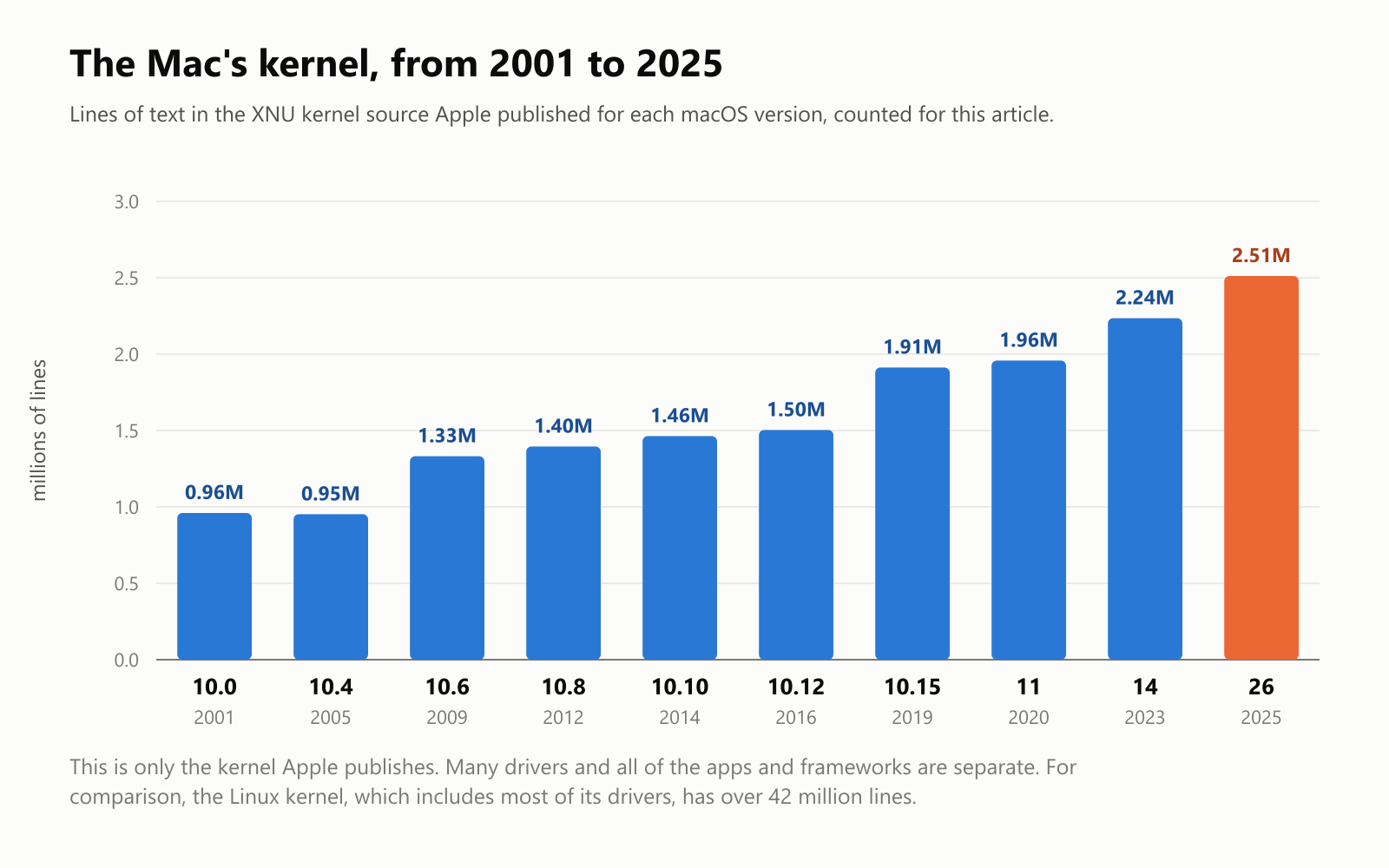
The kernel went from about 1 million lines in Mac OS X 10.0 to about 2.5 million in macOS 26. That sounds small next to the Linux kernel's 42 million, but it's not a fair comparison: Linux packs thousands of hardware drivers into its kernel, while most Mac drivers live elsewhere. And the kernel is only a small part of macOS. The apps and frameworks on top are far larger, and most of them are not open source.
Four processor families, one Mac
The processor is the chip that actually runs programs, and each family of processors understands its own "language" of instructions. Remarkably, the Mac has switched processor families three times:
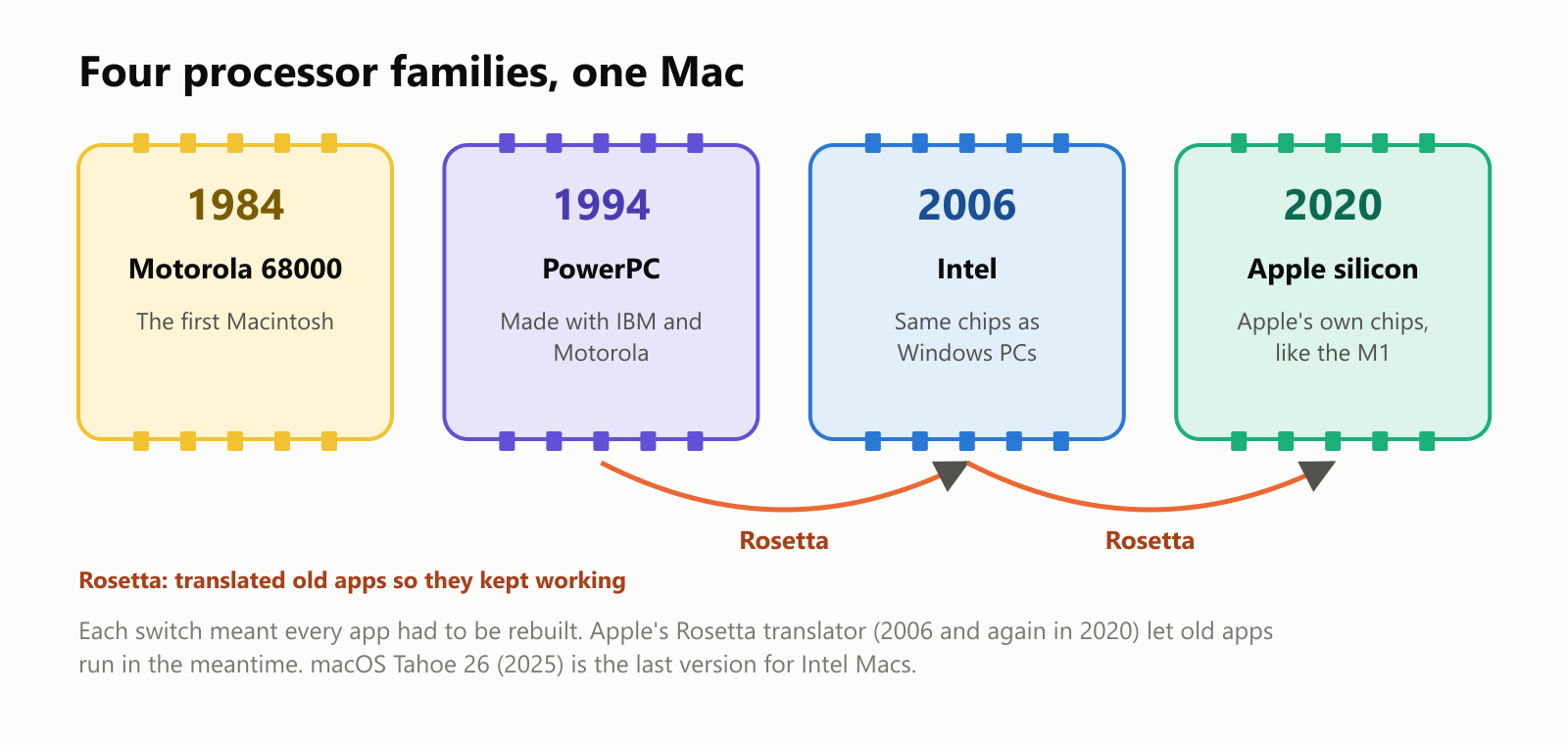
Each switch meant every app had to be rebuilt for the new chip. To keep people's old apps working in the meantime, Apple created Rosetta, a translator (named after the Rosetta Stone) that converts an app's instructions on the fly. It was used for the move to Intel in 2006, and Rosetta 2 for the move to Apple's own chips in 2020.
The latest switch, to Apple silicon (the M1 in 2020, followed by the M2, M3 and later chips), was a big success: the new Macs were fast, ran cool and quiet, and had much longer battery life. Because they use the same kind of chip design as iPhones, they can even run many iPhone and iPad apps. Apple has said that macOS Tahoe 26 (2025) is the last version that will support Macs with Intel processors.
From big cats to California places
Every version of macOS has a name, which Apple uses more than its number:
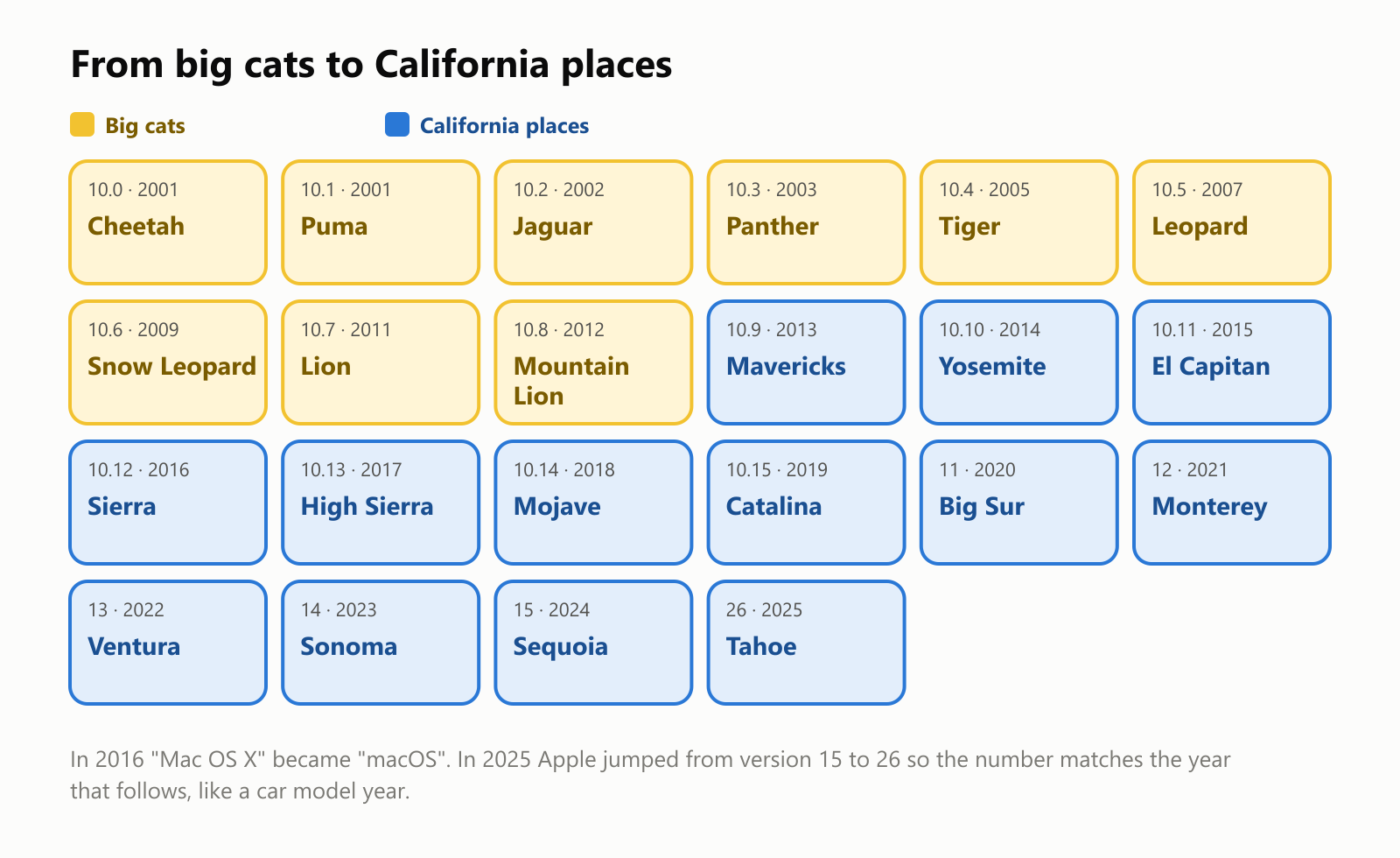
- The first nine versions were named after big cats, from Cheetah (2001) to Mountain Lion (2012).
- Since Mavericks (2013), a famous surfing spot, they've been named after places in California, where Apple is based.
- In 2016, "Mac OS X" was renamed macOS to match iOS, watchOS and tvOS.
- In 2025, Apple jumped from macOS 15 straight to macOS 26, so that all its systems share a number matching the year that follows the release, like a car's model year.
- Since Mavericks (2013), new macOS versions have been free.
Along the way, macOS introduced features many people now take for granted, including Spotlight search (2005), Time Machine backups (2007) and the Mac App Store (2011). In 2019, the Terminal's default command line changed from bash to zsh.
How many computers are Macs?
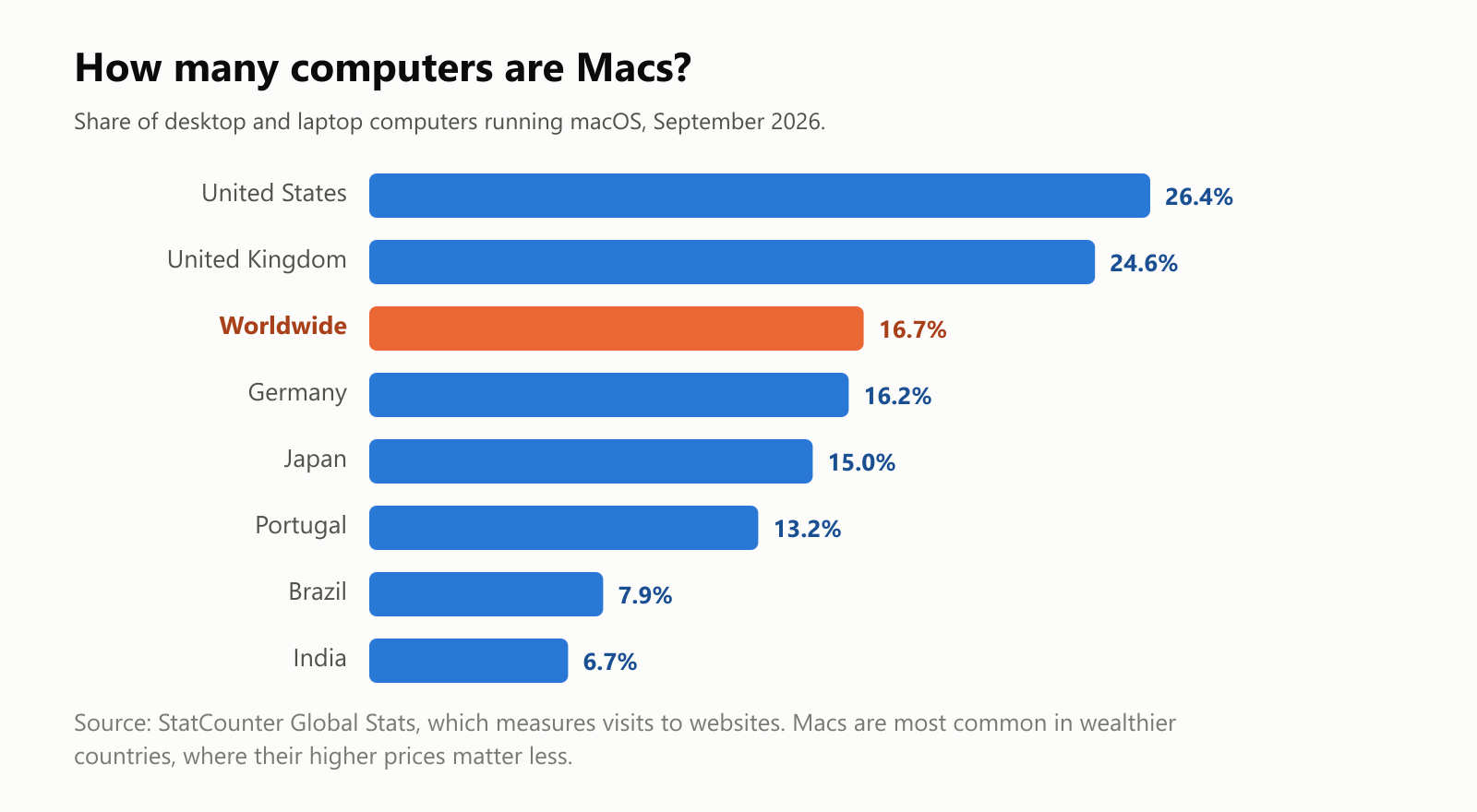
Worldwide, about one in six desktop and laptop computers is a Mac, according to StatCounter, which measures the systems people use to visit websites. But it varies a lot by country: about one in four computers in the United States and the United Kingdom, but fewer than one in ten in Brazil and India, where Macs are expensive compared with Windows PCs.
The good and the not-so-good
Why people like macOS:
- It's polished and consistent. Apps look and work alike, and the system is designed together with the hardware.
- It works well with an iPhone. Messages, photos, passwords and copy-paste flow between Apple devices, and AirDrop sends files between them in seconds.
- It's Unix underneath, which programmers love.
- Fewer viruses target it than Windows (though Macs are not immune), and features like Gatekeeper check apps before they open.
- Free updates for several years after you buy a Mac.
What people complain about:
- Price. Macs cost more than many Windows PCs, and upgrades like extra storage are expensive.
- Only on Apple hardware. macOS's license only allows it on Apple computers, so you can't install it on a PC you already own.
- Fewer games. Many popular games are only made for Windows.
- Hard to repair or upgrade. On most recent Macs, memory and storage are built in and can't be upgraded later.
- Old Macs get left behind. Each new version drops support for older models, as is now happening to Intel Macs.
A small glossary
- macOS: Apple's operating system for Mac computers, called Mac OS X until 2016.
- Mac OS: the original Macintosh system, from 1984 until Mac OS 9.
- NeXTSTEP: the operating system from Steve Jobs' company NeXT, which became the base of Mac OS X.
- Darwin: the open-source core of macOS (and of iOS).
- XNU: the macOS kernel, combining Mach and BSD.
- BSD: a version of Unix from the University of California, Berkeley.
- Mach: a kernel design from Carnegie Mellon University.
- Finder: the Mac app for browsing files and folders.
- Dock: the row of app icons at the bottom of the screen.
- Menu bar: the bar at the top of the screen with the current app's menus.
- Terminal: the Mac app that gives you a Unix command line.
- Apple silicon: Apple's own processor chips, like the M1.
- Rosetta: Apple's translator that lets apps made for an older processor run on a newer one.
Wrapping up
macOS combines a friendly face, descended from the 1984 Macintosh, with a serious engine underneath: Unix from Berkeley, Mach from Carnegie Mellon, and NeXTSTEP from the company Steve Jobs started when he left Apple. That same engine now powers the iPhone and Apple's other devices.
The next time you see those red, yellow and green buttons, you'll know there are decades of computing history behind them, some of it still sitting, line for line, in the code.
Read next
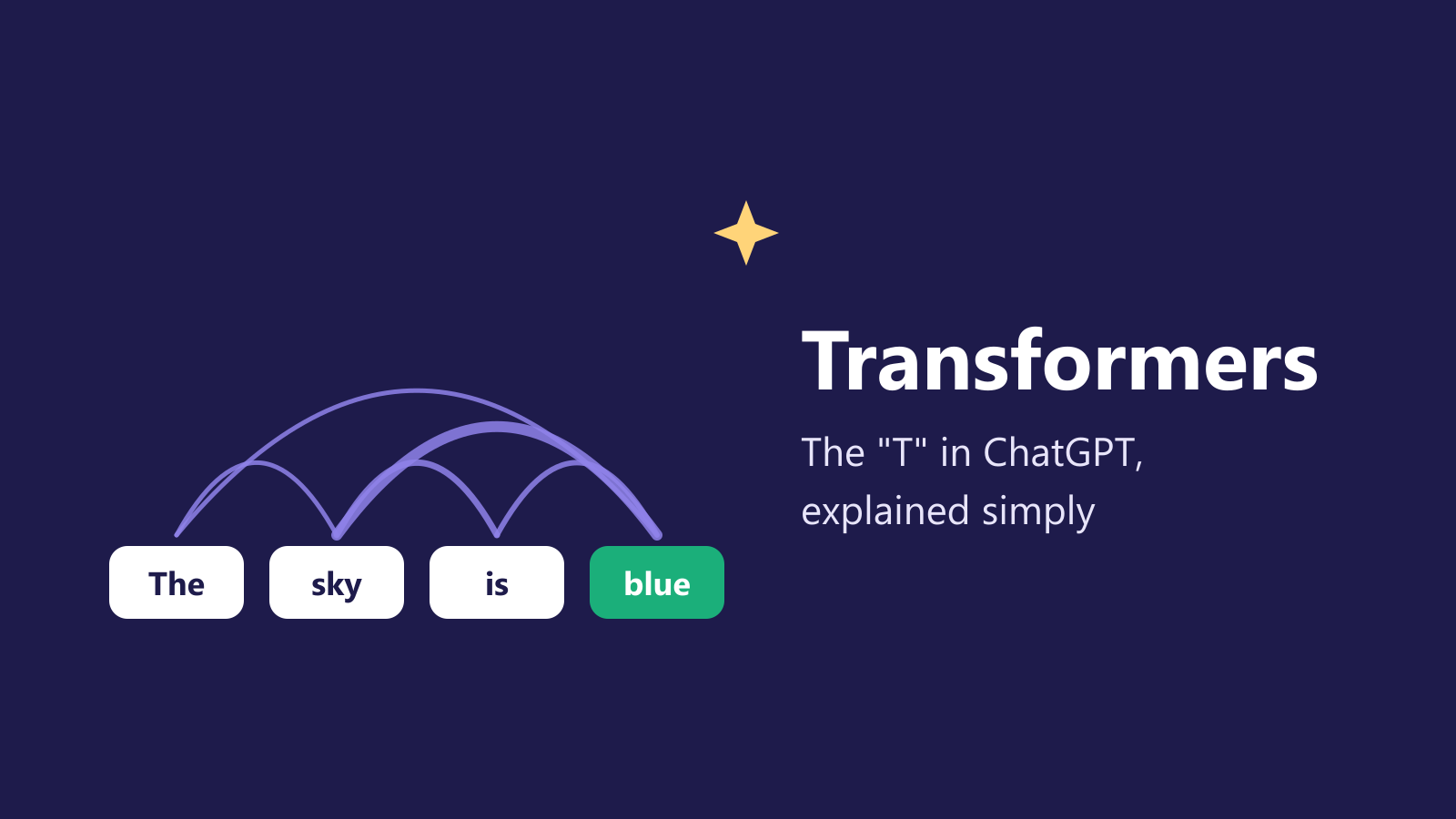
What Is a Transformer in AI? The Idea Behind ChatGPT, Explained Simply
A friendly, jargon-free guide to transformers, the AI design behind ChatGPT, Claude and Gemini. Learn how "attention" lets AI understand words in context, what happens inside a transformer, and why it changed AI so quickly.
 nbkhope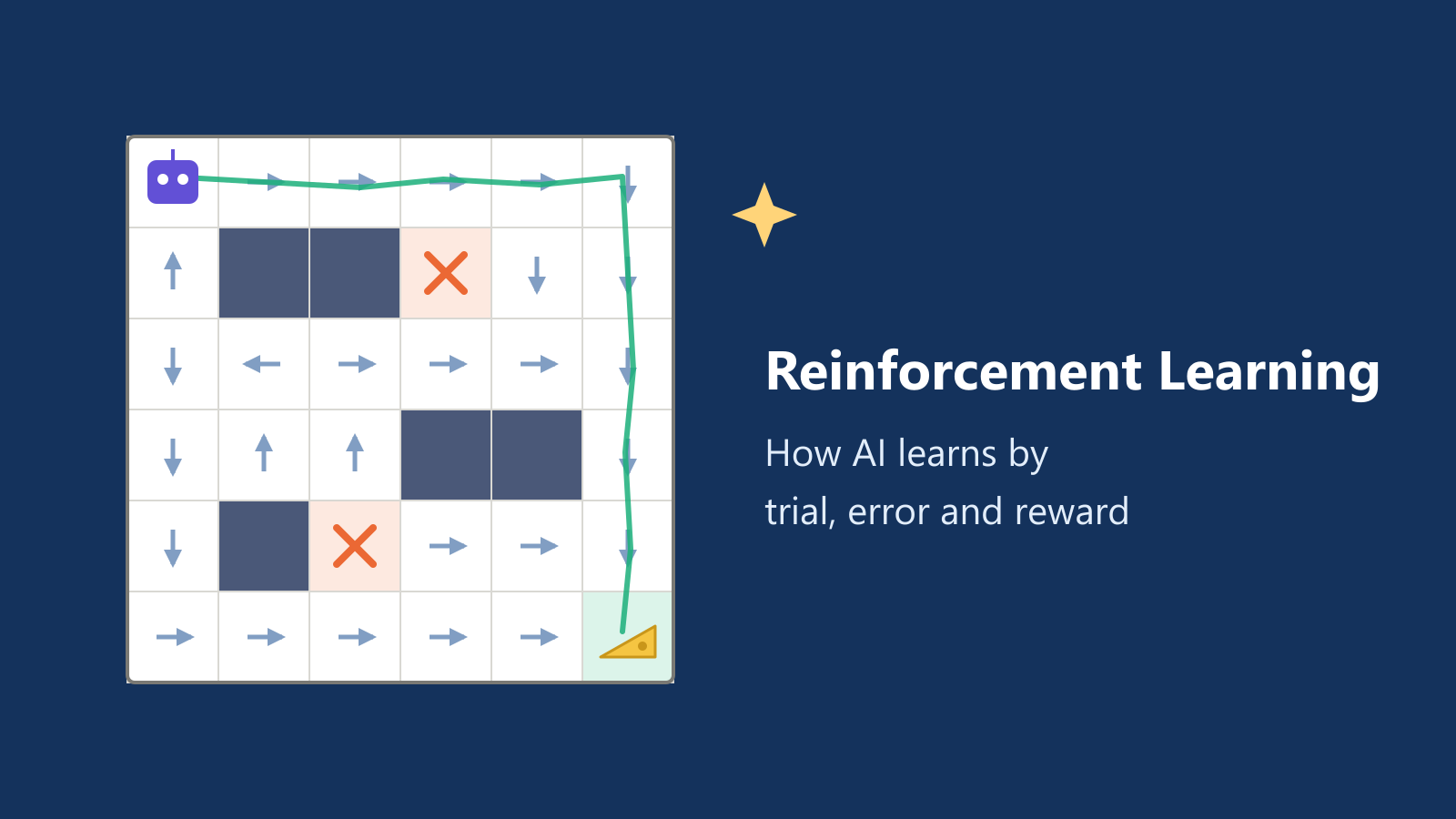
What Is Reinforcement Learning? How AI Learns by Trial, Error and Reward
A friendly, jargon-free introduction to reinforcement learning, how AI learns by trial, error and reward, like training a dog with treats. Watch a real robot learn a maze, see why exploring matters, and learn how it shapes chatbots.
nbkhope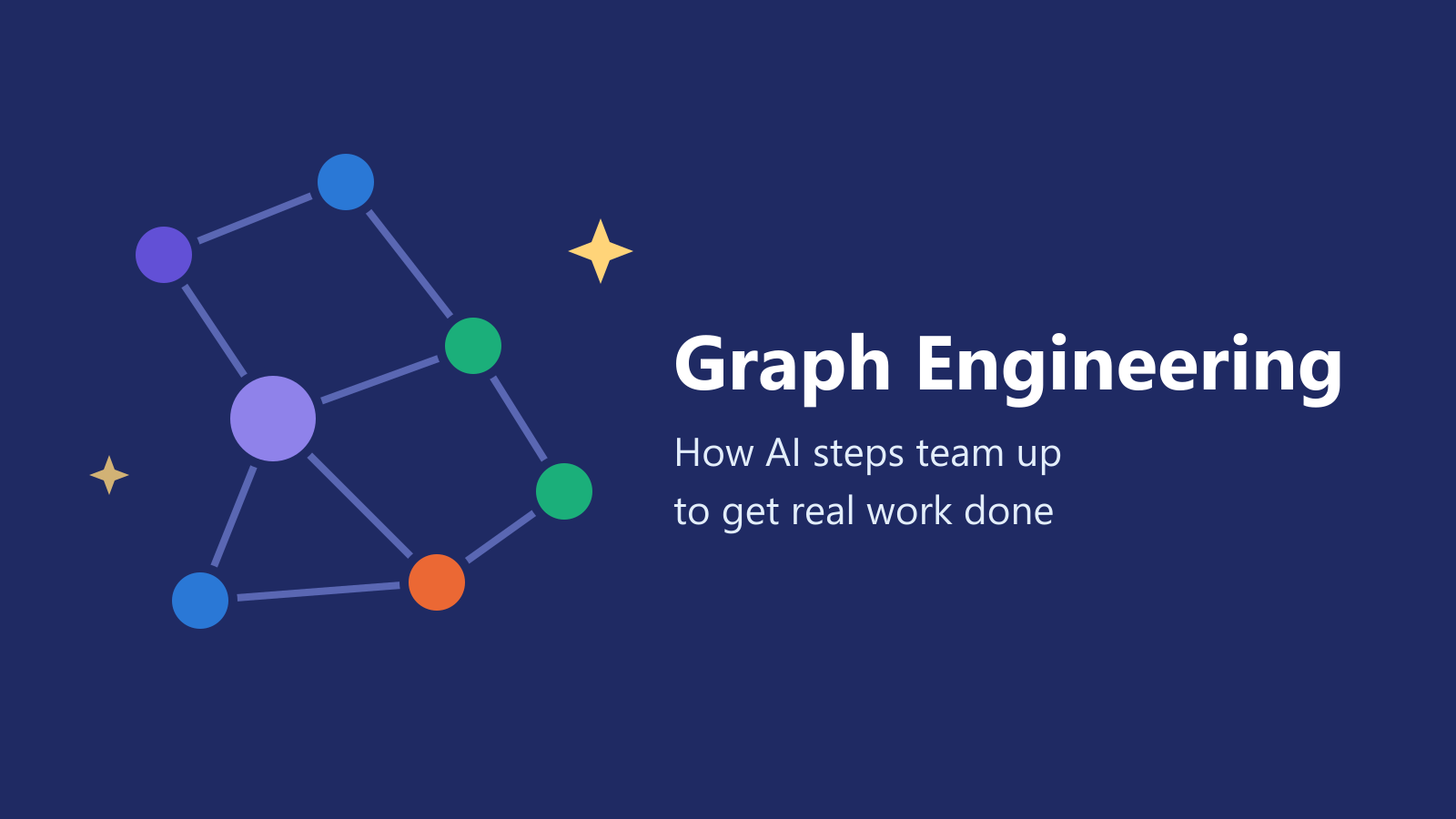
What Is Graph Engineering? How Today's AI Teams Up to Get Real Work Done
A friendly, jargon-free guide to graph engineering, the 2026 idea of building AI as a map of connected steps instead of one big loop. See how today's AI agents work, why small mistakes add up, and how checkers, branches and teamwork fix it.
nbkhope
Comments
Be kind and specific. Comments with links from new accounts appear after a moderator reviews them.