What Is the Unix Operating System? A Simple Guide to the Idea Inside Your Phone and the Internet
A friendly, jargon-free guide to Unix, the 1969 operating system whose ideas now run inside iPhones, Android phones, most of the internet and every top supercomputer. Learn about the kernel, the shell, pipes, permissions and the Unix clock.

On this page
You've probably never typed the word "Unix", but you use it every day. If you have an iPhone or a Mac, it's running a certified Unix system. If you have an Android phone, it's running Linux, a close Unix cousin. The websites you visit, the cloud that stores your photos and all 500 of the world's fastest supercomputers run on the same family of ideas.
Those ideas were born in 1969, in a lab in New Jersey, on a computer that most people today wouldn't recognize. This article explains, in plain language, what Unix is, what makes it special, and how a small research project ended up running much of the world.
Born at Bell Labs
In the 1960s, Bell Labs, the research arm of the American phone company AT&T, worked on an ambitious operating system called Multics with MIT and General Electric. It was powerful but huge and slow-moving, and in 1969 Bell Labs pulled out.
Two Bell Labs researchers, Ken Thompson and Dennis Ritchie, missed having a comfortable system to work on. Thompson found an unused minicomputer, a PDP-7, partly so he could keep running a space game he had written, and started building a small operating system of his own. A colleague, Brian Kernighan, jokingly named it "Unics", a pun on Multics, and the name became Unix.
Two decisions made Unix special:
- In 1973, Ritchie and Thompson rewrote Unix in C, the language Ritchie had just created (see What Is the C Programming Language?). Operating systems were normally written in the specific machine language of one computer. Written in C, Unix could be moved, or ported, to new kinds of computers with modest effort.
- AT&T wasn't allowed to sell computer products, because of a 1956 legal agreement with the US government. So it licensed Unix to universities for a small fee, source code included. A whole generation of students learned computing by reading and improving Unix.
In 1983, Thompson and Ritchie received the Turing Award, often called the Nobel Prize of computing, for their work on Unix.
The layers of a Unix system
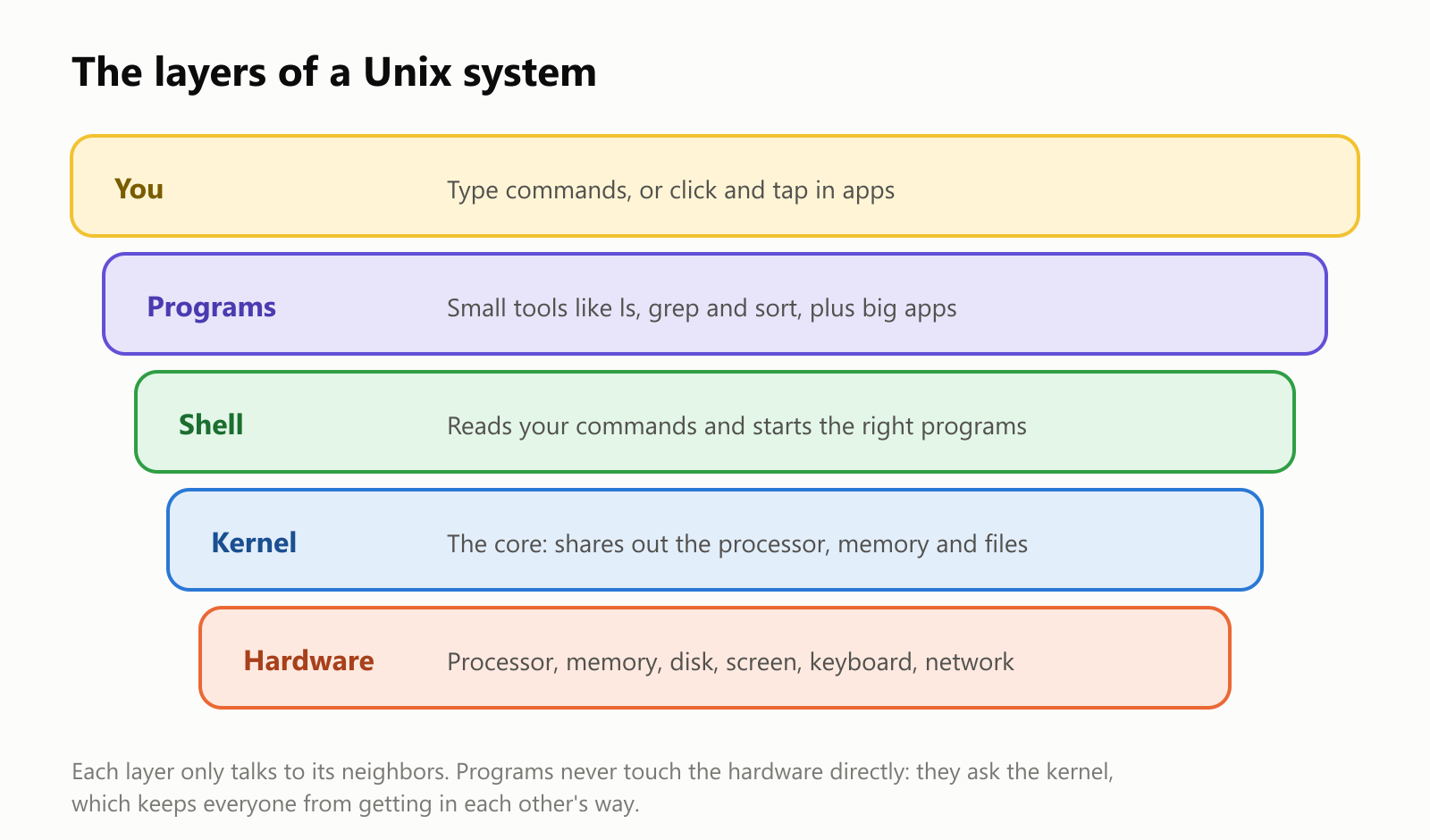
- The kernel is the heart of the system. It decides which program gets to use the processor at each moment, hands out memory, reads and writes files, and talks to the hardware. Programs never touch the hardware directly; they ask the kernel.
- The shell is the program that reads the commands you type and starts other programs for you. It's named that way because it's the outer "shell" around the kernel.
- Programs are everything else: from tiny tools to web browsers.
Unix was also built from day one for many people sharing one computer and many programs running at once. That's ordinary today, but it was a big deal in 1969, and it's why Unix systems are so good at running servers that handle thousands of users.
The Unix philosophy: small tools that work together
Instead of building giant programs that do everything, Unix encourages lots of small tools, each doing one job well:
lslists the files in a folder.grepfinds lines that contain some text.sortputs lines in order.wccounts lines and words.
The magic is how they combine. In 1973, Unix gained pipes, invented by Doug McIlroy: the | symbol sends the output of one program straight into the next, like connecting garden hoses. McIlroy summed up the philosophy as: "Write programs that do one thing and do it well."
Here's a real example. We wrote a three-line story and asked Unix which words appear most often:
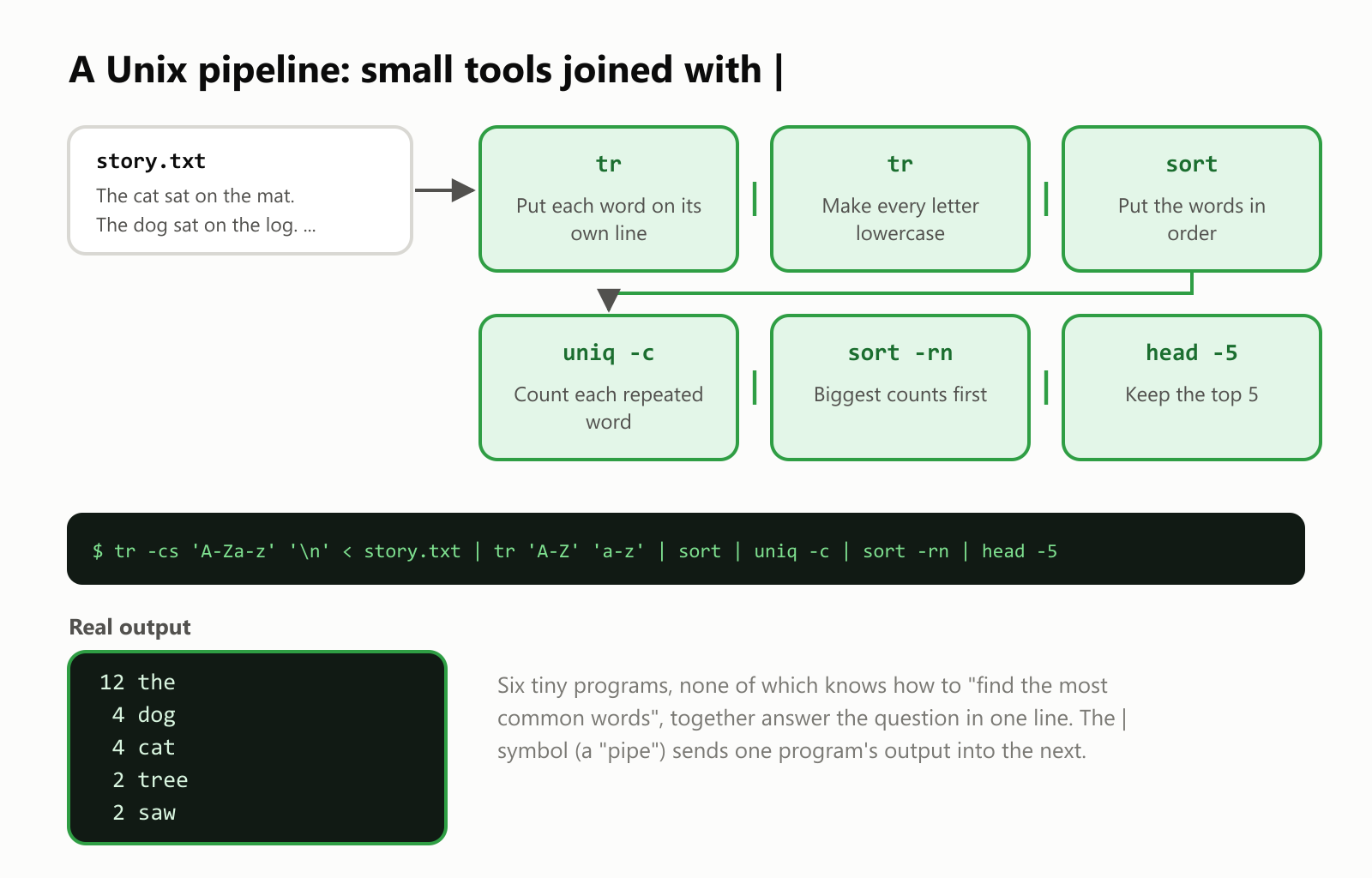
1$ tr -cs 'A-Za-z' '\n' < story.txt | tr 'A-Z' 'a-z' | sort | uniq -c | sort -rn | head -5
2     12 the
3      4 dog
4      4 cat
5      2 tree
6      2 saw
None of those six programs knows how to "find the most common words". Chained together with pipes, they answer the question in a single line. Swap one piece, and you can answer a different question: that flexibility is why programmers still use these tools every day, more than 50 years later.
Everything is a file
Unix has another simple, powerful idea: as much as possible, everything looks like a file. Your documents are files, but so are devices and even information about the system itself. For example, on a Linux system you can read details about the processor as if it were a text file:
$ grep -m1 "model name" /proc/cpuinfo
model name	: 12th Gen Intel(R) Core(TM) i7-12700H
There's even a special file called /dev/null, nicknamed "the black hole": anything written to it simply disappears. Because everything is a file, the same small tools (read, search, copy, count) work on almost anything.
Who can do what: permissions
Since many people could share one Unix computer, every file records who may read it, change it or run it. The ls -l command shows this as a string of letters:
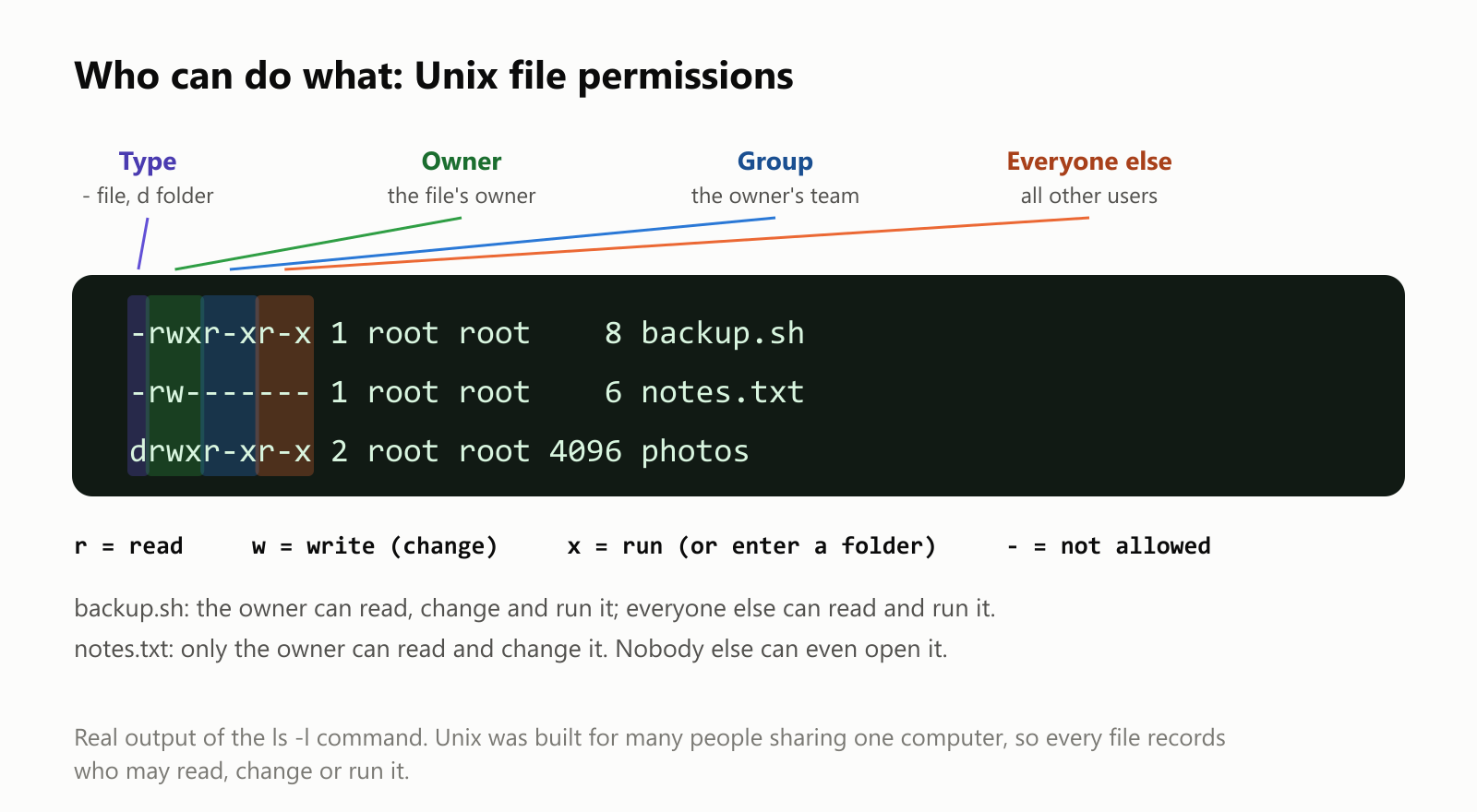
Read the letters in groups of three: the owner, the owner's group (a team of users), and everyone else. r means read, w means write (change), x means run, and - means not allowed. So -rw------- on notes.txt means only its owner can read or change it.
Your phone uses the same idea behind the scenes: on Android, each app runs as its own separate "user", so one app can't snoop on another app's files.
The Unix clock
Here's a fun Unix detail that affects almost every computer: Unix measures time as the number of seconds since midnight UTC on January 1, 1970, a moment programmers call "the epoch".
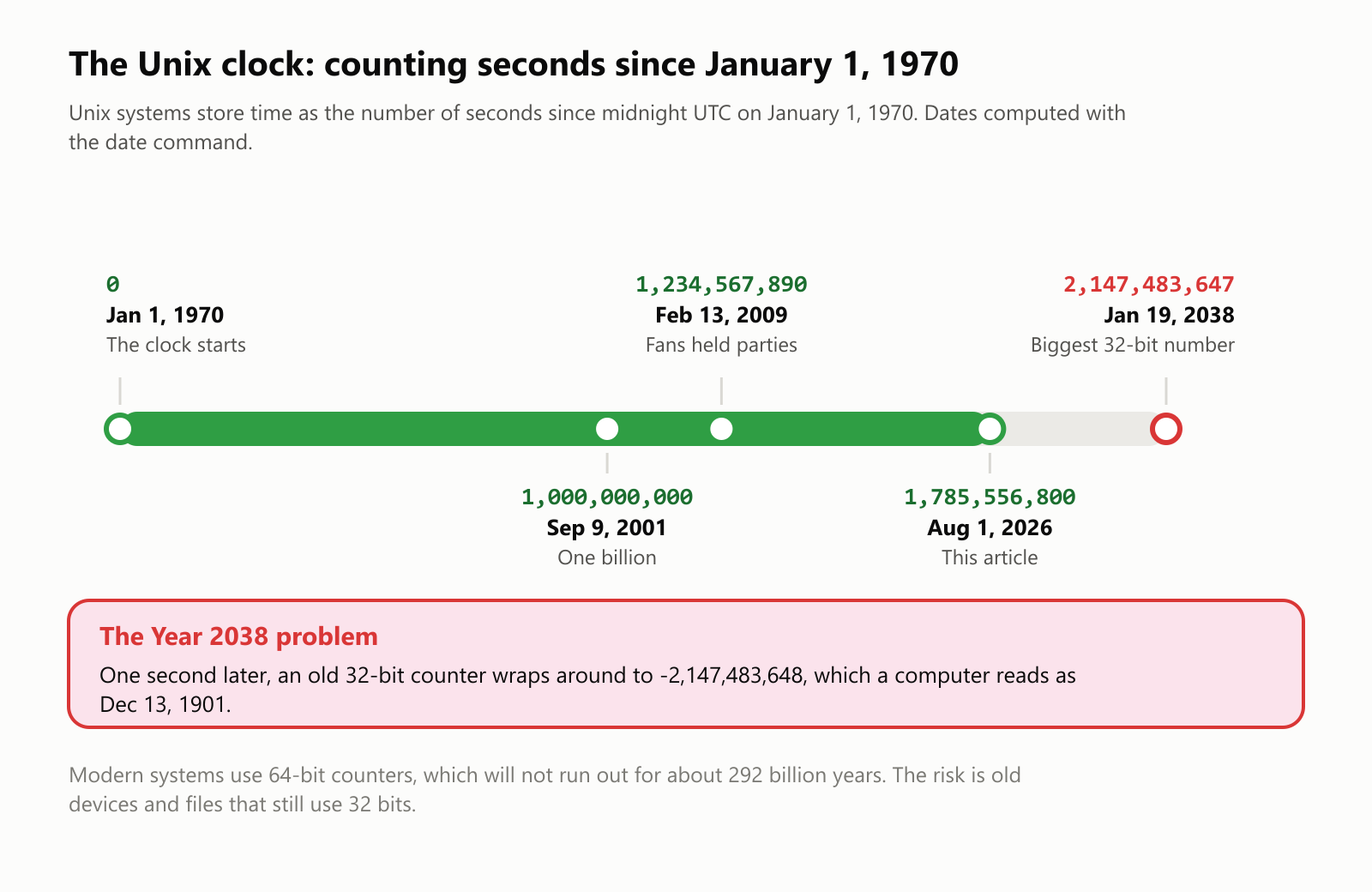
At the moment this article was published, the Unix clock read 1,785,556,800. Programmers even threw parties when it hit 1,234,567,890 in 2009.
The clock has a famous limit. Older systems store the count in a 32-bit number, which can't go above 2,147,483,647, a moment that arrives on January 19, 2038. One second later, the number "wraps around" to a large negative value, and the computer suddenly thinks it's December 13, 1901. We checked this with the date command. It's called the Year 2038 problem, a cousin of the Y2K bug. Modern systems already use 64-bit counters, which won't run out for about 292 billion years, but old gadgets and file formats still need fixing.
The Unix family tree
Because universities and companies could get Unix's source code, it grew into a whole family:
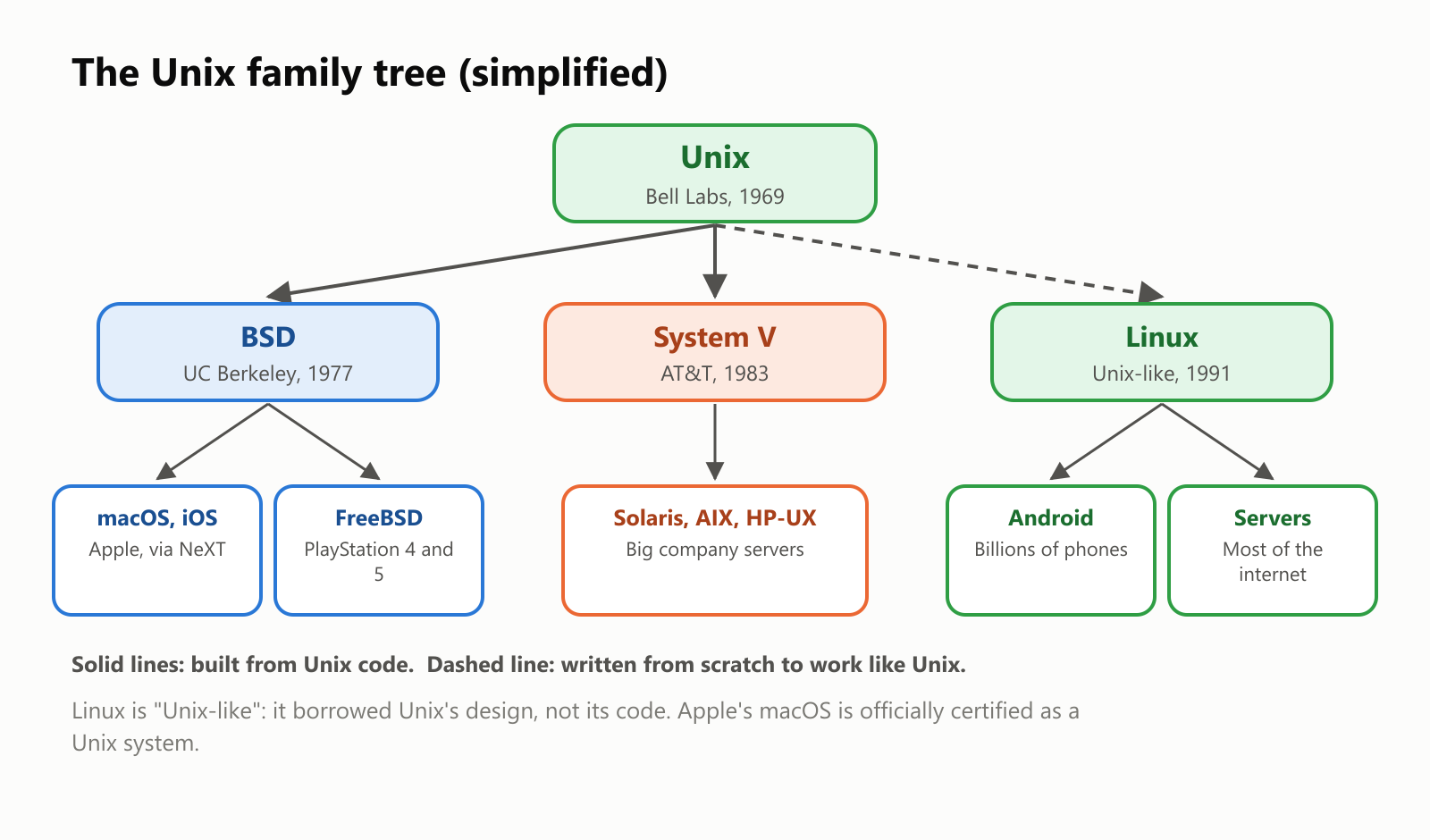
- BSD: students and researchers at the University of California, Berkeley, built their own improved Unix, called BSD, starting in 1977. It added the networking code that helped build the internet. Its descendants include FreeBSD and, through Steve Jobs' NeXT computers, Apple's macOS and iOS (see What Is the Objective-C Programming Language? for the NeXT story).
- System V: AT&T's own commercial Unix, which led to big-company systems like Solaris, AIX and HP-UX.
- Linux: in 1991, a Finnish student named Linus Torvalds wrote a new kernel from scratch that worked like Unix. Combined with free tools from Richard Stallman's GNU project (started in 1983 to build a free Unix-like system), it became Linux. Linux doesn't contain Unix code, so it's called Unix-like, but it follows the same design.
To keep this growing family compatible, a common standard called POSIX was published in 1988. It's why the same commands, like the pipeline above, work on a Mac, on Linux and on many other systems.
Where the Unix family lives today
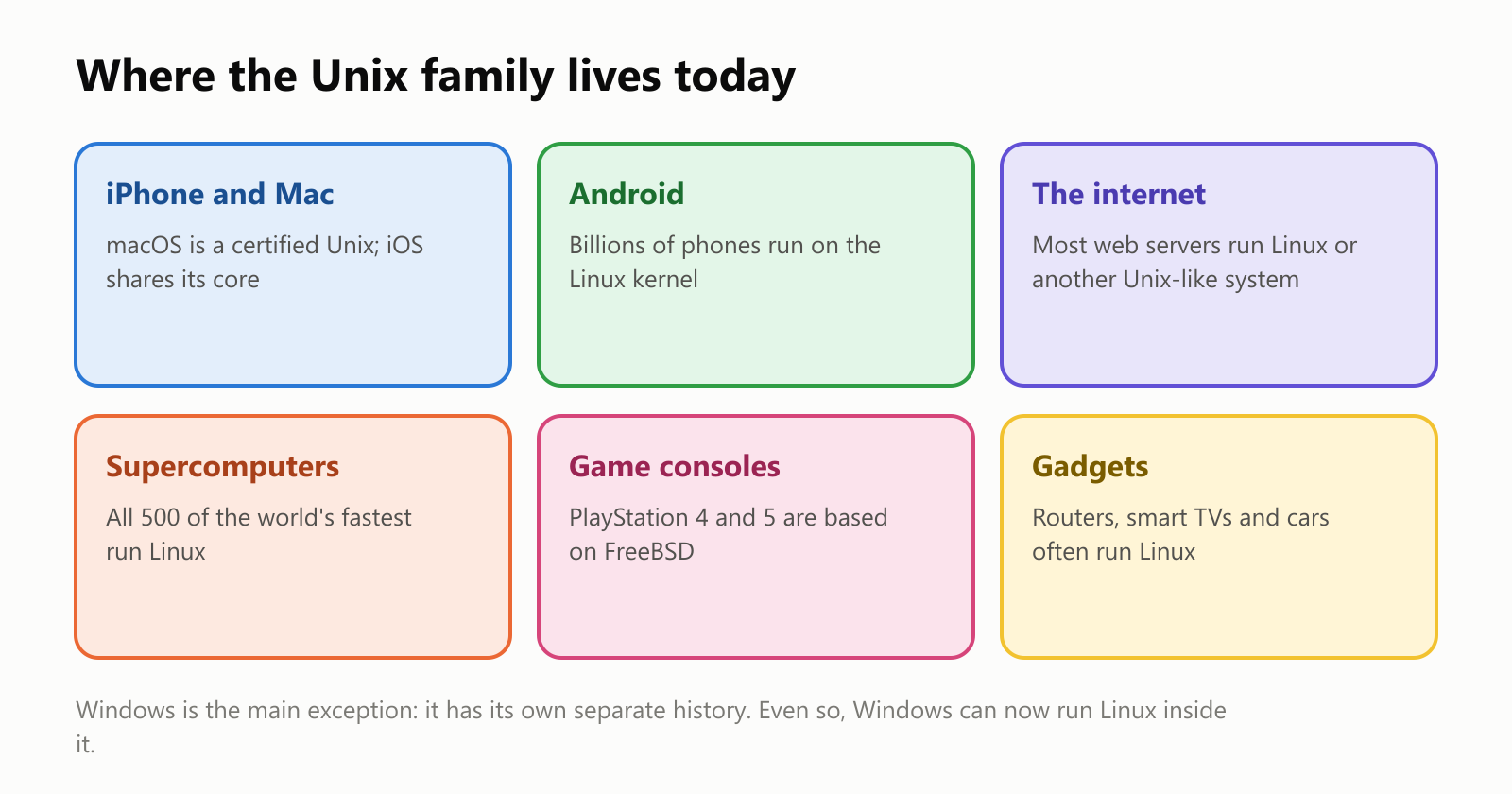
- Phones: iPhones run iOS, built on the same Unix-based core as macOS, and Android runs on the Linux kernel. Together, that's billions of devices.
- The internet: most web servers and cloud computers run Linux or another Unix-like system.
- Supercomputers: since 2017, every single one of the world's 500 fastest supercomputers has run Linux.
- Game consoles and gadgets: Sony's PlayStation 4 and 5 are based on FreeBSD, and Wi-Fi routers, smart TVs and car dashboards often run Linux inside.
The big exception is Windows, which grew from a separate family tree. But even Windows can now run Linux inside it: the examples in this article were run in a small Linux system on a Windows laptop.
A short history
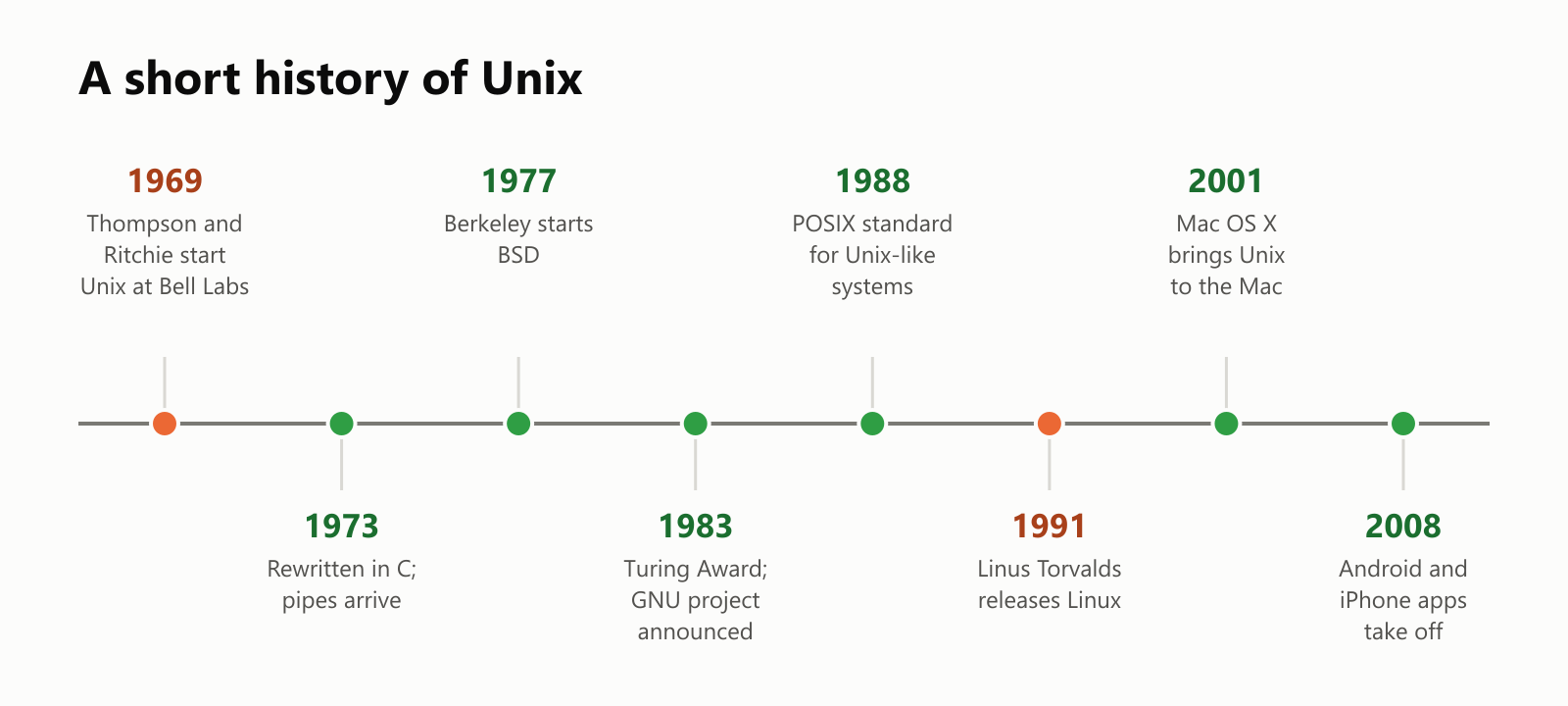
For more about the people and languages around this story, see The History of Computer Programming. And if Ken Thompson's name sounds familiar, he later co-created the Go language at Google (see What Is the Go Programming Language?).
Try it yourself
You may already have a Unix-style command line within reach:
- Mac: open the Terminal app. You're talking to a certified Unix system.
- Linux: open the terminal from your apps menu.
- Windows: install the free Windows Subsystem for Linux (WSL) from Microsoft, which runs a real Linux system inside Windows.
Then try a few safe commands: ls to list files, pwd to see which folder you're in, date to see the time, and date +%s to see the Unix clock tick.
A small glossary
- Operating system: the master program that runs a computer and shares it among apps.
- Unix: an operating system created at Bell Labs in 1969, and the family of systems that followed it.
- Kernel: the core of the operating system, which manages the processor, memory, files and hardware.
- Shell: the program that reads the commands you type and runs other programs.
- Command line / terminal: a text window where you type commands instead of clicking.
- Pipe ( | ): a connection that sends one program's output into another program.
- Permissions: the rules for who may read, change or run each file.
- Unix time: the number of seconds since January 1, 1970, at midnight UTC.
- Year 2038 problem: the moment when old 32-bit Unix clocks run out of numbers.
- BSD: the Berkeley version of Unix, ancestor of FreeBSD and part of macOS.
- Linux: a free, Unix-like operating system started by Linus Torvalds in 1991.
- Unix-like: a system that works like Unix without containing its original code.
- POSIX: the standard that keeps Unix-like systems compatible with each other.
Wrapping up
Unix started as a side project by two researchers who wanted a pleasant system to work on, and became one of the most influential pieces of software ever written. Its ideas, small tools joined with pipes, everything as a file, many users with clear permissions, and a clock counting seconds since 1970, are still at work today.
So the next time you unlock your phone, load a website or hear about a supercomputer, there's a very good chance a descendant of that 1969 experiment is quietly doing the work.
Read next
What Is a Transformer in AI? The Idea Behind ChatGPT, Explained Simply
A friendly, jargon-free guide to transformers, the AI design behind ChatGPT, Claude and Gemini. Learn how "attention" lets AI understand words in context, what happens inside a transformer, and why it changed AI so quickly.
 nbkhope
What Is Reinforcement Learning? How AI Learns by Trial, Error and Reward
A friendly, jargon-free introduction to reinforcement learning, how AI learns by trial, error and reward, like training a dog with treats. Watch a real robot learn a maze, see why exploring matters, and learn how it shapes chatbots.
nbkhope
What Is Graph Engineering? How Today's AI Teams Up to Get Real Work Done
A friendly, jargon-free guide to graph engineering, the 2026 idea of building AI as a map of connected steps instead of one big loop. See how today's AI agents work, why small mistakes add up, and how checkers, branches and teamwork fix it.
nbkhope
Comments
Be kind and specific. Comments with links from new accounts appear after a moderator reviews them.