What Is the Objective-C Programming Language? A Simple Guide to the Language That Built the Mac and the iPhone
A friendly, jargon-free guide to Objective-C, the language behind the Mac, the first iPhone apps and even the first web browser. Learn what its square-bracket messages mean, how it managed memory, and why Swift replaced it.

On this page
If you used an iPhone app between 2008 and 2014, it was almost certainly written in Objective-C. The same language powered the Mac's apps, Steve Jobs' NeXT computers and, surprisingly, the very first web browser.
Today Apple recommends its newer language, Swift, for new apps. But Objective-C is still everywhere under the surface, and its ideas shaped how Apple software works to this day. This article explains, in plain language, what Objective-C is, why its code is full of square brackets, and why it mattered so much.
The recipe: C plus messages
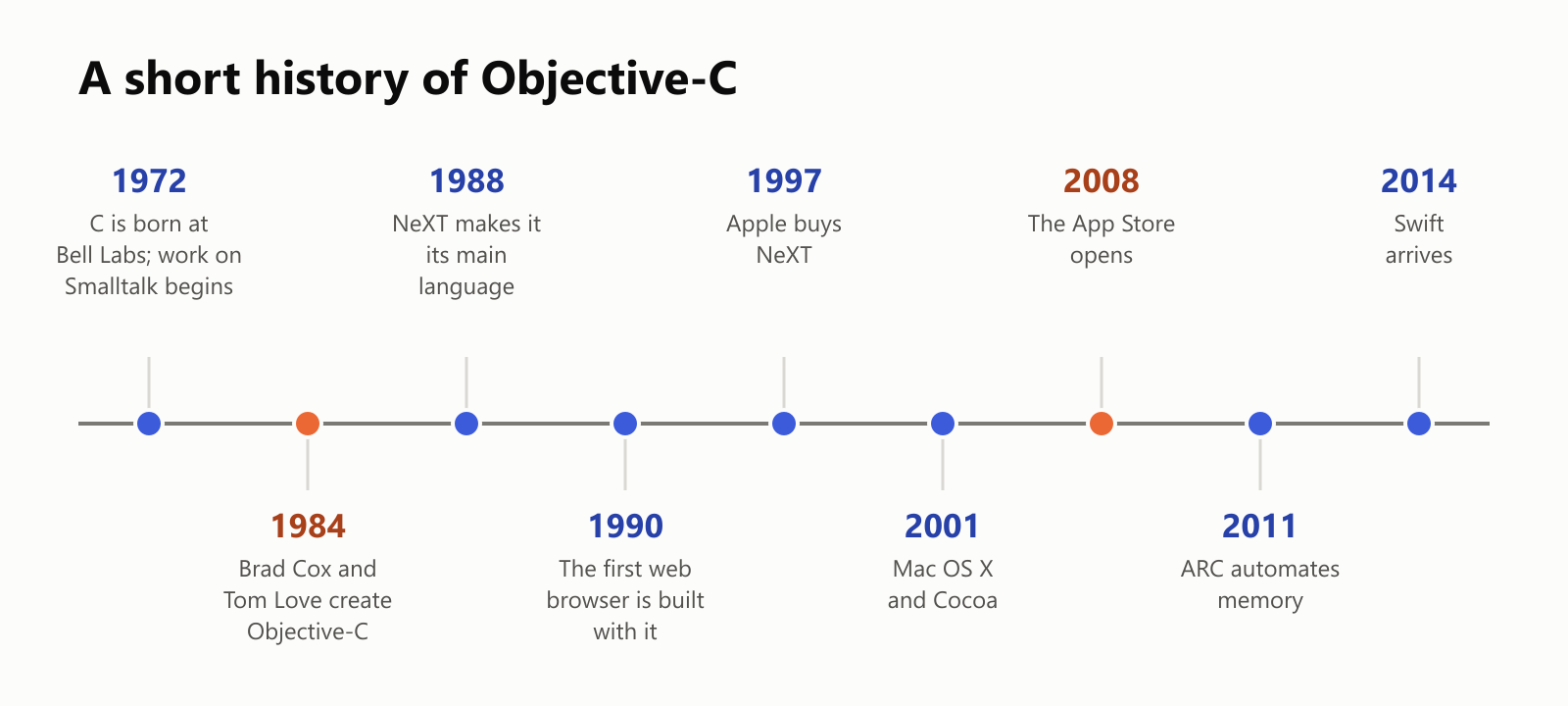
In the early 1980s, two programmers, Brad Cox and Tom Love, wanted to make software out of reusable parts, the way electronics are built from standard chips. Cox called the idea "software ICs" (integrated circuits).
They took two ingredients:
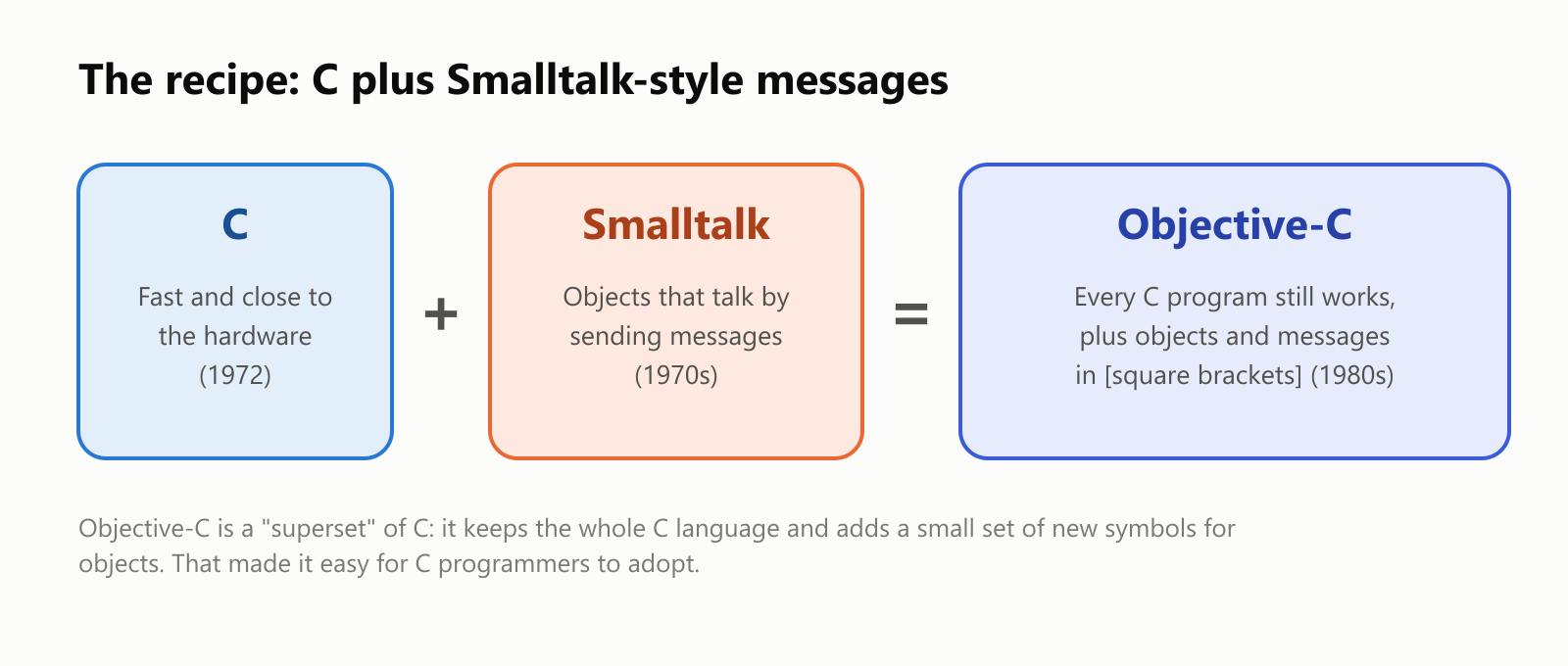
- C, the fast, popular language that ran almost everything (see What Is the C Programming Language?).
- Smalltalk, a language from the research lab Xerox PARC built around objects: self-contained "things" that hold their own data and talk to each other by sending messages.
Objective-C is C with Smalltalk's messages added on top. Every valid C program is also a valid Objective-C program, so C programmers could start using objects without throwing away anything they knew. (C++ took a different approach to the same goal; see What Is the C++ Programming Language?)
Square brackets: sending a message
Objective-C's most recognizable feature is its square brackets. Writing [something doThis] means "send the message doThis to something". Here's a message with two pieces of information:
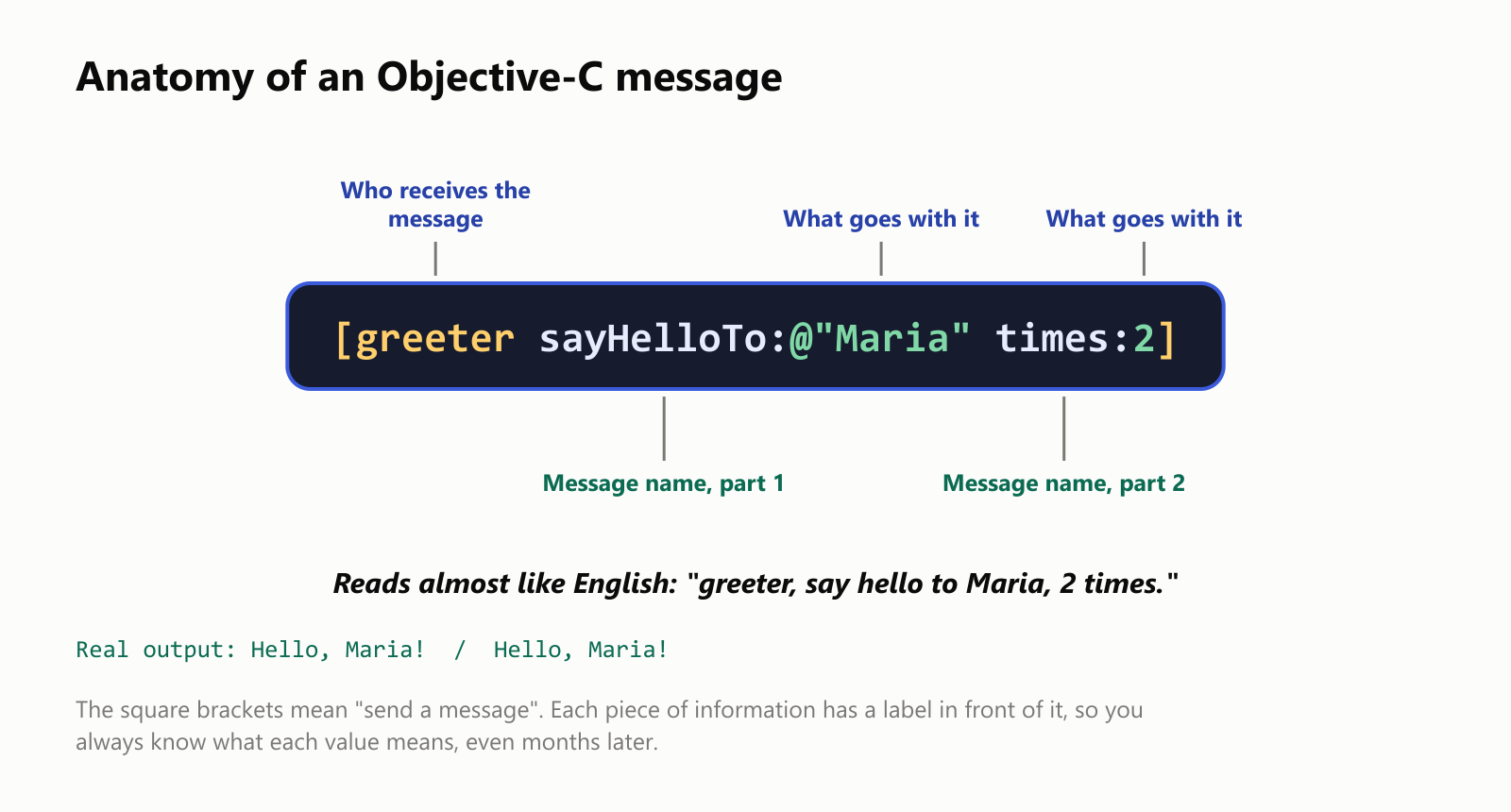
Notice how each value comes with a label: sayHelloTo: before the name and times: before the number. In many languages, the same call would look like greeter.sayHello("Maria", 2), and you'd have to remember what the 2 means. In Objective-C the code explains itself, which is why its method names are famously long and descriptive.
Here's the code behind it:
1@interface Greeter : NSObject
2- (void)sayHelloTo:(NSString *)name times:(int)count;
3@end
4
5@implementation Greeter
6- (void)sayHelloTo:(NSString *)name times:(int)count {
7    for (int round = 0; round < count; round++) {
8        NSLog(@"Hello, %@!", name);
9    }
10}
11@end
Objective-C splits a class into two parts: the @interface, which lists what the object can do (like a menu), and the @implementation, which contains how it does it (the kitchen). The @ sign marks Objective-C's additions to C, like @"Maria", which creates a text object, and NSLog prints a line (it also adds the date and time in front).
Messages are delivered while the program runs
In C, a function call is wired up when the program is built. In Objective-C, a message is looked up while the program runs: the object receives the message, checks its list of methods, and runs the matching one. That makes Objective-C very dynamic, and it leads to some interesting abilities:
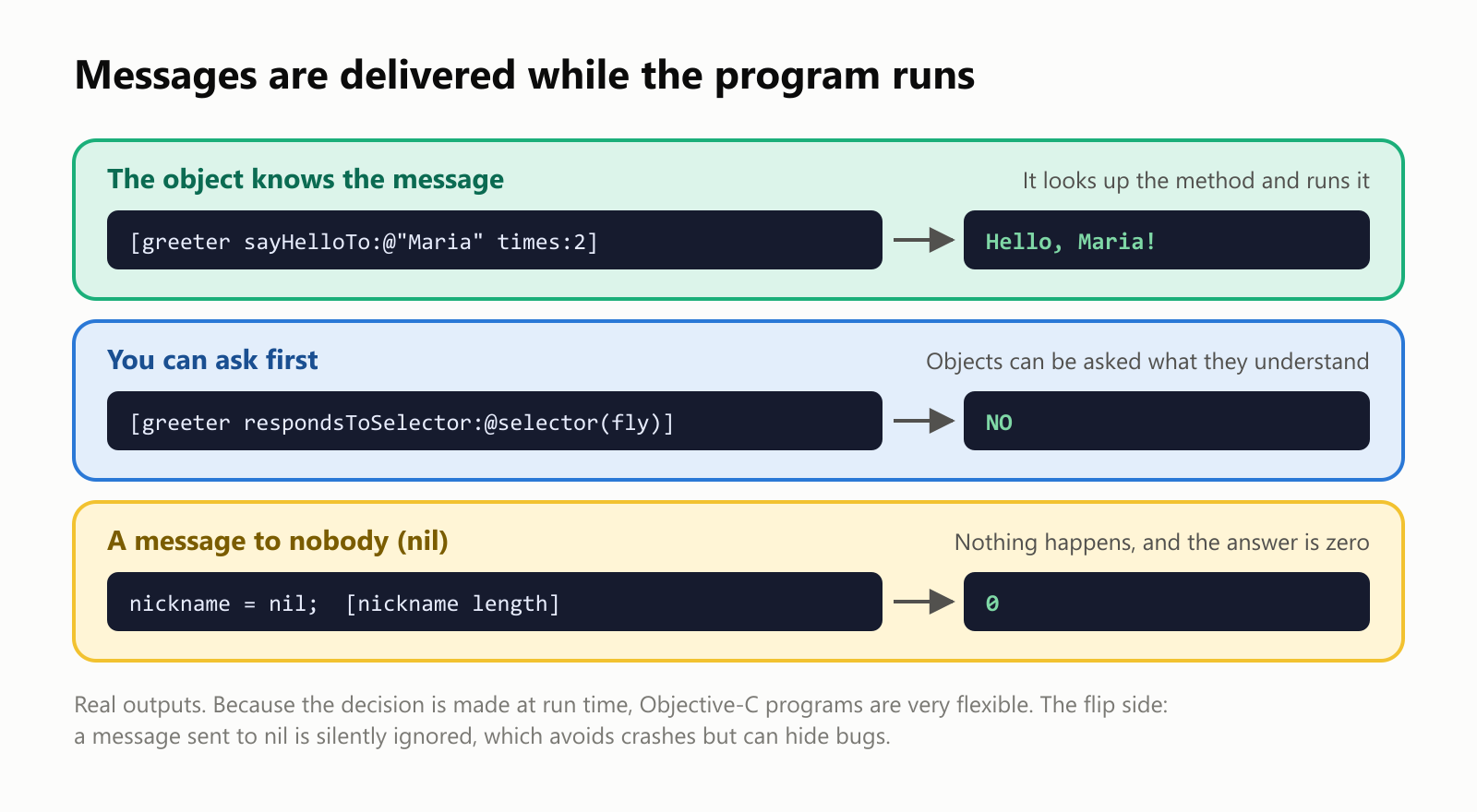
- You can ask an object what it understands before sending a message, with
respondsToSelector:. Our greeter answeredNOwhen asked whether it canfly. - Messages to nobody are harmless. In Objective-C, "nothing" is called
nil. Sending a message tonildoesn't crash: it simply does nothing and answers zero. That made apps more forgiving, but it could also hide mistakes, which is one of the problems Swift's optionals were designed to fix. - You can add abilities to existing objects. A feature called categories lets you teach even Apple's built-in classes new tricks:
1@interface NSString (Shouting)
2- (NSString *)shout;
3@end
4
5@implementation NSString (Shouting)
6- (NSString *)shout {
7    return [[self uppercaseString] stringByAppendingString:@"!"];
8}
9@end
After this, every piece of text in the app understands shout: [@"hello" shout] gives HELLO!. Notice the nested brackets: [[self uppercaseString] stringByAppendingString:@"!"] first makes the text uppercase, then adds an exclamation mark.
A small car, the classic way
Here's a class describing a car, written in the classic style Objective-C programmers used for years:
1@interface Car : NSObject {
2    NSString *color;
3    int speed;
4}
5@property (copy) NSString *color;
6@property int speed;
7- (void)accelerate;
8@end
9
10@implementation Car
11@synthesize color, speed;
12
13- (void)accelerate {
14    self.speed = self.speed + 10;
15}
16@end
And using it:
1Car *myCar = [[Car alloc] init];
2myCar.color = @"red";
3[myCar accelerate];
4[myCar accelerate];
5NSLog(@"My %@ car is going %d km/h", myCar.color, myCar.speed);
6[myCar release];
This prints My red car is going 20 km/h. [[Car alloc] init] is two messages in one: alloc sets aside memory for a new car, and init sets it up. The asterisk in Car *myCar comes from C and means "a pointer", the address in memory where the car lives. And that last line, [myCar release], brings us to one of Objective-C's biggest stories.
Memory: counting library cards
Every object takes up memory, and the program must give that memory back when nobody needs the object anymore. Objective-C keeps track with reference counting, which works like library cards for a book:
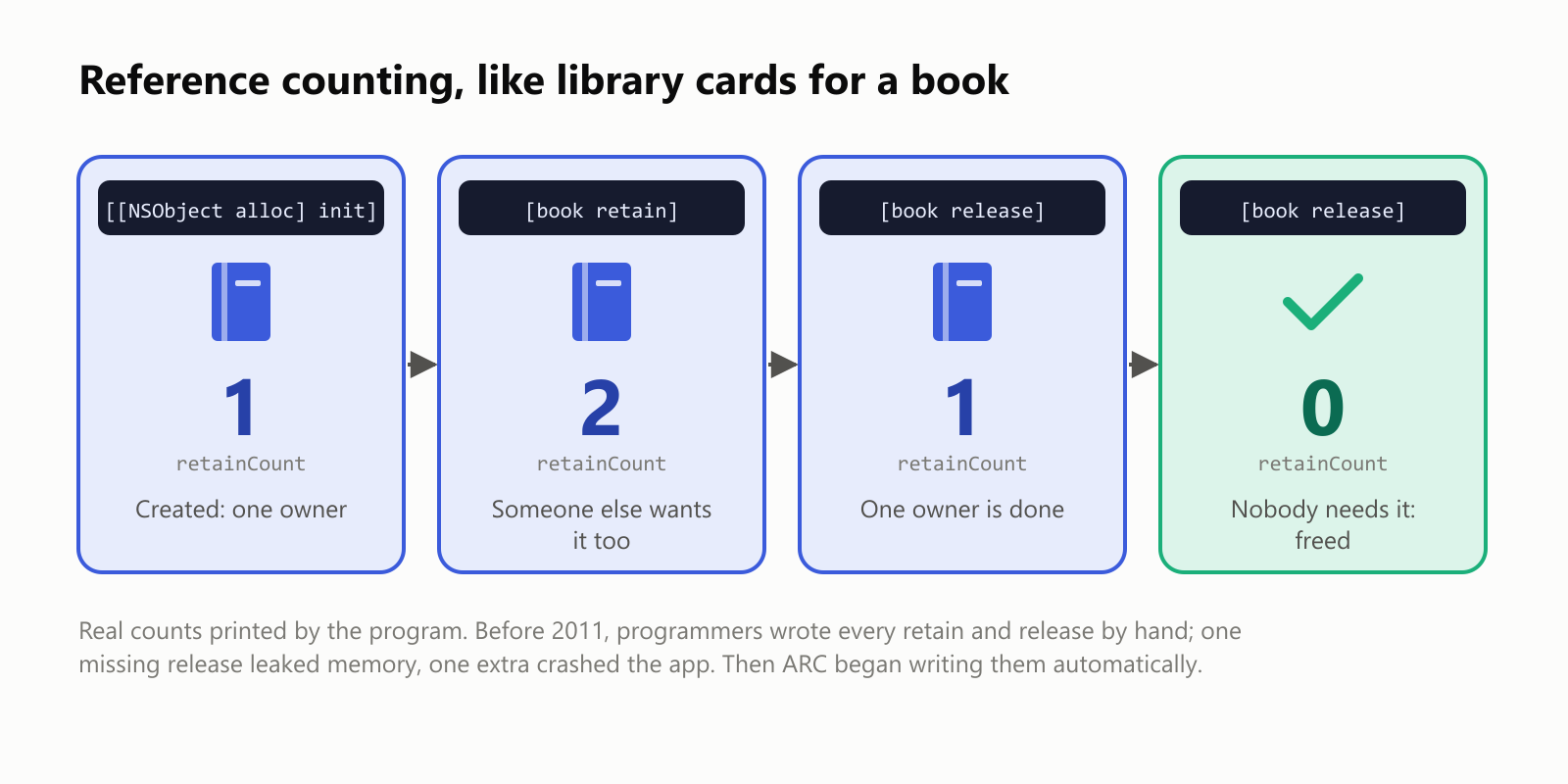
alloccreates the object with a count of 1.retainsays "I need this too", adding 1.releasesays "I'm done", subtracting 1.- When the count reaches 0, the object is freed.
For years, programmers wrote every retain and release by hand. Forget a release, and the app slowly leaked memory; add one too many, and it crashed. In 2011, Apple introduced Automatic Reference Counting (ARC): the compiler writes those messages for you. It was a huge relief, and Swift uses the same approach today.
Is it fast?
Objective-C is C underneath, so the C parts run at full speed. The flexible messages cost a little extra, because the program has to look up which method to run each time. We measured it:
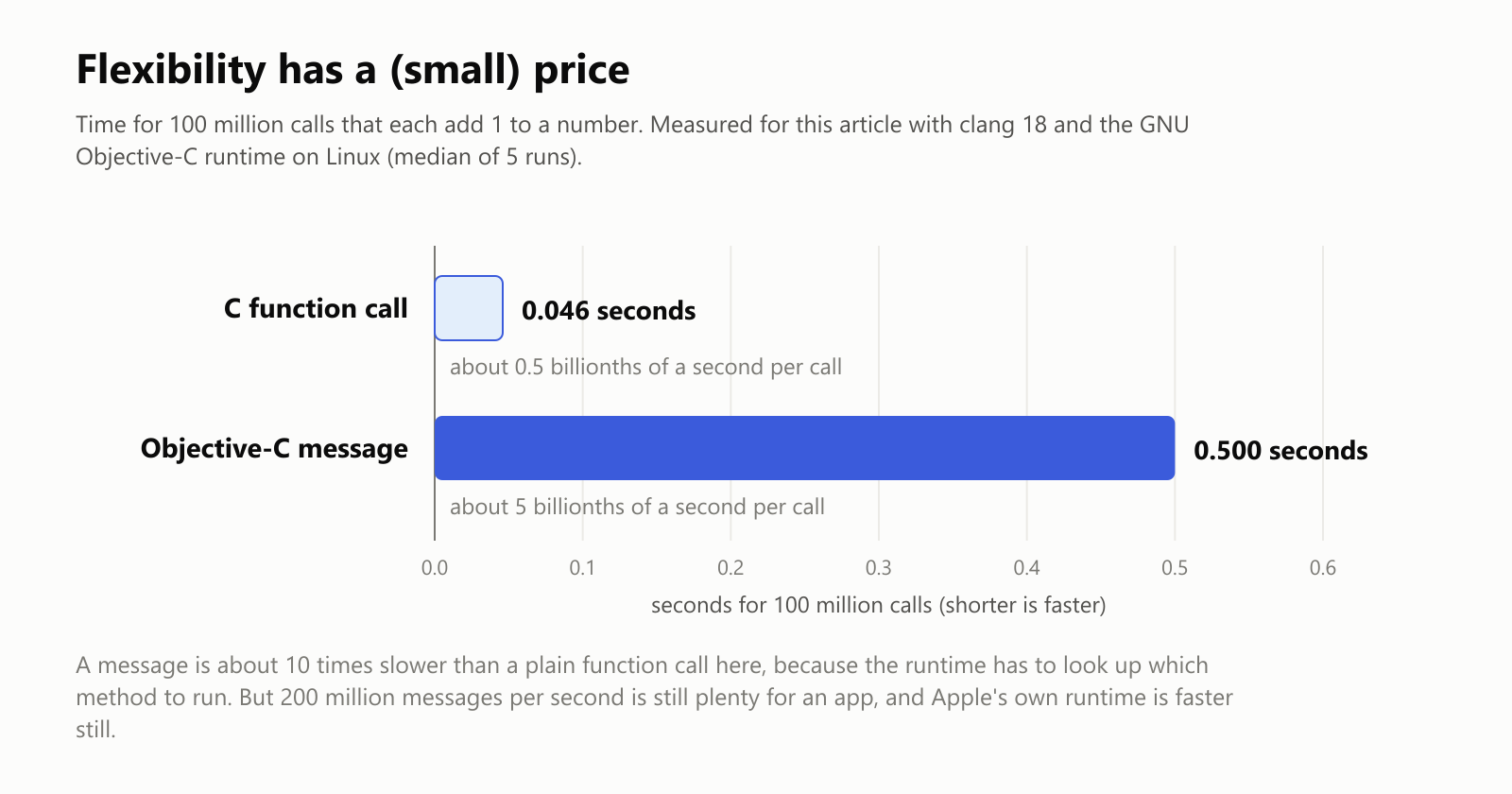
A message took about 10 times longer than a plain C function call in our test, but that's still around 200 million messages per second. Apple's own message system is heavily tuned and faster than the free version we tested, and when a task needs every bit of speed, Objective-C programmers can simply write that part in plain C.
From NeXT to the iPhone
Objective-C's story is closely tied to Steve Jobs:
- After leaving Apple in 1985, Jobs founded NeXT, which made Objective-C the main language of its computers in 1988.
- On a NeXT computer in 1990, Tim Berners-Lee wrote WorldWideWeb, the first web browser, in Objective-C. The tools used to build the levels of the hit game Doom were also written on NeXT machines in Objective-C.
- In 1997, Apple bought NeXT, and Jobs returned. NeXT's software became the foundation of Mac OS X (2001) and its app toolkit, Cocoa.
- In 2008, Apple opened the iPhone to outside developers and launched the App Store. To build an iPhone app, you used Objective-C, and suddenly millions of people wanted to learn it. It was named "Programming Language of the Year" by the TIOBE popularity index in 2011 and 2012.
Why Swift replaced it
In 2014, Apple introduced Swift (see What Is the Swift Programming Language?). Objective-C had served well for 30 years, but it carried C's risks and showed its age:
- Lots of symbols. Square brackets,
@signs, asterisks and two files per class (a.hfile for the interface and a.mfile for the implementation) made code long and intimidating for beginners. - C's memory dangers. Because it's C underneath, Objective-C inherits C's risky memory mistakes.
- Silent
nil. Messages tonilquietly doing nothing could hide bugs that were hard to track down. - Hard to modernize. Fixing these problems without breaking millions of existing apps was nearly impossible, so Apple started fresh.
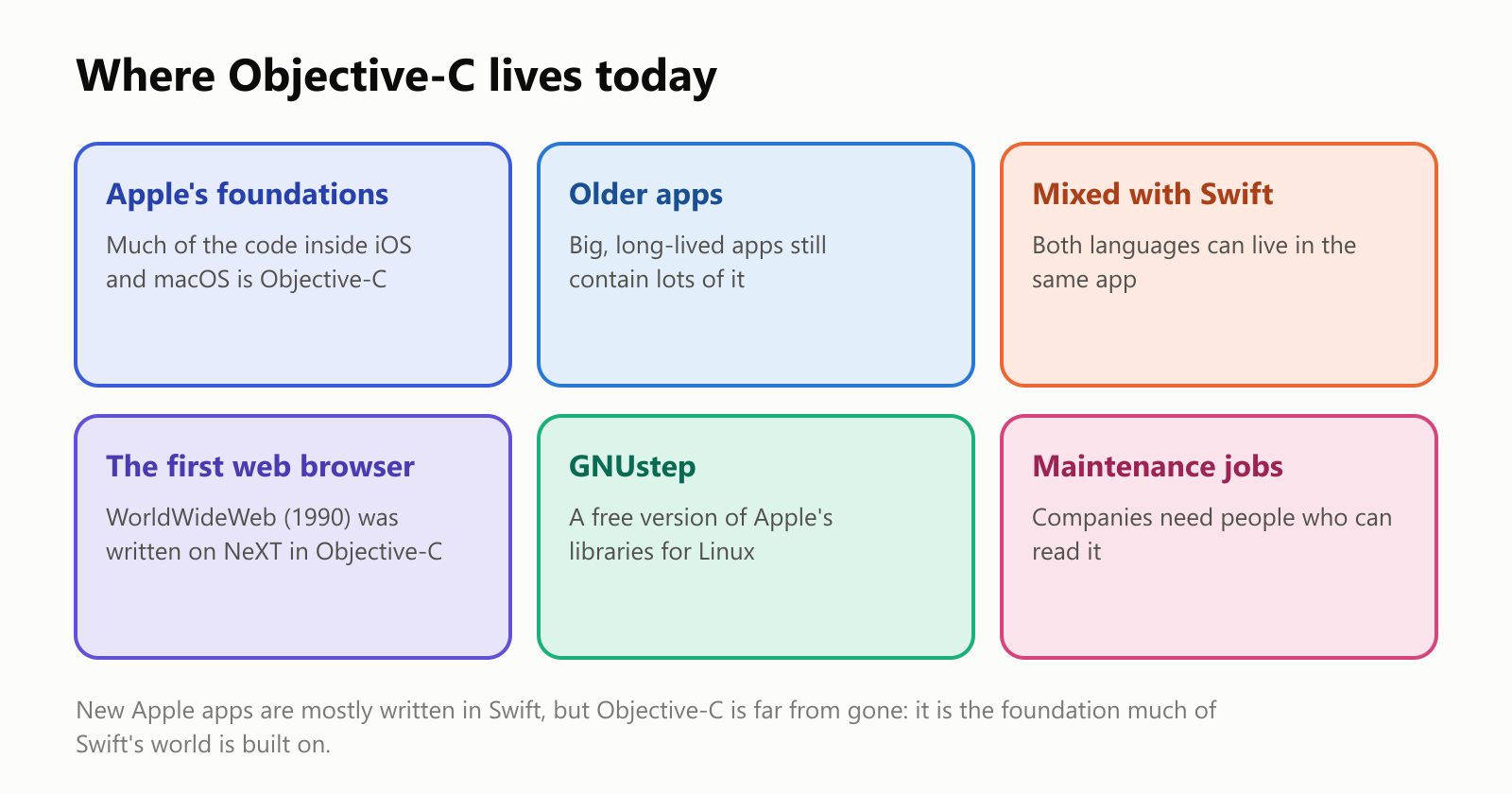
Swift was designed to work side by side with Objective-C, so companies didn't have to rewrite their apps overnight. Many apps today mix both languages, and much of the code inside Apple's own systems is still Objective-C.
A short history
Should you learn Objective-C?
- Good reasons: you'll work on an older iPhone or Mac app, you're curious about how Apple's systems are built, or you want to understand where many of Swift's ideas came from. Reading Objective-C is a valuable skill for Apple developers, even if they write Swift every day.
- Good to know: for new iPhone and Mac apps, start with Swift instead. If you do want to try Objective-C, Apple's free Xcode app on a Mac supports it fully, and on Linux or Windows you can use clang with GNUstep, as we did for this article.
A small glossary
- Objective-C: a programming language that adds Smalltalk-style objects and messages to C, created in the early 1980s.
- Superset: a language that contains another language entirely, plus extra features.
- Message: a request sent to an object, written in square brackets, like
[greeter sayHelloTo:@"Maria" times:2]. - @interface / @implementation: the two halves of a class: what it can do, and how it does it.
- nil: Objective-C's word for "no object". Messages sent to it do nothing.
- Category: a way to add new methods to an existing class, even one you didn't write.
- Reference counting: keeping count of how many parts of a program need an object, and freeing it at zero.
- retain / release: the messages that add to and subtract from that count.
- ARC: Automatic Reference Counting, which writes the retain and release messages for you (since 2011).
- NeXTSTEP: the operating system of NeXT computers, origin of the "NS" in names like
NSString. - Cocoa: Apple's toolkit for building Mac apps (its iPhone sibling is called Cocoa Touch).
Wrapping up
Objective-C was a clever mix: the speed of C with the friendly, flexible messages of Smalltalk, written in square brackets that read almost like sentences. It carried Steve Jobs' NeXT computers, the first web browser, the Mac and the first wave of iPhone apps, and it taught a generation of developers how Apple software works.
Swift has taken over for new apps, but Objective-C hasn't disappeared. It still runs quietly inside the devices in our pockets, and every NS you see in Apple's code is a small reminder of where it all began.
Read next
What Is the C++ Programming Language? A Simple Guide to the Language Behind Games and Browsers
A friendly, jargon-free guide to C++, the programming language behind video games, web browsers and much of the software you use every day. Learn what it adds to C, how classes and automatic cleanup work, and why it's both fast and famously complex.
 nbkhope
What Is the C# Programming Language? A Simple Guide to Microsoft's Language for Apps, Websites and Games
A friendly, jargon-free guide to C#, Microsoft's popular programming language behind Unity games, websites and business apps. Learn where its name comes from, how it runs on almost any device, and why it cleans up memory for you.
nbkhope
What Is the C Programming Language? A Simple Guide to the Language That Runs the World
A friendly, jargon-free guide to C, the 50-year-old programming language hiding inside your phone, your car and the internet. Learn what C is, why it's so fast, how it works with memory, and why it still matters today.
nbkhope
Comments
Be kind and specific. Comments with links from new accounts appear after a moderator reviews them.