What Is the Linux Operating System? A Simple Guide to the Free System That Runs the World
A friendly, jargon-free guide to Linux, the free operating system that started as a student's hobby and now runs Android phones, most of the internet and every top supercomputer. Learn what a kernel and a distribution are, and how Linux is made.

On this page
In August 1991, a 21-year-old computer science student in Finland posted a short message online. He was writing a free operating system, he said, "just a hobby, won't be big and professional like gnu."
That student was Linus Torvalds, and his hobby became Linux: the system inside every Android phone, most of the world's web servers, all 500 of the fastest supercomputers, smart TVs, cars, game consoles and even a helicopter that flew on Mars. This article explains, in plain language, what Linux is, how something free and built by volunteers became so important, and how you can try it.
A student's hobby
In 1991, Linus Torvalds had just bought a new PC and wanted to run a Unix-like system on it. The options were either expensive or limited, so he started writing his own kernel, the core of an operating system, mostly in the C language (see What Is the C Programming Language?).
He released version 0.01 in September 1991: about 10,000 lines of code. He wanted to call it "Freax" (free + freak + Unix), but the volunteer who hosted the files on a university server named the folder "linux", and the name stuck.
In 1992, Linus released Linux under the GNU General Public License (GPL), a license created by Richard Stallman's GNU project, which had been building free Unix-like tools since 1983. That decision changed everything, as we'll see.
The kernel vs. the whole system
The word "Linux" is used in two ways, and it helps to separate them:
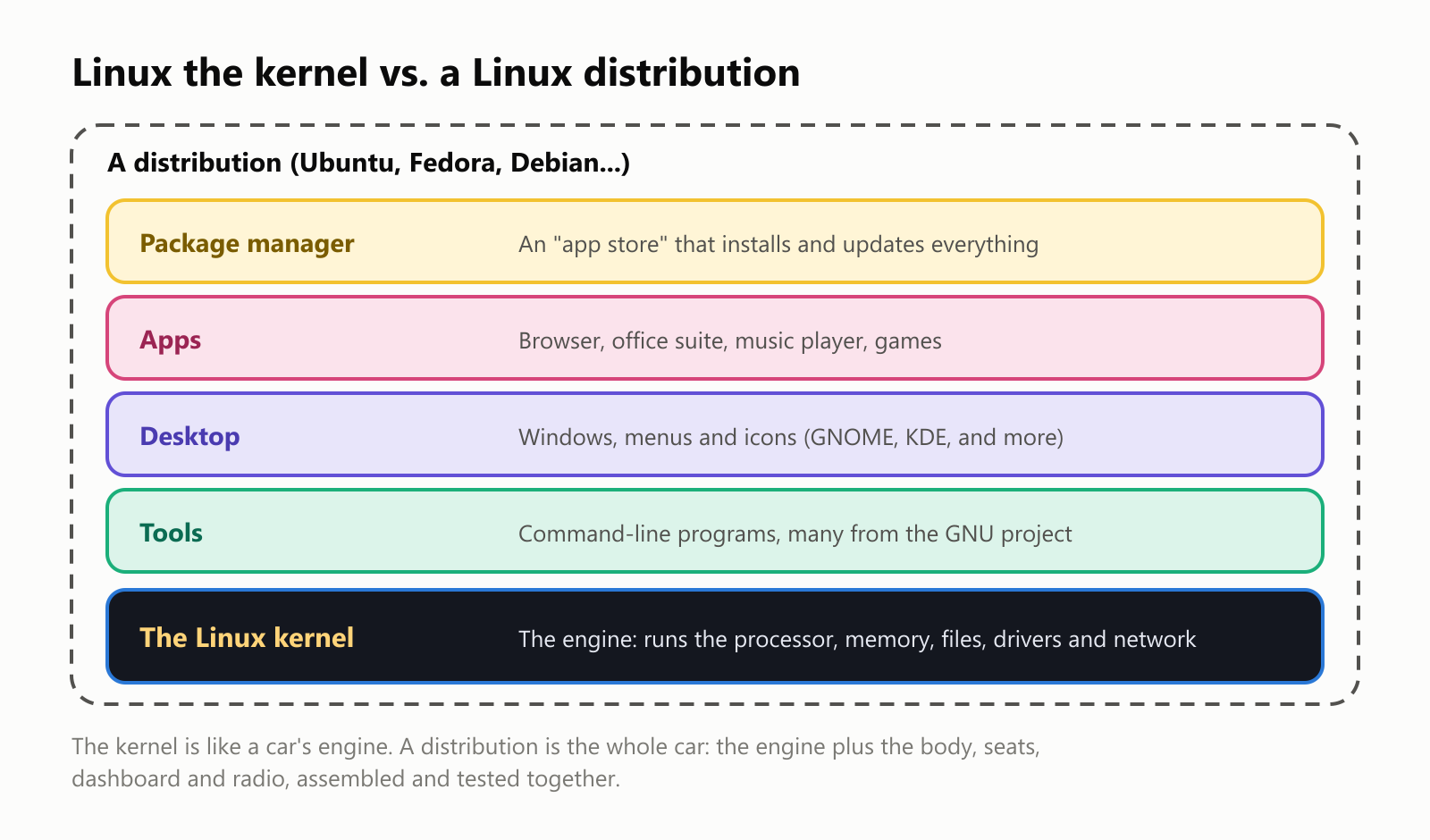
- The Linux kernel is the engine: the program that controls the processor, memory, files and hardware. This is what Linus started, and what he still oversees today.
- A Linux distribution (or "distro") is the whole car: the kernel plus tools, a desktop with windows and icons, apps, and a package manager, an app store that installs and updates everything. Popular distributions include Ubuntu, Debian, Fedora, Linux Mint and Arch Linux.
Because the tools from the GNU project are such a big part of most distributions, some people prefer to say GNU/Linux for the whole system.
Same engine, different cars
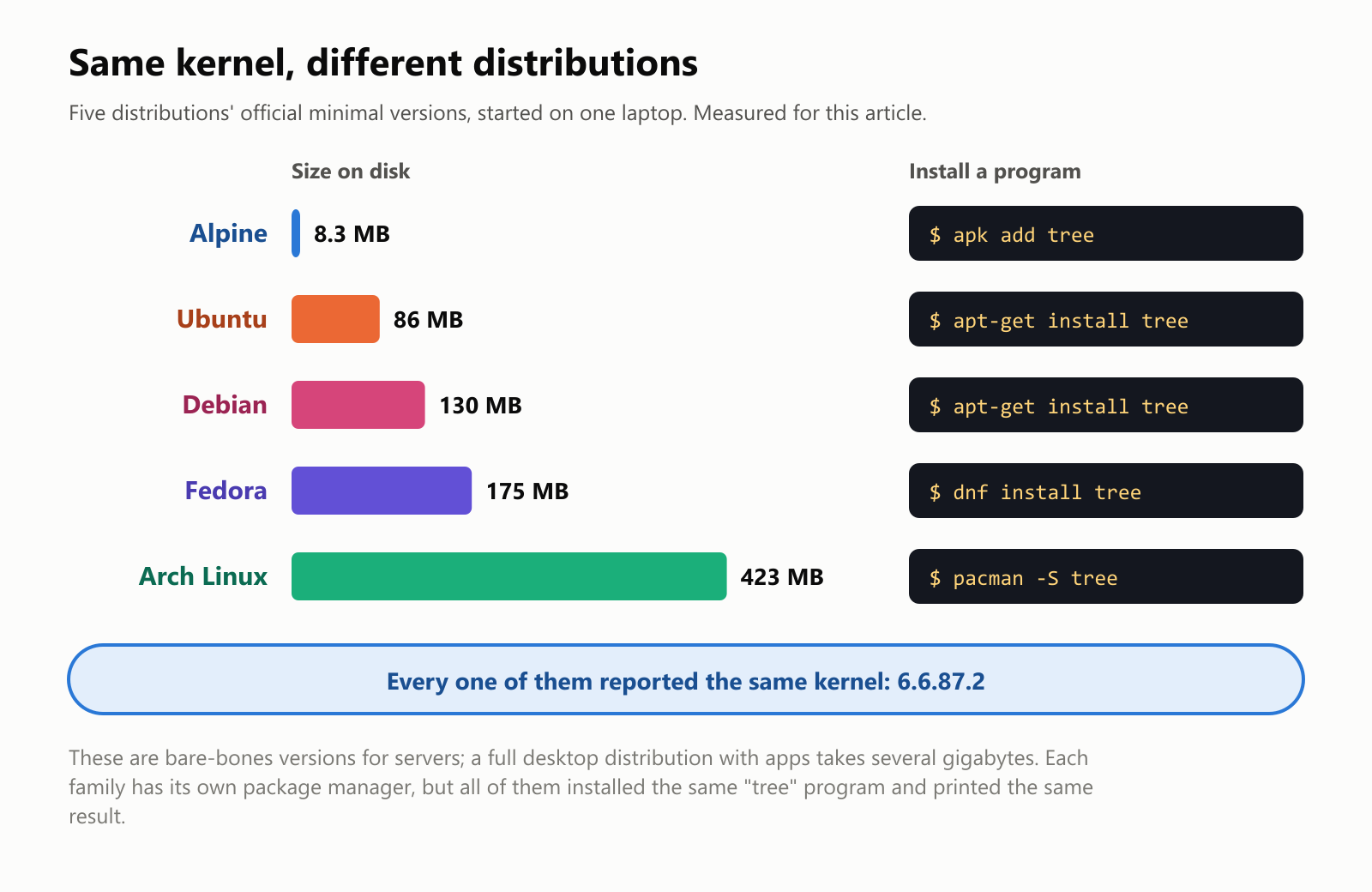
There are hundreds of Linux distributions, each assembled by a different team for a different purpose: some for beginners, some for servers, some tiny enough to fit on a router. We started the official minimal versions of five popular distributions on one laptop:
Three things stand out:
- Sizes vary a lot. Alpine Linux, designed to be tiny, took just over 8 MB. Arch Linux's starter version took over 400 MB. (A full desktop distribution, with apps and a graphical interface, takes several gigabytes.)
- Each family has its own package manager. Installing the same small program called
treetookapt-get installon Ubuntu and Debian,dnf installon Fedora,apk addon Alpine andpacman -Son Arch. All five then printed the same result. - They all shared one kernel. Every distribution reported the same kernel version: the laptop's own Linux kernel (in this case, the one Microsoft ships with Windows to run Linux). The distribution is everything around the engine.
Free as in freedom
Linux is free and open source. That means two things:
- It costs nothing to download and use, on as many computers as you like.
- Anyone can read the source code (the human-readable instructions), change it and share it.
The GPL license adds one important rule: if you share a modified version of Linux, you must share your changes under the same terms. This is sometimes called copyleft. It means that when a company improves Linux for its own products, those improvements flow back to everyone. Over 30 years, that rule turned competitors like Google, Intel, Red Hat, Samsung and Microsoft into collaborators on the same codebase.
How Linux is made
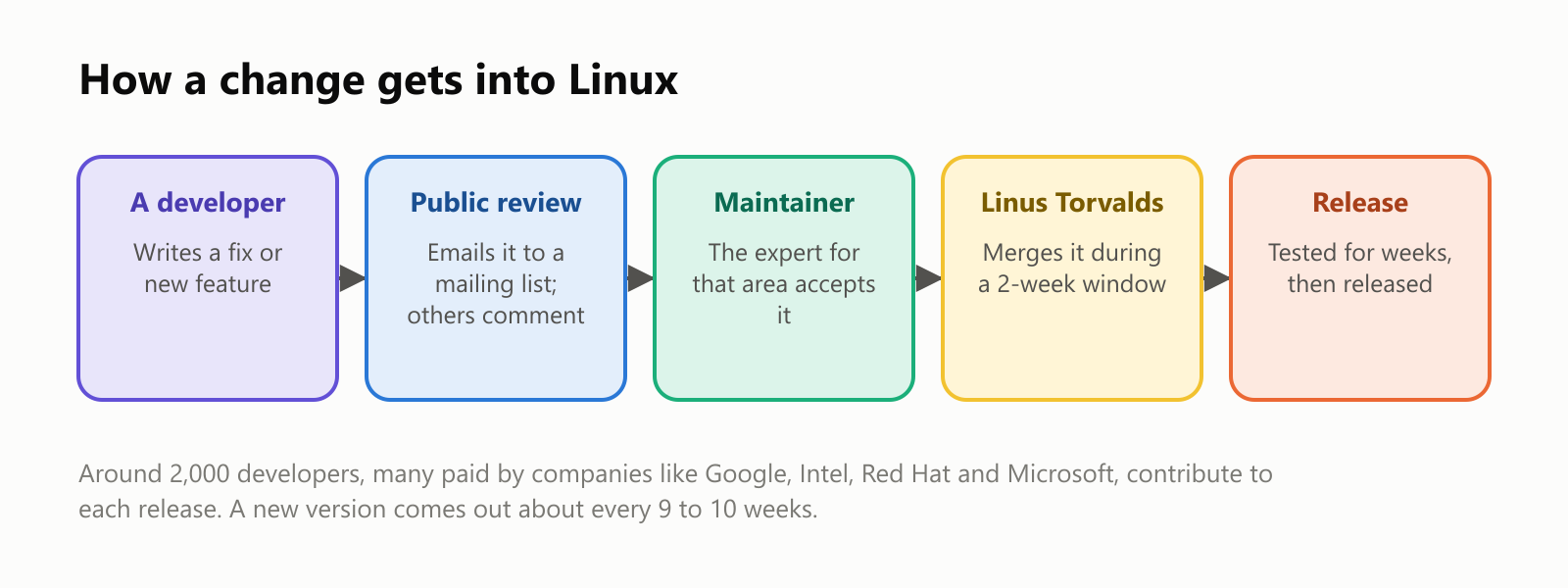
Linux development happens in the open, much of it by email:
- A developer writes a change and emails it to a public mailing list.
- Other developers review it, often asking for improvements.
- The maintainer responsible for that part of the kernel (networking, graphics, a particular kind of hardware) accepts it.
- During a two-week "merge window", Linus Torvalds pulls the accepted changes into the main version.
- The new version is tested for several weeks, then released. A new Linux version comes out roughly every 9 to 10 weeks.
Around 2,000 developers contribute to each release, many of them paid by companies that depend on Linux. In 2005, Linus also created Git, the tool now used by almost all software developers to track changes, specifically to manage Linux's enormous flow of contributions.
From 10,000 lines to tens of millions
We downloaded the official source code of ten Linux versions, from Linus's first release to version 7.0, and counted every line:
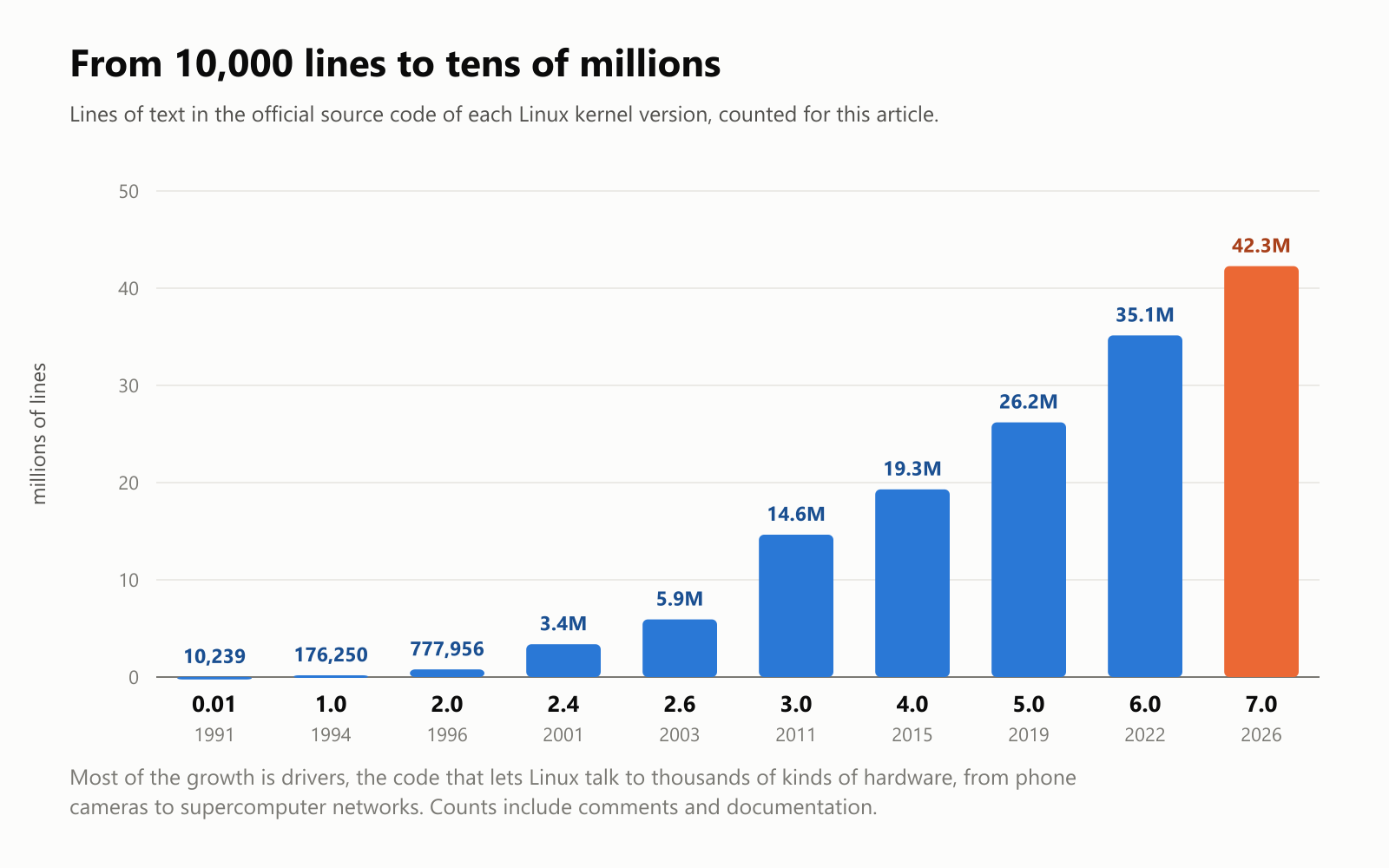
Linux 0.01 had 10,239 lines in 88 files. Linux 7.0, released in April 2026, had 42.3 million lines in nearly 93,000 files: over 4,000 times bigger. (Our count includes every line of every file, including comments and documentation.)
Most of that growth is drivers: the code that lets Linux work with thousands of different devices, from webcams and Wi-Fi chips to the networks inside supercomputers. Recent versions have even started accepting code written in Rust, a newer language designed to prevent memory bugs (see What Is the Rust Programming Language?).
Where Linux runs
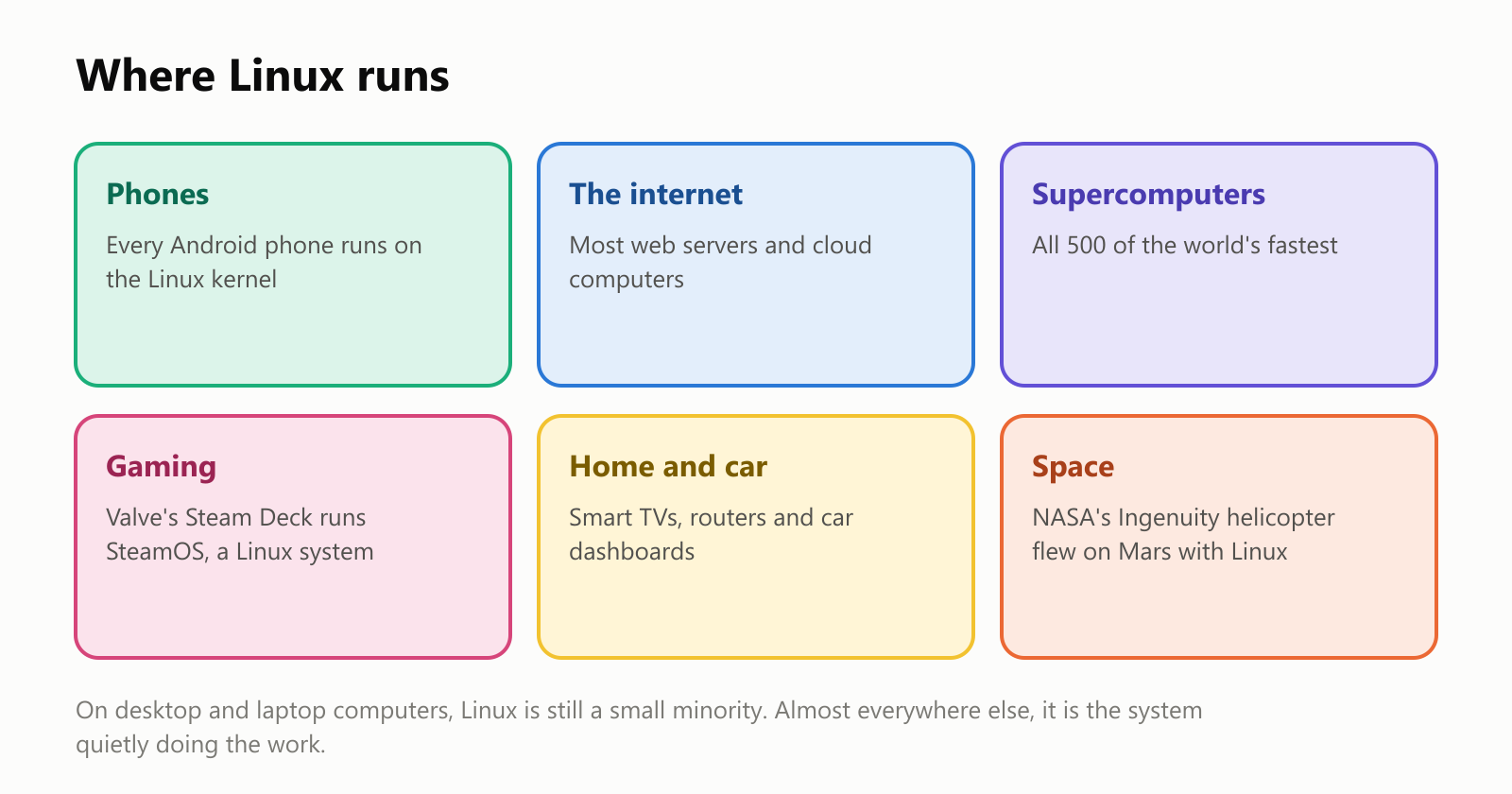
- Phones: Android is built on the Linux kernel, which puts Linux in billions of pockets. Google's Chromebooks run ChromeOS, which is also based on Linux.
- The internet and the cloud: most web servers run Linux, and so do most of the virtual computers rented out by cloud companies.
- Supercomputers: since November 2017, every one of the world's 500 fastest supercomputers has run Linux.
- Gaming: Valve's Steam Deck handheld runs SteamOS, a Linux system that can play thousands of Windows games.
- Home and car: smart TVs, Wi-Fi routers, smart speakers and many car dashboards run Linux inside.
- Space: in 2021, NASA's Ingenuity helicopter made the first powered flight on another planet, on Mars, running Linux.
The big exception is desktop and laptop computers, where Windows and macOS dominate and Linux holds only a few percent. Even there, it's popular with programmers, and Windows itself can now run Linux inside it.
Why companies trust something free
It may seem strange that the world's biggest companies build on software anyone can download for free. A few reasons:
- No license fees, even on millions of servers.
- Control: companies can change the code to fit their exact needs, instead of waiting for a vendor.
- Many eyes: thousands of developers from competing companies review the code, which helps find and fix problems.
- It runs on almost anything, from a $5 computer board to the largest supercomputer.
Some companies, like Red Hat (now part of IBM) and Canonical (which makes Ubuntu), earn money by selling support, training and services around free Linux distributions.
The downsides
- Desktop apps: some popular programs, like certain professional design tools or games with strict anti-cheat systems, don't run on Linux.
- Choice can be confusing: hundreds of distributions and several desktop styles can overwhelm a beginner.
- Hardware support: most hardware works out of the box, but occasionally a printer, Wi-Fi card or graphics chip needs extra setup.
- The command line: many everyday tasks have friendly apps, but troubleshooting guides online often assume you'll type commands.
A short history
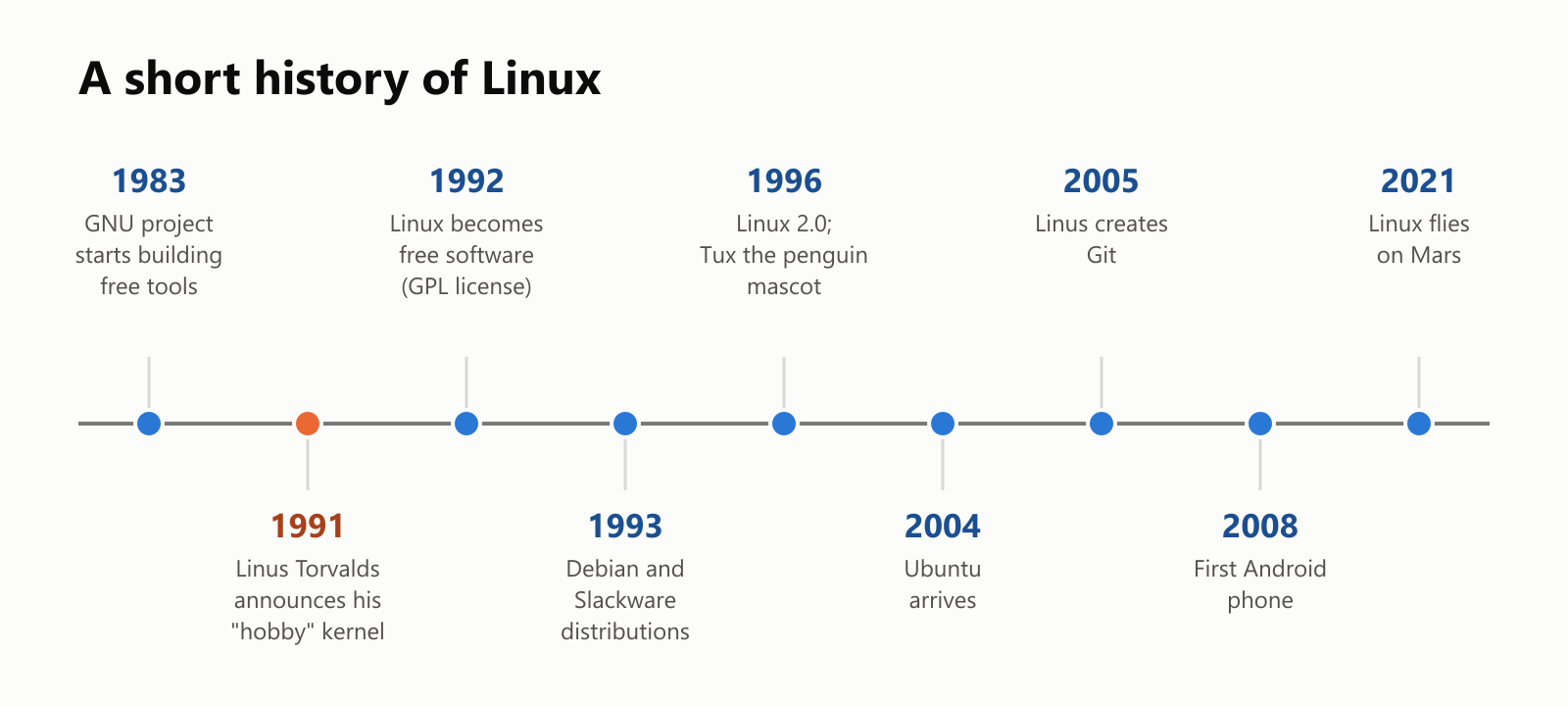
And the penguin? Linux's mascot is a cheerful penguin named Tux, drawn in 1996. Linus has said he liked penguins, and once claimed to have been nibbled by one at a zoo.
Should you try Linux?
- Great reasons: you want a free system, you'd like to give an older computer a second life, you're learning programming or servers, or you're simply curious.
- Easy ways to try it: many distributions, like Ubuntu and Linux Mint, let you start from a USB stick without installing anything, so you can explore and go back to your old system when you restart. On Windows, the free Windows Subsystem for Linux (WSL) runs Linux inside Windows. And if you have an Android phone, you've been using Linux all along.
A small glossary
- Operating system: the master program that runs a computer and shares it among apps.
- Linux: a free, Unix-like operating system kernel started by Linus Torvalds in 1991.
- Kernel: the core of the operating system, which manages the processor, memory, files and hardware.
- Distribution (distro): a complete system built around the Linux kernel, like Ubuntu or Fedora.
- GNU: a project started in 1983 to build a free Unix-like system, whose tools are part of most distributions.
- Package manager: the tool that installs, updates and removes programs on a distribution.
- Open source: software whose source code anyone can read, change and share.
- GPL: the license Linux uses, which requires shared changes to stay open.
- Maintainer: an experienced developer responsible for one part of the kernel.
- Driver: code that lets the operating system work with a specific piece of hardware.
- Git: the tool Linus created in 2005 to track changes to code.
- Tux: the penguin mascot of Linux.
Wrapping up
Linux began as one student's hobby, "won't be big and professional", and grew into one of the largest collaborative projects in human history: tens of millions of lines written by thousands of people from competing companies, released for free to anyone.
You might never see it on your desk, but it's in your phone, behind the websites you visit, inside your TV and even on Mars. Not bad for a hobby.
Read next
What Is a Transformer in AI? The Idea Behind ChatGPT, Explained Simply
A friendly, jargon-free guide to transformers, the AI design behind ChatGPT, Claude and Gemini. Learn how "attention" lets AI understand words in context, what happens inside a transformer, and why it changed AI so quickly.
 nbkhope
What Is Reinforcement Learning? How AI Learns by Trial, Error and Reward
A friendly, jargon-free introduction to reinforcement learning, how AI learns by trial, error and reward, like training a dog with treats. Watch a real robot learn a maze, see why exploring matters, and learn how it shapes chatbots.
nbkhope
What Is Graph Engineering? How Today's AI Teams Up to Get Real Work Done
A friendly, jargon-free guide to graph engineering, the 2026 idea of building AI as a map of connected steps instead of one big loop. See how today's AI agents work, why small mistakes add up, and how checkers, branches and teamwork fix it.
nbkhope
Comments
Be kind and specific. Comments with links from new accounts appear after a moderator reviews them.