How to Declare a Variable in Go: A Visual, Hands-On Guide
Learn Go variables visually: var, :=, zero values, the basic types and their sizes, strict type conversions, overflow, constants, strings as bytes vs. runes, the compiler errors you'll meet, real outputs, and exercises with answers.


On this page
Variables are how a program remembers things: a score, a name, a price. Go gives you two ways to create them, var and the short :=, and a few rules that make Go code unusually safe: every variable starts with a sensible value, types never mix by accident, and an unused variable doesn't even compile.
In this guide you'll declare variables every way Go allows, meet the basic types and how much memory each takes, convert between them, and run into the classic surprises (overflow, decimals that aren't exact, strings whose length isn't what you'd expect), with the real compiler messages along the way. Exercises wrap it up.
All outputs below come from real runs with Go 1.22 on 64-bit Windows. New to Go? Start with Your First Program in Go.
Declaring with var
The full form is the keyword var, a name, and a type:
1package main
2
3import "fmt"
4
5func main() {
6	var age int
7	age = 35
8	fmt.Println(age)
9
10	var name string = "Ada"
11	fmt.Println(name)
12}
35
Ada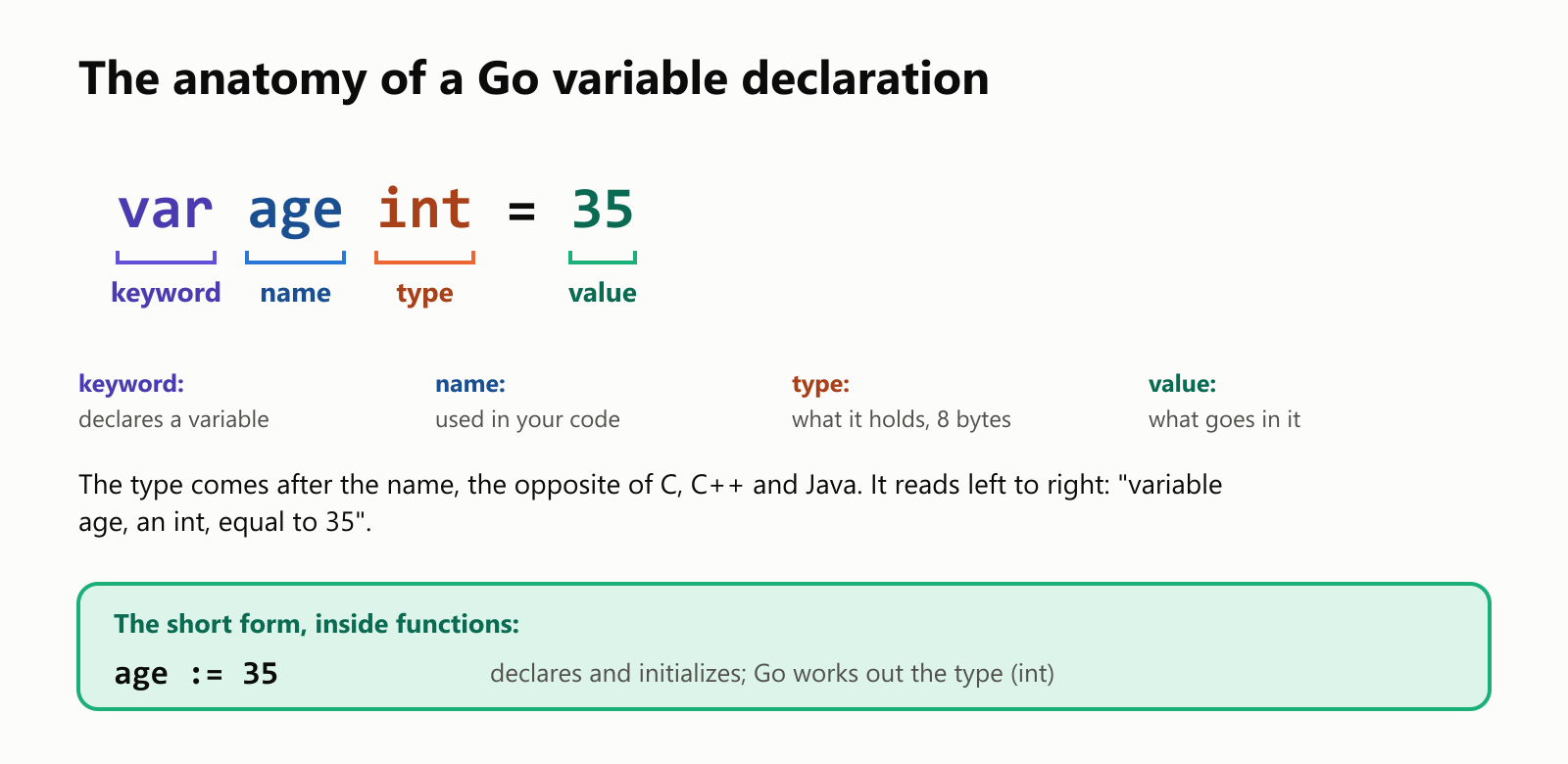
Notice the order: the type comes after the name, the opposite of C, C++ and Java. It reads left to right like a sentence: "variable age, an int".
Every variable starts with a zero value
In Go, a declared variable is never garbage: it starts with the zero value of its type.
1package main
2
3import "fmt"
4
5func main() {
6	var count int
7	var price float64
8	var name string
9	var ready bool
10	fmt.Printf("%v %v %q %v\n", count, price, name, ready)
11}
0 0 "" false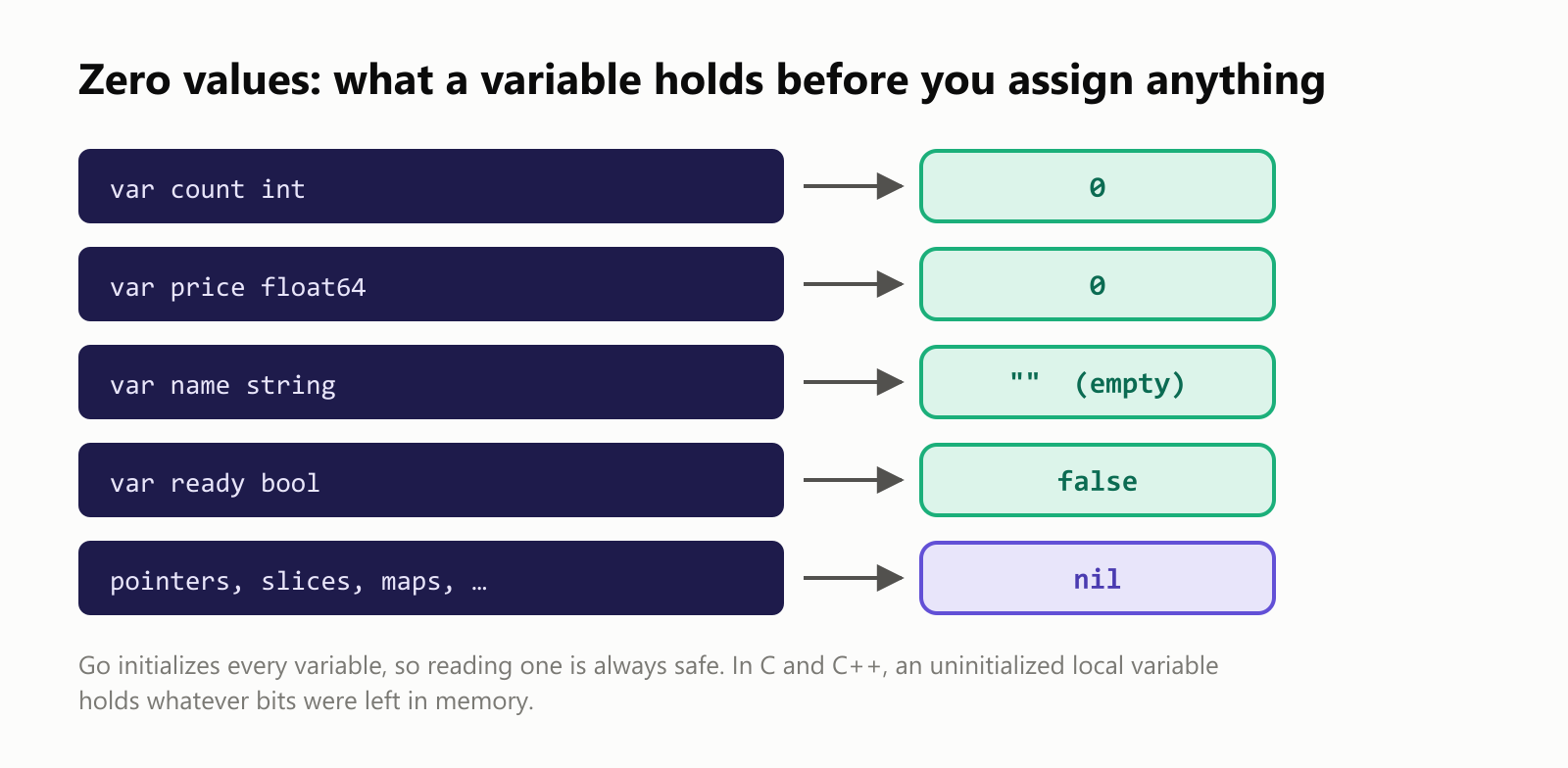
Numbers start at 0, strings at "" (the %q verb prints it with its quotes so you can see it's empty), and booleans at false. That's a big difference from C and C++, where reading an uninitialized variable is a bug. In Go it's always safe, and often exactly what you want: a counter that starts at zero needs no = 0.
Let Go figure out the type
When you give an initial value, Go can work out the type itself. You can drop the type from var, or use the short variable declaration :=:
1package main
2
3import "fmt"
4
5func main() {
6	var city = "Lisbon"
7	height := 1.65
8	year := 2024
9	isOpen := true
10	fmt.Printf("%v is a %T\n", city, city)
11	fmt.Printf("%v is a %T\n", height, height)
12	fmt.Printf("%v is a %T\n", year, year)
13	fmt.Printf("%v is a %T\n", isOpen, isOpen)
14}1Lisbon is a string
21.65 is a float64
32024 is a int
4true is a boolThe %T verb prints a value's type. A whole number becomes an int, a number with a decimal point a float64, text a string, and true/false a bool. The variable is still strictly typed; you just didn't have to spell the type out.
:= is what you'll see most in Go code, but it has two rules:
- It only works inside functions. At the package level (outside any function), use
var. - It must declare at least one new variable. To change an existing variable, use plain
=.
Break them and the compiler tells you:
1package main
2
3import "fmt"
4
5func main() {
6	score := 10
7	score := 20
8	fmt.Println(score)
9}
$ go run .
# hello
.\main.go:7:8: no new variables on left side of :=1package main
2
3import "fmt"
4
5greeting := "Hello"
6
7func main() {
8 fmt.Println(greeting)
9}$ go run .
# hello
.\main.go:5:1: syntax error: non-declaration statement outside function bodyAt the package level, write var greeting = "Hello" instead.
Several at once, changing and swapping
1package main
2
3import "fmt"
4
5var (
6	appName = "Go Quiz"
7	version = 2
8)
9
10func main() {
11	width, height := 1920, 1080
12	fmt.Println(appName, version, width, height)
13
14	score := 10
15	score = score + 5
16	score += 20
17	score++
18	fmt.Println("Score:", score)
19
20	left, right := "left", "right"
21	left, right = right, left
22	fmt.Println(left, right)
23}
Go Quiz 2 1920 1080
Score: 36
right leftvar ( … )groups several declarations, common at the package level.width, height := 1920, 1080declares two variables in one line.=assigns a new value;+=,-=,*=and/=are shortcuts, and++adds one. (In Go,score++is a statement on its own line, not an expression you can use inside another.)left, right = right, leftswaps two values in one line, no temporary variable needed: Go evaluates the right side first.
The basic types and their sizes
1package main
2
3import (
4	"fmt"
5	"math"
6	"unsafe"
7)
8
9func main() {
10	var small int8
11	var whole int
12	var decimal float64
13	var letter rune
14	var text string
15	fmt.Println("int8:", unsafe.Sizeof(small), "byte, up to", math.MaxInt8)
16	fmt.Println("int:", unsafe.Sizeof(whole), "bytes, up to", math.MaxInt)
17	fmt.Println("float64:", unsafe.Sizeof(decimal), "bytes")
18	fmt.Println("rune:", unsafe.Sizeof(letter), "bytes")
19	fmt.Println("string:", unsafe.Sizeof(text), "bytes")
20}1int8: 1 byte, up to 127
2int: 8 bytes, up to 9223372036854775807
3float64: 8 bytes
4rune: 4 bytes
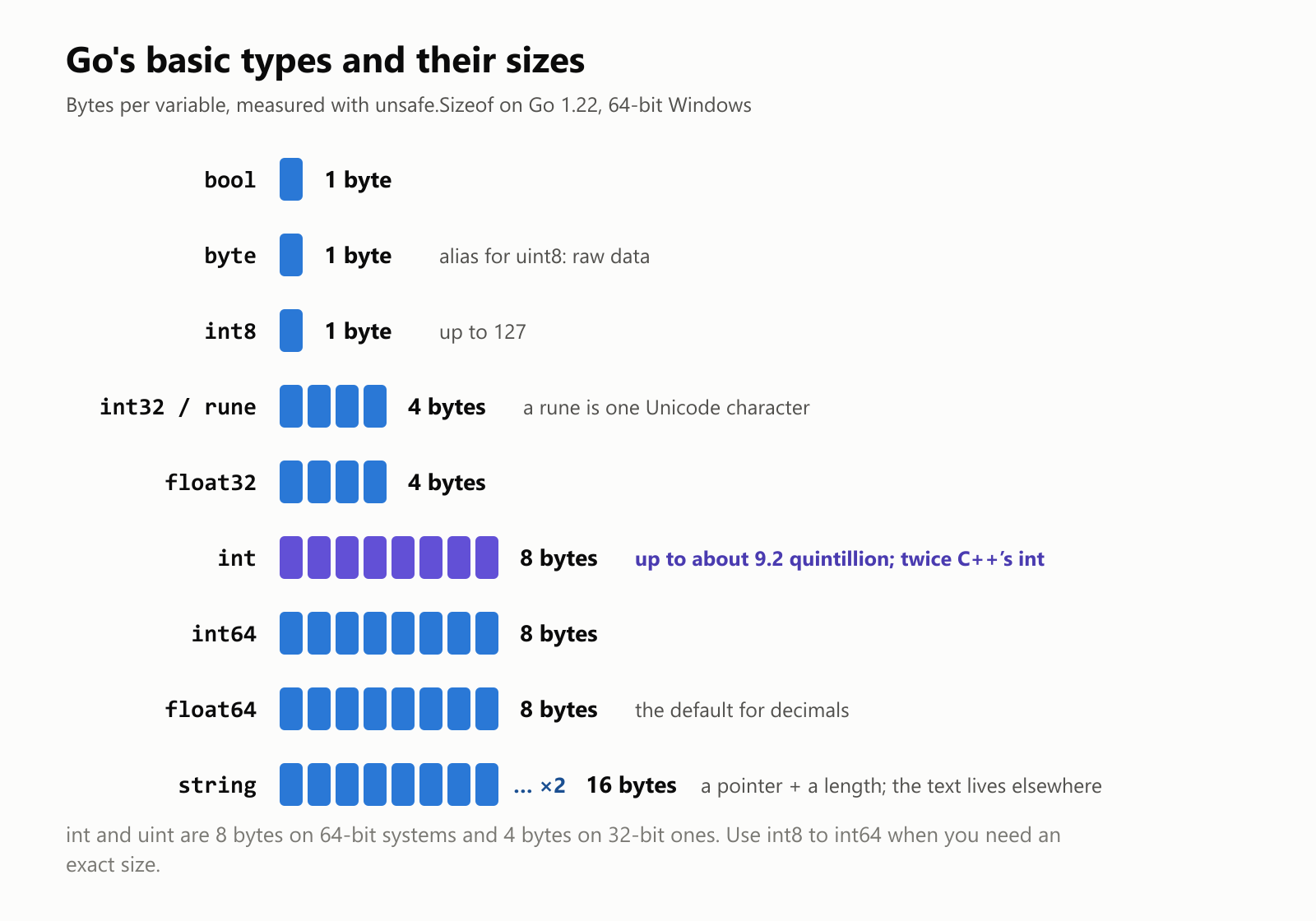
5string: 16 bytesThe ones you'll use most:
intfor whole numbers. On 64-bit systems it's 8 bytes, so it holds up to about 9.2 quintillion. (Useint8,int16,int32orint64when you need an exact size, anduinttypes for numbers that are never negative.)float64for decimals.stringfor text. The 16 bytes are a pointer to the text plus its length; the characters themselves live elsewhere.boolfortrueorfalse.runefor a single Unicode character, written in single quotes:'A','ã'.
Go never mixes types by accident
Many languages quietly convert an int to a decimal when you mix them. Go refuses:
1package main
2
3import "fmt"
4
5func main() {
6	apples := 3
7	price := 0.5
8	total := apples * price
9	fmt.Println(total)
10}
$ go run .
# hello
.\main.go:8:11: invalid operation: apples * price (mismatched types int and float64)You convert explicitly, by writing the type like a function call:
1package main
2
3import "fmt"
4
5func main() {
6	apples := 3
7	price := 0.5
8	total := float64(apples) * price
9	fmt.Println(total)
10
11	average := 7.9
12	fmt.Println(int(average))
13}
1.5
7float64(apples) turns 3 into 3.0. Going the other way, int(7.9) cuts off the decimals (giving 7, not 8). Being explicit means you always see where a conversion happens.
Numbers that don't fit
Go catches some overflow at compile time. Try to put 3 billion in an int32:
1package main
2
3import "fmt"
4
5func main() {
6	var population int32 = 3000000000
7	fmt.Println(population)
8}
$ go run .
# hello
.\main.go:6:25: cannot use 3000000000 (untyped int constant) as int32 value in variable declaration (overflows)But an overflow that happens while the program runs wraps around:
1package main
2
3import "fmt"
4
5func main() {
6	var level int8 = 127
7	level++
8	fmt.Println(level)
9}
-128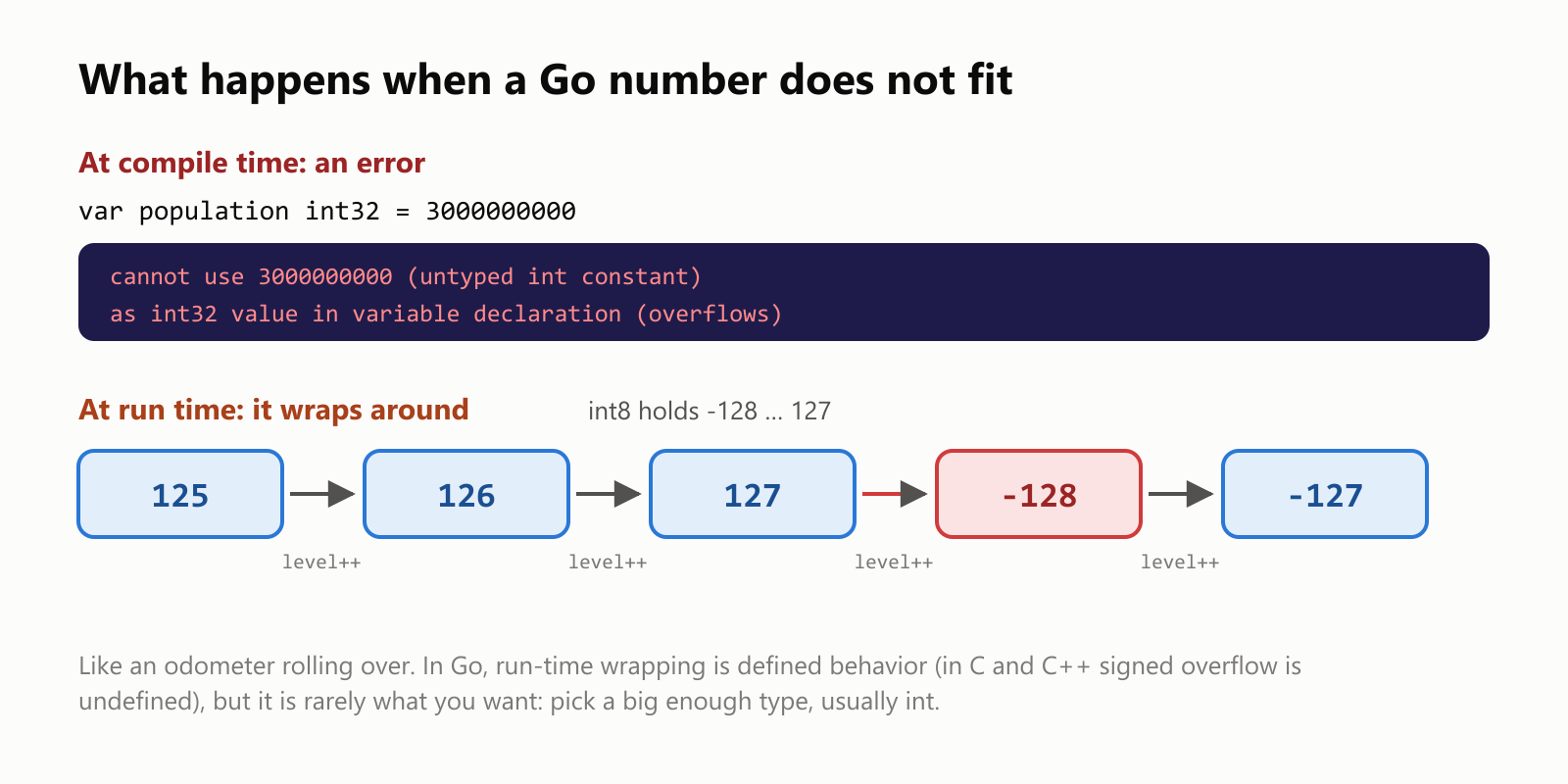
An int8 holds -128 to 127, so 127 + 1 rolls over to -128, like an odometer. In Go this wrapping is well-defined (in C and C++, signed overflow is undefined behavior), but it's almost never what you want: pick a type big enough for your data, which usually just means int.
Constants and exact math
Values that never change are constants, declared with const:
1package main
2
3import "fmt"
4
5const Pi = 3.14159
6
7func main() {
8	const daysPerWeek = 7
9	radius := 2.0
10	fmt.Println("Area:", Pi*radius*radius)
11	fmt.Println("Hours per week:", daysPerWeek*24)
12
13	fmt.Println(0.1 + 0.2)
14	first := 0.1
15	second := 0.2
16	fmt.Println(first + second)
17}1Area: 12.56636
2Hours per week: 168
30.3
40.30000000000000004The last two lines are a lovely Go detail. 0.1 + 0.2 written with constants is computed by the compiler with exact arithmetic, giving exactly 0.3. The same sum with float64 variables happens at run time in binary floating point, where 0.1 and 0.2 can't be stored exactly, so the result is a hair off. Lesson: don't compare decimals with ==, and count money in whole cents.
Changing a constant is a compile error (cannot assign to Pi (neither addressable nor a map index expression)), and a constant can't hold a value computed at run time. (Constants that start with a capital letter, like Pi, are exported from the package, just like functions.)
Strings: bytes vs. characters
1package main
2
3import (
4	"fmt"
5	"unicode/utf8"
6)
7
8func main() {
9	word := "Olá"
10	fmt.Println(len(word))
11	fmt.Println(utf8.RuneCountInString(word))
12	fmt.Println(word + ", world!")
13	var initial rune = 'O'
14	fmt.Println(initial, string(initial))
15}14
23
3Olá, world!
479 O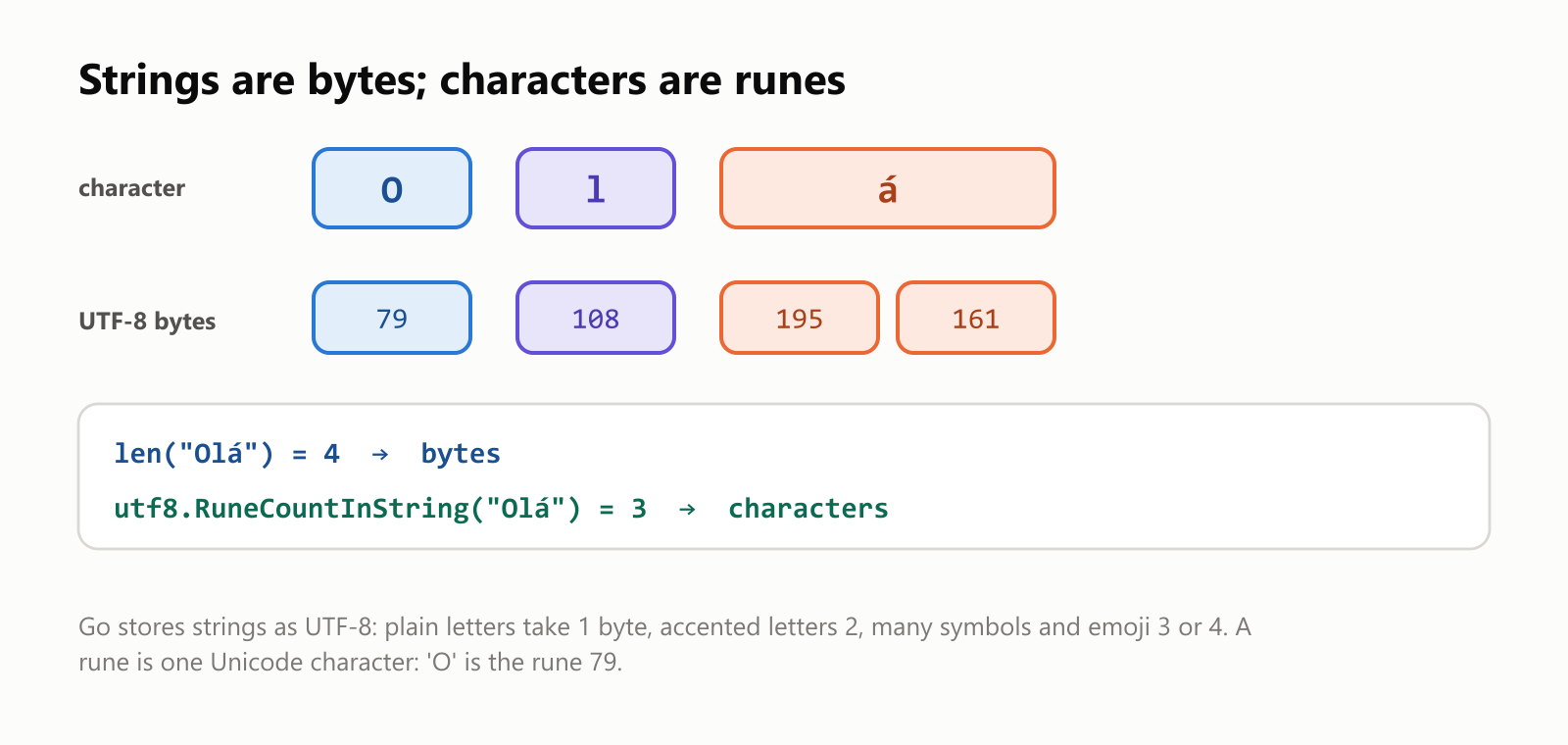
Go strings are stored as UTF-8 bytes. len counts bytes, so "Olá" is 4 (the á takes two bytes); utf8.RuneCountInString counts characters. A rune is one character, and it's really a number (79 is O's code). + joins strings.
The unused-variable rule
As you saw in your first program, Go refuses to build code with a variable you never use:
1package main
2
3import "fmt"
4
5func main() {
6	var age int = 35
7	name := "Ada"
8	fmt.Println(name)
9}
$ go run .
# hello
.\main.go:6:6: age declared and not usedDelete it, use it, or (while experimenting) assign it to the blank identifier: _ = age.
Naming variables
- Letters, digits and underscores, starting with a letter or underscore; names are case-sensitive.
- Go style is camelCase:
totalPrice,userName. (Underscores are legal but unidiomatic.) - Capitalization means visibility: a package-level
MaxUsersis exported to other packages;maxUsersstays private. - Go favors short names for short scopes:
ifor a loop index orerrfor an error is fine for a couple of lines, while longer-lived variables deserve descriptive names likesecondsElapsed.
Your turn: practice
Try these before peeking at the answers. Put each program in its own module and run it with go run ..
Exercise 1: Predict the output (warm-up). What does this print?
1package main
2
3import "fmt"
4
5func main() {
6	var total int
7	var label string
8	count := 3
9	count *= 4
10	fmt.Printf("[%v] [%q] %d %T\n", total, label, count, count/5)
11	fmt.Println(count/5, float64(count)/5)
12}
Exercise 2: Fix the program. It has three errors. Find them by running it.
1package main
2
3import "fmt"
4
5func main() {
6	price := 9.99
7	quantity := 3
8	quantity := 4
9	var discount float64
10	fmt.Println(price * quantity)
11}
Exercise 3: Swap and show types. Declare first := "tea" and second := 42.5, print both values with their types using %v (%T), then declare cup, mug := "small", "large", swap them in one line and print them.
Exercise 4: Minutes to hours. Read a number of minutes with fmt.Scan and print it as hours and minutes. For example, 135 minutes is 2 h 15 min.
Exercise 5: Average score (challenge). Three test scores are ints: 7, 8 and 10. Print their average with two decimals (8.33), not the whole-number result (8).
Quick quiz
- What does a declared
stringvariable hold before you assign anything? - When can't you use
:=? - What happens with
apples * pricewhenapplesis anintandpriceafloat64? - Why is
len("Olá")4? - How big is an
inton a 64-bit computer?
Answers
Exercise 1: total and label hold their zero values; count is 12; count/5 is an int division (2):
1package main
2
3import "fmt"
4
5func main() {
6	var total int
7	var label string
8	count := 3
9	count *= 4
10	fmt.Printf("[%v] [%q] %d %T\n", total, label, count, count/5)
11	fmt.Println(count/5, float64(count)/5)
12}
[0] [""] 12 int
2 2.4Exercise 2: (1) quantity := 4 redeclares a variable: use quantity = 4. (2) discount is declared and never used: remove it (or use it). (3) price * quantity mixes float64 and int: convert with float64(quantity). Fixed:
1package main
2
3import "fmt"
4
5func main() {
6	price := 9.99
7	quantity := 3
8	quantity = 4
9	fmt.Println(price * float64(quantity))
10}39.96Exercise 3: %v prints the value and %T its type; the swap uses Go's multiple assignment:
1package main
2
3import "fmt"
4
5func main() {
6	first := "tea"
7	second := 42.5
8	fmt.Printf("%v (%T)\n", first, first)
9	fmt.Printf("%v (%T)\n", second, second)
10
11	cup, mug := "small", "large"
12	cup, mug = mug, cup
13	fmt.Println(cup, mug)
14}
tea (string)
42.5 (float64)
large smallExercise 4: Integer division gives the hours and % the remaining minutes:
1package main
2
3import "fmt"
4
5func main() {
6	var totalMinutes int
7	fmt.Print("Minutes: ")
8	fmt.Scan(&totalMinutes)
9	hours := totalMinutes / 60
10	minutes := totalMinutes % 60
11	fmt.Printf("%d h %d min\n", hours, minutes)
12}
Minutes: 135
2 h 15 minMinutes: 59
0 h 59 minExercise 5: Adding the ints gives 25; dividing by 3 as ints would give 8, so convert the sum to float64 first:
1package main
2
3import "fmt"
4
5func main() {
6	first, second, third := 7, 8, 10
7	sum := first + second + third
8	fmt.Println(sum / 3)
9	average := float64(sum) / 3
10	fmt.Printf("%.2f\n", average)
11}
8
8.33Quiz: (1) The empty string "", its zero value. (2) Outside functions (at the package level), and when no new variable appears on the left. (3) It doesn't compile: "mismatched types int and float64". Convert one side explicitly. (4) len counts bytes, and á takes two bytes in UTF-8; utf8.RuneCountInString gives 3 characters. (5) 8 bytes, holding values up to about 9.2 quintillion.
Cheat sheet
| I want to… | Write |
|---|---|
| Declare with a type | var age int (starts at 0) |
| Declare and initialize | var age int = 35 or var age = 35 |
| Short declaration (in functions) | age := 35 |
| Several at once | width, height := 1920, 1080 |
| Group at package level | var ( name = "Go"; version = 2 ) |
| Change a value | age = 36, age += 1, age++ |
| Swap | left, right = right, left |
| Convert types | float64(count), int(price) |
| A constant | const Pi = 3.14159 |
| Print value and type | fmt.Printf("%v %T\n", x, x) |
| Bytes / characters in a string | len(text) / utf8.RuneCountInString(text) |
| Ignore a value | _ = unused |
Wrapping up
Go's variables are simple, and strict in helpful ways:
var name typedeclares;name := valuedeclares and infers the type (inside functions only).- Every variable starts at its zero value:
0,"",falseornil. No garbage, ever. intis 8 bytes on 64-bit systems,float64is the default decimal, andstringstores UTF-8 bytes.- Types never mix by accident: convert explicitly with
float64(x)orint(y). - Constant overflow is a compile error; run-time overflow wraps around (127 + 1 in an
int8is -128). - Constants are exact (
0.1 + 0.2is 0.3), whilefloat64variables have the usual binary rounding. - Unused variables don't compile, so Go code stays tidy.
Next in this series: how to install Go on Linux and the for loop in Go. Back to the beginning: Your First Program in Go. For the bigger picture, read What Is the Go Programming Language?
Read next
What Is the Swift Programming Language? A Simple Guide to the Language Behind iPhone Apps
A friendly, jargon-free guide to Swift, the programming language Apple created for iPhone, iPad and Mac apps. Learn why it replaced Objective-C, how optionals prevent crashes, how an app is made, and how fast Swift really is.
 nbkhope
What Is the Rust Programming Language? A Simple Guide to the Fast Language That Won't Let You Crash
A friendly, jargon-free guide to Rust, the programming language that is as fast as C but stops whole families of memory bugs before a program ever runs. Learn about ownership, why tech giants are adopting it, and where it is used.
nbkhope
What Is the Go Programming Language? A Simple Guide to the Language of the Cloud
A friendly, jargon-free guide to Go, the simple and fast programming language Google created for the cloud. Learn what goroutines are, why Go programs are a single file, and how Go came to power Docker, Kubernetes and much of the internet.
nbkhope
Comments
Be kind and specific. Comments with links from new accounts appear after a moderator reviews them.