How to Use defer in Go: A Visual, Hands-On Guide
Learn Go's defer visually: the last-in, first-out stack, when deferred calls really run, arguments evaluated right away, closing files and unlocking mutexes, recovering from panics, changing return values, os.Exit, a real cost benchmark, and exercises.


On this page
Go runs your statements in order, top to bottom. But some work belongs at the end: closing a file you opened, unlocking a lock you took, logging that a function finished. Go's defer keyword lets you write that cleanup right next to the setup and have it run automatically when the function returns, however it returns.
In this guide you'll see the order deferred calls run in, exactly when they run, a surprising detail about their arguments, and the real-world patterns: closing files, unlocking mutexes, recovering from panics and even changing a function's result. You'll also see the one way to skip deferred calls entirely, and a benchmark of what defer costs. Exercises wrap it up.
All outputs below come from real runs with Go 1.22 on Windows. New to Go? Start with Your First Program in Go.
Putting a call off until later
1package main
2
3import "fmt"
4
5func main() {
6	fmt.Println("Hi")
7	fmt.Println("How are you?")
8}
Hi
How are you?Now put defer in front of the first call:
1package main
2
3import "fmt"
4
5func main() {
6	defer fmt.Println("Hi")
7	fmt.Println("How are you?")
8}
How are you?
Hidefer doesn't run the call now. It schedules it to run when the surrounding function returns, here when main finishes.
Last in, first out
Defer several calls and they run in reverse order:
1package main
2
3import "fmt"
4
5func main() {
6	defer fmt.Println("1")
7	defer fmt.Println("2")
8	defer fmt.Println("3")
9	fmt.Println("main is about to return")
10}1main is about to return
23
32
41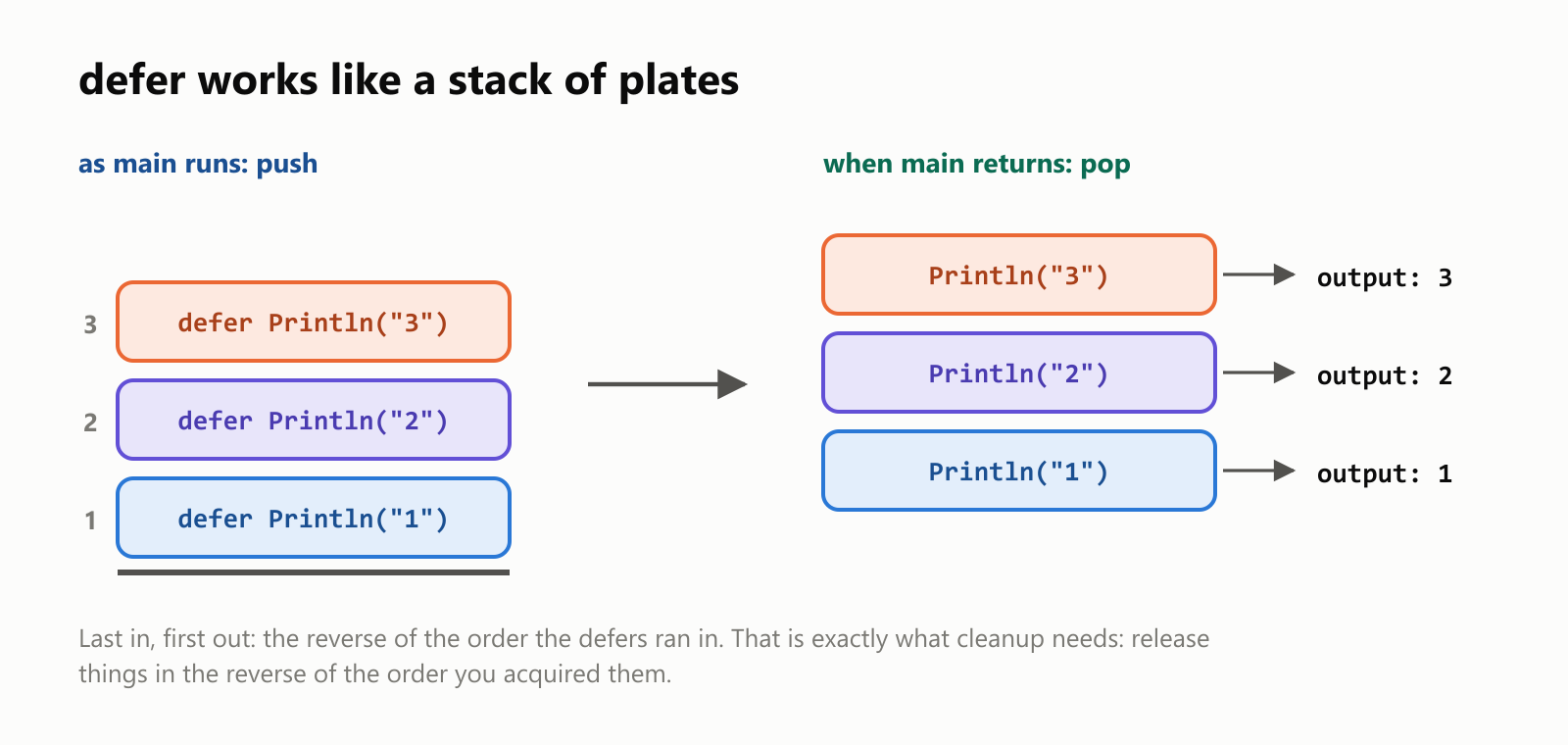
Each function has its own defer stack. Every defer pushes a call on top; when the function returns, Go pops them off the top: last in, first out (LIFO). That's exactly the order cleanup needs: if you open a database and then a file, you want to close the file first and the database last.
When exactly does a deferred call run?
When the function returns, not when the current block or loop ends:
1package main
2
3import "fmt"
4
5func helper() {
6	defer fmt.Println("helper: deferred call")
7	fmt.Println("helper: working")
8}
9
10func main() {
11	fmt.Println("main: before helper")
12	helper()
13	fmt.Println("main: after helper")
14
15	for step := 1; step <= 3; step++ {
16		defer fmt.Println("loop defer", step)
17	}
18	fmt.Println("main: loop finished")
19}1main: before helper
2helper: working
3helper: deferred call
4main: after helper
5main: loop finished
6loop defer 3
7loop defer 2
8loop defer 1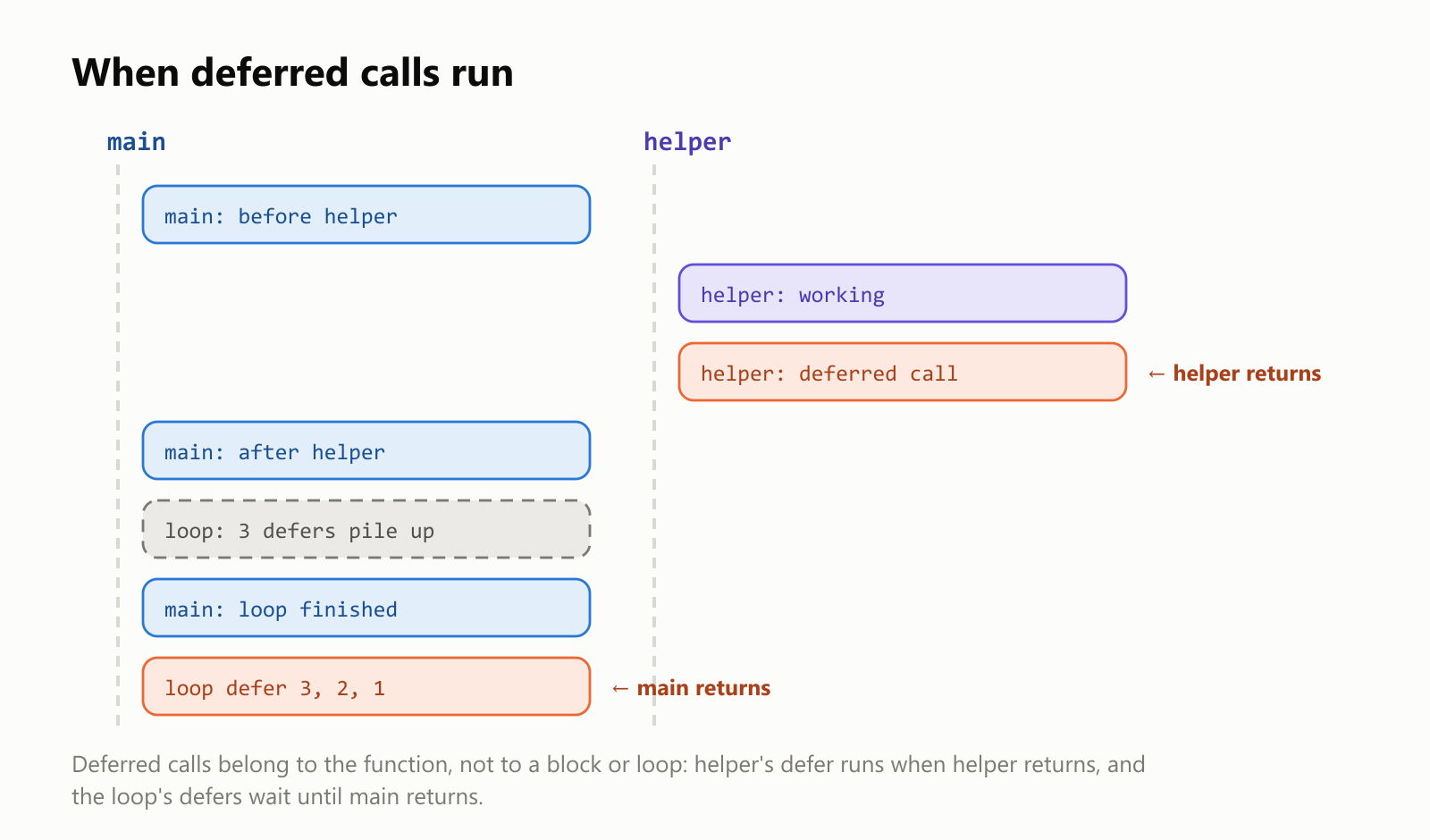
The helper function's deferred call ran as soon as helper returned. But the three deferred calls inside the loop piled up until main returned. That matters when a loop opens many files: deferring Close inside the loop keeps every file open until the whole function ends. Move the loop body into its own function so each deferred Close runs at the end of each pass.
The arguments are evaluated right away
This surprises almost everyone:
1package main
2
3import "fmt"
4
5func main() {
6	count := 1
7	defer fmt.Println("deferred with value:", count)
8
9	defer func() {
10		fmt.Println("deferred closure sees:", count)
11	}()
12
13	count = 99
14	fmt.Println("count is now", count)
15}
count is now 99
deferred closure sees: 99
deferred with value: 1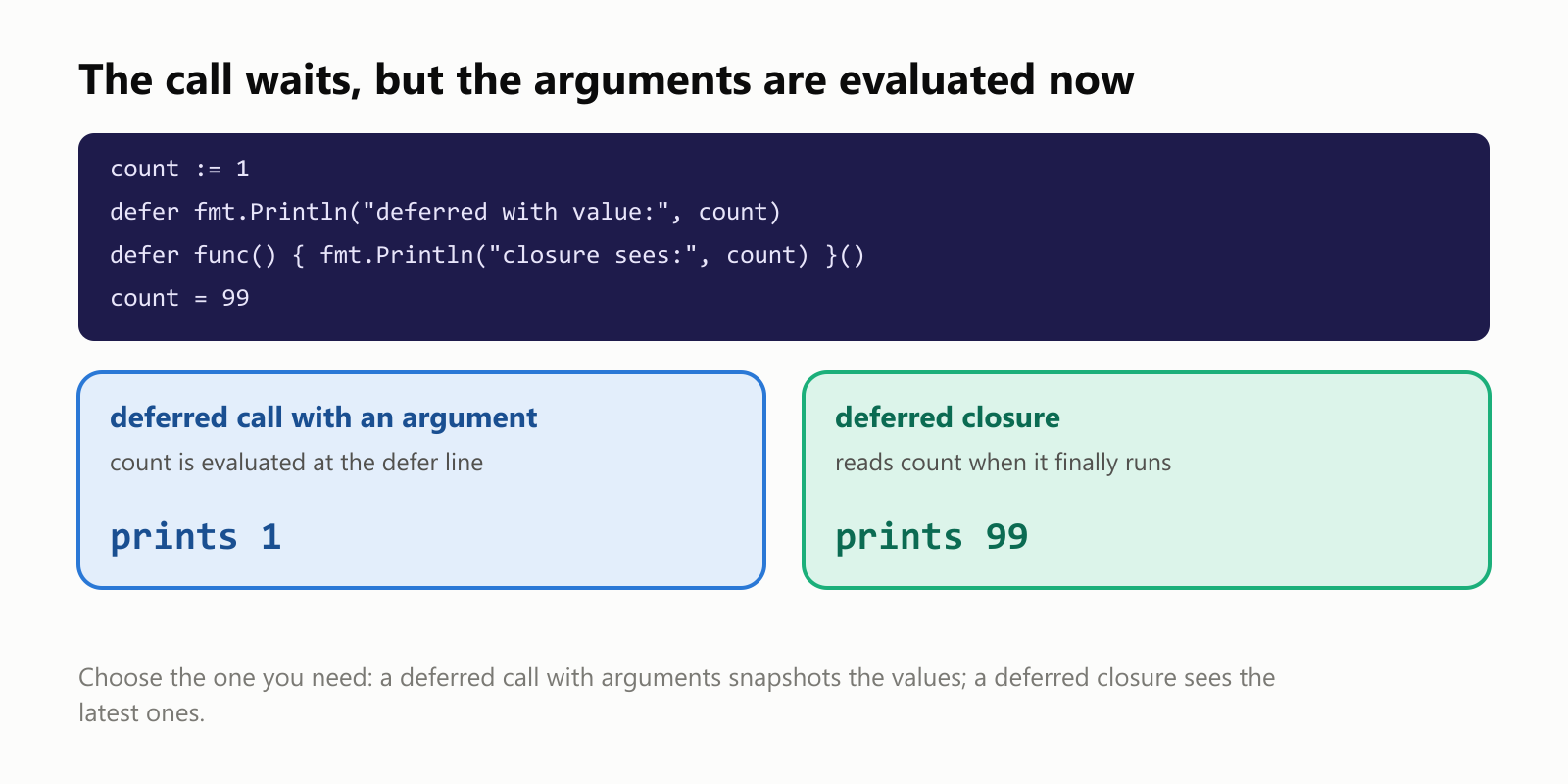
The call happens later, but its arguments are evaluated at the defer line, so count was captured as 1. A deferred closure (an anonymous func() { … }()) has no arguments: it reads count when it finally runs, and sees 99. Pick whichever behavior you need.
Real use 1: closing files
The classic pattern: open something, and immediately defer closing it:
1package main
2
3import (
4	"fmt"
5	"os"
6)
7
8func writeNotes(fileName string) error {
9	file, err := os.Create(fileName)
10	if err != nil {
11		return err
12	}
13	defer file.Close()
14
15	fmt.Fprintln(file, "Buy milk")
16	fmt.Fprintln(file, "Call Ana")
17	return nil
18}
19
20func main() {
21	if err := writeNotes("notes.txt"); err != nil {
22		fmt.Println("error:", err)
23		return
24	}
25	defer os.Remove("notes.txt")
26
27	contents, err := os.ReadFile("notes.txt")
28	if err != nil {
29		fmt.Println("error:", err)
30		return
31	}
32	fmt.Print(string(contents))
33}
Buy milk
Call AnaWriting defer file.Close() right after a successful os.Create means you can't forget it, even if the function grows more return statements later. (err is Go's conventional name for an error value; checking if err != nil after each call that can fail is the standard Go pattern.) The defer os.Remove cleans up the example file when main ends.
Real use 2: unlocking a mutex
When several goroutines (Go's lightweight threads) share data, a mutex makes sure only one touches it at a time. defer guarantees the unlock:
1package main
2
3import (
4	"fmt"
5	"sync"
6)
7
8type Counter struct {
9	lock  sync.Mutex
10	value int
11}
12
13func (counter *Counter) Increment() {
14	counter.lock.Lock()
15	defer counter.lock.Unlock()
16	counter.value++
17}
18
19func main() {
20	counter := &Counter{}
21	var group sync.WaitGroup
22	for worker := 0; worker < 100; worker++ {
23		group.Add(1)
24		go func() {
25			defer group.Done()
26			counter.Increment()
27		}()
28	}
29	group.Wait()
30	fmt.Println("final value:", counter.value)
31}
final value: 100100 goroutines each add 1, and the result is always 100. If Increment returned early or panicked without unlocking, every other goroutine would wait forever. With defer, the unlock always happens. (defer group.Done() is the same idea: it tells the WaitGroup this goroutine finished, no matter how.)
Real use 3: recovering from a panic
A panic is Go's emergency stop (like the "index out of range" crash you may have seen). Deferred calls still run during a panic, and a deferred function can call recover() to stop the panic and turn it into a normal error:
1package main
2
3import "fmt"
4
5func safeElement(numbers []int, index int) (value int, err error) {
6	defer func() {
7		if problem := recover(); problem != nil {
8			err = fmt.Errorf("recovered: %v", problem)
9		}
10	}()
11	return numbers[index], nil
12}
13
14func main() {
15	numbers := []int{10, 20, 30}
16	fmt.Println(safeElement(numbers, 1))
17	fmt.Println(safeElement(numbers, 5))
18	fmt.Println("the program keeps going")
19}
20 <nil>
0 recovered: runtime error: index out of range [5] with length 3
the program keeps goingrecover() only works inside a deferred function. Use it sparingly, at boundaries like a web server's request handler, so one bad request doesn't crash the whole server. Ordinary errors should be returned as error values.
Real use 4: changing the result
Look again at safeElement: its results are named (value int, err error), and the deferred function changed err after the return statement had already set it. A deferred function runs after return sets the results but before the caller receives them, so it can adjust them:
1package main
2
3import "fmt"
4
5func double(number int) (result int) {
6	defer func() {
7		result *= 2
8	}()
9	return number + 1
10}
11
12func main() {
13	fmt.Println(double(4))
14}10return number + 1 sets result to 5, then the deferred function doubles it to 10. Handy for adding context to errors; confusing if overused.
The one thing that skips defers: os.Exit
1package main
2
3import (
4	"fmt"
5	"os"
6)
7
8func main() {
9	defer fmt.Println("this never prints")
10	fmt.Println("exiting")
11	os.Exit(0)
12}exitingos.Exit ends the program immediately: deferred calls don't run, so files may not be flushed and cleanup is skipped. (A panic that nobody recovers does run the deferred calls first; os.Exit doesn't.) In main, prefer returning normally, or use os.Exit only after your cleanup is done.
How much does defer cost?
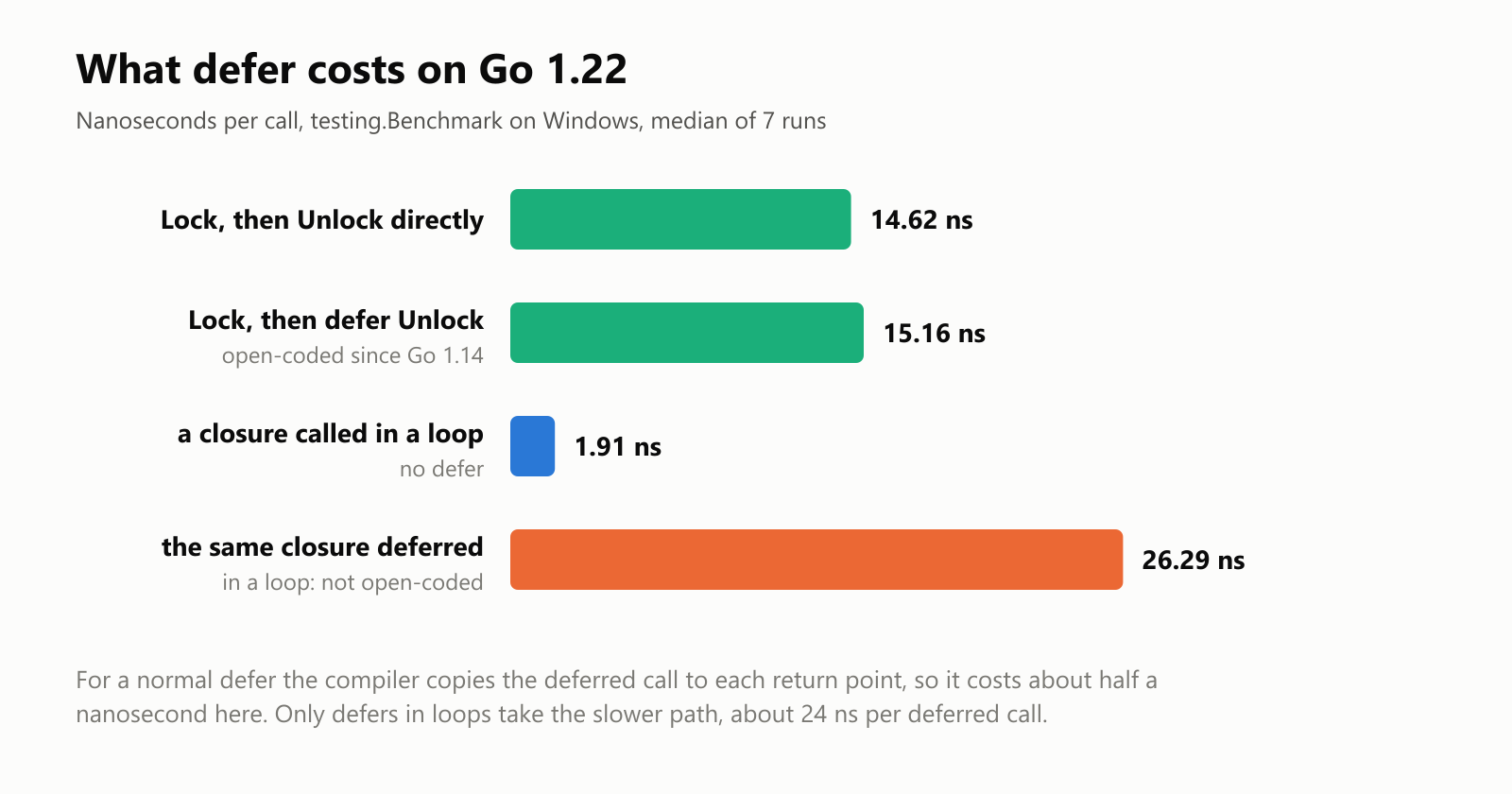
Older Go versions made defer noticeably slow, so some code avoided it. We measured a mutex lock-and-unlock with and without defer on Go 1.22:
| What | Time per call |
|---|---|
| Lock and unlock directly | 14.62 ns |
Lock, then defer the unlock | 15.16 ns |
| A closure called inside a loop | 1.91 ns |
| The same closure deferred inside a loop | 26.29 ns |
Since Go 1.14, the compiler open-codes simple deferred calls, copying them to each place the function returns, so a normal defer costs about half a nanosecond (the gap moved around between runs). Only a defer inside a loop (where the number of deferred calls isn't known in advance) takes the slower path: about 24 nanoseconds per deferred call compared with calling the same closure directly. Use defer freely for cleanup.
Your turn: practice
Try these before peeking at the answers. Run each with go run ..
Exercise 1: Predict the output (warm-up). What does this print?
1package main
2
3import "fmt"
4
5func main() {
6	defer fmt.Println("A")
7	fmt.Println("B")
8	defer fmt.Println("C")
9	fmt.Println("D")
10}
Exercise 2: Countdown. Write a loop from 1 to 5 that defers printing each number, followed by a line that prints Counting…, so the output shows Counting… and then 5, 4, 3, 2, 1.
Exercise 3: Trace a function. Write a trace(name string) func() helper that prints enter name when called and returns a function that prints exit name, so that defer trace("process")() on the first line of a function logs its start and end.
Exercise 4: Predict the arguments. What does this print, and why?
1package main
2
3import "fmt"
4
5func main() {
6	message := "first"
7	defer fmt.Println(message)
8	message = "second"
9	defer func() { fmt.Println(message) }()
10	message = "third"
11}
Exercise 5: Safe division (challenge). Write safeDivide(numerator, denominator int) (result int, err error) that recovers from the "integer divide by zero" panic and returns it as an error.
Quick quiz
- In what order do three deferred calls run?
- When does a call deferred inside a loop run?
- When are a deferred call's arguments evaluated?
- Do deferred calls run during a panic? During
os.Exit? - Why put
defer file.Close()right after opening a file?
Answers
Exercise 1: B and D print as main runs; then the deferred calls run in reverse, C before A:
1package main
2
3import "fmt"
4
5func main() {
6	defer fmt.Println("A")
7	fmt.Println("B")
8	defer fmt.Println("C")
9	fmt.Println("D")
10}1B
2D
3C
4AExercise 2: The deferred prints pile up and run in reverse after the loop:
1package main
2
3import "fmt"
4
5func main() {
6	for number := 1; number <= 5; number++ {
7		defer fmt.Println(number)
8	}
9	fmt.Println("Counting…")
10}1Counting…
25
34
43
52
61Exercise 3: trace("process") runs immediately (printing enter), and the function it returns is what gets deferred:
1package main
2
3import "fmt"
4
5func trace(name string) func() {
6	fmt.Println("enter", name)
7	return func() {
8		fmt.Println("exit", name)
9	}
10}
11
12func process() {
13	defer trace("process")()
14	fmt.Println("processing…")
15}
16
17func main() {
18	process()
19}
enter process
processing…
exit processNote the two pairs of parentheses: defer trace("process")() defers the returned function. Writing defer trace("process") would defer the whole trace call, printing enter at the end instead.
Exercise 4: The first deferred call captured "first" as its argument; the closure reads message when it runs, after it became "third". Reverse order puts the closure first:
1package main
2
3import "fmt"
4
5func main() {
6	message := "first"
7	defer fmt.Println(message)
8	message = "second"
9	defer func() { fmt.Println(message) }()
10	message = "third"
11}
third
firstExercise 5: A deferred recover turns the panic into an error through the named result:
1package main
2
3import "fmt"
4
5func safeDivide(numerator, denominator int) (result int, err error) {
6	defer func() {
7		if problem := recover(); problem != nil {
8			err = fmt.Errorf("cannot divide: %v", problem)
9		}
10	}()
11	return numerator / denominator, nil
12}
13
14func main() {
15	fmt.Println(safeDivide(10, 2))
16	fmt.Println(safeDivide(10, 0))
17}
5 <nil>
0 cannot divide: runtime error: integer divide by zero(In real code you'd simply check if denominator == 0 first; this exercise is about seeing recover work.)
Quiz: (1) In reverse: last deferred, first run. (2) When the whole surrounding function returns, not at the end of each pass. (3) At the defer line; only the call itself waits. (4) Yes during a panic (that's how recover works); no during os.Exit, which ends the program immediately. (5) So the close can't be forgotten, whichever return the function takes later.
Cheat sheet
| I want to… | Write |
|---|---|
| Run a call when the function returns | defer fmt.Println("done") |
| Close a file | file, err := os.Open(name) … defer file.Close() |
| Unlock a mutex | lock.Lock() then defer lock.Unlock() |
| Mark a goroutine done | defer group.Done() |
| Read variables at the end, not now | defer func() { … }() |
| Turn a panic into an error | defer func() { if problem := recover(); problem != nil { err = … } }() |
| Change a named result | defer func() { result *= 2 }() |
| Trace a function | defer trace("name")() |
| Exit without running defers | os.Exit(code) (use with care) |
Wrapping up
defer keeps setup and cleanup side by side:
- A deferred call runs when the surrounding function returns, in last-in, first-out order.
- It belongs to the function, not the block: defers inside a loop pile up until the function ends.
- Arguments are evaluated at the
deferline; a deferred closure reads variables when it runs. - Classic uses: closing files, unlocking mutexes,
WaitGroup.Done, andrecoverto turn a panic into an error. - Deferred functions can change named results, because they run after
returnsets them. os.Exitskips deferred calls; a panic doesn't.- It's nearly free: 15.16 ns vs. 14.62 ns for a mutex unlock in our benchmark; only defers inside loops cost more (about 24 ns each).
Back through the series: Two-Dimensional Slices in Go, The For Loop in Go and Your First Program in Go. Next up: pointers in Go.
Read next
What Is the Swift Programming Language? A Simple Guide to the Language Behind iPhone Apps
A friendly, jargon-free guide to Swift, the programming language Apple created for iPhone, iPad and Mac apps. Learn why it replaced Objective-C, how optionals prevent crashes, how an app is made, and how fast Swift really is.
 nbkhope
What Is the Rust Programming Language? A Simple Guide to the Fast Language That Won't Let You Crash
A friendly, jargon-free guide to Rust, the programming language that is as fast as C but stops whole families of memory bugs before a program ever runs. Learn about ownership, why tech giants are adopting it, and where it is used.
nbkhope
What Is the Go Programming Language? A Simple Guide to the Language of the Cloud
A friendly, jargon-free guide to Go, the simple and fast programming language Google created for the cloud. Learn what goroutines are, why Go programs are a single file, and how Go came to power Docker, Kubernetes and much of the internet.
nbkhope
Comments
Be kind and specific. Comments with links from new accounts appear after a moderator reviews them.