
Structs in Go: A Visual, Hands-On Guide
Learn Go structs visually: defining and creating them, zero values, printing, copies and pointers, comparing with ==, methods, constructors, embedding, exported fields and JSON tags, anonymous structs, how field order changes a struct's size, and exercises.


On this page
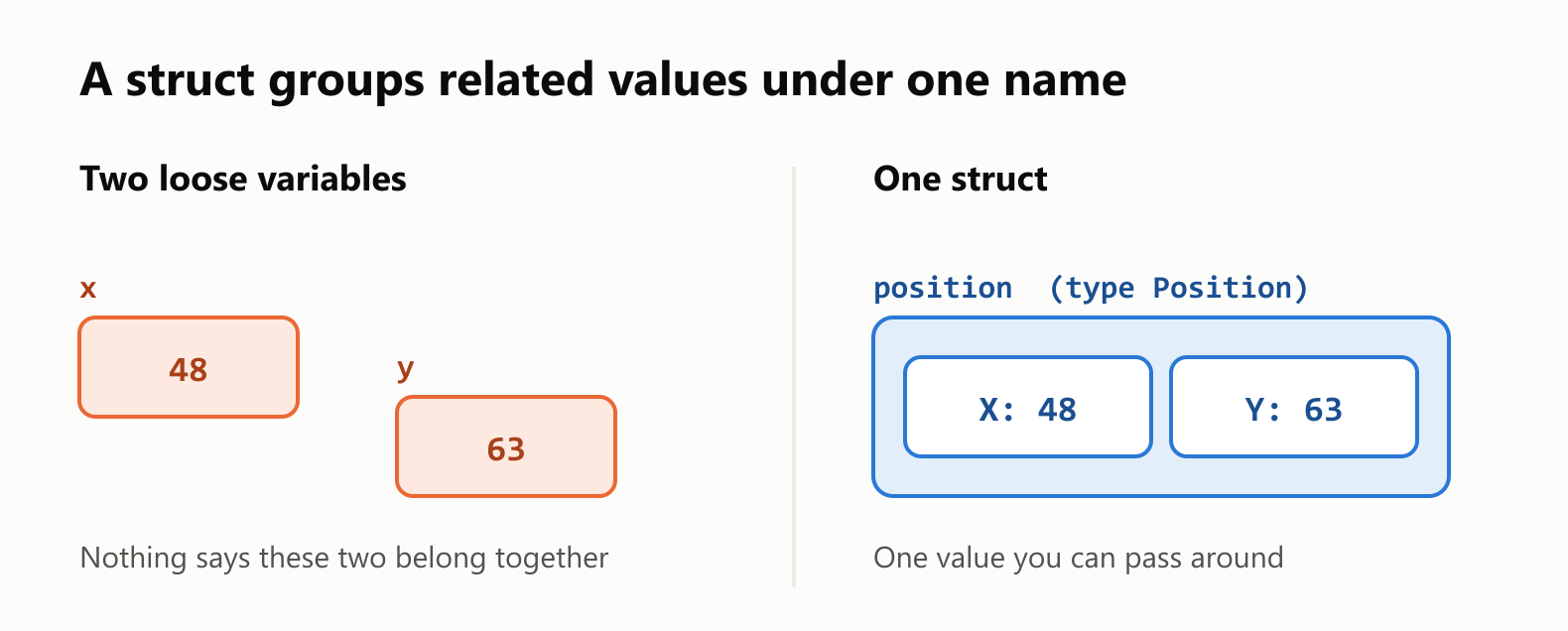
In a 2D game, a player's position takes two numbers: x and y. You could keep them in two variables, but they really describe one thing. Add a name, a level and some health, and you're soon passing five separate values to every function.
A struct groups related values into a single type of your own. Structs are how you model almost everything in Go, from a point on a screen to a user in a database.
In this guide you'll define and create structs, see how they copy and compare, and give them methods. You'll also learn the constructor pattern, how embedding works, how to turn a struct into JSON, and how the order of the fields changes the struct's size in memory. Exercises wrap it up.
All outputs below come from real runs with Go 1.22 on 64-bit Windows. New to Go? Start with Your First Program in Go.
Your first struct
1package main
2
3import "fmt"
4
5type Position struct {
6	X int
7	Y int
8}
9
10func main() {
11	position := Position{X: 48, Y: 63}
12
13	fmt.Println(position)
14	fmt.Println(position.X)
15	fmt.Println(position.Y)
16
17	position.X = 87
18	fmt.Println(position)
19}1{48 63}
248
363
4{87 63}type Position struct { … } defines a new type with two fields, X and Y. Position{X: 48, Y: 63} creates a value of that type. A dot reads a field (position.X) or changes it (position.X = 87).
Three ways to create a struct
1package main
2
3import "fmt"
4
5type Player struct {
6	Name   string
7	Level  int
8	Active bool
9}
10
11func main() {
12	byName := Player{Name: "Ana", Level: 3}
13	byOrder := Player{"Bruno", 5, true}
14	var empty Player
15
16	fmt.Printf("%+v\n", byName)
17	fmt.Printf("%+v\n", byOrder)
18	fmt.Printf("%+v\n", empty)
19}
{Name:Ana Level:3 Active:false}
{Name:Bruno Level:5 Active:true}
{Name: Level:0 Active:false}- By name: the fields can go in any order, and any you leave out get their zero value:
""for a string,0for a number andfalsefor a bool. - By order: the values must follow the order of the fields, and you must give all of them.
- With
var: every field gets its zero value.
Prefer naming the fields. Your code stays readable, and it keeps compiling if someone adds a field later. The compiler rejects a partial list of values:
1package main
2
3import "fmt"
4
5type Position struct {
6	X int
7	Y int
8}
9
10func main() {
11	fmt.Println(Position{48})
12}
./main.go:11:25: too few values in struct literal of type PositionIt also catches a field that doesn't exist:
1package main
2
3import "fmt"
4
5type Position struct {
6	X int
7	Y int
8}
9
10func main() {
11	fmt.Println(Position{Z: 48})
12}
./main.go:11:23: unknown field Z in struct literal of type PositionPrinting a struct
The fmt package has several ways to show a struct, which helps a lot when debugging:
1package main
2
3import "fmt"
4
5type Position struct {
6	X int
7	Y int
8}
9
10func main() {
11	position := Position{48, 63}
12	fmt.Printf("%v\n", position)
13	fmt.Printf("%+v\n", position)
14	fmt.Printf("%#v\n", position)
15	fmt.Printf("%T\n", position)
16}1{48 63}
2{X:48 Y:63}
3main.Position{X:48, Y:63}
4main.Position%+v adds the field names and is the one you'll reach for most. %#v shows the value as Go code, and %T shows the type.
Structs are values
Assigning a struct copies every field. If you want to share one struct instead, use a pointer:
1package main
2
3import "fmt"
4
5type Position struct {
6	X int
7	Y int
8}
9
10func main() {
11	first := Position{1, 2}
12
13	second := first
14	second.X = 99
15	fmt.Println(first, second)
16
17	pointer := &first
18	pointer.X = 99
19	fmt.Println(first, second)
20}
{1 2} {99 2}
{99 2} {99 2}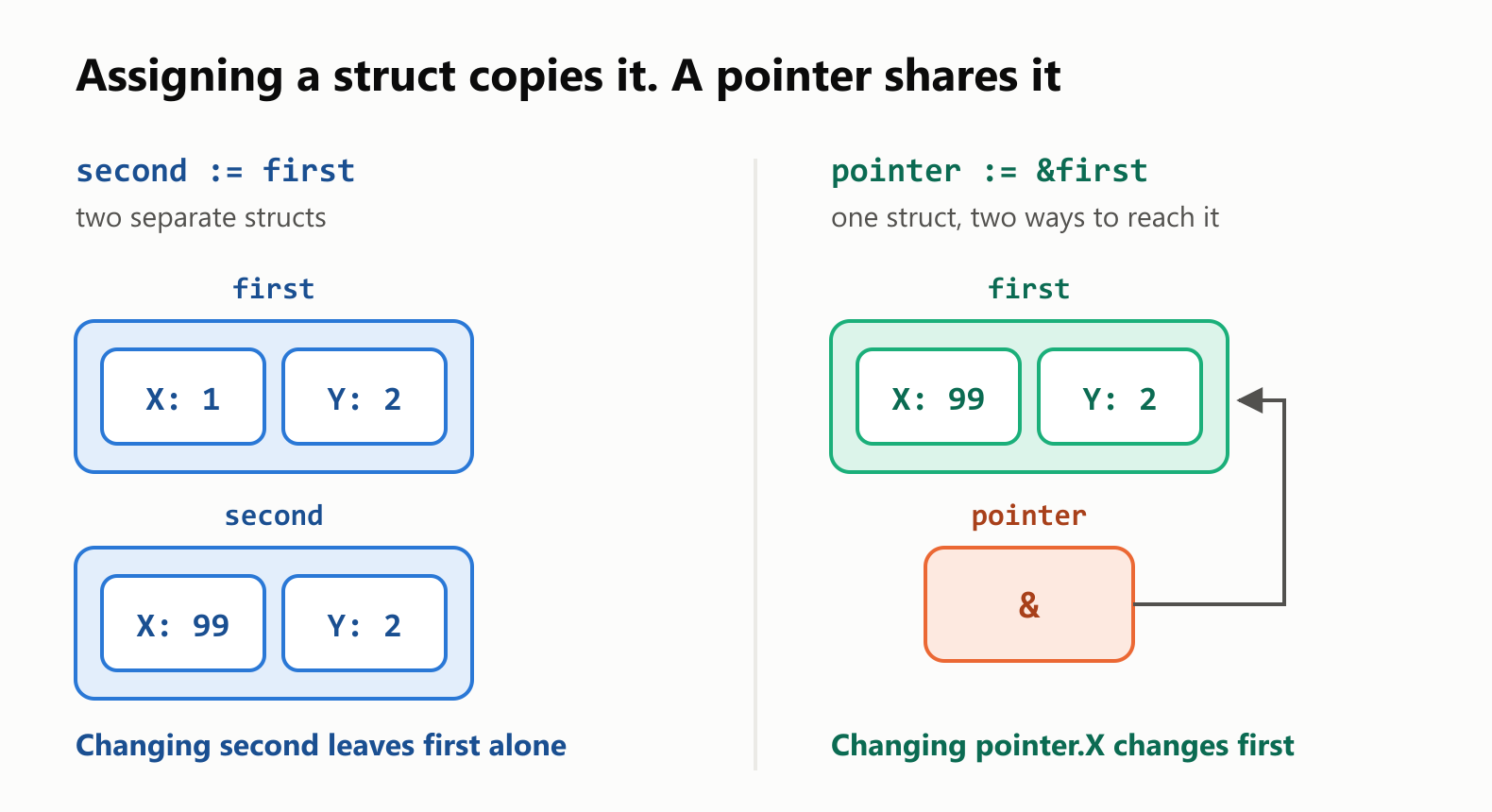
The same applies to function arguments: a function receives its own copy of a struct unless you pass a pointer. Notice that pointer.X needs no *, because Go follows the pointer for you.
Comparing structs
Two structs are equal with == when all their fields are equal. That also means a struct can be a map key:
1package main
2
3import "fmt"
4
5type Position struct {
6	X int
7	Y int
8}
9
10func main() {
11	first := Position{1, 2}
12	second := Position{1, 2}
13	third := Position{3, 4}
14
15	fmt.Println(first == second)
16	fmt.Println(first == third)
17
18	visited := map[Position]bool{}
19	visited[first] = true
20	fmt.Println(visited[second], visited[third])
21}
true
false
true falsesecond finds the entry stored under first, because the two are equal. This only works when every field can be compared. Slices, maps and functions can't, so a struct that holds one can't use ==:
1package main
2
3import "fmt"
4
5type Team struct {
6	Name    string
7	Members []string
8}
9
10func main() {
11	first := Team{Name: "Red"}
12	second := Team{Name: "Red"}
13	fmt.Println(first == second)
14}
./main.go:13:14: invalid operation: first == second (struct containing []string cannot be compared)Methods
A method is a function attached to a type. The receiver, written before the method's name, is the value it works on:
1package main
2
3import "fmt"
4
5type Position struct {
6	X int
7	Y int
8}
9
10func (position Position) Moved(deltaX, deltaY int) Position {
11	return Position{position.X + deltaX, position.Y + deltaY}
12}
13
14func (position *Position) Move(deltaX, deltaY int) {
15	position.X += deltaX
16	position.Y += deltaY
17}
18
19func main() {
20	start := Position{1, 1}
21
22	next := start.Moved(2, 3)
23	fmt.Println(start, next)
24
25	start.Move(10, 10)
26	fmt.Println(start)
27}
{1 1} {3 4}
{11 11}Moved has a value receiver: it works on a copy, so it returns a new Position and leaves start alone. Move has a pointer receiver, so it changes start itself. Pointers in Go covers how to choose.
One method is special. If a type has a String() string method, fmt uses it to print the value:
1package main
2
3import "fmt"
4
5type Position struct {
6	X int
7	Y int
8}
9
10func (position Position) String() string {
11	return fmt.Sprintf("(%d, %d)", position.X, position.Y)
12}
13
14func main() {
15	fmt.Println(Position{48, 63})
16}
(48, 63)Constructor functions
Go has no constructors built into the language. By convention, you write a plain function named New… when a struct needs default values or validation:
1package main
2
3import (
4	"errors"
5	"fmt"
6)
7
8type Player struct {
9	Name   string
10	Level  int
11	Health int
12}
13
14func NewPlayer(name string) (*Player, error) {
15	if name == "" {
16		return nil, errors.New("name is required")
17	}
18	return &Player{Name: name, Level: 1, Health: 100}, nil
19}
20
21func main() {
22	fmt.Println(NewPlayer("Ana"))
23	fmt.Println(NewPlayer(""))
24}
&{Ana 1 100} <nil>
<nil> name is requiredWhen the zero value is already useful, skip the constructor. A good Go type often works straight from var, as sync.Mutex and strings.Builder do.
Embedding: a struct inside a struct
Go has no classes and no inheritance. To reuse a struct, you embed it by writing its type without a field name:
1package main
2
3import "fmt"
4
5type Position struct {
6	X int
7	Y int
8}
9
10func (position *Position) Move(deltaX, deltaY int) {
11	position.X += deltaX
12	position.Y += deltaY
13}
14
15type Player struct {
16	Position
17	Name string
18}
19
20func main() {
21	hero := Player{Position: Position{48, 63}, Name: "Ana"}
22
23	hero.Move(2, 2)
24
25	fmt.Println(hero.X, hero.Position.X)
26	fmt.Printf("%+v\n", hero)
27}
50 50
{Position:{X:50 Y:65} Name:Ana}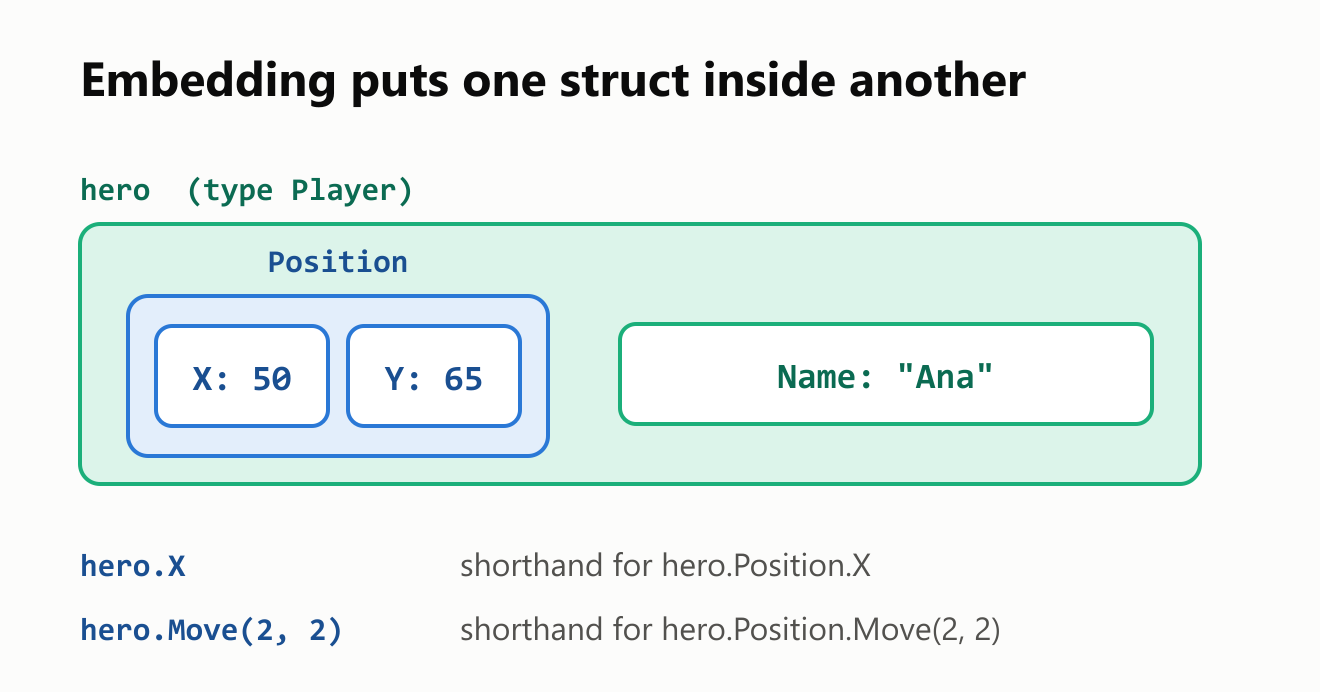
The fields and methods of Position are promoted, so hero.X and hero.Move work directly. It's still a struct inside a struct, not inheritance. A Player isn't a Position, as the compiler will tell you:
1package main
2
3import "fmt"
4
5type Position struct {
6	X int
7	Y int
8}
9
10type Player struct {
11	Position
12	Name string
13}
14
15func describe(position Position) string {
16	return fmt.Sprint(position.X, ",", position.Y)
17}
18
19func main() {
20	hero := Player{Name: "Ana"}
21	fmt.Println(describe(hero))
22}
./main.go:21:23: cannot use hero (variable of type Player) as Position value in argument to describePass hero.Position instead.
Exported fields and JSON
In Go, a capital first letter means exported: visible outside the package. That matters for fields too, because packages like encoding/json can only see exported ones. A struct tag, the text in backticks, customizes the JSON name:
1package main
2
3import (
4	"encoding/json"
5	"fmt"
6)
7
8type Player struct {
9	Name     string `json:"name"`
10	Level    int    `json:"level"`
11	Nickname string `json:"nickname,omitempty"`
12	password string
13}
14
15func main() {
16	hero := Player{Name: "Ana", Level: 3, password: "secret"}
17	encoded, err := json.Marshal(hero)
18	if err != nil {
19		fmt.Println("error:", err)
20		return
21	}
22	fmt.Println(string(encoded))
23
24	var loaded Player
25	err = json.Unmarshal([]byte(`{"name":"Bruno","level":7}`), &loaded)
26	if err != nil {
27		fmt.Println("error:", err)
28		return
29	}
30	fmt.Printf("%+v\n", loaded)
31}
{"name":"Ana","level":3}
{Name:Bruno Level:7 Nickname: password:}password is lowercase, so it stayed out of the JSON. omitempty dropped the empty Nickname. json.Unmarshal needs a pointer (&loaded) so that it can fill in your struct.
Anonymous structs
For a one-off shape, you can define a struct without naming it. It's common for lists of test cases:
1package main
2
3import "fmt"
4
5func main() {
6	scores := []struct {
7		Name  string
8		Value int
9	}{
10		{"Ana", 10},
11		{"Bruno", 20},
12	}
13
14	for _, score := range scores {
15		fmt.Println(score.Name, score.Value)
16	}
17}
Ana 10
Bruno 20If you need the same shape in a second place, give it a name.
Field order changes the size
Here's something that surprises people. These two structs hold exactly the same fields, in a different order:
1package main
2
3import (
4	"fmt"
5	"unsafe"
6)
7
8type Scattered struct {
9	Active  bool
10	Score   int64
11	Visible bool
12}
13
14type Grouped struct {
15	Score   int64
16	Active  bool
17	Visible bool
18}
19
20func main() {
21	fmt.Println("Scattered:", unsafe.Sizeof(Scattered{}), "bytes")
22	fmt.Println("Grouped:", unsafe.Sizeof(Grouped{}), "bytes")
23}
Scattered: 24 bytes
Grouped: 16 bytes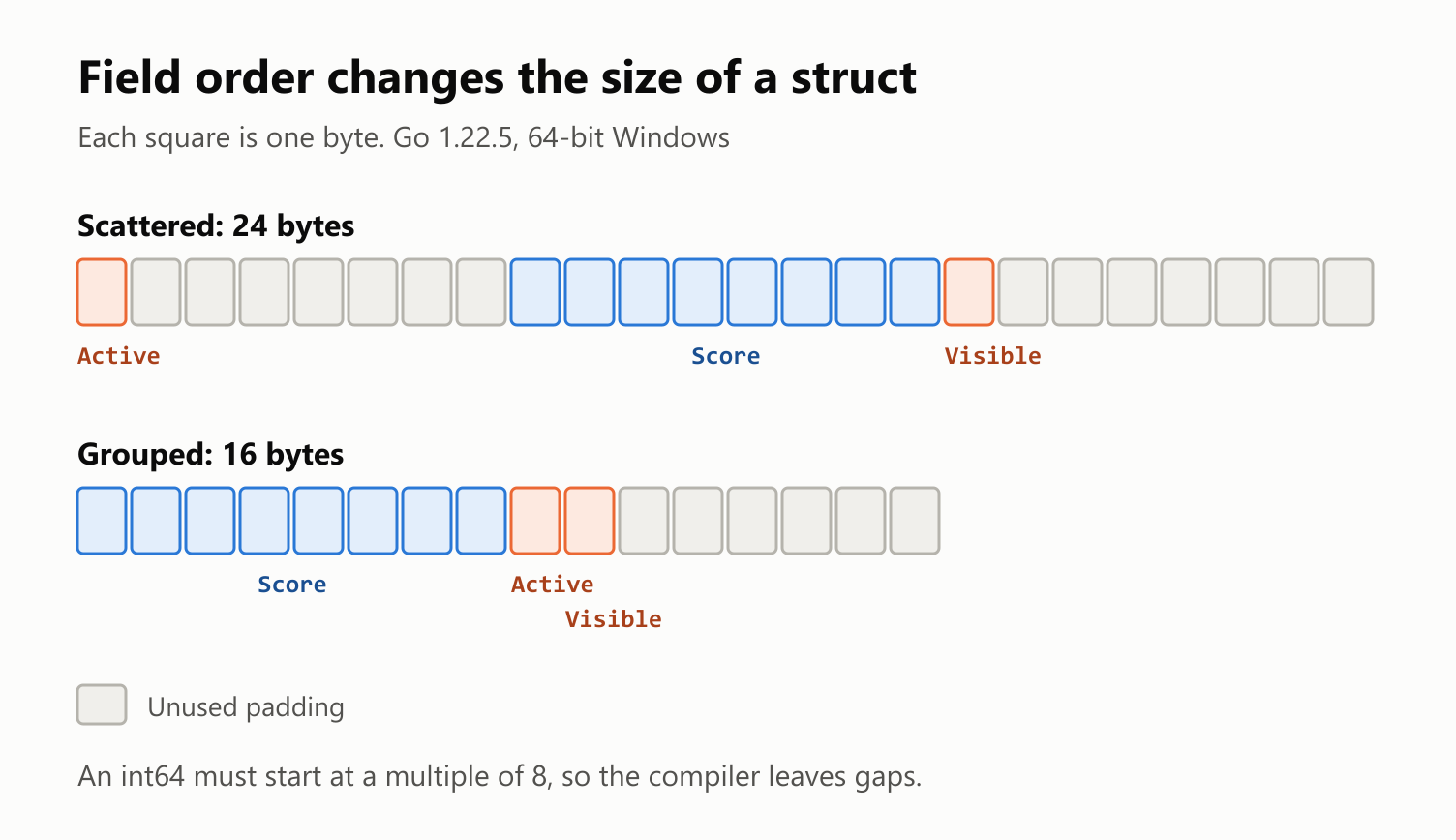
The processor reads an int64 most efficiently from an address that's a multiple of 8, so the compiler inserts unused padding to line it up, and Go doesn't reorder your fields for you. In a slice of a million elements, the difference would be 24 MB versus 16 MB.
Don't reorder every struct because of this. Group fields so they read logically, and think about size only when you're storing huge numbers of them.
Your turn: practice
Try these before peeking at the answers. Run each with go run ..
Exercise 1: Predict the output (warm-up). What does this print?
1package main
2
3import "fmt"
4
5type Box struct {
6	Width int
7}
8
9func main() {
10	first := Box{Width: 1}
11	second := first
12	pointer := &first
13
14	second.Width = 2
15	pointer.Width = 3
16
17	fmt.Println(first.Width, second.Width, pointer.Width)
18}
Exercise 2: Rectangle. Define a Rectangle struct with Width and Height, and give it an Area() int method. Print the area of a 3 by 4 rectangle.
Exercise 3: Predict the receivers. What does this print, and why?
1package main
2
3import "fmt"
4
5type Plant struct {
6	Height int
7}
8
9func (plant Plant) Grow() {
10	plant.Height += 1
11}
12
13func (plant *Plant) Water() {
14	plant.Height += 10
15}
16
17func main() {
18	plant := Plant{}
19	plant.Grow()
20	plant.Water()
21	fmt.Println(plant.Height)
22}
Exercise 4: A nice print. Define a Book struct with Title and Pages, and give it a String() method so that printing a book shows Dune (412 pages).
Exercise 5: Embedding (challenge). Define a Person with a Name and a Greet() string method that returns Hi, I'm Ana. Embed Person in an Employee with a Role field. Give Employee its own Greet that adds the role to what Person.Greet returns, then print both greetings.
Quick quiz
- What does
second := firstdo whenfirstis a struct? - Why is
Position{X: 1, Y: 2}usually better thanPosition{1, 2}? - What's the value of a field you don't set?
- When does comparing two structs with
==fail to compile? - Is a struct that embeds
Positionalso aPosition? - Why would a field be missing from the JSON that
json.Marshalproduces?
Answers
Exercise 1: second is a separate copy, while pointer leads to first:
3 2 3Exercise 2: A value receiver is enough, because Area only reads the fields:
1package main
2
3import "fmt"
4
5type Rectangle struct {
6	Width  int
7	Height int
8}
9
10func (rectangle Rectangle) Area() int {
11	return rectangle.Width * rectangle.Height
12}
13
14func main() {
15	rectangle := Rectangle{Width: 3, Height: 4}
16	fmt.Println(rectangle.Area())
17}12Exercise 3: Grow changed a copy, so only Water, with its pointer receiver, had an effect:
10Exercise 4: fmt calls String for you:
1package main
2
3import "fmt"
4
5type Book struct {
6	Title string
7	Pages int
8}
9
10func (book Book) String() string {
11	return fmt.Sprintf("%s (%d pages)", book.Title, book.Pages)
12}
13
14func main() {
15	fmt.Println(Book{Title: "Dune", Pages: 412})
16}
Dune (412 pages)Exercise 5: Employee.Greet takes priority over the promoted method, and you can still reach the embedded one through employee.Person:
1package main
2
3import "fmt"
4
5type Person struct {
6	Name string
7}
8
9func (person Person) Greet() string {
10	return "Hi, I'm " + person.Name
11}
12
13type Employee struct {
14	Person
15	Role string
16}
17
18func (employee Employee) Greet() string {
19	return employee.Person.Greet() + ", and I work as an " + employee.Role
20}
21
22func main() {
23	employee := Employee{Person: Person{Name: "Ana"}, Role: "engineer"}
24	fmt.Println(employee.Person.Greet())
25	fmt.Println(employee.Greet())
26}
Hi, I'm Ana
Hi, I'm Ana, and I work as an engineerQuiz: (1) It copies every field into a new, separate struct. (2) It stays readable, and it keeps compiling when fields are added. (3) The zero value of its type. (4) When a field can't be compared, such as a slice, a map or a function. (5) No. It contains a Position and gets its fields and methods, but it's a different type. (6) The field is unexported (lowercase), it's empty and tagged omitempty, or it's tagged json:"-".
Cheat sheet
| I want to… | Write |
|---|---|
| Define a struct | type Position struct { X int; Y int } |
| Create one by field name | Position{X: 48, Y: 63} |
| Create one by field order | Position{48, 63} |
| Start with all zero values | var position Position |
| Read or change a field | position.X, position.X = 87 |
| Print with field names | fmt.Printf("%+v\n", position) |
| Share instead of copy | pointer := &position |
| Compare | first == second |
| Add a read-only method | func (position Position) Moved(…) Position |
| Add a method that changes the struct | func (position *Position) Move(…) |
| Control how it prints | func (position Position) String() string |
| Set defaults or validate | func NewPlayer(name string) (*Player, error) |
| Embed a struct | type Player struct { Position; Name string } |
| Name a JSON field | Name string `json:"name"` |
| Check the size | unsafe.Sizeof(position) |
Wrapping up
A struct gives related values a single name and type:
- Fields group your data, and a dot reads or changes them.
- Name the fields when you create a struct. Any you leave out get their zero value.
- Structs are values. Assigning or passing one copies it, and a pointer shares it.
==compares every field, so it only works when all of them can be compared.- Methods attach behavior. Use a pointer receiver to change the struct, and
String()to control how it prints. New…functions are a convention, for when the zero value isn't enough.- Embedding promotes fields and methods, but it isn't inheritance.
- Only exported fields reach JSON, and struct tags choose their names.
- Field order affects size: 24 bytes versus 16 for the same three fields in our example.
Back through the series: Pointers in Go, How to Use defer in Go and Your First Program in Go. Next up: Maps in Go.
Read next

Ruby Blocks and Iterators: Write Your Own
Learn how Ruby methods receive blocks, pass values with yield, handle a missing block, and return an Enumerator. Build and run your own iterator.
 nbkhope
C++ std::vector: Size, Capacity, and Safe Growth
Learn how std::vector grows in C++: the difference between size and capacity, when reserve helps, why resize is different, and how growth can invalidate references.
nbkhope
How to Handle Errors in Go: A Hands-On Guide
Learn Go's everyday error pattern with runnable examples: return an error, check it, add context with %w, and recognize a missing file with errors.Is.
nbkhope
Comments
Be kind and specific. Comments with links from new accounts appear after a moderator reviews them.