
Maps in Go: A Visual, Hands-On Guide
Learn Go maps visually: how a hash map finds a value, make and literals, nil maps, missing keys and the comma ok idiom, deleting, why loop order changes, sharing and cloning, valid key types, counting and grouping, a real benchmark against slices, and exercises.


On this page
A teacher has a list of students and the grade each one got on a test. Given a name, you want the grade. You could keep a slice of names and search it from the start every time, but Go has a better tool for looking something up by name.
A map associates keys with values: each student's name (the key) leads to that student's grade (the value). Other languages call the same idea a hash map, a dictionary or an associative array.
In this guide you'll create and use maps, handle keys that don't exist, and see why a loop over a map changes order. You'll also learn how maps are shared between functions, what can be a key, three patterns you'll use constantly, and a benchmark showing when a map really is faster than a slice. Exercises wrap it up.
All outputs below come from real runs with Go 1.22 on Windows. New to Go? Start with Your First Program in Go.
Your first map
1package main
2
3import "fmt"
4
5func main() {
6	grades := make(map[string]int)
7
8	grades["Ana"] = 9
9	grades["Maria"] = 10
10
11	fmt.Println(grades)
12	fmt.Println(grades["Maria"])
13	fmt.Println(len(grades))
14}
map[Ana:9 Maria:10]
10
2The type map[string]int reads as "a map from string keys to int values", and the general form is map[KeyType]ValueType. make creates the map. grades["Ana"] = 9 adds a key, or updates it if it's already there, and grades["Maria"] reads the value back. len tells you how many keys the map holds.
How does it find "Maria" so quickly? A map is a hash table. A hash function turns the key into a number, and that number points to a small group of entries, called a bucket:

The map only looks inside that bucket, so the lookup takes about the same time however many entries the map holds.
Creating a map
Besides make, you can write a map literal when you already know the contents:
1package main
2
3import "fmt"
4
5func main() {
6	grades := map[string]int{
7		"Ana":   9,
8		"Maria": 10,
9	}
10	empty := map[string]int{}
11	roomy := make(map[string]int, 1000)
12
13	fmt.Println(grades, empty, roomy)
14}
map[Ana:9 Maria:10] map[] map[]The second argument to make is a size hint: the map starts with room for about that many entries. It still grows when needed.
Watch out for a map that was declared but never created. Its zero value is nil, and you can read from it but not write to it:
1package main
2
3import "fmt"
4
5func main() {
6	var grades map[string]int
7	fmt.Println(grades == nil, len(grades), grades["Ana"])
8	grades["Ana"] = 9
9}
true 0 0
panic: assignment to entry in nil mapThe fix is to create the map with make or a literal before you write to it.
Keys that don't exist
Reading a key that isn't in the map doesn't cause an error. You get the zero value of the value type. That makes this ambiguous:
1package main
2
3import "fmt"
4
5func main() {
6	grades := map[string]int{"Ana": 9, "Bruno": 0}
7
8	fmt.Println(grades["Bruno"])
9	fmt.Println(grades["Carla"])
10
11	grade, found := grades["Bruno"]
12	fmt.Println(grade, found)
13
14	grade, found = grades["Carla"]
15	fmt.Println(grade, found)
16
17	if grade, found := grades["Ana"]; found {
18		fmt.Println("Ana got", grade)
19	}
20}10
20
30 true
40 false
5Ana got 9Bruno scored 0, and Carla isn't in the map, yet both reads give 0. The two-value form, known as the comma ok idiom, tells them apart: the second value is true only when the key exists. The last lines show the common style, which declares both variables inside the if.
Updating and deleting
1package main
2
3import "fmt"
4
5func main() {
6	grades := map[string]int{"Ana": 9, "Bruno": 7, "Carla": 8}
7
8	grades["Ana"] = 10
9	grades["Bruno"]++
10	fmt.Println(grades)
11
12	delete(grades, "Carla")
13	delete(grades, "Nobody")
14	fmt.Println(grades)
15
16	clear(grades)
17	fmt.Println(grades, len(grades))
18}
map[Ana:10 Bruno:8 Carla:8]
map[Ana:10 Bruno:8]
map[] 0delete removes a key, and deleting one that isn't there does nothing. clear, added in Go 1.21, removes every key.
Looping over a map
range gives you each key and value. The order, though, isn't what you might expect:
1package main
2
3import (
4	"fmt"
5	"strings"
6)
7
8func main() {
9	grades := map[string]int{"Ana": 9, "Bruno": 7, "Carla": 8, "Davi": 6, "Elisa": 10}
10
11	orders := map[string]bool{}
12	firsts := map[string]int{}
13	for round := 0; round < 10000; round++ {
14		names := []string{}
15		for name := range grades {
16			names = append(names, name)
17		}
18		orders[strings.Join(names, " ")] = true
19		firsts[names[0]]++
20	}
21
22	fmt.Println(len(orders), "different orders")
23	fmt.Println(firsts)
24}
5 different orders
map[Ana:4927 Bruno:1286 Carla:1279 Davi:1216 Elisa:1292](The counts change from run to run.)
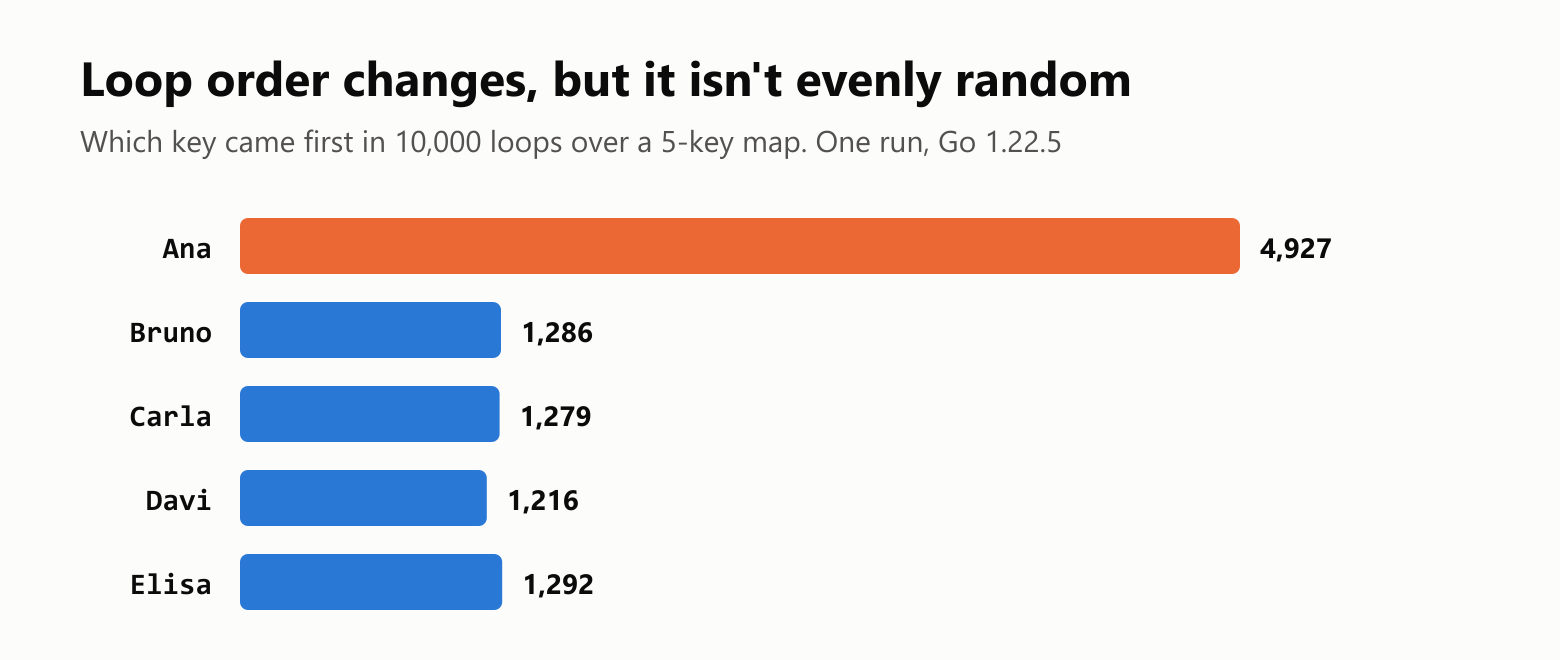
The same map, looped over 10,000 times, came out in 5 different orders. Go deliberately starts each loop at a random position, so that nobody can rely on the order. It isn't a fair shuffle, though. On Go 1.22, a small map keeps its entries in one bucket of 8 slots, and the loop starts at a random slot. Three of those slots are empty here and fall through to Ana, so Ana comes first in 4 of every 8 loops. This is an internal detail that later Go versions changed, so don't depend on it either: treat the order as unknown.
When you need a stable order, sort the keys yourself:
1package main
2
3import (
4	"fmt"
5	"sort"
6)
7
8func main() {
9	grades := map[string]int{"Carla": 8, "Ana": 9, "Bruno": 7}
10
11	names := make([]string, 0, len(grades))
12	for name := range grades {
13		names = append(names, name)
14	}
15	sort.Strings(names)
16
17	for _, name := range names {
18		fmt.Println(name, grades[name])
19	}
20}
Ana 9
Bruno 7
Carla 8fmt.Println already sorts the keys when it prints a map, which is why the outputs in this guide look tidy.
Maps are shared, not copied
A struct is copied when you assign it, but a map isn't. A map variable holds a pointer to the underlying table, so assigning it or passing it to a function shares that table:
1package main
2
3import (
4	"fmt"
5	"maps"
6)
7
8func addBonus(grades map[string]int) {
9	grades["Ana"]++
10}
11
12func main() {
13	first := map[string]int{"Ana": 1}
14
15	addBonus(first)
16	fmt.Println(first)
17
18	second := first
19	second["Ana"] = 2
20
21	third := maps.Clone(first)
22	third["Ana"] = 3
23
24	fmt.Println(first, second, third)
25	fmt.Println(maps.Equal(first, second), maps.Equal(first, third))
26}
map[Ana:2]
map[Ana:2] map[Ana:2] map[Ana:3]
true false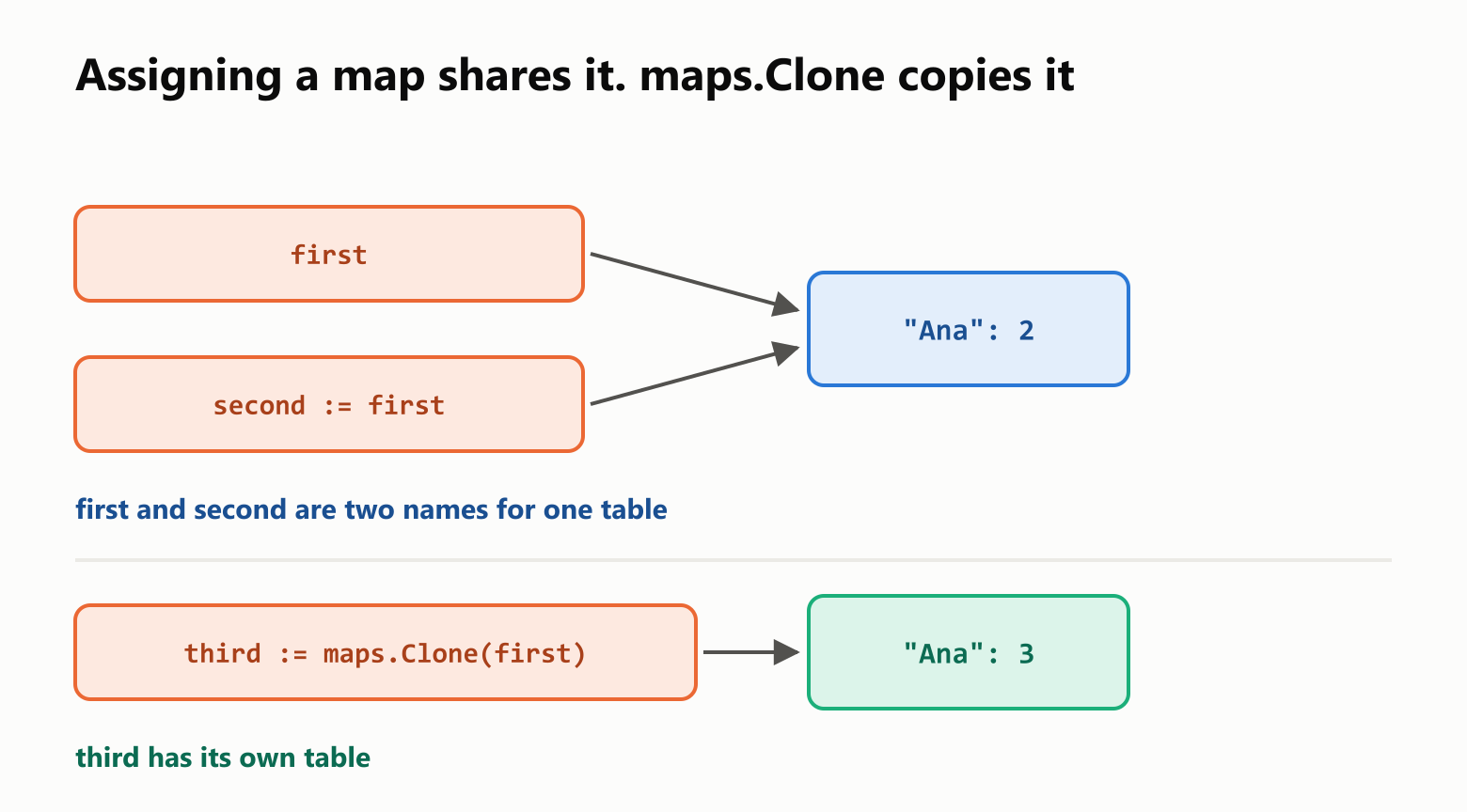
maps.Clone from the standard library makes a separate copy, and maps.Equal compares contents. You need maps.Equal because == doesn't work on maps:
1package main
2
3import "fmt"
4
5func main() {
6	first := map[string]int{"Ana": 9}
7	second := map[string]int{"Ana": 9}
8	fmt.Println(first == second)
9}
./main.go:8:14: invalid operation: first == second (map can only be compared to nil)What can be a key
A key must be a type that works with ==: strings, numbers, bools, pointers, arrays, and structs made of those. Slices, maps and functions can't be keys:
1package main
2
3import "fmt"
4
5func main() {
6	seats := map[[]string]int{}
7	fmt.Println(seats)
8}
./main.go:6:15: invalid map key type []stringValues have no such limit, and they can be any type at all.
Structs as values
There's one surprise when the values are structs. You can't change a field directly:
1package main
2
3import "fmt"
4
5type Student struct {
6	Grade int
7}
8
9func main() {
10	students := map[string]Student{"Ana": {Grade: 9}}
11	students["Ana"].Grade = 10
12	fmt.Println(students)
13}
./main.go:11:2: cannot assign to struct field students["Ana"].Grade in mapReading from a map gives you a copy, so changing it would be lost. You can either write the whole value back or store pointers:
1package main
2
3import "fmt"
4
5type Student struct {
6	Grade int
7}
8
9func main() {
10	students := map[string]Student{"Ana": {Grade: 9}}
11	student := students["Ana"]
12	student.Grade = 10
13	students["Ana"] = student
14	fmt.Println(students)
15
16	pointers := map[string]*Student{"Ana": {Grade: 9}}
17	pointers["Ana"].Grade = 10
18	fmt.Println(pointers["Ana"].Grade)
19}
map[Ana:{10}]
10Three patterns you'll use constantly
Counting. The zero value makes this short, because a new key starts at 0:
1package main
2
3import (
4	"fmt"
5	"strings"
6)
7
8func main() {
9	text := "the cat and the dog and the bird"
10
11	counts := map[string]int{}
12	for _, word := range strings.Fields(text) {
13		counts[word]++
14	}
15
16	fmt.Println(counts)
17}
map[and:2 bird:1 cat:1 dog:1 the:3]Grouping. The zero value of a slice is nil, and append handles that fine:
1package main
2
3import "fmt"
4
5func main() {
6	names := []string{"Ana", "Bruno", "Alice", "Bia"}
7
8	groups := map[string][]string{}
9	for _, name := range names {
10		letter := name[:1]
11		groups[letter] = append(groups[letter], name)
12	}
13
14	fmt.Println(groups)
15}
map[A:[Ana Alice] B:[Bruno Bia]]A set. Go has no set type, so a map from the item to bool does the job. A missing key reads as false:
1package main
2
3import "fmt"
4
5func main() {
6	seen := map[string]bool{}
7
8	for _, name := range []string{"Ana", "Bruno", "Ana"} {
9		if seen[name] {
10			fmt.Println("duplicate:", name)
11			continue
12		}
13		seen[name] = true
14	}
15
16	fmt.Println(len(seen))
17}
duplicate: Ana
2Maps and goroutines
Maps aren't safe for writing from several goroutines at once. When we tried it with eight goroutines, Go stopped the whole program with fatal error: concurrent map writes, and that's an error recover can't catch. Protect the map with a mutex:
1package main
2
3import (
4	"fmt"
5	"sync"
6)
7
8type SafeCounts struct {
9	lock   sync.Mutex
10	counts map[string]int
11}
12
13func (safe *SafeCounts) Add(key string) {
14	safe.lock.Lock()
15	defer safe.lock.Unlock()
16	safe.counts[key]++
17}
18
19func main() {
20	safe := &SafeCounts{counts: map[string]int{}}
21
22	var group sync.WaitGroup
23	for worker := 0; worker < 100; worker++ {
24		group.Add(1)
25		go func() {
26			defer group.Done()
27			safe.Add("visits")
28		}()
29	}
30	group.Wait()
31
32	fmt.Println(safe.counts)
33}map[visits:100](defer makes sure the unlock always happens. See How to Use defer in Go.)
Is a map always faster than a slice?
We measured it with testing.Benchmark on Go 1.22, looking up every string key in turn. One version scans a slice of key-value pairs, and the other uses a map:

| Elements | Scanning a slice | Map lookup |
|---|---|---|
| 5 | 10.59 ns | 12.96 ns |
| 10 | 16.85 ns | 10.21 ns |
| 100 | 126.38 ns | 10.40 ns |
| 1,000 | 1,175.53 ns | 13.32 ns |
| 10,000 | 11,329.19 ns | 27.52 ns |
The slice's time grows with its size, while the map barely moves. With 5 elements, the slice was actually about 20% faster, because hashing a key has a fixed cost. By 10 elements the map was ahead, and at 10,000 it was about 400 times faster. The map's small rise at the end most likely comes from the data no longer fitting as well in the processor's cache.
So don't reach for a map only for speed when you have a handful of items, but do use one as soon as the collection can grow.
The size hint matters as well. Filling a map with 100,000 integers took a median of 5.34 ms starting from an empty make(map[int]int), and 3.20 ms with make(map[int]int, 100000), about 40% less, because the map never had to grow along the way.
Your turn: practice
Try these before peeking at the answers. Run each with go run ..
Exercise 1: Predict the output (warm-up). What does this print?
1package main
2
3import (
4	"fmt"
5	"maps"
6)
7
8func main() {
9	first := map[string]int{"a": 1}
10	second := first
11	third := maps.Clone(first)
12
13	second["a"] = 2
14	third["a"] = 3
15
16	fmt.Println(first["a"], second["a"], third["a"], first["b"])
17}
Exercise 2: Letter count. Count how many times each letter appears in "banana", and print the map. Hint: range over a string gives you runes, and string(letter) turns one back into a string.
Exercise 3: Predict the stock. What does this print, and why?
1package main
2
3import "fmt"
4
5func main() {
6	stock := map[string]int{"apple": 0}
7
8	quantity, found := stock["apple"]
9	fmt.Println(quantity, found)
10
11	quantity, found = stock["pear"]
12	fmt.Println(quantity, found)
13
14	delete(stock, "pear")
15	fmt.Println(len(stock))
16}
Exercise 4: Invert a map. Write invert(numbers map[string]int) map[int]string, which swaps keys and values. Try it with {"one": 1, "two": 2}.
Exercise 5: Group anagrams (challenge). Two words are anagrams when they have the same letters. Group listen, silent, cat, enlist and act into a map[string][]string, using each word's letters in sorted order as the key.
Quick quiz
- What happens when you read a key that doesn't exist?
- How do you tell a missing key from a value of zero?
- What happens when you write to a
nilmap? - Why shouldn't you rely on the order of a
rangeover a map? - Does assigning a map to another variable copy it?
- Can a slice be a map key? Can it be a map value?
Answers
Exercise 1: first and second share one table, while third has its own. The key "b" doesn't exist, so it reads as 0:
2 2 3 0Exercise 2: The zero value does the work, as in the counting pattern:
1package main
2
3import "fmt"
4
5func main() {
6	counts := map[string]int{}
7	for _, letter := range "banana" {
8		counts[string(letter)]++
9	}
10	fmt.Println(counts)
11}
map[a:3 b:1 n:2]Exercise 3: "apple" exists with the value 0, "pear" doesn't exist, and deleting a missing key does nothing:
0 true
0 false
1
Exercise 4: Create the new map with the right size, then swap each pair. If two keys shared a value, one of them would be lost:
1package main
2
3import "fmt"
4
5func invert(numbers map[string]int) map[int]string {
6	inverted := make(map[int]string, len(numbers))
7	for name, number := range numbers {
8		inverted[number] = name
9	}
10	return inverted
11}
12
13func main() {
14	fmt.Println(invert(map[string]int{"one": 1, "two": 2}))
15}
map[1:one 2:two]Exercise 5: Anagrams give the same key once their letters are sorted, so they land in the same group:
1package main
2
3import (
4	"fmt"
5	"sort"
6)
7
8func sortedLetters(word string) string {
9	letters := []byte(word)
10	sort.Slice(letters, func(first, second int) bool {
11		return letters[first] < letters[second]
12	})
13	return string(letters)
14}
15
16func main() {
17	words := []string{"listen", "silent", "cat", "enlist", "act"}
18
19	groups := map[string][]string{}
20	for _, word := range words {
21		key := sortedLetters(word)
22		groups[key] = append(groups[key], word)
23	}
24
25	fmt.Println(groups)
26}
map[act:[cat act] eilnst:[listen silent enlist]]Quiz: (1) You get the zero value of the value type, with no error. (2) With the comma ok form: value, found := grades[key]. (3) The program panics. Reading from one is fine. (4) Go changes it on purpose, and it can vary from one loop to the next. (5) No. Both variables share the same table, and maps.Clone makes a real copy. (6) A slice can't be a key, because it doesn't work with ==, but it can be a value.
Cheat sheet
| I want to… | Write |
|---|---|
| Create an empty map | grades := make(map[string]int) |
| Create one with contents | grades := map[string]int{"Ana": 9} |
| Reserve room | make(map[string]int, 1000) |
| Add or update | grades["Ana"] = 9 |
| Read | grades["Ana"] |
| Check whether a key exists | grade, found := grades["Ana"] |
| Remove a key | delete(grades, "Ana") |
| Remove every key | clear(grades) |
| Count the keys | len(grades) |
| Loop | for name, grade := range grades { … } |
| Loop in a stable order | Collect the keys, then sort.Strings(names) |
| Copy | maps.Clone(grades) |
| Compare | maps.Equal(first, second) |
| Count things | counts[word]++ |
| Group things | groups[key] = append(groups[key], item) |
| Make a set | seen := map[string]bool{} |
Wrapping up
A map answers "what's the value for this key?" quickly:
map[KeyType]ValueTypelinks keys to values, using a hash table under the hood.- Create it before writing. Writing to a
nilmap panics, while reading from one is fine. - Missing keys give the zero value. Use
value, found := …to tell the difference. - Loop order isn't reliable. Sort the keys when the order matters.
- Maps are shared, not copied. Use
maps.Clonefor a copy andmaps.Equalto compare. - Keys must work with
==, so slices can't be keys. - You can't change a struct field inside a map directly. Write the value back, or store pointers.
- Counting, grouping and sets are the patterns you'll use most.
- Concurrent writes need a mutex, or the program crashes.
- Maps beat slices as collections grow: 27.52 ns vs. 11,329.19 ns at 10,000 elements, though a slice won at 5.
That's the end of the Go series. Go back through it, starting from Your First Program in Go, or revisit Structs in Go and Pointers in Go.
Read next

Ruby Blocks and Iterators: Write Your Own
Learn how Ruby methods receive blocks, pass values with yield, handle a missing block, and return an Enumerator. Build and run your own iterator.
 nbkhope
C++ std::vector: Size, Capacity, and Safe Growth
Learn how std::vector grows in C++: the difference between size and capacity, when reserve helps, why resize is different, and how growth can invalidate references.
nbkhope
How to Handle Errors in Go: A Hands-On Guide
Learn Go's everyday error pattern with runnable examples: return an error, check it, add context with %w, and recognize a missing file with errors.Is.
nbkhope
Comments
Be kind and specific. Comments with links from new accounts appear after a moderator reviews them.