
Pointers in Go: A Visual, Hands-On Guide
Learn Go pointers visually: & and *, nil and the panic it can cause, changing values inside functions, new, pointers to structs, pointer receivers, why slices and maps behave differently, the for loop trap, a real benchmark, and exercises.


On this page
Every variable in your program lives somewhere in memory, and that place has an address. A pointer is a variable that stores one of those addresses. With it, two parts of your program can work on the same value instead of on separate copies.
Pointers have a scary reputation, mostly earned in languages like C. Go's are much tamer: there are only two operators to learn, there's no pointer arithmetic, and the garbage collector frees memory for you.
In this guide you'll learn those two operators, what nil means, how pointers let a function change your variables, and how they work with structs and methods. You'll also see why slices and maps act differently, and a benchmark that may change your mind about when pointers are faster. Exercises wrap it up.
All outputs below come from real runs with Go 1.22 on Windows. New to Go? Start with Your First Program in Go.
Your first pointer
1package main
2
3import "fmt"
4
5func main() {
6	var score int = 37
7	var pointer *int = &score
8
9	fmt.Println("score:", score)
10	fmt.Println("pointer:", pointer)
11	fmt.Println("*pointer:", *pointer)
12
13	*pointer = 62
14	fmt.Println("score is now:", score)
15}1score: 37
2pointer: 0xc00000a0d8
3*pointer: 37
4score is now: 62(The address will be different on your machine, and may change from run to run.)
Three new pieces of syntax appear here:
*intin a type means "a pointer to anint".&scoremeans "the address ofscore".&is the address-of operator.*pointerin an expression means "the value at this address". Following a pointer like this is called dereferencing.
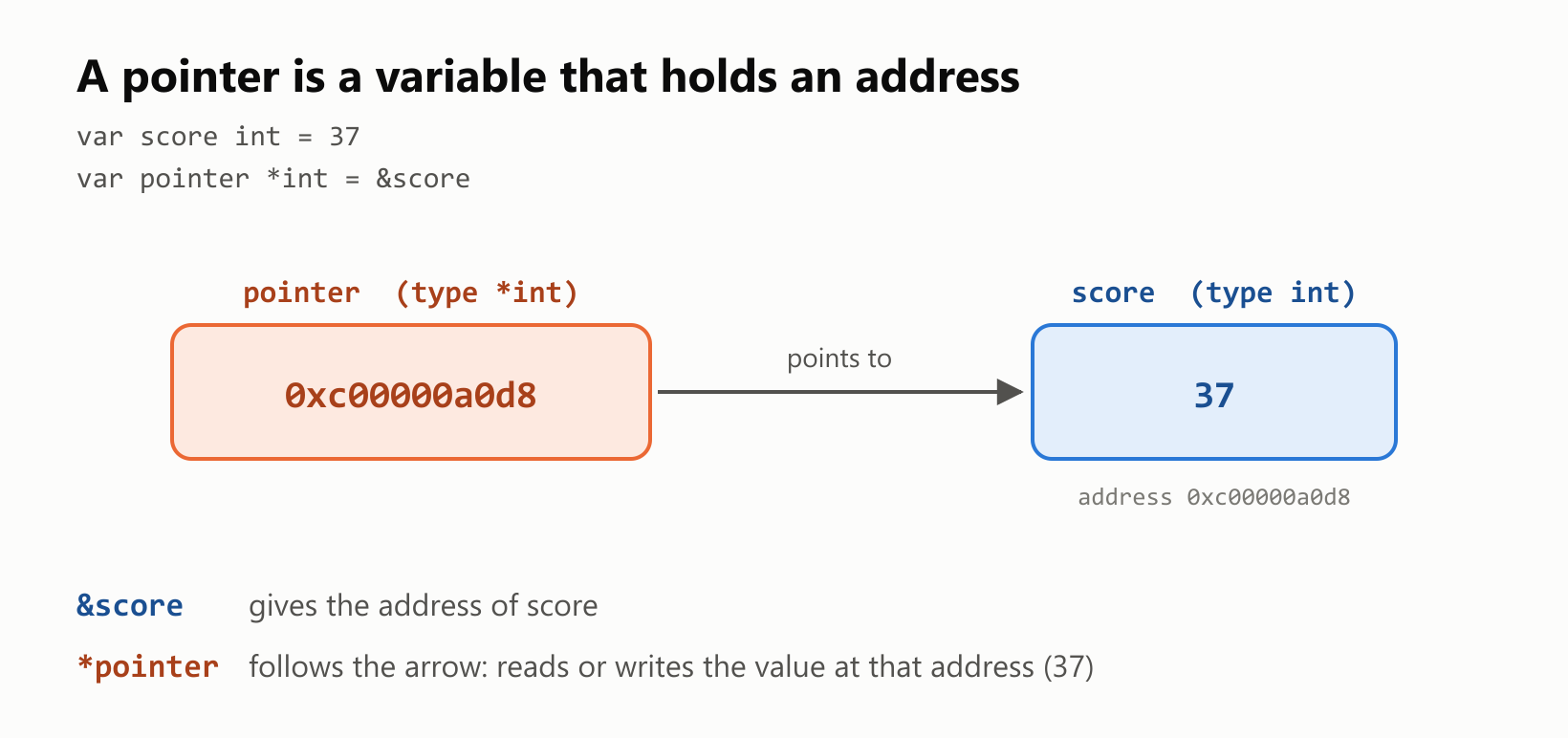
The last assignment, *pointer = 62, never mentions score, yet score changed. There's only one integer here, and the pointer is a second way to reach it.
Most of the time you'd let Go infer the type and write pointer := &score, as the rest of this guide does.
A pointer versus a copy
Assigning one variable to another copies the value. Taking its address doesn't:
1package main
2
3import "fmt"
4
5func main() {
6	original := 10
7
8	copied := original
9	copied = 20
10	fmt.Println("copied:", copied, "original:", original)
11
12	pointer := &original
13	*pointer = 30
14	fmt.Println("*pointer:", *pointer, "original:", original)
15}
copied: 20 original: 10
*pointer: 30 original: 30Changing copied left original alone, because they're two separate integers. Writing through pointer changed original, because the pointer leads to it.
nil: a pointer to nothing
A pointer you haven't set has the zero value nil, which means it points to nothing. Dereferencing nil crashes the program:
1package main
2
3import "fmt"
4
5func main() {
6	var pointer *int
7	fmt.Println(pointer)
8	fmt.Println(pointer == nil)
9	fmt.Println(*pointer)
10}
<nil>
true
panic: runtime error: invalid memory address or nil pointer dereferenceThis is the most common pointer bug in Go. It compiles fine and fails only when the program runs, so check for nil whenever a pointer might not be set.
That same nil is also useful. It can mean "no value", which is different from a zero:
1package main
2
3import "fmt"
4
5func describe(age *int) string {
6	if age == nil {
7		return "age not provided"
8	}
9	return fmt.Sprintf("age %d", *age)
10}
11
12func main() {
13	age := 0
14	fmt.Println(describe(&age))
15	fmt.Println(describe(nil))
16}
age 0
age not providedA plain int couldn't tell "the age is 0" apart from "nobody told us the age". A *int can.
Letting a function change your variable
Go always passes arguments by value: the function receives a copy. So how does a function change a variable that belongs to its caller? You give it the variable's address:
1package main
2
3import "fmt"
4
5func doubleCopy(number int) {
6	number *= 2
7}
8
9func doubleInPlace(number *int) {
10	*number *= 2
11}
12
13func main() {
14	value := 21
15
16	doubleCopy(value)
17	fmt.Println("after doubleCopy:", value)
18
19	doubleInPlace(&value)
20	fmt.Println("after doubleInPlace:", value)
21}
after doubleCopy: 21
after doubleInPlace: 42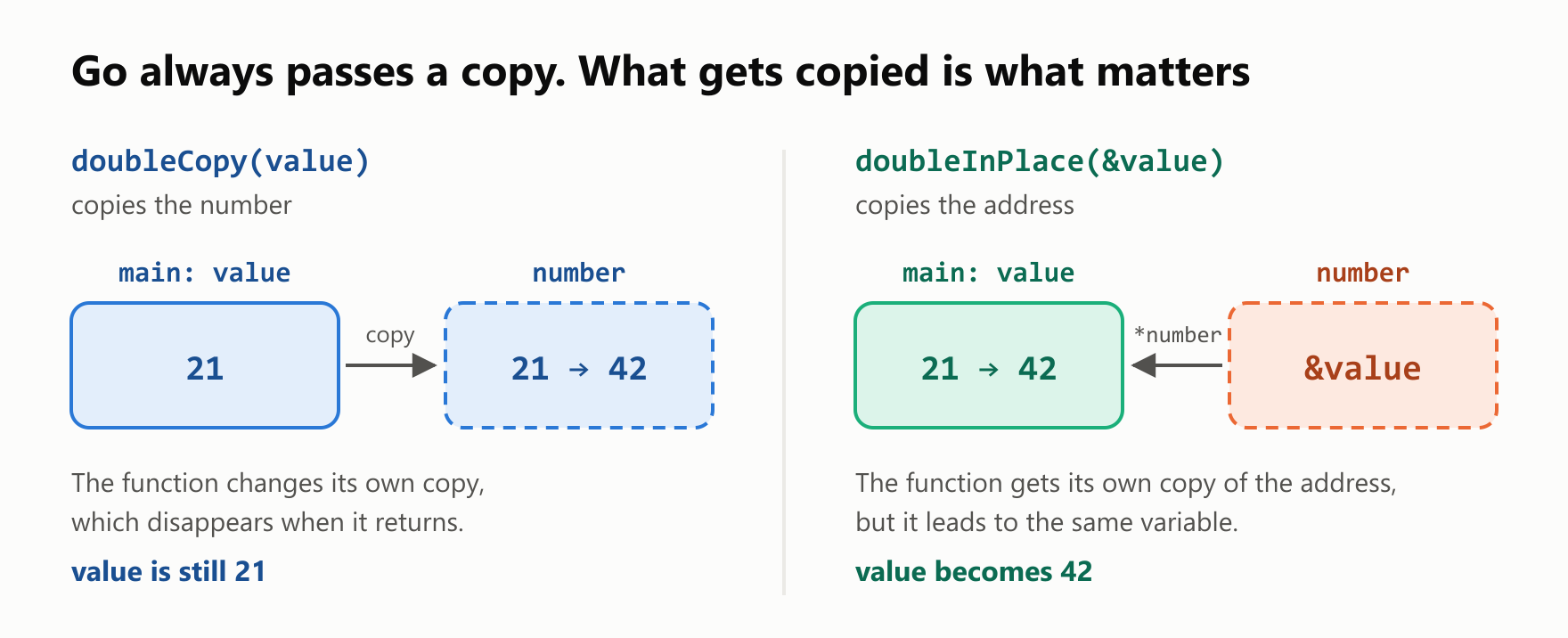
doubleInPlace also receives a copy, but it's a copy of the address. That address still leads to the caller's variable, so *number *= 2 changes the original.
A classic example is swapping two variables:
1package main
2
3import "fmt"
4
5func swap(first, second *int) {
6	*first, *second = *second, *first
7}
8
9func main() {
10	left, right := 1, 2
11	swap(&left, &right)
12	fmt.Println(left, right)
13}
2 1Creating pointers: new, and returning local variables
The built-in new function creates a zero-valued variable and gives you a pointer to it:
1package main
2
3import "fmt"
4
5func main() {
6	counter := new(int)
7	fmt.Println(*counter)
8
9	*counter = 5
10	*counter++
11	fmt.Println(*counter)
12}
0
6You won't see new very often, because & usually reads better. In C, returning the address of a local variable is a serious bug. In Go, it's completely safe:
1package main
2
3import "fmt"
4
5func newCounter() *int {
6	count := 100
7	return &count
8}
9
10func main() {
11	first := newCounter()
12	second := newCounter()
13	*first += 1
14	fmt.Println(*first, *second)
15}
101 100The compiler notices that count outlives the function, so it allocates count on the heap, the long-lived area of memory that the garbage collector manages. This decision is called escape analysis, and you can watch it happen:
go build -gcflags=-m ../main.go:6:2: moved to heap: countEach call creates its own count, which is why first and second end up with different values.
Pointers to structs
Structs are where you'll use pointers most. Go lets you skip the * when you reach a field through a pointer:
1package main
2
3import "fmt"
4
5type Player struct {
6	Name  string
7	Level int
8}
9
10func levelUp(player *Player) {
11	player.Level++
12}
13
14func main() {
15	hero := Player{Name: "Ana", Level: 1}
16	levelUp(&hero)
17	fmt.Println(hero)
18
19	pointer := &hero
20	fmt.Println(pointer.Name, (*pointer).Name)
21	fmt.Println(pointer)
22	fmt.Printf("%+v\n", *pointer)
23}1{Ana 2}
2Ana Ana
3&{Ana 2}
4{Name:Ana Level:2}pointer.Name is shorthand for (*pointer).Name, and the short form is what everyone writes. Printing a pointer to a struct shows &{…} instead of a raw address.
Pointer receivers on methods
The same value-or-pointer choice applies to methods. A receiver is the variable before the method's name, and it's copied just like an argument:
1package main
2
3import "fmt"
4
5type Counter struct {
6	value int
7}
8
9func (counter Counter) IncrementCopy() {
10	counter.value++
11}
12
13func (counter *Counter) Increment() {
14	counter.value++
15}
16
17func main() {
18	counter := Counter{}
19
20	counter.IncrementCopy()
21	fmt.Println("after IncrementCopy:", counter.value)
22
23	counter.Increment()
24	fmt.Println("after Increment:", counter.value)
25}
after IncrementCopy: 0
after Increment: 1IncrementCopy changed a copy that was thrown away. Increment has a pointer receiver, so it changed the real counter. Notice that the call is just counter.Increment(): Go takes the address for you.
A good rule: if a method needs to change its receiver, use a pointer receiver. If any method on a type uses one, use it on all of that type's methods for consistency.
Slices and maps: already sharing
Slices and maps look like they break the rules. Here, functions change them with no pointer in sight, until append comes along:
1package main
2
3import "fmt"
4
5func changeFirst(numbers []int) {
6	numbers[0] = 99
7}
8
9func appendOne(numbers []int) {
10	numbers = append(numbers, 4)
11}
12
13func appendOneThroughPointer(numbers *[]int) {
14	*numbers = append(*numbers, 4)
15}
16
17func addEntry(ages map[string]int) {
18	ages["Ana"] = 30
19}
20
21func main() {
22	numbers := []int{1, 2, 3}
23
24	changeFirst(numbers)
25	fmt.Println(numbers)
26
27	appendOne(numbers)
28	fmt.Println(numbers)
29
30	appendOneThroughPointer(&numbers)
31	fmt.Println(numbers)
32
33	ages := map[string]int{}
34	addEntry(ages)
35	fmt.Println(ages)
36}1[99 2 3]
2[99 2 3]
3[99 2 3 4]
4map[Ana:30]Arguments are still copied, but a slice is a small value that contains a pointer to an underlying array, plus a length and a capacity. The copy points to the same array, so changeFirst changes elements the caller can see. appendOne, though, only updated the length in its own copy, so the caller's slice stayed at three elements.
In practice you rarely need a *[]int. The usual Go style is to return the new slice, which is why you write numbers = append(numbers, 4). A map also holds a pointer internally, so you don't need a pointer to a map to add entries.
Two loop details
Changing elements in a range loop. The range variable is a copy of the element, so changing it does nothing to the slice. Take a pointer to the element instead:
1package main
2
3import "fmt"
4
5type Player struct {
6	Name  string
7	Level int
8}
9
10func main() {
11	players := []Player{{"Ana", 1}, {"Bruno", 1}}
12
13	for _, player := range players {
14		player.Level = 10
15	}
16	fmt.Println(players)
17
18	for index := range players {
19		player := &players[index]
20		player.Level = 10
21	}
22	fmt.Println(players)
23}
[{Ana 1} {Bruno 1}]
[{Ana 10} {Bruno 10}]Taking the address of a loop variable. What does this print?
1package main
2
3import "fmt"
4
5func main() {
6	var pointers []*int
7	for number := 1; number <= 3; number++ {
8		pointers = append(pointers, &number)
9	}
10	for _, pointer := range pointers {
11		fmt.Print(*pointer, " ")
12	}
13	fmt.Println()
14}
1 2 3 That's the answer since Go 1.22, where each pass through the loop gets its own number. The version comes from the go line in your go.mod, and with go 1.21 the same program printed 4 4 4, because all three pointers shared one variable. You may still run into that bug in older code.
What Go doesn't let you do
No pointer arithmetic. In C you can add to a pointer to walk through memory. Go refuses:
1package main
2
3import "fmt"
4
5func main() {
6	numbers := [3]int{10, 20, 30}
7	pointer := &numbers[0]
8	pointer++
9	fmt.Println(*pointer)
10}
./main.go:8:2: invalid operation: pointer++ (non-numeric type *int)This rules out a whole family of memory bugs. (The unsafe package can bypass this, but as the name warns, ordinary code stays away from it.)
No address of a constant. A pointer has to lead to a variable:
1package main
2
3import "fmt"
4
5func main() {
6	pointer := &42
7	fmt.Println(*pointer)
8}
./main.go:6:14: invalid operation: cannot take address of 42 (untyped int constant)Store the number in a variable first. The exception is a composite literal such as &Player{Name: "Ana"}, which is allowed and very common.
Are pointers faster?
A common belief is that passing a pointer is always faster because it avoids a copy. We measured it with testing.Benchmark on Go 1.22, comparing a 16-byte struct and a 1 KiB struct:
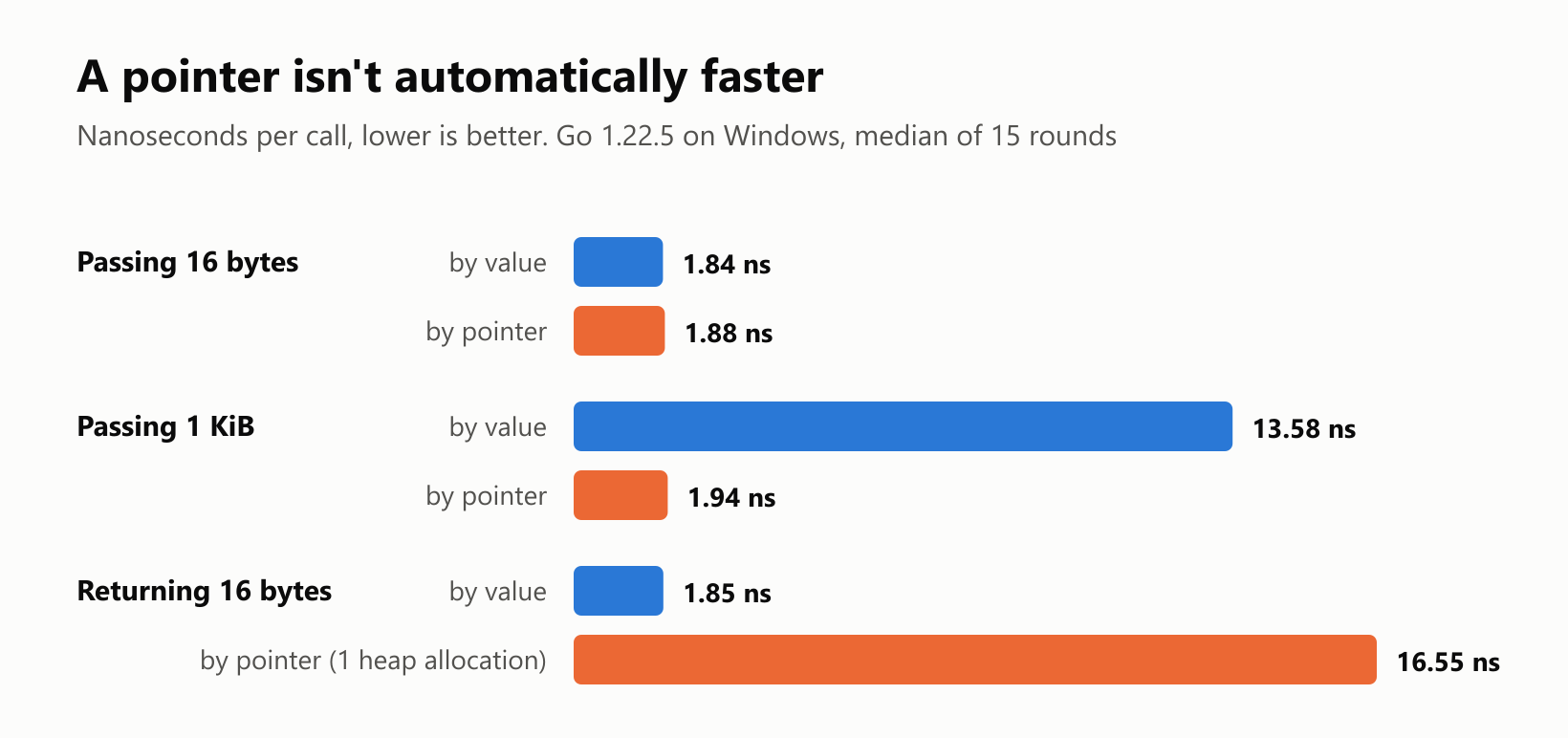
| What | By value | By pointer |
|---|---|---|
| Passing a 16-byte struct | 1.84 ns | 1.88 ns |
| Passing a 1 KiB struct | 13.58 ns | 1.94 ns |
| Returning a 16-byte struct | 1.85 ns | 16.55 ns |
The results show three different stories:
- Small values: no measurable difference. Copying 16 bytes is nearly free.
- Large values: the pointer wins by about 7 times, because the copy has real work to do.
- Returning a new value: the pointer lost by about 9 times. In this test the value escaped to the heap, which cost one allocation per call, plus work for the garbage collector later.
So choose based on what your code means. Use a pointer when a function needs to change the value, when "no value" must be possible, or when the struct is large. Otherwise, a plain value is simpler, and often just as fast.
These are tiny, artificial functions, so treat the numbers as a rough guide and measure your own code before optimizing it.
Your turn: practice
Try these before peeking at the answers. Run each with go run ..
Exercise 1: Predict the output (warm-up). What does this print?
1package main
2
3import "fmt"
4
5func main() {
6	number := 5
7	pointer := &number
8	other := pointer
9
10	*other = 8
11	number++
12
13	fmt.Println(number, *pointer, *other)
14}
Exercise 2: Reset. Write a reset(number *int) function that sets the caller's variable to 0, and try it from main.
Exercise 3: Predict the arguments. What does this print, and why?
1package main
2
3import "fmt"
4
5func increaseAll(numbers []int, amount *int) {
6	for index := range numbers {
7		numbers[index] += *amount
8	}
9	*amount = 0
10}
11
12func main() {
13	numbers := []int{1, 2, 3}
14	amount := 10
15	increaseAll(numbers, &amount)
16	fmt.Println(numbers, amount)
17}
Exercise 4: A safe default. Write valueOr(pointer *int, fallback int) int, which returns the value the pointer leads to, or fallback if the pointer is nil.
Exercise 5: A linked list (challenge). Define a Node struct with a Value int and a Next *Node. Write push(head *Node, value int) *Node, which returns a new first node. Push 1, 2 and 3, then walk the list and print each value.
Quick quiz
- What's the difference between
*in*intand*in*pointer? - What's the zero value of a pointer, and what happens when you dereference it?
- Does Go pass arguments by value or by reference?
- Is it safe to return the address of a local variable in Go?
- Why can a function change a slice's elements without a pointer, but not its length?
Answers
Exercise 1: pointer and other both lead to number, so there's a single integer. It becomes 8, then 9, and all three expressions read it:
9 9 9Exercise 2: Write through the pointer, and pass the address at the call:
1package main
2
3import "fmt"
4
5func reset(number *int) {
6	*number = 0
7}
8
9func main() {
10	points := 75
11	reset(&points)
12	fmt.Println(points)
13}0Exercise 3: The slice's copy shares its underlying array, so the elements change. The pointer leads to amount, so the function resets it to 0 after using it:
[11 12 13] 0Exercise 4: Check for nil before dereferencing:
1package main
2
3import "fmt"
4
5func valueOr(pointer *int, fallback int) int {
6	if pointer == nil {
7		return fallback
8	}
9	return *pointer
10}
11
12func main() {
13	number := 7
14	fmt.Println(valueOr(&number, 100))
15	fmt.Println(valueOr(nil, 100))
16}
7
100Exercise 5: Each new node points to the old first node, and nil marks the end of the list. Pushing to the front reverses the order:
1package main
2
3import "fmt"
4
5type Node struct {
6	Value int
7	Next  *Node
8}
9
10func push(head *Node, value int) *Node {
11	return &Node{Value: value, Next: head}
12}
13
14func main() {
15	var head *Node
16	for number := 1; number <= 3; number++ {
17		head = push(head, number)
18	}
19	for node := head; node != nil; node = node.Next {
20		fmt.Print(node.Value, " ")
21	}
22	fmt.Println()
23}
3 2 1 Quiz: (1) In *int, it's part of a type: "pointer to an int". In *pointer, it's an operator that follows the pointer to its value. (2) nil; dereferencing it causes a panic. (3) By value, always. Passing a pointer copies the address. (4) Yes. Escape analysis moves the variable to the heap, so it stays valid. (5) The copied slice shares the caller's underlying array, but its length is stored in the copy itself.
Cheat sheet
| I want to… | Write |
|---|---|
Declare a pointer to an int | var pointer *int |
| Get a variable's address | pointer := &score |
| Read the value | *pointer |
| Change the value | *pointer = 62 |
| Check for no value | if pointer == nil { … } |
| Let a function change a variable | func double(number *int), called with double(&value) |
| Create a zero-valued variable | counter := new(int) |
| Create a struct and get a pointer | hero := &Player{Name: "Ana"} |
| Reach a field through a pointer | hero.Name |
| Let a method change its receiver | func (counter *Counter) Increment() |
| Change slice elements in a loop | player := &players[index] |
| See what moves to the heap | go build -gcflags=-m . |
Wrapping up
A pointer is an address, and a small set of rules covers how it behaves:
&gets an address, and*follows it. In a type,*intmeans "pointer to anint".- The zero value is
nil. Dereferencing it panics, but it's also a handy way to say "no value". - Go always passes copies. Passing a pointer copies the address, which is how a function changes your variable.
- Returning the address of a local variable is safe, because escape analysis moves it to the heap.
- Fields and methods are convenient:
pointer.Nameandcounter.Increment()handle the*and&for you. - Slices and maps already share their data, though a slice's length belongs to each copy.
- Pointers aren't automatically faster: 1.94 ns vs. 13.58 ns for a 1 KiB struct, but 16.55 ns vs. 1.85 ns when returning a small one that escapes.
Back through the series: How to Use defer in Go, Two-Dimensional Slices in Go and Your First Program in Go. Next up: Structs in Go.
Read next

Ruby Blocks and Iterators: Write Your Own
Learn how Ruby methods receive blocks, pass values with yield, handle a missing block, and return an Enumerator. Build and run your own iterator.
 nbkhope
C++ std::vector: Size, Capacity, and Safe Growth
Learn how std::vector grows in C++: the difference between size and capacity, when reserve helps, why resize is different, and how growth can invalidate references.
nbkhope
How to Handle Errors in Go: A Hands-On Guide
Learn Go's everyday error pattern with runnable examples: return an error, check it, add context with %w, and recognize a missing file with errors.Is.
nbkhope
Comments
Be kind and specific. Comments with links from new accounts appear after a moderator reviews them.