
The Parts of Web Development: A Visual, Hands-On Guide
Learn the parts of web development visually: what frontend and backend mean, how they talk, a tiny real app built with both, why the frontend is public, why you can't trust it, what full-stack developers do, how to choose, and exercises.


On this page
Web development is usually divided into two parts: the frontend and the backend. The frontend is what the user sees. It's in front of them, which is where the name comes from. The backend is what stores, processes and looks after the data that keeps the app working. It's behind what the user sees.
That sounds simple, and the split explains a lot about how the web works: who writes what, what can be hacked, and what a job title really means.
In this guide you'll see both parts and how they talk, build a tiny real app with each one, and then try to break it. You'll find out why nothing in the frontend is secret, and why one bad request can bring down a server that looks fine. You'll finish with the three kinds of web developer and how to choose between them. Exercises wrap it up.
All outputs below come from real runs with Node.js 26 and Chrome on Windows.
Two sides of one app
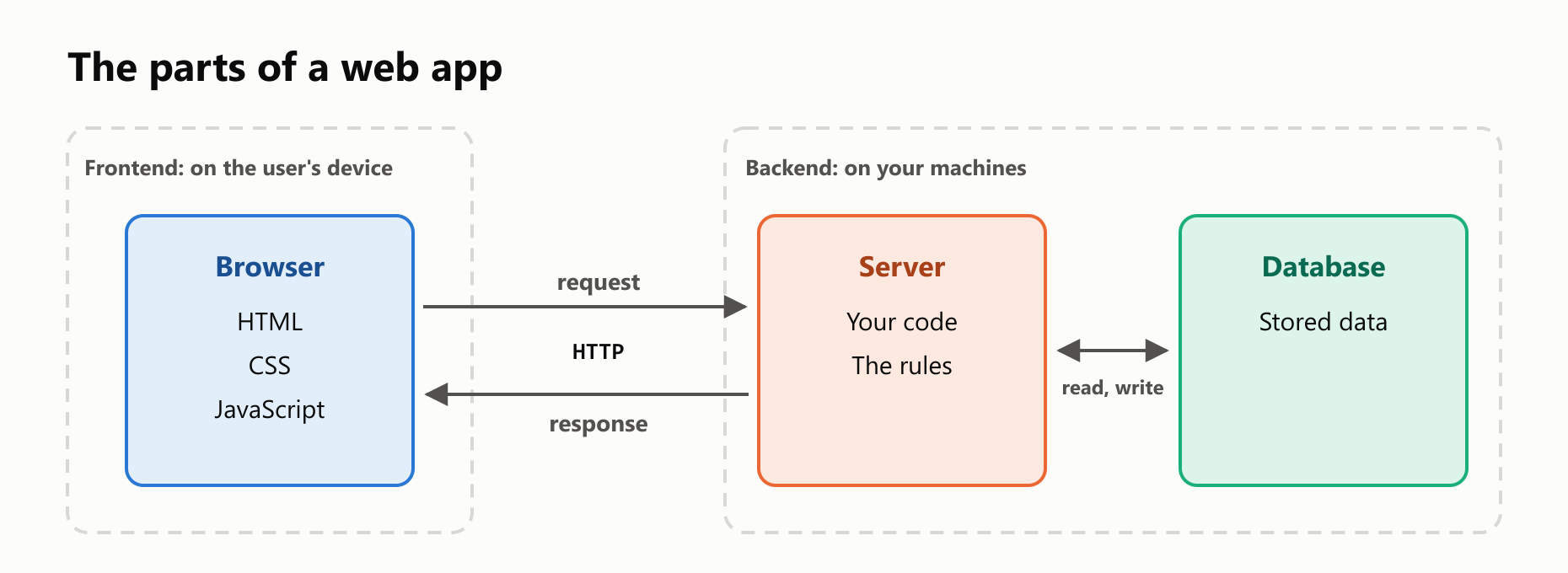
Think of a restaurant. The dining room is what customers see: the tables, the menu, the waiter. The kitchen is where the food is really made, and the pantry is where the ingredients are kept. Customers never walk into the kitchen. They give their order to the waiter, and a plate comes back.
A web app has the same shape:
The frontend
The frontend is the graphical part of a website or app, and it runs in the user's browser. It's built from three languages, each with one job:
- HTML defines the structure: this is a heading, this is a button.
- CSS defines the appearance: colors, sizes and layout.
- JavaScript defines the behavior: what happens when you click.
The backend
The backend is everything behind the scenes. It runs on machines the company controls, and the user never sees it directly. It has two main parts:
- A server: a program that waits for requests and answers them. It can be written in almost any language, such as JavaScript, Python, Java, Go or PHP.
- A database: where the data is stored, so that it survives after the program stops.
The backend decides who can do what, and it holds the rules of the business and the data everyone shares.
How they talk
The two sides run on different computers, so they talk over the network. The frontend sends an HTTP request, and the backend sends back a response. For data, the format is usually JSON, which is text that looks like a JavaScript object. A set of addresses that a backend offers for this is called an API.
The article What Happens When You Visit a Website? follows that trip in detail. Let's see it in a real app instead.
Build a tiny app
Here's a complete task list with both parts, in two files. You need a recent version of Node.js, which includes everything used here, even the database. Create a new folder, and save this as index.html. This is the whole frontend:
1<!doctype html>
2<html lang="en">
3  <head>
4    <meta charset="utf-8">
5    <title>My Tasks</title>
6    <style>
7      body { font-family: sans-serif; max-width: 400px; margin: 40px auto; }
8      ul { padding: 0; }
9      li { padding: 8px; background: #e3eefb; margin-bottom: 8px; list-style: none; }
10    </style>
11  </head>
12  <body>
13    <h1>My Tasks</h1>
14    <form id="form">
15      <input id="title" required maxlength="50" placeholder="New task">
16      <button>Add</button>
17    </form>
18    <ul id="list"></ul>
19    <script>
20      const list = document.querySelector("#list");
21      const titleInput = document.querySelector("#title");
22
23      function show(task) {
24        const item = document.createElement("li");
25        item.textContent = task.title;
26        list.append(item);
27      }
28
29      async function load() {
30        const response = await fetch("/api/tasks");
31        const tasks = await response.json();
32        tasks.forEach(show);
33      }
34
35      document.querySelector("#form").addEventListener("submit", async (event) => {
36        event.preventDefault();
37        const response = await fetch("/api/tasks", {
38          method: "POST",
39          headers: { "Content-Type": "application/json" },
40          body: JSON.stringify({ title: titleInput.value }),
41        });
42        show(await response.json());
43        titleInput.value = "";
44      });
45
46      load();
47    </script>
48  </body>
49</html>
You can spot all three languages: the HTML structure, the CSS in <style>, and the JavaScript in <script>. fetch is how the frontend talks to the backend.
Now save this as server.js. This is the whole backend:
1const http = require("node:http");
2const fs = require("node:fs");
3const { DatabaseSync } = require("node:sqlite");
4
5const database = new DatabaseSync("tasks.db");
6database.exec("CREATE TABLE IF NOT EXISTS tasks (id INTEGER PRIMARY KEY, title TEXT)");
7
8function sendJson(response, status, data) {
9  response.writeHead(status, { "Content-Type": "application/json" });
10  response.end(JSON.stringify(data));
11}
12
13function addTask(request, response) {
14  let body = "";
15  request.on("data", (chunk) => {
16    body += chunk;
17  });
18  request.on("end", () => {
19    const { title } = JSON.parse(body);
20    const result = database.prepare("INSERT INTO tasks (title) VALUES (?)").run(title);
21    sendJson(response, 201, { id: Number(result.lastInsertRowid), title });
22  });
23}
24
25const server = http.createServer((request, response) => {
26  if (request.url === "/") {
27    response.writeHead(200, { "Content-Type": "text/html" });
28    response.end(fs.readFileSync("index.html"));
29  } else if (request.url === "/api/tasks" && request.method === "GET") {
30    sendJson(response, 200, database.prepare("SELECT id, title FROM tasks").all());
31  } else if (request.url === "/api/tasks" && request.method === "POST") {
32    addTask(request, response);
33  } else {
34    sendJson(response, 404, { error: "Not found" });
35  }
36});
37
38server.listen(3000, () => console.log("Running at http://localhost:3000"));
The server answers three kinds of request: it sends the page, it lists the tasks, and it adds a task. Start it, and leave that terminal open:
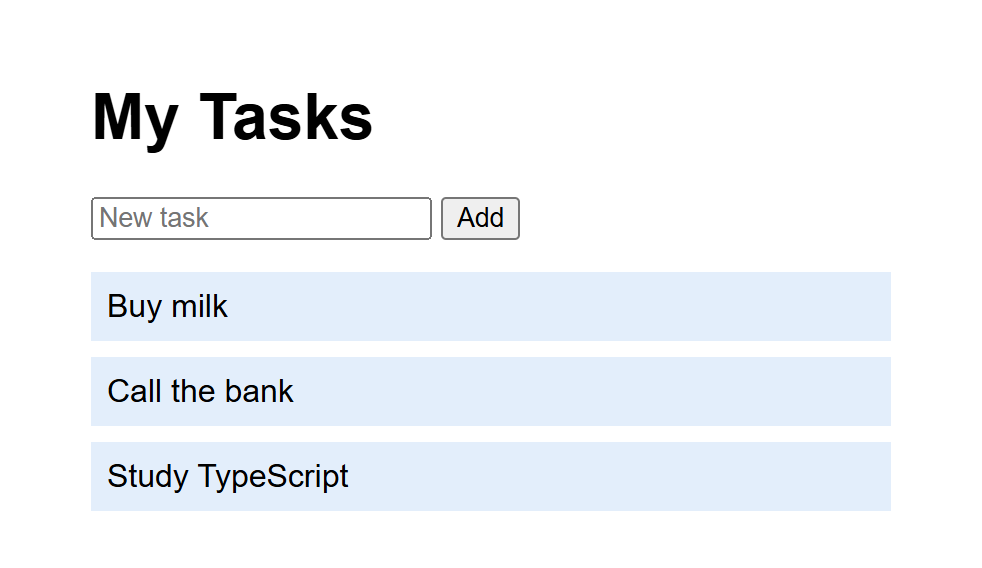
node server.jsRunning at http://localhost:3000Open http://localhost:3000 in your browser, and add some tasks:
Watch them talk
You can play the part of the frontend yourself with curl, a tool that sends requests from the terminal. Run these in a second terminal. They're written for Git Bash, macOS or Linux. Here's what the browser's fetch sent when you added a task, with -i to show the whole response:
curl -i -X POST http://localhost:3000/api/tasks -d '{"title":"Buy milk"}'1HTTP/1.1 201 Created
2Content-Type: application/json
3Date: Sat, 07 Nov 2026 01:36:49 GMT
4Connection: keep-alive
5Keep-Alive: timeout=5
6Transfer-Encoding: chunked
7
8{"id":1,"title":"Buy milk"}The status 201 means the task was created. Asking for the list gives back JSON, and no page at all:
curl http://localhost:3000/api/tasks[{"id":1,"title":"Buy milk"},{"id":2,"title":"Call the bank"}]This is the key idea. The backend doesn't know or care about buttons and colors. It deals in data, and the frontend decides how that data looks.
Stop the server with Ctrl+C, start it again, and repeat that last command. The tasks are all still there, because they live in the tasks.db file. That's what the database is for.
Follow one click
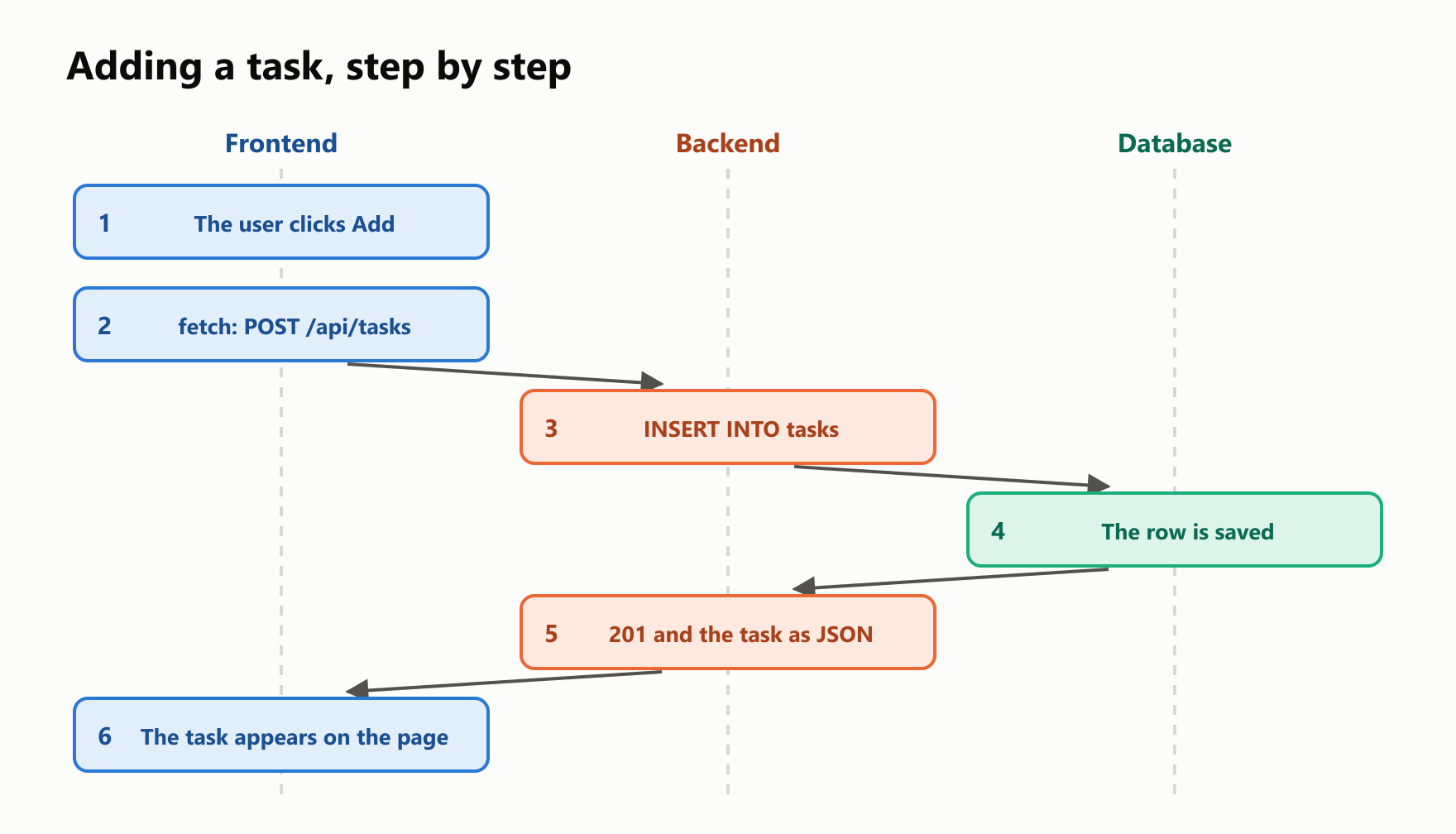
Here's the full trip when you click Add:
The frontend is public
Everything in the frontend gets sent to the user's computer, because that's the only way a browser can run it. So suppose you put a secret in the page's script:
const apiKey = "sk-secret-123";Anyone can read it. They don't need to break anything, only to ask for the page:
curl -s http://localhost:3000/ | grep apiKey const apiKey = "sk-secret-123";The backend's code is different. It sits in the same folder, and the server just doesn't hand it out:
curl http://localhost:3000/server.js{"error":"Not found"}So here's the rule: passwords, API keys and any other secrets belong in the backend, and never in the frontend.
Never trust the frontend
The form has some checks. required refuses an empty title, and in Chrome, clicking Add on an empty field added nothing. maxlength="50" limits the length. So the backend is safe, right?
Those checks run in the browser, and a request doesn't have to come from a browser:
curl -X POST http://localhost:3000/api/tasks -d '{"title":""}'{"id":3,"title":""}The empty task was saved, and a title with 5,000 characters was accepted too. It gets worse. Send something that isn't JSON at all:
curl -X POST http://localhost:3000/api/tasks -d 'oops'The terminal running the server shows this, and then the server is gone:
SyntaxError: Unexpected token 'o', "oops" is not valid JSONOne bad request took the whole app down for everybody. The fix is for the backend to check everything itself. Replace addTask in server.js with these two functions:
1function parseTitle(body) {
2  try {
3    const { title } = JSON.parse(body);
4    if (typeof title === "string" && title.length >= 1 && title.length <= 50) {
5      return title;
6    }
7  } catch {
8    return undefined;
9  }
10  return undefined;
11}
12
13function addTask(request, response) {
14  let body = "";
15  request.on("data", (chunk) => {
16    body += chunk;
17  });
18  request.on("end", () => {
19    const title = parseTitle(body);
20    if (title === undefined) {
21      sendJson(response, 400, { error: "The title must have 1 to 50 characters" });
22      return;
23    }
24    const result = database.prepare("INSERT INTO tasks (title) VALUES (?)").run(title);
25    sendJson(response, 201, { id: Number(result.lastInsertRowid), title });
26  });
27}
Restart the server and try again:
curl -X POST http://localhost:3000/api/tasks -d 'oops'{"error":"The title must have 1 to 50 characters"}The status is now 400, which means the request was bad. The same answer came back for an empty title, a missing title and the 5,000-character one, and the server kept running.
That doesn't make the frontend's checks useless. They give the user instant feedback with no trip across the network, while the backend's checks provide the protection. A good app has both.
Who does what
Each part has its own kind of developer:
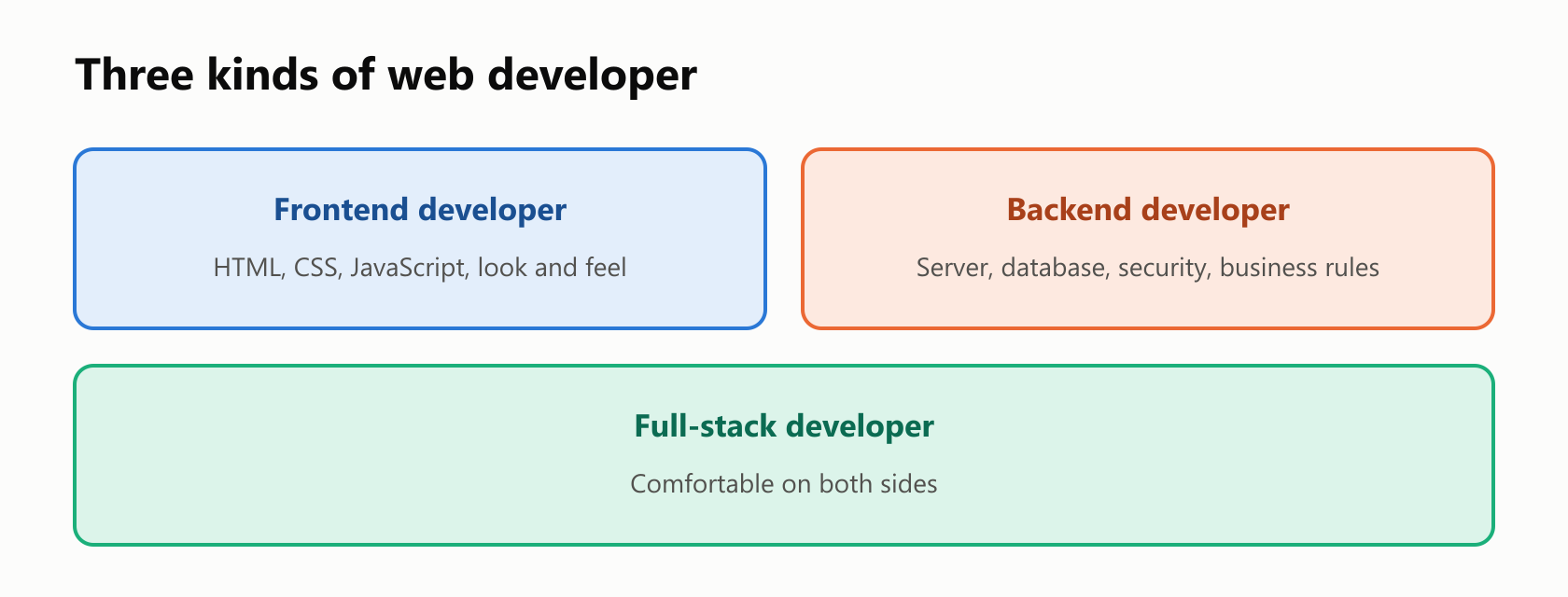
| Frontend developer | Backend developer | Full-stack developer | |
|---|---|---|---|
| Works on | What the user sees | What runs behind it | Both |
| Typical tools | HTML, CSS, JavaScript, React | Node.js, Python, Java, SQL | A mix of both |
| Cares about | Usability, accessibility, speed in the browser | Correct data, security, reliability | How the parts fit together |
| Typical task | Build a checkout page | Charge the card and record the order | Build the whole feature |
Being full-stack doesn't mean being an expert in everything. It usually means being comfortable on both sides, and stronger on one of them.
The line isn't always sharp
The two-part split is a useful model, and real projects blur it:
- One language, both sides. With Node.js, JavaScript runs in the browser and on the server, as in the app you just built.
- Pages built on the server. Instead of sending data for the browser to arrange, a server can send finished HTML. Many modern frameworks do a mix of both.
- More than one frontend. A website and a phone app are two frontends that can share the same backend, which is another reason the backend deals in data.
- More roles. Designers plan how things look and work. DevOps engineers keep the servers running. Bigger teams divide the work further.
Which one is for you?
There's no best choice, and your first choice isn't permanent. Some honest questions can point the way:
- Do you like seeing your work right away? Frontend gives you something on the screen in seconds.
- Do you care how things look and feel? That's frontend, too.
- Do you enjoy data, logic and making systems reliable? That's backend.
- Do you want to build a whole product by yourself? Learn enough of both to go full-stack.
Whichever you pick, HTML, CSS and JavaScript are a good start, because every web app ends up in a browser.
Your turn: practice
Try these before peeking at the answers. For exercises 3 and 5, use the version of server.js with parseTitle.
Exercise 1: Which side? (warm-up). Is each job mainly frontend or backend?
- Changing a button's color
- Storing a user's password safely
- Showing a menu when you click an icon
- Checking that a coupon is still valid
- Making the page fit a phone screen
- Recording an order in the database
Exercise 2: Who needs a restart? With the server running, you change the <h1> in index.html, then the error message in server.js. For each one, what do you see after refreshing, and why?
Exercise 3: Count the tasks. Add a route to server.js so that GET /api/tasks/count answers with the number of tasks, like {"count":3}. Hint: SQL can count rows with SELECT COUNT(*) AS count FROM tasks, and .get() returns a single row.
Exercise 4: The weather key. You want your page to show the weather, using a paid service that gives you a secret key. Why can't fetch call that service straight from the frontend, and how should the app be organized?
Exercise 5: Delete a task (challenge). Add a route for DELETE /api/tasks/1, where the number is the task's id. Answer with {"deleted":1} and status 200, or {"deleted":0} and status 404 if there's no such task.
Quick quiz
- What's the difference between the frontend and the backend?
- What are the jobs of HTML, CSS and JavaScript?
- What are the two main parts of a backend?
- How do the frontend and the backend talk to each other?
- What's an API?
- Why did the tasks survive a restart?
- Why can't you keep a secret in the frontend?
- Why isn't
requiredon a form field enough? - What does a full-stack developer do?
Answers
Exercise 1: (1) Frontend. (2) Backend. (3) Frontend. (4) Backend, because the frontend can't be trusted with it. (5) Frontend. (6) Backend.
Exercise 2: The new <h1> shows up right away, because the server reads index.html on every request. The error message doesn't change until you restart the server, because Node.js loaded server.js when it started.
Exercise 3: Add this before the final else in server.js:
  } else if (request.url === "/api/tasks/count") {
sendJson(response, 200, database.prepare("SELECT COUNT(*) AS count FROM tasks").get());{"count":3}Exercise 4: Everything in the frontend is public, so the key would be visible to every visitor, who could then use it at your expense. The frontend should call your own backend, and your backend should call the weather service, with the key stored on the server.
Exercise 5: Add this before the final else. The id is the last part of the address, and changes says how many rows were deleted:
1  } else if (request.url.startsWith("/api/tasks/") && request.method === "DELETE") {
2    const id = Number(request.url.split("/").pop());
3    const result = database.prepare("DELETE FROM tasks WHERE id = ?").run(id);
4    sendJson(response, result.changes === 1 ? 200 : 404, { deleted: result.changes });
curl -X DELETE http://localhost:3000/api/tasks/1
curl -X DELETE http://localhost:3000/api/tasks/1{"deleted":1}{"deleted":0}Quiz: (1) The frontend is what the user sees, and it runs in the browser. The backend stores and processes the data, on the company's machines. (2) HTML is the structure, CSS the appearance and JavaScript the behavior. (3) A server and a database. (4) Through HTTP requests and responses, usually with JSON. (5) A set of addresses a backend offers so that other programs can use it. (6) They're stored in a database file, and not in the program's memory. (7) Everything in the frontend gets sent to the user's computer. (8) It runs in the browser, and a request doesn't have to come from a browser. (9) Works on both the frontend and the backend, usually with one stronger side.
Cheat sheet
| Term | Meaning |
|---|---|
| Frontend | The part the user sees, running in the browser |
| Backend | The part behind the scenes, running on servers |
| Full-stack | Working on both parts |
| HTML | Structure of a page |
| CSS | Appearance of a page |
| JavaScript | Behavior of a page, and also a server language with Node.js |
| Server | A program that waits for requests and answers them |
| Database | Where data is stored so that it lasts |
| HTTP | The rules for requests and responses |
| JSON | A text format for sending data |
| API | The addresses a backend offers to other programs |
200, 201 | Status codes for OK and created |
400, 404 | Status codes for a bad request and not found |
Wrapping up
Every web app has a side you see and a side you don't:
- The frontend is what the user sees, built with HTML, CSS and JavaScript.
- The backend stores and processes the data, with a server and a database.
- They talk through HTTP, usually sending JSON.
- The backend deals in data, and the frontend decides how it looks.
- Everything in the frontend is public, so secrets belong in the backend.
- Never trust the frontend. Requests can come from anywhere, so the backend must check everything.
- Frontend checks are for convenience, and backend checks are for protection.
- Developers specialize in frontend or backend, and full-stack developers work on both.
What kind of web developer do you want to be?
Next up: frontend web development.
Read next

Ruby Blocks and Iterators: Write Your Own
Learn how Ruby methods receive blocks, pass values with yield, handle a missing block, and return an Enumerator. Build and run your own iterator.
 nbkhope
C++ std::vector: Size, Capacity, and Safe Growth
Learn how std::vector grows in C++: the difference between size and capacity, when reserve helps, why resize is different, and how growth can invalidate references.
nbkhope
How to Handle Errors in Go: A Hands-On Guide
Learn Go's everyday error pattern with runnable examples: return an error, check it, add context with %w, and recognize a missing file with errors.Is.
nbkhope
Comments
Be kind and specific. Comments with links from new accounts appear after a moderator reviews them.