
Inside an AI Answer: What an NVIDIA GPU Actually Does
Follow one AI question through an NVIDIA GPU: prompt processing, token-by-token generation, memory, and batching. See a calculated chart of why long chats cost memory.

On this page
Inside an AI Answer: What an NVIDIA GPU Actually Does
You send an AI assistant a question. A moment later, words start appearing. What happened between the Send button and the first word? If the service runs on NVIDIA GPUs, the answer involves two very different jobs, a memory shortcut, and some clever scheduling.
This is a tour of inference—running an already trained model to answer a request. For NVIDIA's history, business, and a real CPU-versus-GPU benchmark, read What Is NVIDIA?. Not every AI service uses NVIDIA hardware, and a particular service may divide this work among several machines. The workflow below is a simplified view of a common large-language-model setup.
Two jobs hiding inside one reply
Imagine asking: “Explain why the moon has phases in three sentences.” The system first turns text into tokens, pieces a model can process. Then it runs two stages:
| Stage | What the GPU is doing | What you notice |
|---|---|---|
| Prefill | Processes the input tokens together and prepares the information needed for generation | A pause before the first word |
| Decode | Produces one new token, uses it as context, then repeats | Words appearing gradually |
In a restaurant analogy, prefill is reading the whole order and setting up the kitchen. Decode is plating the response one piece at a time. The analogy is imperfect: the GPU is doing matrix calculations, not looking up a stored sentence. NVIDIA's inference explanation describes these two phases and the different demands they place on hardware.
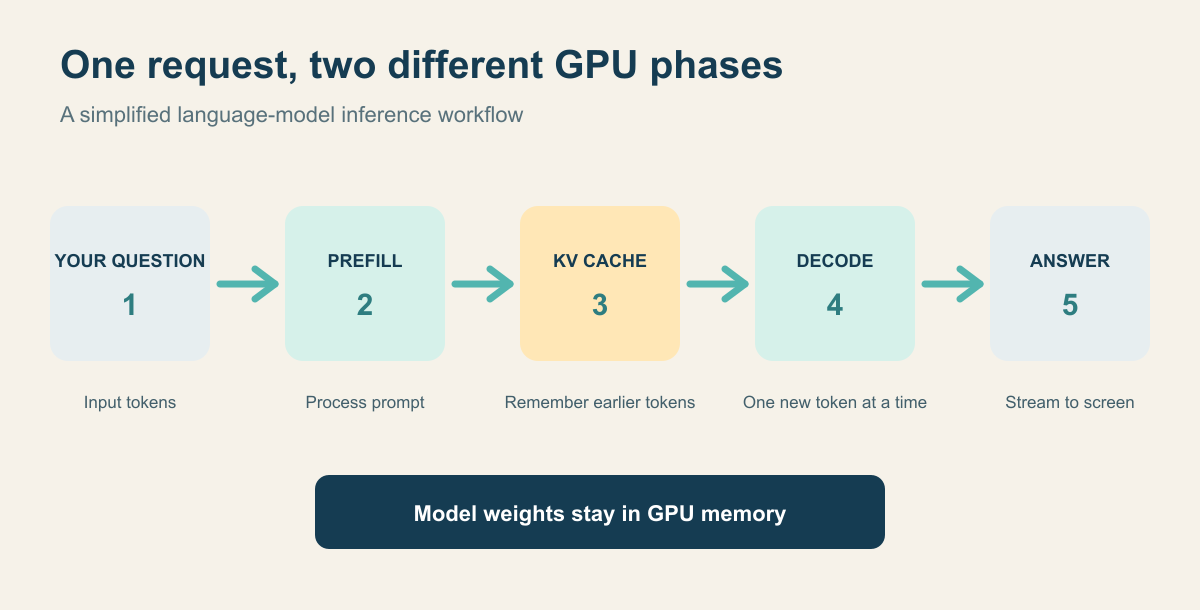
The model's weights are learned numbers loaded into GPU memory. During prefill, the model also prepares key and value information for attention. Instead of recomputing that information for every earlier token at every step, the server can keep a KV cache. Each new output token adds more to the cache. That saves repeated work, but it takes memory. NVIDIA's TensorRT documentation describes the cache's token dimension.
Where NVIDIA hardware fits
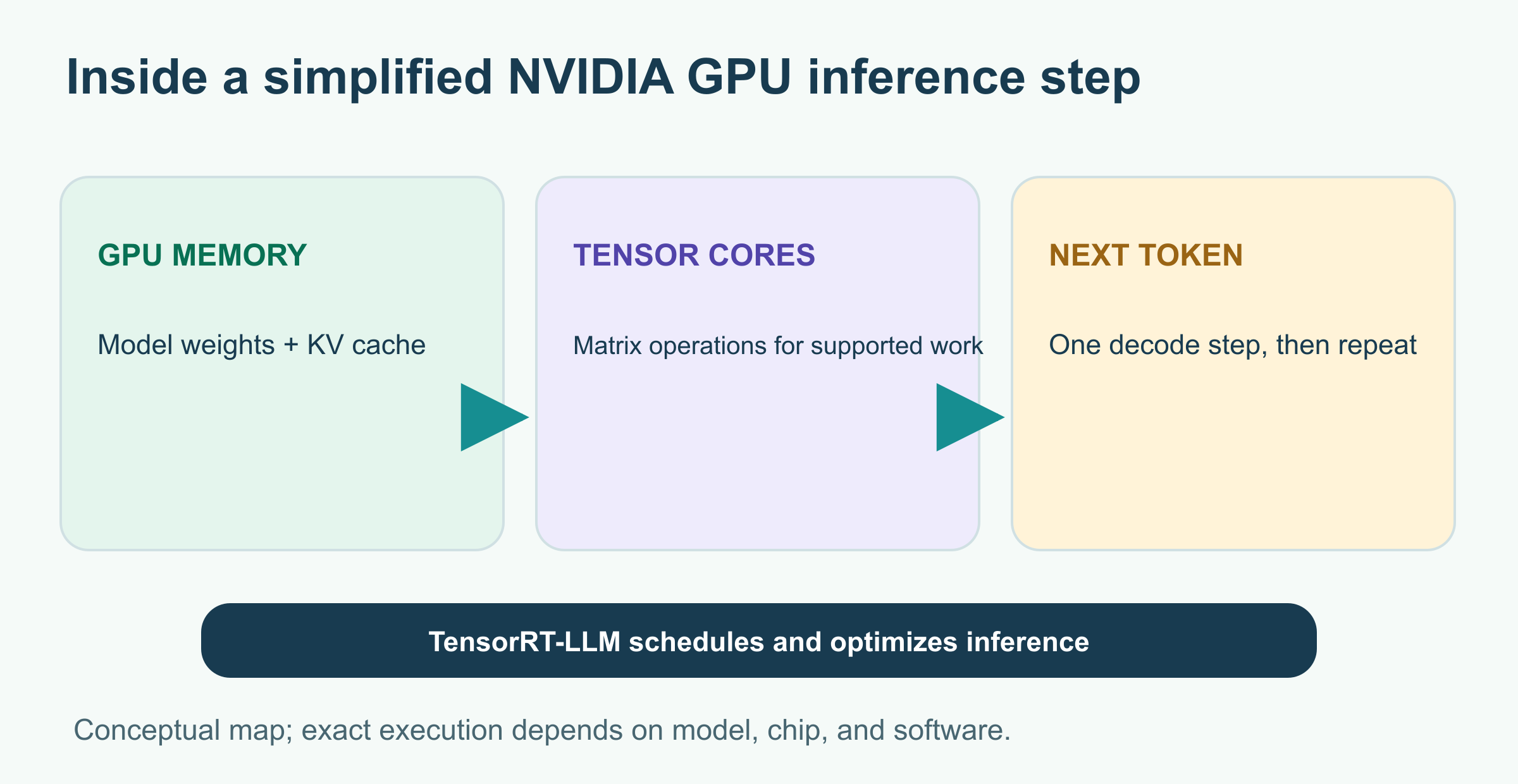
The GPU does not store a ready-made reply. Its memory holds model weights and working data, while compute units carry out the model's calculations. NVIDIA's Tensor Cores are specialized for matrix multiply-accumulate operations; the exact operations that use them depend on the model, numeric format, hardware, and software. NVIDIA's architecture overview describes their role. Software such as TensorRT-LLM organizes inference, but a chip alone does not decide how to answer your question.
A chart you can calculate yourself
How much memory can that cache use? Here is a deliberately small illustrative model configuration, not a measurement of a named NVIDIA chip or a commercial AI service:
32 layers × 8 KV heads × 128 values per head
× 2 arrays (keys and values) × 2 bytes per value
= 131,072 bytes per token = 128 KiB per token
That makes the arithmetic pleasantly simple. Four times as many tokens means four times as much KV-cache storage for one request, if the model and numeric format stay the same.
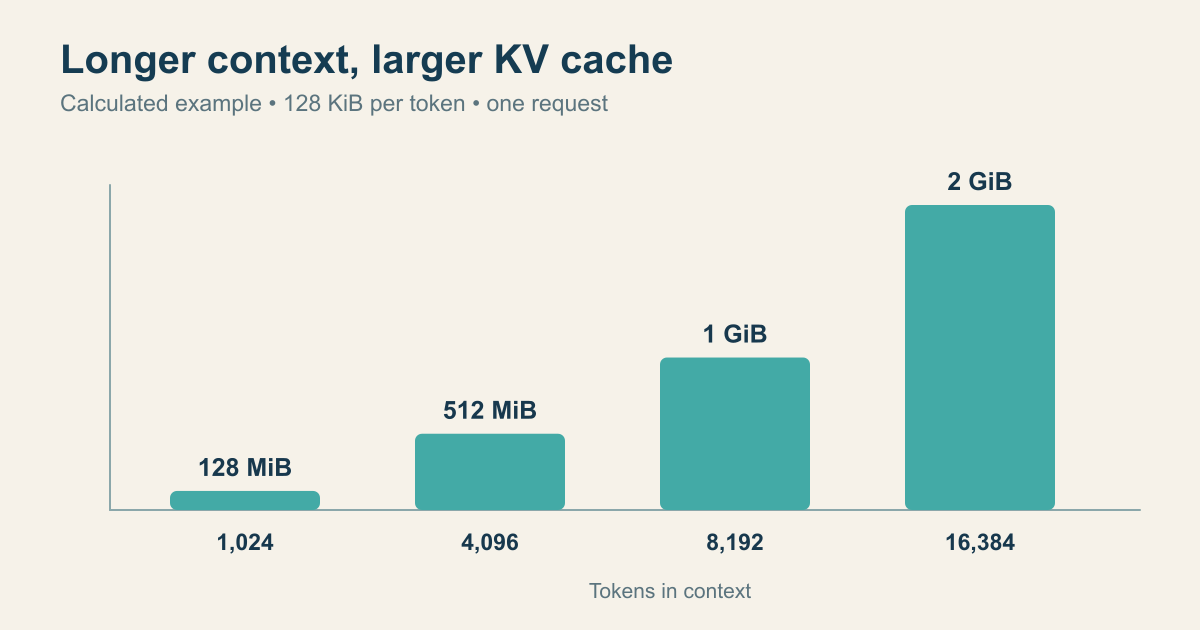
| Tokens kept in context | Calculated KV cache |
|---|---|
| 1,024 | 128 MiB |
| 4,096 | 512 MiB |
| 8,192 | 1 GiB |
| 16,384 | 2 GiB |
This excludes model weights, temporary working memory, multiple simultaneous requests, and implementation overhead. Actual models differ in layer count, attention layout, precision, and cache optimizations. The insight is the slope: for a fixed design, longer context uses more cache memory. NVIDIA's technical overview likewise describes KV-cache growth with sequence length and batch size.
Why a short question can still feel slow
The time until the first visible token and the pace of later tokens are different measurements. A long document increases prompt-processing work; a request for a long essay adds decode steps. A queue of other users can affect both. You cannot infer GPU speed from a single stopwatch result without knowing the model, input length, output length, server load, and network conditions.
There are also two ways to judge a service:
- Latency: how long one person waits for the first token or complete answer.
- Throughput: how many tokens or requests the system handles across many people in a period.
Grouping requests into a batch can use GPU hardware more effectively, but a batch is not automatically the fastest experience for every individual. Systems such as NVIDIA TensorRT-LLM use techniques including in-flight batching to combine active requests while making room when one finishes. Another lever is quantization, storing some numbers in fewer bits; it can reduce memory and accelerate work, but accuracy and speed must be measured for the specific model and hardware.
What to remember next time text streams onto your screen
The first word and the following words come from different phases. The KV cache helps generation avoid repeated calculations, while long contexts and many simultaneous users compete for memory. NVIDIA sells hardware and software that help run this pipeline, but the useful question is bigger than a logo on a chip: what workload is being served, and which bottleneck matters—first-token delay, generation speed, or total capacity?
For the bigger picture, continue with What Is an LLM? and What Is Deep Learning?.
Sources and further reading
Read next

The Top 5 AI Coding Agents in 2026: Which One Belongs in Your Workflow?
Five AI coding agents, five different ways to build. Compare Claude Code, Codex, Cursor, GitHub Copilot and Google Antigravity with real workflows and a quick chooser.
 nbkhope
How to Protect Your Privacy When Using AI Tools
Protect your privacy when using AI tools with a practical workflow for removing personal details, checking data controls, handling files, and reviewing shared links.
nbkhope
How to Check an AI Answer Before You Use It
AI can give a useful answer with a wrong date, invented quote, or bad total. Learn a five-step check you can use before acting on its response.
nbkhope
Comments
Be kind and specific. Comments with links from new accounts appear after a moderator reviews them.