What Is DOS? A Simple Guide to the Operating System That Started the PC Era
A friendly, jargon-free guide to DOS, the text-only operating system that ran the first wave of personal computers. Learn how it worked, why file names had 8 letters, what the 640 KB limit was, and how DOS still lives on inside Windows today.

On this page
Imagine turning on a computer and seeing... almost nothing. No pictures, no mouse pointer, no icons. Just a black screen, a few letters, and a small blinking line:
C:\>_For millions of people in the 1980s and early 1990s, that was what using a computer looked like. The program behind that blinking line was DOS, and it was the system that put a personal computer on desks in offices, schools and homes around the world. This article explains, in plain language, what DOS was, how people used it, why it had some strange limits, and why traces of it are still inside your Windows computer today.
What is DOS?
DOS stands for Disk Operating System. The name comes from its main job: managing the files stored on disks, which in the early days meant thin, bendy floppy disks.
There were several versions of DOS made by different companies, but the most famous by far was MS-DOS, made by Microsoft. IBM sold its own edition, called PC DOS. When people say "DOS" today, they almost always mean MS-DOS or one of its close relatives.
DOS had three defining features:
- Text only. You controlled the computer by typing commands with the keyboard. There was no mouse (at first) and no windows.
- One program at a time. You started a program, used it, quit it, and then started another one.
- Small and simple. The whole system fit on a single floppy disk with room to spare.
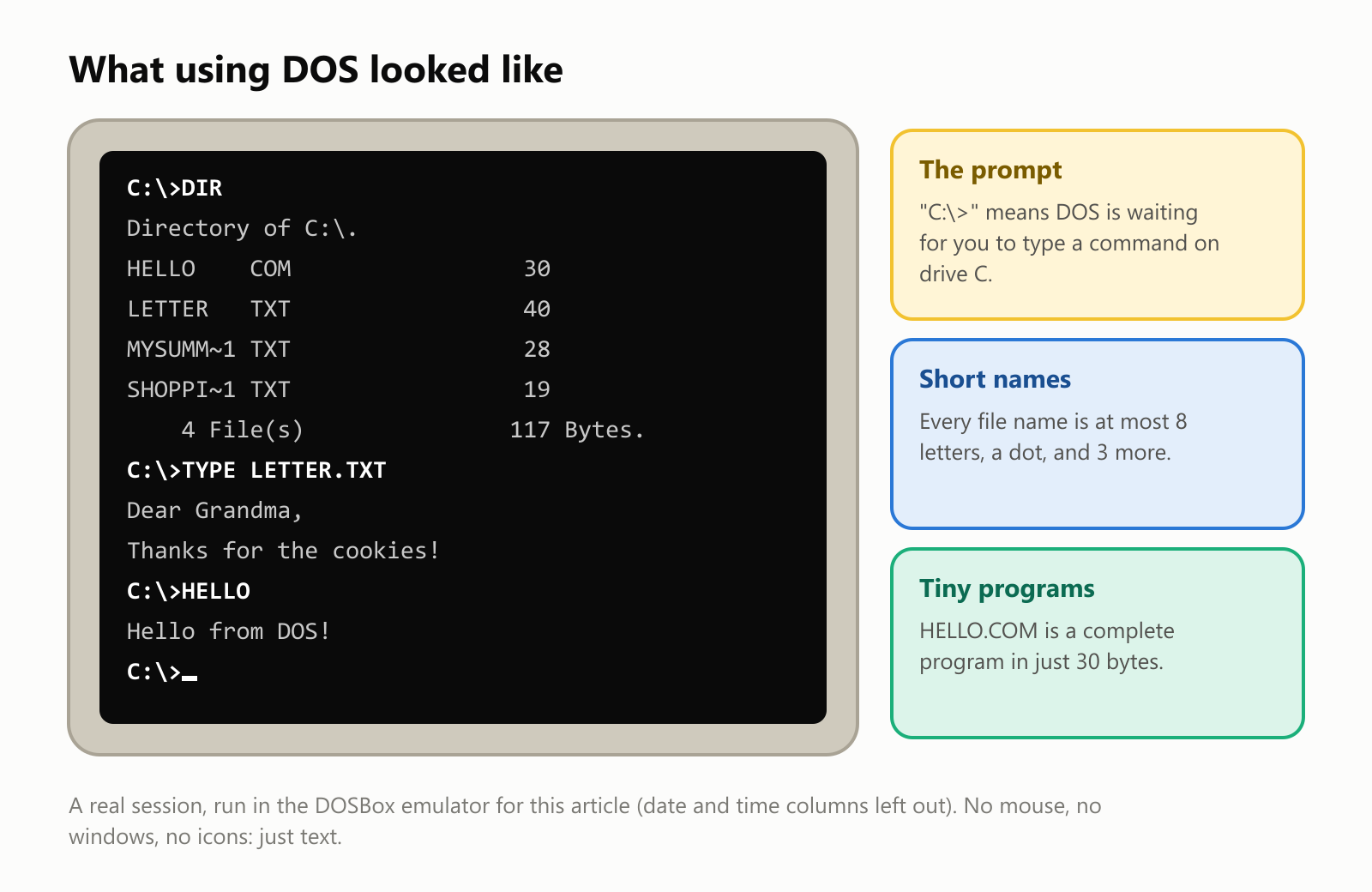
Here is a real DOS session, run for this article in DOSBox, a free program that imitates an old DOS computer:
The famous origin story
DOS was born from one of the most famous business deals in history.
In 1980, IBM, then the giant of the computer world, was rushing to build its first personal computer, the IBM PC. It needed an operating system, and it asked a small company called Microsoft, run by Bill Gates and Paul Allen, for help. IBM had first approached Digital Research, the maker of a popular system called CP/M, but that deal didn't happen (the reasons are still debated).
Microsoft didn't have an operating system either. But a programmer named Tim Paterson, at a small Seattle company called Seattle Computer Products, had just written one in a few months. He called it 86-DOS, and its working nickname was QDOS: the "Quick and Dirty Operating System". Microsoft bought the rights to it, reportedly for about $75,000 in total, improved it, and licensed it to IBM.
The IBM PC came out in August 1981 with PC DOS 1.0. And here comes the clever part: Microsoft kept the right to sell its own version, MS-DOS, to other computer makers. When companies like Compaq started building their own "IBM-compatible" PCs, they all needed MS-DOS. Those compatible PCs took over the world, and Microsoft became one of the biggest companies on Earth.
How DOS works
DOS is built from a few small pieces, stacked on top of each other:
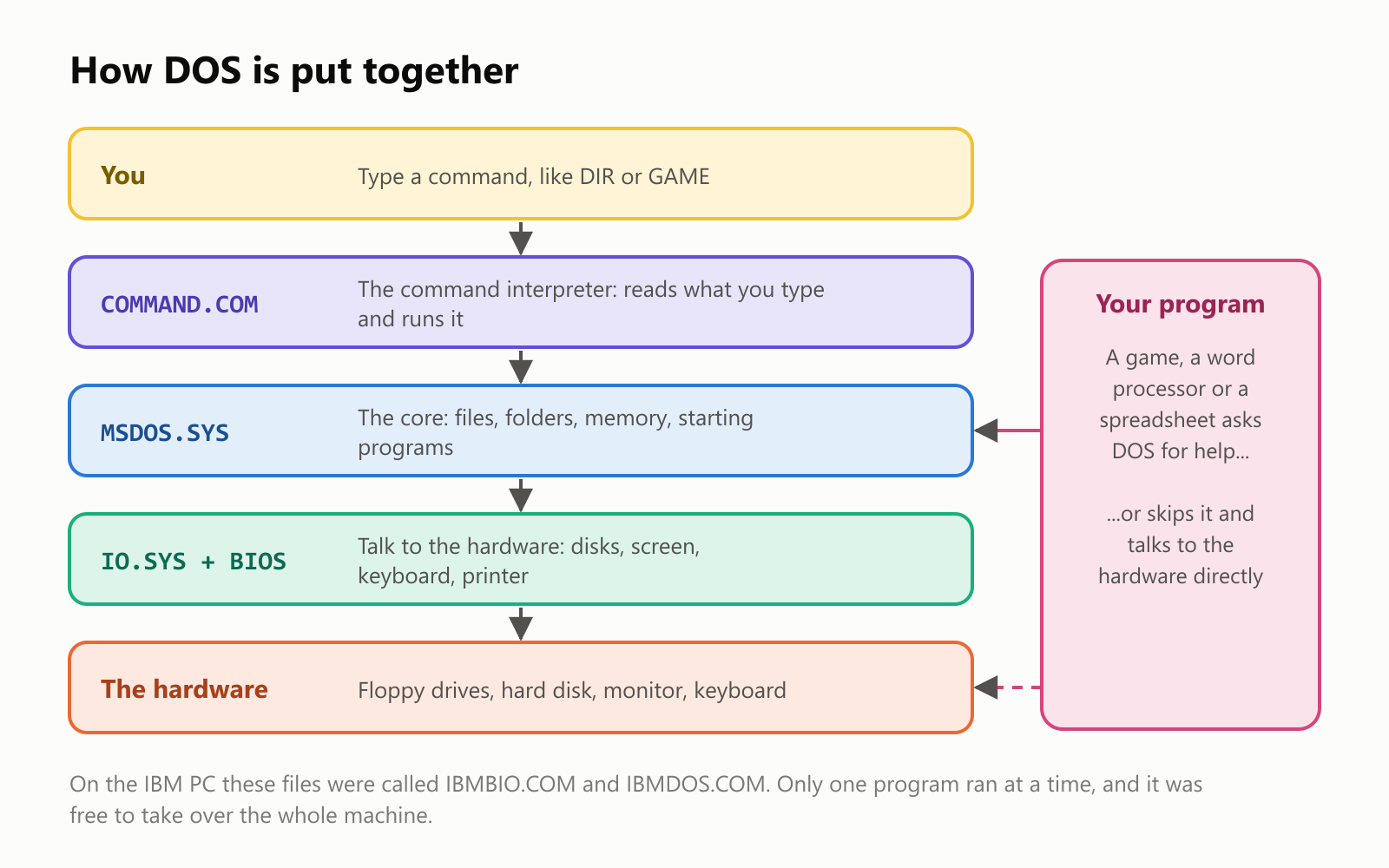
- COMMAND.COM is the part you talk to. It shows the
C:\>prompt, reads what you type and runs it. - MSDOS.SYS is the core. It keeps track of files and folders, hands out memory, and starts programs.
- IO.SYS and the computer's built-in BIOS do the low-level work of talking to the disks, screen and keyboard.
Unlike modern systems, DOS didn't protect itself from programs. A game could ignore DOS completely and draw straight onto the screen or play sounds directly through the hardware, which made games fast but also made crashes common. If a program misbehaved, the usual fix was to restart the computer.
Talking to DOS: commands and drive letters
Using DOS meant learning a handful of commands. Here are some of the most common ones:
| Command | What it does | Example |
|---|---|---|
DIR | Lists the files in the current folder | DIR |
CD | Changes to another folder ("change directory") | CD GAMES |
COPY | Copies a file | COPY LETTER.TXT A: |
DEL | Deletes a file | DEL OLD.TXT |
TYPE | Shows what's inside a text file | TYPE LETTER.TXT |
MD | Makes a new folder ("make directory") | MD PHOTOS |
CLS | Clears the screen | CLS |
FORMAT | Prepares a disk for use (and erases it!) | FORMAT A: |
If you mistyped a command, MS-DOS replied with a message that many people still remember: Bad command or file name.
The C: in the prompt is a drive letter. Early PCs had one or two floppy disk drives, which were named A: and B:. When hard disks arrived, the first one became C:. That's why, more than 40 years later, the main drive on a Windows computer is still called C:, even though most computers no longer have floppy drives at all.
The 8.3 rule for file names
DOS had a strict rule for naming files: a name of up to 8 characters, a dot, and an extension of up to 3 characters, like LETTER.TXT or GAME.EXE. No spaces, and no difference between upper and lower case. This is known as the 8.3 rule.
The extension told you (and DOS) what kind of file it was. .COM, .EXE and .BAT were programs you could run. .TXT was plain text. .SYS was a system file.
We tested the rule by putting files with long names in a folder and asking DOS to list them:
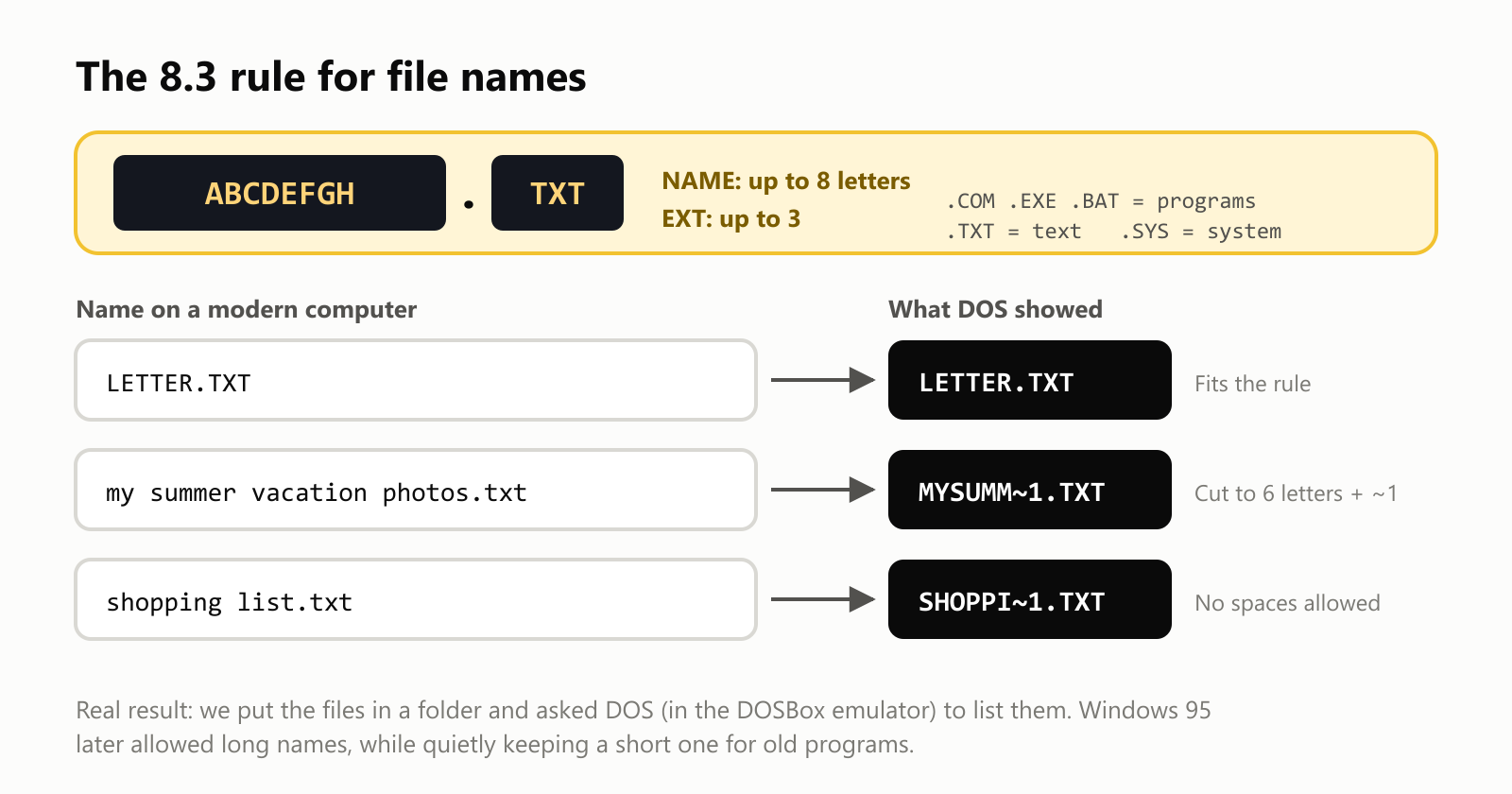
DOS couldn't see the long names at all. It showed shortened versions, cut to six letters, followed by ~1 to keep them unique. This trick came from Windows 95, which introduced long file names in 1995 while quietly keeping an 8.3 name for every file, so that old DOS programs could still open them.
Batch files: little scripts
A batch file (ending in .BAT) is a text file containing a list of DOS commands, run one after another. It was the simplest way to automate a task. The batch file we used to run the session above looked like this (the > D:\DIR.TXT part saves each command's output to a file instead of the screen):
1@ECHO OFF
2C:
3VER > D:\VER.TXT
4DIR > D:\DIR.TXT
5TYPE LETTER.TXT > D:\TYPE.TXT
6HELLO > D:\HELLO.TXT
7MEM > D:\MEM.TXT
8EXIT
Two batch and settings files were especially important. Every time the computer started, DOS read CONFIG.SYS (which set up memory and devices) and ran AUTOEXEC.BAT (which ran your favorite start-up commands). Editing these two files to squeeze out a bit more memory for a new game was a rite of passage for a generation of computer users.
The famous 640 KB
The original IBM PC could use at most 1 MB (1,024 KB) of memory. Its designers reserved the top part for things like video memory and the BIOS, which left 640 KB for DOS and your programs. That area was called conventional memory.
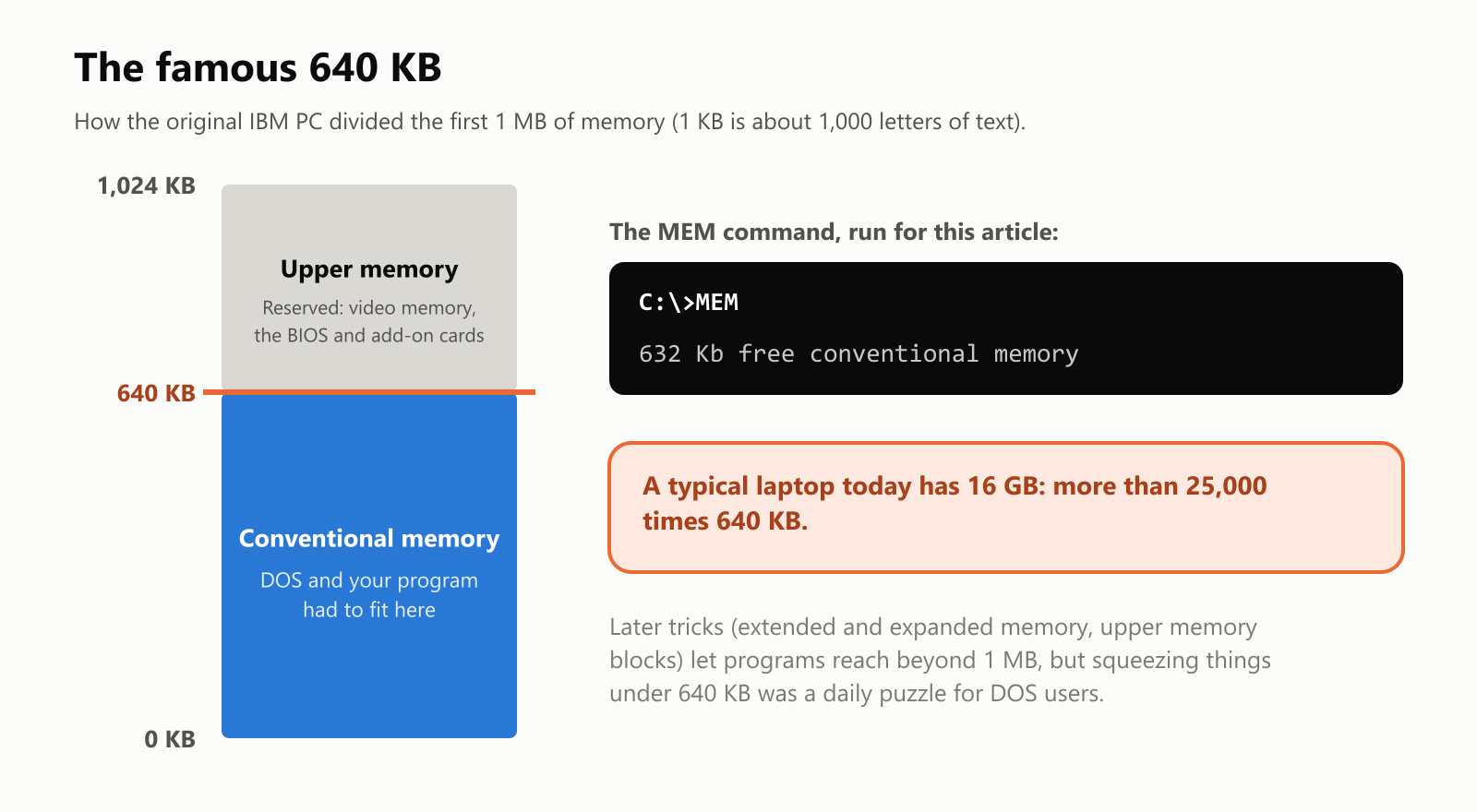
In 1981, 640 KB seemed enormous: many early PCs were sold with just 16 or 64 KB. But programs grew quickly, and the 640 KB limit became one of the biggest headaches of the DOS era. Later versions of DOS and add-on programs invented clever ways to use memory beyond the limit, with names like extended memory, expanded memory and upper memory blocks. Big games like Doom (1993) used a helper program called a DOS extender to break free of the limit entirely.
When we ran the MEM command in DOSBox, it reported 632 KB of free conventional memory. (DOSBox gives programs a lot of help behind the scenes; on a real 1990s PC, with drivers for the mouse, sound card and CD-ROM loaded, getting above 600 KB free took real effort.)
How small DOS programs were
DOS ran on computers with very little memory and storage, so its programs had to be tiny. We measured a few:
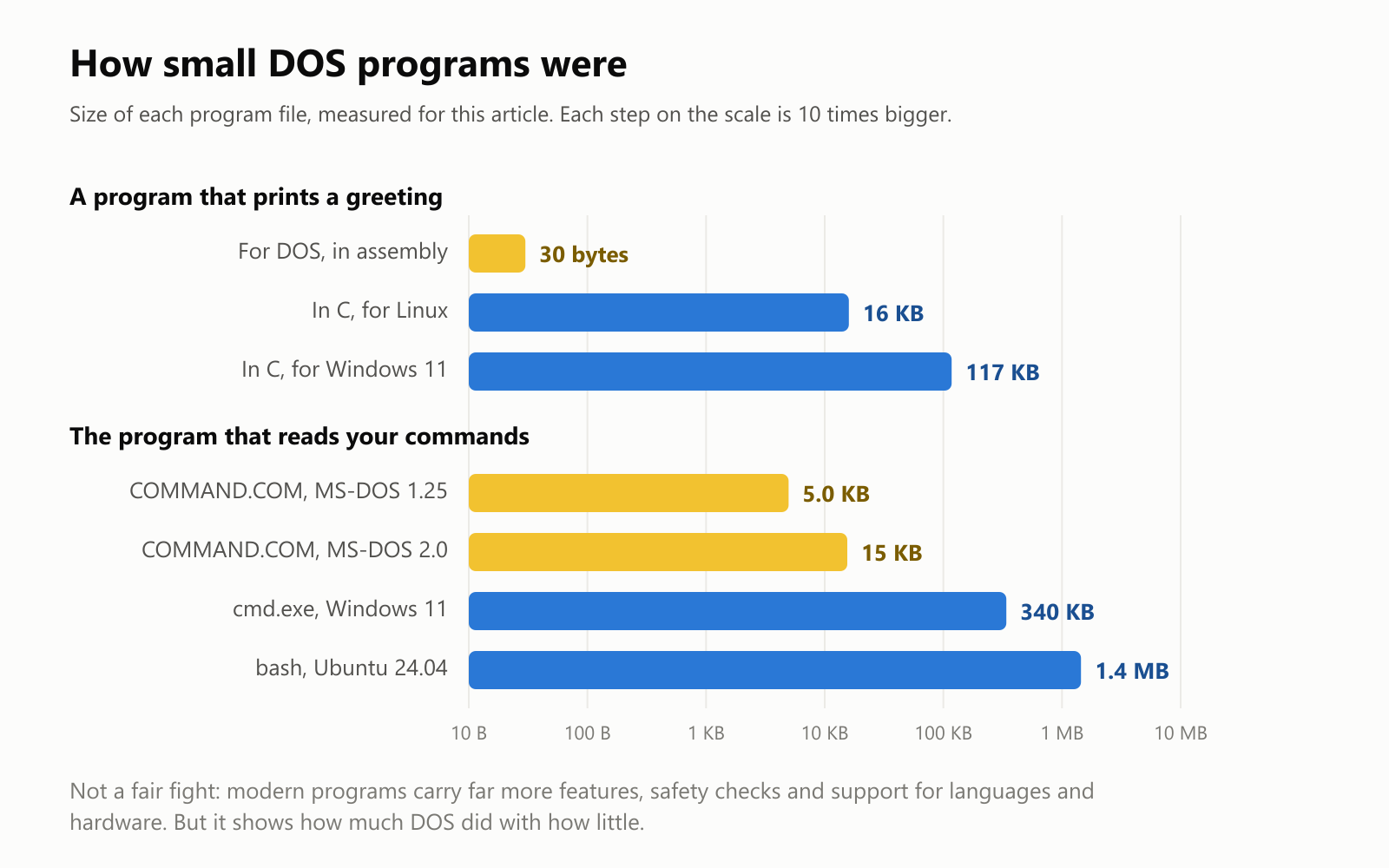
Our greeting program for DOS was just 30 bytes: shorter than this sentence. Here it is, written in assembly language, which gives the processor its instructions one by one:
1org 100h
2    mov dx, message
3    mov ah, 9
4    int 21h
5    mov ax, 4C00h
6    int 21h
7message db 'Hello from DOS!', 13, 10, '$'
In plain English: "put the address of the message here, ask DOS to print it (function number 9), then ask DOS to end the program". The line int 21h is how a program calls DOS for help. Every DOS program, from a tiny utility to a giant spreadsheet, used it.
The same greeting written in C (see What Is the C Programming Language?) came out at 16 KB on Linux and 117 KB on Windows 11, because modern programs include extra code for starting up, handling errors and working with today's systems. The whole MS-DOS 1.25 command interpreter, COMMAND.COM, was under 5 KB.
The source code, now free to read
For decades, the code of MS-DOS was a closely guarded secret. Then Microsoft opened it up: it shared the code of early versions with the Computer History Museum in 2014, released it on GitHub under the open MIT license in 2018, and added MS-DOS 4.0 in 2024. Anyone can now read it. We downloaded it and counted the lines:
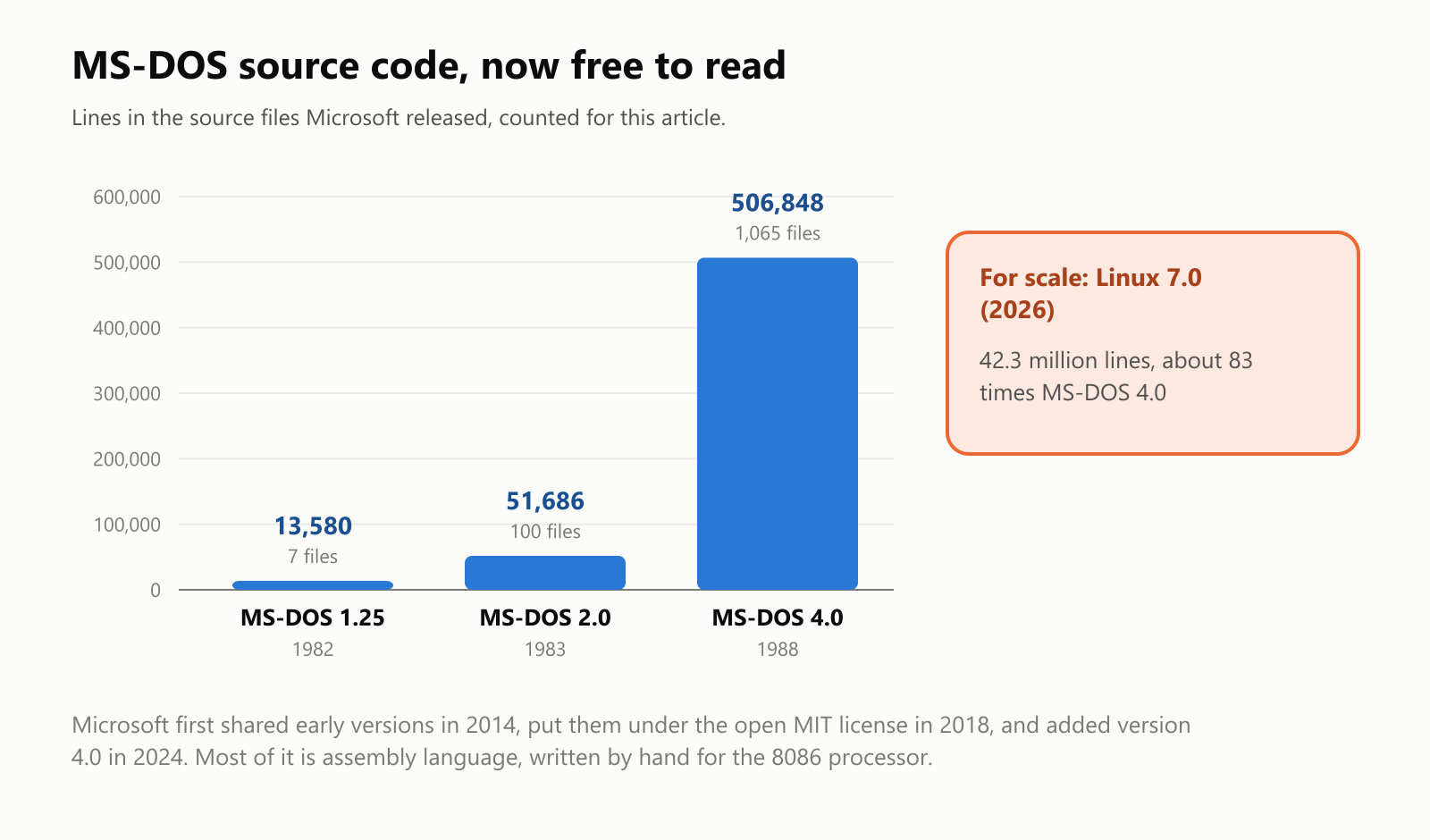
MS-DOS 1.25 has about 13,600 lines in 7 files (including a few tools Tim Paterson's company used to build it). MS-DOS 4.0 has about 507,000 lines, because it includes dozens of extra programs and utilities. For comparison, the Linux kernel's latest version has over 42 million lines. Most of the MS-DOS code is assembly language, written by hand, instruction by instruction, for the Intel 8086 processor family.
From DOS to Windows
Windows started life as a program that ran on top of DOS. With Windows 1.0 (1985) through 3.11, you started your computer into DOS and then typed WIN to start Windows.
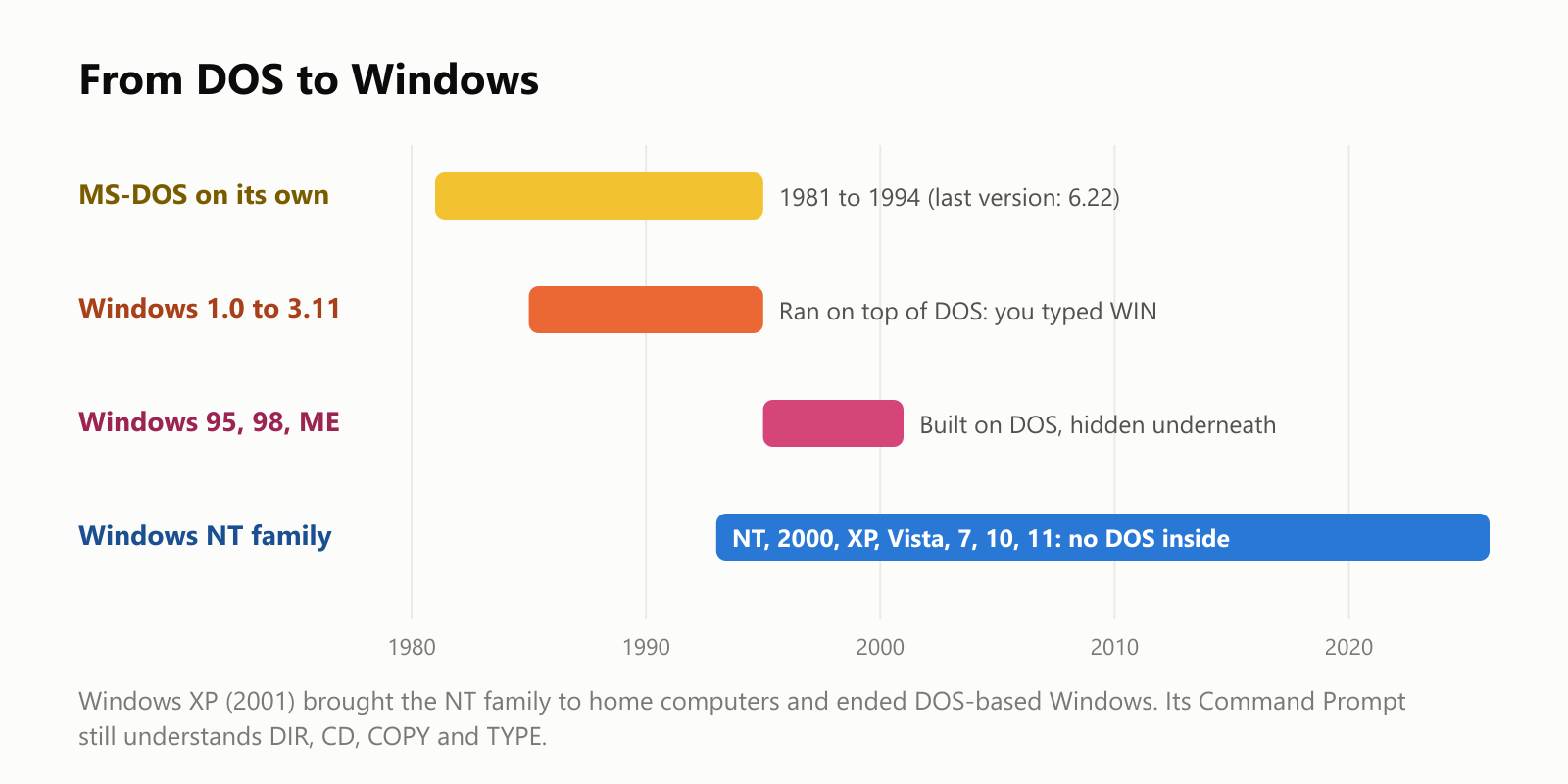
- MS-DOS 6.22 (1994) was the last version of MS-DOS sold on its own.
- Windows 95, 98 and ME still had DOS hidden underneath. The computer started in DOS and then quickly switched to Windows.
- Windows XP (2001) brought the separate Windows NT family, built from scratch without DOS, to home computers. Every Windows since, including Windows 11, belongs to that family.
DOS didn't completely disappear, though. Windows' Command Prompt (cmd.exe) is not DOS, but it was designed to feel like it: DIR, CD, COPY, DEL and TYPE all still work. And some old DOS rules are still alive. We tried to make a folder named CON on a Windows 11 laptop:
mkdir CON
The directory name is invalid.
CON (the console), PRN (the printer), AUX, NUL, COM1 and LPT1 were special device names in DOS, and Windows still refuses to create a folder with those names, more than 40 years later.
DOS and games
For many people, DOS will always mean games. Because a DOS game could take over the whole computer, developers could squeeze every bit of speed out of it. Classics like Prince of Persia, SimCity, The Secret of Monkey Island, Wolfenstein 3D and Doom were DOS games, and getting them running (with the right memory settings and the right sound card options) was part of the adventure.
Modern 64-bit versions of Windows can't run old DOS programs directly. That's why emulators like DOSBox exist: they imitate an old DOS PC inside a modern computer. Many game stores sell classic DOS games bundled with DOSBox, and the Internet Archive lets you play thousands of them right in your web browser.
Is DOS still used?
Surprisingly, yes, a little:
- FreeDOS, a free and open-source DOS started in 1994 by Jim Hall, is still maintained by volunteers. It can run most old DOS programs on modern hardware.
- Some businesses and factories still run old DOS software that controls machines or keeps records, because it works and replacing it is risky or expensive.
- Some computer manufacturers have used small DOS systems for tasks like updating a computer's built-in firmware.
- Retro gaming fans use DOSBox and FreeDOS to play and preserve the classics.
The downsides
DOS was simple, fast and small, but it had real limits:
- One program at a time. You couldn't keep a document open while checking something in another program (at least not without special add-ons).
- No protection. Any program could crash the whole computer, or even damage files, by accident or on purpose.
- Memory headaches. The 640 KB limit forced users to tinker with CONFIG.SYS and AUTOEXEC.BAT.
- Hard to learn. You had to memorize commands and type them exactly right. A blank prompt doesn't tell a beginner what to do.
- No users or passwords. Anyone sitting at the computer could read or delete anything.
These are exactly the problems that Windows, the Mac and Unix-like systems solved with windows, a mouse, multitasking and protected memory.
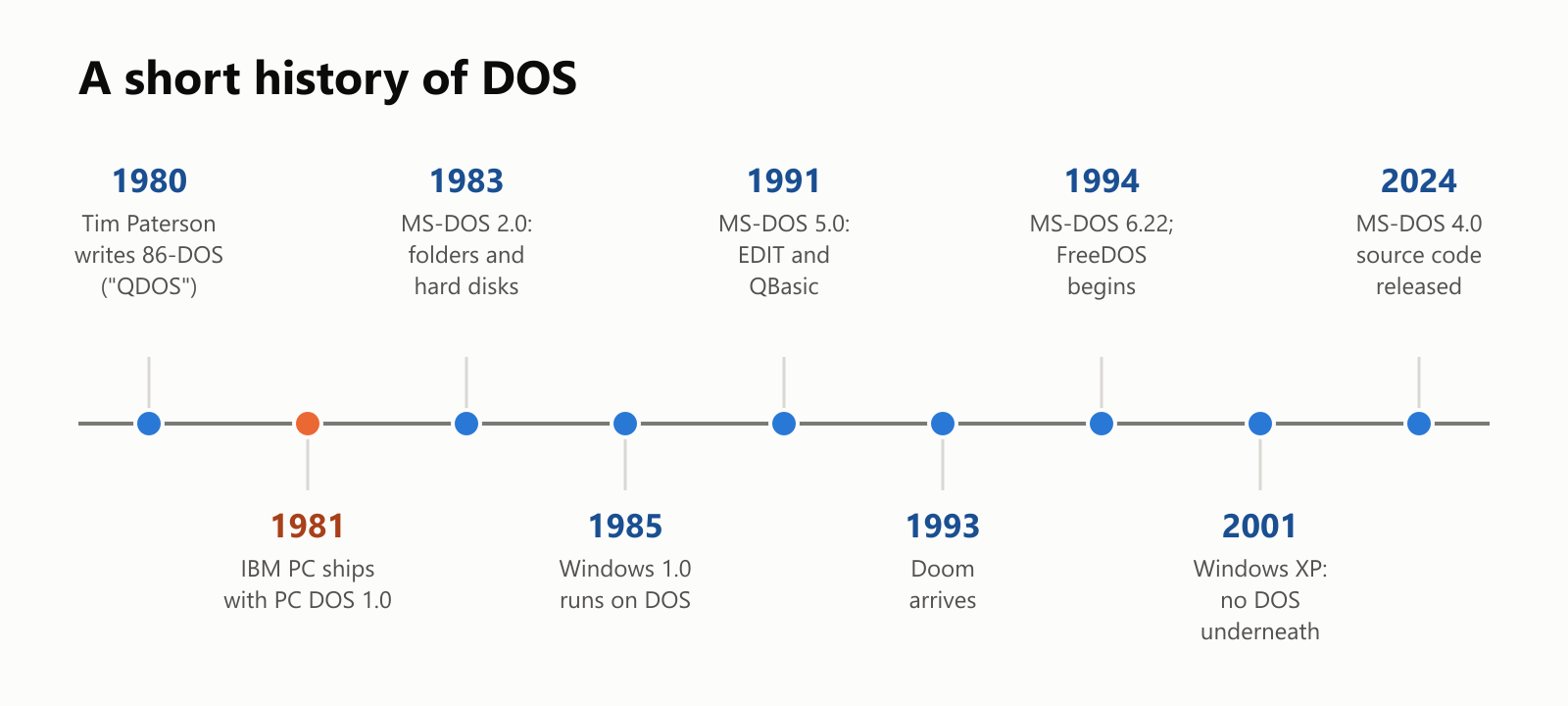
A short history
A small glossary
- DOS: Disk Operating System, a simple text-based operating system for early personal computers.
- MS-DOS / PC DOS: Microsoft's version of DOS, and the edition IBM sold with its PCs.
- Prompt: the
C:\>text that shows DOS is waiting for a command. - Command: a word you type to tell DOS what to do, like
DIRorCOPY. - Drive letter: a letter naming a disk drive; A: and B: for floppy drives, C: for the first hard disk.
- 8.3 file name: a name of up to 8 characters, a dot, and an extension of up to 3.
- Extension: the part after the dot that tells what kind of file it is, like
.TXTor.EXE. - Batch file: a
.BATfile listing commands to run one after another. - AUTOEXEC.BAT / CONFIG.SYS: files DOS read every time the computer started.
- Conventional memory: the first 640 KB of memory, where DOS and programs ran.
- COMMAND.COM: the program that reads and runs your commands.
- Emulator: a program that imitates another computer, like DOSBox imitating an old DOS PC.
- FreeDOS: a free, open-source DOS that is still maintained today.
Wrapping up
DOS was small, plain and sometimes frustrating, but it was the system that turned the personal computer from a hobby into something found on every office desk. It started as a "quick and dirty" program written in a few months, became the foundation of Microsoft's success, and carried the PC through its first 15 years.
The next time you see "C:" on your computer, or type dir in a Command Prompt, you're looking at a little piece of DOS that never went away.
Read next

What Is a Transformer in AI? The Idea Behind ChatGPT, Explained Simply
A friendly, jargon-free guide to transformers, the AI design behind ChatGPT, Claude and Gemini. Learn how "attention" lets AI understand words in context, what happens inside a transformer, and why it changed AI so quickly.
 nbkhope
What Is Reinforcement Learning? How AI Learns by Trial, Error and Reward
A friendly, jargon-free introduction to reinforcement learning, how AI learns by trial, error and reward, like training a dog with treats. Watch a real robot learn a maze, see why exploring matters, and learn how it shapes chatbots.
nbkhope
What Is Graph Engineering? How Today's AI Teams Up to Get Real Work Done
A friendly, jargon-free guide to graph engineering, the 2026 idea of building AI as a map of connected steps instead of one big loop. See how today's AI agents work, why small mistakes add up, and how checkers, branches and teamwork fix it.
nbkhope
Comments
Be kind and specific. Comments with links from new accounts appear after a moderator reviews them.