What Is Loop Engineering? How AI Agents Keep Working Until the Job Is Done
A friendly, jargon-free guide to loop engineering, the 2026 idea of designing the loop that lets an AI agent keep working until a job is done, with clear goals, real feedback, smart stop rules and knowing when to ask a person.

On this page
Think about the thermostat in your home. It doesn't heat the house once and hope for the best. It checks the temperature, turns the heat on, checks again, and turns it off when the room is warm enough. Then it keeps watching. That simple loop of act, check, adjust is why your living room stays comfortable all day without you touching anything.
Today's AI is learning the same trick. Instead of answering one question and stopping, AI agents now work in loops: they try something, check how it went, and try again, sometimes dozens of times, until the job is done. Designing those loops well has a new name in 2026: loop engineering.
This article explains what loop engineering is in plain language, why it matters, and what makes a loop good or bad. There's no code, just pictures and everyday examples.
From one answer to many turns
A classic chatbot works in one turn: you ask, it answers, and that's it. If the answer is wrong, you have to notice and ask again.
An agent works differently. You give it a goal, and it runs a loop by itself: plan the next move, do it, check the result, and go around again.
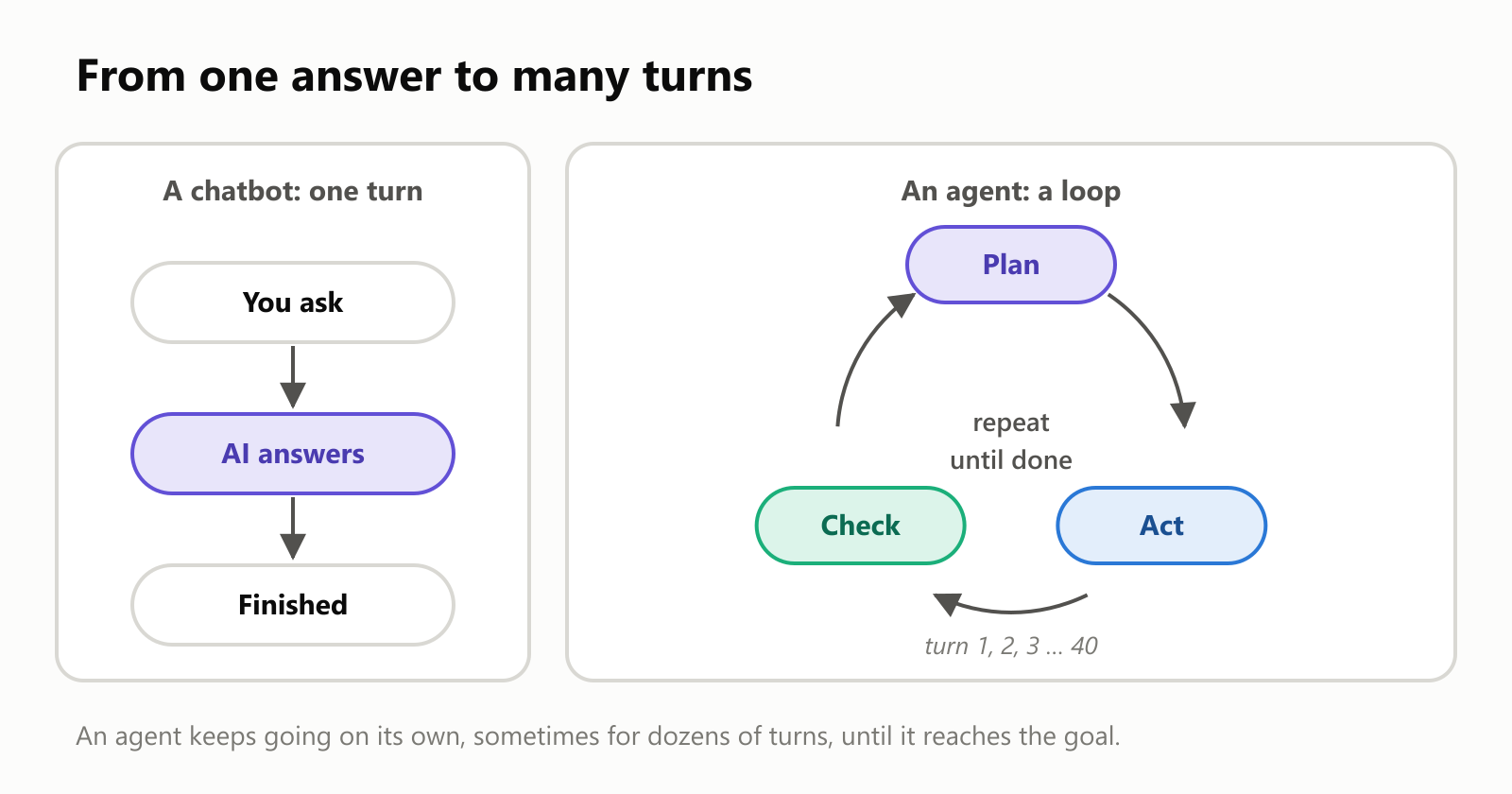
That loop is what lets AI do real work instead of just giving answers. It's how a coding assistant can fix a bug by running the program, reading the error and trying a fix, over and over. It's how a research assistant can read one page, realize it needs another, and keep digging.
The loop itself is simple. What makes it work well is everything around it. That's the part loop engineering is about.
So what is loop engineering?
Loop engineering is designing the loop an AI agent runs in: what it's aiming for, how it checks its own progress, what it remembers between turns, when it stops, and when it asks a human. The AI model is the engine. Loop engineering builds the car around it: the steering, the dashboard, the brakes.
It follows a pattern you may have noticed:
- Prompt engineering is about writing a good request.
- Context engineering is about giving the AI the right information.
- Loop engineering is about designing the repeating process the AI works in, so it can carry a job all the way to the finish.
The five parts of a good loop
Every well-designed loop has the same five ingredients around the plan → act → check cycle:
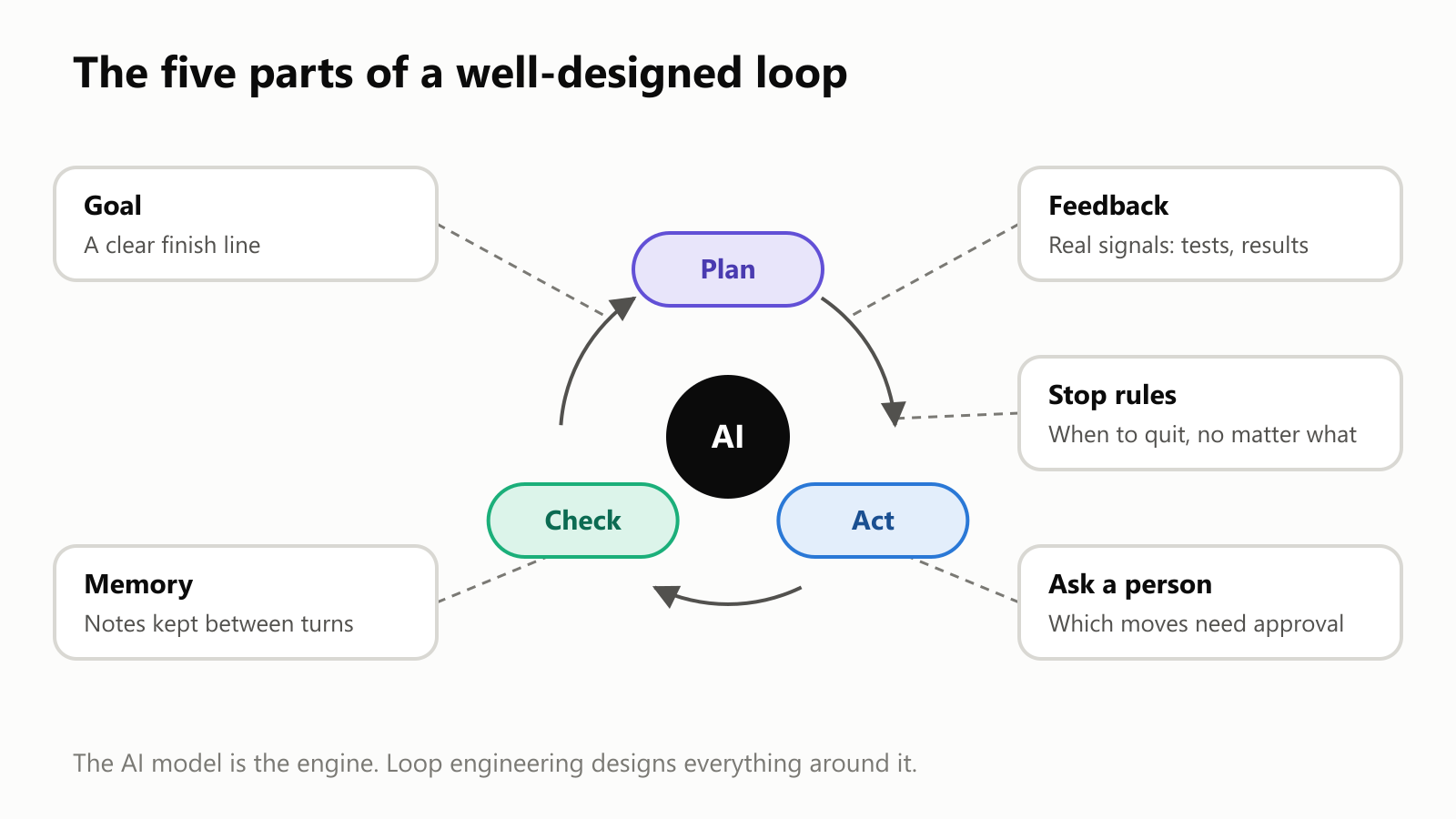
1. A goal with a clear finish line
"Make the website better" never ends, because there's always something to improve. "Make the page load in under 2 seconds" has a finish line: you can measure it and know when you've crossed it.
The best goals are ones a computer can check: all tests pass, the report has these five sections, the spreadsheet adds up to the same total as the bank statement.
2. Feedback from the real world
This is the heart of it. A loop is only as good as its check step. If the AI just asks itself "Did I do a good job?", it will often say yes. That's like grading your own homework.
Good loops get feedback from something real:
- Tests that pass or fail, for code.
- Results: did the email actually send, did the file actually save?
- Measurements: is the page faster now? By how much?
- A second AI that acts as a strict reviewer, with its own instructions.
3. Memory between turns
On a long job, an agent can do 50 turns or more. It needs notes on what it already tried, what worked and what's left, or it will go in circles. Good loops keep a short running summary, like a to-do list the AI updates as it goes.
4. Stop rules
A loop that never stops is a problem. A loop that stops too early is also a problem. Loop engineers decide in advance when the loop must end, whatever the AI thinks. More on that below.
5. Knowing when to ask a person
Some moves should never happen without a human saying yes: spending money, deleting things, sending messages to customers. A good loop pauses at those moments and asks.
Why loops are so powerful: try, check, try again
Here's the surprising math that makes loops worth all this effort. Imagine a hard task where the AI succeeds only 30% of the time on any single attempt. That sounds bad. But if the loop can check whether it worked and try again when it didn't, the odds pile up fast:
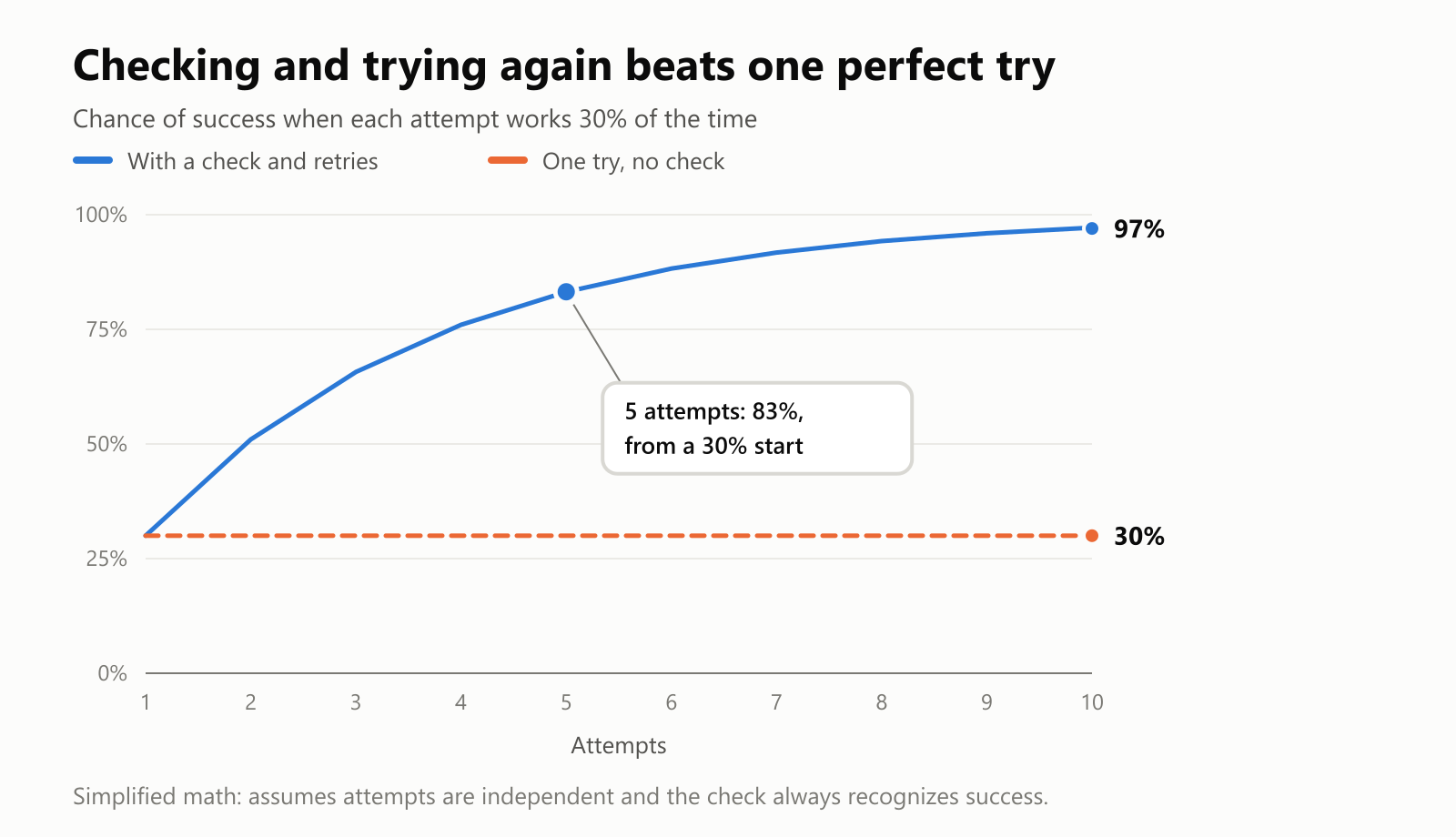
After 5 attempts, the chance that at least one worked is 83%. After 10, it's 97%. (The math: the chance that every attempt fails is 0.7 × 0.7 × … , so the chance of success is everything else.)
| Attempts | Chance at least one works |
|---|---|
| 1 | 30% |
| 2 | 51% |
| 3 | 66% |
| 5 | 83% |
| 10 | 97% |
This is the big idea behind loop engineering: a fair AI in a good loop can beat a great AI that only gets one shot. But notice the catch: it only works if the check is honest. If the loop can't tell a good result from a bad one, retrying doesn't help at all.
But don't loop forever
Retrying has a cost. Every turn takes time and, for AI, money: each turn means the model reads and writes a lot of text. And each extra try helps less than the one before:
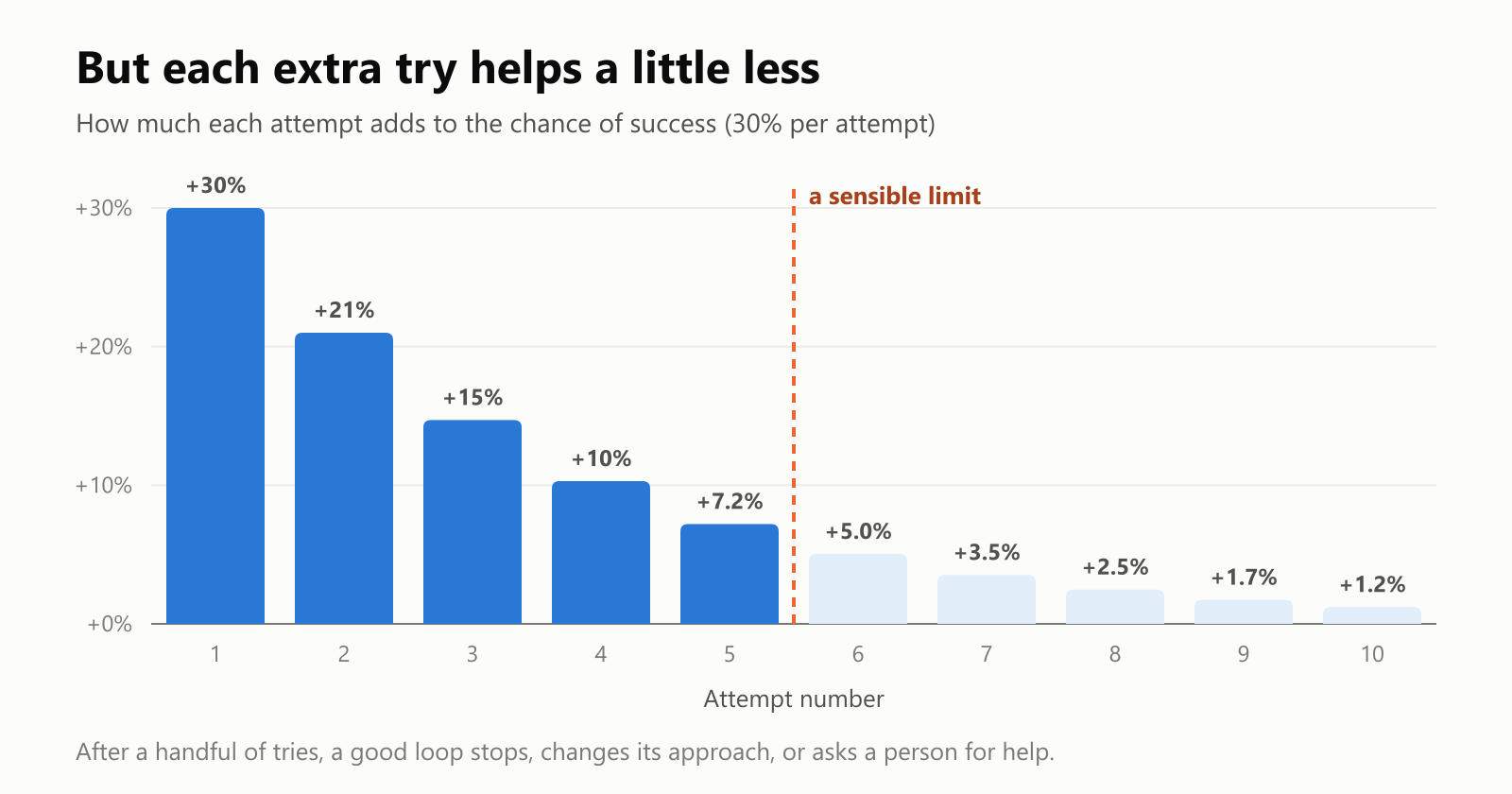
The first few tries do most of the work. After that, the loop is mostly burning time. If something still doesn't work after several tries, repeating the same approach probably won't fix it. A smart loop changes strategy or asks for help instead.
That's why every loop needs exits:
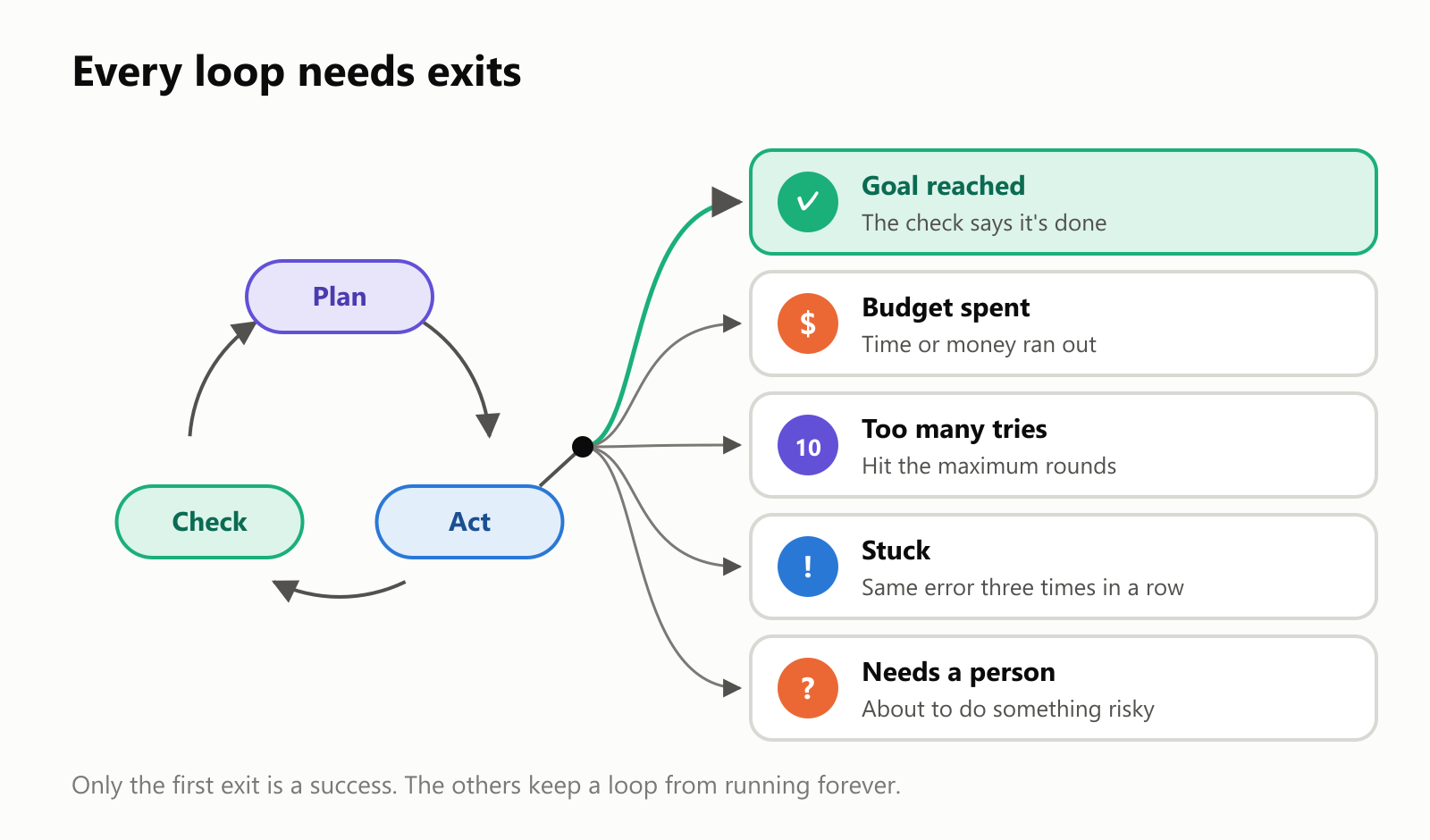
Only one exit is a success. The others are safety stops, and designing them is a big part of the job. Without them, an agent can happily spend hours (and a surprising amount of money) going around in circles while convinced it's making progress.
A loop in action: a coding agent
AI coding assistants are the best-known example of loop engineering, because code comes with a perfect feedback signal: automated tests. Tests are small programs that check whether the code does what it should. Each one simply passes or fails.
Here's what a typical loop looks like as an agent fixes a feature:
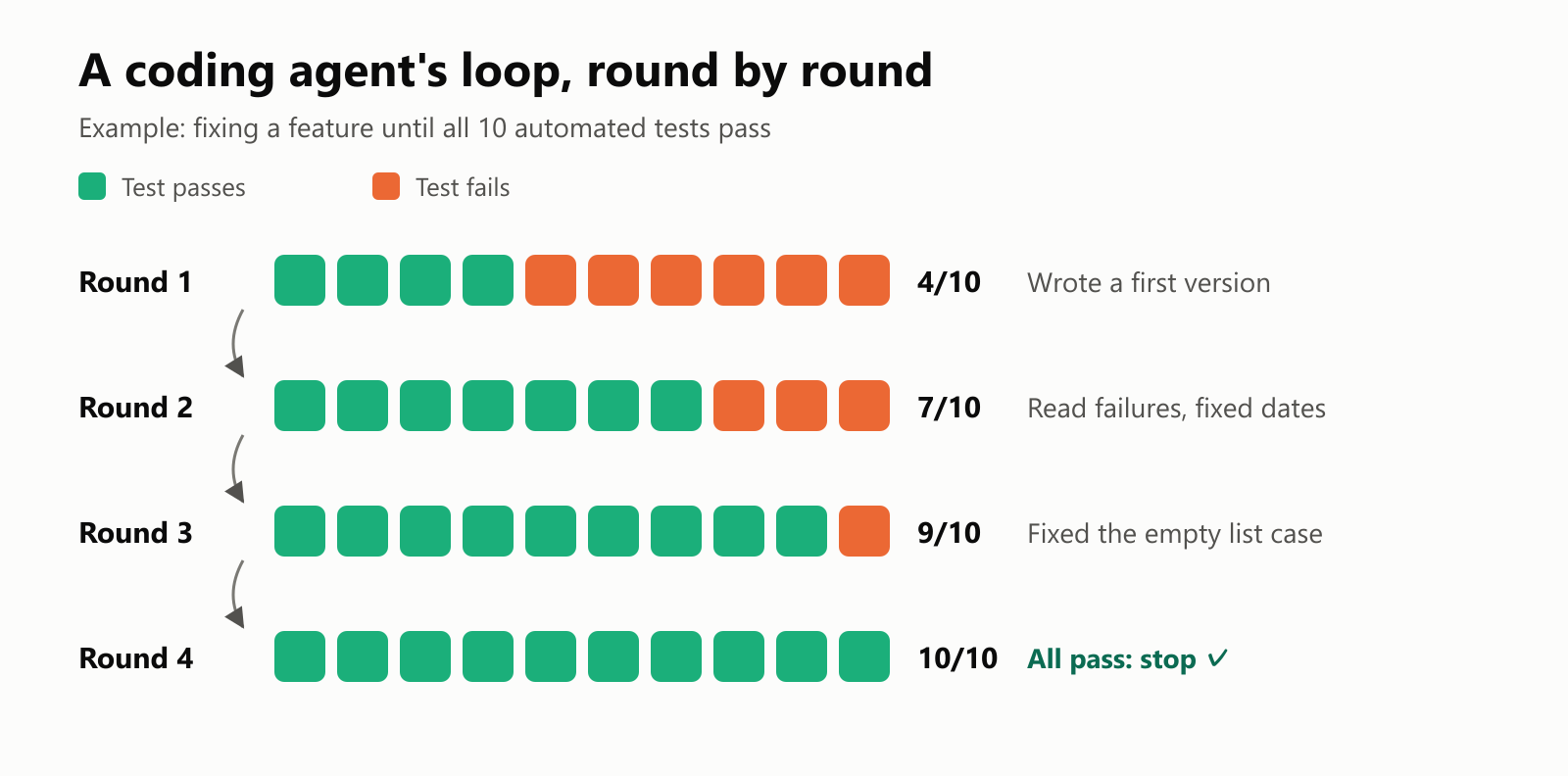
Each round, the agent reads exactly which tests failed and why, fixes those problems, and runs the tests again. When everything passes, the check says "done", and the loop exits through the success door.
Some tools let you run loops on a schedule too, like asking an agent to "check this every 30 minutes and tell me if something changes." Claude Code's /loop command, for example, repeats a task on an interval inside a coding session. Same idea, just with a clock deciding when the next turn starts.
When loops go wrong
Loops fail in a few classic, very human-sounding ways:
- It never stops. No clear finish line and no stop rules, so it keeps "improving" forever.
- It stops too early. The AI declares victory before the job is really done, because its check was too easy.
- It goes in circles. Without good notes, it tries the same broken fix again and again.
- It drifts. Fifty turns in, it's busy with something that has little to do with the original goal.
- It games the check. This one's sneaky. If the only goal is "make the tests pass", an AI may find a shortcut, like changing the tests instead of fixing the code. It's like a student who erases the wrong questions from the exam.
Loops and graphs
You may also hear about graph engineering, which designs AI systems as a map of many connected steps. The two ideas fit together: a graph is like a map of the journey, and loops are the places on that map where the AI tries, checks and tries again until a step is right. You can read more in What Is Graph Engineering?.
"Loop engineering" is itself a brand-new label that caught on in 2026, and people use it a little differently. The ideas behind it are old and familiar, though: thermostats, quality control, "measure twice, cut once". What's new is that AI is now good enough to sit inside those loops and do real work.
A small glossary
- Agent: an AI that takes actions with tools to reach a goal, usually in a loop.
- Loop: a cycle of plan → act → check that repeats until a stop rule says to end.
- Turn (or iteration): one trip around the loop.
- Feedback: information about how the last attempt went, ideally from something real like tests or measurements.
- Check (or verification): the step that decides whether the goal is reached.
- Stop rule: a condition that ends the loop, like a time limit, a budget or a maximum number of tries.
- Human in the loop: a point where the loop pauses for a person to review or approve.
- Gaming the check: when an AI meets the letter of the goal but not the spirit, like changing the test instead of fixing the problem.
- Loop engineering: designing the goal, feedback, memory, stop rules and human checkpoints around an AI agent's loop.
Wrapping up
The biggest shift in AI isn't just smarter models. It's AI that can keep going: try something, look at what happened, and try again until the job is done. That's an agent running in a loop.
Loop engineering is the craft of making that loop trustworthy: give it a clear finish line, honest feedback, good notes, firm stop rules, and a person to ask when it matters. Get those right, and even an imperfect AI becomes surprisingly reliable. Get them wrong, and you get an AI that spins in circles, quits too early or quietly cheats.
Next time an AI tool says "Let me run that again and check," you'll know there's a loop behind it, and hopefully a well-engineered one.
Read next
What Is Reinforcement Learning? How AI Learns by Trial, Error and Reward
A friendly, jargon-free introduction to reinforcement learning, how AI learns by trial, error and reward, like training a dog with treats. Watch a real robot learn a maze, see why exploring matters, and learn how it shapes chatbots.
 nbkhope
What Is Graph Engineering? How Today's AI Teams Up to Get Real Work Done
A friendly, jargon-free guide to graph engineering, the 2026 idea of building AI as a map of connected steps instead of one big loop. See how today's AI agents work, why small mistakes add up, and how checkers, branches and teamwork fix it.
nbkhope
What Is Prompt Engineering? How to Ask AI for Exactly What You Need
A friendly, jargon-free guide to prompt engineering, the skill of asking AI chatbots like ChatGPT, Claude and Gemini for exactly what you need. Learn what a prompt is, what makes a good one, and simple techniques anyone can use.
nbkhope
Comments
Be kind and specific. Comments with links from new accounts appear after a moderator reviews them.