What Is Prompt Engineering? How to Ask AI for Exactly What You Need
A friendly, jargon-free guide to prompt engineering, the skill of asking AI chatbots like ChatGPT, Claude and Gemini for exactly what you need. Learn what a prompt is, what makes a good one, and simple techniques anyone can use.

On this page
Two people ask the same AI chatbot for help with the same thing. One gets a bland, generic answer. The other gets something useful on the first try. The difference usually isn't luck, and it isn't a better chatbot. It's how they asked.
Writing requests that get great results from AI has a name: prompt engineering. It sounds technical, but it's really about clear communication, and anyone can learn it. This article explains what prompt engineering is, why it works, and simple techniques you can start using today.
What is a prompt?
A prompt is whatever you give an AI to respond to. Usually that's the text you type into a chatbot: a question, an instruction, a request. It can also include things you attach, like a document or a photo.
"What's the capital of Italy?" is a prompt. So is "Rewrite this email so it sounds more polite," followed by the email.
And what is prompt engineering?
Prompt engineering is the practice of writing and improving prompts so that the AI gives you the answer you actually want. The word "engineering" can sound intimidating, but here it simply means designing something carefully and adjusting it until it works well.
Think of it like giving directions. "Go to the store" leaves a lot of room for guessing. "Go to the bakery on Main Street, buy one loaf of whole-wheat bread, and be back by 6" doesn't. AI works the same way: the clearer your directions, the better the result.
Why does the way you ask matter so much?
An AI chatbot can't read your mind. It doesn't know who you are, what you already know, what the answer is for, or what "good" looks like to you. All it has is your prompt. When details are missing, it fills the gaps with the most typical, middle-of-the-road answer.
Here's the same request asked two ways:
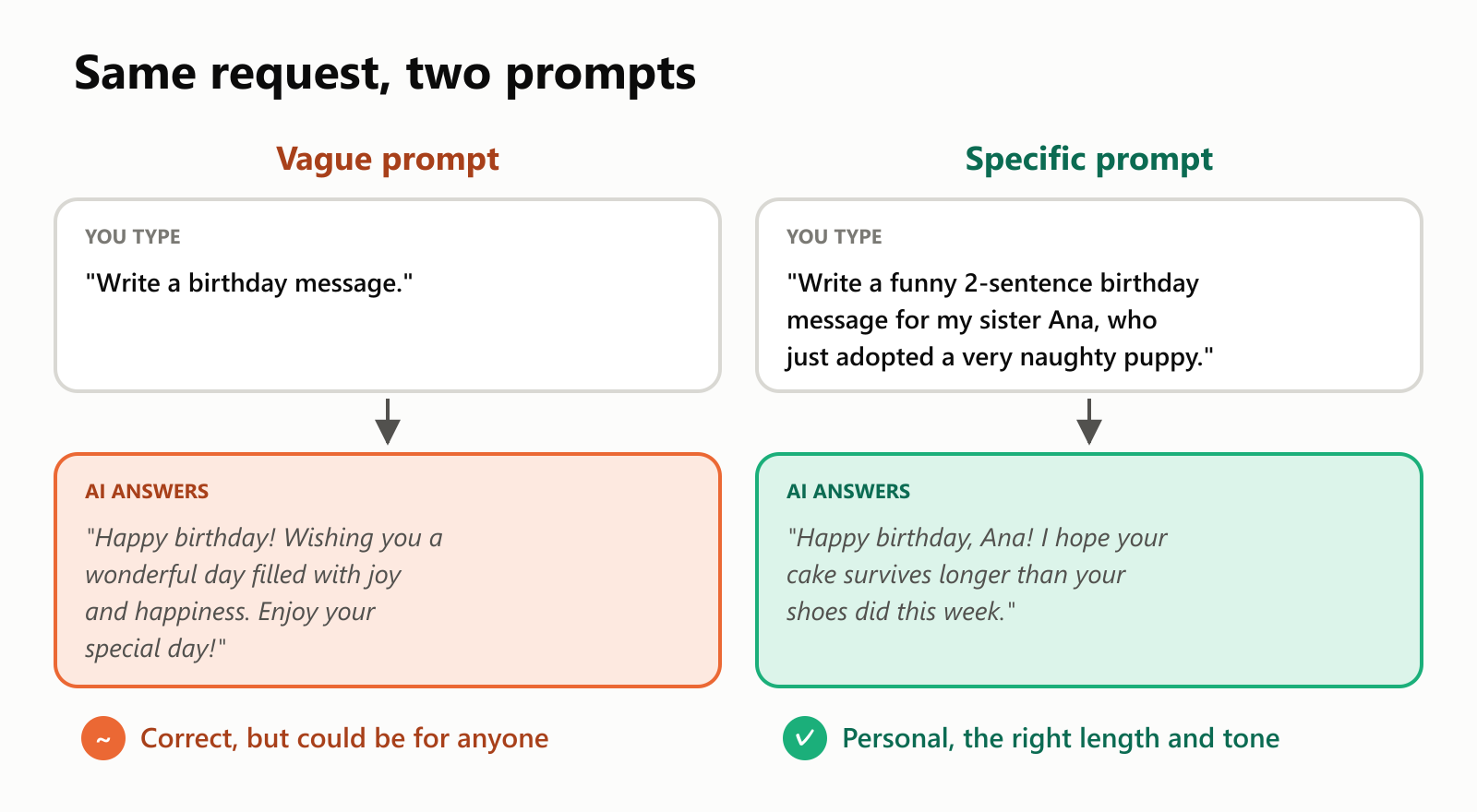
Neither answer is wrong. But the second prompt told the AI who the message is for, how long it should be, what tone to use, and a detail to build on, so the answer fits.
The parts of a good prompt
Most strong prompts are built from a few simple ingredients:
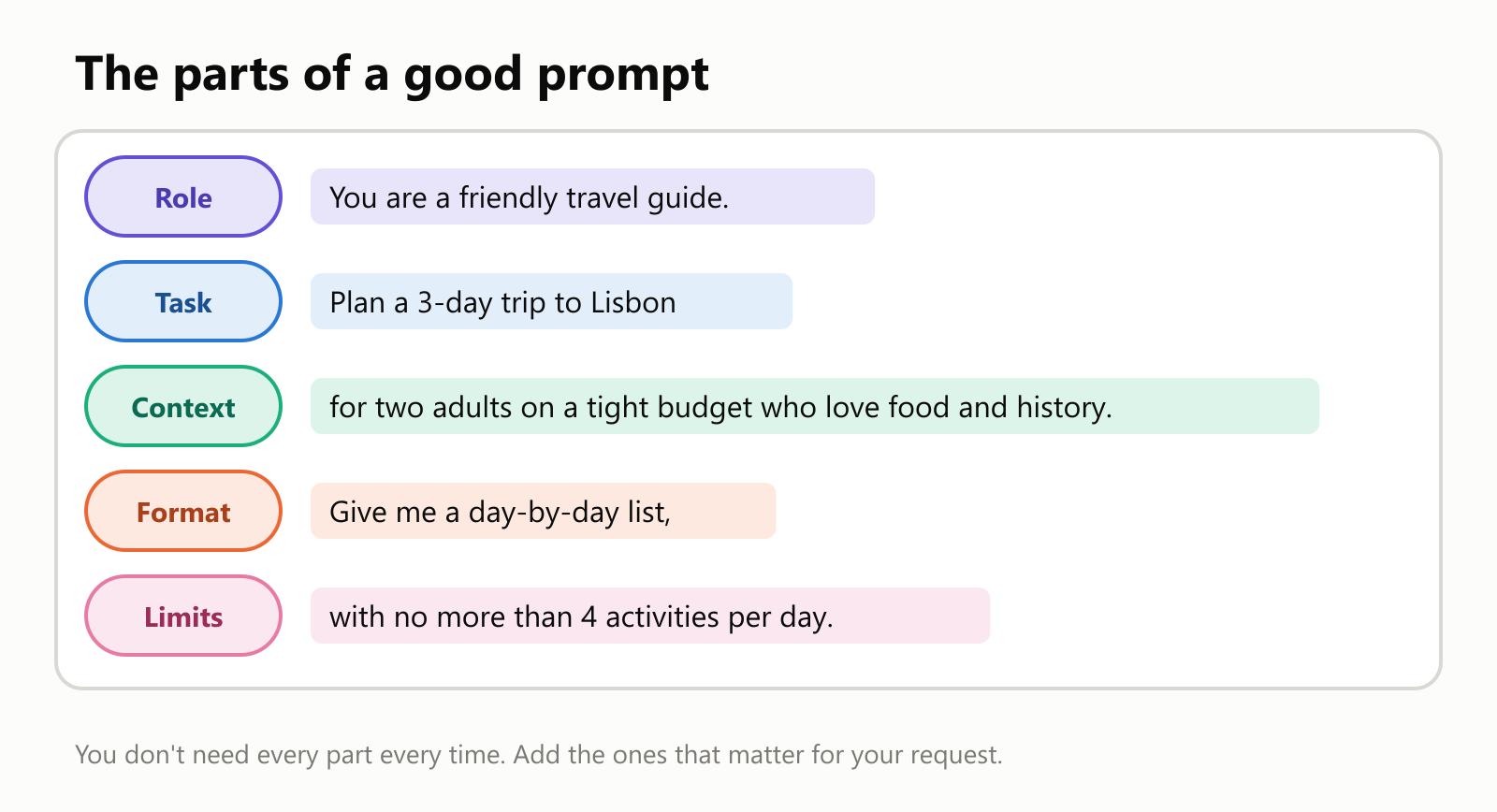
| Part | What it does | Example |
|---|---|---|
| Role | Tells the AI what perspective to take | "You are a patient math tutor." |
| Task | Says clearly what you want done | "Explain how fractions work." |
| Context | Gives background the AI can't know | "My son is 9 and finds math stressful." |
| Format | Describes the shape of the answer | "Use a short story with 3 steps." |
| Limits | Sets boundaries | "Keep it under 150 words, and avoid jargon." |
You don't need all five every time. A quick question doesn't need a role. But when an answer disappoints you, check this list: one of these parts is usually missing.
Simple techniques that work
1. Be specific
Replace vague words with concrete details. Instead of "short," say "3 sentences." Instead of "for beginners," say "for someone who has never cooked before."
- Before: "Give me some dinner ideas."
- After: "Give me 5 vegetarian dinner ideas that take under 30 minutes and use ingredients from a regular supermarket."
2. Show examples
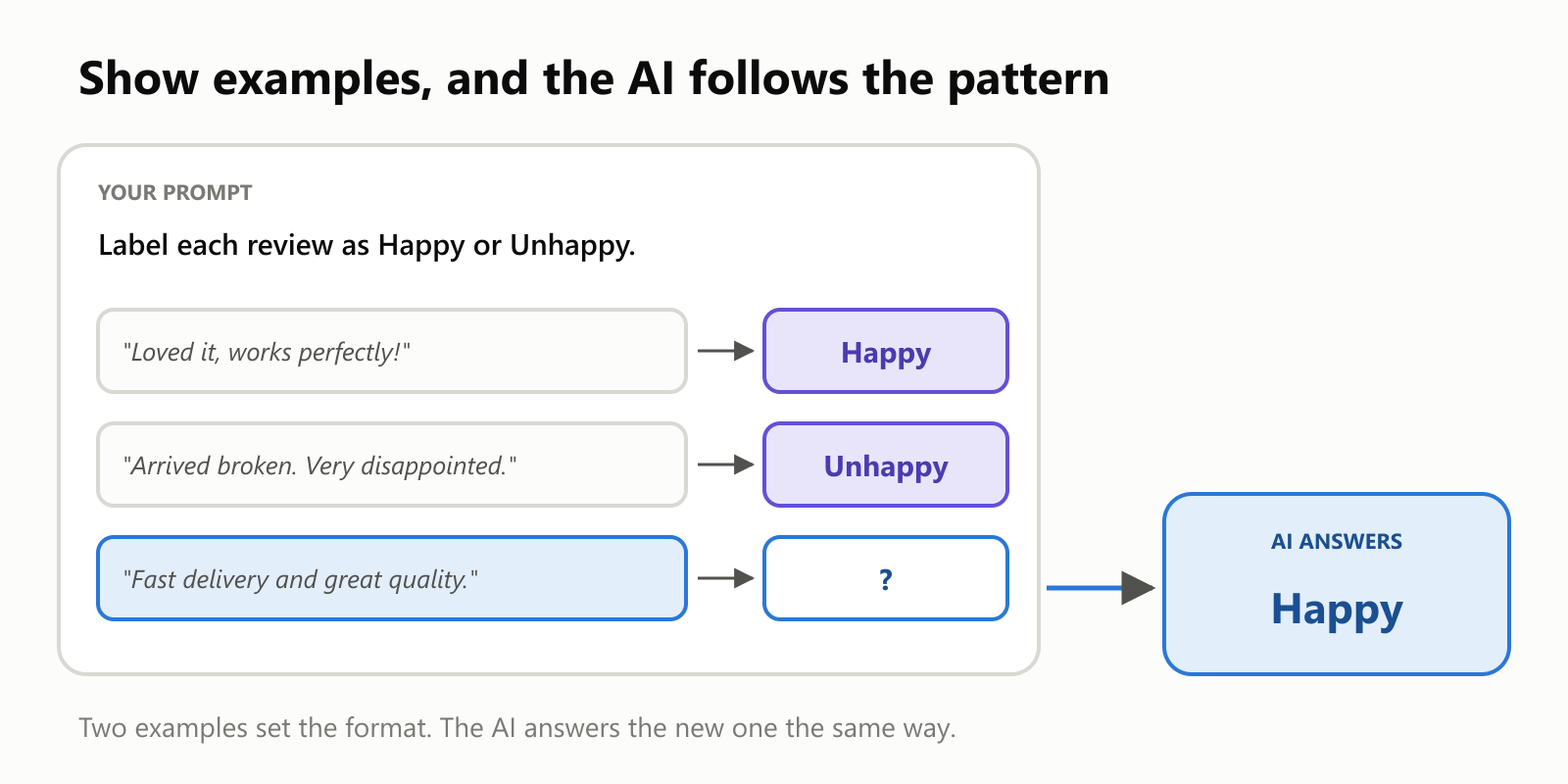
If you want answers in a particular style or format, show the AI one or two examples. It will follow the pattern. This is so effective that it has a name: few-shot prompting (each example is a "shot").
3. Ask it to think step by step
For problems with several steps, like math, planning or decisions, ask the AI to work through it gradually. Phrases like "Think it through step by step" or "Explain your reasoning before giving the final answer" often lead to more careful, more accurate answers.
"I have $200 for groceries this month and I've spent $137 so far. If I spend about $15 a week, will the money last the remaining 4 weeks? Think it through step by step."
4. Say what format you want
Want a table, a bulleted list, an email, a checklist, or a single sentence? Just ask. The AI is very good at following format instructions.
5. Break big tasks into smaller ones
Instead of asking for an entire business plan at once, ask for an outline first, then work on one section at a time. You'll get better results and stay in control of the direction.
6. Let the AI ask you questions
When you're not sure what details matter, flip it around:
"I want to write a speech for my parents' 40th wedding anniversary. Before you write anything, ask me the questions you need answered to make it personal."
Prompting is a conversation
You rarely get the perfect answer on the first try, and that's normal. The real skill is noticing what's off and saying so.
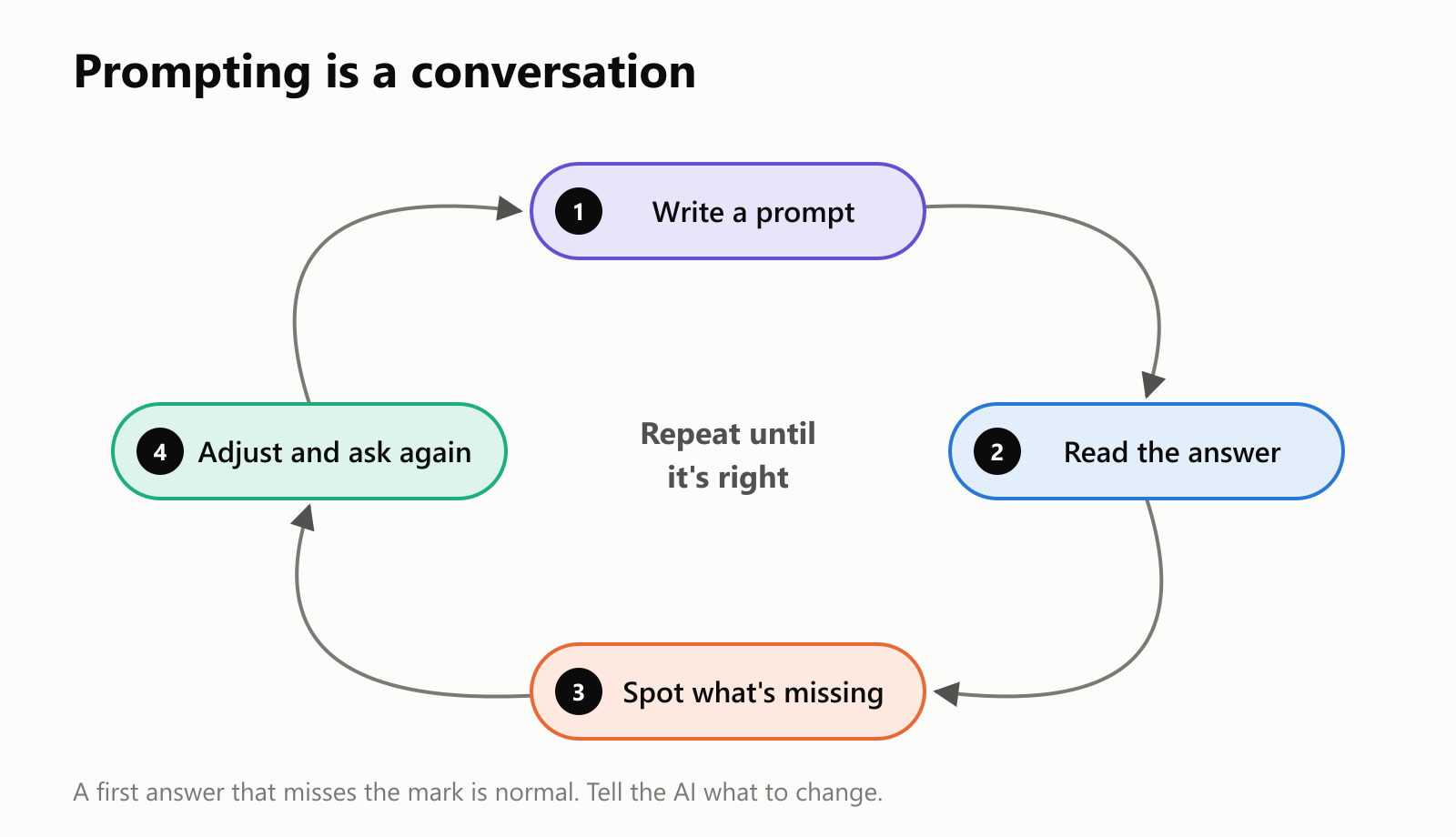
You don't have to start over. Simply reply with what to change:
- "Make it shorter and more casual."
- "That's too technical. Explain it like I'm 12."
- "Good, but add a section about costs."
- "Keep the first paragraph and rewrite the rest."
Common mistakes to avoid
- Being too vague. "Help me with my resume" gives the AI almost nothing to work with. Say what job you're applying for and what you want improved.
- Cramming in too many requests at once. Five different tasks in one message often means none of them gets done well.
- Assuming it knows your situation. It doesn't know your company, your town or your audience unless you tell it.
- Accepting the first answer without reading it. Check that it actually answers your question.
- Trusting facts blindly. Even with a great prompt, AI can make mistakes or invent things that sound real. This is called a hallucination.
Is prompt engineering a job?
For some people, yes. Companies building products on top of AI often have people who carefully design, test and improve the prompts behind the scenes, sometimes thousands of words long, so the product behaves reliably for every user.
But you don't need to make it a career for it to be useful. For most of us, prompt engineering is simply an everyday skill, like knowing how to search the internet well. A few good habits make every AI tool you use more helpful.
A quick glossary
- Prompt: the text (and any attachments) you give an AI to respond to.
- Prompt engineering: writing and refining prompts to get better answers from AI.
- Context: background information that helps the AI understand your situation.
- Few-shot prompting: including a few examples in your prompt so the AI follows the pattern.
- Step-by-step prompting: asking the AI to work through a problem gradually before answering.
- Hallucination: when the AI confidently says something that isn't true.
- LLM (Large Language Model): the technology behind AI chatbots.
Wrapping up
Prompt engineering is the skill of asking AI for exactly what you need. It comes down to a few habits: be specific, give context, describe the format you want, show examples, and treat the exchange as a conversation where you guide the AI toward the answer.
You don't need any technical background to get good at it. Next time a chatbot gives you a so-so answer, don't give up on it. Ask again, better.
Read next
What Is MCP? The Model Context Protocol Explained Simply
A friendly, jargon-free guide to MCP (Model Context Protocol), the standard that lets AI assistants like ChatGPT, Claude and Gemini safely connect to your apps, files and data. Learn what it is, why it matters and how it works.
 nbkhope
What Is an LLM? Large Language Models Explained Simply
A friendly, jargon-free guide to Large Language Models (LLMs), the technology behind ChatGPT, Claude and Gemini. Learn what they are, how they learn, how they write, and how to use them wisely.
nbkhope
How to Create a Variable in the C++ Programming Language
We can create variables in C++ using the following syntax: We declare the variable first with the data type, followed by the desired name. For example, if you want to store a person's age, you could…
nbkhope
Comments
Be kind and specific. Comments with links from new accounts appear after a moderator reviews them.