What Is MCP? The Model Context Protocol Explained Simply
A friendly, jargon-free guide to MCP (Model Context Protocol), the standard that lets AI assistants like ChatGPT, Claude and Gemini safely connect to your apps, files and data. Learn what it is, why it matters and how it works.

On this page
AI chatbots are great at writing and explaining things, but on their own they live in a bubble. Ask one "What's on my calendar tomorrow?" or "Summarize the report in my shared folder" and, out of the box, it can't help you: it has no way to see your calendar or your files.
MCP, short for Model Context Protocol, is the technology that pops that bubble. It's a common standard that lets AI apps connect to the other apps, files and services you already use. This article explains what MCP is, why it matters, and how it works, without code and without jargon.
What does "Model Context Protocol" mean?
Let's take the name apart, one word at a time:
- Model: the AI model, the "brain" behind a chatbot like ChatGPT, Claude or Gemini.
- Context: the information the model can use to give you a good answer. Your question is context. So is your calendar, a document, or a company database, if the model can reach it.
- Protocol: an agreed-upon set of rules that lets two systems talk to each other. You use protocols every day without noticing: your phone and your earbuds use the Bluetooth protocol, and your browser uses the HTTP protocol to load web pages.
Put together: MCP is a shared set of rules that lets AI models get the context they need, and take actions, by connecting to other apps and data sources.
It was introduced by the AI company Anthropic in November 2024 as an open standard, meaning anyone can use it for free. It caught on quickly: other major AI companies, including OpenAI, Google and Microsoft, added support for it, and thousands of connections have been built since. In late 2025, Anthropic handed MCP over to the Agentic AI Foundation, part of the nonprofit Linux Foundation, so that no single company controls it.
The big idea: a universal plug for AI
Think about how many chargers you used to own. Every phone, camera and gadget had its own special cable. Today, one USB-C cable charges most of them, because manufacturers agreed on a single standard.
MCP does the same thing for AI. Before it, every AI app had to build a custom connection to every tool it wanted to use: one for the calendar, another for email, another for the company database, and the AI app next door had to build them all again.
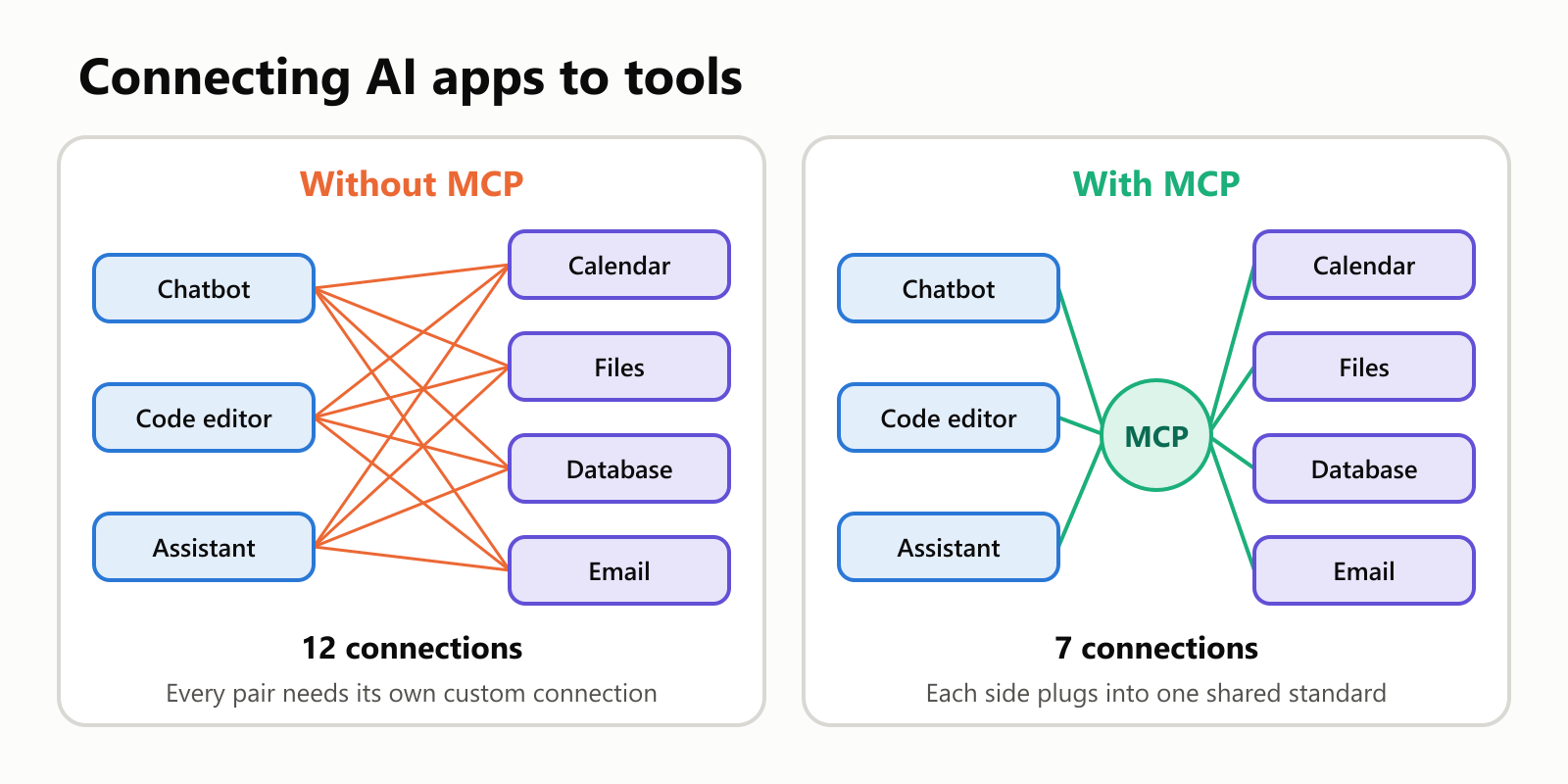
With MCP, each tool only needs to be connected once, and then it works with any AI app that speaks MCP. And each AI app only needs to learn MCP once to work with all of those tools.
Why that makes such a big difference
The savings grow fast as more apps and tools join. Without a standard, the number of custom integrations is apps × tools. With a standard, it's just apps + tools.
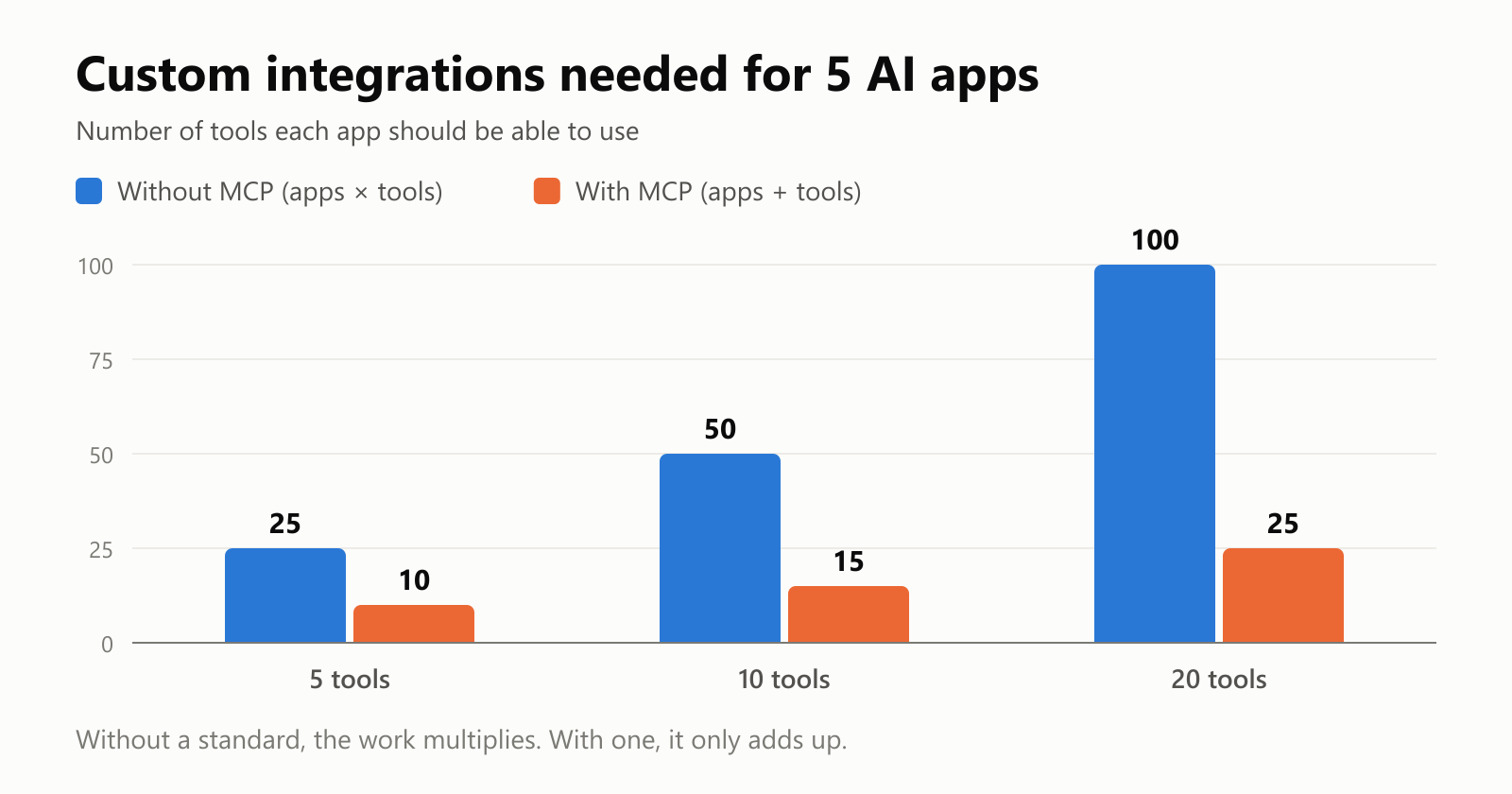
Less custom work means more tools get connected, bugs get fixed in one place, and you get to choose your favorite AI app without losing access to the tools you rely on.
How does MCP work?
MCP has three main pieces. Here's what each one does, using a simple example: an AI chatbot that can read your calendar.
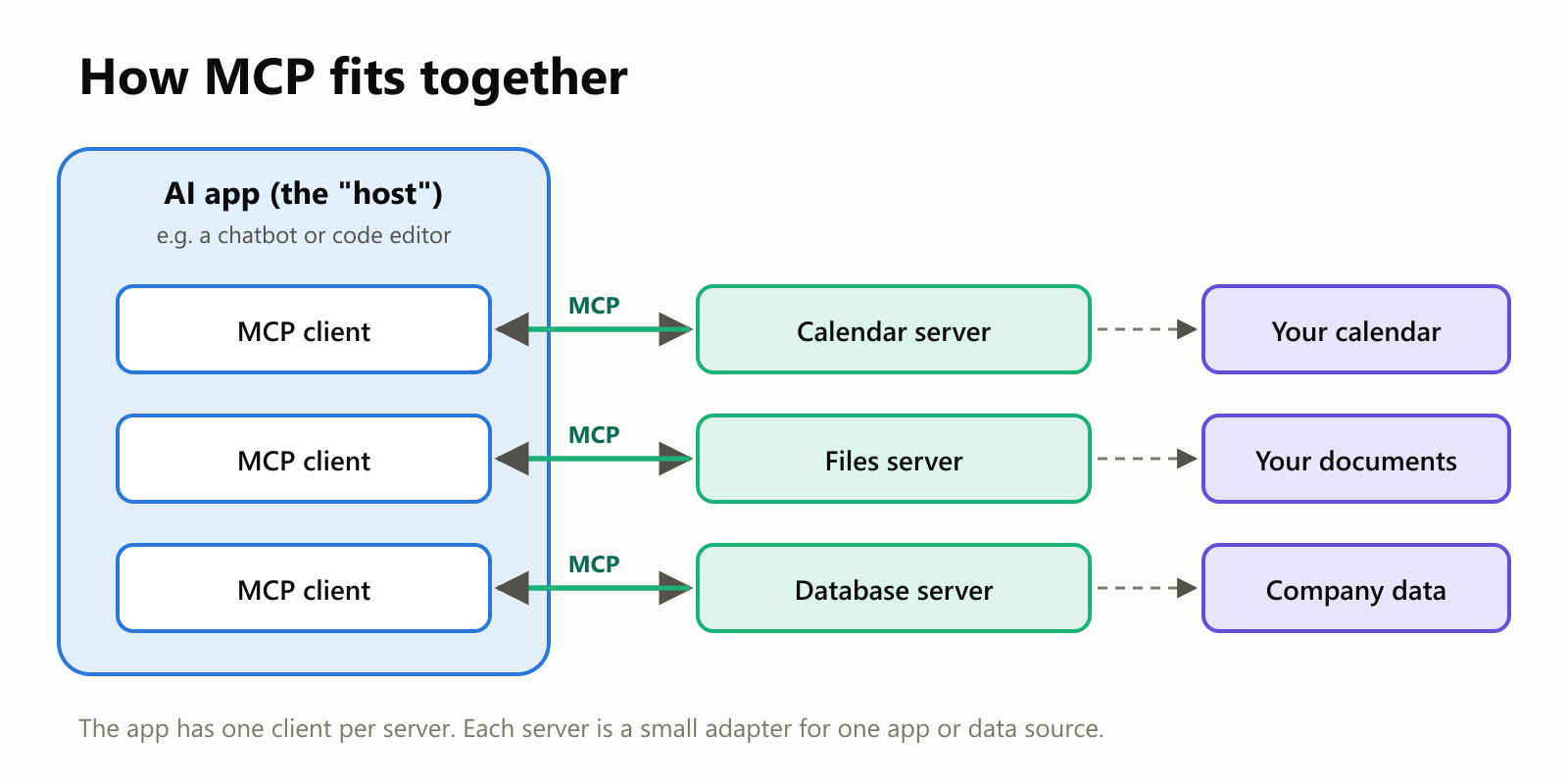
- The host: the AI app you're using, such as a chatbot on your computer or an AI-powered code editor.
- MCP clients: small connectors that live inside the host. The host creates one client for each server it connects to.
- MCP servers: small programs that act as adapters. Each one knows how to talk to one specific app or data source (your calendar, your files, a database) and presents it to the AI in the standard MCP way.
Despite the name, an MCP "server" doesn't have to be a big machine in a data center. It can be a small program running on your own computer, or a service on the internet run by the company that makes the app.
What can an MCP server offer?
An MCP server can offer the AI three kinds of things:
| What it offers | What it means | Example |
|---|---|---|
| Tools | Actions the AI can take | "Create a calendar event", "Send a message" |
| Resources | Information the AI can read | A document, a spreadsheet, a list of products |
| Prompts | Ready-made instructions you can pick | "Summarize this week's meetings" |
What happens when you ask a question?
Let's follow a real request from start to finish:
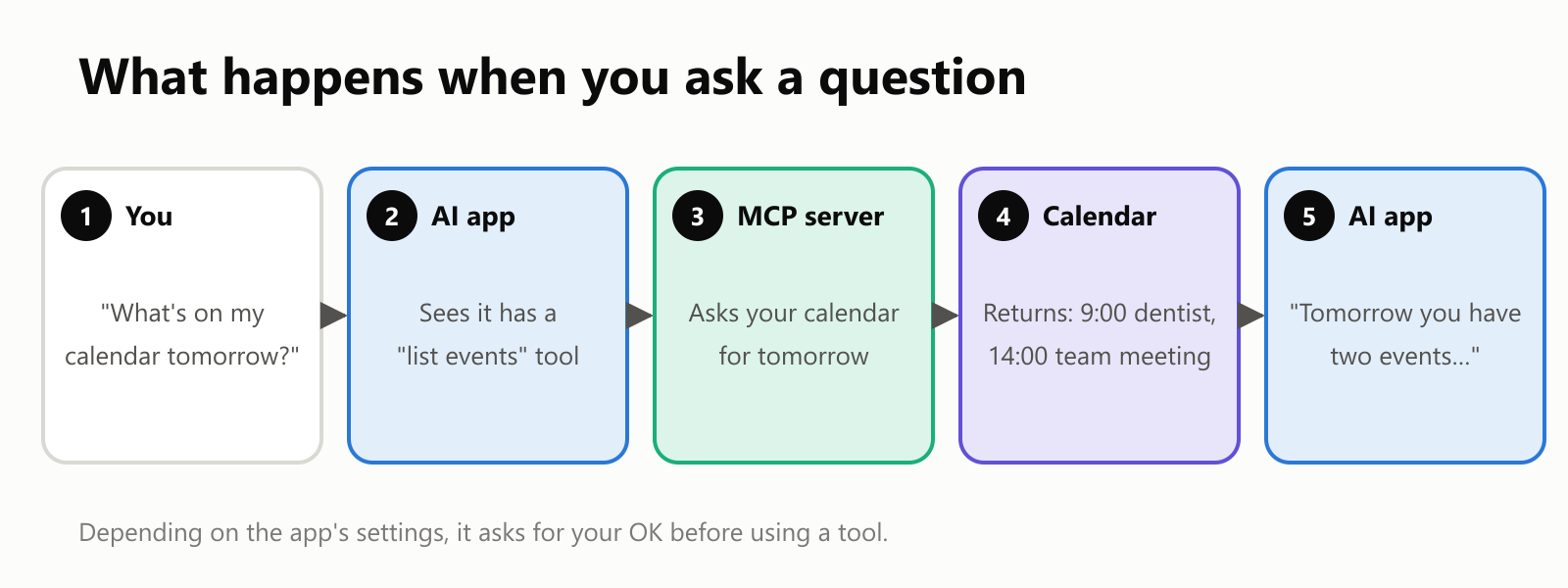
- You ask your AI app a question in plain language.
- The AI figures out that answering needs your calendar, and that a connected MCP server offers a tool for listing events.
- The MCP server receives the request and asks your calendar app for tomorrow's events.
- The calendar sends back the events, and the server passes them to the AI.
- The AI writes a friendly answer using that real information.
All of this happens in a few seconds. The important part is step 2: the AI knows what tools are available because every MCP server describes its tools in the same standard way.
What can you do with MCP?
Here are some everyday examples of what becomes possible once an AI app is connected to the right MCP servers:
- Personal organization: "Find a free hour on Thursday and schedule a call with Ana."
- Documents: "Summarize the three most recent files in my project folder."
- Work tools: "Create a task for the bug we just discussed and assign it to me."
- Data: "How many orders did we get last week, compared with the week before?"
- Programming: an AI code editor can read the project's files, run its tests, and look up documentation.
Is it safe?
Connecting AI to your apps is powerful, and power deserves care. MCP itself is just a set of rules; how safe it is in practice depends on which servers you connect and which permissions you give them.
A few habits go a long way:
- Use trusted servers. Treat an MCP server like any app you install on your computer.
- Limit access. If a server only needs to read your calendar, don't give it permission to edit or delete.
- Review actions. Keep the "ask before acting" setting on for anything that sends, buys, changes or deletes.
- Watch for tricks. Text the AI reads (a web page, an email, a document) could contain hidden instructions meant to fool it. This is called prompt injection. Being asked to approve actions is your safety net.
A quick glossary
- MCP (Model Context Protocol): an open standard for connecting AI apps to other apps, files and data.
- Protocol: a shared set of rules that lets two systems talk to each other.
- Context: the information an AI can use to answer you.
- Host: the AI app you use (a chatbot, a code editor, an assistant).
- MCP client: the connector inside the host that talks to one MCP server.
- MCP server: an adapter that offers one app or data source to AI apps in the standard MCP way.
- Tool: an action an MCP server lets the AI take.
- Resource: information an MCP server lets the AI read.
- Prompt injection: hidden instructions in content the AI reads, meant to trick it.
Wrapping up
MCP is like a universal plug for AI. Instead of every AI app building custom connections to every tool, MCP gives them one common way to connect. AI apps learn MCP once, tools offer an MCP server once, and everything works together.
For you, that means AI assistants that can actually help with your stuff: your calendar, your documents, your work tools. Connect only what you trust, keep an eye on what the AI is about to do, and enjoy an assistant that finally lives outside its bubble.