
Selectors in Redux: A Visual, Hands-On Guide
Learn Redux selectors visually with Redux Toolkit: why repeated state paths break, how a selector fixes it, useSelector and connect, derived data, why a new array costs real renders, createSelector, arguments, the sort bug, testing, and exercises.


On this page
Many React apps use Redux to manage their data. All of it lives in one place, the store, and it's usually just a plain JavaScript object. That's simple at first. Then a few dozen components start reaching into that object, and every one of them has to know exactly how it's organized.
A selector is the fix, and it's one of the smallest ideas in Redux: a function that takes the state and returns a piece of it.
In this guide you'll see what repeated paths cost, write your first selectors, and use them in React. You'll then derive new data from the state, measure how a careless selector causes extra renders, fix that with createSelector, and meet a bug that only appears in a selector. Exercises wrap it up.
All outputs below come from real runs with Redux Toolkit 2.14, React 19 and Node.js 26 on Windows. To follow along, create a folder and run npm init -y and npm install @reduxjs/toolkit. Each file is named in its first line, and you run a program with node main.mjs.
The state is one object
Here's a small online shop, written with Redux Toolkit, the standard way to write Redux today. Each slice owns one section of the state:
1// store.mjs
2import { configureStore, createSlice } from "@reduxjs/toolkit";
3
4const productsSlice = createSlice({
5  name: "products",
6  initialState: [
7    { id: 1, name: "Keyboard", price: 50 },
8    { id: 2, name: "Mouse", price: 25 },
9    { id: 3, name: "Monitor", price: 200 },
10  ],
11  reducers: {},
12});
13
14const cartSlice = createSlice({
15  name: "cart",
16  initialState: { items: [] },
17  reducers: {
18    addItem(state, action) {
19      state.items.push({ productId: action.payload, quantity: 1 });
20    },
21  },
22});
23
24const userSlice = createSlice({
25  name: "user",
26  initialState: { name: "Ana" },
27  reducers: {
28    rename(state, action) {
29      state.name = action.payload;
30    },
31  },
32});
33
34export const { addItem } = cartSlice.actions;
35export const { rename } = userSlice.actions;
36
37export const store = configureStore({
38  reducer: {
39    products: productsSlice.reducer,
40    cart: cartSlice.reducer,
41    user: userSlice.reducer,
42  },
43});
getState shows the whole object:
1// main.mjs
2import { store, addItem } from "./store.mjs";
3
4store.dispatch(addItem(1));
5store.dispatch(addItem(3));
6
7console.log(store.getState());1{
2 products: [
3 { id: 1, name: 'Keyboard', price: 50 },
4 { id: 2, name: 'Mouse', price: 25 },
5 { id: 3, name: 'Monitor', price: 200 }
6 ],
7 cart: { items: [ [Object], [Object] ] },
8 user: { name: 'Ana' }
9}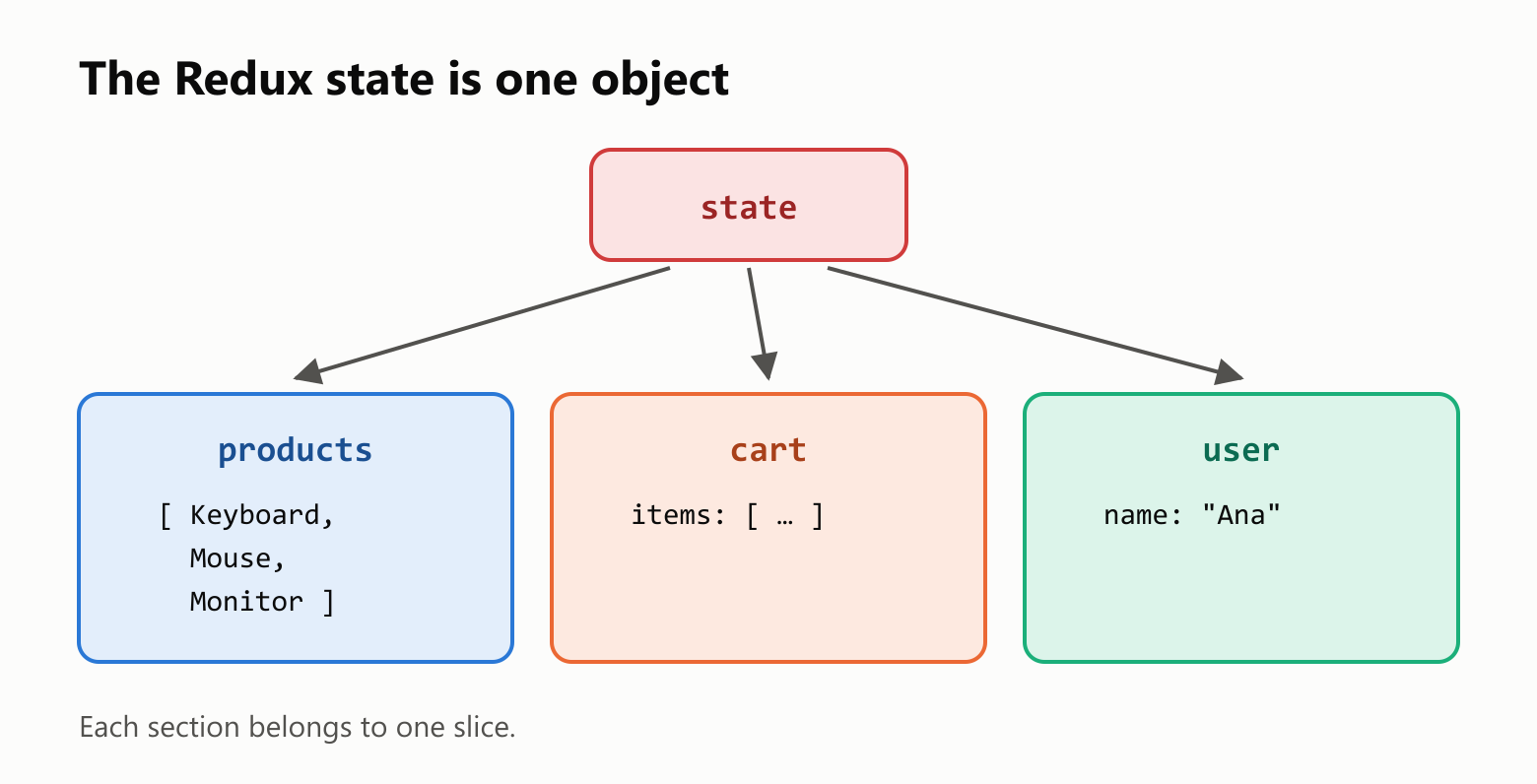
The same path, everywhere
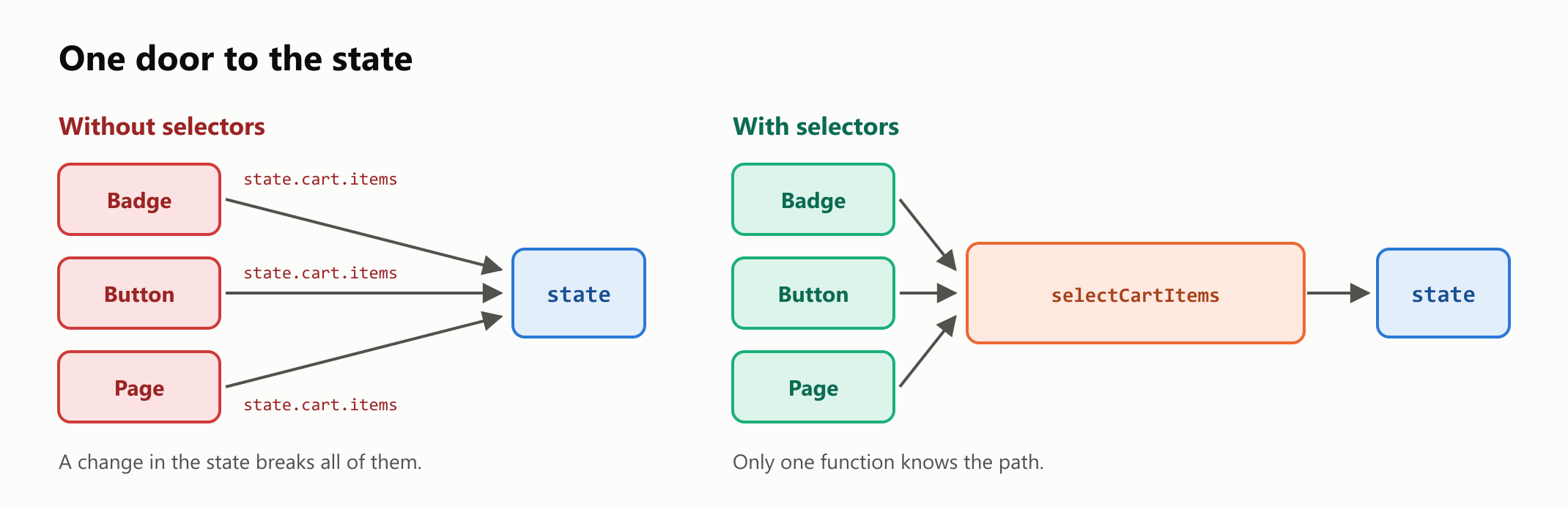
Say three parts of the app show the cart. For now, they're simple functions that receive the state, and each one spells out the path to the data:
1// main.mjs
2import { store, addItem } from "./store.mjs";
3
4function cartBadge(state) {
5  return `Cart: ${state.cart.items.length}`;
6}
7
8function checkoutButton(state) {
9  return state.cart.items.length === 0 ? "Cart is empty" : "Check out";
10}
11
12function cartPage(state) {
13  return state.cart.items.map((item) => `Product ${item.productId}`);
14}
15
16store.dispatch(addItem(1));
17const state = store.getState();
18
19console.log(cartBadge(state));
20console.log(checkoutButton(state));
21console.log(cartPage(state));
Cart: 1
Check out
[ 'Product 1' ]It works, and all three now depend on the shape of the state. Suppose you rename items to lines in the cart slice:
1// main.mjs
2function cartBadge(state) {
3  return `Cart: ${state.cart.items.length}`;
4}
5
6const state = { cart: { lines: [{ productId: 1, quantity: 1 }] } };
7
8console.log(cartBadge(state));
TypeError: Cannot read properties of undefined (reading 'length')That's one crash, and you'd have to find and fix the same path in every component. In a real app, that could be dozens of files.
Your first selectors
A selector takes the state as its argument, follows the path, and returns the data. By convention, its name starts with select. Keep them together in one file:
1// selectors.mjs
2export const selectProducts = (state) => state.products;
3export const selectCartItems = (state) => state.cart.items;
4export const selectUserName = (state) => state.user.name;
Components now ask for the data by name:
1// main.mjs
2import { store, addItem } from "./store.mjs";
3import { selectCartItems } from "./selectors.mjs";
4
5function cartBadge(state) {
6  return `Cart: ${selectCartItems(state).length}`;
7}
8
9function checkoutButton(state) {
10  return selectCartItems(state).length === 0 ? "Cart is empty" : "Check out";
11}
12
13store.dispatch(addItem(1));
14const state = store.getState();
15
16console.log(cartBadge(state));
17console.log(checkoutButton(state));
Cart: 1
Check outIf items becomes lines now, you change one line in selectors.mjs, and no component changes. The knowledge of how to find the data is wrapped inside the selector.
Selectors in React
In a React app, the useSelector hook from react-redux runs a selector and re-renders the component when the result changes. To try it, you'd also run npm install react react-dom react-redux in a React project, and wrap the app in <Provider store={store}>:
1import { useSelector } from "react-redux";
2import { selectCartItems, selectUserName } from "./selectors.mjs";
3
4export function CartSummary() {
5  const items = useSelector(selectCartItems);
6  const name = useSelector(selectUserName);
7
8  return <p>{name} has {items.length} items</p>;
9}
With two items in the cart, that rendered this text:
Ana has 2 itemsOlder code uses connect and mapStateToProps for the same job. It's still supported, and selectors work there too:
1import { connect } from "react-redux";
2import { selectCartItems, selectUserName } from "./selectors.mjs";
3
4function CartSummary({ items, name }) {
5  return <p>{name} has {items.length} items</p>;
6}
7
8const mapStateToProps = (state) => {
9  return {
10    items: selectCartItems(state),
11    name: selectUserName(state),
12  };
13};
14
15export default connect(mapStateToProps)(CartSummary);
For new code, the Redux team recommends the hooks.
Deriving data
The state should hold only what can't be calculated. A cart's total comes from its items and prices, so storing it would give you two copies to keep in sync. A selector can calculate it, and it can build on other selectors. Add these to selectors.mjs:
1// Add to selectors.mjs
2export const selectCartItemCount = (state) => selectCartItems(state).length;
3
4export const selectCartTotal = (state) => {
5  const products = selectProducts(state);
6  return selectCartItems(state).reduce((total, item) => {
7    const product = products.find((candidate) => candidate.id === item.productId);
8    return total + product.price * item.quantity;
9  }, 0);
10};1// main.mjs
2import { store, addItem } from "./store.mjs";
3import { selectCartItemCount, selectCartTotal } from "./selectors.mjs";
4
5store.dispatch(addItem(1));
6store.dispatch(addItem(3));
7
8console.log(selectCartItemCount(store.getState()));
9console.log(selectCartTotal(store.getState()));2
250The hidden cost of a new array
Numbers and strings are compared by value, so those selectors are fine. Arrays and objects are compared by reference. filter creates a new array every time, even when nothing has changed:
1// main.mjs
2import { store } from "./store.mjs";
3
4const selectExpensiveProducts = (state) => {
5  return state.products.filter((product) => product.price >= 50);
6};
7
8const state = store.getState();
9
10console.log(selectExpensiveProducts(state));
11console.log(selectExpensiveProducts(state) === selectExpensiveProducts(state));1[
2 { id: 1, name: 'Keyboard', price: 50 },
3 { id: 3, name: 'Monitor', price: 200 }
4]
5falseSame state, same contents, different array. useSelector runs the selector after every action, and it re-renders the component when the result is different, so this list re-renders on every action in the app. React Redux warned us about it in development:
Selector selectExpensiveProducts returned a different result when called with the same parameters. This can lead to unnecessary rerenders.We measured it. Two components showed the same expensive products, one with each kind of selector. We changed the user's name five times, which has nothing to do with products, and then added an item to the cart:
| Selector | First render | After 5 name changes | After adding an item |
|---|---|---|---|
Plain function with filter | 1 render | 6 renders | 7 renders |
createSelector | 1 render | 1 render | 1 render |
createSelector
createSelector adds memoization: it remembers the last result, and only recalculates when its inputs change. It's included in Redux Toolkit. You give it a list of input selectors and a result function:
1// Add to selectors.mjs
2import { createSelector } from "@reduxjs/toolkit";
3
4export const selectExpensiveProducts = createSelector(
5  [selectProducts],
6  (products) => products.filter((product) => product.price >= 50),
7);1// main.mjs
2import { store, rename } from "./store.mjs";
3import { selectExpensiveProducts } from "./selectors.mjs";
4
5const first = selectExpensiveProducts(store.getState());
6const second = selectExpensiveProducts(store.getState());
7
8store.dispatch(rename("Bia"));
9const third = selectExpensiveProducts(store.getState());
10
11console.log(first === second);
12console.log(first === third);
13console.log(selectExpensiveProducts.recomputations());true
true
1Three calls, one calculation, and the very same array each time. Renaming the user changed the state, and it didn't change state.products, so the selector kept its answer.
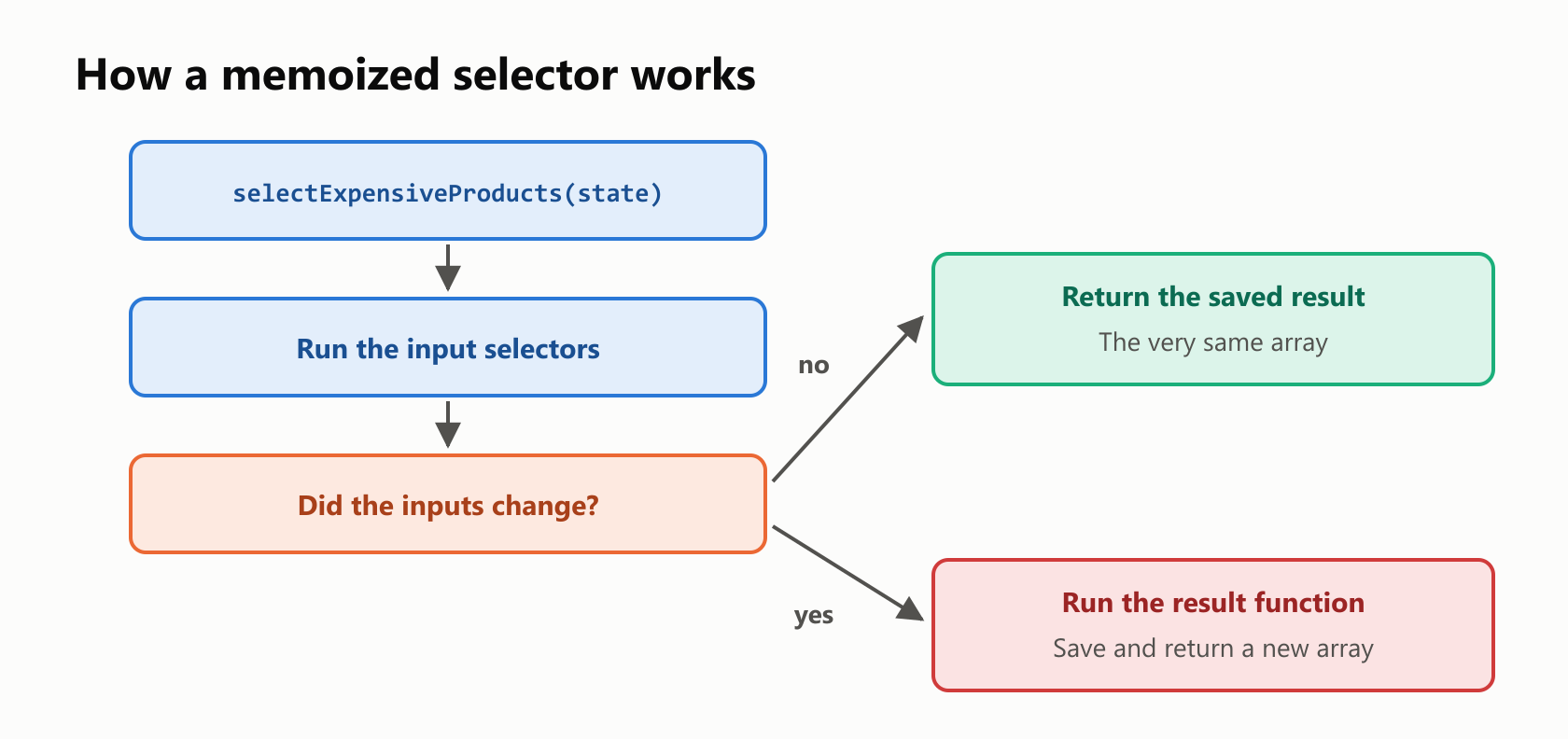
This works because Redux state is immutable: an update creates new objects along the changed path and keeps the rest. So comparing references is enough to know whether anything changed.
Selectors with arguments
A selector can take extra arguments after the state. An input selector can pick them out:
1// Add to selectors.mjs
2export const selectProductsAbove = createSelector(
3  [selectProducts, (state, minimum) => minimum],
4  (products, minimum) => products.filter((product) => product.price >= minimum),
5);1// main.mjs
2import { store } from "./store.mjs";
3import { selectProductsAbove } from "./selectors.mjs";
4
5const state = store.getState();
6
7console.log(selectProductsAbove(state, 100));
8
9selectProductsAbove(state, 50);
10selectProductsAbove(state, 100);
11selectProductsAbove(state, 50);
12
13console.log(selectProductsAbove.recomputations());[ { id: 3, name: 'Monitor', price: 200 } ]
2Four calls, with two different arguments, gave two calculations. Older guides warn that a selector only remembers its last call, and that was true up to Reselect 4. Version 5, used by Redux Toolkit 2, remembers each combination of inputs. In a component, you pass the argument with a small arrow function, and the render count stayed at 1 in our test:
const products = useSelector((state) => selectProductsAbove(state, 100));Using createSelector well
It isn't needed everywhere. selectCartItems only returns a value that's already in the state, so it's stable as it is, and wrapping it adds nothing. In development, Reselect warns about two common mistakes. The first is a result function that does no work:
1// main.mjs
2import { createSelector } from "@reduxjs/toolkit";
3import { store } from "./store.mjs";
4import { selectProducts } from "./selectors.mjs";
5
6const selectSameProducts = createSelector([selectProducts], (products) => products);
7
8selectSameProducts(store.getState());
The result function returned its own inputs without modification. e.g
`createSelector([state => state.todos], todos => todos)`
This could lead to inefficient memoization and unnecessary re-renders.The second is doing the work in an input selector, which defeats the comparison:
1// main.mjs
2import { createSelector } from "@reduxjs/toolkit";
3import { store } from "./store.mjs";
4
5const selectPriceCount = createSelector(
6  [(state) => state.products.map((product) => product.price)],
7  (prices) => prices.length,
8);
9
10selectPriceCount(store.getState());
An input selector returned a different result when passed same arguments.
This means your output selector will likely run more frequently than intended.So here's the rule: input selectors only extract, and the result function transforms.
| Selector returns | Use |
|---|---|
| A value already in the state | A plain function |
| A number, string or boolean you calculate | A plain function, unless the work is heavy |
| A new array or object | createSelector |
Selectors inside a slice
Redux Toolkit also lets a slice declare its own selectors. They receive just that slice's state, so the top-level path isn't repeated:
1// main.mjs
2import { configureStore, createSlice } from "@reduxjs/toolkit";
3
4const counterSlice = createSlice({
5  name: "counter",
6  initialState: { value: 7 },
7  reducers: {},
8  selectors: {
9    selectValue: (counter) => counter.value,
10  },
11});
12
13const store = configureStore({
14  reducer: { counter: counterSlice.reducer },
15});
16
17console.log(counterSlice.selectors.selectValue(store.getState()));7Testing selectors
Selectors are plain functions: the same state gives the same result. You don't need a store or React to test them, only an object:
1// main.mjs
2import assert from "node:assert";
3import { selectCartTotal } from "./selectors.mjs";
4
5const state = {
6  products: [{ id: 1, name: "Keyboard", price: 50 }],
7  cart: { items: [{ productId: 1, quantity: 3 }] },
8};
9
10assert.equal(selectCartTotal(state), 150);
11console.log("All checks passed");
All checks passedWhat selectors can't catch
Here's a bug you might only meet in a selector. sort changes an array in place, and Redux Toolkit freezes the state, so sorting directly crashes:
1// main.mjs
2import { store } from "./store.mjs";
3import { selectProducts } from "./selectors.mjs";
4
5const products = selectProducts(store.getState());
6products.sort((first, second) => first.price - second.price);
TypeError: Cannot assign to read only property '0' of object '[object Array]'The freeze is doing you a favor, because changing the state outside a reducer would break the memoization above. Sort a copy with toSorted, which returns a new array:
1// main.mjs
2import { createSelector } from "@reduxjs/toolkit";
3import { store } from "./store.mjs";
4import { selectProducts } from "./selectors.mjs";
5
6const selectProductsByPrice = createSelector([selectProducts], (products) => {
7  return products.toSorted((first, second) => first.price - second.price);
8});
9
10const names = selectProductsByPrice(store.getState()).map((product) => product.name);
11console.log(names);
[ 'Mouse', 'Keyboard', 'Monitor' ]A wrong path is more dangerous still, since JavaScript doesn't complain about it. A typo in a selector just gives undefined:
1// main.mjs
2import { store } from "./store.mjs";
3
4const selectUserName = (state) => state.user.nmae;
5
6console.log(selectUserName(store.getState()));undefinedA test catches that. So does TypeScript, if you give the selector's parameter the type of the state. Since store.mjs is JavaScript, we checked this with npx tsc --noEmit --allowJs --module nodenext --target esnext --skipLibCheck selectors.ts:
1import type { store } from "./store.mjs";
2
3type RootState = ReturnType<typeof store.getState>;
4
5export const selectUserName = (state: RootState) => state.user.nmae;
selectors.ts(5,64): error TS2339: Property 'nmae' does not exist on type '{ name: string; }'.Your turn: practice
Try these before peeking at the answers. Use the store.mjs and selectors.mjs you built in this guide.
Exercise 1: Predict it (warm-up). What does this program print? Remember what createSelector compares.
1// main.mjs
2import { createSelector } from "@reduxjs/toolkit";
3import { store, addItem, rename } from "./store.mjs";
4import { selectCartItems } from "./selectors.mjs";
5
6const selectProductIds = createSelector([selectCartItems], (items) => {
7  return items.map((item) => item.productId);
8});
9
10selectProductIds(store.getState());
11store.dispatch(rename("Bia"));
12selectProductIds(store.getState());
13store.dispatch(addItem(2));
14selectProductIds(store.getState());
15
16console.log(selectProductIds.recomputations());
Exercise 2: A greeting. Write selectGreeting, which returns text like Hi, Ana!, using selectUserName. Does it need createSelector?
Exercise 3: Cart lines. Write a memoized selectCartLines that returns one object per cart item, with the product's name and a subtotal. Add products 1 and 3, and print the result.
Exercise 4: Most expensive first. Write a memoized selectMostExpensiveProduct that returns the name of the product with the highest price, with no crash from the frozen state.
Exercise 5: One product (challenge). Write selectProductById(state, id), a selector with an argument, which returns the product or undefined. Then use it inside a selectProductName(state, id) selector that returns Unknown when there's no such product.
Quick quiz
- What is a selector?
- Why is repeating
state.cart.itemsin components a problem? - What's the modern replacement for
connectandmapStateToProps? - Why shouldn't you store a cart's total in the state?
- Why does a selector with
filterre-render a component on every action? - What does
createSelectorremember, and when does it recalculate? - Which part of
createSelectorshould do the work? - When is a plain function enough?
- Why does
selectProducts(state).sort(...)crash? - Do you need a store to test a selector?
Answers
Exercise 1: It calculated twice: on the first call, and after addItem. Renaming the user didn't change state.cart.items:
2Exercise 2: No, because it returns a string, which is compared by value:
1// main.mjs
2import { store } from "./store.mjs";
3import { selectUserName } from "./selectors.mjs";
4
5const selectGreeting = (state) => `Hi, ${selectUserName(state)}!`;
6
7console.log(selectGreeting(store.getState()));
Hi, Ana!Exercise 3: It needs both the products and the cart items, and it returns a new array, so it's memoized:
1// main.mjs
2import { createSelector } from "@reduxjs/toolkit";
3import { store, addItem } from "./store.mjs";
4import { selectProducts, selectCartItems } from "./selectors.mjs";
5
6const selectCartLines = createSelector(
7  [selectProducts, selectCartItems],
8  (products, items) => items.map((item) => {
9    const product = products.find((candidate) => candidate.id === item.productId);
10    return { name: product.name, subtotal: product.price * item.quantity };
11  }),
12);
13
14store.dispatch(addItem(1));
15store.dispatch(addItem(3));
16
17console.log(selectCartLines(store.getState()));1[
2 { name: 'Keyboard', subtotal: 50 },
3 { name: 'Monitor', subtotal: 200 }
4]Exercise 4: toSorted leaves the frozen array alone:
1// main.mjs
2import { createSelector } from "@reduxjs/toolkit";
3import { store } from "./store.mjs";
4import { selectProducts } from "./selectors.mjs";
5
6const selectMostExpensiveProduct = createSelector([selectProducts], (products) => {
7  return products.toSorted((first, second) => second.price - first.price)[0].name;
8});
9
10console.log(selectMostExpensiveProduct(store.getState()));MonitorExercise 5: find returns an existing object, so a plain function is enough, and the second selector builds on the first:
1// main.mjs
2import { store } from "./store.mjs";
3import { selectProducts } from "./selectors.mjs";
4
5const selectProductById = (state, id) => {
6  return selectProducts(state).find((product) => product.id === id);
7};
8
9const selectProductName = (state, id) => {
10  return selectProductById(state, id)?.name ?? "Unknown";
11};
12
13console.log(selectProductName(store.getState(), 2));
14console.log(selectProductName(store.getState(), 9));
Mouse
UnknownQuiz: (1) A function that takes the state and returns a piece of it. (2) Each component depends on the shape of the state, so one change breaks them all. (3) The useSelector hook. (4) It can be calculated from the items and prices, and a stored copy can get out of sync. (5) filter creates a new array every time, and arrays are compared by reference. (6) It remembers the results for its inputs, and it recalculates only when those inputs change. (7) The result function. Input selectors only extract. (8) When it returns a value already in the state, or a number, string or boolean. (9) sort changes the array in place, and Redux Toolkit freezes the state. (10) No. A plain object is enough.
Cheat sheet
| I want to… | Write |
|---|---|
| Read a value | const selectUserName = (state) => state.user.name; |
| Use it in React | const name = useSelector(selectUserName); |
Use it with connect | (state) => ({ name: selectUserName(state) }) |
| Calculate a number | (state) => selectCartItems(state).length |
| Build an array or object | createSelector([selectProducts], (products) => …) |
| Take an argument | [selectProducts, (state, minimum) => minimum] |
| Pass an argument in React | useSelector((state) => selectProductsAbove(state, 100)) |
| Count calculations | selectExpensiveProducts.recomputations() |
| Sort safely | products.toSorted(…) |
| Declare selectors in a slice | selectors: { selectValue: (counter) => counter.value } |
Wrapping up
A selector puts the knowledge of your state in one place:
- A selector is a function that takes the state and returns a piece of it.
- Change the state's shape, and only the selector changes, not the components.
useSelectorruns a selector in React, andconnectstill works in older code.- Keep the state minimal, and derive the rest with selectors.
- Selectors can build on other selectors.
- A new array or object means a new render, on every action.
createSelectormemoizes, so it returns the same result until its inputs change.- Input selectors extract, and the result function transforms.
- Plain functions are enough for values already in the state.
- Never
sortthe state. UsetoSorted. - Selectors are easy to test, with nothing but an object.
Read next

Ruby Blocks and Iterators: Write Your Own
Learn how Ruby methods receive blocks, pass values with yield, handle a missing block, and return an Enumerator. Build and run your own iterator.
 nbkhope

C++ std::vector: Size, Capacity, and Safe Growth
Learn how std::vector grows in C++: the difference between size and capacity, when reserve helps, why resize is different, and how growth can invalidate references.
nbkhope
How to Handle Errors in Go: A Hands-On Guide
Learn Go's everyday error pattern with runnable examples: return an error, check it, add context with %w, and recognize a missing file with errors.Is.
nbkhope
Comments
Be kind and specific. Comments with links from new accounts appear after a moderator reviews them.