
Azure App Configuration for Node.js: A Visual, Hands-On Guide
Learn Azure App Configuration for Node.js visually, with no Azure account: run the official emulator, store and read settings, use read-only keys and labels, load them with the provider, refresh without a restart, handle failures, and do the exercises.


On this page
Certain values in an application are kept apart from the code: a page size, a title, a feature switch. Usually they live in a configuration file, such as a .env file or a .json file. That's fine for one app on one machine. With several apps or servers, each one has its own copy, and changing a value means touching them all.
Azure App Configuration is a cloud service that keeps those values in one central place. In this guide you'll run it on your own computer, store and read settings from Node.js, and protect them with read-only keys. You'll then give each environment its own values with labels, switch to the easier provider library, change a setting without restarting the app, and see what happens when the store can't be reached. Exercises wrap it up.
You don't need an Azure account to follow along. All outputs below come from real runs with Microsoft's official App Configuration emulator 1.2.0 in Docker, @azure/app-configuration 1.13, @azure/app-configuration-provider 2.6 and Node.js 26 on Windows.
One place for configuration
Here's the idea in one picture:
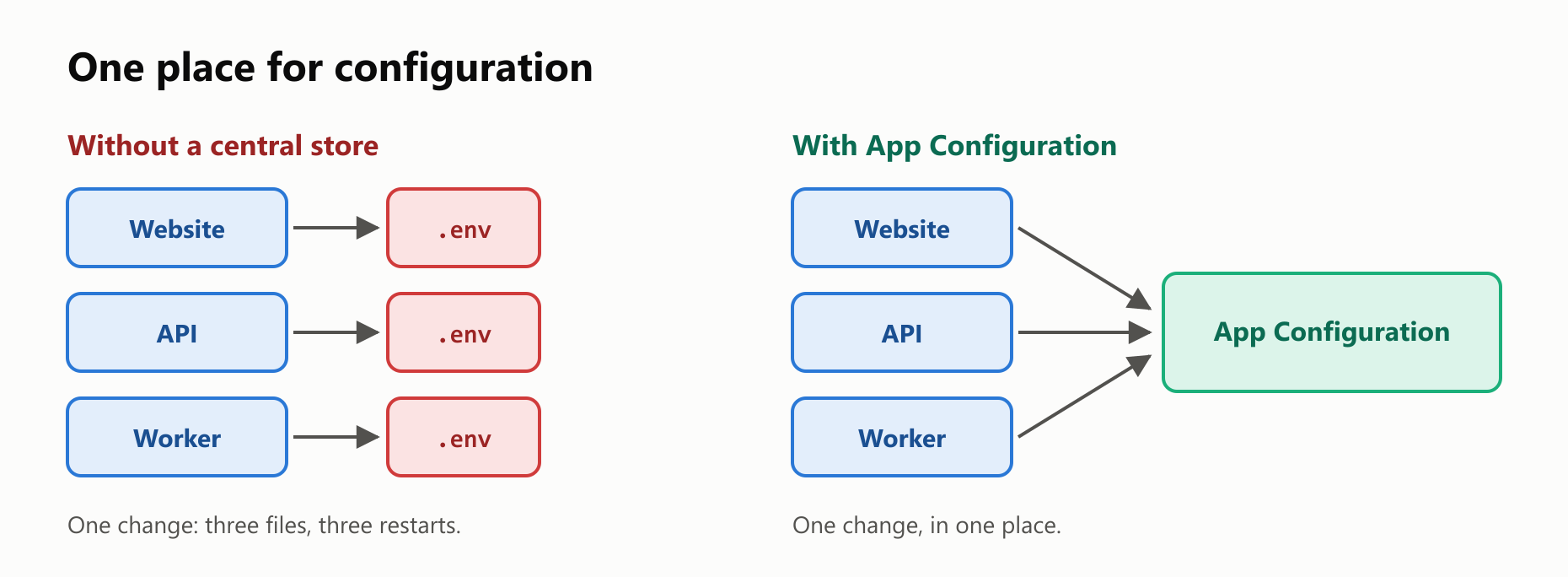
The store holds key-values: a key, such as app:title, and a text value, such as My Shop. Each one can also have a label, which you'll use later for environments.
Start a local store
The emulator is a small version of the service that runs in Docker. This command starts it with two access keys, one that can write and one that can only read:
1docker run -d --name app-config -p 8483:8483 \
2  -e Tenant:AnonymousAuthEnabled=false \
3  -e Tenant:HmacSha256Enabled=true \
4  -e Tenant:AccessKeys:0:Id=local-write \
5  -e Tenant:AccessKeys:0:Secret=c2VjcmV0 \
6  -e Tenant:AccessKeys:0:ReadOnly=false \
7  -e Tenant:AccessKeys:1:Id=local-read \
8  -e Tenant:AccessKeys:1:Secret=cmVhZA== \
9  -e Tenant:AccessKeys:1:ReadOnly=true \
10  mcr.microsoft.com/azure-app-configuration/app-configuration-emulator:1.2.0
These made-up keys are only for this local emulator. Without one of them, the store refuses to answer:
curl -s -o /dev/null -w "%{http_code}\n" http://localhost:8483/kv401In a new folder, install the client library:
npm init -y
npm install @azure/app-configuration @azure/app-configuration-provider
A connection string holds the address of the store and a key. It's a secret, so it doesn't belong in your code. Save both in a file called .env, and keep that file out of Git:
APP_CONFIG_WRITE=Endpoint=http://localhost:8483;Id=local-write;Secret=c2VjcmV0
APP_CONFIG_READ=Endpoint=http://localhost:8483;Id=local-read;Secret=cmVhZA==
Run each program with node --env-file=.env main.mjs, which loads that file into process.env.
Using a real store in Azure
For a real store, the steps are short. In the Azure portal, search for App Configuration and click Create. Pick your subscription, a resource group, a location, a name and a pricing tier. Then find the read-only connection string on the store's access keys page. The screens change over time, and we didn't run these steps for this guide, so follow Microsoft's guide to creating a store.
Your code stays the same, with two differences. The connection string's endpoint uses https and ends in azconfig.io, and you won't need the allowInsecureConnection option you're about to meet.
Write some settings
AppConfigurationClient is the client from the @azure/app-configuration library. You create it with a connection string. Save this as seed.mjs, and run it once:
1// seed.mjs
2import { AppConfigurationClient } from "@azure/app-configuration";
3
4const client = new AppConfigurationClient(process.env.APP_CONFIG_WRITE, {
5  allowInsecureConnection: true,
6});
7
8const settings = [
9  { key: "app:title", value: "My Shop" },
10  { key: "app:pageSize", value: "20" },
11  { key: "app:pageSize", label: "production", value: "50" },
12  { key: "app:features", value: '{"darkMode":true}', contentType: "application/json" },
13  { key: "other:color", value: "blue" },
14];
15
16for (const setting of settings) {
17  await client.setConfigurationSetting(setting);
18}
19
20console.log(`Saved ${settings.length} settings`);
Saved 5 settingsWhy allowInsecureConnection? The emulator uses plain http, and the library refuses that by default, because a connection string shouldn't travel unencrypted. Without the option, the call fails with this:
Cannot connect to http://localhost:8483/kv/app%3Atitle?api-version=2026-04-01 while allowInsecureConnection is false.Keep that option for local work only.
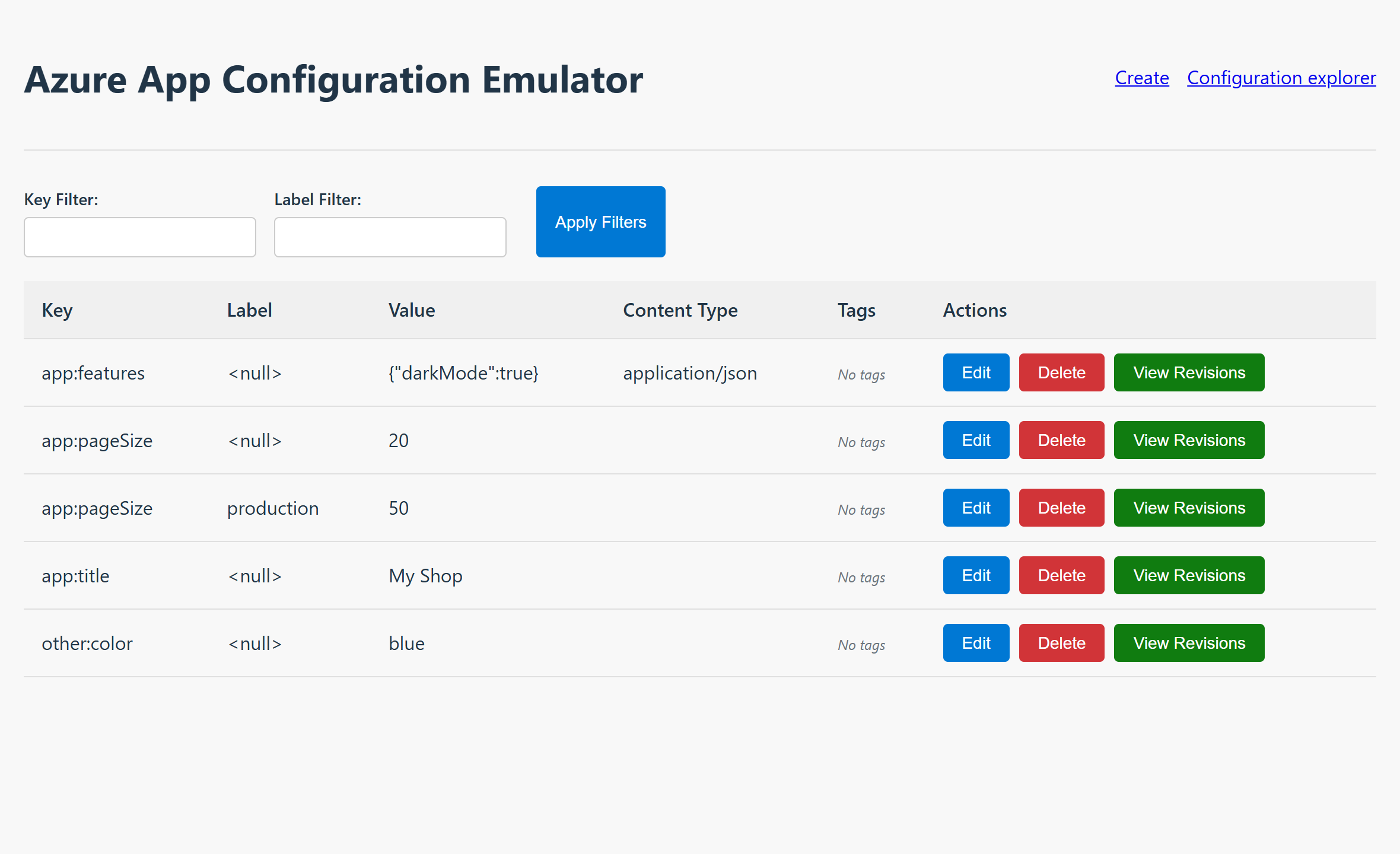
The emulator also has a web page, at http://localhost:8483, that works like the Configuration Explorer in the Azure portal. It needs anonymous access, which our command turned off, so right now it shows no values. To use it, add -e Tenant:AnonymousAuthEnabled=true -e Authentication:Anonymous:AnonymousUserRole=Owner in place of the first setting. Here it is with the same data:
Read the settings
There are several ways to get the values. This one lists all the key-values, using the read-only key:
1// main.mjs
2import { AppConfigurationClient } from "@azure/app-configuration";
3
4const client = new AppConfigurationClient(process.env.APP_CONFIG_READ, {
5  allowInsecureConnection: true,
6});
7
8for await (const setting of client.listConfigurationSettings()) {
9  console.log({ key: setting.key, label: setting.label, value: setting.value });
10}1{ key: 'app:features', label: undefined, value: '{"darkMode":true}' }
2{ key: 'app:pageSize', label: undefined, value: '20' }
3{ key: 'app:pageSize', label: 'production', value: '50' }
4{ key: 'app:title', label: undefined, value: 'My Shop' }
5{ key: 'other:color', label: undefined, value: 'blue' }listConfigurationSettings returns an async iterator, which fetches the results page by page, so you loop over it with for await. To get a single value, use getConfigurationSetting:
1// main.mjs
2import { AppConfigurationClient } from "@azure/app-configuration";
3
4const client = new AppConfigurationClient(process.env.APP_CONFIG_READ, {
5  allowInsecureConnection: true,
6});
7
8const setting = await client.getConfigurationSetting({ key: "app:title" });
9console.log(setting.value);
10
11try {
12  await client.getConfigurationSetting({ key: "app:missing" });
13} catch (error) {
14  console.log(error.statusCode);
15}
My Shop
404A key that doesn't exist throws an error, with the HTTP status 404. Notice too that every value is text, even 20.
Why read-only keys matter
An app that only reads its settings shouldn't be able to change them. If its key leaks, the damage is limited. Try to write with the read-only key:
1// main.mjs
2import { AppConfigurationClient } from "@azure/app-configuration";
3
4const client = new AppConfigurationClient(process.env.APP_CONFIG_READ, {
5  allowInsecureConnection: true,
6});
7
8try {
9  await client.setConfigurationSetting({ key: "app:title", value: "Hacked" });
10} catch (error) {
11  console.log(error.statusCode);
12}
13
14const setting = await client.getConfigurationSetting({ key: "app:title" });
15console.log(setting.value);
403
My ShopThe store refused with 403, which means forbidden, and the value didn't change.
For production, Microsoft recommends skipping connection strings altogether and signing in with Microsoft Entra ID, using DefaultAzureCredential from @azure/identity. That needs a real Azure account, so it isn't part of this guide.
Labels: one key, many environments
A label gives the same key a different value. app:pageSize has two versions in our store: one with no label, and one for production.
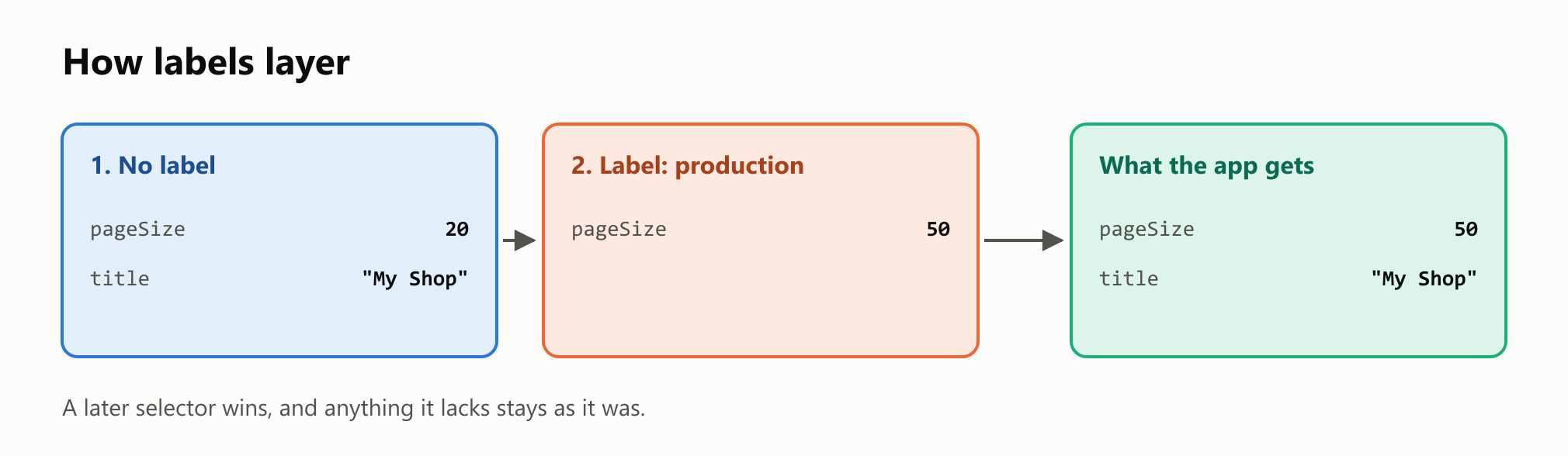
A filter asks for a single label:
1// main.mjs
2import { AppConfigurationClient } from "@azure/app-configuration";
3
4const client = new AppConfigurationClient(process.env.APP_CONFIG_READ, {
5  allowInsecureConnection: true,
6});
7
8const filter = { keyFilter: "app:*", labelFilter: "production" };
9
10for await (const setting of client.listConfigurationSettings(filter)) {
11  console.log(setting.key, setting.value);
12}
app:pageSize 50The easier way: the provider
The client gives you full control, and most apps just want their settings. Microsoft's provider library, @azure/app-configuration-provider, is built on the same client. load reads everything at once and gives you a Map:
1// main.mjs
2import { load } from "@azure/app-configuration-provider";
3
4const settings = await load(process.env.APP_CONFIG_READ, {
5  clientOptions: { allowInsecureConnection: true },
6});
7
8console.log([...settings.keys()]);
9console.log(settings.get("app:pageSize"));
10console.log(settings.get("app:features"));
[ 'app:features', 'app:pageSize', 'app:title', 'other:color' ]
20
{ darkMode: true }By default, it loads the settings with no label. Notice app:features: because it was saved with the content type application/json, it arrived as a real object.
Selectors choose what to load, and later selectors win, which gives you the layering from the picture above. trimKeyPrefixes removes the prefix, and constructConfigurationObject turns the result into a normal object:
1// main.mjs
2import { load } from "@azure/app-configuration-provider";
3
4const settings = await load(process.env.APP_CONFIG_READ, {
5  clientOptions: { allowInsecureConnection: true },
6  selectors: [
7    { keyFilter: "app:*" },
8    { keyFilter: "app:*", labelFilter: "production" },
9  ],
10  trimKeyPrefixes: ["app:"],
11});
12
13const config = settings.constructConfigurationObject();
14console.log(config);
{ features: { darkMode: true }, pageSize: '50', title: 'My Shop' }In a real app, the label would come from an environment variable, so the same code runs everywhere.
When to load the settings
There are two simple ways to fit this into an app. In both, you create one central configuration module that the rest of the code calls.
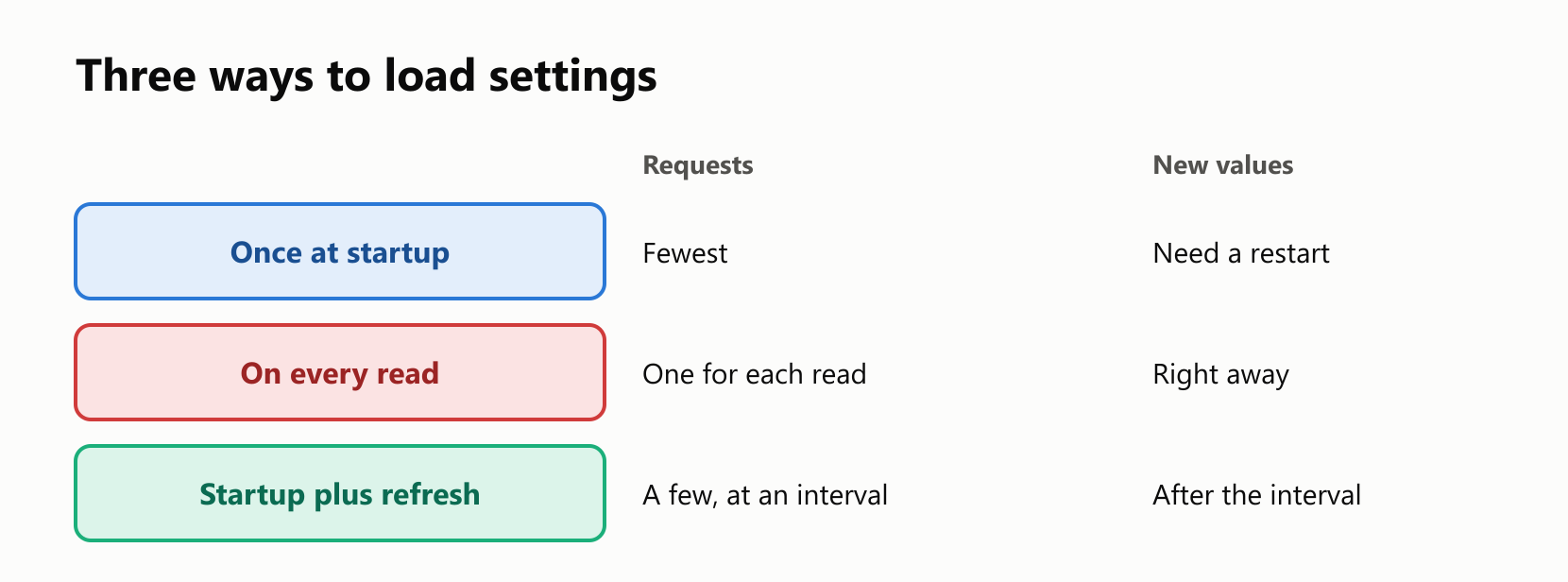
The first is to load the settings once, when the app starts, and keep them in memory. The second is to ask the store every time you need a value. Let's count the requests for 100 reads of the same value:
1// main.mjs
2import { AppConfigurationClient } from "@azure/app-configuration";
3import { load } from "@azure/app-configuration-provider";
4
5let requests = 0;
6
7const clientOptions = {
8  allowInsecureConnection: true,
9  additionalPolicies: [{
10    position: "perCall",
11    policy: {
12      name: "countRequests",
13      sendRequest(request, next) {
14        requests += 1;
15        return next(request);
16      },
17    },
18  }],
19};
20
21const client = new AppConfigurationClient(process.env.APP_CONFIG_READ, clientOptions);
22for (let round = 0; round < 100; round += 1) {
23  await client.getConfigurationSetting({ key: "app:title" });
24}
25console.log(`Every time: ${requests} requests`);
26
27requests = 0;
28const settings = await load(process.env.APP_CONFIG_READ, { clientOptions });
29for (let round = 0; round < 100; round += 1) {
30  settings.get("app:title");
31}
32console.log(`Once at startup: ${requests} requests`);
Every time: 100 requests
Once at startup: 1 requestsAzure limits and can charge for requests, so this difference matters. See the pricing page for the current numbers. Loading at startup has one drawback, though: a new value only arrives when the app restarts. The provider solves that too.
Change a setting with no restart
With refreshOptions, the provider remembers the settings and checks for changes at an interval. You call refresh() from your app, for example when a request comes in. It does nothing until the interval has passed:
1// main.mjs
2import { AppConfigurationClient } from "@azure/app-configuration";
3import { load } from "@azure/app-configuration-provider";
4
5const clientOptions = { allowInsecureConnection: true };
6const admin = new AppConfigurationClient(process.env.APP_CONFIG_WRITE, clientOptions);
7
8const settings = await load(process.env.APP_CONFIG_READ, {
9  clientOptions,
10  refreshOptions: { enabled: true, refreshIntervalInMs: 1000 },
11});
12
13console.log(settings.get("app:title"));
14
15await admin.setConfigurationSetting({ key: "app:title", value: "My New Shop" });
16
17await settings.refresh();
18console.log(settings.get("app:title"));
19
20await new Promise((resolve) => setTimeout(resolve, 1200));
21
22await settings.refresh();
23console.log(settings.get("app:title"));
24
25await admin.setConfigurationSetting({ key: "app:title", value: "My Shop" });
My Shop
My Shop
My New ShopThe first refresh came too soon, and the second one picked up the change. The app never restarted. A real interval would be much longer than one second. The default is 30 seconds.
When the store is down
Your settings now live across a network, so think about what happens when it fails. By default, load keeps retrying for up to 100 seconds. Here we shorten that with startupOptions, and point at a port where nothing is listening:
1// main.mjs
2import { load } from "@azure/app-configuration-provider";
3
4const offline = "Endpoint=http://localhost:9999;Id=local-read;Secret=cmVhZA==";
5
6try {
7  await load(offline, {
8    clientOptions: { allowInsecureConnection: true },
9    startupOptions: { timeoutInMs: 3000 },
10  });
11} catch (error) {
12  console.log(String(error));
13}
Error: The load operation failed.You have two choices. Stop the app, which is right when it can't run safely with no settings, or fall back to safe defaults and log the problem. Exercise 3 asks you to write the second one.
What doesn't belong here
App Configuration is for settings, and not for secrets. Anyone with a read key can read every value, so passwords and API keys need a safer home. The next guide covers exactly that, with Azure Key Vault. App Configuration can even hold references to Key Vault secrets, so your app has a single place to look.
When you're done, stop the emulator. Its data goes with it:
docker rm -f app-configYour turn: practice
Try these before peeking at the answers. Start the emulator and run seed.mjs first.
Exercise 1: Predict the winner (warm-up). What does this program print? Think about the order of the selectors.
1// main.mjs
2import { load } from "@azure/app-configuration-provider";
3
4const settings = await load(process.env.APP_CONFIG_READ, {
5  clientOptions: { allowInsecureConnection: true },
6  selectors: [
7    { keyFilter: "app:pageSize", labelFilter: "production" },
8    { keyFilter: "app:pageSize" },
9  ],
10});
11
12console.log(settings.get("app:pageSize"));
Exercise 2: A new setting. Save a setting called app:currency with the value USD, then read it back with getConfigurationSetting.
Exercise 3: Safe defaults. Write loadConfig(connectionString), which returns the settings as an object, or { title: "Default Shop" } if the store can't be reached. Try it with the offline connection string from this guide, with a timeout of 3 seconds.
Exercise 4: Status codes. Which HTTP status do you get in each case? No code needed.
- No access key at all
- Reading a key that doesn't exist
- Writing with a read-only key
Exercise 5: Watch for changes (challenge). Use settings.onRefresh to run a function that prints Settings changed when a refresh finds new values. Change app:title from the program, trigger the refresh, and put the original value back at the end.
Quick quiz
- What problem does a central configuration store solve?
- What's a key-value, and what's a label?
- What's in a connection string, and why does it stay out of your code?
- Why does
listConfigurationSettingsneedfor await? - What type does every value have, unless it's parsed as JSON?
- Why use a read-only key in an app?
- What does the provider add to the client?
- With two selectors, which one wins?
- What's the drawback of loading the settings only at startup?
- Why shouldn't you keep a password in App Configuration?
Answers
Exercise 1: The later selector wins, and here that's the one with no label:
20Exercise 2: Write with one key, and read with the other:
1// main.mjs
2import { AppConfigurationClient } from "@azure/app-configuration";
3
4const clientOptions = { allowInsecureConnection: true };
5const admin = new AppConfigurationClient(process.env.APP_CONFIG_WRITE, clientOptions);
6const reader = new AppConfigurationClient(process.env.APP_CONFIG_READ, clientOptions);
7
8await admin.setConfigurationSetting({ key: "app:currency", value: "USD" });
9
10const setting = await reader.getConfigurationSetting({ key: "app:currency" });
11console.log(setting.value);USDExercise 3: The try covers both the load and the conversion:
1// main.mjs
2import { load } from "@azure/app-configuration-provider";
3
4async function loadConfig(connectionString) {
5  try {
6    const settings = await load(connectionString, {
7      clientOptions: { allowInsecureConnection: true },
8      startupOptions: { timeoutInMs: 3000 },
9      selectors: [{ keyFilter: "app:*" }],
10      trimKeyPrefixes: ["app:"],
11    });
12    return settings.constructConfigurationObject();
13  } catch {
14    return { title: "Default Shop" };
15  }
16}
17
18const online = await loadConfig(process.env.APP_CONFIG_READ);
19const offline = await loadConfig("Endpoint=http://localhost:9999;Id=local-read;Secret=cmVhZA==");
20
21console.log(online.title);
22console.log(offline.title);
My Shop
Default ShopExercise 4: (1) 401, because the caller isn't identified. (2) 404, because the key doesn't exist. (3) 403, because the caller is identified and isn't allowed.
Exercise 5: onRefresh registers the function, and it runs after a refresh that finds a change:
1// main.mjs
2import { AppConfigurationClient } from "@azure/app-configuration";
3import { load } from "@azure/app-configuration-provider";
4
5const clientOptions = { allowInsecureConnection: true };
6const admin = new AppConfigurationClient(process.env.APP_CONFIG_WRITE, clientOptions);
7
8const settings = await load(process.env.APP_CONFIG_READ, {
9  clientOptions,
10  refreshOptions: { enabled: true, refreshIntervalInMs: 1000 },
11});
12
13settings.onRefresh(() => console.log("Settings changed"));
14
15await admin.setConfigurationSetting({ key: "app:title", value: "Sale Today" });
16await new Promise((resolve) => setTimeout(resolve, 1200));
17await settings.refresh();
18
19console.log(settings.get("app:title"));
20
21await admin.setConfigurationSetting({ key: "app:title", value: "My Shop" });
Settings changed
Sale TodayQuiz: (1) Each app having its own copy of the settings, so that one change means editing and restarting them all. (2) A key with a text value, and a label is what gives the same key a different value for each environment. (3) The store's address and an access key, and it's a secret. (4) It returns an async iterator that fetches the results page by page. (5) Text. (6) If the key leaks, nobody can change your settings with it. (7) Loading everything at once, selectors, prefix trimming, JSON parsing and refresh. (8) The later one. (9) New values only arrive when the app restarts. (10) Anyone with a read key can read every value, so secrets belong in Key Vault.
Cheat sheet
| I want to… | Write |
|---|---|
| Create a client | new AppConfigurationClient(connectionString) |
Allow http locally | { allowInsecureConnection: true } |
| Save a setting | client.setConfigurationSetting({ key, value }) |
| Save it for one environment | client.setConfigurationSetting({ key, label, value }) |
| Read one setting | client.getConfigurationSetting({ key }) |
| List settings | for await (const setting of client.listConfigurationSettings()) |
| Filter them | { keyFilter: "app:*", labelFilter: "production" } |
| Load everything | await load(connectionString) |
| Load with layers | selectors: [{ keyFilter: "app:*" }, { keyFilter: "app:*", labelFilter: "production" }] |
| Remove a prefix | trimKeyPrefixes: ["app:"] |
| Get a plain object | settings.constructConfigurationObject() |
| Turn on refresh | refreshOptions: { enabled: true, refreshIntervalInMs: 30000 } |
| Check for changes | await settings.refresh() |
| Limit the startup wait | startupOptions: { timeoutInMs: 3000 } |
Wrapping up
A central store means one change for every app that reads it:
- App Configuration keeps key-values in one place. You can try it locally with the official emulator.
- A connection string is a secret. Keep it out of your code.
- Give apps a read-only key, and prefer Microsoft Entra ID in production.
- Every value is text, unless it's saved as JSON and loaded with the provider.
- Labels give one key a value for each environment, and later selectors win.
- The provider is the easy path: it loads everything into a
Mapor an object. - Load at startup, and use refresh to get new values with no restart.
- Plan for failure. Stop the app, or fall back to safe defaults.
- Settings go here, and secrets don't.
Next up: cloud secrets with Azure Key Vault for Node.js apps.
Read next
What Is PowerShell? A Simple Guide to the Windows Command Line That Speaks in Objects
A friendly, jargon-free guide to PowerShell, the command line built into every Windows PC. Learn its Verb-Noun commands, see why it passes objects instead of plain text, rename 1,000 photos in under a second and find out why there are two PowerShells.
 nbkhope
What Is Bash? A Simple Guide to the Bourne Again Shell and the Command Line
A friendly, jargon-free guide to Bash, the program inside the black text window that developers type into. Have a first real conversation with it, see what happens when you press Enter, rename 1,000 photos in under a second and read your first script.
nbkhope
What Is Android? A Simple Guide to the System on Most of the World's Phones
A friendly, jargon-free guide to Android, the free operating system that runs most of the world's phones. Learn how it is built on Linux, why so many brands use it, what is inside a real app and the permissions it asks for, and why updates are slow.
nbkhope
Comments
Be kind and specific. Comments with links from new accounts appear after a moderator reviews them.