Connecting an MCP Server to an AI Application
Connect an MCP server to an AI app, discover its tools, and route the model’s tool requests safely. See the client loop, local vs. remote transports, and where your app still needs to make decisions.


On this page
Connecting an MCP Server to an AI Application
An MCP server is like a well-labeled workshop: it can offer tools, reference material, and reusable prompts. But the workshop does not walk over to your AI app by itself. The host application needs an MCP client to connect, inspect what is available, and route the right request to the right server.
Let’s wire that up. We’ll build a small TypeScript client that starts a local server, discovers its tools, and shows where the model fits in. Then we’ll map the same idea to a remote server and a real AI product.

The pieces in the conversation
The host is the application the person uses. It owns the chat, calls a language model, manages connections, and decides what the person can approve. An MCP client lives inside that host and speaks to one particular server. The server advertises capabilities: tools the model can ask to run, resources the host can read, and prompts that can start a workflow.
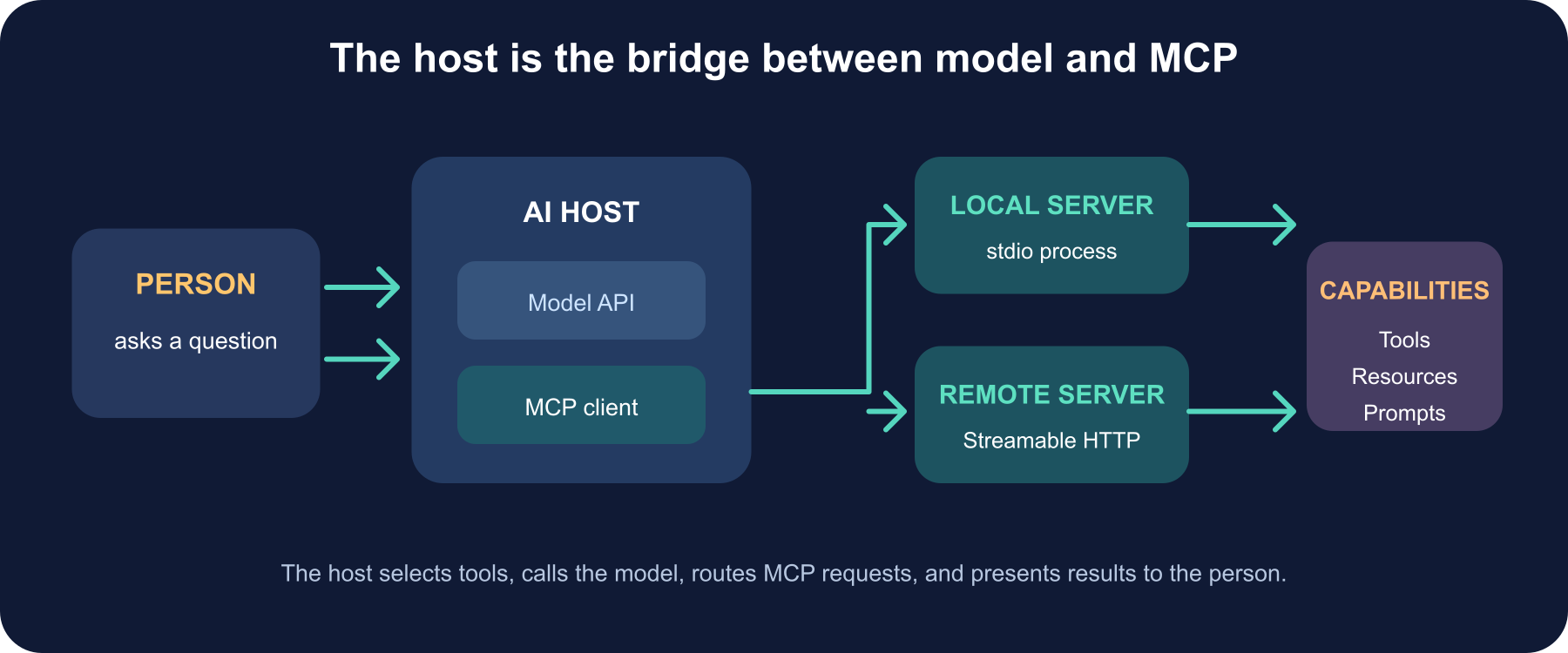
Here’s the key idea: MCP connects your app to capabilities; it does not call the AI model for you. Your host presents selected tool descriptions to the model, receives a tool request, asks the MCP client to execute it, and returns the result to the model.
Connect to a local server in TypeScript
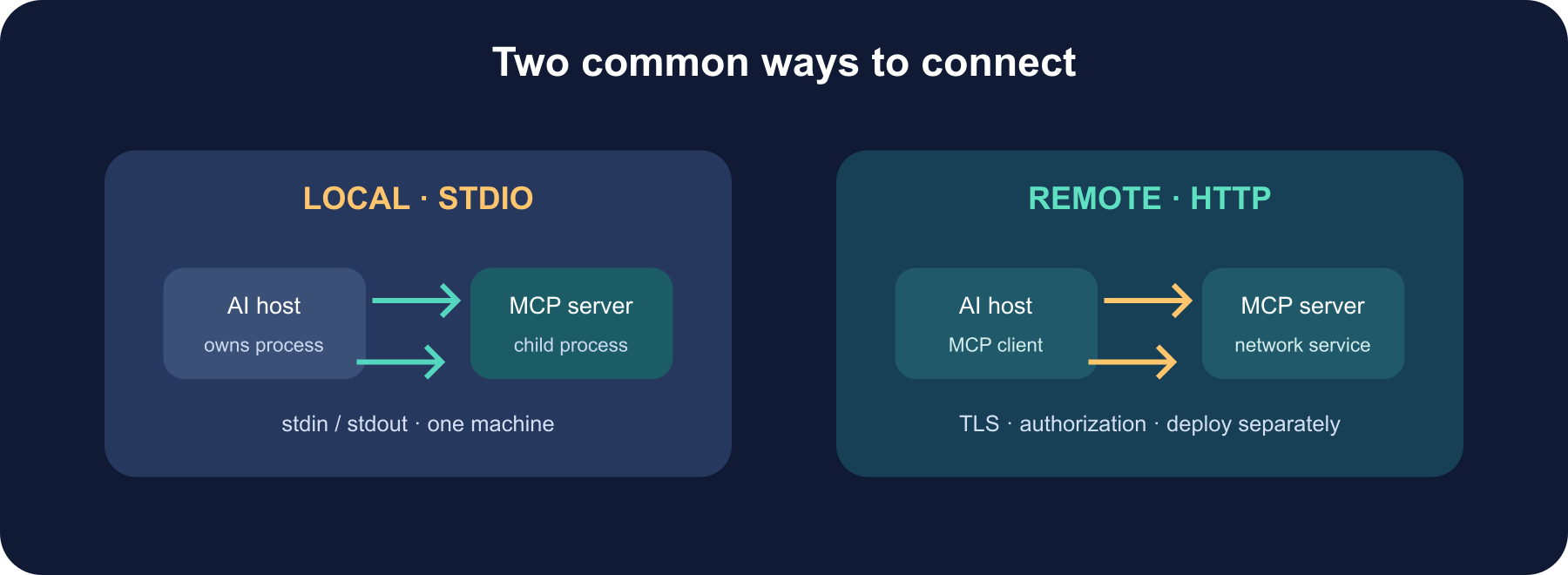
The official TypeScript SDK v2 separates the client package from the server package. This small example starts the server process as a child process using stdio, asks the server what tools it exposes, and invokes one of them. Install the client SDK and a TypeScript runner in your project:
npm install @modelcontextprotocol/client
npm install -D typescript tsx @types/node
Save this as src/connect.ts, adjusting the server path and tool arguments for your project:
1import { Client } from "@modelcontextprotocol/client";
2import { StdioClientTransport } from "@modelcontextprotocol/client/stdio";
3
4const client = new Client(
5  { name: "my-ai-host", version: "1.0.0" },
6  { versionNegotiation: { mode: "auto" } },
7);
8
9const transport = new StdioClientTransport({
10  command: "npx",
11  args: ["tsx", "./server/index.ts"],
12});
13
14try {
15  await client.connect(transport);
16
17  const { tools } = await client.listTools();
18  console.log("Available tools:", tools.map(({ name }) => name));
19
20  // Use a name and arguments that the connected server actually advertises.
21  const result = await client.callTool({
22    name: "get-weather",
23    arguments: { city: "Boston" },
24  });
25
26  if (result.isError) {
27    throw new Error("The MCP tool reported an error");
28  }
29
30  for (const block of result.content) {
31    if (block.type === "text") console.log(block.text);
32  }
33} finally {
34  await client.close();
35}
versionNegotiation: { mode: "auto" } asks the SDK to use the current stateless 2026-07-28 protocol lifecycle when supported and fall back for an older server. That matters because simply installing the newer SDK does not necessarily mean every manually created client opts into the new wire protocol. For local stdio, the SDK launches and owns the process: don’t also start a second copy in another terminal. Keep protocol messages on stdout and send server diagnostics to stderr.
Connect to a remote server
For a server deployed on the network, use the SDK’s Streamable HTTP transport and a full https:// endpoint. The client and server can live in separate applications and deploy independently. A production remote integration also needs authorization: use the MCP OAuth flow supported by your client and provider, keep credentials in a secure credential store, and never paste a long-lived bearer token into a source file or a model prompt.
The exact configuration is host-specific. In a product like an IDE, you may add the server through that product’s MCP settings and let the host manage its client. In an application you build yourself, the MCP SDK manages protocol communication, while your app’s identity layer supplies the supported authorization provider. Do not invent your own header scheme if the server requires MCP authorization.
The transport changes, but the client flow stays familiar:
1import { Client, StreamableHTTPClientTransport } from "@modelcontextprotocol/client";
2
3const client = new Client(
4  { name: "my-ai-host", version: "1.0.0" },
5  { versionNegotiation: { mode: "auto" } },
6);
7
8await client.connect(
9  new StreamableHTTPClientTransport(new URL("https://mcp.example.com/mcp")),
10);
For a protected endpoint, configure the SDK’s supported OAuth client provider for your app; this URL-only example is suitable only for a server that does not require authorization. Use https:// for network connections.
The model-to-server loop
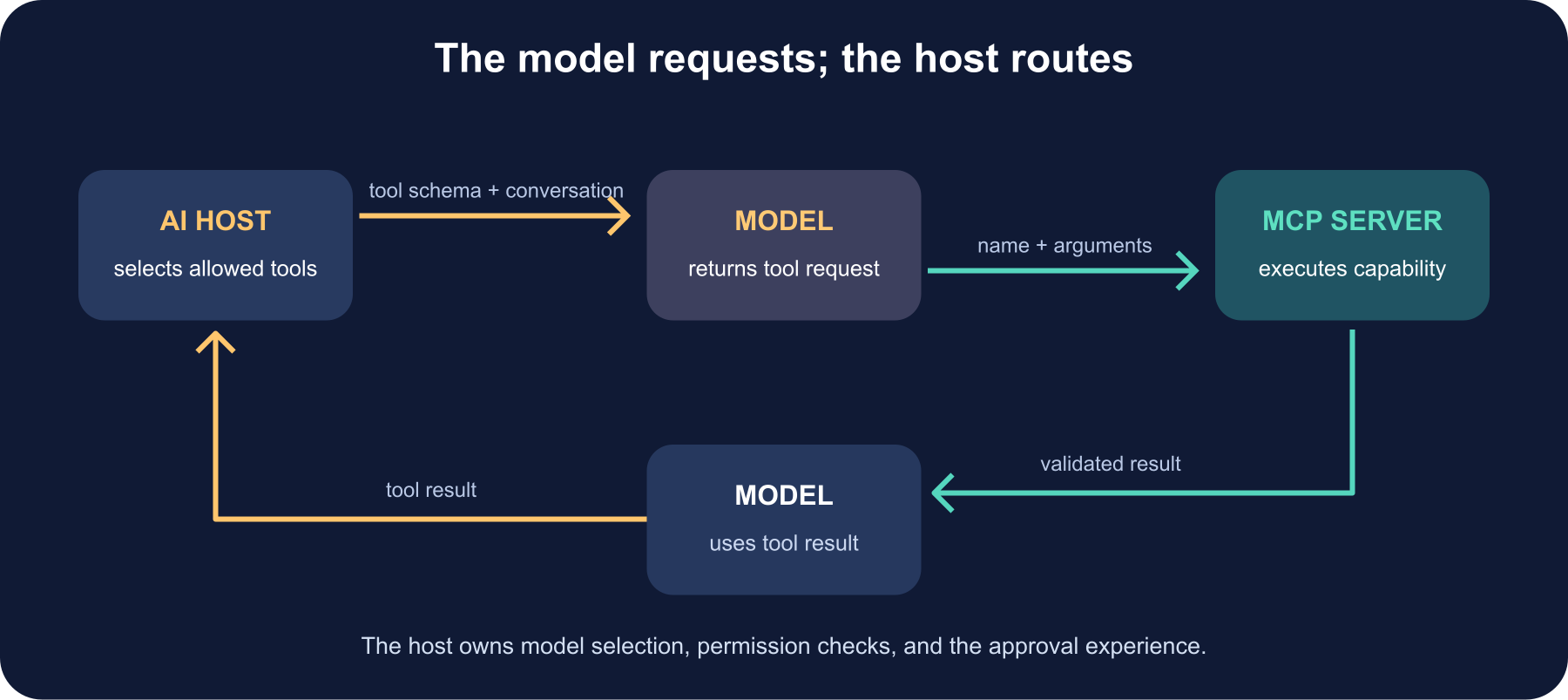
Once you call listTools(), the server’s tool names, descriptions, and JSON input schemas can be mapped to the model API’s tool definitions. When the model returns a tool call, route its name and arguments to client.callTool(). Then send the returned content back to the model as the result of that call.
1Host → MCP client: listTools()
2MCP client → server: tools/list
3Server → MCP client → host: tool names + input schemas
4Host → model: conversation + selected tools
5Model → host: request tool(name, arguments)
6Host → MCP client: callTool(name, arguments)
7MCP client → server → host: tool result
8Host → model: tool result
9Model → person: response
MCP’s callTool() does not decide whether the model should call the tool. The host makes that handoff, and it is the right place to filter tools to the current task, validate the selected name and arguments, apply user permissions, and ask before sensitive actions. A server-advertised schema is useful guidance and validation; it is not proof that a particular user is allowed to perform an operation.
Give the model a small, relevant toolbox
It can be tempting to forward every tool from every server into every model request. That creates a crowded menu and may expose capabilities the user does not need. Instead, use the current task and account permissions to select a small set. Give tools clear descriptions, keep argument schemas specific, and distinguish read-only actions from ones that change data.
The tools/list operation can be paginated, and current MCP responses can include cache hints. Use the SDK’s pagination behavior and honor safe cache scope and lifetime; tool lists that vary by user or tenant must not leak between accounts. Refresh discovery when a server changes, and fail clearly when a tool disappears between discovery and a later call.
Resources, prompts, and capabilities
Tools are actions. Resources expose data the host can read by URI, and prompts provide reusable starting templates. You can discover these with the corresponding list methods, then read a resource or retrieve a prompt when the user’s task calls for it. Don’t fetch every resource by default: choose the specific material needed and consider how private content enters the model context.
An MCP server may also advertise optional protocol extensions. Support only capabilities the host and server actually negotiate; don’t assume a server’s advertised name or version is a trustworthy identity claim. Protocol metadata helps with compatibility and display, not access control.
Common connection problems
| Symptom | First thing to check |
|---|---|
spawn npx ENOENT | Is Node/npm on the host process’s PATH? Does the command work from the app’s actual working directory? |
| No tools appear | Did the server start successfully? Check stderr, supported protocol revisions, and its tools/list result. |
Tool returns isError | Read the server’s result safely; validate the arguments and required permissions. |
| Remote call returns 401 | Complete the server’s OAuth authorization flow and verify the token is for this resource. |
| It works on one machine only | Check runtime versions, environment variables, command paths, network access, and TLS certificates. |
| The call hangs | Set a timeout, propagate cancellation, and check the server and downstream service latency. |
For an older server, the SDK may negotiate the previous initialize-handshake lifecycle instead of the newer stateless lifecycle. Check the server’s actual protocol support before debugging a difference as an application error.
A safe first integration
Start with one trusted server and one read-only tool. Confirm that the server returns the result you expect, then connect the tool loop to your model provider. Add write actions only after you have per-user authorization, careful argument checks, visible confirmation where the action matters, timeouts, and useful logs with secrets removed. Close transports on shutdown, and keep server processes and dependencies updated.
Further reading
Read next
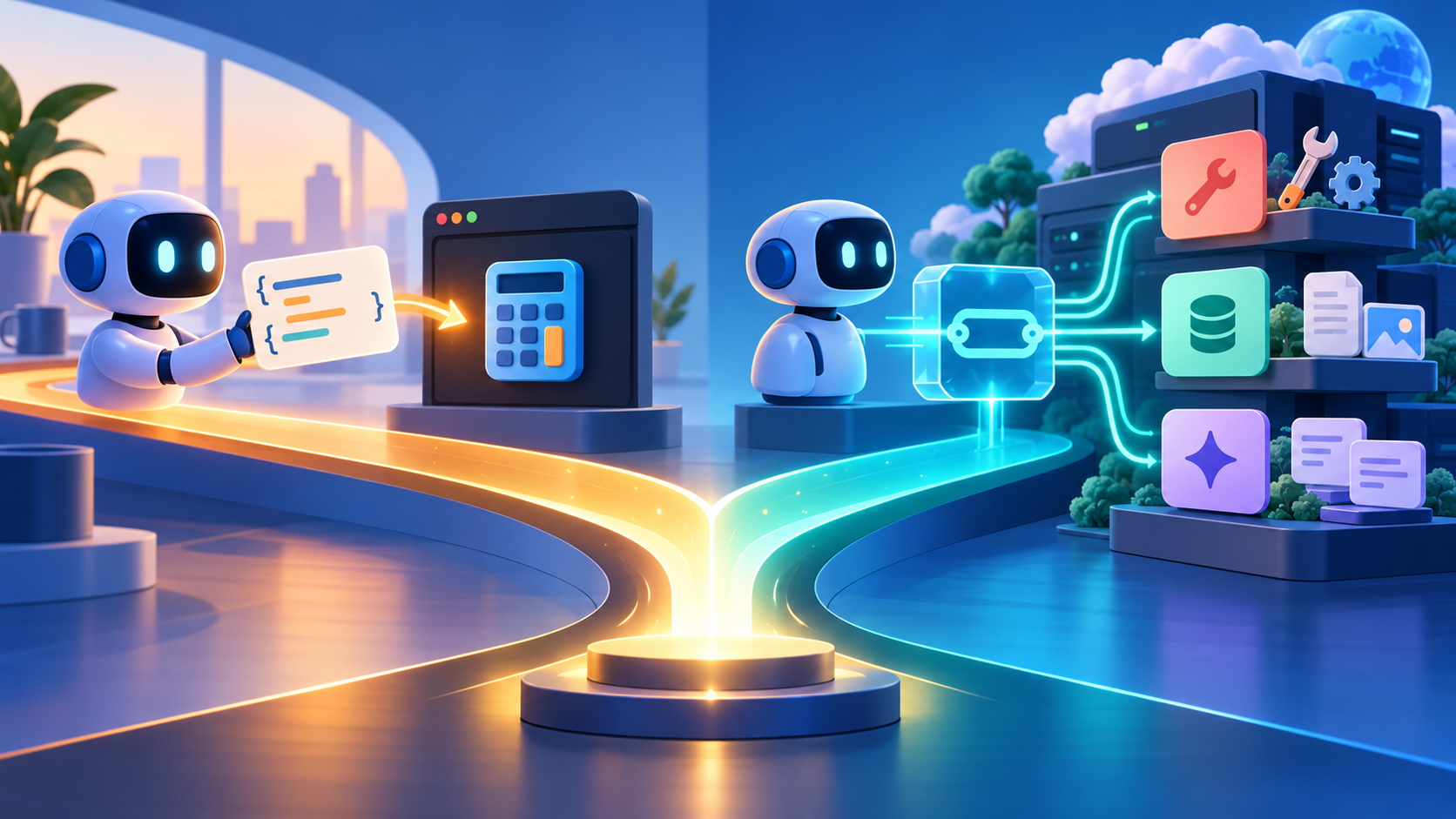
MCP vs. Function Calling: What’s the Difference?
MCP and function calling solve different parts of the AI tool puzzle. See how model-issued tool calls differ from a reusable protocol—and how the two work together in one application.
 nbkhope
What Is Grok? Elon Musk’s AI Assistant, xAI, and SpaceX Explained
Grok is the AI assistant and model family first developed by xAI. Learn how it works, how it uses X and the web, where Tesla fits, and why current materials mention SpaceXAI and SpaceXSI.
nbkhope
MCP Server Authentication Explained: OAuth, Tokens, and Trust
MCP authentication is more than a password on a server. Learn how OAuth, token audiences, scopes, and per-tool checks fit together for remote MCP—and what local stdio servers should do instead.
nbkhope
Comments
Be kind and specific. Comments with links from new accounts appear after a moderator reviews them.