What Is Grok? Elon Musk’s AI Assistant, xAI, and SpaceX Explained
Grok is the AI assistant and model family first developed by xAI. Learn how it works, how it uses X and the web, where Tesla fits, and why current materials mention SpaceXAI and SpaceXSI.

On this page
Grok is an AI assistant and a family of large language models first created by xAI, the artificial intelligence company founded by Elon Musk. You can use Grok to ask questions, write, brainstorm, work with code, and—when the feature is available—search the web or public posts on X.
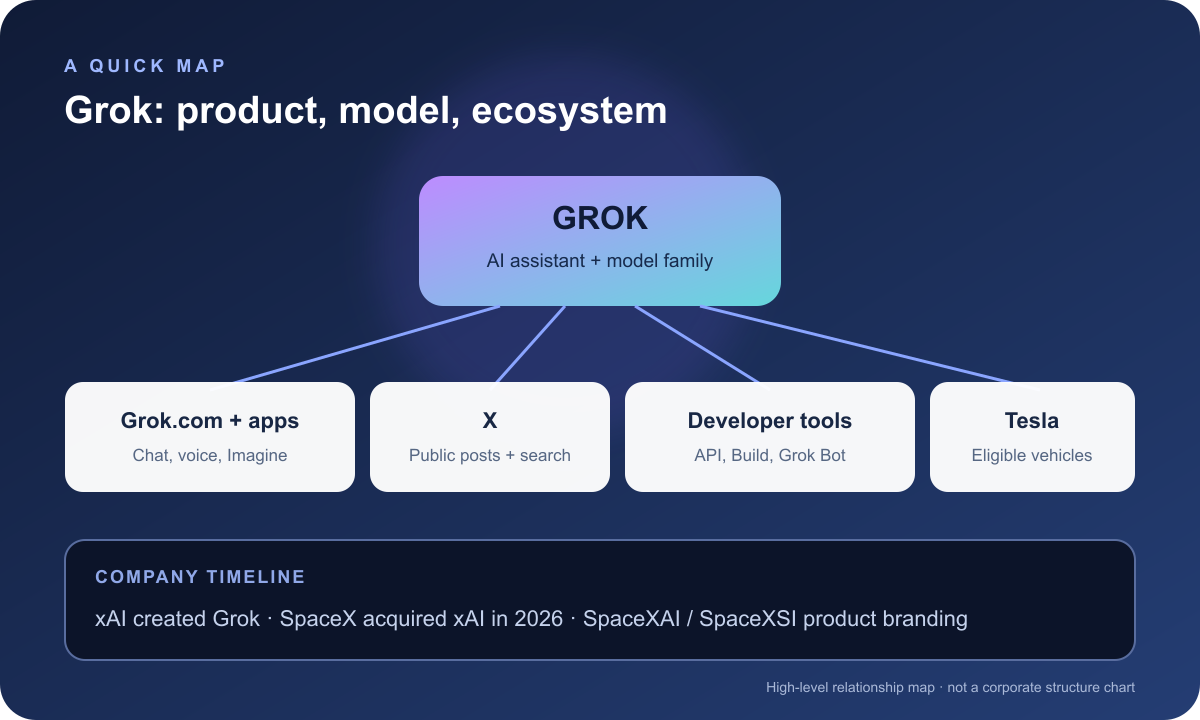
The names around Grok can be confusing. xAI built the first Grok models; SpaceX acquired xAI in February 2026; and current product pages use names such as SpaceXAI and SpaceXSI. Grok also appears in X and in some Tesla vehicles. These are connected products and organizations, but the names do not all mean the same thing.
This guide was prepared on October 18, 2026. AI products change quickly, so model names, features, pricing, and availability may have changed since publication.
What is Grok?
Grok can mean either the AI assistant people interact with or the model family that generates its answers. It is similar to how “ChatGPT” can refer to a product experience while “GPT” names the models behind it. The exact meaning depends on the context: Grok on a phone is an app, while a name such as Grok 4.7 identifies a particular model generation.
xAI introduced Grok in 2023. The company described it as a conversational AI with a playful voice and access to current information from X. Since then, Grok has grown beyond a chat window into a set of products for web and mobile users, developers, and businesses. Current product materials include chat, voice, image and video creation, API access, and Grok Bot, an AI agent for longer tasks. What you can use depends on the model, app, plan, region, and settings.
Grok is a large language model (LLM): a neural network trained to recognize patterns in sequences of text and other supported media, then generate a likely continuation. The assistant around the model may also connect it to tools, such as web search. The model and the assistant are related, but they are not identical.
How does Grok answer a question?
When you send a prompt, the assistant passes relevant context to a model. The model generates an answer based on patterns learned during training and the information in the current conversation. If the product decides it needs newer information, it may call a search tool and use retrieved results as additional context.
That distinction matters: a search tool can bring current pages or X posts into a response, but it does not turn the model’s underlying training into a live feed. Search is also not guaranteed for every question. X’s help page says Grok can decide whether to search public X posts and the open web for a particular request.
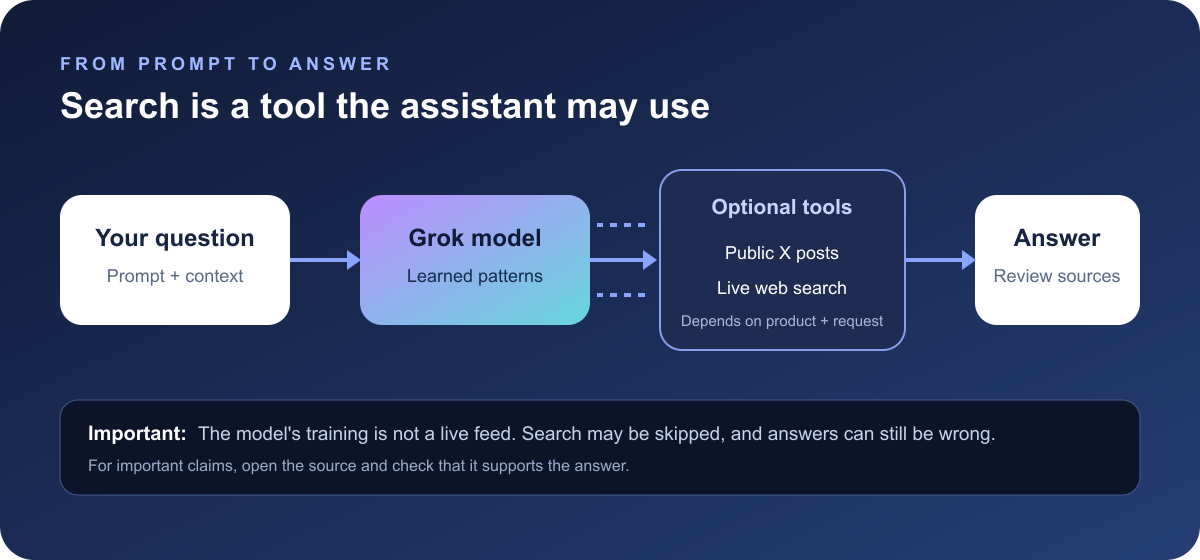
An answer can still be wrong, even when it sounds certain or includes current information. Search results may be incomplete, a source may be mistaken, or the model may misread what it retrieved. For important claims, open the cited source and check that it actually supports the answer.
What can Grok do?
Depending on the version and product, Grok can help with:
- Explaining a topic, summarizing material, and answering follow-up questions.
- Drafting, rewriting, translating, and brainstorming.
- Writing or explaining code and helping investigate a software problem.
- Searching for recent information, including public X posts when that tool is enabled.
- Understanding uploaded images or files in products that support those inputs.
- Creating images or video through Grok Imagine.
- Responding by voice, and in some connected settings, working with external tools.
These are product capabilities, not guarantees of accuracy. The same account may get different tools in the web app, mobile app, X, a vehicle, or the developer API. Model pickers and subscription plans change, too; check the current product or API documentation before relying on a specific feature.
A useful way to ask for research
For a question that may have changed recently, ask Grok to show its work:
Find the current official documentation for [topic].
Summarize what it says, link the sources, and separate confirmed facts
from your interpretation. If you cannot verify a claim, say so.
Then open the links yourself. A model can produce plausible-looking references that do not prove the claim, so treat the source as the evidence—not the confident tone of the answer.
Where can you use Grok?
Grok is available through several experiences. They can share models, but their interfaces and features differ.
| Experience | What it is |
|---|---|
| Grok on the web and mobile | The standalone assistant on Grok’s website and apps. |
| Grok on X | An assistant embedded in X. Depending on the question and settings, it can search public X posts and the web. |
| Grok API | Developer access for applications that send requests to a versioned Grok model. Access, limits, and prices depend on the selected model and account. |
| Grok Build and Grok Bot | Tools aimed at software and longer-running, multi-step work. Their capabilities and availability depend on the current offering. |
| Grok in Tesla vehicles | A voice assistant for eligible cars, with some vehicle-related features. Availability and requirements vary by vehicle and software version. |
Tesla’s support page says Grok is available in vehicles with an AMD infotainment processor, vehicle software version 2025.26 or later, and Premium Connectivity or Wi-Fi. Tesla notes that availability can change. Check your car’s software and the current Tesla Grok support page before expecting it to work.
How are xAI, SpaceXAI, SpaceXSI, X, and Tesla related?
The simplest way to understand the names is to separate the model, the product, and the company:
- Grok is the assistant and model family.
- xAI is the company that created Grok. SpaceX announced it acquired xAI on February 2, 2026; SpaceX’s public filing describes the AI business as including Grok and X.
- SpaceXAI appears in current product branding and the footer of xAI’s product website. SpaceXSI is used in the developer documentation, whose name expands to “SpaceX Super Intelligence.” These labels describe the current AI product and developer ecosystem; they are not different Grok models.
- X is a social platform where Grok is integrated. When enabled, Grok can search public X posts for information.
- Tesla offers Grok through the vehicle interface in eligible cars. This is a product integration; Tesla’s vehicle requirements do not make Tesla the company that originally developed Grok.
In short, Grok began as xAI’s AI product and is now part of the wider SpaceX AI business. X and Tesla are places where people can encounter Grok, while the current developer console and product pages use the SpaceXAI/SpaceXSI names. Musk’s involvement links the companies historically and publicly, but a shared founder or integration does not make every company or product the same thing.
Is Grok open source?
Not as a blanket description of every Grok product. In 2024, xAI released the weights and architecture of Grok-1 under the Apache 2.0 license. That was an early base model, not the full Grok app, and it was not fine-tuned as a chat assistant. Newer models and hosted products can have different access and terms.
“Open weights” means a model’s learned numerical parameters are available to download under specified terms. It does not automatically include the training data, all software used to train or serve it, or every later model in the family. Check the license for the exact model you want to use.
What should you keep in mind?
Grok can be useful for first drafts, explanations, idea generation, and fast research. It can also make factual mistakes, misunderstand a request, or overstate what its sources show. Treat its output as a starting point when accuracy matters, and have a person review generated code before running it.
Pay attention to which product you are using and what data you share. X’s Grok privacy information explains how public posts and interactions may be used to improve models, and where account settings apply. A separate app, API, Tesla feature, or enterprise service may have different terms and controls. Do not paste private work, personal information, or credentials unless you understand the relevant data policy.
The short version
Grok is an AI assistant and model family that began at xAI. It can answer questions, help with writing and code, and use tools such as web search in supported experiences. SpaceX acquired xAI in 2026, and current product materials use SpaceXAI and SpaceXSI branding. Grok is also integrated with X and available in eligible Tesla vehicles. The product name may be the same across those places, but the model, tools, availability, and data rules can differ.
For the latest details, start with the official Grok overview, developer documentation, X Help page, and Tesla support page.
Read next

MCP Server Authentication Explained: OAuth, Tokens, and Trust
MCP authentication is more than a password on a server. Learn how OAuth, token audiences, scopes, and per-tool checks fit together for remote MCP—and what local stdio servers should do instead.
 nbkhope
How to Generate Audio from Text with Text-to-Speech (TTS)
Turn a written script into spoken audio: try your browser’s built-in voice, then generate an MP3 with a modern text-to-speech API. Learn voice selection, SSML pronunciation fixes, and quality checks.
nbkhope
How to Label AI Data: A Practical Guide to Better Training Examples
Learn to label AI data with a clear task, practical label rules, a small pilot, and quality checks that catch disagreements instead of hiding them. Includes a worked customer-support example.
nbkhope
Comments
Be kind and specific. Comments with links from new accounts appear after a moderator reviews them.