What Is Computer Vision? How Computers Learn to See the World
A friendly, jargon-free introduction to computer vision, the AI that lets computers understand photos and video. Learn how a computer sees an image as numbers, why seeing is hard, what vision AI can do, and where you use it every day.

On this page
Your phone unlocks when it sees your face. Your photo app finds every picture of the beach when you type "beach". Your car beeps when you drift out of your lane. A banking app reads the numbers on a check you photographed. None of these devices has eyes in the way you do, yet they all "see".
This is computer vision: the part of artificial intelligence that teaches computers to understand images and video. It's one of the oldest dreams in computing, and in the last decade it has gone from barely working to being everywhere.
This article explains computer vision in plain language: how a computer looks at a picture, why seeing is surprisingly hard, what vision AI can do, and where you already use it every day.
What is computer vision?
Computer vision is the field of teaching computers to get useful information from images and video: recognizing what's in a picture, finding where things are, reading text, following movement, and more.
For you, seeing feels effortless. You glance at a room and instantly know there's a cat on the sofa, a cup on the table and someone at the door. But that ease hides an enormous amount of work your brain does without you noticing. Teaching a computer to do the same turned out to be one of the hardest problems in AI.
In fact, there's a famous story from 1966, when a professor at MIT set up a "summer vision project", expecting students to make real progress on getting a computer to recognize objects over a single summer. It took the rest of the field another fifty years to get there.
How a computer "sees" a picture
Here's the first surprise: a computer doesn't see a picture at all. It sees numbers.
Every digital image is a grid of tiny squares called pixels. In a black-and-white image, each pixel is just one number for how bright it is, usually from 0 (black) to 255 (white):
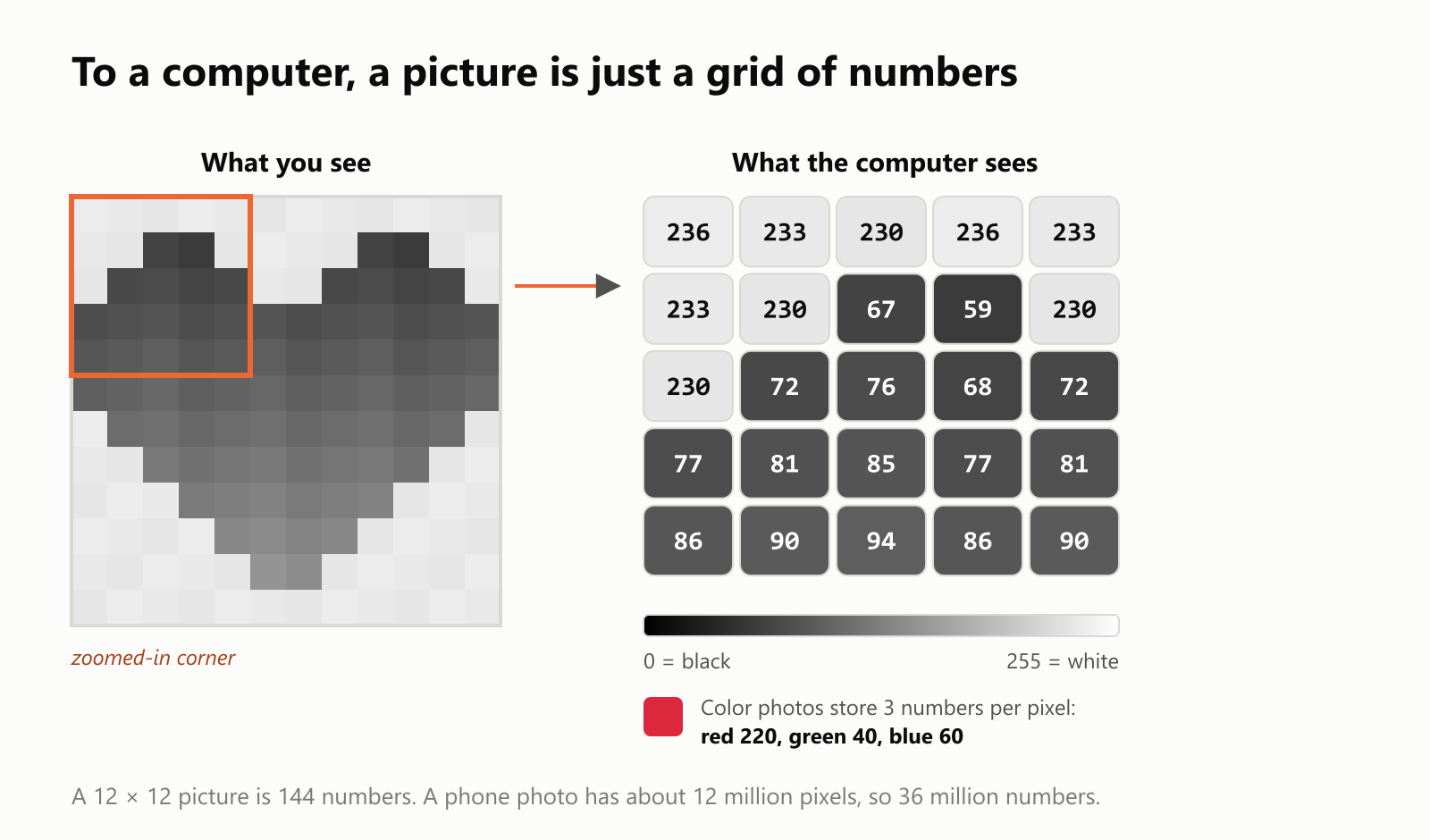
Color images store three numbers per pixel: how much red, green and blue light to mix. A typical phone photo has around 12 million pixels, so it's about 36 million numbers.
So when we say a computer "looks at" a photo, what it really gets is a giant spreadsheet of numbers. The whole challenge of computer vision is getting from those numbers to an idea like "that's a dog".
Why seeing is so hard for a computer
Think about everything that can change about the same object:
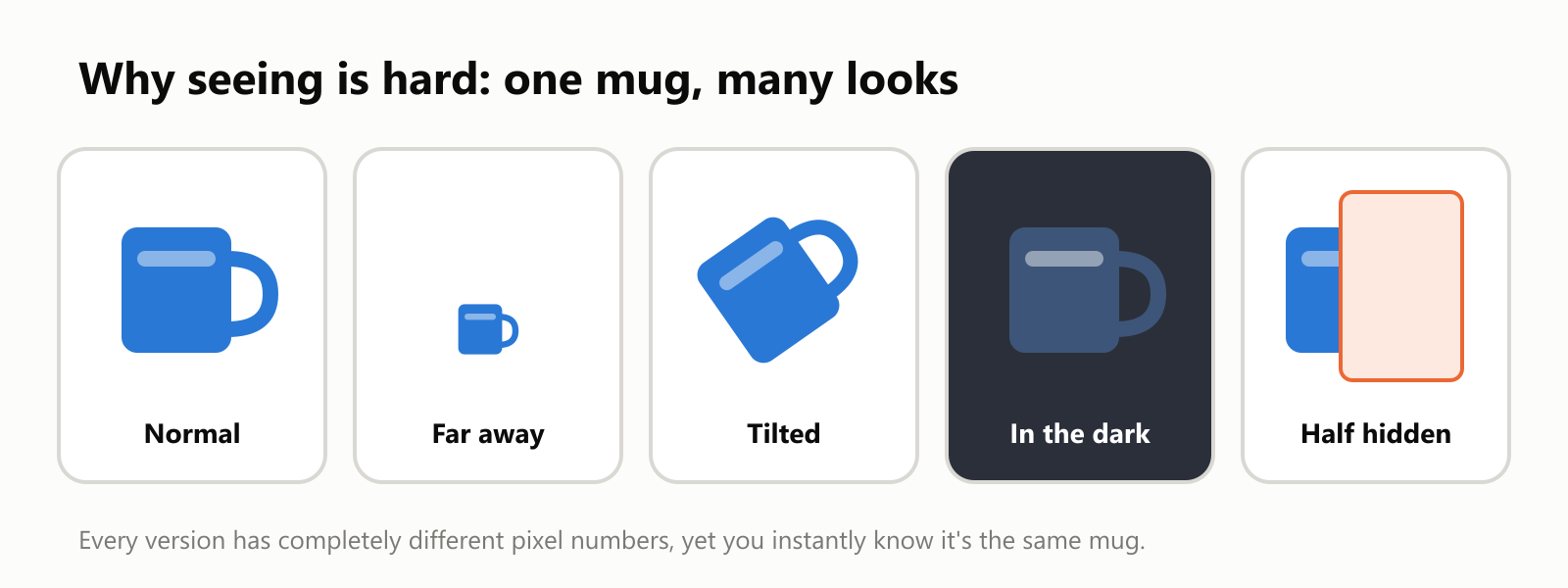
Each of those five pictures produces a completely different set of pixel numbers. Yet you know immediately that it's the same mug. A computer has to learn to ignore all the changes that don't matter, like size, angle, lighting, background or something blocking the view, while paying attention to the ones that do.
And that's just a mug. Now imagine telling apart hundreds of dog breeds, reading messy handwriting, or spotting a pedestrian stepping off a curb at night in the rain.
A first step: finding edges
Before the AI boom, a lot of computer vision was about clever, hand-designed tricks. One of the most basic, and still useful, is edge detection.
The idea is simple: compare each pixel with its neighbors. Where the brightness changes sharply, there's probably the border of something. Here's a real edge detector (a classic method called the Sobel filter) run on a small drawing of a house:
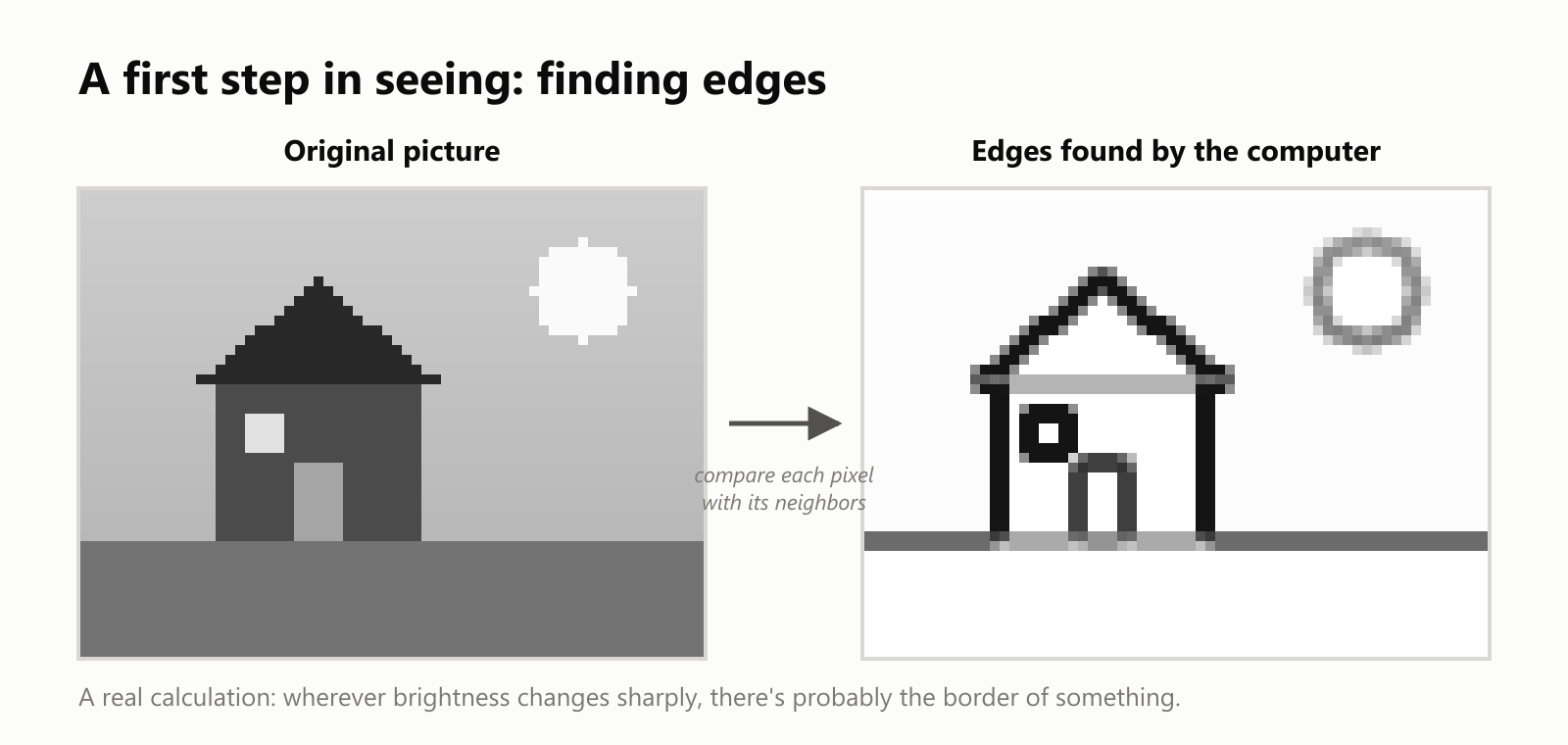
From a grid of numbers, the computer has found the outlines of the roof, walls, door, window and sun. Outlines are a big step toward recognizing shapes. In fact, when researchers look inside modern deep learning vision systems, the very first layers learn to find edges like these all on their own.
From hand-made rules to learning from millions of photos
For decades, people tried to describe objects with rules: "a face has two dark eyes above a nose above a mouth". These systems worked in tidy lab conditions and failed in the messy real world.
The breakthrough came from learning instead of rules. In 2009, a team led by researcher Fei-Fei Li released ImageNet, a collection of more than 14 million photos labeled by people. With that much data, faster computers and deep neural networks, vision systems could finally learn what things look like from examples. In 2012, a deep learning system called AlexNet dramatically beat every other method at recognizing objects in photos, and the modern era of computer vision began.
Today's vision models learn the same way: show them a huge number of labeled pictures ("this is a cat", "this box is a car", "these pixels are road"), and they gradually learn the patterns, from edges to shapes to whole objects.
What computer vision can do
Vision AI can answer questions about a picture at different levels of detail. Here are the three most common:
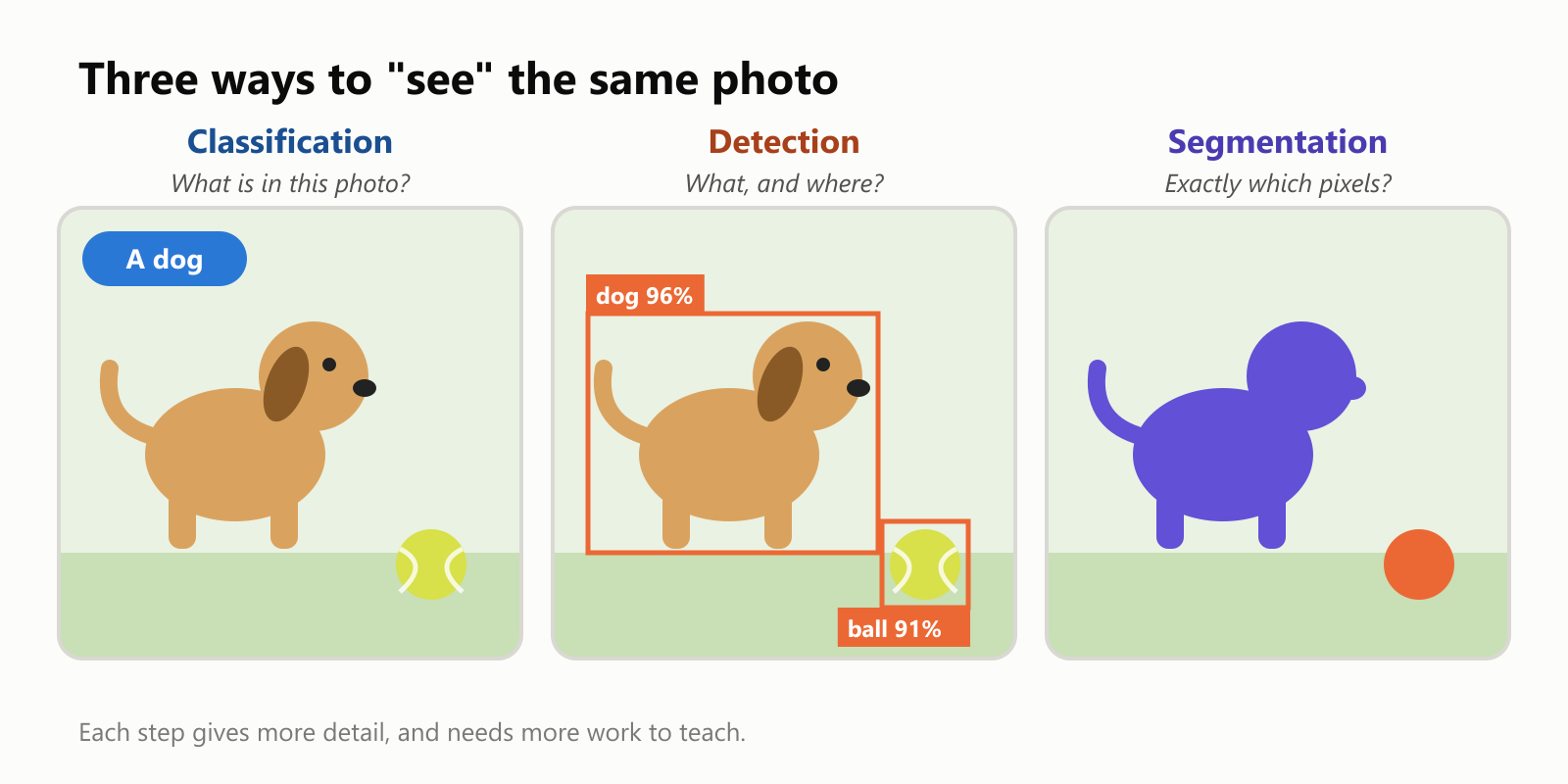
- Classification: "What is this a picture of?" One answer for the whole image: a dog.
- Object detection: "What's in it, and where?" A box around each thing, with a label: dog here, ball there. This is what lets a car find every pedestrian and every other car.
- Segmentation: "Exactly which pixels belong to what?" A precise outline of each thing. This is how video calls blur your background but not you, and how medical software outlines an organ in a scan.
And there's much more:
- Face recognition: matching a face to a known person, like unlocking your phone.
- Text recognition (OCR): reading printed or handwritten text in images, like scanning a receipt or a check.
- Pose estimation: finding the position of a person's body, used in fitness apps and motion capture.
- Tracking: following objects from one video frame to the next, used in sports replays and traffic cameras.
- Image generation: the reverse direction, creating new images from a text description.
A vision model ranks its guesses
A vision model never just "knows" what's in a picture. It calculates how likely each possible answer is and ranks them:
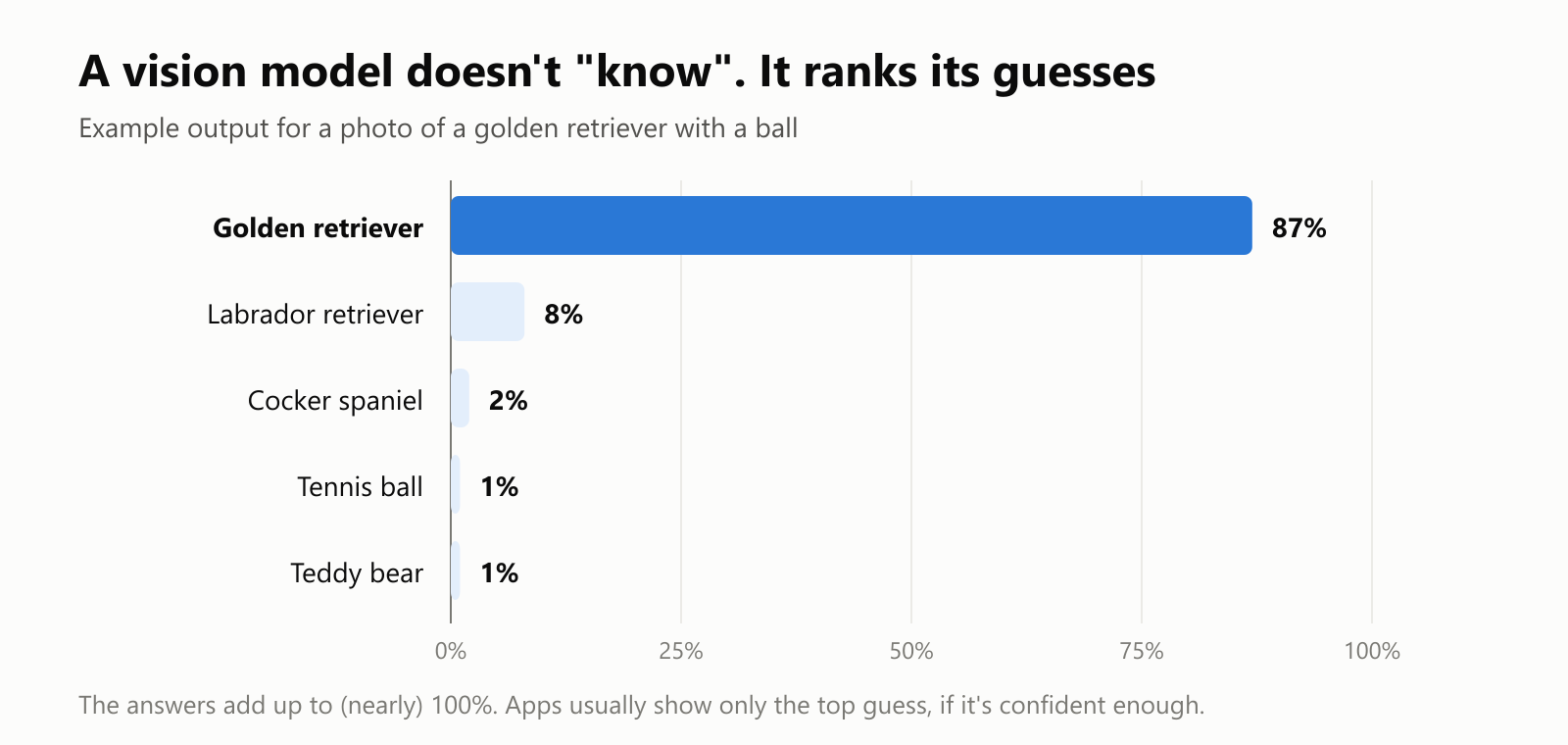
Notice that the model's second choice is another similar-looking dog breed. That's typical: its mistakes tend to be "reasonable" confusions. Apps usually show you only the top guess, and only when the model is confident enough. When it's not, a good app asks you or a person to check.
Where you meet computer vision every day
| Where | What computer vision does |
|---|---|
| Your phone | Face unlock, portrait-mode blur, searching photos by "dog" or "beach", reading QR codes |
| Your car | Lane keeping, reading speed-limit signs, automatic emergency braking, parking cameras |
| Self-driving taxis | Detecting and tracking cars, cyclists and pedestrians all around the vehicle |
| Shopping | Self-checkout scanners, searching for products with a photo |
| Banking | Depositing a check by photographing it, checking that an ID matches your face |
| Health | Helping doctors spot signs of disease in X-rays, scans and photos of the eye or skin |
| Farming | Spotting sick plants and weeds from drones or tractor cameras |
| Factories | Catching defects on products as they move down a production line |
| Accessibility | Apps that describe a scene, read a menu or identify banknotes for people who are blind or have low vision |
The limits and the worries
Computer vision is powerful, but far from perfect:
- Unusual conditions: fog, glare, darkness, odd angles or things it never saw during training can confuse it.
- It can be fooled: researchers have shown that a few carefully placed stickers on a stop sign can make some vision systems misread it. Changes that mean nothing to a human can mean a lot to a model.
- Bias: a model is only as good as its training photos. A 2019 study by the U.S. National Institute of Standards and Technology (NIST) found that many face recognition systems made more mistakes for some demographic groups than for others.
- Privacy: cameras plus face recognition can track people in public without their knowledge. Many cities, countries and companies are debating where to draw the line, and some have restricted its use.
A small glossary
- Computer vision: teaching computers to understand images and video.
- Pixel: one tiny square of a digital image, stored as numbers.
- RGB: the three numbers per pixel in a color image: red, green and blue.
- Edge detection: finding places where brightness changes sharply, usually the borders of objects.
- Classification: naming what's in a whole image.
- Object detection: finding each object and drawing a box around it.
- Segmentation: labeling every pixel with what it belongs to.
- OCR (optical character recognition): reading text from images.
- Face recognition: identifying or verifying a person from their face.
- ImageNet: a famous collection of over 14 million labeled photos that helped kick off modern computer vision.
- Confidence score: how sure a model is about an answer, often shown as a percentage.
Wrapping up
To a computer, a picture is just a grid of numbers. Computer vision is the art of turning those numbers into understanding: edges, then shapes, then objects, then whole scenes. After decades of slow progress with hand-made rules, learning from millions of labeled photos finally made it work, and now it's in your pocket, your car and your doctor's office.
It still has blind spots, from strange lighting to unfair mistakes, and it raises real questions about privacy. But the next time your phone instantly finds every photo of your dog, you'll know what's happening: millions of numbers, a lot of learned patterns, and a ranked list of guesses with "dog" right at the top.
Read next
What Is Reinforcement Learning? How AI Learns by Trial, Error and Reward
A friendly, jargon-free introduction to reinforcement learning, how AI learns by trial, error and reward, like training a dog with treats. Watch a real robot learn a maze, see why exploring matters, and learn how it shapes chatbots.
 nbkhope
What Is Graph Engineering? How Today's AI Teams Up to Get Real Work Done
A friendly, jargon-free guide to graph engineering, the 2026 idea of building AI as a map of connected steps instead of one big loop. See how today's AI agents work, why small mistakes add up, and how checkers, branches and teamwork fix it.
nbkhope
What Is Loop Engineering? How AI Agents Keep Working Until the Job Is Done
A friendly, jargon-free guide to loop engineering, the 2026 idea of designing the loop that lets an AI agent keep working until a job is done, with clear goals, real feedback, smart stop rules and knowing when to ask a person.
nbkhope
Comments
Be kind and specific. Comments with links from new accounts appear after a moderator reviews them.