
Why Does an AI Task Cost More Than One Prompt?
A single AI task can contain several model calls, tool results, repeated context, and retries. Follow a fictional token ledger and try an interactive call-by-call exercise.


On this page
Why Does an AI Task Cost More Than One Prompt?
You ask an AI assistant one question: “Find the garden's Saturday event details and draft a short invitation.” It searches, reads a result, writes a draft, notices the date is wrong, and revises. To you, that was one task. Underneath, it may have been several calls to a model, plus work done by a search tool.
The cover illustrates that chain; it is not a trace from a real product. This article uses invented token counts to show how to account for the work without tying the lesson to prices that change. A token is a small unit of text that a model processes or generates. For a deeper introduction, see What Is an LLM?.
One task can contain several calls
An agent may ask the model what to do, execute a tool call, pass the tool's result back to the model, and ask for a final answer. A correction can add another pass. The tool result is not automatically a model output: it becomes model input when the application sends it into a later call. OpenAI's agent runtime guide describes this model–tool–model loop; another product may arrange the steps differently.
Think of a restaurant bill: asking for one meal does not mean the kitchen did one operation. Counting only the first model call is like counting the appetizer and overlooking the main course. But tokens are not money. Input and output can have different rates; tools, cached input, or subscriptions can follow separate rules.
A small ledger you can audit
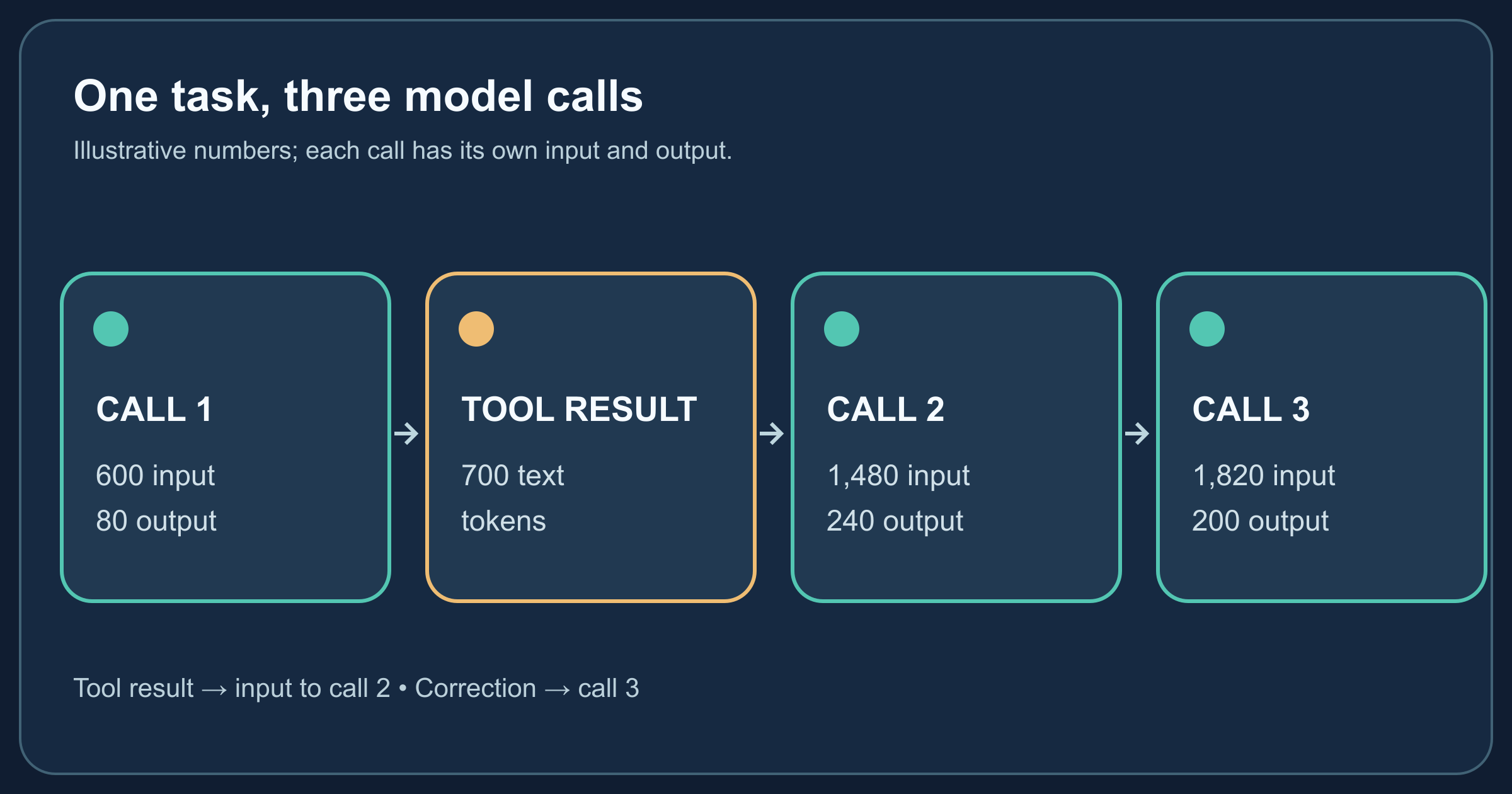
Suppose the assistant makes these fictional calls. The first output asks a search tool for information. The search tool returns 700 tokens of text. That text appears inside the second model call's input, alongside earlier context and new instructions. The draft has a wrong date, so a correction triggers a third call.
| Step | Model input | Model output | Combined model tokens | What happened |
|---|---|---|---|---|
| 1. Plan and request search | 600 | 80 | 680 | Model asks for a tool result. |
| Tool returns text | — | — | 0 at this step | 700 tokens of tool text wait to be passed back. |
| 2. Read result and draft | 1,480 | 240 | 1,720 | Tool text and earlier context enter the model. |
| 3. Correct the date | 1,820 | 200 | 2,020 | Another model call revises the draft. |
| Task total | 3,900 | 520 | 4,420 | Three model calls, not one. |
The 700 tool-result tokens are already inside the 1,480 input tokens of call 2. Do not add them a second time to the total. In this example, call 2's input can be unpacked as 600 tokens of initial context + 80 of prior model output + 700 of tool text + 100 of new instructions = 1,480. Call 3 uses 600 + 80 + 700 + 100 + 240 from the draft + 100 for the correction = 1,820. These are teaching numbers, not a claim about any provider's exact message format.
Build the total yourself
Before you click, predict: will the task still have only 680 model tokens after the tool returns? Advance the activity to see the input and output bars grow. Then compare your prediction with the table.
Build the task's token ledger
Advance through an illustrative research task. Each bar is one model call, with input and output counted separately.
600 input + 80 output tokens. The output asks a search tool for information.
Task total: 600 input + 80 output = 680 model tokens.
Predict what happens to the total if a tool result is fed back to the model. Then continue.
Fictional token counts, not a tokenizer trace or price estimate. Real usage depends on model, context handling, caching, tools, and provider billing rules.
Why the input can grow
Later calls often carry part of the earlier conversation: the original request, instructions, tool definitions, earlier model outputs, and tool results. The application may instead summarize, truncate, or retrieve only some of that material. Either way, inspect each call's actual usage, rather than assuming that one visible user prompt was processed only once. OpenAI's usage guidance distinguishes input tokens, output tokens, and cached input in its recorded usage.
The bars above also show why a long tool result matters. A search result with unnecessary page text can enlarge a later model input. A tool that returns only the relevant fields may keep the task smaller, but shortening context blindly can omit evidence the assistant needs. Measure task quality as well as token counts.
Does caching erase the repeated input?
No. A provider may reuse a matching prompt prefix and charge it at a different rate, but cached input is still input usage. A cache hit is not guaranteed just because two calls share history. OpenAI's prompt-caching guide says reuse depends on the prefix and reports cached tokens within input usage. Exact cache eligibility and rates vary by model and provider, so this worksheet deliberately does not turn tokens into currency.
There may be other costs outside this token ledger: a paid search API, file storage, image generation, or a separate fee for a tool. A consumer subscription may not expose per-call billing at all. Ask which product and billing model you are measuring before treating a token total as a bill.
Try an accounting exercise
Imagine a second draft needed one extra call with 900 input and 150 output tokens. Starting from the table, what is the new task total? Work it out before opening the answer.
For your own project, make a simple worksheet with one row per model call, not per user message. Record the call purpose, input tokens, output tokens, any cached-input subset, tool invocation and separate fee if applicable, and whether a retry occurred. Sum each category once. If the provider reports incomplete or delayed usage, mark the total as provisional rather than filling the gap with zero.
Make the task efficient without making it brittle
First remove unnecessary tool results and duplicate context. Set a sensible maximum number of steps and retries. Prefer a narrow, structured tool response when it preserves the evidence needed for the answer. Use caching where the platform supports it and measure actual hits, rather than assuming it will apply. Finally, compare correct, reviewed outcomes: a cheap answer that needs repeated repair may cost more time and money overall.
The lesson is a simple accounting rule: one user task can contain multiple model calls, and each call has its own input and output. To understand why an assistant might make those calls, read What Is an AI Agent?. To check whether its final draft is sound, use How to Check an AI Answer.
Sources and further reading
Read next

AI and Your Inbox: A Visual, Hands-On Guide
Let AI help with your email without handing it the keys. What it does well, how hidden text can steer it, which permissions to grant, and what happened when real models sorted and acted on a 30-email test inbox. With working Python, charts and a checklist.
 nbkhope
AI and Your Tax Return: A Visual, Hands-On Guide
Can AI help with your tax return? See what it does well, where it fails and how to protect your data. Real tests on 20 fictional returns, a workflow where the model reads and code calculates, working Python, charts and a checklist for the 2027 filing season.
nbkhope
How to Give an AI Agent Safe Access to Your Tools
Follow a fictional email assistant from reading to drafting, sending, and deleting. Learn which permissions each step needs, where approval belongs, and how to limit damage.
nbkhope
Comments
Be kind and specific. Comments with links from new accounts appear after a moderator reviews them.