
AI Agents for Weekly Work Reports: From Scattered Updates to a Trustworthy Draft
Build a weekly report from Slack or Teams, GitHub, Jira and documents without inventing progress. Follow a source-linked agent workflow and copy a ready-to-use prompt.


On this page
AI Agents for Weekly Work Reports
It is Friday afternoon. The work happened in six places: a project board, a GitHub repository, a shared document, meeting notes, chat threads and your own memory. Your manager wants five clear sentences about the week. You have 40 tabs open and a suspicious feeling that the important decision is hiding in tab 27.
An AI agent can gather those pieces, compare them and prepare a weekly report for review. The useful result is not a longer list of activity. It is a short, source-linked account of what changed, what remains open and what needs help.

This guide shows a practical workflow, including a fictional example you can adapt. It assumes the agent has permission to read the relevant sources. A connected tool can only access what its connected account and workspace settings allow; it cannot reliably fill gaps by guessing. OpenAI's plugin guidance gives a weekly update as an example of a reusable template paired with connected project documents.
Start with a reporting contract
Before asking for a summary, define the period, audience, scope and output. “This week” is ambiguous across time zones and working schedules. For example: “Cover Monday 00:00 through Sunday 23:59 in America/New_York for Project Atlas. Write for a nontechnical team lead. Keep it under 250 words. Draft only.”
Then decide what the report should answer:
| Section | Question it answers | Evidence to seek |
|---|---|---|
| Outcomes | What changed for users or the team? | Released feature, approved document, resolved ticket |
| Progress | What moved forward but is not finished? | Ticket history, review status, experiment result |
| Blockers | What needs a decision or another person? | Current ticket, latest thread, unresolved review |
| Next week | What is the likely next step? | Plan or commitment, clearly labeled if tentative |
A commit is evidence that code changed, not proof that it reached users. A closed ticket may have been canceled. A chat message can describe a plan that was later reversed. The agent should compare sources and say when they disagree.
Connect the places where work actually happened
Give the agent approved read access to the specific channels, repositories and projects relevant to the report. Say whose work to include and whether the report is about an individual or a team. A connection must be authorized for the right account; mentioning a service in a prompt does not grant access. If a connector is unavailable, provide a small export or links to the relevant items and ask the agent to name the gap.
| Source | What to ask the agent to inspect | What to verify before reporting |
|---|---|---|
| Slack or Microsoft Teams | Selected channels and threads for decisions, handoffs, blockers and the latest reply. | Was the request resolved later? Is the conversation appropriate to share? |
| Git and GitHub | Commits, linked issues, pull requests, reviews, CI and deployment history for the week. | Was the change only committed, merged, deployed or actually verified? |
| Jira or another task board | Work items assigned or updated in the period, status changes, comments, dependencies and remaining work. | Was an item completed, moved, reopened or closed for another reason? |
| Docs and meeting notes | Approved decisions, deliverables and plans that may not appear in code or tickets. | Is this the latest version and a confirmed decision? |
GitHub's repository-activity guide explicitly uses issues, PRs, commits and CI health. Atlassian's Jira AI documentation describes work-item summaries with status, contributors, blockers and next steps. OpenAI's Slack and Teams setup guide notes that a shared assistant uses configured connections and conversation context; it does not automatically inherit a person's private-channel or app access. Check the connected account and audience before using chat content in a report.
Be careful with “effort.” A burst of messages, a large commit count or a ticket that stayed open for a week does not measure hours worked or difficulty. If your team uses Jira time tracking, the agent may report logged time and remaining estimates as those fields are recorded, with a link and a label that they are recorded figures. Atlassian's time-tracking guidance explains how work logs and estimates are entered. When those fields are absent, describe work and progress in words; do not manufacture an effort score or evaluate a person's productivity from activity counts.
The five-step report pipeline
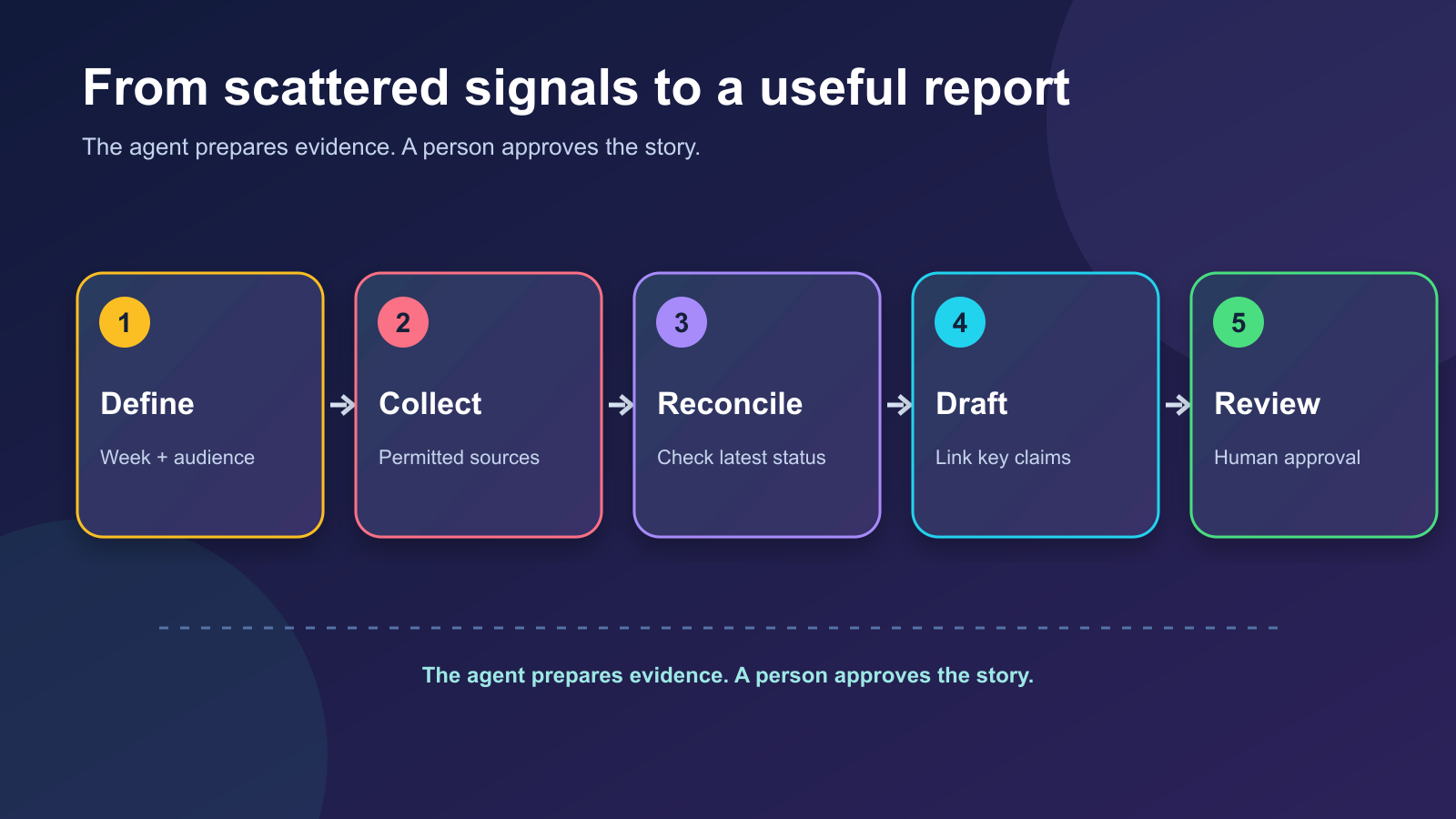
- Collect. Read only the approved Jira project or task board, GitHub repository, documents and Slack or Teams threads within the date window. Ask the agent to list sources it could not access.
- Extract. Turn each relevant item into a candidate claim: an event, timestamp, owner, status and source link. A report is easier to audit when every important sentence has a trail back to its origin.
- Reconcile. Group duplicates. Check the latest status of a ticket and the newest reply in a thread. Separate “merged,” “deployed” and “verified by users.”
- Draft. Lead with outcomes and blockers, then add progress and next steps. Match the reader's level of detail; a team lead may need a decision, not a commit hash.
- Review. Confirm sensitive details, dates, ownership and tone. Share the report only after the responsible person has approved it.
The GitHub Copilot guide to repository summaries describes collecting issues, pull requests, commits and CI health for a recent-activity report. Those are useful signals, but a cross-team weekly report may also need decisions from documents and conversations. OpenAI's work brief guide advises linking original sources, checking the latest replies and saying when a source is unavailable.
A tiny example: activity versus outcome
The following is fictional. Imagine these records from one week:
| Raw record | What the agent should check | Report-worthy claim |
|---|---|---|
| Three commits mention faster search | Was the change merged and deployed? | “Search optimization merged; release is pending.” |
Ticket AT-42 says “Done” | Was it completed or closed as a duplicate? | “Search bug fix is complete” only if confirmed. |
| A chat thread asks for legal review | Did a later reply resolve it? | “Launch copy awaits legal review” if still open. |
| Calendar shows a customer meeting | Were decisions recorded? | Include a decision, not merely “attended meeting.” |
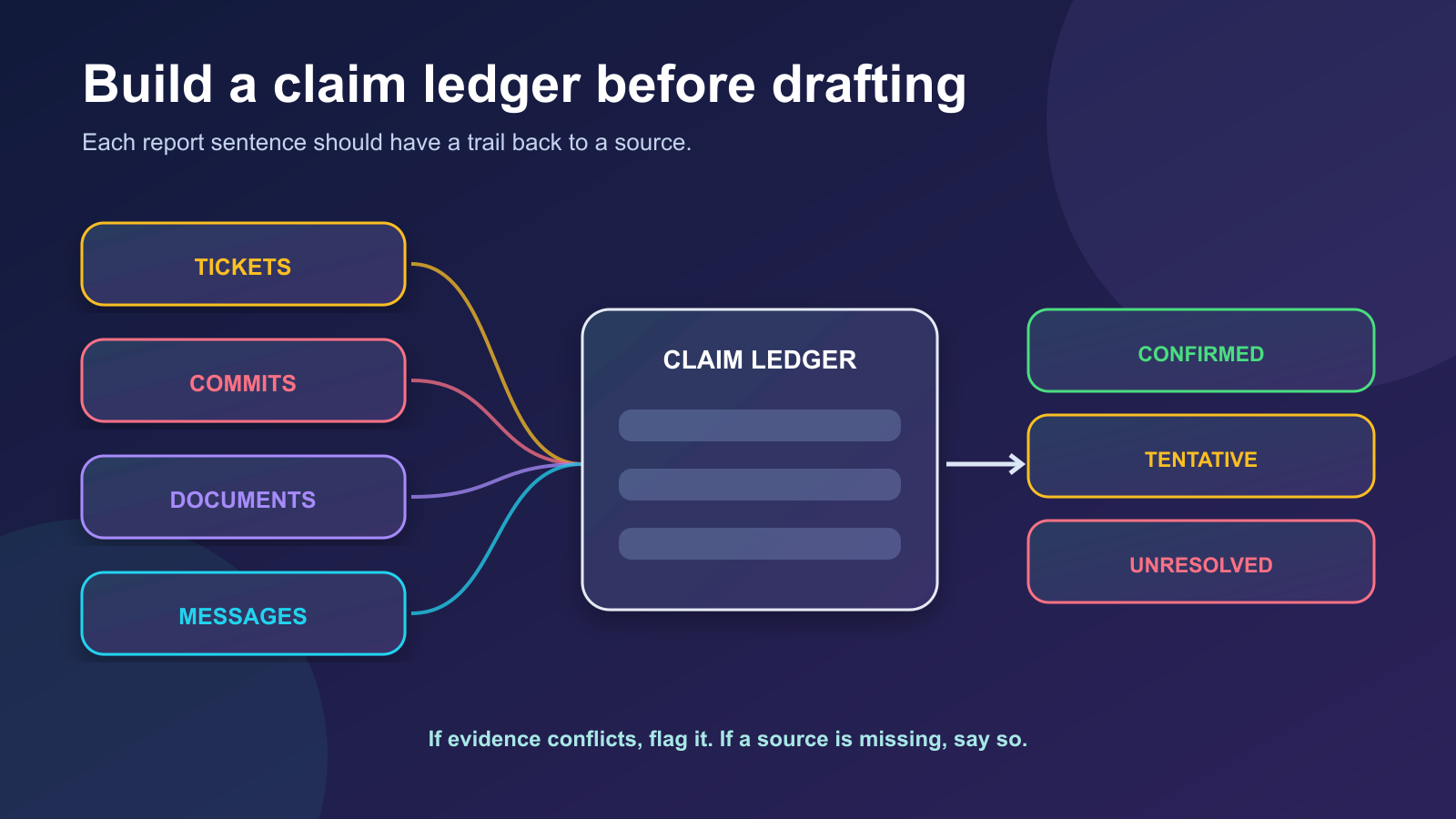
A useful draft might read:
Outcome: The team merged the search optimization; deployment is scheduled for next week. [Pull request]
Progress: The onboarding guide is in review. [Document]
Blocker: Launch copy is waiting for legal feedback; the owner requested a decision by Tuesday. [Latest thread]
Next week: Confirm deployment, measure search latency and resolve the copy review. The measurement plan is tentative. [Plan]
The bracketed links stand in for real links. If the agent cannot verify a release or decision, it should label the item unconfirmed or leave it out. Do not let fluent writing turn a weak signal into a definite accomplishment.
A prompt you can reuse
1Prepare a DRAFT weekly work report for [project/team] covering
2[start date/time] through [end date/time] in [time zone].
3Audience: [who will read it]. Limit: [word count].
4
5Use only these approved sources: [Jira project/task board], [GitHub
6repository and branch], [documents], [selected Slack/Teams channels
7and threads]. Read relevant updates
8within the window and check the latest status before reporting a
9blocker or completed item. Tell me which sources were unavailable.
10
11First create a short evidence ledger: claim, source link, date,
12status (confirmed/tentative/unresolved), and any conflicting signal.
13Then draft sections for outcomes, progress, blockers and next week.
14Use plain language and link each material claim to a source.
15Distinguish merged, deployed and verified. Do not invent numbers,
16decisions, owners or commitments. Report logged time or estimates only
17if recorded in an approved source; never infer effort from message,
18ticket or commit counts. Flag anything I should verify.
19
20Do not send the report, edit source systems or create tasks.
21Leave the final draft for my review.
If your team uses the same format every Friday, put the template and rules in a reusable instruction or skill. OpenAI's plugin documentation describes this pairing: the skill supplies the report format and a connected app retrieves permitted documents.
Automate only after the manual version works
Run the prompt by hand for a few weeks first. Check whether it misses a source, counts the same work twice, reports an old blocker or treats a plan as a promise. Once the output is reliably reviewable, a scheduled agent can prepare the draft on a set day. OpenAI's scheduled-task guidance recommends testing the prompt manually, reviewing early runs and keeping durable instructions in the task.
Set access as narrowly as possible. A weekly report rarely needs permission to send messages, change tickets or read unrelated private channels. Review the connected account, the source system's permissions and who will see the draft. That makes the agent more useful because it can say, “I could not access the release notes,” instead of quietly inventing what they contained.
The weekly habit worth keeping
The best weekly report is a decision aid, not an activity scoreboard. Ask the agent to gather and reconcile evidence, then use your judgment to decide what matters to the reader. A good draft saves tab-hunting time and makes uncertainty visible. A great final report leaves everyone knowing what happened, what is next and where the proof lives.
Sources and further reading
Read next

How to Verify a Suspicious Image or Video
A striking image or video can be real, generated, edited, or simply mislabeled. Follow a practical source-checking workflow before sharing it.
 nbkhope
How to Debug with AI Agents: From Mysterious Bug to Verified Fix
Give an AI agent the right repository, browser and operational context. Trace a bug from the UI through code, logs and tests to a reviewable fix.
nbkhope
On-Device AI vs. Cloud AI: What Changes for You?
Where does an AI task actually run—on your device or on a server? Use an offline travel-photo example and a decision map to weigh privacy, capability, network needs, and battery.
nbkhope
Comments
Be kind and specific. Comments with links from new accounts appear after a moderator reviews them.