The For Loop: A Visual, Hands-On Guide
Learn the for loop visually: its three parts and the order they run, counting patterns, the fencepost problem, nested loops, range-based for, common traps, real benchmarks (47× from loop order alone) and exercises with answers.


On this page
Need to print a times table, add up a hundred numbers, or visit every pixel of a photo? When you know how many times something should repeat, the for loop is the tool for the job. It's the most common loop in C, C++, Java, C#, JavaScript and their many cousins.
In this guide you'll take a for loop apart, watch it run step by step, learn the counting patterns everyone uses, solve the famous fencepost puzzle, build nested loops and a multiplication table, and see a measurement where simply swapping two loops made a program 47 times slower. Exercises with answers wrap it up.
Three parts on one line
A for loop packs everything that controls the repetition into its first line:
for (start; check; step) {
    // body: runs again and again while check is true
}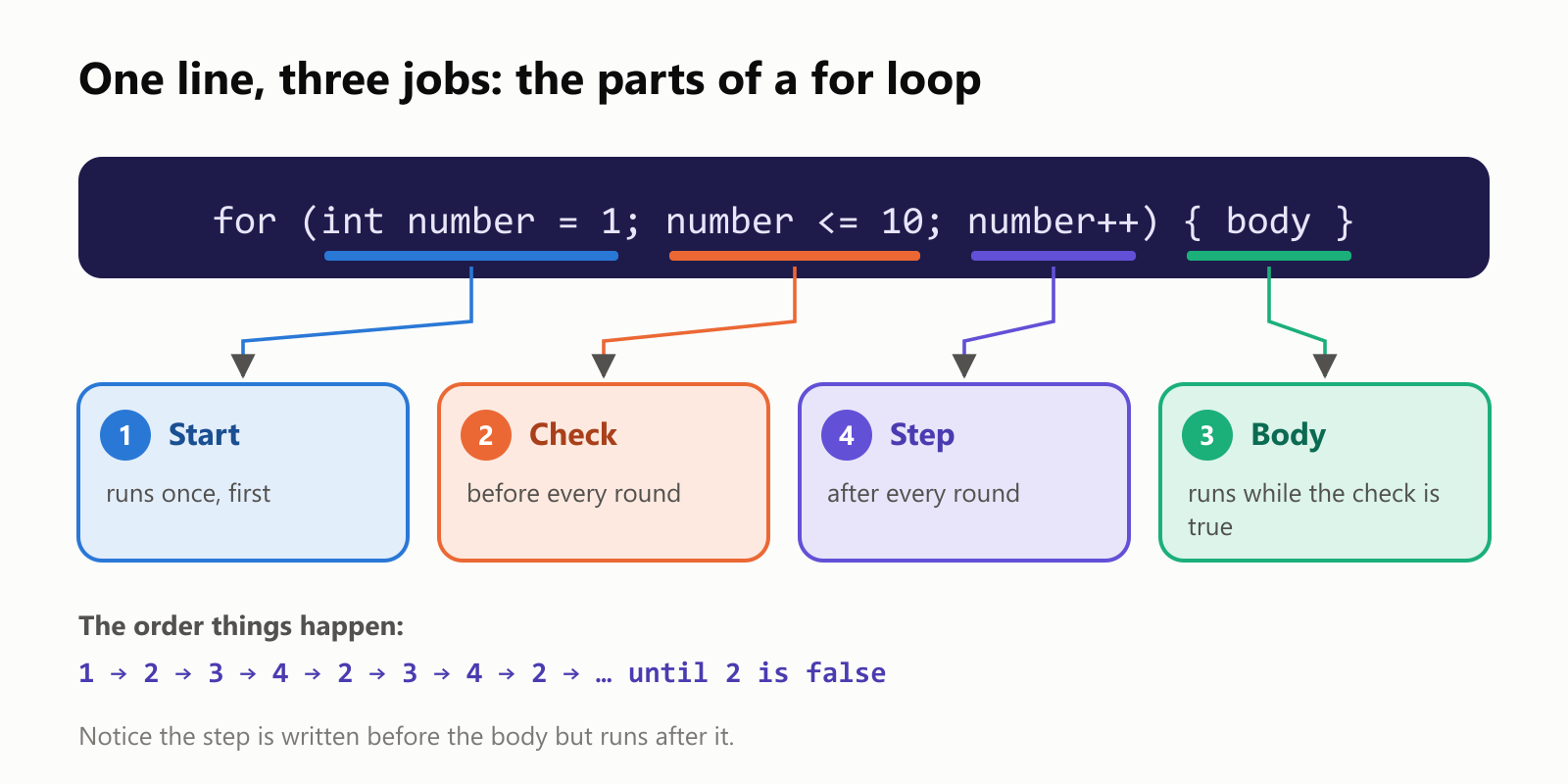
Here's the classic example, counting from 1 to 10:
1#include <iostream>
2
3int main() {
4    for (int number = 1; number <= 10; number++) {
5        std::cout << number << " ";
6    }
7    std::cout << "\n";
8}
Sample run:
1 2 3 4 5 6 7 8 9 10 Step by step
What exactly happens, and in what order? Here's a shorter loop, from 1 to 3, traced one action at a time:
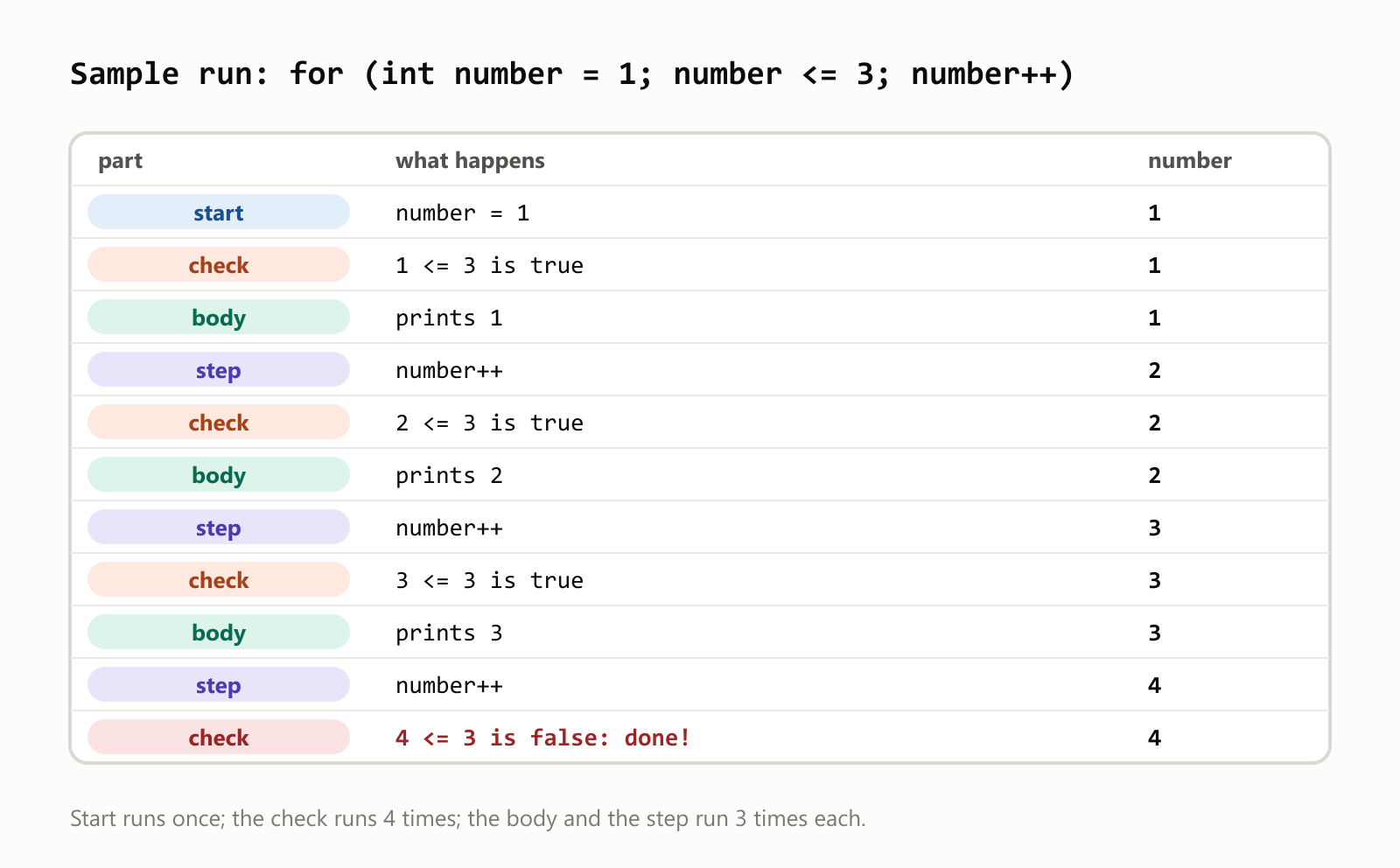
Two things to notice: the check runs one more time than the body (the last check is the one that says "stop"), and when the loop ends, number has already gone one past the end.
A for loop is a while loop in disguise
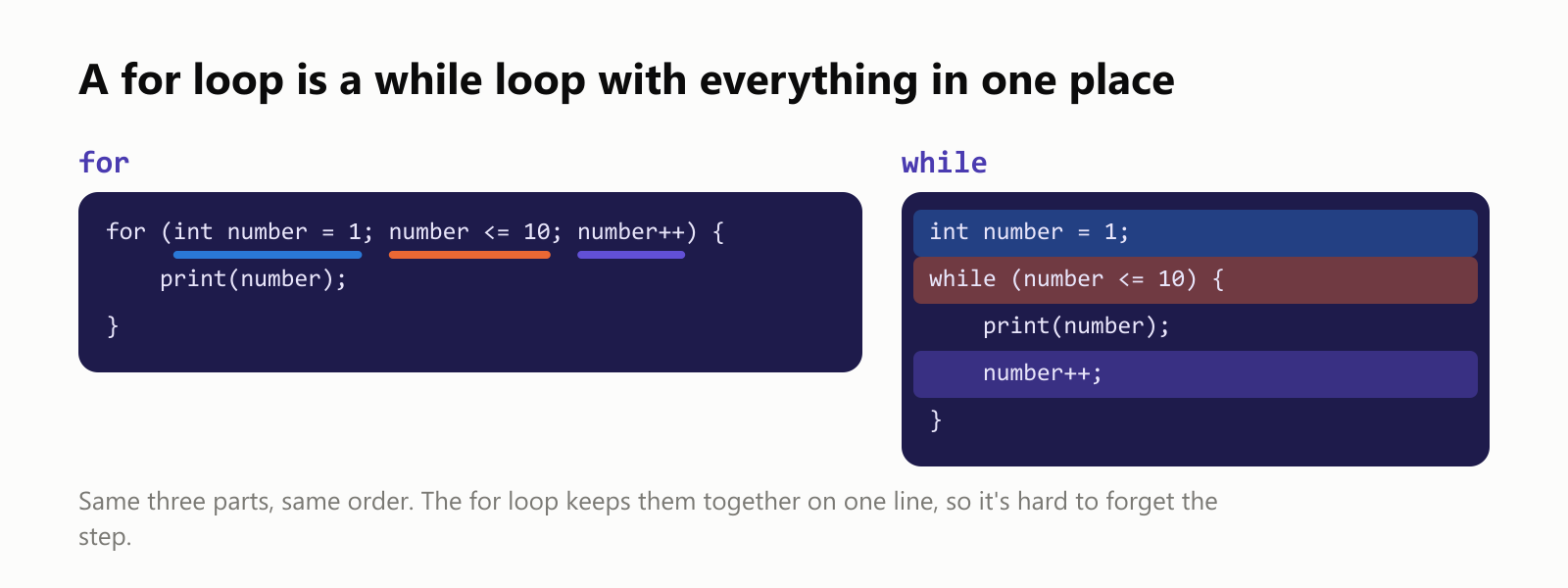
Every for loop can be rewritten as a while loop, and the other way around. The for loop just keeps the three parts together, so it's hard to forget one:
Counting patterns
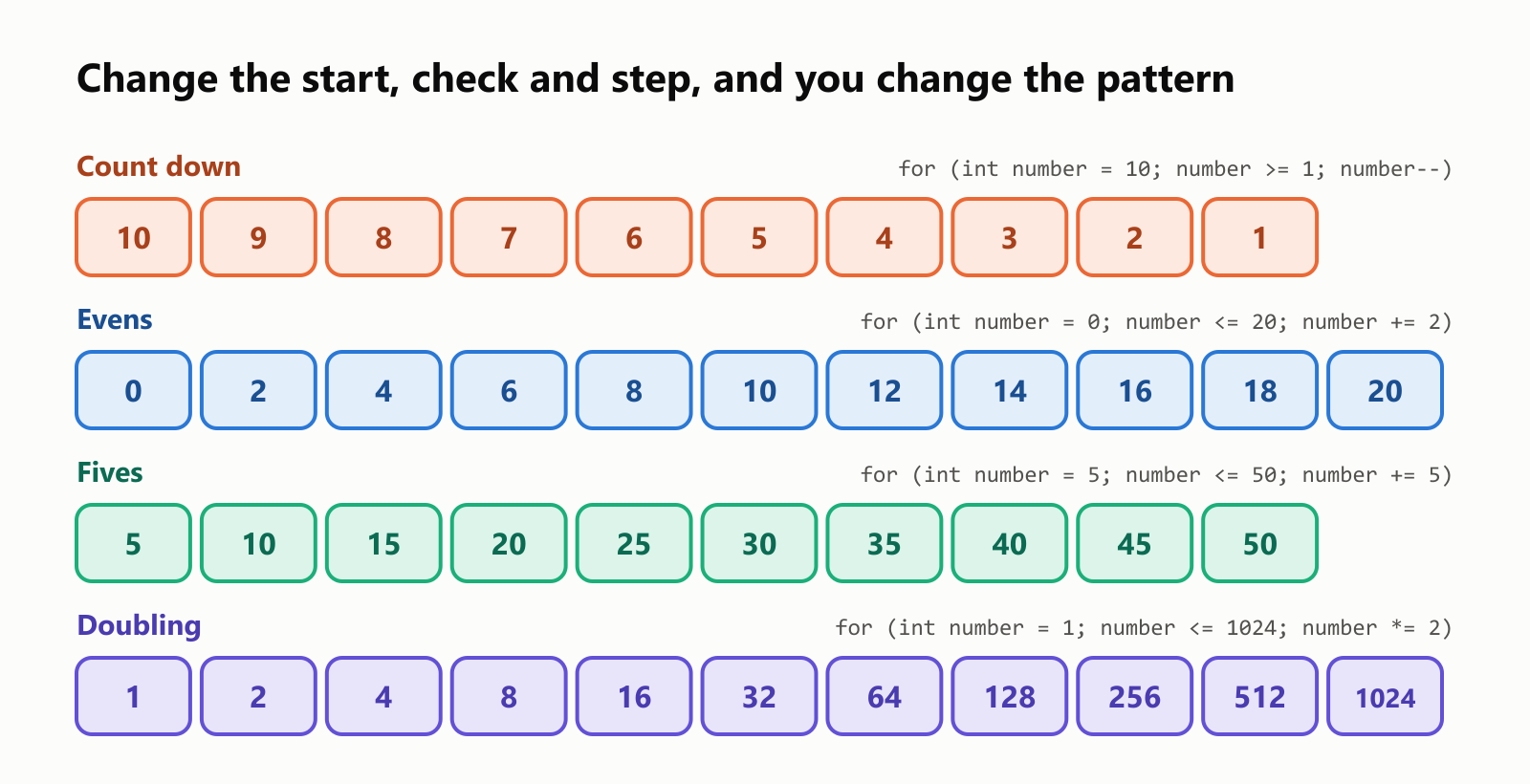
The start, check and step can be anything you like, which makes the for loop a flexible counting machine:
1#include <iostream>
2
3int main() {
4    std::cout << "Count down:     ";
5    for (int number = 10; number >= 1; number--) std::cout << number << " ";
6
7    std::cout << "\nEvens:          ";
8    for (int number = 0; number <= 20; number += 2) std::cout << number << " ";
9
10    std::cout << "\nFives:          ";
11    for (int number = 5; number <= 50; number += 5) std::cout << number << " ";
12
13    std::cout << "\nPowers of two:  ";
14    for (int number = 1; number <= 1024; number *= 2) std::cout << number << " ";
15
16    std::cout << "\n";
17}1Count down: 10 9 8 7 6 5 4 3 2 1
2Evens: 0 2 4 6 8 10 12 14 16 18 20
3Fives: 5 10 15 20 25 30 35 40 45 50
4Powers of two: 1 2 4 8 16 32 64 128 256 512 1024 You can even run two variables at once, separated by commas. Here one counts up while the other counts down, until they meet in the middle:
1#include <iostream>
2
3int main() {
4    for (int left = 0, right = 9; left < right; left++, right--) {
5        std::cout << "(" << left << ", " << right << ") ";
6    }
7    std::cout << "\n";
8}
(0, 9) (1, 8) (2, 7) (3, 6) (4, 5) Adding things up: the young Gauss
A favorite classroom story: a teacher once told the class to add up all the numbers from 1 to 100, expecting it to keep them busy. Young Carl Friedrich Gauss answered almost instantly. A for loop does it the patient way:
1#include <iostream>
2
3int main() {
4    int total = 0;
5    for (int number = 1; number <= 100; number++) {
6        total += number;
7    }
8    std::cout << "1 + 2 + ... + 100 = " << total << "\n";
9    std::cout << "Gauss's shortcut: 100 * 101 / 2 = " << 100 * 101 / 2 << "\n";
10}
1 + 2 + ... + 100 = 5050
Gauss's shortcut: 100 * 101 / 2 = 5050The pattern total = 0 before the loop and total += something inside it is called an accumulator, and you'll use it constantly.
The fencepost problem
Here's a puzzle that has tripped up programmers for as long as there have been programs. You're building a fence 10 meters long, with a post every meter. How many posts do you need?
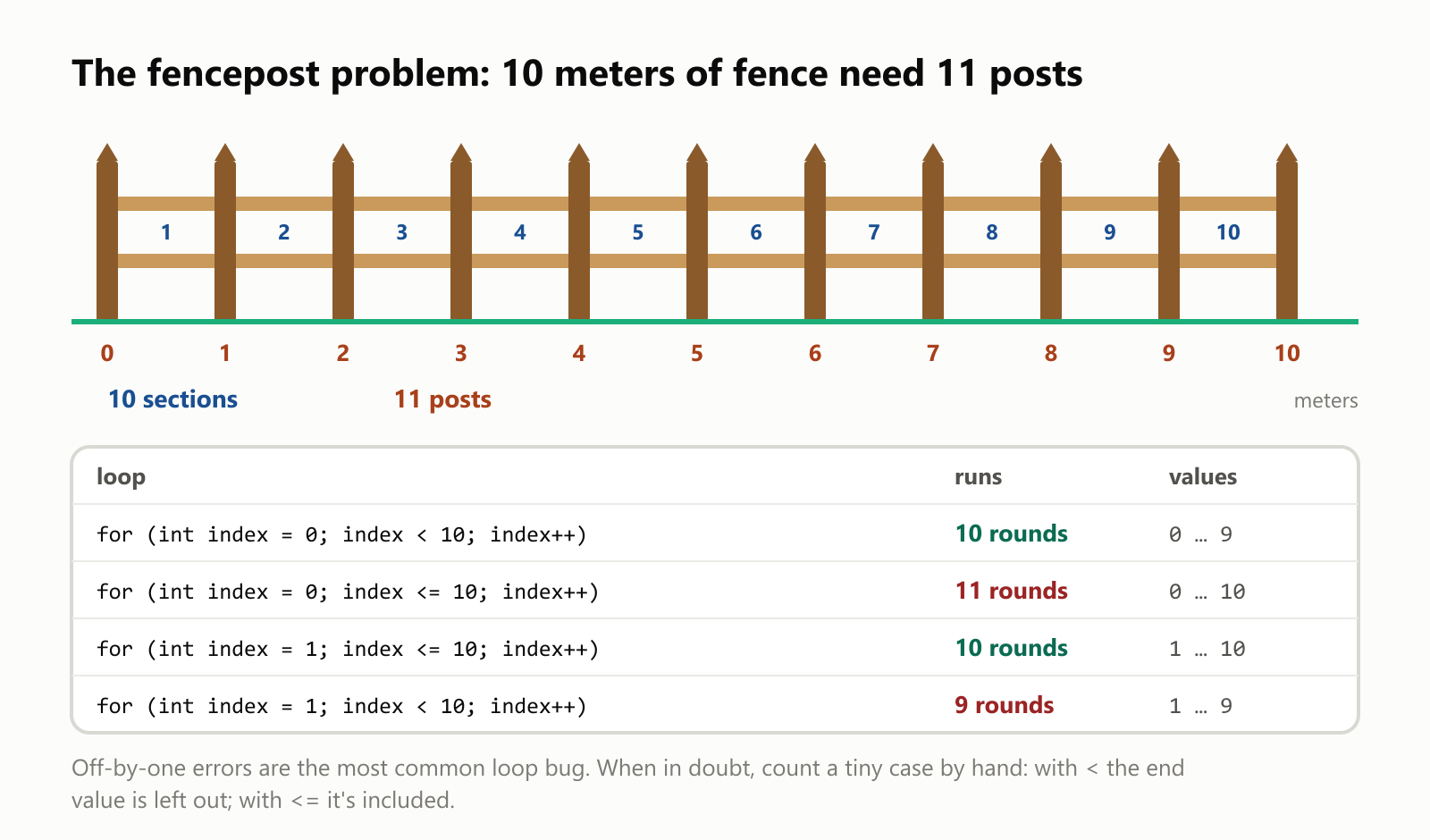
Most people say 10. The answer is 11: there's a post at 0 m and one at 10 m.
1#include <iostream>
2
3int main() {
4    int posts = 0;
5    for (int meter = 0; meter <= 10; meter++) {   // a post at 0 m, 1 m, ..., 10 m
6        posts++;
7    }
8    std::cout << "A 10 m fence with a post every meter needs " << posts << " posts\n";
9}
A 10 m fence with a post every meter needs 11 postsBeing off by one like this is so common it has a name: the off-by-one error. The two loop styles you'll use most:
for (int index = 0; index < count; index++)runs exactlycounttimes, from 0 to count − 1. It's the standard for arrays, which count from 0.for (int number = 1; number <= count; number++)also runscounttimes, from 1 to count. It's natural for "human" counting.
Mixing them up (starting at 0 and using <=) gives you one round too many.
Loops inside loops
A for loop's body can contain another for loop. The inner loop then runs all the way through for every single round of the outer loop:
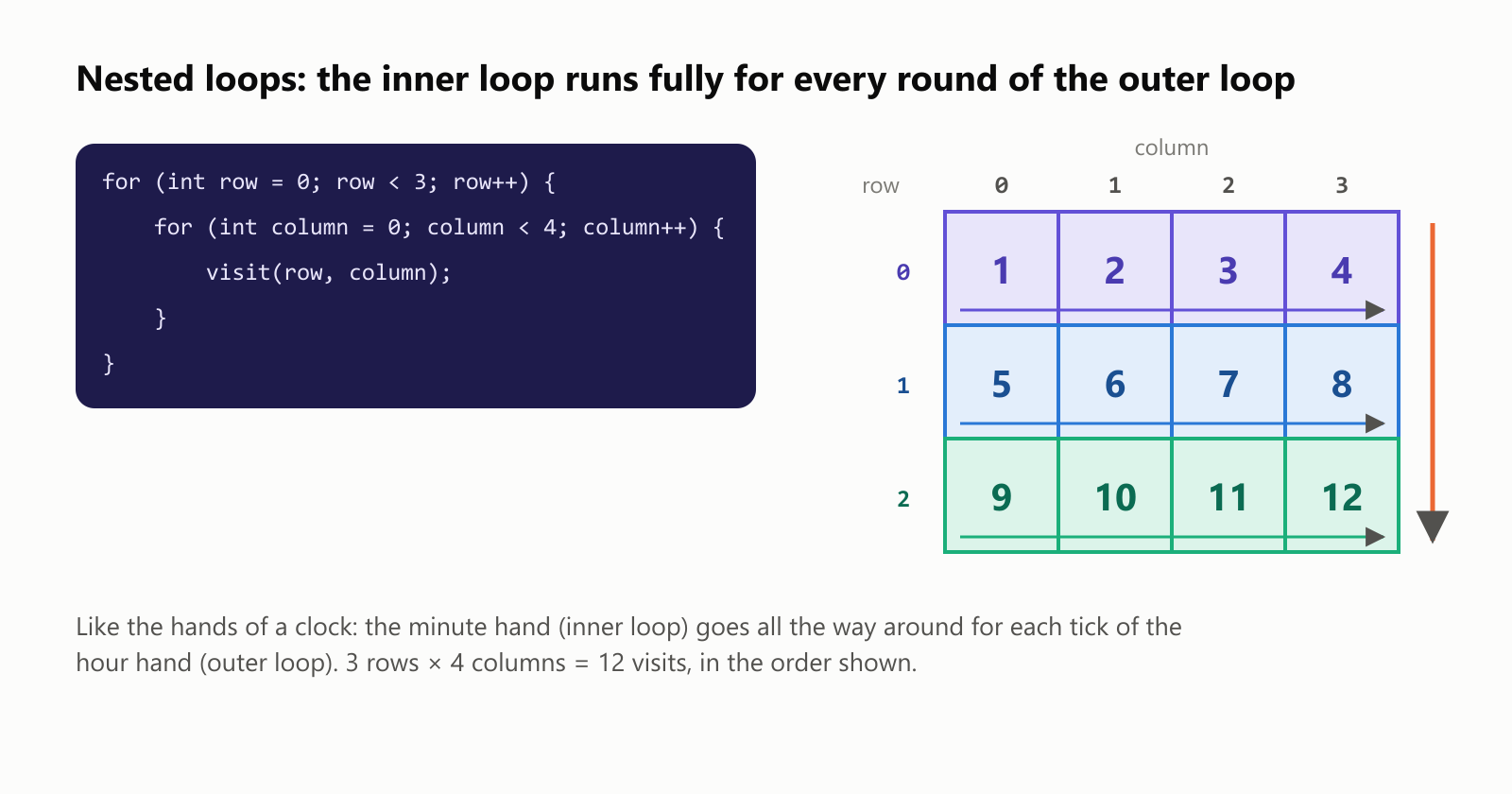
The classic nested-loop program is a multiplication table:
1#include <iomanip>
2#include <iostream>
3
4int main() {
5    for (int row = 1; row <= 9; row++) {
6        for (int column = 1; column <= 9; column++) {
7            std::cout << std::setw(3) << row * column;
8        }
9        std::cout << "\n";
10    }
11}
1 1 2 3 4 5 6 7 8 9
2 2 4 6 8 10 12 14 16 18
3 3 6 9 12 15 18 21 24 27
4 4 8 12 16 20 24 28 32 36
5 5 10 15 20 25 30 35 40 45
6 6 12 18 24 30 36 42 48 54
7 7 14 21 28 35 42 49 56 63
8 8 16 24 32 40 48 56 64 72
9 9 18 27 36 45 54 63 72 81std::setw(3) pads each number to 3 characters wide so the columns line up.
The inner loop's limits can depend on the outer loop. Here the inner loop prints as many stars as the current row number:
1#include <iostream>
2
3int main() {
4    for (int row = 1; row <= 5; row++) {
5        for (int star = 1; star <= row; star++) {
6            std::cout << '*';
7        }
8        std::cout << "\n";
9    }
10}1*
2**
3***
4****
5*****Every pair, once
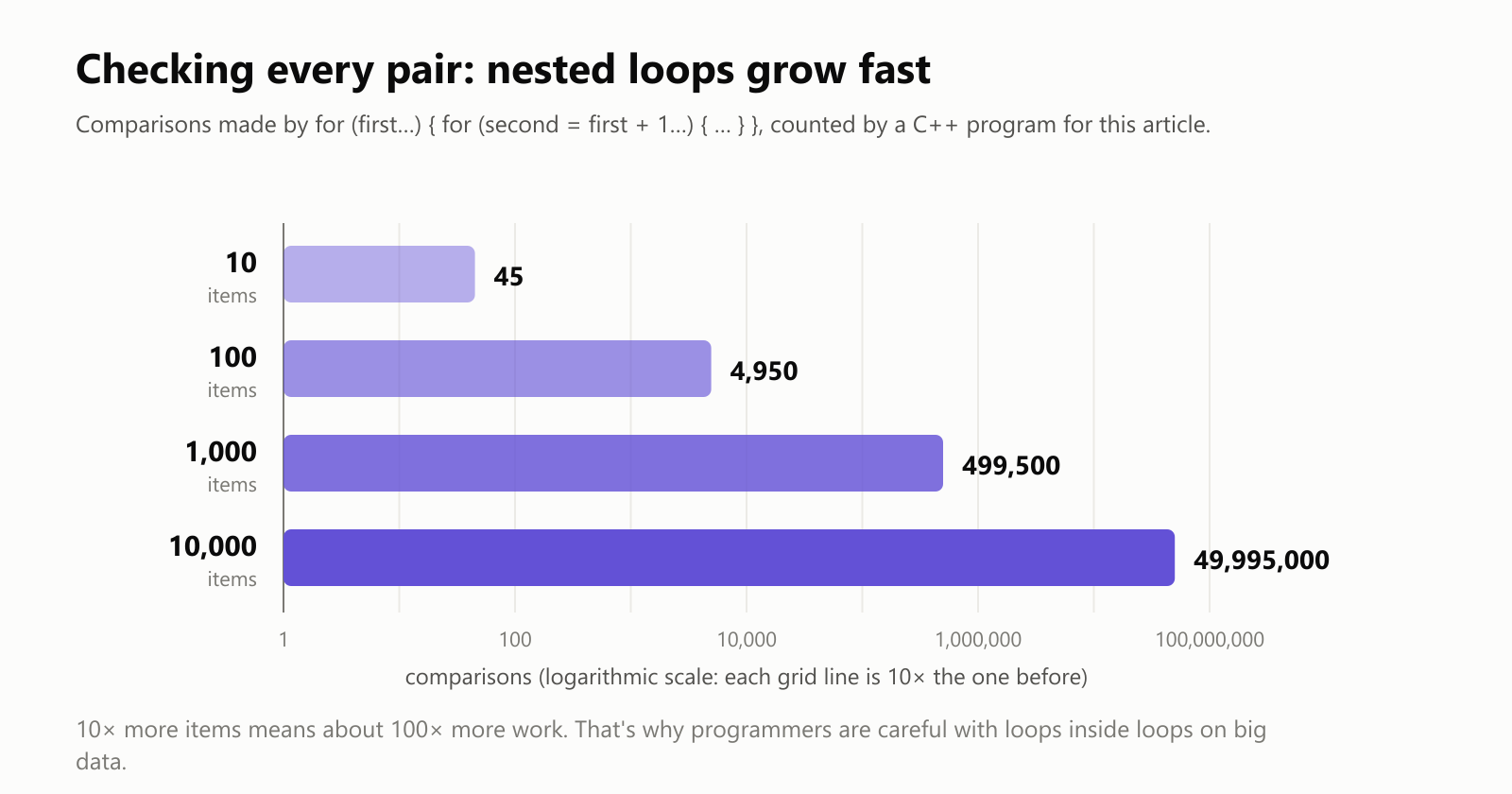
Starting the inner loop at first + 1 visits every pair of items exactly once, with no repeats and no item paired with itself. Here's how many handshakes happen when 5 people all shake hands with each other:
1#include <iostream>
2
3int main() {
4    const int people = 5;
5    int handshakes = 0;
6    for (int first = 1; first <= people; first++) {
7        for (int second = first + 1; second <= people; second++) {
8            std::cout << first << "-" << second << " ";
9            handshakes++;
10        }
11    }
12    std::cout << "\n" << people << " people make " << handshakes << " handshakes\n";
13}
1-2 1-3 1-4 1-5 2-3 2-4 2-5 3-4 3-5 4-5
5 people make 10 handshakesThat pattern is everywhere: checking a list for duplicates, finding the two closest cities, comparing every player with every other. But watch how the work grows as the list gets longer:
Loop order matters: a 47× surprise
Nested loops over a grid can go row by row (rows on the outside) or column by column (columns on the outside). Both visit every cell once and give the same answer. So it shouldn't matter which you pick… right?
We measured it, adding up a 4,096 × 4,096 grid of numbers (64 MB) both ways:
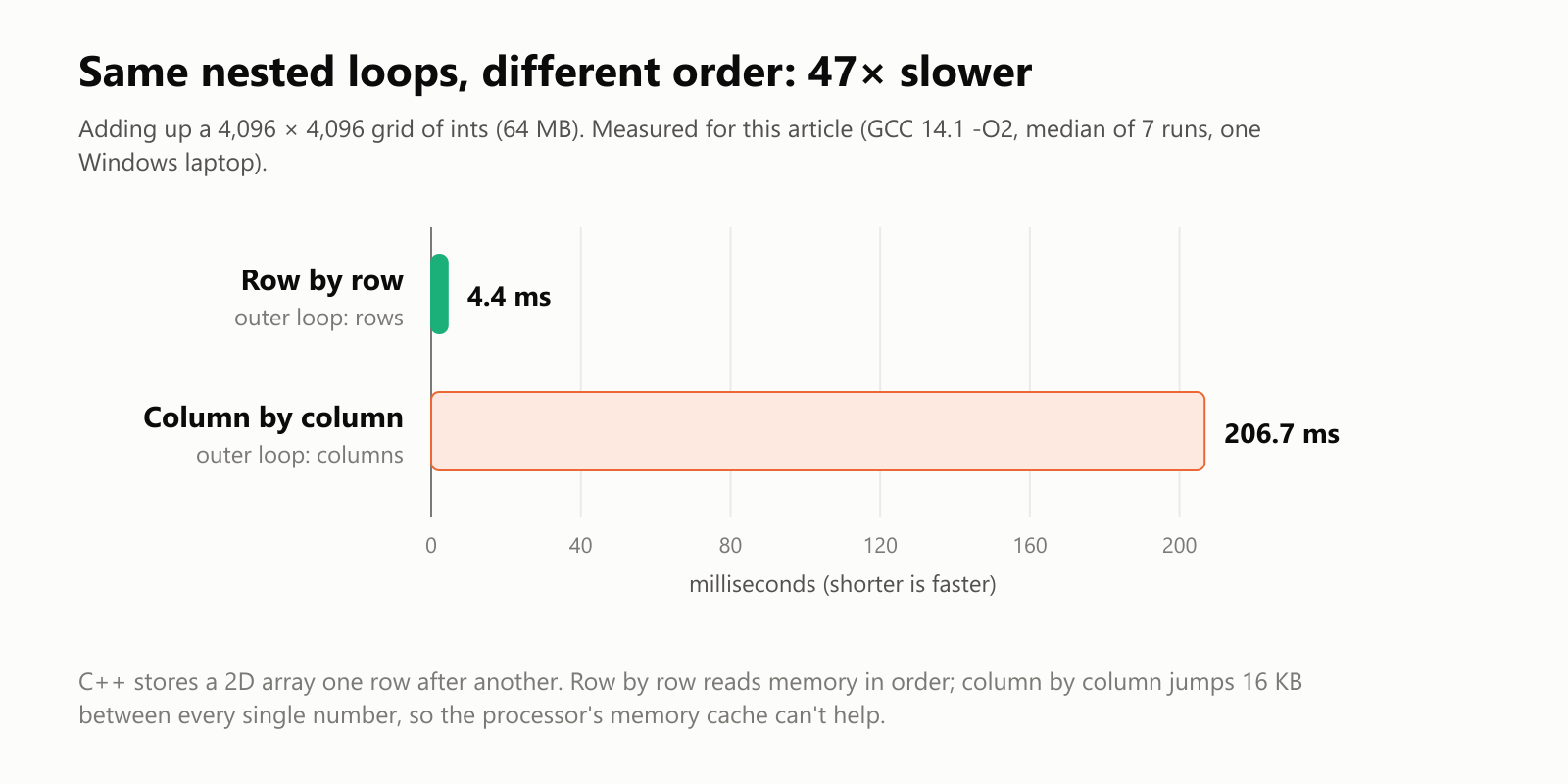
The only difference between the two was which for line came first:
1// Fast: row by row
2for (int row = 0; row < size; row++)
3    for (int column = 0; column < size; column++)
4        total += grid[row][column];
5
6// 47× slower: column by column
7for (int column = 0; column < size; column++)
8    for (int row = 0; row < size; row++)
9 total += grid[row][column];The range-based for loop (C++11)
When you just want to visit every element of a collection, modern C++ has a shorter form, the range-based for: "for each thing in this collection".
1#include <iostream>
2#include <string>
3#include <vector>
4
5int main() {
6    std::vector<std::string> planets = {"Mercury", "Venus", "Earth", "Mars"};
7    for (const std::string& planet : planets) {
8        std::cout << planet << " has " << planet.size() << " letters\n";
9    }
10
11    std::string word = "loop";
12    for (char letter : word) {
13        std::cout << "[" << letter << "]";
14    }
15    std::cout << "\n";
16}1Mercury has 7 letters
2Venus has 5 letters
3Earth has 5 letters
4Mars has 4 letters
5[l][o][o][p]No index, no size, nothing to get off by one. It works on arrays, vectors, strings and most other containers.
Copy or the real thing?
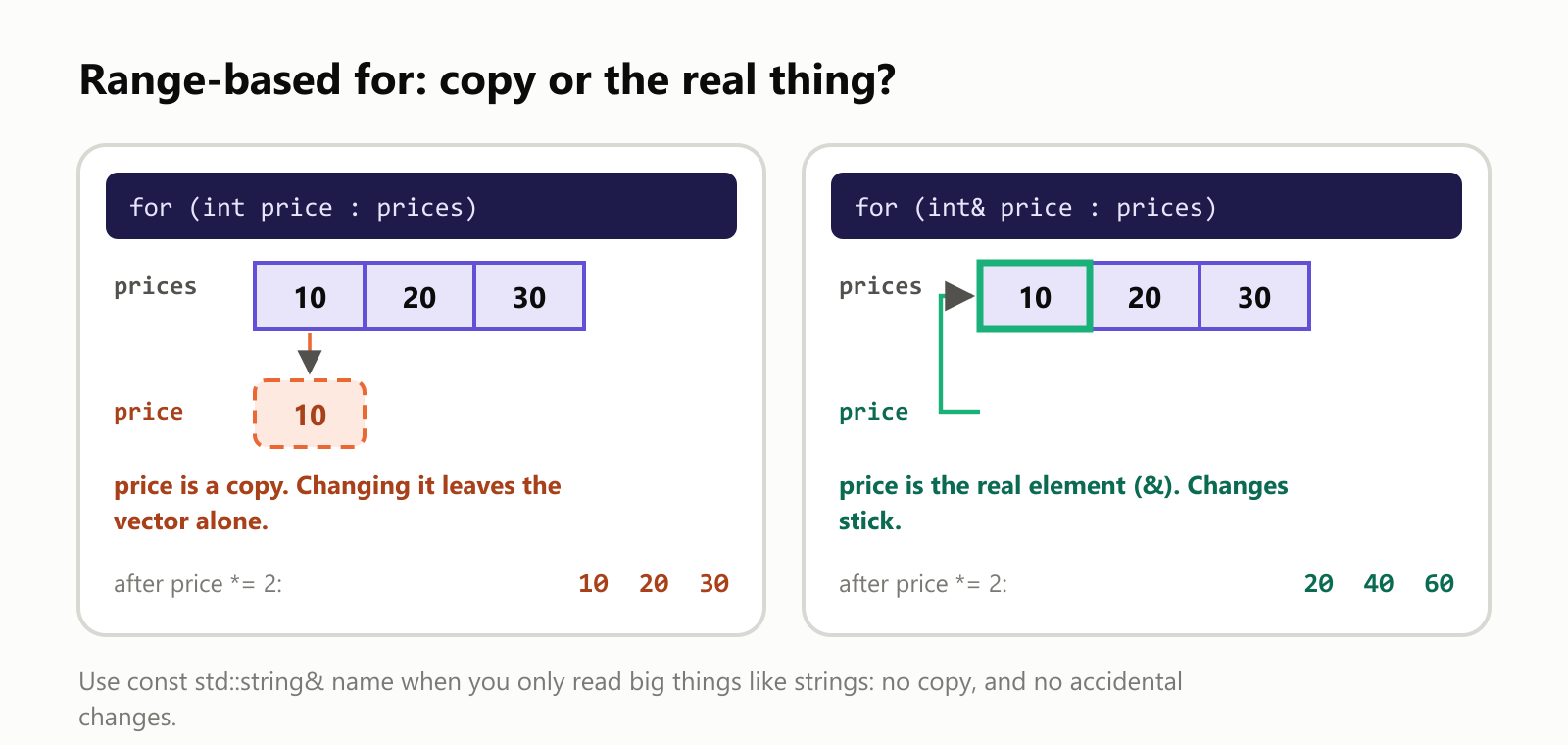
There's one catch. By default, the loop variable is a copy of each element. To change the elements themselves, add & to make it a reference:
1#include <iostream>
2#include <vector>
3
4int main() {
5    std::vector<int> prices = {10, 20, 30};
6
7    for (int price : prices) {
8        price *= 2;            // doubles a copy; the vector doesn't change
9    }
10    std::cout << "After copy loop:      ";
11    for (int price : prices) std::cout << price << " ";
12
13    for (int& price : prices) {
14        price *= 2;            // & means "the real element": the vector changes
15    }
16    std::cout << "\nAfter reference loop: ";
17    for (int price : prices) std::cout << price << " ";
18    std::cout << "\n";
19}
After copy loop: 10 20 30
After reference loop: 20 40 60 | You want to… | Write |
|---|---|
| Read small values (numbers, characters) | for (int value : values) |
| Read big values (strings, objects) without copying | for (const std::string& name : names) |
| Change the elements | for (int& value : values) |
| Know the position too | the classic for (std::size_t index = 0; index < values.size(); index++) |
Three traps
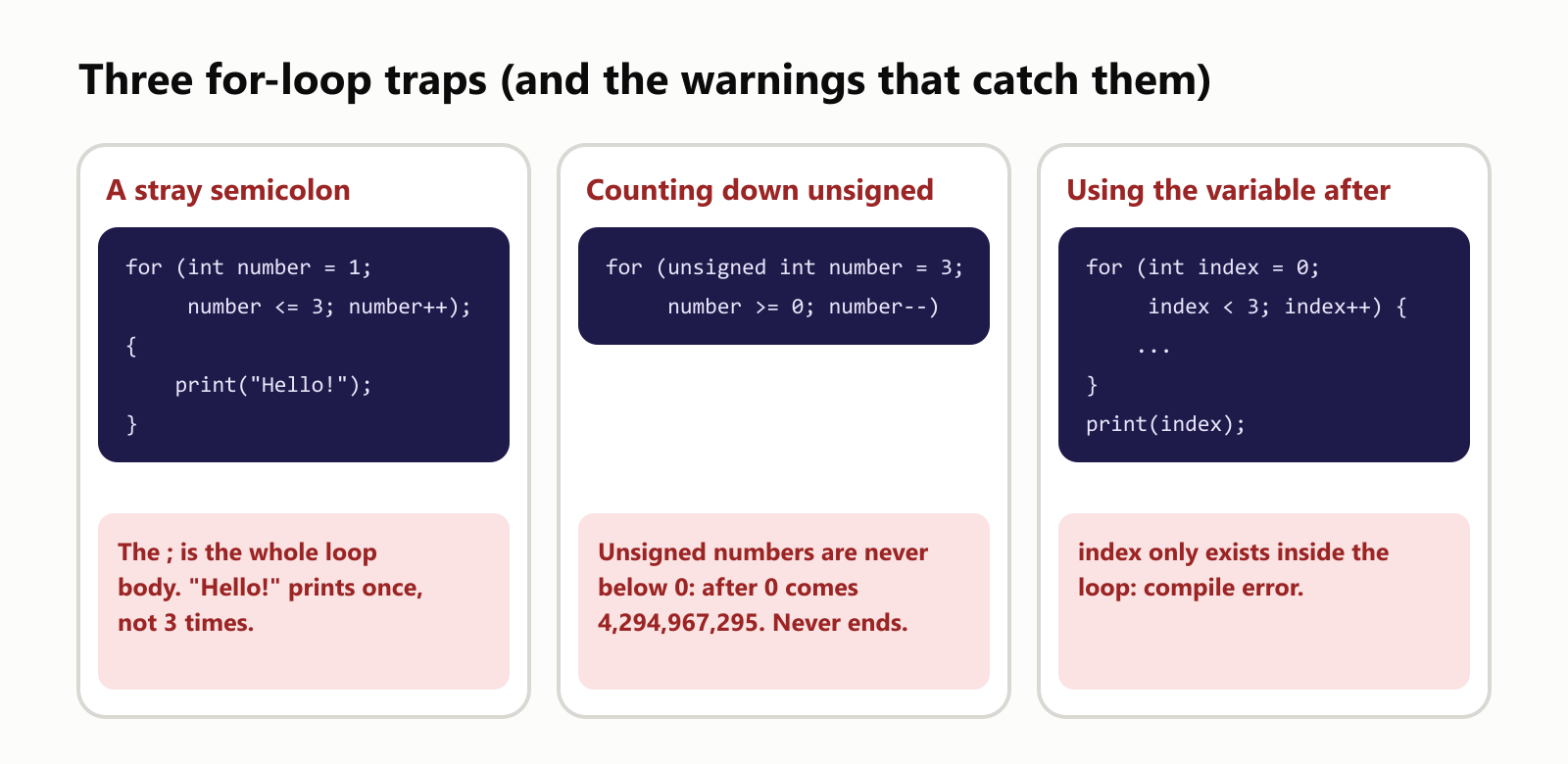
Trap 1: a stray semicolon
1#include <iostream>
2
3int main() {
4    for (int number = 1; number <= 3; number++);
5    {
6        std::cout << "Hello!\n";
7    }
8}Hello!The ; right after the parentheses is an empty statement, and it is the loop body. The loop spins three times doing nothing, and then the block in braces runs once. GCC (with -Wall) notices:
1semicolon.cpp: In function 'int main()':
2semicolon.cpp:4:5: warning: this 'for' clause does not guard... [-Wmisleading-indentation]
3    4 |     for (int number = 1; number <= 3; number++);
4      |     ^~~
5semicolon.cpp:5:5: note: ...this statement, but the latter is misleadingly indented as if it were guarded by the 'for'
6    5 |     {
7      |     ^
Trap 2: counting down with unsigned
An unsigned int can't be negative. Subtract 1 from 0 and it wraps around to its largest value, 4,294,967,295. So number >= 0 is always true, and this loop never ends:
for (unsigned int number = 3; number >= 0; number--) {
    std::cout << number << "\n";
}
With a safety limit added so it stops after 6 lines, you can see it happen:
1#include <iostream>
2
3int main() {
4    int printed = 0;
5    for (unsigned int number = 3; number >= 0 && printed < 6; number--) {   // printed < 6 is a safety net
6        std::cout << number << "\n";
7        printed++;
8    }
9}13
22
31
40
54294967295
64294967294GCC's -Wextra warns: comparison of unsigned expression in '>= 0' is always true. When counting down to 0, use a plain int.
Trap 3: using the loop variable afterward
A variable declared in the for line only exists inside the loop:
1#include <iostream>
2
3int main() {
4    for (int index = 0; index < 3; index++) {
5        std::cout << index << " ";
6    }
7    std::cout << index << "\n";   // index only exists inside the loop
8}1scope.cpp: In function 'int main()':
2scope.cpp:7:18: error: 'index' was not declared in this scope
3 7 | std::cout << index << "\n"; // index only exists inside the loop
4 | ^~~~~That's actually a feature: each loop gets its own fresh variable, and old ones can't leak out and cause confusion. If you really need the value afterward, declare the variable before the loop.
The same idea in other languages
| Language | Count from 1 to 10 | For each item |
|---|---|---|
| C, C++, Java, C# | for (int number = 1; number <= 10; number++) | for (int value : values) (C++, Java), foreach (var value in values) (C#) |
| JavaScript | for (let number = 1; number <= 10; number++) | for (const value of values) |
| Python | for number in range(1, 11): | for value in values: |
Python has no three-part for loop at all. Its range(1, 11) produces 1 to 10: the end is left out, just like < 11. Here's the multiplication-table row for 7 in Python and JavaScript:
for times in range(1, 4):
    print(7 * times)
for (let times = 1; times <= 3; times++) {
console.log(7 * times);
}Both print 7, 14 and 21.
Practice time
Try these before peeking at the answers. Copy each program into a file, compile with g++ -std=c++20 -Wall program.cpp, and run it.
Exercise 1: Predict the output (warm-up). What does this print?
for (int number = 1; number < 10; number += 3) {
    std::cout << number << " ";
}
Exercise 2: Count the rounds. Without running them, how many times does each loop's body run?
for (int index = 0; index <= 5; index++) { ... }   // a
for (int index = 5; index > 0; index--) { ... }    // b
for (int index = 1; index < 100; index *= 10) { ... }   // c
Exercise 3: Sum the evens. Add up all the even numbers from 1 to 100. (Hint: let the step skip the odd ones.)
Exercise 4: Factorials. 5! ("5 factorial") means 1 × 2 × 3 × 4 × 5 = 120. Print every factorial from 1! to 10!. (Hint: it grows fast; use long long.)
Exercise 5: The 7 times table. Print 7 x 1 = 7 through 7 x 10 = 70.
Exercise 6: Prime hunter (challenge). Print every prime number up to 50. A prime has no divisors other than 1 and itself. Use a nested loop to try divisors, and break as soon as you find one.
Quick quiz
- In what order do the start, check, body and step run?
- How many times does
for (int index = 0; index < 8; index++)run? What's the last value ofindexinside the body? - What's wrong with
for (int index = 0; index < 5; index++);? - Two nested loops each run 100 times. How many times does the inner body run?
- In
for (int value : values), doesvalue *= 2changevalues?
Answers
Exercise 1: 1 4 7. After 7, the step makes it 10, and 10 < 10 is false.
1 4 7 Exercise 2: (a) 6 times: 0, 1, 2, 3, 4, 5 (the classic off-by-one; <= includes the 5). (b) 5 times: 5, 4, 3, 2, 1. (c) 2 times: 1 and 10; the next value, 100, fails < 100.
Exercise 3:
1#include <iostream>
2
3int main() {
4    int total = 0;
5    for (int number = 2; number <= 100; number += 2) {
6        total += number;
7    }
8    std::cout << "Sum of the even numbers from 1 to 100: " << total << "\n";
9}
Sum of the even numbers from 1 to 100: 2550Exercise 4: An accumulator again, but multiplying instead of adding, so it starts at 1, not 0.
1#include <iostream>
2
3int main() {
4    long long factorial = 1;
5    for (int number = 1; number <= 10; number++) {
6        factorial *= number;
7        std::cout << number << "! = " << factorial << "\n";
8    }
9}11! = 1
22! = 2
33! = 6
44! = 24
55! = 120
66! = 720
77! = 5040
88! = 40320
99! = 362880
1010! = 3628800Exercise 5:
1#include <iostream>
2
3int main() {
4    for (int times = 1; times <= 10; times++) {
5        std::cout << "7 x " << times << " = " << 7 * times << "\n";
6    }
7}17 x 1 = 7
27 x 2 = 14
37 x 3 = 21
47 x 4 = 28
57 x 5 = 35
67 x 6 = 42
77 x 7 = 49
87 x 8 = 56
97 x 9 = 63
107 x 10 = 70Exercise 6: The inner loop only needs to try divisors up to the square root (divisor * divisor <= candidate): if a number has a divisor bigger than that, it also has a smaller one.
1#include <iostream>
2
3int main() {
4    for (int candidate = 2; candidate <= 50; candidate++) {
5        bool isPrime = true;
6        for (int divisor = 2; divisor * divisor <= candidate; divisor++) {
7            if (candidate % divisor == 0) {
8                isPrime = false;
9                break;   // one divisor is enough to rule it out
10            }
11        }
12        if (isPrime) std::cout << candidate << " ";
13    }
14    std::cout << "\n";
15}
2 3 5 7 11 13 17 19 23 29 31 37 41 43 47 Quiz: (1) Start once; then check, body, step, check, body, step… until the check is false. (2) 8 times; the last value inside the body is 7. (3) The semicolon: it becomes the whole (empty) loop body, so the block after it runs only once. (4) 100 × 100 = 10,000 times. (5) No: value is a copy. Use int& value to change the elements.
Cheat sheet
| I want to… | Write |
|---|---|
| Count 1 to 10 | for (int number = 1; number <= 10; number++) |
Repeat exactly count times | for (int index = 0; index < count; index++) |
| Count down | for (int number = 10; number >= 1; number--) |
| Count by 2s, 5s… | for (int number = 0; number <= 100; number += 5) |
| Visit every element | for (int value : values) |
| Change every element | for (int& value : values) |
| Walk a grid (fast order) | for (row…) { for (column…) { grid[row][column] } } |
| Visit every pair once | for (first…) { for (second = first + 1…) { … } } |
| Add things up | int total = 0; for (…) { total += …; } |
| Leave early / skip a round | break; / continue; |
Wrapping up
The for loop is the go-to loop when you know how many times to repeat:
- Three parts on one line: the start runs once; the check runs before every round; the step runs after every round.
- Change the parts, change the pattern: count down, count by twos, double, or run two variables at once.
- Mind the fenceposts:
index < countfrom 0 andnumber <= countfrom 1 both runcounttimes; mixing them up gives one too many. - Nested loops multiply: 3 × 4 = 12 visits; every pair of 10,000 items is about 50 million comparisons.
- Order matters: row by row was 47 times faster than column by column in our test.
- Range-based for visits every element with no index to get wrong; add
&to change elements.
Next, see when to reach for The While and Do-While Loops instead, make decisions inside your loops with The If Statement, and use loops on real data with C++ Arrays.
Interested in learning the C++ programming language? Try doing it with One Hour a Day.
Read next
What Is the Swift Programming Language? A Simple Guide to the Language Behind iPhone Apps
A friendly, jargon-free guide to Swift, the programming language Apple created for iPhone, iPad and Mac apps. Learn why it replaced Objective-C, how optionals prevent crashes, how an app is made, and how fast Swift really is.
 nbkhope
What Is the Rust Programming Language? A Simple Guide to the Fast Language That Won't Let You Crash
A friendly, jargon-free guide to Rust, the programming language that is as fast as C but stops whole families of memory bugs before a program ever runs. Learn about ownership, why tech giants are adopting it, and where it is used.
nbkhope
What Is the Go Programming Language? A Simple Guide to the Language of the Cloud
A friendly, jargon-free guide to Go, the simple and fast programming language Google created for the cloud. Learn what goroutines are, why Go programs are a single file, and how Go came to power Docker, Kubernetes and much of the internet.
nbkhope
Comments
Be kind and specific. Comments with links from new accounts appear after a moderator reviews them.