
Ruby Hashes: A Visual, Hands-On Guide
Learn Ruby hashes visually: key-value pairs, symbol vs. string keys, reading safely with fetch and dig, default values for counting and grouping, iterating and transforming, keyword arguments, real benchmarks and exercises with answers.


On this page
A phone book maps names to numbers. A dictionary maps words to meanings. A shop's stock list maps products to quantities. Whenever you want to look something up by a name instead of by a position, you want a hash.
Hashes are everywhere in Ruby: settings, JSON from web APIs, counting things, grouping things, and the records inside nearly every array. In this guide you'll see how a hash works, read from it safely, count and group with default values, avoid the symbol-vs-string trap, dig through nested data, pass options with keyword arguments, and measure how fast lookups really are. Exercises with answers wrap it up.
All the outputs below come from real runs with Ruby 3.3.
A cabinet of labeled drawers

A hash stores key-value pairs. The key is the label; the value is what's inside. Other languages call the same idea a dictionary (Python), a map (Java, Go) or an object (JavaScript).
1todo = {}
2todo[:monday] = "clean the dishes"
3todo[:wednesday] = "karate practice"
4p todo
5
6capitals = { "France" => "Paris", "Japan" => "Tokyo", "Brazil" => "Brasília" }
7p capitals
8
9person = { name: "Ada", born: 1815, languages: ["English", "French"] }
10p person
11p person.size1{:monday=>"clean the dishes", :wednesday=>"karate practice"}
2{"France"=>"Paris", "Japan"=>"Tokyo", "Brazil"=>"Brasília"}
3{:name=>"Ada", :born=>1815, :languages=>["English", "French"]}
43There are two ways to write the pairs:
key => value(the "hash rocket") works with any kind of key: strings, numbers, symbols, even arrays.key: valueis a shortcut that only works for symbol keys:{ name: "Ada" }means exactly{ :name => "Ada" }.
Values can be anything, including arrays and other hashes.
Array or hash?

Use an array when you have a list where order matters. Use a hash when every value has a name you'll look it up by.
Reading values
1todo = { monday: "clean the dishes", wednesday: "karate practice" }
2p todo[:monday]
3p todo[:friday]
4p todo.fetch(:monday)
5p todo.fetch(:friday, "nothing planned")
6p todo.fetch(:friday) { |day| "nothing on #{day}" }
7p todo.key?(:monday)
8p todo.value?("karate practice")
9p todo.keys
10p todo.values1"clean the dishes"
2nil
3"clean the dishes"
4"nothing planned"
5"nothing on friday"
6true
7true
8[:monday, :wednesday]
9["clean the dishes", "karate practice"]When the key isn't there

Square brackets give nil for a missing key. fetch refuses, loudly:
todo = { monday: "clean the dishes" }
todo.fetch(:friday)
fetch_error.rb:2:in `fetch': key not found: :friday (KeyError)
from fetch_error.rb:2:in `<main>'Which is better? It depends on whether a missing key is normal or a mistake:
- If a missing key is normal ("no plans on Friday"), use
[]orfetchwith a fallback. - If a missing key means something went wrong (a required setting, a misspelled key), use
fetch. Thenilfrom[]tends to travel on through your program and blow up somewhere far away, which is much harder to debug.
Adding, changing and removing
1stock = { apples: 10, bananas: 6 }
2stock[:cherries] = 25
3stock[:apples] = 8
4p stock
5
6removed = stock.delete(:bananas)
7puts "Removed bananas (there were #{removed})"
8p stock
9
10more = stock.merge(dates: 12, apples: 30)
11p more
12p stock1{:apples=>8, :bananas=>6, :cherries=>25}
2Removed bananas (there were 6)
3{:apples=>8, :cherries=>25}
4{:apples=>30, :cherries=>25, :dates=>12}
5{:apples=>8, :cherries=>25}- Assigning to a key that exists replaces its value; a new key is added. A hash never has the same key twice.
deleteremoves a pair and returns its value.mergereturns a new hash combining both, and the second hash wins when keys clash. (merge!changes the original.)- Ruby hashes remember the order in which keys were added.
Going through a hash
1prices = { coffee: 3.5, cake: 4.25, juice: 4.0, sandwich: 7.0 }
2
3prices.each do |item, price|
4  puts "#{item.to_s.ljust(9)} #{format('%.2f', price)}"
5end
6
7p prices.sum { |item, price| price }
8p prices.select { |item, price| price >= 4 }
9p prices.reject { |item, price| price >= 4 }
10p prices.min_by { |item, price| price }
11p prices.sort_by { |item, price| -price }.first(2)
12p prices.transform_values { |price| (price * 1.1).round(2) }
13p prices.map { |item, price| "#{item}: #{price}" }
14p prices.to_a.first1coffee 3.50
2cake 4.25
3juice 4.00
4sandwich 7.00
518.75
6{:cake=>4.25, :juice=>4.0, :sandwich=>7.0}
7{:coffee=>3.5}
8[:coffee, 3.5]
9[[:sandwich, 7.0], [:cake, 4.25]]
10{:coffee=>3.85, :cake=>4.68, :juice=>4.4, :sandwich=>7.7}
11["coffee: 3.5", "cake: 4.25", "juice: 4.0", "sandwich: 7.0"]
12[:coffee, 3.5]The block gets two parameters, the key and the value. select and reject give back hashes; transform_values changes every value and keeps the keys. map, min_by and sort_by treat the hash as a list of [key, value] pairs.
Default values: counting and grouping

Counting with Hash.new(0)
1text = "the cat and the hat and the bat"
2
3counts = Hash.new(0)
4text.split.each { |word| counts[word] += 1 }
5p counts
6p counts["dog"]
7p counts
8
9p text.split.tally1{"the"=>3, "cat"=>1, "and"=>2, "hat"=>1, "bat"=>1}
20
3{"the"=>3, "cat"=>1, "and"=>2, "hat"=>1, "bat"=>1}
4{"the"=>3, "cat"=>1, "and"=>2, "hat"=>1, "bat"=>1}With Hash.new(0), a missing key reads as 0, so counts[word] += 1 works even the first time a word shows up. Reading a missing key doesn't add it: counts["dog"] is 0, but the hash doesn't change. (For plain counting, tally does it all in one step.)
Grouping with a block
1students = [["Ana", "A"], ["Bruno", "B"], ["Carla", "A"], ["Diego", "C"], ["Eva", "B"]]
2
3by_grade = Hash.new { |hash, grade| hash[grade] = [] }
4students.each { |name, grade| by_grade[grade] << name }
5p by_grade
6
7p students.group_by { |name, grade| grade }.transform_values { |pairs| pairs.map(&:first) }
{"A"=>["Ana", "Carla"], "B"=>["Bruno", "Eva"], "C"=>["Diego"]}
{"A"=>["Ana", "Carla"], "B"=>["Bruno", "Eva"], "C"=>["Diego"]}The block runs whenever a missing key is read, and here it stores a fresh empty array under that key.
The trap: Hash.new([])
It looks like it should do the same thing. It doesn't:
1by_grade = Hash.new([])
2by_grade["A"] << "Ana"
3by_grade["B"] << "Bruno"
4p by_grade
5p by_grade["Z"]
{}
["Ana", "Bruno"]The hash is still empty, and every missing key returns the same single array, which now holds both names. << changed the shared default array and never stored anything in the hash. It's the same trap as Array.new(3, []) in the arrays article. Use the block form whenever the default is an array, a hash or a string you'll change.
Symbol keys vs. string keys

1settings = { "volume" => 7 }
2p settings[:volume]
3p settings["volume"]
4
5require "json"
6saved = JSON.generate({ volume: 7, theme: "dark" })
7p saved
8p JSON.parse(saved)
9p JSON.parse(saved, symbolize_names: true)
10p JSON.parse(saved).transform_keys(&:to_sym)1nil
27
3"{\"volume\":7,\"theme\":\"dark\"}"
4{"volume"=>7, "theme"=>"dark"}
5{:volume=>7, :theme=>"dark"}
6{:volume=>7, :theme=>"dark"}:volume and "volume" are different keys: Ruby never converts one into the other. This bites everyone at least once, especially with data from JSON, which always comes back with string keys.
Are symbol keys faster? A little. We measured it:
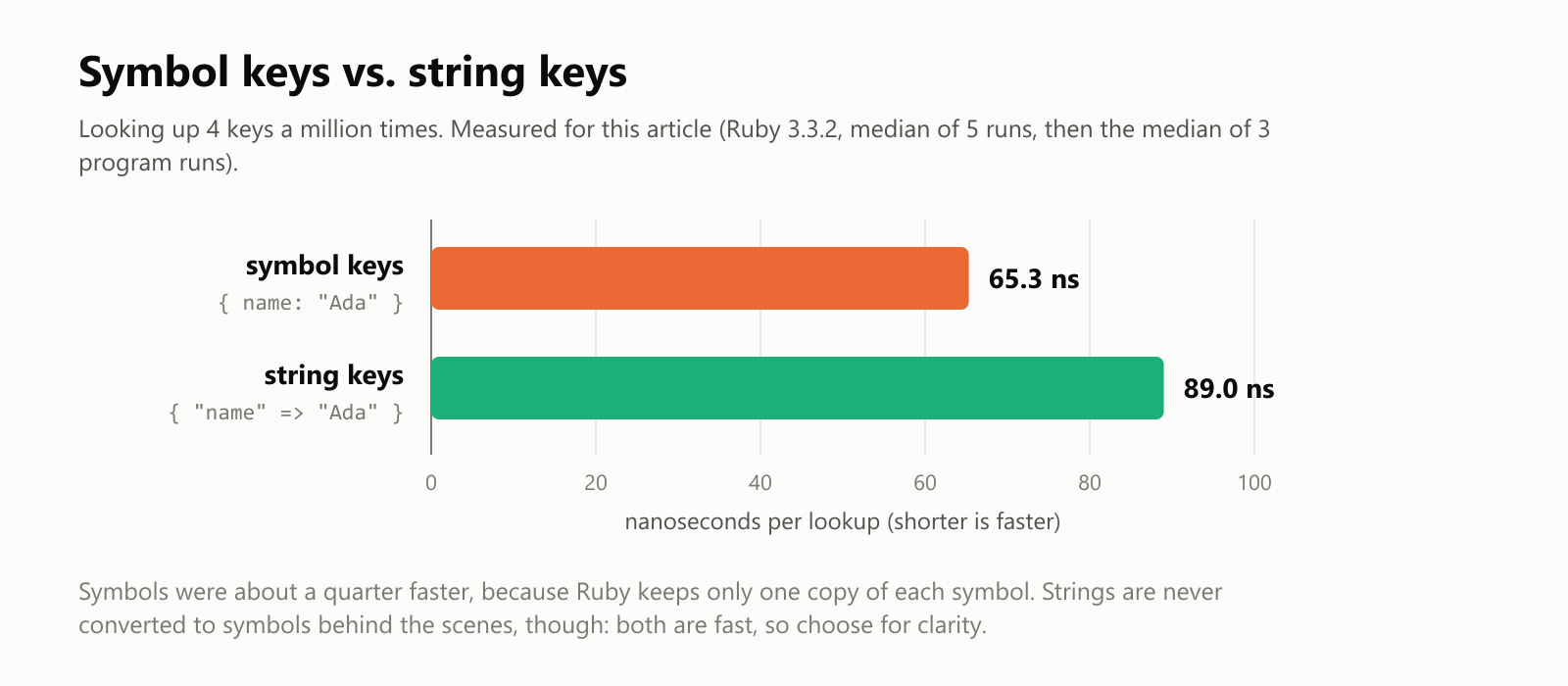
Symbols won by about a quarter, because Ruby keeps exactly one copy of each symbol and can compare them instantly. But we're talking about 24 billionths of a second per lookup. Choose the style that makes your code clearer and consistent.
Nested data and dig
Real-world data, like JSON from a web API, is often hashes inside arrays inside hashes:

1user = {
2  name: "Ada",
3  address: { city: "London", country: "UK" },
4  pets: [{ name: "Byron", kind: "cat" }],
5}
6
7p user[:address][:city]
8p user.dig(:pets, 0, :name)
9p user.dig(:job, :title)
10begin
11  user[:job][:title]
12rescue NoMethodError => error
13  puts "Without dig: #{error.message}"
14end1"London"
2"Byron"
3nil
4Without dig: undefined method `[]' for niluser[:job] is nil, and asking nil for [:title] crashes. dig stops at the first missing step and gives nil instead.
Keyword arguments: options with names
Older Ruby code often passed a hash as the last argument of a method to give it named options. Modern Ruby has a better tool built in, keyword arguments, with defaults and error checking:
1def greeting(name, day: "today", chore: "relax")
2  puts "Hello, #{name}! #{day.capitalize} you have to #{chore}."
3end
4
5greeting("James")
6greeting("James", day: "monday", chore: "wash the car")
7greeting("James", chore: "do the laundry")
Hello, James! Today you have to relax.
Hello, James! Monday you have to wash the car.
Hello, James! Today you have to do the laundry.They read like a hash at the call site, but Ruby checks them for you. A misspelled option is an error, not a silent nil:
1def greeting(name, day: "today", chore: "relax")
2  puts "Hello, #{name}! #{day.capitalize} you have to #{chore}."
3end
4
5greeting("James", weather: "sunny")
keywords_error.rb:1:in `greeting': unknown keyword: :weather (ArgumentError)
from keywords_error.rb:5:in `<main>'How fast is a hash?
A hash doesn't search through its keys one by one. It turns each key into a number (its hash code, which is where the name comes from) and uses that to jump straight to the right slot. We timed lookups as the hash grew:
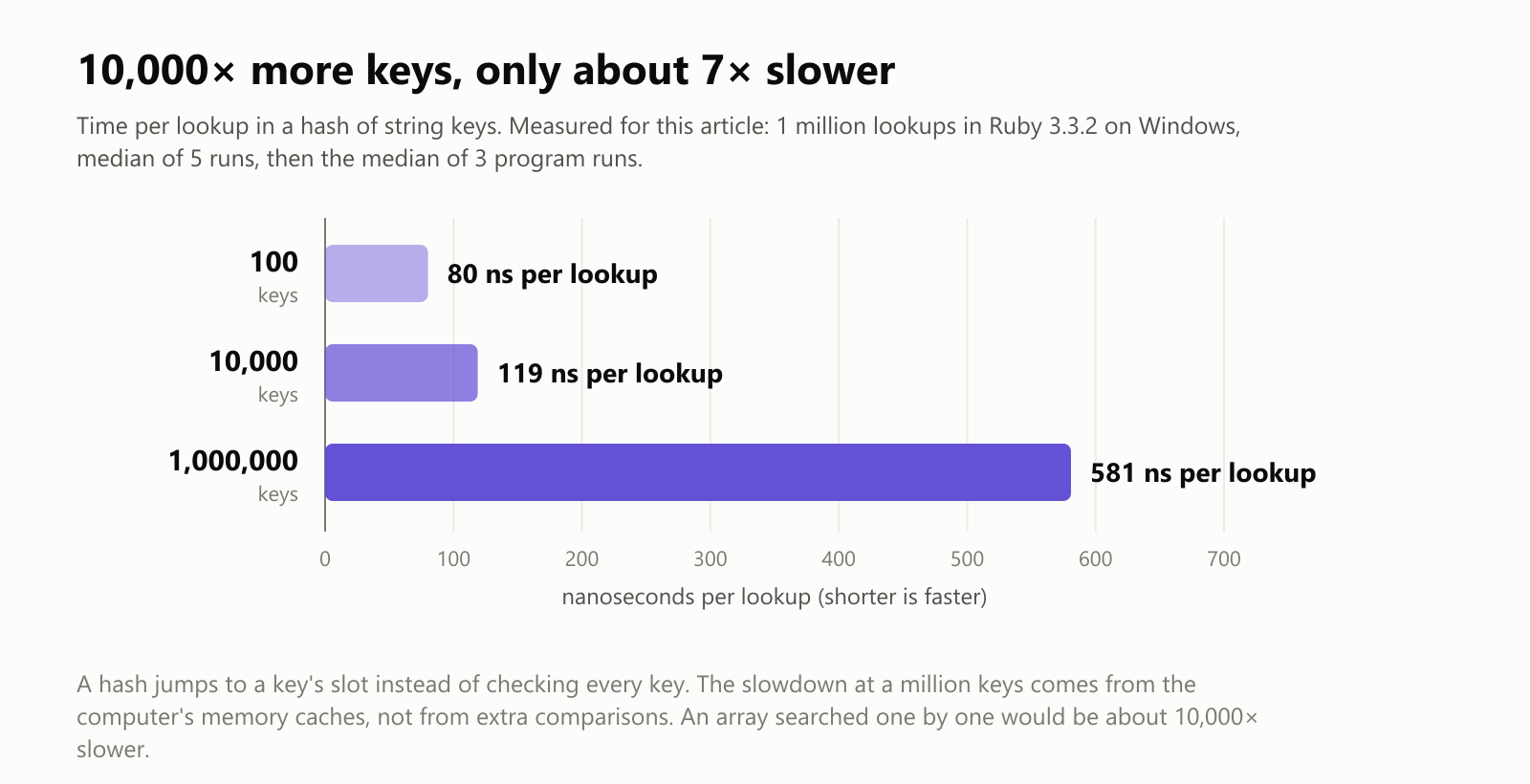
Going from 100 keys to a million keys made each lookup only about 7 times slower, and that slowdown comes from the computer's memory caches (a big hash no longer fits in the fastest memory), not from more work. Searching an array of a million entries one by one would mean up to a million comparisons per lookup.
Converting between hashes and arrays
1capitals = { "France" => "Paris", "Japan" => "Tokyo", "Brazil" => "Brasília" }
2p capitals.invert
3p capitals.key("Tokyo")
4p capitals.to_a
5p [["a", 1], ["b", 2]].to_h
6p %w[x y z].zip([1, 2, 3]).to_h1{"Paris"=>"France", "Tokyo"=>"Japan", "Brasília"=>"Brazil"}
2"Japan"
3[["France", "Paris"], ["Japan", "Tokyo"], ["Brazil", "Brasília"]]
4{"a"=>1, "b"=>2}
5{"x"=>1, "y"=>2, "z"=>3}invert swaps keys and values, key finds the key for a value, and to_h turns a list of pairs back into a hash.
A map of everyday hash methods

Practice time
Try these before peeking at the answers.
Exercise 1: Predict the output (warm-up). What do the three p lines print?
1letters = Hash.new(0)
2"banana".each_char { |letter| letters[letter] += 1 }
3p letters["a"]
4p letters["z"]
5p letters.size
Exercise 2: Inventory. A shop has { notebook: 10, pen: 25, backpack: 2 }. Process the orders [[:pen, 5], [:backpack, 3], [:notebook, 4], [:eraser, 1]]: sell when there's enough stock, otherwise print a warning. Show the final stock.
Exercise 3: Reverse phone book. Given names to numbers, find who a number belongs to, and print nobody for an unknown number.
Exercise 4: Group by first letter. Group %w[apple avocado banana blueberry cherry apricot] by their first letter and print each group, sorted.
Exercise 5: Combine scores. Merge Monday's and Tuesday's scores into totals, adding them up when a player appears on both days.
Exercise 6: Tiny translator (challenge). Build an English-to-Portuguese dictionary hash and translate a sentence word by word. Words not in the dictionary should appear in [brackets].
Quick quiz
- What's the difference between
todo[:friday]andtodo.fetch(:friday)when the key is missing? - Are
{ name: "Ada" }and{ "name" => "Ada" }the same hash? - What's wrong with
Hash.new([])for grouping? - What does
user.dig(:address, :city)do thatuser[:address][:city]doesn't? - Why is looking up a key in a hash fast, even with a million keys?
Answers
Exercise 1: "banana" has three a's, a missing key reads as the default 0, and there are 3 different letters (b, a, n):
1letters = Hash.new(0)
2"banana".each_char { |letter| letters[letter] += 1 }
3p letters["a"]
4p letters["z"]
5p letters.size
3
0
3Exercise 2: fetch with a fallback of 0 handles the item that isn't stocked at all:
1stock = { notebook: 10, pen: 25, backpack: 2 }
2orders = [[:pen, 5], [:backpack, 3], [:notebook, 4], [:eraser, 1]]
3
4orders.each do |item, quantity|
5  available = stock.fetch(item, 0)
6  if quantity <= available
7    stock[item] = available - quantity
8    puts "Sold #{quantity} #{item}"
9  else
10    puts "Can't sell #{quantity} #{item}: only #{available} left"
11  end
12end
13p stock1Sold 5 pen
2Can't sell 3 backpack: only 2 left
3Sold 4 notebook
4Can't sell 1 eraser: only 0 left
5{:notebook=>6, :pen=>20, :backpack=>2}Exercise 3: invert builds the number-to-name hash in one step:
1phone_book = { "Ana" => "555-0101", "Bruno" => "555-0199", "Carla" => "555-0142" }
2by_number = phone_book.invert
3
4puts "555-0199 belongs to #{by_number['555-0199']}"
5puts "555-0000 belongs to #{by_number.fetch('555-0000', 'nobody')}"
555-0199 belongs to Bruno
555-0000 belongs to nobodyExercise 4: group_by returns a hash of letter to words; sorting the hash sorts it by key:
1words = %w[apple avocado banana blueberry cherry apricot]
2by_letter = words.group_by { |word| word[0] }
3by_letter.sort.each do |letter, group|
4  puts "#{letter}: #{group.sort.join(', ')}"
5end
a: apple, apricot, avocado
b: banana, blueberry
c: cherryExercise 5: merge with a block decides what to do when both hashes have the same key:
1monday = { "Ana" => 30, "Bruno" => 25 }
2tuesday = { "Bruno" => 40, "Carla" => 35 }
3
4total = monday.merge(tuesday) { |name, first_score, second_score| first_score + second_score }
5p total
{"Ana"=>30, "Bruno"=>65, "Carla"=>35}Exercise 6: fetch with a fallback keeps unknown words visible:
1DICTIONARY = {
2  "the" => "o", "cat" => "gato", "eats" => "come", "fish" => "peixe",
3  "dog" => "cão", "likes" => "gosta de",
4}.freeze
5
6def translate(sentence)
7  sentence.downcase.split.map { |word| DICTIONARY.fetch(word, "[#{word}]") }.join(" ")
8end
9
10puts translate("The cat eats fish")
11puts translate("The dog likes pizza")
o gato come peixe
o cão gosta de [pizza]Real translation is much harder (word order, gender, verb forms), but dictionary lookups like this are where it starts.
Quiz: (1) [] returns nil; fetch raises a KeyError (unless you give it a fallback). (2) No: one has the symbol key :name, the other the string key "name", and Ruby treats them as different keys. (3) Every missing key shares one array, so << adds names to that shared default instead of storing them in the hash; use Hash.new { |hash, key| hash[key] = [] }. (4) If :address is missing, dig returns nil instead of crashing with "undefined method [] for nil". (5) A hash turns the key into a number and jumps straight to its slot instead of checking keys one by one; in our test, a million keys made each lookup only about 7 times slower than 100 keys.
Cheat sheet
| I want to… | Write |
|---|---|
| Make a hash | { name: "Ada", born: 1815 } or { "name" => "Ada" } |
| Read a value | h[:name] (nil if missing) |
| Read, or fail loudly | h.fetch(:name) |
| Read with a fallback | h.fetch(:name, "unknown") |
| Read nested data | h.dig(:address, :city) |
| Add or change | h[:city] = "London" |
| Remove | h.delete(:city) |
| Combine | h.merge(other), or merge(other) { |key, old, new| … } |
| Check for a key / value | h.key?(:name) / h.value?("Ada") |
| Loop | h.each { |key, value| … } |
| Filter / transform | select, reject, transform_values, transform_keys |
| Count things | Hash.new(0) then counts[thing] += 1, or list.tally |
| Group things | Hash.new { |hash, key| hash[key] = [] }, or list.group_by { } |
| Named method options | def method(name, color: "red") |
| From / to pairs | pairs.to_h / h.to_a |
| Symbol keys from JSON | JSON.parse(text, symbolize_names: true) |
Wrapping up
Hashes are how Ruby programs look things up by name:
- Key-value pairs:
{ name: "Ada" }for symbol keys,{ "name" => "Ada" }for any key. - Reading:
[]givesnilfor a missing key,fetchraises (or uses your fallback), anddigwalks nested data safely. - Defaults:
Hash.new(0)counts andHash.new { |hash, key| hash[key] = [] }groups, butHash.new([])shares one array between every key. :nameand"name"are different keys. Symbols were about a quarter faster in our test, but choose for clarity and consistency.- Keyword arguments give methods named options, with defaults and typo checking.
- Lookups stay fast: going from 100 to a million keys made each lookup only about 7 times slower in our test.
Want more Ruby? Read What Is the Ruby Programming Language?, then Ruby Arrays, Ruby String Methods and Basic File I/O in Ruby.
Looking for a reference text for Ruby? Get the Well-Grounded Rubyist.
Read next

Ruby Blocks and Iterators: Write Your Own
Learn how Ruby methods receive blocks, pass values with yield, handle a missing block, and return an Enumerator. Build and run your own iterator.
 nbkhope
C++ std::vector: Size, Capacity, and Safe Growth
Learn how std::vector grows in C++: the difference between size and capacity, when reserve helps, why resize is different, and how growth can invalidate references.
nbkhope
How to Handle Errors in Go: A Hands-On Guide
Learn Go's everyday error pattern with runnable examples: return an error, check it, add context with %w, and recognize a missing file with errors.Is.
nbkhope
Comments
Be kind and specific. Comments with links from new accounts appear after a moderator reviews them.